
For many business owners in Salinas, the idea of "backing up" data is simple: save files to a cloud service like Dropbox or OneDrive. While that’s a good first step, it often creates a dangerous false sense of security. If you’re in Salinas or the Monterey Bay Area, you need to know that just storing files isn't enough to protect your business.
This guide is about moving beyond storage. We're going to take an advanced look at what real data recovery actually means. You'll learn how to go from just saving files to having a tested, reliable plan that can bring your business back online after a disaster.
Why Cloud Storage Is Not a Real Data Recovery Plan
If you’re running a business in Monterey County, you know that downtime is not an option. Whether you manage a farm in Salinas or a hotel in Carmel, every minute your systems are offline costs you money and hurts your reputation.
You’ve probably been told that using cloud storage is the answer. The problem is, this standard advice skips the most important part.
Storing your files is just one piece of the puzzle. A true data recovery plan answers a much bigger question: How quickly and reliably can you get your business running again after a disaster? Just using a simple cloud folder leaves you exposed.
The Standard Advice Falls Short
Industry peers typically offer surface-level tips that sound good but skip the most important part: testing recovery. These check-the-box suggestions sound good but leave you unprepared for a real crisis. You've likely heard them all before:
- "Just use cloud storage." Services like Dropbox or OneDrive are great for sharing files, but they weren’t built for restoring your entire business quickly.
- "Automate your backups." Automation is key, but it doesn't promise your backups are complete, uncorrupted, or even usable when you need them most.
- "Go with a big brand name." A known provider is fine, but most fail to address recovery validation. They don’t show clients how to test their backups or what to expect during a real disaster. This leaves business owners exposed to data loss, downtime, and reputational harm.
This approach misses the most vital step of all: recovery validation. Simply hoping your backup works is a gamble you can't afford to take. The data recovery services market is projected to grow from USD 6.1 billion in 2025 to USD 27.5 billion by 2034, showing just how seriously businesses are taking this risk.
This trend makes it clear: data loss is no longer a small IT issue but a major business threat.

The Expert Pivot to Proven Recovery
Adaptive Information Systems includes recovery drills and documented failover testing as part of every managed backup solution. We don’t just store your data—we prove it can be restored quickly when it matters.
Think of it like a fire drill for your data. You don’t just assume the fire escape works; you practice using it so you’re ready for a real emergency.
We’ve seen that 74% of SMBs hit by ransomware had their data encrypted—and only 26% recovered without major losses. The difference? Verified, isolated backups and tested recovery processes.
This approach gives contractors and business owners peace of mind knowing their backup isn’t just a folder in the cloud—it’s a real, tested plan to keep operations running if something goes wrong.
The table below shows the key differences between basic file storage and a professionally managed recovery plan.
Data Storage vs Real Data Recovery
| Feature | Basic Cloud Storage (e.g., Dropbox, OneDrive) | Real Data Recovery (Adaptive IS Plan) |
|---|---|---|
| Primary Goal | File synchronization and sharing. | Business continuity and operational restoration. |
| Recovery Speed | Slow, manual file-by-file downloads. | Rapid, full-system restoration in minutes or hours. |
| Scope | Stores individual files and folders. | Backs up entire systems: applications, settings, and data. |
| Validation | None. You only know it works when you try it. | Regular, documented recovery drills and testing. |
| Support | Self-service help articles and generic support. | Hands-on, expert support during a crisis. |
| Security | Basic protection against device failure. | Isolated, air-gapped backups to protect against ransomware. |
As you can see, one is like a filing cabinet in the cloud, while the other is a complete emergency plan for your business.
For more on building a resilient data strategy, check out our guide on the essentials of cloud backup for small business.
Understanding the True Threats to Your Business Data
When you think about data loss, you probably picture hackers and cyberattacks. While those are real dangers, focusing only on outside threats means you’re missing the bigger picture.
For businesses from Pacific Grove to Carmel, the most common data risks are often less dramatic but just as destructive.

True business continuity planning means looking at all possible problems. This goes beyond storage and into the world of real data recovery—preparing for what actually happens, not just what makes headlines. The most common issues are often hiding in plain sight.
The Silent Killers of Business Data
A surprising number of data loss events aren't caused by a malicious attack. Instead, they’re quiet, internal failures that can stop your operations without warning. Understanding these threats is the first step toward building a recovery plan that truly protects your business.
Here are the threats that are often overlooked:
- Hardware Failure: Your server’s hard drive won’t warn you before it dies. It just stops. All hardware has a limited lifespan, and when a critical piece fails, it can take your business data with it.
- Human Error: This is the most common cause of data loss. An employee might accidentally delete a vital folder, overwrite an important file, or click a phishing link. These simple mistakes can cause as much damage as a major cyberattack.
- Software Corruption: A failed software update or a bug in an application can corrupt your files, making them unreadable. This can happen silently, and you might not notice until you desperately need that data.
These internal threats are exactly why a simple cloud folder isn't enough. You need a system that can restore your entire work environment, not just a few files.
Physical and Environmental Dangers
Living and working in the beautiful Monterey Bay area also means being ready for unique physical risks. Your equipment is vulnerable to events that have nothing to do with digital security but can be just as bad for your data.
Think about what a bad winter storm could do to your business in Seaside or Marina. A long power outage could damage your server, corrupt your data, and keep your business offline long after the lights are back on.
A sobering fact to consider: 74% of SMBs hit by ransomware had their data encrypted. Of those, only 26% recovered without major losses. The key difference wasn't just having backups; it was having verified, isolated backups and tested recovery processes that could withstand both digital and physical disasters.
This highlights a critical point—your recovery plan must account for everything, from a spilled coffee on a server to a regional power failure.
Why Your Risk Profile Matters
Every business has unique risks. A hospitality business in Monterey has different critical systems than an agricultural company in Salinas. Understanding what threatens your specific operations is key to building a plan that works.
By identifying your true weaknesses—whether it's aging hardware or a lack of employee training—you can move beyond generic advice. This knowledge helps you create a targeted, practical, and tested plan that ensures your business can recover quickly, no matter what disaster strikes.
This is the foundation of real data recovery.
The Critical Difference Between Backups and Verified Recovery
Here’s a secret most IT providers won’t tell you: having a backup is not the same as having a recovery plan. It’s a dangerous mistake, a gap we see every day with new clients here in the Monterey Bay Area that leaves countless businesses exposed.
You might have an automated backup system, and that feels safe. But what if those backups are silently failing, creating corrupt copies you only discover during an actual emergency?
This is where the standard advice fails. An unverified backup isn't much more than a hopeful guess. It’s like paying for an insurance policy but never checking if it provides any coverage.
Moving From Hope to Proof
Many IT providers sell you a backup solution and call it a day. You pay a fee, and everyone assumes the data is safe. The problem is, our research shows that most providers fail to address recovery validation. They don't show you how to test the backups or what to expect during a disaster, leaving you exposed to downtime and data loss.
This is the critical gap where businesses fall through. A backup file is useless if you can't restore it quickly when your business depends on it. That’s why our approach is built on a simple but powerful idea: a backup isn't real until you've proven you can recover from it.
At Adaptive Information Systems, we go beyond storage to deliver real data recovery. We've made recovery validation a standard part of every managed backup solution we provide.
Think of it like a fire drill for your data. You don't just buy fire extinguishers and hope they work; you test them and train your team. We apply that same logic to your business data, turning your backup from a hopeful wish into a guaranteed lifeline.
The Power of Recovery Drills
So, what does verified recovery look like? It’s a proactive process. We run scheduled drills to make sure your data is always restorable. This isn't a simple file check; it's a full simulation of a recovery event.
Our process includes:
- Scheduled Recovery Drills: We periodically restore your critical systems to a secure, isolated environment. This lets us confirm the backups are complete and fully functional without disrupting your daily operations.
- Documented Failover Testing: We simulate a server failure to test how quickly we can switch to your backup systems. This tells you your real-world recovery time, so you know what to expect.
- Data Integrity Checks: We go a step further by checking that files and databases can be opened and used after being restored, ensuring the data is not just present but also usable.
This proactive approach means that when a disaster hits your Salinas business—whether it’s hardware failure or a ransomware attack—there are no surprises. You can learn more about how we define these crucial timelines in our article about understanding Recovery Point and Recovery Time Objectives.
By testing the entire process, we find and fix problems before they can impact your business. This is the difference between having a data backup and having a true business continuity plan. It’s the peace of mind that comes from knowing your backup is a real, tested plan to keep you running when it matters most.
Building Your Data Recovery Playbook
Having a verified backup is a huge first step, but technology alone won't get you through a disaster. A real recovery strategy is a step-by-step playbook that helps your team act decisively when a crisis hits. A good plan turns chaos into a controlled, predictable process.
Creating this playbook is about thinking through the "what ifs" before they happen. It’s the link that connects your backup technology to your business operations, making sure everyone knows their role. This is where you move beyond storage and into real data recovery.
Defining Your Recovery Objectives
Before you can build a plan, you have to define what a successful recovery looks like. In the IT world, we use two key metrics, but they’re really just simple business questions.
- Recovery Time Objective (RTO): How fast do you need to be back online? This is the maximum amount of time your business can afford to be down. For a farm in Salinas during harvest, the RTO might be just a few hours.
- Recovery Point Objective (RPO): How much data can you afford to lose? This determines how often you need to back up. If your business can only afford to lose an hour's worth of transactions, then your RPO is one hour.
Answering these two questions is the foundation of your recovery strategy. They determine the technology you need and the exact steps your team will follow.
Prioritizing Your Critical Systems
Not all of your systems are equally important. Your email is important, but your accounting software is probably essential. A key part of your playbook is to identify and prioritize your most critical systems before something happens.
Create a tiered list of your applications. Tier 1 systems are the ones that would shut your business down if they went offline. Tier 2 systems are important but not immediately critical. This simple step ensures that in a real emergency, your most important assets are restored first. To get this right, it helps to understand the four phases of data recovery and how they apply to each system.
A well-documented plan removes the guesswork during a high-stress event. It clearly outlines who is responsible for what, how to communicate with staff and customers, and the exact sequence of steps to follow. This clarity can be the difference between a small problem and a major disaster.
The flowchart below shows the simple but powerful logic behind a verified recovery process.
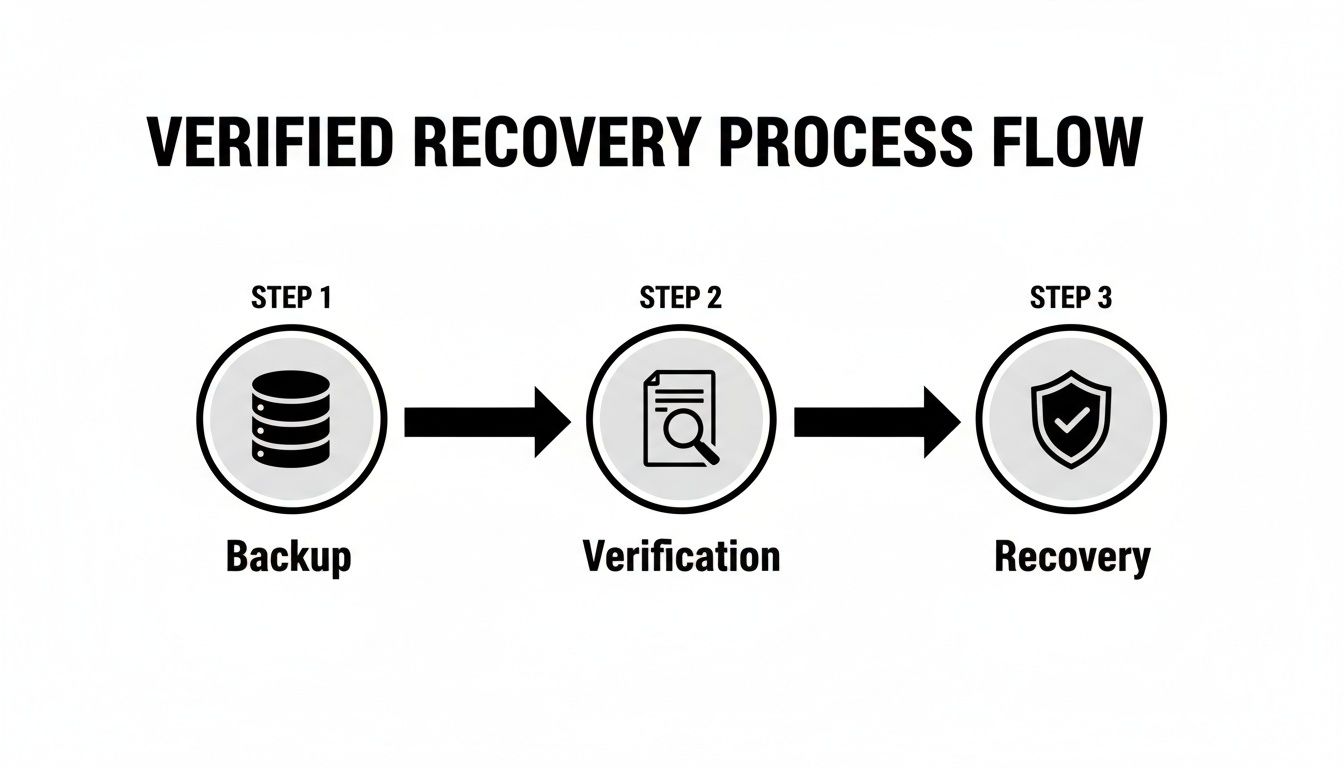
This visual shows that a backup is only the start. The verification and recovery stages are what give you true business continuity. Your playbook puts this process into action.
To help you get started, here’s a quick checklist of the essential parts of a data recovery playbook.
Key Elements of a Disaster Recovery Plan
| Plan Component | Why It's Critical | Example for a Local Business |
|---|---|---|
| Recovery Team Roster | Designates clear leadership and roles, avoiding confusion during a crisis. | A Salinas-based accounting firm designates the managing partner as the lead, with the office manager handling communications. |
| Vendor Contact List | Provides immediate access to crucial external partners like your IT provider, ISP, and software vendors. | The list includes the direct support line for the point-of-sale software vendor and the account manager at the internet company. |
| System Priority List | Ensures the most vital business functions (e.g., payment processing) are restored first to minimize financial impact. | A restaurant in Monterey prioritizes its POS system (Tier 1) over its internal email server (Tier 2). |
| Step-by-Step Procedures | Offers a clear, actionable checklist for technical staff to follow, reducing the risk of human error under pressure. | The plan includes a specific sequence: "1. Verify cloud backup integrity. 2. Spin up virtual server. 3. Restore database." |
| Communication Plan | Manages expectations for employees and customers, protecting your company’s reputation. | Pre-written email templates and social media posts are ready to inform customers about a service outage and provide updates. |
This table covers the core parts of a plan that actually works when you need it most.
Documenting Roles and Communication
Finally, your playbook needs to be a practical guide for people. Technology can't do everything on its own. Your plan has to clearly spell out roles, responsibilities, and how everyone will communicate.
Make sure you document the following:
- The Recovery Team: Who is in charge during a disaster? Who has the authority to declare an emergency?
- Contact Information: Keep an up-to-date, accessible list of all key people, vendors, and IT partners—and don't just store it on the server that might go down.
- Communication Plan: How will you notify employees about the outage? What about customers? How will you provide ongoing updates?
Building a complete playbook takes time, but it’s one of the best investments you can make in your business’s future. For an even deeper dive, our article with a complete data recovery plan example is a great resource.
Choosing the Right Data Recovery Partner in Monterey Bay
When your business is on the line, the last thing you want is to explain a server crash to a call center a thousand miles away. A data disaster demands immediate, hands-on support. You need a local partner who gets it—someone who understands the pressures of running a business in Monterey County.
Picking the right IT partner for data recovery is about more than just comparing fees. It's about finding a team that works as part of your own. The standard advice points you toward big national names, but that misses the most critical factor: their approach to recovery. You have to ask questions that separate a passive storage vendor from an active recovery partner.
This is the key to moving beyond just storage and into real data recovery. It's about finding a provider who is invested in protecting your company's future, not just its files.
Questions to Ask a Potential IT Partner
Before you sign any contract, you need to dig deeper. Many providers sell a "set-it-and-forget-it" backup service. It sounds easy, but it leaves you exposed when something goes wrong. To find a true partner, you have to check their process, not just their technology.
Here are the key questions you should ask:
- Do you include recovery testing as part of your standard service? If they try to sell testing as an expensive add-on, that’s a huge red flag. Proactive recovery drills should be a core part of any managed backup plan.
- Can you provide fast, on-site support in an emergency? When your server in Seaside goes down, you need an engineer who can be there in hours, not days. Remote support is great, but it can’t solve a physical hardware failure.
- What’s your experience with my industry? A provider who knows the demands of Salinas agriculture or Monterey hospitality will understand your needs in a way a generic provider never could.
Their answers will tell you everything you need to know. You’re not just buying a backup service; you’re investing in a business continuity partnership.
At Adaptive Information Systems, we don’t just store your data—we prove it can be restored when it matters most. Documented failover testing isn't an upsell; it's a standard part of every managed backup solution we provide. We believe in proof, not just promises.
The Adaptive IS Partnership Approach
We reject the passive, "set-it-and-forget-it" model. Our mission is to deliver enterprise-level IT at an affordable price for local SMBs, which means taking a hands-on role in protecting your operations. We work with you to understand your business, identify your critical systems, and build a recovery plan that is tested, proven, and ready for anything.
This partnership approach means you can focus on running your business, knowing your backup isn't just a folder in the cloud—it's a real, tested strategy to keep the lights on. When weighing your options, it's worth reviewing a guide to data recovery service success to make sure you choose a partner who aligns with your needs.
Ultimately, choosing a local partner means choosing someone invested in your success. If you’re in Salinas or anywhere in the Monterey Bay Area, Adaptive IS offers backup health checks and local recovery support—so you’re not relying on hope when it comes to your business data. For a full picture of what a modern solution should look like, check out our insights on professional data backup and recovery services.
The Peace of Mind That Comes with a Tested Plan
At the end of the day, a data recovery strategy is about something more valuable than data—it’s about your peace of mind. It’s the quiet confidence that comes from knowing your Salinas business can handle any storm, digital or physical.
When you go beyond storage and build a plan for real data recovery, you’re investing in the future of your business. This frees you to focus on what you do best: serving your customers and growing your company, without worrying that a hardware failure or ransomware attack will shut you down for good. Instead, you can operate with the assurance that you have a clear plan ready to go.
From Hope to Guarantee
Too many business owners run on hope, crossing their fingers that their backups will work when a crisis hits. A tested plan swaps that hope for a guarantee. You know it works because you’ve seen it work in a simulated disaster.
Contractors and business owners gain peace of mind knowing their backup isn’t just a folder in the cloud—it’s a real, tested plan to keep operations running if something goes wrong.
This is the key difference between just having files saved somewhere and having a true business continuity strategy. It’s about having a proven process you and your team can rely on. When you partner with a provider who makes verified recovery a priority, you're investing in the stability of your company. You can learn more in our guide on the importance of disaster recovery plan testing.
For business owners across Monterey County, from hospitality in Carmel to agriculture in Salinas, this level of assurance is priceless. Don't leave your company's future to chance. Secure it with a professional backup health check and a recovery plan that’s built for reality.
Adaptive Information Systems
380 Main St, Salinas CA 93901 | 831-644-0300 | hello@adaptiveis.net
Got Questions About Data Recovery? We've Got Answers.
As we help businesses across Monterey and Salinas move from just storing files to building a real recovery strategy, the same questions tend to pop up. Here are some clear, straightforward answers to what local business owners really want to know about keeping their operations safe.
How Often Should I Actually Test My Backups?
This is a great question, and the honest answer is it depends on how much data you can afford to lose. Think about your last workday—could you stomach re-doing all of it? For most businesses, finding a practical, consistent rhythm is what matters most.
We’ve found a two-tiered approach works best:
- Quarterly Full Recovery Drills: Once a quarter, you need to simulate a real outage. This isn't just checking a file; it's restoring an entire critical system to a sandboxed environment to prove everything boots up and works exactly as it should.
- Monthly Spot Checks: Every month, we pick a few random, but important, files or a specific database to restore. This is a quick health check that lets us catch any quiet issues before they morph into a full-blown crisis.
This balanced schedule gives you confidence that your data isn't just backed up—it's actually recoverable. It’s the difference between having an insurance policy and knowing for a fact that it will pay out.
What's the Real Difference Between Disaster Recovery and Business Continuity?
People use these terms interchangeably all the time, but they cover completely different ground. Getting this right is the key to building a business that can actually withstand a major problem.
Imagine a water pipe bursts and floods your office.
Disaster recovery (DR) is the IT team’s playbook. It’s the specific, technical set of steps to get your technology back online: restoring servers from backups, firing up applications, and getting data flowing again. Its mission is purely technical.
Business continuity (BC), on the other hand, is the bigger picture. It’s the company's overall strategy for survival. It answers the question, "How do we keep the lights on and serve customers while the tech is being fixed?" This plan covers everything else:
- Where will employees work tomorrow? (A temporary office, from home?)
- How are we redirecting our main phone lines?
- What’s the communication plan for our clients and staff?
- Can we take orders manually for the next 48 hours?
A rock-solid disaster recovery plan is a critical piece of your business continuity strategy, but it’s just that—one piece of a much larger puzzle.
Is My "Cloud-Only" Backup Strategy Safe From Ransomware?
While having a cloud backup is a massive step up from no backup at all, a cloud-only strategy has a dangerous blind spot when it comes to modern ransomware. The Achilles' heel is synchronization.
Most cloud storage platforms—think Dropbox, Google Drive, OneDrive—work by constantly syncing the files on your computer with the cloud. If a ransomware attack hits your office and encrypts all your local files, those now-useless encrypted files will automatically sync to your cloud account, writing right over your clean copies.
A professional-grade recovery solution closes this loophole by creating "air-gapped" or immutable backups. These are pristine copies of your data that are completely disconnected and isolated from your live network. They're invisible and unreachable to malware, which means even if your entire network is taken hostage, you have a guaranteed clean copy ready to restore. That's the foundation of a real data recovery plan.
Adaptive Information Systems
380 Main St, Salinas CA 93901 | 831-644-0300 | hello@adaptiveis.net