
Let's be honest, cloud backup for a small business isn't just another line item on your IT budget—it's a fundamental survival tool. Think of it as your digital insurance policy. It's the one thing that stands between a minor hiccup and a disaster that could shut your doors for good, whether that's a ransomware attack, a fried server, or just simple human error. At its core, it ensures your most critical asset—your data—is always safe and recoverable.
Why Cloud Backup Is Your Business Lifeline

Picture this: You walk into the office on a Tuesday morning, coffee in hand, only to find every single computer screen locked. A chilling message demands a hefty ransom. All your customer files, invoices, and project data are gone, held hostage by a cybercriminal you’ll never meet. This isn't a scene from a bad action movie; it's a terrifying reality that cripples unprepared businesses every single day.
In our connected world, data is the lifeblood of your company. It’s your client relationships, your financial history, your trade secrets. Losing it is far more than just a bad day—it can be the end of the road. And the threats aren't always so dramatic. It could be a server that finally gives up, an employee accidentally deleting a critical folder, or a physical disaster like a fire or flood.
The Alarming Reality of Data Loss
The statistics on data loss are stark and unforgiving. Research shows that a staggering 60% of SMBs shut down within 180 days of a major data loss event. That figure should be a wake-up call, highlighting just how vulnerable small businesses are when their data disappears. Whether it's from a cyberattack or a hardware failure, the result is the same: disruption and, all too often, collapse. If you want to dig deeper, you can explore more data protection strategies for businesses to understand just how vital preparation is.
This is exactly why treating cloud backup as just another IT task is a huge mistake. It’s a core business function, as essential as paying your rent or running payroll.
A backup plan you haven't tested is just a hope. A tested cloud backup plan is a guarantee that your business can survive a crisis, recover quickly, and continue serving your customers without missing a beat.
A Pilot's Pre-Flight Checklist for Your Business
Think of implementing cloud backup for your small business like a pilot running through a pre-flight checklist. Before a plane ever leaves the ground, the pilot methodically checks every critical system. They don’t just hope for the best; they prepare for the worst to ensure a safe flight, no matter the turbulence.
Your business data deserves that same meticulous care. A solid backup strategy is your non-negotiable checklist for navigating the unpredictable skies of the modern economy. It ensures you can weather any storm, whether it's a ransomware attack, a server crash, or an employee error. This isn't about preventing disasters—some things are out of your control. It's about making sure they don't become fatal. It’s the difference between a minor inconvenience and a catastrophic failure.
Decoding Your Cloud Backup Options
When you start looking into cloud backup for small business, you'll quickly run into a few core methods that make it all work. Think of it like looking under the hood of a car; you don't need to be a mechanic, but knowing the basics helps you pick the right one for your needs.
Let's break down these options with a simple analogy: imagine your business data is a book you're writing every day. How you save your progress is your backup strategy.
The Three Main Backup Methods Explained
Each backup type strikes a different balance between speed, storage space, and how easy it is to get your data back. A good IT partner will help you find the right mix, but it’s smart to understand what’s happening behind the scenes.
1. Full Backup: The Complete Manuscript
A full backup is exactly what it sounds like. It’s like printing and saving a complete copy of your entire manuscript every single time. This approach creates a total, self-contained snapshot of all your data at that moment.
While it's the simplest to restore from—you just grab the latest complete version—it’s also the slowest and hungriest for storage space. Running a full backup every night isn't practical or efficient for most businesses.
2. Incremental Backup: Only Today's New Pages
An incremental backup is much smarter with resources. This is like printing only the new pages you wrote since your last backup. It captures just the changes made since the last time a backup ran, whether that was a full backup or another incremental one.
This method is super fast and uses very little storage for each run. The catch? Restoration is more complicated. To get your manuscript back, you need the last full backup plus every single incremental backup since then, all in the correct order. If one piece is missing, the whole chain breaks.
3. Differential Backup: All Changes Since Day One
A differential backup is the happy medium. It's like printing all the pages that have changed since you printed your very first complete draft. It backs up all data that has been modified since the last full backup was taken.
This uses more storage than an incremental backup but way less than a new full one. The big win is in restoration. You only need two pieces: the last full backup and the most recent differential backup. That’s it. This makes it much faster and more reliable to restore than an incremental strategy. A solid plan often blends these methods, a concept you can explore in these data backup strategies for Monterey Bay businesses.
To make this clearer, let's compare these methods side-by-side.
Comparing Key Backup Methods
| Backup Type | Backup Speed | Storage Space Needed | Restoration Speed and Simplicity |
|---|---|---|---|
| Full | Slowest | Most | Fastest and Simplest (one file) |
| Incremental | Fastest | Least | Slowest and Most Complex (many files) |
| Differential | Moderate | Moderate | Fast and Simple (two files) |
As you can see, there’s a trade-off with each approach. The best strategy for your business will likely use a smart combination, like a full backup weekly and differential or incremental backups daily.
Files vs. Images: A Crucial Distinction
Beyond the "how," you also have to decide "what" to back up. This choice boils down to two main levels of protection.
- File-Level Backup: This is where you pick and choose specific files and folders to save. Think of your accounting files, customer lists, or critical project documents. It's great for protecting your most important data assets without saving everything.
- Image-Level Backup (Cloning): This is the whole shebang. It creates a perfect clone of your entire system—the operating system, all your programs, your settings, and every last file. If a server dies, you can restore this complete image to new hardware and be back in business fast, without reinstalling everything from scratch.
For real business continuity, an image-level backup is the gold standard. It minimizes your downtime by restoring your entire working environment, not just the files. This is a cornerstone of any modern disaster recovery plan.
This infographic shows just how much better a modern cloud approach is compared to older, traditional methods.
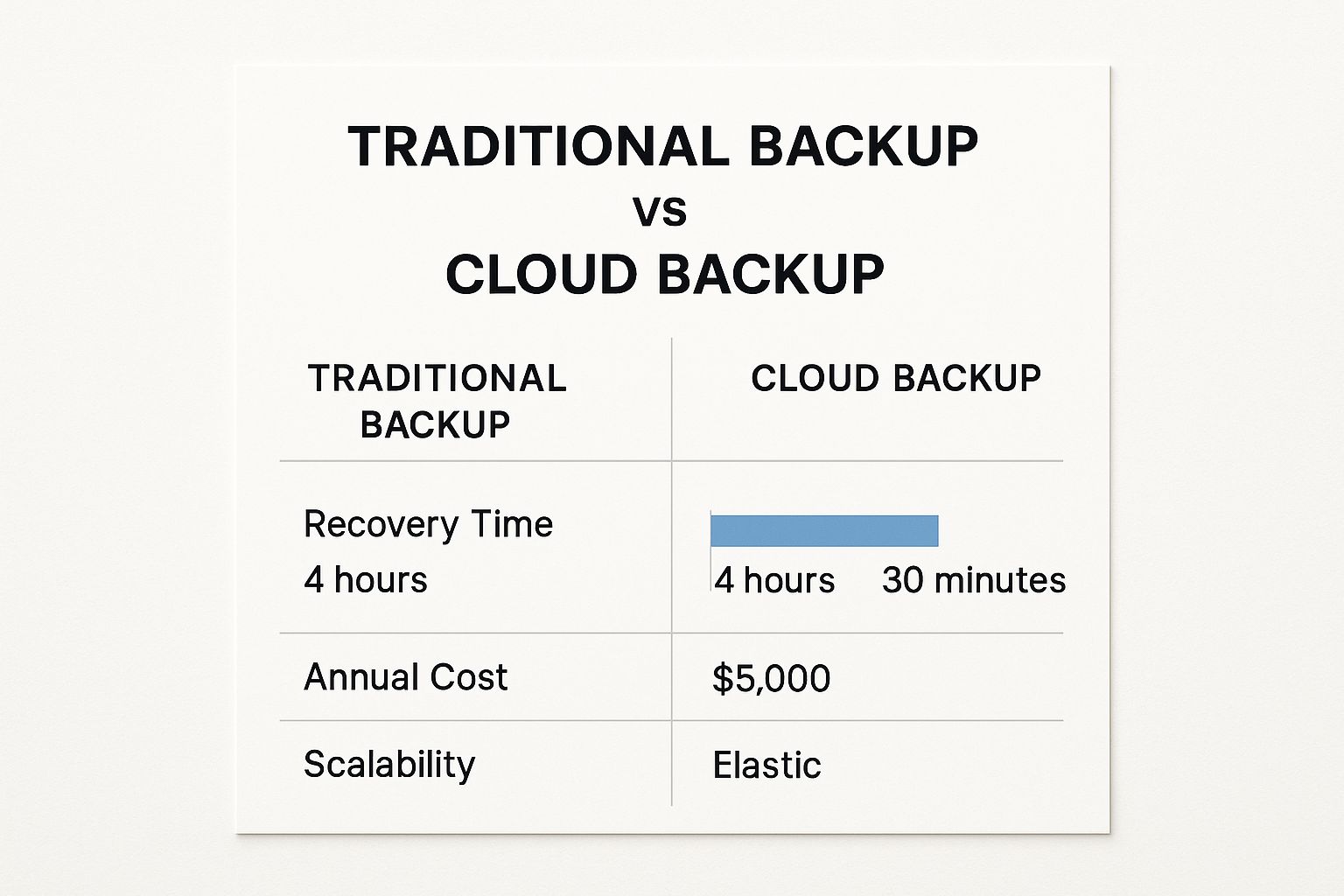
The numbers don't lie. Cloud solutions deliver much faster recovery times and greater flexibility at a lower annual cost, making them a perfect match for growing businesses that need to stay protected and agile.
How To Choose the Right Cloud Backup Service
Choosing a cloud backup provider is a lot like hiring a key employee. You wouldn't just look at their salary demands; you'd dig deeper. Are they trustworthy? Will they fit in with your existing team? Can you count on them when a real crisis hits?
When you apply that same mindset to picking a service, your focus shifts from just the price tag to the factors that genuinely matter for your business's survival. A cloud backup for small business isn't just a utility; it's a long-term partnership. Picking the right partner is a critical decision that deserves some careful thought.
Assess Security as Your Top Priority
Before you even glance at a pricing page, you have to get a feel for a provider's security. This is the "trustworthiness" part of the hiring decision. Your business data is one of your most valuable assets, and handing it over to a third party demands absolute confidence in their security measures.
Look for services that offer end-to-end encryption. This is completely non-negotiable. It means your data gets scrambled before it even leaves your computers and stays unreadable to everyone—including the provider's own staff—until you decide to restore it with your unique key.
On top of that, find providers who operate with a zero-knowledge model. Think of it like a bank giving you a safety deposit box where you hold the only key. The bank provides the vault, but it has absolutely no way to see what you've stored inside. A zero-knowledge provider can't access your encrypted files, which gives you the ultimate layer of privacy and security.
Evaluate Ease of Use and Integration
The most powerful backup system on the planet is worthless if it's too complicated to actually use. This is where ease of use comes into play—it's all about how well your new "hire" gels with your current team and workflow. A clunky interface or a confusing setup can lead to mistakes, or even worse, cause you to give up on the system entirely.
A good provider will have:
- An Intuitive Dashboard: You should be able to see your backup status at a glance, set up schedules easily, and start a restore with just a few clicks.
- Seamless Automation: The service should just work quietly in the background without getting in the way of your day-to-day operations. The real goal is "set it and forget it."
- Simple Restoration Process: When disaster strikes and you need your data back, the process needs to be fast and straightforward, not some technical puzzle you have to solve under immense pressure.
Your backup service should reduce your workload, not add to it. If a provider’s platform feels overwhelming during a free trial, it will feel impossible during a real emergency.
Don't Overlook Customer Support and Reliability
Finally, you need to know that your provider will have your back when things go wrong. This is where you test their dependability under pressure. A disaster can happen at any time, and you need a support team that’s available 24/7/365 to help you get back on your feet.
Put their support to the test during your evaluation period. Ask a technical question. Was the response fast? Did the agent seem knowledgeable and genuinely helpful? A provider that's hard to get ahold of when you're trying to give them money will be completely MIA when you're in the middle of a crisis. Partnering with a managed services provider for your cloud IT services in Salinas can add another layer of expert support, ensuring someone is always in your corner.
Understand the Real Cost
While price shouldn't be the only thing you look at, it’s still an important piece of the puzzle. Basic cloud backup plans for small businesses can start anywhere from $10 to $50 per month for storage between 100GB and 1TB. Costs often scale with how much you use, typically between $0.01 and $0.05 per GB per month. Premium plans will layer on advanced security and full disaster recovery features.
Remember, the cheapest option is rarely the best value. You have to factor in the potential cost of downtime, data loss, and the damage to your reputation. The right service isn't an expense; it's a high-return investment in your company's future.
Implementing Your Backup and Recovery Plan

Choosing the right provider for cloud backup for small business is a huge step forward, but the job isn't done yet. Now it's time to roll up your sleeves and get your system deployed for maximum protection. This is where you turn that subscription into a real-world safety net for your company.
A solid backup plan is much more than just clicking a button; it’s a strategic process. It’s about figuring out what truly matters, deciding how often to protect it, and then confirming that your protection actually works. Think of this as creating the instruction manual for your company's digital survival.
Step 1: Identify Your Critical Data
Before you back up a single file, you have to know what you can’t live without. Let's be honest: not all data is created equal. While saving everything might seem like a good idea, your immediate focus should be on the information that keeps the lights on.
Start by making a simple inventory. Ask yourself: what data, if it vanished for just one day, would bring your operations to a screeching halt?
- Financial Records: This is everything from your accounting files and invoices to payroll data and tax documents.
- Customer Information: Think about your CRM database, client contact lists, and project histories. These are irreplaceable assets.
- Operational Data: This could be your inventory databases, supplier contracts, or even internal process guides.
- Proprietary Information: Do you have unique intellectual property, designs, or business plans? This is the stuff that gives you a competitive edge.
Pinpointing this data first ensures your most valuable assets get the highest level of protection from day one. It's a focused approach that forms the foundation of any effective backup strategy.
Step 2: Define Your Backup Schedule and Policies
With your critical data identified, the next step is deciding how often to back it up and how long to keep those copies. This is where you establish your Retention Policy and Backup Frequency. Your choices here will directly impact your storage costs and your ability to bounce back from different types of disasters.
A common starting point for small businesses is to schedule a full backup weekly, with daily incremental or differential backups to catch all the day-to-day changes. This strikes a great balance between solid protection and efficiency.
Your retention policy determines how far back in time you can go to grab an old file. A typical policy might look something like this: keep daily backups for a week, weekly backups for a month, and monthly backups for a year. This tiered approach gives you detailed, short-term recovery options without eating up a ton of storage.
A well-known industry best practice is the 3-2-1 Rule. This simple framework is a powerful blueprint for resilience: maintain 3 copies of your data on 2 different types of media, with 1 of those copies stored off-site. A cloud backup service automatically handles the off-site requirement for you.
Step 3: Test Your Backups Religiously
This is it. The most crucial—and most often skipped—step in the entire process. A backup you haven't tested isn't a plan; it's a prayer. You can't just assume your backups are working until you've actually restored data from them.
Setting up regular, scheduled test restores is the only way to guarantee your "insurance policy" will pay out when you need it. You really don't want to discover your backups have been failing for months right in the middle of a real crisis.
Start with a simple test:
- Choose a Non-Critical File: Pick a file or a small folder that won't disrupt anything if the test goes sideways.
- Perform a Test Restore: Use your backup service's dashboard to restore that file to a new, separate location on your system.
- Verify the Data: Open the restored file. Is it intact? Is it uncorrupted? Is it the correct version?
Making a habit of conducting these tests quarterly is a fantastic move. It gives you peace of mind and makes sure your team knows the recovery drill before an emergency hits. For more detail, a comprehensive guide on creating a full backup and disaster recovery plan for your small business can offer even more depth on this vital topic. Getting this right is what separates businesses that survive a disaster from those that don't.
Navigating Security and Compliance in the Cloud
Handing over your business's most valuable asset—its data—to a third-party provider can feel like a huge leap of faith. For a lot of small business owners, the very idea of storing critical files "in the cloud" brings up immediate worries about security and regulations.
But here's the reality: when you team up with a reputable provider, you're not just renting storage space. You're adopting an enterprise-level security posture that would be almost impossible for most small businesses to build and maintain on their own. In nearly every case, a professional cloud service is far more secure than an on-premise solution. These companies have dedicated cybersecurity teams working 24/7 to protect your data in physically hardened data centers, complete with redundant power, advanced surveillance, and airtight access controls.
Understanding Cloud Encryption
The bedrock of cloud backup for small business security is encryption. The best services in the game use two powerful methods to ensure your data stays completely private: end-to-end encryption and zero-knowledge architecture.
Think of it like a bank's safety deposit box system.
- End-to-End Encryption: Your data gets scrambled into unreadable code before it even leaves your computer. Just like you'd put your valuables in the box and lock it before handing it over to the bank guard, your files are secured before they ever travel across the internet.
- Zero-Knowledge Encryption: This is the key part. It means only you hold the key to unscramble your data. The cloud provider builds and maintains the vault (their secure servers), but they have absolutely no way to open your specific box or see what’s inside. This guarantees total privacy.
This two-layer approach means that even in the incredibly unlikely event of a security breach at the provider's data center, your files are just encrypted, useless code to any unauthorized person.
Your Partner in Regulatory Compliance
Does your business operate in a regulated industry like healthcare or finance? If so, you're probably bound by strict rules like HIPAA or GDPR, which dictate how you must handle and protect sensitive customer information. Keeping up with compliance can feel like a full-time job.
This is where a quality cloud backup provider becomes your compliance partner. Top-tier services are built from the ground up to meet or exceed the technical demands of major regulations. They give you the secure infrastructure and documented controls you need to prove due diligence, helping you meet your obligations without needing to become a compliance expert yourself.
One of the most crucial yet simple security steps you must take is enforcing two-factor authentication (2FA) on your backup account. It requires a second form of verification, like a code sent to your phone, before allowing a login. It's one of the single most effective ways to block unauthorized access.
There's a reason the market for these secure services is booming. More small businesses are waking up to these benefits, driving the global cloud backup market from a value of around $5.95 billion to a projected $7.54 billion by 2025. This explosive growth is fueled by the very challenges small businesses face every day: a massive increase in data, rising cybersecurity threats, and the absolute need for reliable data protection. You can dive deeper into these cloud backup market trends and forecasts to see exactly why this technology is becoming so essential.
Answering Your Top Cloud Backup Questions
Even after seeing the clear benefits, it's natural for small business owners to have a few more questions. When it’s something as critical as your business's data, you want to be completely sure you’re making the right move. Let's clear up some of the most common questions we hear so you can move forward with confidence.
We'll tackle the big ones head-on, from how secure it really is to figuring out how much space you actually need. Getting these answers will put you in the driver's seat.
Is Cloud Backup Really More Secure Than an Office Hard Drive?
Without a doubt, and it’s not even a fair fight. Picture your office—it's exposed to local risks like fire, flooding, or a simple break-in. That single external hard drive on someone’s desk is a ticking time bomb. It can fail without warning, get stolen, or just be misplaced, taking all of your essential business data with it. It’s a classic single point of failure.
Reputable cloud providers, on the other hand, play in a totally different league. They run their operations out of geographically scattered, high-security data centers that have 24/7 surveillance, backup power sources, and physical security measures most businesses could only dream of. Even more importantly, they wrap your data in end-to-end encryption, scrambling it into unreadable code before it ever leaves your network. Trying to match that level of security in-house is practically impossible for a small business.
What Is the Difference Between Cloud Backup and Cloud Storage?
This is a huge one, and confusing the two can create a dangerous false sense of security.
- Cloud Storage (like Dropbox or Google Drive): Think of this as a shared digital filing cabinet. Its main job is to sync files and help your team collaborate. If a file gets deleted by accident or hit with ransomware, that change often syncs everywhere almost instantly, wiping out your good copy.
- Cloud Backup: This is your disaster recovery plan. It’s designed to create independent, versioned copies of your files and systems at specific points in time. It’s your fireproof, off-site vault. If disaster strikes, you can restore everything from a clean snapshot taken before the problem happened. You can literally turn back the clock.
Cloud storage is for productivity. Cloud backup is for protection. A smart business uses both, but never mistakes one for the other.
How Much Data Storage Do I Really Need?
That's a bit like asking "how long is a piece of string?" The answer depends entirely on what your business does. A service-based business that mostly works with documents might only need 500 GB. But a marketing agency or architecture firm handling massive video or design files could easily need several terabytes (TB).
Here’s a simple way to approach it:
- Audit Your Critical Data: First, add up the current size of everything you can't afford to lose—customer records, financials, key project files.
- Add a Growth Buffer: Think about the future. A 50-100% buffer is a good rule of thumb to cover you for the next couple of years.
- Choose a Scalable Plan: The most important thing is to pick a provider with flexible plans. Start with a tier that meets your needs today (say, 1TB) and make sure you can easily upgrade when you need to. Don't get locked into paying for massive storage you won't touch for years.
The goal is to find a solution that grows with you, keeping you protected without wasting your budget.
Ready to implement a robust and secure cloud backup solution designed for the needs of local businesses? Adaptive Information Systems offers expert guidance and managed IT services to protect your critical data and ensure your business can weather any storm. Learn how we can build your digital safety net today.