
Think you’re covered? Test your recovery. It's a question I ask business owners across Salinas and Monterey County. You have a backup system, which feels like a complete safety net. But the truth is, recent insights show that backups without a disaster recovery plan often fail to restore systems quickly or completely—leading to costly downtime and data loss.
For many local businesses in agriculture or hospitality, that kind of delay is not an option.
Why Backups Are Only Half the Battle
It’s a common question: “We already have backups—why would we need disaster recovery?” It seems logical. You've paid for a service to copy your important data. If something goes wrong, you should be able to flip a switch and get back to work.
But it's rarely that simple. A backup you’ve never tried to restore from is more of a hope than a plan. What this actually means for you is that unless you’ve tested your recovery process, you’re flying blind. Ransomware, fire, or even accidental deletion can cripple systems if backups aren’t easily restorable.
The Critical Recovery Gap
Imagine this: a Salinas agricultural company is in the middle of harvest season. Suddenly, their payroll and logistics systems go down. They have backups, but they've never actually tried a full restore. When they finally attempt it, they find out the process will take days, not hours. Even worse, the data is corrupt and key files are missing.
This highlights the "recovery gap"—the dangerous space between having data saved and actually getting your business running again. A failed recovery can be just as damaging as the initial disaster.
The only way to know if you can bounce back is to conduct a recovery simulation. This guide will walk you through how to do that, turning your backup from a promise into a real plan. Our guide on preparing your backup solutions for a real disaster is a great place to start.
Mapping Your Recovery Before You Test
Jumping into a recovery test without a plan is like sailing from the Monterey harbor without a map. You need a clear blueprint first. This prep work turns a chaotic fire drill into a structured exercise that gives you real, helpful information.
The first step is figuring out what a successful recovery looks like for your business. This comes down to two key numbers.
Define Your Recovery Objectives
Every business has a different tolerance for being offline. A Carmel-based hotel can't afford to have its booking system down for long. A local accounting firm might care more about perfect data accuracy than immediate access outside of tax season. This is why you need to set clear goals.
Answer two basic questions:
- Recovery Time Objective (RTO): How long can your business afford to be down? This is the maximum time from when a disaster hits until your most important systems are back online. Is it four hours? A full day?
- Recovery Point Objective (RPO): How much data can you afford to lose? This determines how often you need to back up your information. If your RPO is one hour, you can't lose more than an hour's worth of work.
Answering these questions gives you the pass/fail rules for your test. For a deeper look, you can explore the differences between RTO and RPO in our detailed guide.
What this actually means for you is that RTO and RPO are not just tech terms—they are business decisions. They directly affect how you serve your customers during a crisis.
Identify Your A-Team and Critical Systems
Once you have your targets, you need to map out the "who" and "what" of your recovery. You can't test anything if you don’t know which systems are most important or who is responsible for bringing them back.
Start by making a simple list of every critical piece of software, hardware, and data your business uses. Think about your point-of-sale system, accounting software, customer lists, and any special programs that keep your doors open.
Next, assign roles. Who is on your recovery team? This should never be just one person. Define clear jobs for everyone, from the person who declares a disaster to the team members who check that systems are working after the recovery.
To get you started, use the simple worksheet below. It's a great way to put these ideas into real terms.
| Your Business Recovery Objectives Worksheet |
|---|
| Use this table to identify your most critical business systems and define how quickly you need them back online (RTO) and how much data you can afford to lose (RPO). |
| Critical System (e.g., Point-of-Sale, Accounting Software) |
| Recovery Time Objective (RTO) |
| Recovery Point Objective (RPO) |
Filling this out is the first real step toward building a recovery plan that works when you need it most.
How to Run a Realistic Recovery Simulation
With your recovery goals mapped out, it’s time to practice. A recovery simulation is just a controlled run-through to see if your plan works. It’s about building muscle memory for your team so you aren't guessing during a real crisis.
Think of it like a fire drill. You don’t wait for a real fire to find the exits. A recovery simulation does the same for your data.
Choosing Your Test Scenario
Not all tests are the same. You can start small and work your way up to bigger scenarios. The choice depends on what you want to learn.
Here are a few common types of tests:
- File-Level Restore: This is the most basic test. Can you restore one important file or a specific folder from your backup? It’s a quick way to confirm your backup data is readable.
- Application Restore: Can you bring a specific program back online? For instance, could you restore your accounting system to a working state on a separate computer?
- Full Server Failover: This is a more advanced test. It involves pretending a whole server has failed and redirecting everything to a backup server. This tests your ability to keep the business running with little interruption.
Imagine a logistics company gets hit with ransomware. A realistic simulation would involve starting their recovery plan, restoring the entire server from a clean backup, and checking that the shipping software is running again. The goal is to time the whole process.
This visual shows the basic flow for mapping out what you'll test.
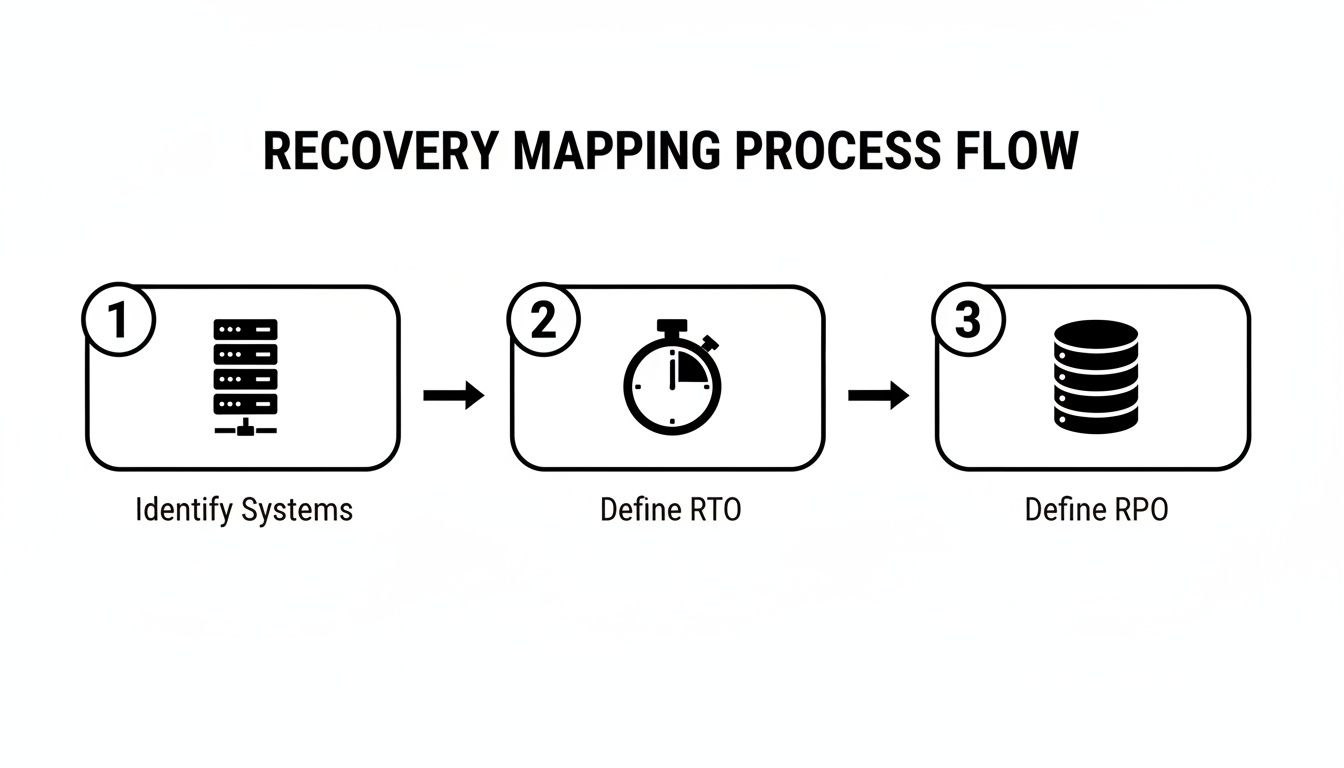
This process ensures your simulation is focused on what truly matters—the systems that keep you in business.
Document and Time Everything
The most important part of any simulation isn’t just seeing if it works—it’s writing down every step. This is how you find the hidden problems that only show up under pressure.
As you run the test, have someone take notes. They should record:
- The exact start and end times.
- How long each major step takes.
- Any unexpected problems or error messages.
- Notes on what went well and where the team struggled.
What this actually means for you is that timing your recovery gives you a true measure of what you can do. If your RTO is four hours but the test takes ten, you’ve just found a major gap in your plan—one you can now fix before a disaster strikes.
This documentation is priceless. It’s the information you’ll use to improve your plan, update your steps, and train your team better. To make sure your tests are effective, you can get ideas from a SOC 2 readiness assessment guide, which offers a structured way to check your processes.
Our complete guide to disaster recovery plan testing provides even more detail on how to structure these simulations.
What to Do After the Test: Finding the Gaps in Your Armor

Once the simulation is over, the real work begins. The point of a test isn't to get a pass/fail grade; it's about turning the results into actions that make your business stronger.
Start with a post-test meeting. Get everyone involved in a room and walk through the notes. The focus should be on discovery, not blame. Finding problems is a win—it means you’ve found a weakness you can fix before a real crisis.
Asking the Right Questions
The core of your review is simple: compare what actually happened to what you thought would happen.
Start by asking these key questions:
- Did We Meet Our RTO? If you aimed for a four-hour recovery but it took twelve, you need to find out where the delays happened.
- Were There Technical Problems? Was the restore process slowed by something unexpected, like the wrong hardware, a missing software key, or a slow network?
- Did the Team Know Their Roles? Was there confusion? Did anyone seem unsure of what to do or when to do it?
- Was Our Documentation Clear? Could a stranger follow your recovery plan, or were there steps that were confusing or missing?
These questions help you understand why the recovery took so long. This is also a good time to review your overall security with a comprehensive cybersecurity audit checklist.
Uncovering Common Failure Points
From our experience with businesses in Pacific Grove and across the region, a few common problems pop up during these tests. You might find your backups were incomplete. Other times, the restore steps are just too complicated for a high-stress situation.
If your test shows you can't get certain data back, it might be time to look into reliable data recovery solutions to see what professional options are available.
What this actually means for you is that every minute of unexpected delay during a test represents hours or days of lost income during a real disaster. Finding these issues now is an investment in your future.
This analysis is also important for your finances. Insurance policies can have strict terms. The data you gather from a test proves you have a working plan, which can be critical when you're trying to make a claim.
Turning Your Insights into a Stronger Recovery Plan
A report from your test sitting on a shelf does nothing. The real value comes from taking what you’ve learned and turning it into action.
The goal isn't just to patch holes; it's to build a stronger business. Based on what happened, you can now create a clear roadmap for improvements.
From Findings to Fixes
Your post-test meeting likely uncovered a few areas for improvement. It's time to assign owners to each action item and set deadlines.
Some of the most common next steps we see include:
- Updating Documentation: If your team was confused by the steps, your recovery documents need a rewrite. Make them clearer and easier to follow under pressure.
- Targeted Team Training: If certain team members struggled, schedule training sessions to fill those knowledge gaps so everyone knows what to do next time.
- Technology Upgrades: If you couldn't meet your RTO because the restore process was too slow, it might be time for better technology. Modern solutions can get you back online in minutes, not days.
What this really means for you is that recovery testing is a continuous cycle of improvement, not a one-time event. Each test makes you a little bit stronger.
This process is a core part of a bigger strategy. To see how these tests fit into your overall planning, our business continuity plan template can provide valuable structure.
When You Uncover Serious Gaps
Sometimes, a test reveals your current backup system isn't good enough. Maybe the data was incomplete, or the process was too complex to use in an emergency. If this happens, you’re not alone—and you don't have to solve it yourself.
This is where Adaptive can help. Our Backup & Disaster Recovery packages offer enterprise-level IT at an affordable price for local SMBs. We handle everything, including regular testing and offsite replication, so you can have complete confidence that your business is protected.
Unsure if your backups would work in a real crisis? Book a free recovery readiness review with our team.
Adaptive Information Systems
380 Main St, Salinas CA 93901 | 831-644-0300 | hello@adaptiveis.net