
Think of a cybersecurity audit checklist as your guide to digital safety. It’s a simple way to check everything from your company's security rules to your tech setup. An audit helps you find weak spots before they become big problems, making sure your business is safe from common cyber threats.
Why Salinas Businesses Need a Cybersecurity Audit
If you own a business in Monterey County, you know how hard you've worked to build it. Whether you're running a farm in Salinas or a popular hotel in Monterey, a single cyberattack can put all that effort at risk. Customer data, your money, and the good name you've built are all on the line.
This isn't just a problem for big cities. Hackers often target small and mid-sized businesses right here.
A good audit gives you a clear look at where you stand with your security. You’ll go from guessing about your safety to knowing exactly how protected you are. Using a checklist makes sure you check every part of your business, so nothing gets missed.
The Four Pillars of a Strong Cybersecurity Audit
To understand what an audit covers, it helps to break it down into four key areas. Think of these as the pillars holding up your entire security wall. Each one is important, and a weakness in one can bring the others down.
| Audit Pillar | What It Covers | Why It Matters for Your Business |
|---|---|---|
| Policies & Governance | Looking at your written security rules, plans for emergencies, and employee training. | This makes sure everyone knows their role in keeping the company safe and that you have a clear plan if something goes wrong. |
| Network Security | Checking firewalls, Wi-Fi security, and who can access your network. | A weak network is like an open door for hackers. This pillar secures the digital border of your business. |
| Systems & Endpoints | Checking servers, computers, and phones for the right settings, updates, and virus protection. | Every device connected to your network is a possible entry point. Locking them down is a must. |
| Compliance & Data | Making sure you follow industry rules (like HIPAA or PCI DSS) and are protecting sensitive data the right way. | This protects you from big fines and legal trouble, and it builds trust with your customers. |
Getting a handle on these four areas gives you a complete picture of your security. It shows you where you're strong and where you need to get better.
Pinpoint Hidden Risks and Save Money
The best part of an audit is that it finds security holes you didn't even know you had. Maybe it’s a program that hasn't been updated in years, an old employee account that still has full access, or a gap in your data backup plan.
Finding and fixing these issues before an attack is always cheaper than cleaning up the mess after. A security breach can shut down your business, lead to fines, and cost a lot to fix—enough to sink a small company.
An audit is one of the best investments you can make. It changes your security from something you worry about to a real business advantage that protects your money and builds trust with your clients.
Align Your Strategy and Ensure Compliance
A good cybersecurity audit checklist is often built around what’s called Governance, Risk, and Compliance (GRC). This is all about connecting your security efforts to your business goals and legal duties.
An audit confirms that your security policies are up-to-date and understood by your team. It also makes sure you’re regularly checking for risks in a structured way. This isn't just about tech—it’s about smart business management.
Getting an expert to guide you can make all the difference. This is a key part of good business technology consulting. An audit gives you the information you need to make smart decisions, making sure every dollar you spend on IT makes your business stronger.
Adaptive Information Systems
380 Main St, Salinas CA 93901 | 831-644-0300 | hello@adaptiveis.net
Strengthening Your Human Defenses
We talk a lot about technology, but your first—and most important—line of defense isn't software. It’s your team.
It might surprise you, but many cyberattacks succeed not by breaking through tough firewalls, but by tricking an employee. This is why the "human element" is a key part of any serious cybersecurity audit.
Your internal rules are the guardrails that keep your people and your business safe. Without clear rules on handling data, who can access what, and regular security training, you're leaving the door open to simple mistakes.
Reviewing Access and Permissions
A basic security idea is giving employees access only to the information they need to do their jobs. This is called the principle of least privilege. Every extra piece of access someone has is an unnecessary risk.
Start this part of your audit by asking some direct questions:
- Who has access to what? Do you have a clear, updated list of every employee’s permissions for all your software and files?
- Is that access still needed? When an employee changes roles, is their old access removed right away? This is key to preventing "privilege creep," where permissions just build up over time.
- What is your offboarding process? When someone leaves the company, how quickly is their access to everything—email, cloud apps, internal servers—cut off?
This last point is very important for businesses here in the Salinas Valley that depend on seasonal agricultural workers. A formal, immediate offboarding process at the end of a contract isn't just a good idea; it's a vital security step.
Your audit needs to confirm you have a written process for giving, reviewing, and removing user access. Not managing permissions is like leaving a set of keys to your office with every person who used to work for you.
Evaluating Security Training and Awareness
You can't expect your team to follow the rules if they don't know what they are. I've seen it many times: good, ongoing security training is one of the best investments you can make. Phishing attacks, where employees are tricked into clicking bad links, are still one of the most common ways breaches happen.
Your audit should check that you have these things in place:
- Onboarding Security Training: Do new hires get trained on your security rules, how to use company tech safely, and how to spot threats like phishing before they get full access?
- Regular Awareness Refreshers: Do you provide ongoing training or run phishing tests to keep security on everyone's mind all year? A single training session isn't enough.
- A Clear Incident Reporting Process: Does every person on your team know exactly who to call and what to do if they think there's a security problem? A quick response can be the difference between a small issue and a huge disaster.
When you build a security-first culture, you turn every employee into a defender of your business. For a deeper look at protecting your company’s digital border, our small business guide to network security offers more helpful advice.
Auditing Your Technical Infrastructure

Now, let’s get into the hardware and software that keeps your business running. This part of your cybersecurity audit checklist looks at the health of your network, devices, and apps. Think of it as checking the foundation, wiring, and locks on your office building.
Your goal here is simple: make sure your technical defenses are set up correctly, are up-to-date, and are doing their job. This means looking closely at your firewall, Wi-Fi security, and the protections on every computer and smartphone connected to your network. It might sound like a lot, but we can break it down.
Checking Your Network and Wi-Fi Security
Your network is the digital front door to your business. A weak firewall or an insecure Wi-Fi network is like leaving that door wide open. It’s very common; many business owners in Monterey and other local cities set up their Wi-Fi and then forget about it, not realizing that old security can be cracked in minutes.
Start by looking at these key areas:
- Firewall Rules: When was the last time you reviewed your firewall rules? They should block all traffic by default and only allow the specific connections you need for business.
- Wi-Fi Encryption: Check that your main Wi-Fi network is using WPA3 or at least WPA2 encryption. Older types like WEP are outdated and offer almost no protection.
- Guest Network: If you offer public Wi-Fi at your Pacific Grove café or Marina shop, it must be on a separate, isolated network. This is a must-do. It ensures guests can't access your internal business systems.
A huge part of auditing your tech is knowing how to secure your Wi-Fi network the right way. It’s a basic piece of any good cybersecurity plan.
Securing Your Endpoints and Software
Every device that connects to your network—from the server in the back to the laptop an employee uses at home—is called an "endpoint." Each one is a possible way in for an attacker, which means they all need to be locked down.
Your audits must include security checks that look closely at your firewalls, intrusion detection systems, and network rules. This means actively looking for weaknesses with tools for penetration testing and vulnerability scanning. These tools can find the exact wrong settings or old software that attackers look for. If you're curious, you can learn the difference between vulnerability scanning vs. penetration testing in our other guide.
Here’s a simple checklist to run through:
- Patch Management: Are all operating systems (like Windows or macOS) and apps updated with the latest security patches? Automatic updates are your best friend here.
- Endpoint Protection: Does every device have professional antivirus and anti-malware software installed, running, and up-to-date?
- Multi-Factor Authentication (MFA): Have you turned on MFA on every possible account? Focus on email, financial software, and any cloud services first. It's one of the best security layers you can add.
Think of software that isn't updated as a known weakness you're choosing to ignore. Hackers actively look for these easy targets, and keeping your systems updated closes those doors before they can get in.
Protecting Your Data and Ensuring Compliance
If you handle customer information, keeping it safe is not optional. It's more than just good business—it's often the law. This part of our cybersecurity audit checklist focuses on data protection and following the rules, making sure your Monterey County business stays on the right side of them.
Handling data the right way means you know what you’re collecting, where it’s stored, and how it’s protected. This is how you build trust with your clients, whether they're buying from your shop in Salinas or using your services in Seaside.
This flow chart shows three basic steps for securing your network, which is the foundation for protecting the data on it.
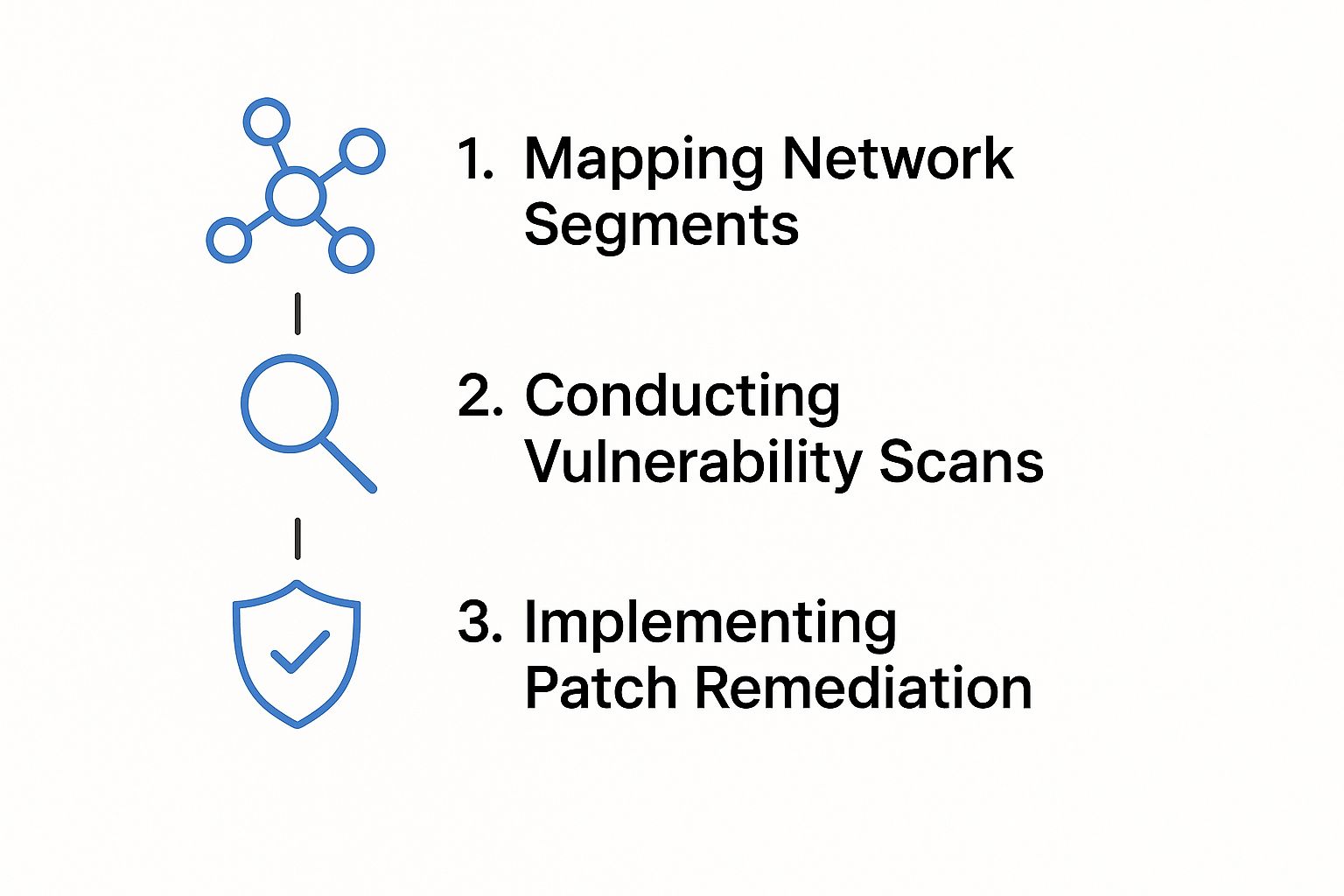
As you can see, it’s a clear path from understanding your network to finding and fixing weaknesses. This creates a cycle of constant improvement that keeps you ahead of threats.
Understanding Your Compliance Obligations
Depending on your industry, you may have to follow specific data security rules. A doctor's office in Pacific Grove, for example, must follow the Health Insurance Portability and Accountability Act (HIPAA). A restaurant in Carmel that takes credit cards needs to follow the Payment Card Industry Data Security Standard (PCI DSS).
And for almost every business in California, the California Consumer Privacy Act (CCPA) sets the rules for handling personal information. The first step is to figure out which of these apply to you. Our team can help you with this, but you can start by asking yourself:
- What kind of sensitive data are we collecting? (Like names, addresses, credit card numbers, health info, etc.)
- Where are we storing this data? (Is it on a local server, in a cloud app, or on employee laptops?)
- Who has access to it, and why?
Key Data Protection Checklist Items
Once you know the rules you must follow, you can check your technical and procedural controls. Your audit needs to confirm you have strong protections in place to shield data from being seen or stolen.
Use these questions to get started:
- Is all your sensitive data encrypted? Data needs to be scrambled both "at rest" (when it's sitting on a hard drive) and "in transit" (when it’s being sent over the internet). This is a must.
- Do you have a data retention policy? You should only keep sensitive data for as long as you have a real business need for it. A policy makes sure you’re safely getting rid of old data.
- How are you managing data backups? Are your backups themselves secure? Have you actually tested them to make sure you can restore everything if there's an emergency?
Beyond just hardware and software, your overall strategy is key. It's a good idea to learn about the most important data security best practices to build a stronger defense from the start.
Cybersecurity rules around the world have gotten much stricter, and it's changing how companies must handle audits. Data breaches now cost millions of dollars on average, which raises the stakes for keeping your security strong.
This focus on data protection isn't just about avoiding fines; it's about earning and keeping your customers' trust. A full cybersecurity risk assessment process is the best way to find exactly where your data is most at risk.
Turning Your Audit Findings into an Action Plan

Finishing a cybersecurity audit can feel like a big accomplishment. But the real win comes from what you do next. A report full of issues isn’t helpful unless you turn it into a simple, prioritized action plan.
Seeing a long list of problems can feel overwhelming. The key is to organize your findings into clear steps instead of trying to fix everything at once. That’s how we at Adaptive make top-level security both affordable and easy to manage for small and mid-sized businesses.
Prioritizing Your Fixes
Sort every issue into three buckets. This will make it clear what needs to be fixed now and what can wait.
- Urgent & Critical: These are problems that need your immediate attention, like unpatched critical software or a guest Wi-Fi network that's connected to your main systems. These are like a fire in the building—put them out first.
- High-Impact Improvements: These are fixes that make your defenses much stronger without being an emergency. For example, rolling out multi-factor authentication for all users or creating a process to remove an employee’s access right after they leave.
- Lower-Priority Enhancements: These are routine tasks you can schedule for later, like updating your written security policy or holding a quick training on phishing awareness.
The goal is progress, not perfection. Fixing your top three critical risks is a huge win and makes your business much safer than it was yesterday.
Creating a Simple Action Plan
With your priorities set, put every task into a single, easy-to-use document. Simple plans get done.
| Finding | Priority | Assigned To | Due Date | Status |
|---|---|---|---|---|
| Update server software | Urgent | In-House IT | [Date] | In Progress |
| Enable MFA on email | High | Adaptive IS | [Date] | Not Started |
| Review data backup | High | In-House IT | [Date] | Completed |
This chart makes it clear who is responsible for what and when it’s due. It turns a long list into a clear set of tasks. And don’t forget your backups—our guide on backup and disaster recovery solutions shows you how to protect your most important data.
Some fixes, like changing weak passwords, your own team can handle. Others, like adjusting firewall rules or doing deep security scans, are often best left to an expert. We can help you figure out what makes the most sense for your budget and skills.
Common Questions About Cybersecurity Audits
Even with a detailed checklist, it’s normal to have questions. You’re busy running your business, and a cybersecurity audit can feel like a big project. Here in Monterey County, we hear the same great questions from local business owners just like you, from farms in Salinas to hotels on the coast.
Getting clear answers is the first step toward feeling confident about protecting your company. We’ve answered some of the most common questions we get, giving you the direct advice you'd expect from a local partner.
How Often Should My Business Conduct a Cybersecurity Audit?
For most small and mid-sized businesses, a full audit once a year is a great place to start. This annual check-up lets you see how your digital health is doing, find new security holes, and update your defenses against the latest threats. Think of it like an annual physical for your company’s technology.
However, certain events should trigger an audit right away, no matter when your last one was. These include things like:
- Getting new major software or moving a big part of your work to the cloud.
- Growing quickly with new employees and devices connecting to your network.
- Moving to a new office or making big changes to your network.
- After a security incident. This is a must—an audit is key to finding and fixing the problem's root cause.
Sticking to a regular schedule is the best way to keep your security from becoming outdated.
Can I Do a Cybersecurity Audit Myself or Do I Need an Expert?
You absolutely can—and should—start with an internal audit. Using a checklist like this one is a great way to spot obvious problems and strengthen your basic security. It helps build a more security-aware culture and can fix many easy issues without any outside cost.
However, bringing in a professional gives you a completely different level of confidence. An outside expert brings two big advantages:
- An Unbiased Perspective: It's easy to miss risks in a system you built and use every day. An outside auditor sees things with fresh eyes.
- Specialized Tools and Knowledge: Experts use advanced tools to run deep security scans and tests that find hidden weaknesses an internal check would almost certainly miss.
Plus, if your Salinas business needs to meet specific rules like HIPAA for healthcare or PCI DSS for payments, an external audit is often required. It provides the official proof you need to show your defenses are strong.
The most common mistake we see is when a business does an audit but fails to act on the findings. The report gets filed away, and major risks are left unfixed. An audit's value comes from the action plan you create afterward.
The key is to prioritize. Start with the most critical fixes—the ones that pose the biggest threat to your business—and work your way down the list. Small, steady improvements are much better than trying to do everything at once and getting overwhelmed. Remember, the goal is steady progress, not instant perfection.
Adaptive Information Systems
380 Main St, Salinas CA 93901 | 831-644-0300 | hello@adaptiveis.net
Your Local Partner in Cybersecurity
Protecting your business here in Monterey County is our top priority. We're Adaptive Information Systems, and we believe every local company deserves enterprise-level IT security at a price that makes sense for your budget.
Whether you're in Salinas, Monterey, or Seaside, we're your neighbors. We're here to help you understand cybersecurity, from doing a full audit with a clear checklist to putting a security plan in place that just works.
Let us handle the technical side of things. That way, you can get back to what you do best—running your business and serving your customers with complete peace of mind.
Ready to secure your business for good? Get a personalized consultation from Adaptive Information Systems. Our local experts will build a security plan that fits your unique needs and budget.