
If you're running a business in Salinas, you know email is the lifeblood of your operations. It connects you with clients, partners, and vendors across Monterey County. But are you protecting that lifeline? One bad email can bring your business to a stop, leading to costly problems, data breaches, and a loss of client trust. Ignoring email security is no longer an option for businesses in our area, whether you're in agriculture or hospitality.
That's why we've put together this essential guide. We're not talking about generic tips; we’re giving you practical, enterprise-level email security best practices designed for the needs and budget of local businesses like yours. Think of this as your direct line to an IT consultant who wants to help you succeed securely.
This article gets straight to the point. We will walk you through the nine most important steps you can take to strengthen your defenses, protect your data, and make sure your email remains a tool for growth, not a gateway for threats. From setting up multi-factor authentication to using proper email encryption, each practice is explained with clear steps you can take today to make your business safer. Let's get started.
1. Multi-Factor Authentication (MFA)
If your passwords are the lock on your front door, Multi-Factor Authentication (MFA) is the deadbolt and alarm system combined. It makes anyone logging into your email provide a second piece of evidence (or "factor") to prove they are who they say they are. This simple step is one of the most effective email security best practices you can use. Even if a cybercriminal steals a password, they can't get into the account without the second factor.
Microsoft reports that turning on MFA blocks 99.9% of automated cyberattacks. Google saw similar success, which cut employee account takeovers down to almost zero. For businesses that have to follow rules like HIPAA, MFA is often a requirement, not a suggestion.
How to Implement MFA Effectively
Getting started with MFA is simple. Your first step should be to turn it on for all important accounts, like those for administrators, executives, and your finance team. From there, you can roll it out to the whole company.
- Prioritize App-Based Authenticators: While text message codes are better than nothing, they can be hacked. Encourage your team to use authenticator apps like Google Authenticator or Authy for a safer way to verify their identity.
- Establish Backup Codes: Make sure every user saves their backup codes in a safe place offline. These codes are key for getting back into an account if a phone is lost or stolen.
- Educate Your Team: Explain to your staff why you are using MFA. When they understand it's a powerful tool to protect both company and personal data, they are more likely to use it.
MFA is a core layer of modern security that works together with a strong password plan. By using both, you create a powerful defense against hackers. For more help, check out these password policy best practices to strengthen your first line of defense.
2. Email Encryption
If a password is the lock on your email server, encryption is the armored truck that carries the messages. Email encryption turns your private information into an unreadable code. This makes sure that only the right person with the correct key can read it. This is a basic email security best practice for protecting secret data both while it's being sent and when it's stored.
This is very important for businesses that handle protected information. Healthcare groups use it to follow HIPAA rules, and law firms in cities like Monterey rely on it to protect client privacy. Even services for regular people, like ProtonMail, have over 100 million users because they offer easy-to-use encryption. This shows how valuable it is for everyone.
How to Implement Email Encryption Effectively
You don't need a huge, complex project to start using encryption. You can begin by figuring out what kind of data needs protection. Then, you can use the right tools to secure it, whether it's financial records, client information, or company plans.
- Automate Where Possible: Set up rules that automatically encrypt emails with sensitive keywords like "Social Security Number" or "credit card." This takes the pressure off your employees and means fewer mistakes.
- Use Cloud-Based Services: Modern cloud encryption services make it easy to manage the "keys" used to decode messages. This helps your team send and receive encrypted emails without needing to be tech experts.
- Establish Clear Policies: Create a clear policy that explains when your team must use encryption. Train them on how to spot and open an encrypted message so they can communicate smoothly with clients and partners.
By making encryption a standard part of how you communicate, you protect your data and show you're serious about security. This builds trust with your clients and partners, especially in the Salinas Valley where reputation is everything.
3. Advanced Threat Protection and Anti-Phishing
Think of your normal email filter as a basic security guard. Advanced Threat Protection (ATP) is like an elite security team that uses smart technology to stop tricky threats before they get to your inbox. ATP tools use artificial intelligence to find and block clever phishing scams, malware, and other attacks that fool regular spam filters.
This active defense is a critical email security best practice. Tools like Microsoft Defender for Office 365 and Barracuda have been shown to cut down on phishing attacks by over 95% for their users. To learn more about the latest threats, you can read about the current state of phishing and email security to see why this is so important.
How to Implement Advanced Threat Protection
Using an ATP solution adds a powerful layer of defense that protects your whole company from expensive attacks. It works 24/7 to find threats that a busy employee might miss, keeping your data and money safe.
- Configure Key Policies: Start by turning on "safe links" and "safe attachments." Safe links check website addresses in real-time when you click them. Safe attachments open files in a secure "sandbox" to check for viruses before they get to you.
- Implement User Reporting: Your team is your last line of defense. Add a simple "report phishing" button to your email program. This not only gets rid of the threat but also helps the system learn to spot similar attacks in the future.
- Combine with Training: Technology isn't enough on its own. ATP works best when you also train your team regularly. Teach them how to spot the signs of a phishing attack, as this knowledge is key to a complete defense.
By adding ATP, you greatly lower the risk of a data breach from a bad email. Learn more about the dangers of email phishing to understand why this protection is a must-have for modern businesses.
4. Regular Security Awareness Training
While technology is your shield, your team is your human firewall. Regular Security Awareness Training teaches your employees to be your strongest defense, not your weakest link. This means ongoing education about scams, how to spot phishing emails, and safe email habits. Since human error causes most successful cyberattacks, this is one of the most important email security best practices you can have.
Security training company KnowBe4 reports that its customers see an average 90% drop in how often employees fall for phishing scams after training. Google's own training program cut down how often their employees clicked on phishing links to almost zero. This ongoing education turns employees from potential targets into an active defense force.
How to Implement Security Awareness Training Effectively
Good training is not a one-time meeting; it's a continuous process. The goal is to build a security-first culture where every person feels comfortable questioning suspicious emails and reporting threats.
- Run Simulated Phishing Tests: Send fake phishing emails to your team from time to time to see who clicks. Give helpful, gentle feedback to anyone who falls for it, explaining the red flags they missed.
- Tailor Content to Your Industry: Your training should feel real. If you're in the Salinas agriculture business, use examples of phishing emails that pretend to be about invoices or shipping. This makes the threat easier to understand.
- Make it Interactive and Engaging: Boring presentations are easy to forget. To get ideas on making your training better, look at resources on creating interactive videos for corporate training.
- Reward Good Behavior: Publicly thank employees who spot and report real phishing attempts. Positive feedback encourages everyone to stay alert and help protect the company.
By investing in your team's knowledge, you fix the root cause of many security problems. This greatly reduces your risk and makes your whole company safer.
5. Strong Email Authentication (SPF, DKIM, DMARC)
If you've ever gotten an email that looked like it was from your bank but wasn't, you've seen email spoofing. Strong email authentication is like your company's digital signature, proving that your emails are really from you. Three tools—SPF, DKIM, and DMARC—work together to confirm your identity as a sender and stop criminals from using your company's name to send fake messages.
These tools are a must-have part of modern email security best practices. For example, PayPal cut down on fake emails using its name by an amazing 99% after setting up DMARC. This powerful trio protects your brand's reputation, helps your emails get delivered, and stops scams before they can trick your customers or partners.
The summary below shows how these tools work together to protect you.
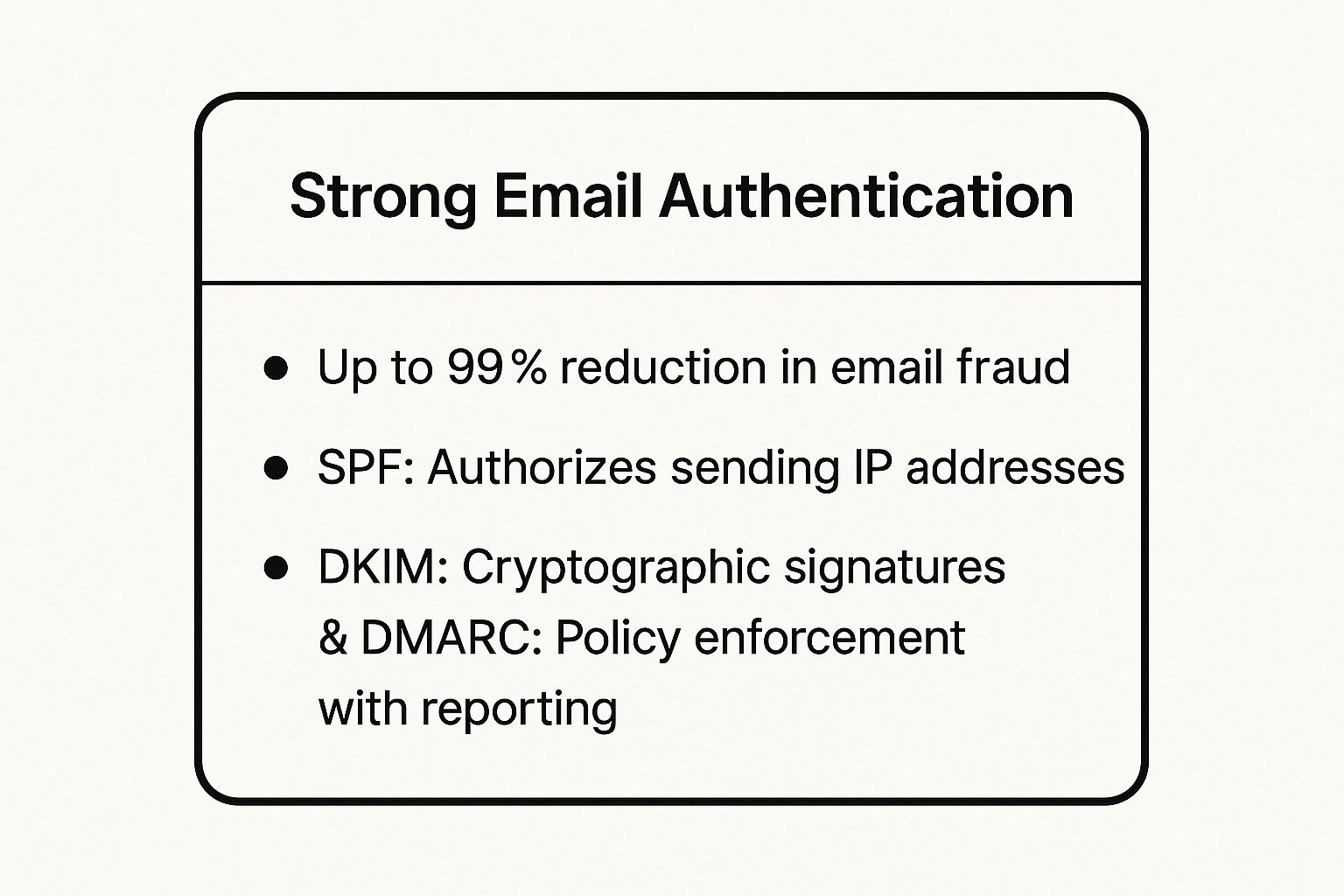
As you can see, these three layers work as a team: SPF checks the server, DKIM checks the message, and DMARC tells email providers what to do if a check fails. This combined defense is what makes it so good at stopping email fraud.
How to Implement Authentication Effectively
Setting up SPF, DKIM, and DMARC involves adding special records to your website's settings (called DNS). This can sound technical, but taking it one step at a time makes it manageable for any business, whether you're a startup in Salinas or a well-known company in Pacific Grove.
- Start with Monitoring: Begin by creating a DMARC record that is set to "none" (
p=none). This lets you see who is sending email from your domain without blocking anything. You'll get reports that show all the activity. - Authorize Legitimate Senders: Use the DMARC reports to find all the services that send email for you (like Microsoft 365 or Mailchimp). Make sure each one is properly listed in your SPF and DKIM records.
- Gradually Increase Enforcement: Once you're sure all your real mail is set up correctly, you can slowly make your DMARC policy stricter. Move from "none" to "quarantine" (which sends bad mail to spam) and finally to "reject" (which blocks it completely).
When set up right, email authentication is a powerful shield. It tells the world you take security seriously, ensuring your real messages are trusted and delivered.
6. Regular Software Updates and Patch Management
Leaving your email software out of date is like knowing a window in your office has a broken lock and doing nothing about it. Regular software updates and patch management mean keeping your email programs, servers, and security tools up-to-date to fix known security holes. This is one of the most important email security best practices, as hackers actively look for and attack these weak spots.
The facts are clear: an IBM report found that a shocking 60% of data breaches happen because of unpatched security holes. Major attacks like the WannaCry ransomware, which hurt systems worldwide, spread by using a weak spot that Microsoft had already released a patch for. For businesses, updating on time is a non-negotiable defense against disasters you can prevent.
How to Implement Effective Patch Management
A steady patching plan closes security gaps before hackers can get in. The key is to be proactive about updates instead of waiting for a problem.
- Automate Where Possible: For most of your computers and standard programs, turn on automatic updates. This makes sure you get security fixes as soon as they're ready without you having to do anything.
- Prioritize Security Patches: Not all updates are the same. You should always install critical security patches before you install routine updates that just add new features. Sign up for security alerts from vendors like Microsoft to get early warnings.
- Test Before Deploying: For very important systems like your email server, always test patches in a safe environment first. This stops an update from accidentally causing problems or breaking other software.
Good patch management is a key part of strong security. The first step is to understand your specific weak spots, which you can find with a professional check-up. You can learn more by exploring these cybersecurity assessment services to strengthen your defenses.
7. Email Backup and Recovery Planning
If a cyberattack or system crash deletes your email data, your business could come to a sudden stop. Email Backup and Recovery Planning is your safety net. It means making secure copies of your email data and having a clear plan to restore it quickly. This helps your business keep running, letting you recover from data loss with little downtime or financial pain. It's a key part of any good list of email security best practices.
For example, when the City of Atlanta was hit by a ransomware attack, their offline backups were key to getting services back online. Many companies also use the built-in recovery tools in Microsoft 365 to recover from attacks. For businesses that must follow regulations, like law firms in Carmel, keeping email archives is important for both recovery and legal reasons.
How to Implement Email Backup and Recovery Effectively
A strong backup plan is something you do before a problem happens. It includes both the technology to save your data and the plan to restore it when you need it. Your goal is to make data loss a small bump in the road, not a total disaster.
- Follow the 3-2-1 Backup Rule: This is a simple but powerful industry standard. Keep at least three copies of your data on two different types of storage, with at least one copy stored in a separate location or in the cloud.
- Test Your Recovery Procedures: Backups are useless if you can't restore them. Set up regular tests (maybe once a quarter) to make sure your recovery plan works and that your team knows exactly what to do in an emergency.
- Consider Immutable Backups: To fight against ransomware, use "immutable" backups. These create copies of your data that can't be changed or deleted. This ensures that even if your live systems are locked by hackers, you have a clean version to restore from.
By creating a strong backup system, you protect one of your most important business assets. To learn how to build a full plan, check out our backup and disaster recovery solutions for more details.
8. Access Controls and Privilege Management
If your email system were a building, not everyone would need a key to the server room. Access Controls and Privilege Management are the rules that make sure employees only have keys to the rooms they need to do their jobs. This idea, known as the "Principle of Least Privilege," is a key part of modern email security best practices. It lowers the potential damage from a hack by giving accounts only the minimum access they need.
A hacked account is bad, but a hacked account with administrator powers is a catastrophe. By limiting who can get into sensitive mailboxes or change settings, you make it much harder for attackers to do serious damage. For businesses in fields like healthcare or finance, strong access controls are not just a good idea—they are often required by laws like HIPAA.
How to Implement Effective Access Controls
The goal is to give users enough access to do their jobs, but not so much that you create unnecessary risks. Start by figuring out different job roles and what data each role needs to access.
- Conduct Quarterly Access Reviews: Regularly check who has access to what. Remove access for employees who have changed jobs or left the company. This simple task closes security holes.
- Implement Approval Workflows: Require a manager or IT to approve any request for access to sensitive shared mailboxes, like
finance@yourcompany.comorhr@yourcompany.com. This adds an important checkpoint. - Document and Monitor Privileged Access: Keep a clear record of who has admin rights and why. Use tools to watch these accounts for strange activity, like someone logging in late at night or deleting large amounts of data.
These controls are a core part of a bigger security plan. To see how they fit into a full system, you can learn more about implementing Zero Trust security to protect your network from all angles.
9. Email Data Loss Prevention (DLP)
Think of Email Data Loss Prevention (DLP) as a smart security guard for your outgoing messages. It actively scans emails before they leave your company, looking for sensitive information you've told it to protect. If it finds something like a credit card number or a patient's health record, it can automatically block or encrypt the email to stop a data leak. This is a critical email security best practice for any business that handles private information.
For companies in Salinas or Monterey that have to follow rules like HIPAA or PCI-DSS, a DLP system is a must-have. Big banks use it to protect customer financial data, and hospitals rely on it to avoid breaking privacy laws. For a local farm business, it could stop secret crop data from ending up in a competitor's hands. It stops expensive mistakes before they happen.
How to Implement DLP Effectively
Setting up a DLP system is a step-by-step process. Your goal is to stop data leaks without getting in the way of normal business communication.
- Start in Monitoring Mode: Before you start blocking emails, run your DLP in "monitoring" mode. This lets you see what kind of sensitive data is being sent out without stopping it. This helps you adjust your rules without causing problems for your team.
- Create Clear Violation Notifications: When an email is blocked, the user should get an automatic, easy-to-understand message. It should explain why the email was stopped and give clear steps on how to fix it, like removing the sensitive data.
- Regularly Review and Update: Threats and data change over time. You should regularly check your DLP reports and update your rules to make sure they are still effective and match your company's needs.
9 Email Security Best Practices Comparison
| Item | Implementation Complexity 🔄 | Resource Requirements ⚡ | Expected Outcomes 📊 | Ideal Use Cases 💡 | Key Advantages ⭐ |
|---|---|---|---|---|---|
| Multi-Factor Authentication (MFA) | Moderate – integration and user onboarding | Moderate – devices, training | Up to 99.9% reduction in account takeovers | High-privilege accounts, enterprise email security | Strong protection beyond passwords, compliance support |
| Email Encryption | High – key management and system compatibility | High – encryption infrastructure | Confidentiality of email content, compliance with privacy laws | Sensitive data exchange, regulated industries | End-to-end confidentiality, non-repudiation |
| Advanced Threat Protection & Anti-Phishing | High – ongoing tuning and management | High – ML systems and threat intel | Up to 99% reduction in phishing and malware incidents | Enterprise protection against targeted threats | Blocks zero-day threats, detailed threat intelligence |
| Regular Security Awareness Training | Moderate – continuous user engagement | Moderate – training platforms and time | Significant reduction in phishing click rates | Organizations addressing human error, compliance requirements | Improves security culture, reduces social engineering risk |
| Strong Email Authentication (SPF, DKIM, DMARC) | High – DNS management and ongoing monitoring | Low to moderate – DNS and reporting | Up to 99% reduction in domain spoofing | Domain owners preventing spoofing and phishing | Industry standard, improves email deliverability |
| Regular Software Updates & Patch Management | Moderate – testing and deployment processes | Moderate – IT resources for updates | Closes vulnerabilities, reduces attack surface | All organizations maintaining secure email environments | Reduces exploit risk, compliance adherence |
| Email Backup and Recovery Planning | Moderate – backup setup and testing | Moderate to high – storage and tools | Ensures business continuity, quick recovery from data loss | Organizations needing disaster recovery and compliance | Protects against data loss, supports legal discovery |
| Access Controls & Privilege Management | High – policy setting and continuous review | Moderate – management tools | Limits insider threats and data exposure | Large organizations with sensitive data and compliance needs | Least privilege enforcement, audit trails |
| Email Data Loss Prevention (DLP) | High – policy design and tuning | High – monitoring and incident handling | Prevents data breaches and unauthorized data transmission | Regulated industries, intellectual property protection | Compliance support, real-time data monitoring |
Partner with a Local Expert for Your Email Security
Figuring out modern cybersecurity can feel like a lot, but you don't have to secure your business communication all by yourself. In this guide, we've walked through the key email security best practices that build a strong defense against online threats. From making multi-factor authentication your first line of defense to setting up advanced tools like DMARC, each step adds a powerful layer of protection for your company.
Remember, the goal is to build a complete security culture, not just to check a box. This starts with teaching your team through regular security awareness training, so they can spot a phishing attempt from a mile away. It continues with keeping your software updated to close security holes and using strong access controls to make sure sensitive data is kept private. By combining these tech tools with a well-trained team, you create a security plan that is both strong and long-lasting.
The most important thing to remember is that being proactive is always better—and cheaper—than cleaning up a mess. Using email encryption, data loss prevention, and a reliable backup plan aren't just IT chores; they are smart business moves. They protect your company’s reputation, your clients’ trust, and your bottom line, especially for businesses here in the Salinas Valley and across Monterey County where local relationships are everything.
Your Next Step: From Knowledge to Action
Putting these ideas into practice is not just about avoiding a data breach. It's about building a strong foundation that lets your business grow with confidence. A secure business is a trustworthy business, giving you an advantage whether you work in agriculture or financial services. You can safely use new technologies, support employees who work from home, and promise your partners that their information is safe with you.
Taking the first step is often the hardest, but you don't have to go it alone. For businesses in Monterey, Carmel, and beyond, having a local partner who understands your challenges is a huge benefit. An expert can help you prioritize these practices, set them up correctly, and manage them for you, which frees you up to focus on running your company. Protecting your business is our top priority, and we're here to give you the hands-on support you need.
Ready to turn these email security best practices from a checklist into a reality? The team at Adaptive Information Systems specializes in delivering enterprise-grade cybersecurity solutions tailored for local SMBs, from Salinas to Seaside. Let us handle the technical complexities so you can focus on what you do best.
Secure your business's future by contacting us today.
Adaptive Information Systems
380 Main St, Salinas CA 93901 | 831-644-0300 | hello@adaptiveis.net