
Backup disaster recovery solutions are the plans and tools that get your business back online after a major disruption. For your business in Salinas, these solutions combine data backups with a full strategy to cut down on downtime and data loss. This ensures your company can survive anything from a local power outage to a major cyberattack.
Why Your Salinas Business Needs a Recovery Plan
Imagine your business operations here in Salinas coming to a sudden, grinding halt. For local companies in agriculture, hospitality, or professional services, any amount of downtime isn't just a minor hiccup—it's a real threat to your money and reputation. A solid recovery plan is no longer a luxury for big corporations; it's a must-have for survival in Monterey County.
Many business owners think that just having a copy of their files is enough. But a basic backup is like a spare tire; it’s helpful, but it won’t get you back on the road quickly after a major breakdown. A true disaster recovery plan is your complete roadside assistance package: the tow truck, the mechanic, and the rental car all rolled into one powerful strategy.
The Real-World Costs of Unplanned Downtime
When your systems go down, the costs add up fast. It’s not just about losing sales right away. The damage can be far-reaching and impact every part of your business. Without effective backup disaster recovery solutions, you risk facing several big problems.
These risks include:
- Direct Financial Loss: Every minute your team can't work or your customers can't buy from you turns directly into lost money. For a busy restaurant in Monterey or an ag-tech firm in the Salinas Valley, even a few hours offline can mean thousands in losses.
- Damaged Customer Trust: Your customers expect you to be reliable. If your systems are down, they can't use your services or get information. This leads to frustration and a loss of confidence. In a competitive market, they might just move to a competitor who is always open for business.
- Operational Chaos: Without access to key data—like client records, inventory, or financial information—your daily operations can completely fall apart. This chaos makes it incredibly hard to serve customers and manage your team.
A common mistake is not realizing the true cost of an outage. It's more than just lost sales; it's the cost of rebuilding your reputation, managing frustrated employees, and possibly dealing with fines if sensitive data is lost.
More Than Just Backups
A complete strategy goes beyond just saving files. It involves a detailed plan that explains exactly how your business will respond to a disaster. This includes knowing your most important systems, deciding who is in charge of what during a crisis, and setting up clear ways to communicate.
Thinking ahead about these situations is key. You can learn more about making a plan in our detailed guide to backup and disaster recovery for small businesses.
To see the bigger picture of protecting your business, you might also look at different disaster preparedness strategies for businesses. This approach makes sure you're not just reacting to problems but are actively building a stronger company ready for any challenge. It’s about creating a business that can handle any storm.
Comparing Your Backup Solution Options
Choosing the right backup and disaster recovery solution can feel like a lot, but it doesn’t have to be. When you break it down, the main options fall into a few key types, each with its own pros. Understanding these will help you find the perfect fit for your business’s budget and the way you work.
The two most common choices are traditional on-premise backups and modern cloud-based solutions. Think of on-premise as owning and managing the physical equipment yourself—like a server in your office closet. Cloud solutions, on the other hand, mean storing your data safely on remote servers managed by someone else.
Each option has its benefits. On-premise gives you direct, physical control over your data. The cloud offers amazing flexibility and usually costs less to start. When you're looking at your options, it's smart to check out the various data storage solutions that make them work.
On-Premise vs. Cloud Backups
For years, on-premise was the only choice. It means buying servers and storage devices, which is a big cost up front. You’re also responsible for all the maintenance, security, and upgrades. This requires you to have an expert on staff or a dedicated IT partner.
Cloud backups work very differently. Instead of buying hardware, you pay a monthly fee to a provider who handles all the hard work. This model gets rid of big startup costs and makes it easy to add or remove storage as your needs change. It also keeps your backups in a different location from your office—a critical detail if a local disaster like a fire or flood ever hits your building.
This infographic shows the key goals you should aim for with any professional solution.
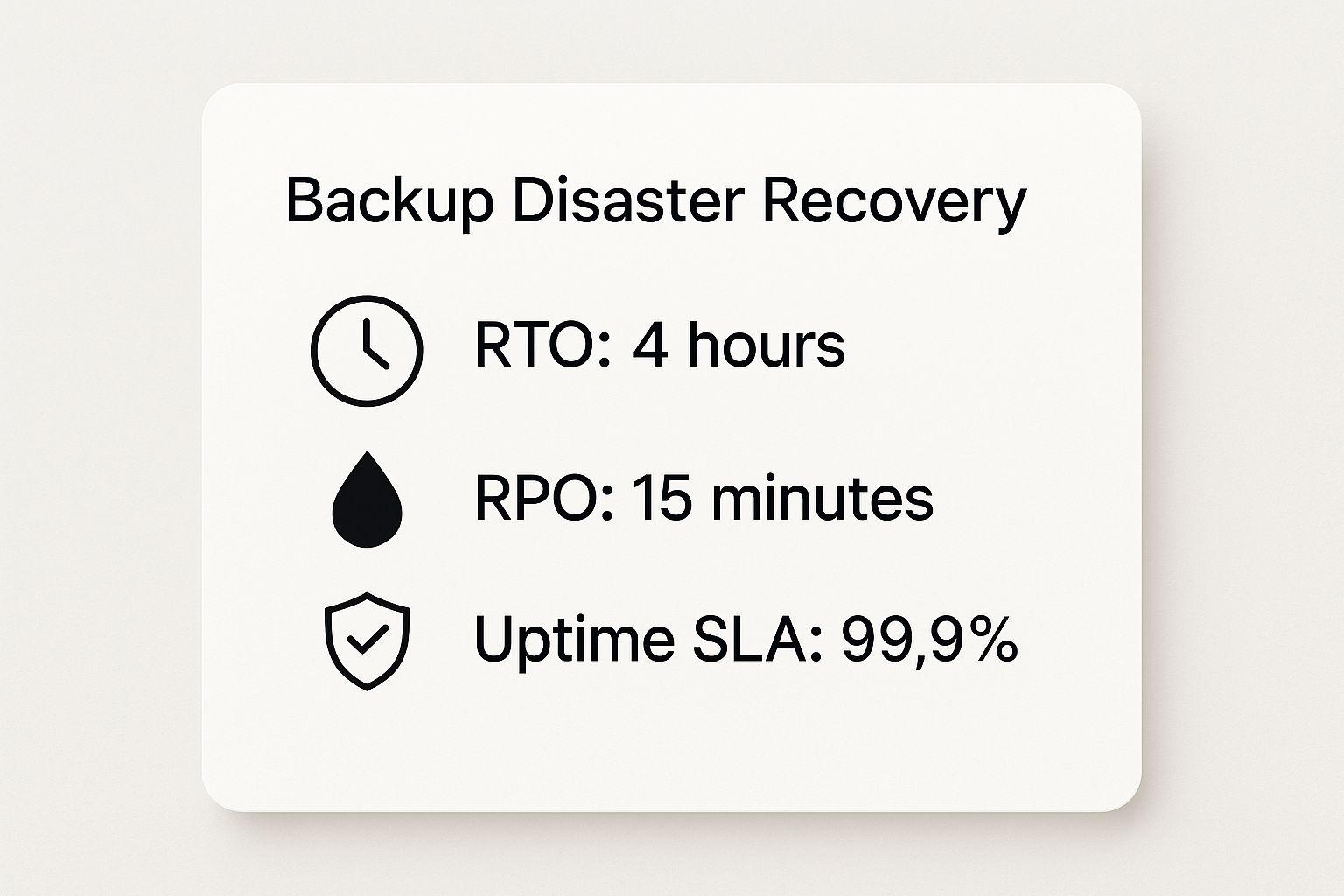
As you can see, the goal for any strong plan is to recover within hours and lose only minutes of data, not days.
The Hybrid Approach: The 3-2-1 Rule
So, which is better? For most businesses today, the answer isn't "one or the other"—it's both. The best way to protect your data is a hybrid strategy known as the 3-2-1 backup rule.
This rule gives you a simple, powerful guide to make sure your data is always safe and you can get it back. It’s the same strategy used by big companies, but it’s now affordable enough for small and local businesses to use.
Here’s how it works:
- Keep at least THREE copies of your data. This includes your original data plus two backups.
- Store your backups on TWO different types of media. For example, you might have one backup on a local server and another in the cloud.
- Keep ONE copy of your backup offsite. This is the most important step for true disaster recovery. Storing a copy in the cloud or another building protects you from a disaster that affects your whole office.
By following the 3-2-1 rule, you create layers of protection. If one backup fails or gets hit by a ransomware attack, you still have a clean, separate copy ready to go.
On-Premise vs. Cloud vs. Hybrid Backup Comparison
To help you decide, let's look at how these three choices compare. This table breaks down the key differences in cost, recovery speed, security, and room to grow for small to medium-sized businesses.
| Feature | On-Premise Backup | Cloud Backup | Hybrid Backup (3-2-1 Rule) |
|---|---|---|---|
| Initial Cost | High (hardware purchase required) | Low (subscription-based) | Moderate (combines hardware and subscription) |
| Recovery Speed | Fast for local file recovery | Can be slower depending on internet speed | Fast local recovery, flexible cloud recovery |
| Security | You are fully responsible for physical and cyber security | Managed by the provider with encryption | Multi-layered security (both on-site and cloud) |
| Scalability | Limited (requires purchasing new hardware) | Highly scalable (adjust subscription as needed) | Very scalable and flexible |
| Disaster Proofing | Vulnerable to local disasters (fire, flood, theft) | Excellent protection against local disasters | The highest level of protection available |
In the end, a hybrid approach gives you the best of both worlds: the fast recovery of local backups and the strong security of the cloud. Building this kind of system is a key part of creating a good recovery strategy.
You can learn how these ideas fit into a larger plan by looking at a complete disaster recovery plan for small business right here on our blog.
How Disaster Recovery as a Service (DRaaS) Works
What if you could have a top-notch IT recovery team and a backup office ready to go, but without the huge price? That’s the idea behind Disaster Recovery as a Service (DRaaS). It’s one of the most powerful and affordable ways for small businesses to get the same level of protection as a large enterprise.
Think of it like this: instead of building and staffing your own emergency center, you pay for a service that does it all for you. A DRaaS provider creates a mirror image of your entire IT setup—servers, data, and applications—in a secure, remote cloud center.
This mirrored setup is kept up-to-date constantly. If a disaster hits your office, whether it’s a power outage in Monterey or a server failure, you simply "failover" to this cloud setup. Your team can then connect to it and keep working with very little interruption, often from anywhere with an internet connection.
The Key Benefits for Local Businesses
For many local companies, building a second IT system just for disaster recovery is too expensive. DRaaS changes the game by turning a huge one-time cost into a predictable, monthly payment. It's how you get enterprise-level IT at a price that works for your local business.
Here are the main advantages you get:
- Lower Upfront Costs: You get to skip the huge initial spending on hardware, software, and extra space. Instead, it’s a simple monthly or yearly fee.
- Expert Management: The DRaaS provider's team of experts handles all the complex tasks. This frees up your team to focus on running the business, not on managing complicated recovery systems.
- Rapid Recovery: Because your systems are already copied and waiting in the cloud, recovery times are much shorter. You can get back online in minutes or hours, not days or weeks.
- Easy to Scale: As your business grows, your DRaaS solution can easily grow with you. You don't have to buy and install new hardware to add more servers or data to your plan.
This service-based model is a big reason why so many businesses are using it. The global market for DRaaS is growing fast because businesses realize it’s a smarter way to protect against modern threats. You can find more details about the DRaaS market growth on imarcgroup.com.
The DRaaS Process in Action
So, how does this actually work when you need it most? The whole process is designed to be simple and fast, taking the panic out of a crisis. It usually happens in a few stages.
- Replication: The DRaaS software is always working in the background, continuously copying your data and systems to the provider's secure cloud. This isn't just a file backup; it's a complete, bootable copy of your servers.
- Disaster Declaration: When something takes your main systems offline, you or your IT partner (like us at Adaptive) declare a disaster with the DRaaS provider.
- Failover: The provider immediately turns on your copied systems in the cloud. Your team is given secure access to run the business from this cloud-based copy.
- Failback: Once your main office is stable and ready, the provider helps you "failback." This process smoothly shifts work back to your original servers and updates any data that changed while you were running in the cloud.
The real power of DRaaS is the peace of mind it gives you. You know that no matter what happens to your building, a fully working copy of your business is safe, secure, and ready to take over in a moment.
This service transforms disaster recovery from a scary, expensive project into a simple and affordable strategy.
Building Your Actionable Disaster Recovery Plan
Having powerful backup and disaster recovery solutions is a great start, but technology is only half the story. The other critical part is a clear, written plan that your team can actually follow when things go wrong. Without a playbook, even the best tools won't help much in a crisis.
Think of it this way: a fire department has the best trucks and hoses, but their real power comes from training and pre-planned procedures. Your disaster recovery plan is that playbook for your business. It turns chaos into a calm, organized response.
This isn’t about creating a huge document that no one ever reads. It’s about building a simple, actionable guide that makes sure everyone knows what to do, who to call, and how to get the business back up and running. A great plan helps your business get ready long before a disaster ever strikes.
Identifying Your Most Critical Business Functions
First things first: you need to figure out what absolutely must stay online for your business to operate. Let's be honest, not all systems are equally important. Your email server is probably a lot more critical than the software you use to order office supplies.
Sit down with your team and ask a simple question: "If there was a fire and we could only save a few things, what would they be?" This is a great way to set priorities.
- Tier 1 (Mission-Critical): These are the things your business cannot operate without for more than a few hours. Think about your cash register system, customer database, or main production software.
- Tier 2 (Business-Critical): These are important things that can be down for a day or so without causing a major problem. This might include your accounting software or internal chat tools.
- Tier 3 (Non-Essential): These are the "nice-to-have" things that, while useful, can be restored over a longer time.
By organizing your systems this way, you can focus your recovery efforts where they matter most, getting the heart of your business running again as quickly as possible.
Defining Clear Roles and Responsibilities
During a crisis, confusion is your worst enemy. A clear chain of command is a must. Your plan has to state who is in charge of what—from officially declaring a disaster to talking with worried customers.
You need to assign specific jobs to team members. For example:
- Disaster Recovery Lead: The one person with the power to declare a disaster and start the plan.
- Technical Team: The people responsible for working with your IT partner (like Adaptive) to do the technical recovery, like switching over to a backup system.
- Communications Lead: This person's job is to keep employees, customers, and key partners updated with clear, steady information.
Don’t just assign roles—assign backups for each role, too. What happens if your main DR Lead is on vacation when a crisis hits? Having primary and secondary contacts for every key job builds strength into your team, not just your tech.
Creating an Emergency Communication Tree
How will you reach your team if your main email and phone systems are down? A communication tree is a simple but vital tool that shows how information will flow through the company during an emergency.
It starts at the top, with leaders contacting their direct reports, who then contact their teams. This chain reaction makes sure everyone gets the message quickly, even when normal communication isn't working. Your plan should include more than one way to contact every employee, like personal cell numbers and email addresses.
Schedule and Perform Regular Tests
Finally, a plan you never test is just a piece of paper. Regular testing is the only way to know if your plan actually works. It's how you find weak spots, fix problems, and get your team comfortable with their roles before a real emergency happens.
Start with simple exercises where you walk through a disaster scenario as a group. From there, you can move on to real failover tests where you switch to your backup systems on purpose. These drills prove your technology works and, more importantly, build your team’s confidence.
For more help creating a full strategy, our guide on building a disaster recovery plan for small business takes a deeper look at these important steps.
Choosing the Right BDR Partner in Monterey County
Your technology is only as good as the team behind it. Investing in top-tier backup and disaster recovery solutions is a great start, but the real secret to long-term security is picking the right local IT partner to manage your strategy. This decision is just as important as the technology you choose.
You need a partner who understands the unique challenges businesses face here in Monterey County, from the agricultural fields of Salinas to the busy hospitality industry in Carmel. A local provider brings a helpful perspective that a big national company just can't match. They understand our area because they're part of it.
Questions to Ask Any Potential Provider
Before you sign a contract, you have to ask the right questions. This isn't about trying to trick anyone; it's about making sure their services and skills are a perfect fit for your business. Think of it as hiring a partner, not just another vendor.
Here's a checklist of must-ask questions to guide your conversation:
- What's your experience with businesses like mine here in Monterey County? A partner who knows local agriculture, finance, or hospitality will already understand your specific needs.
- What are your guaranteed response times? When disaster strikes, every minute of downtime costs you money. You need a clear, written promise for how fast they'll act.
- How do you test our disaster recovery plan, and how often? A great partner will insist on regular, scheduled testing. This makes sure everything works perfectly long before you actually need it.
- Can you explain your security measures for protecting our backed-up data? Get the details. Ask about how they encrypt data, secure their data centers, and defend against ransomware.
Choosing a partner is a long-term decision. You're trusting them with the survival of your business, so take the time to find a team that feels like a true part of your own.
Checking these things is more important than ever. The disaster recovery market is growing incredibly fast as cyber-attacks and cloud use continue to rise. You can read the full research about these market trends to see just how fast things are changing. This growth means more providers are out there, making a careful choice essential.
At Adaptive, our mission is to deliver enterprise-level IT at a price that makes sense for your business. We build lasting relationships based on trust and a deep understanding of our local community. For a closer look at how we help local companies, check out our guide on Salinas backup and disaster recovery. Finding the right partner is what turns a good investment into bulletproof protection.
Ready to Protect Your Business? Let's Talk.

Choosing the right partner makes all the difference when it comes to protecting your business. If you're looking for enterprise-level backup and disaster recovery solutions designed specifically for businesses here in Salinas and Monterey County, our team is ready to help.
We're here to provide the hands-on expertise you need to ensure your operations are always secure, resilient, and ready for anything.
Adaptive Information Systems
380 Main St, Salinas CA 93901 | 831-644-0300 | hello@adaptiveis.net