
When you decide to implement a Zero Trust security model, you’re changing how you think about keeping your business safe. Instead of trusting people just because they’re inside your office network, you check every single request to access your data. It’s all about knowing who every user and device is, controlling their access, and keeping a close eye on everything that happens.
The main idea is simple but powerful: never trust, always verify. And for businesses in Salinas and Monterey County, it’s the best way to protect your data.
Why Zero Trust Is a Must for Monterey County Businesses

For years, businesses here in Salinas and across Monterey County used a "castle-and-moat" security plan. You would build a strong wall (your firewall) around your office network, and anyone inside was automatically trusted. That worked fine when everyone was in the same building.
But today, that wall is gone. Your team might be working from home in Pacific Grove, using cloud apps from a coffee shop, or checking emails on their phones. This new way of working makes the old security model a serious risk.
Moving Beyond the Castle Walls
If you stick with the old-school approach, you’re leaving your business open to attack. Once a hacker gets past your main firewall, they can often move freely through your whole network. They can access private files and important systems without any more checks.
For our local industries like agriculture and hospitality, your customer information and business data are everything. You simply can't afford to take that risk.
Zero Trust completely changes the game. It works on one key belief: threats can be both outside and inside your network. Instead of trusting someone just because they're on the office Wi-Fi, Zero Trust demands proof for every request, every time.
This isn’t just a new tech trend; it’s a necessary change in how you think about security. For any Monterey County business, Zero Trust is a key part of modern strategies for small business risk management that keeps your business and data safe.
The real magic of Zero Trust is how it shrinks your "attack surface." By checking every user, device, and app before giving them access, you get rid of countless ways a hacker could cause trouble.
Let’s quickly compare the old way with the new way.
Traditional Security vs Zero Trust Security
| Security Aspect | Traditional 'Castle-and-Moat' Approach | Modern Zero Trust Approach |
|---|---|---|
| Core Idea | Trust everyone and everything inside the network. | Trust no one, verify everything, no matter where they are. |
| Access Control | Based on location (inside vs. outside the network). | Based on who the user is, device health, and specific permissions. |
| Perimeter | A strong, clear network border (firewall). | The border is gone; every user and device is its own perimeter. |
| Threat Belief | Believes the internal network is a safe, trusted zone. | Believes threats can be anywhere—inside or outside the network. |
| Verification | One-time check when you enter the network. | Constant, real-time checks for every single access request. |
As you can see, the Zero Trust approach is built for how we work today. It’s more flexible, specific, and realistic about where threats come from.
The Practical Benefits for Your Business
Using a Zero Trust plan isn't just about stopping attacks; it's about building a stronger, more efficient business. The results are clear. Companies that switch to Zero Trust find threats 50% faster and have 44% fewer security problems. It's no wonder that about 60% of organizations are expected to use it as their main security plan by 2025.
Here’s what that means for your business day-to-day:
- Safer Remote Work: Your employees can connect securely from anywhere without putting your network in danger.
- Stronger Data Protection: You can lock down private client info, financial records, and business secrets.
- Reduced Breach Impact: If a breach ever does happen, this model keeps the threat stuck in a small area, preventing it from spreading.
This modern security plan ensures your business is protected not just from today's threats, but from whatever comes next.
Build Your Foundation on Solid Identity Verification

The first step in using a Zero Trust model is to get a handle on who—and what—is trying to access your company’s data. The idea is simple: you can't protect what you don't know about. Before you can approve or deny access to anything, you need a complete list of every user and device that connects to your network.
Think of it like a strict guest list for a private party. You wouldn't let someone in just because they showed up; you’d check their name first. In the same way, Zero Trust starts by identifying every person, laptop, server, and smartphone that needs access.
This means more than just listing employee names. You need to know every piece of hardware they use, whether it’s a company desktop in your Salinas office or a personal tablet they use at home.
The Power of "Who Are You, Really?"
Once you have your list, the next step is to use strong authentication. This is the "verify" part of "never trust, always verify." You need to be sure that the person logging in is who they say they are. A simple password is not enough anymore.
This is where Multi-Factor Authentication (MFA) is a must. MFA makes users provide two or more pieces of proof to get access. This could be something they know (a password), something they have (a code from their phone), or something they are (a fingerprint).
For a local business, this one change gives you a huge security boost. A Carmel-based medical office using MFA can better protect patient records. A Salinas ag-tech company can keep its important research data safe from stolen passwords.
The goal of strong identity checks isn't to make things hard for your team. It's to build a security checkpoint that works well but is easy for the right people to get through, keeping your business running smoothly and securely.
Enforcing the Principle of Least Privilege
With strong identity checks in place, you can now use one of the most powerful ideas in Zero Trust: the principle of least privilege. This means each user only gets access to the specific data and apps they need to do their job—and nothing more.
Your marketing person shouldn't have access to payroll files. Your accountant doesn't need to get into your website's code. By limiting access, you seriously reduce the damage a hacked account can cause. If a hacker gets into one user’s account, they are blocked from reaching your most important systems.
Doing this requires clear rules. You can start by outlining user roles and what they need to access, a process we cover in our guide to creating an IT security policy template.
This focus on identity is a global standard for a reason. In fact, 63% of organizations worldwide have built their Zero Trust plans around strong authentication like MFA. These methods are the first and most important line of defense in a modern security plan. By getting identity right from the start, you set the stage for everything else.
Map and Segment Your Network to Contain Threats
So, you’ve made it tougher for the wrong people to get into your network. The next logical step is to get a handle on what you're protecting and where it is.
Right now, your network might be like one big, open office. It's great for working together, but it's also a dream for a security threat, letting it spread like a fire. A Zero Trust model changes that completely.
Instead of an open floor plan, you’re going to build a series of smaller, secure, individually locked rooms. This strategy is called microsegmentation, and it’s a huge deal for stopping threats in their tracks.
From Open Plan to Secure Zones
The idea behind microsegmentation is simple: if one room is compromised, the threat is trapped inside. It can't just walk down the hall to get into other sensitive areas.
Let's put that into a real-world example. For a Pacific Grove hotel, this could mean completely separating the guest Wi-Fi from the system that stores booking and credit card info. A breach on the guest network would have zero effect on your important financial systems.
This might sound like a huge, expensive project, but it doesn't have to be. As your IT partner, we bring big-company security to local businesses at a price you can afford. You can start small and protect your most important "rooms" first.
The goal isn't to rebuild your whole network overnight. It's about putting smart, secure walls around your most important assets. You’re creating controlled zones that will seriously limit the damage from any single security problem.
To get started, you need a map. First, we'll work with you to find and list:
- Your Most Critical Data: Where are your client lists, financial records, or business plans stored? For an agricultural company in Salinas, this might be important crop research on a specific server.
- Key Applications and Services: What software do you need for your daily work? This could be your accounting software, CRM tool, or sales system.
- Data Flow: How does information move between these apps and servers? Understanding these paths is key because it tells us exactly where to build our digital walls.
Mapping this flow is a central part of a Zero Trust plan, as it shows where security checks will be most effective. This visual breaks down how verification, access decisions, and monitoring all work together.
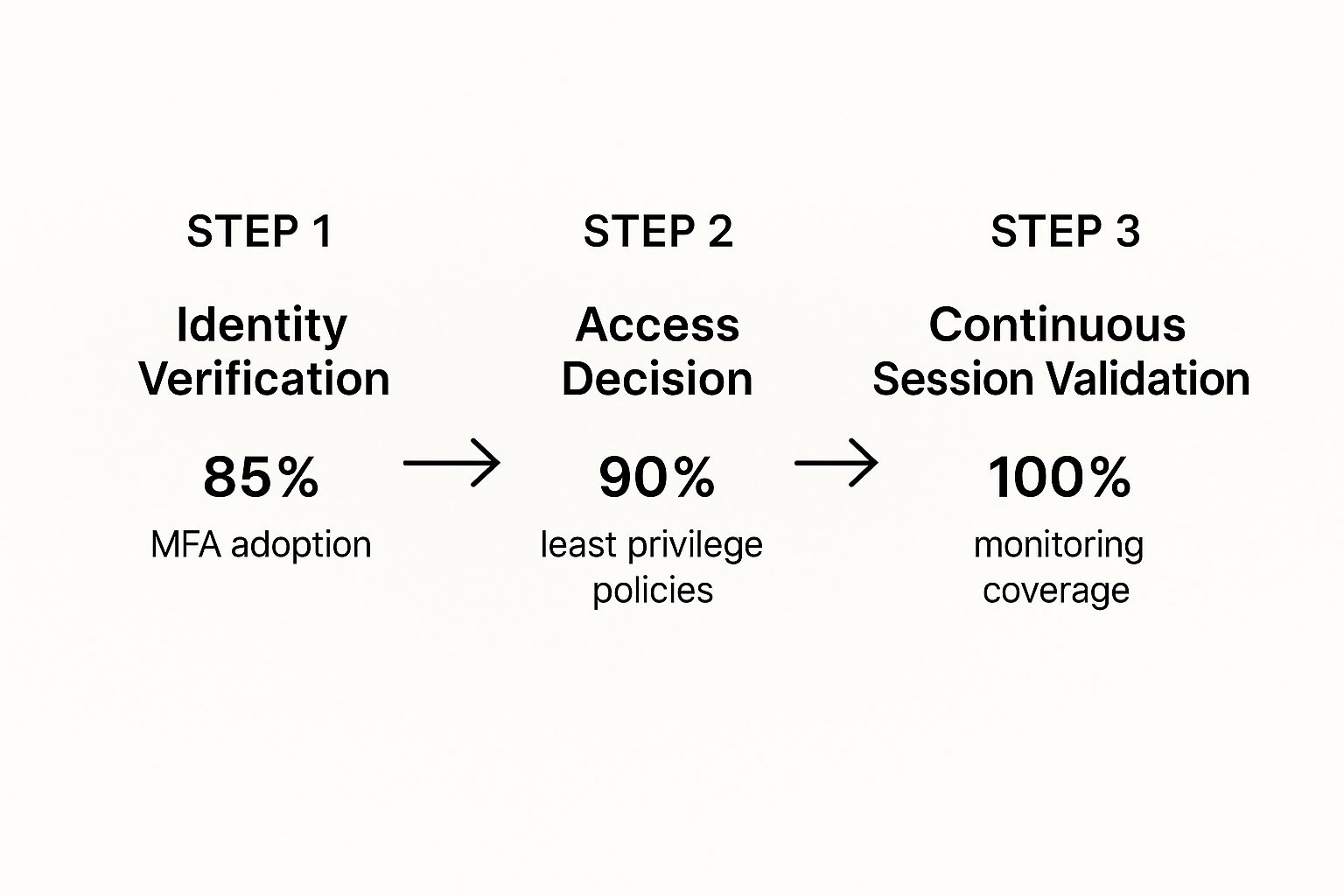
As you can see, strong identity verification is the gatekeeper. From there, strict access rules and full monitoring create a powerful defense that's tough to beat.
Creating Your First Segments
Once your map is ready, we can start making your first secure zones. A great place to start is to create segments based on jobs or departments.
For example, we could build separate network zones for your finance team, your sales department, and your operations staff.
This simple step ensures that a hacked device in one department can't automatically access the private data in another. Each zone gets its own specific access rules, which strengthens that principle of least privilege we talked about earlier.
From there, you can add more secure zones over time, slowly making your security stronger in a way that’s easy to manage and fits your budget. This practical, step-by-step approach is how you successfully implement Zero Trust without overwhelming your team or your wallet.
Implement Continuous Network Monitoring and Analysis

You've set up strong identity checks and divided your network into secure zones. That’s a great start. But setting up a Zero Trust security plan isn't a one-time project—it only works if you’re always watching.
Think of it like having a security guard who never sleeps. This guard is always watching, logging every person who enters or leaves a room, and immediately flagging anything that looks strange. That’s what continuous monitoring does for your digital files. For a Marina-based logistics company, this means keeping a close eye on who is accessing shipping databases 24/7.
This active approach is the heart of the "never trust, always verify" idea. It's not enough to check someone once at the front door. You have to keep checking their actions inside your network to spot odd behavior that could be a sign of a threat.
What to Watch for in Your Network
The idea of watching everything might sound like a lot, especially if you don't have a big IT team. The good news is that modern tools can do most of this work automatically, only alerting you when something really needs your attention. A key part of Zero Trust is knowing what's happening on your network, and learning how to monitor network traffic is a vital skill.
Your monitoring system will be looking for strange things like these:
- Unusual Access Times: An employee who normally works 9-to-5 suddenly tries to access financial files at 3 AM.
- Impossible Geography: A single user account logging in from Seaside and then, five minutes later, from another country.
- Large Data Transfers: A user account suddenly downloading huge amounts of client data when they usually only access small files.
- Repeated Failed Logins: Many failed attempts to access an important server, which could be a sign of a hacker trying to break in.
Catching these red flags as they happen is what lets you stop a potential breach before any real damage is done. You can find more details on how this works in our complete guide to network security monitoring.
Real-Time Alerts and Proactive Defense
Modern security tools use smart analysis to learn what "normal" activity looks like for your business. When any behavior is different from this normal pattern, the system can automatically send an alert or even take action, like temporarily locking a suspicious account.
The real power of continuous monitoring is that it changes your security from reactive to proactive. You’re no longer waiting for something to break; you’re actively looking for the earliest signs of trouble.
This constant need to check for weak spots and tighten up access is why old-school security walls just don't work anymore. This level of watchfulness is the new standard for keeping your business safe.
Automate and Refine Your Security Policies
You've done the hard work—checking identities, splitting up your network, and setting up constant monitoring. The next step is making all that work for you, 24/7. This is where you let automation take over, so your security system can react to threats in seconds, not hours.
Automation is what makes a Zero Trust model so effective. It follows your security rules all the time without anyone needing to step in. Imagine a device suddenly starts acting strange—maybe it's trying to access private client files from a coffee shop's public Wi-Fi. An automated rule can instantly block its access until someone can check it out.
This isn't about buying some complicated or expensive new software. It’s simply about setting smart, logical rules that protect your business 24/7. This approach is perfect for local businesses that don't have a security team watching screens all day. For a closer look, there's great information on automating security policies to keep things consistent.
Evolve Your Policies as You Grow
Here’s the thing about a Zero Trust strategy: it’s never really "done." It’s a living security plan that has to change as your business changes. The rules that are perfect for you today might leave you open to risk a year from now after you've hired new people or started using new software.
Because of this, you need to review your policies regularly. You need a simple, repeatable way to look at your rules and ask some honest questions:
- Are these access rules still making sense? Maybe an employee moved from sales to marketing and needs different permissions.
- Do we have new important data to protect? That big new client project likely has sensitive info that needs to be secured.
- Are we getting too many false alarms? If you're getting alerts that turn out to be nothing, your rules might be too tight and slowing down work.
Think of your security policies like a business plan—they need to be checked and updated to stay effective. A quarterly review is a great place to start to make sure your Zero Trust strategy stays lined up with your business goals and current threats.
This process of constant improvement is what makes Zero Trust so powerful and affordable over time. By making small, regular adjustments, you avoid having to do a huge, expensive security project later. It ensures your security grows with you. If managing this ongoing process feels like too much, our team offers expert Salinas managed IT security services to keep your defenses sharp.
Your Local Partner for Zero Trust Security
Jumping into a Zero Trust security model can feel like a huge project, but you don't have to do it alone. The truth is, the journey starts with small, powerful steps that build on each other to create a strong defense for your business.
It all comes down to a clear plan: always check every identity, divide your network into secure zones to stop threats, and keep a close watch with constant monitoring. This isn't a one-time fix; it's a modern, flexible approach to security that changes as your business changes.
Your Monterey County IT Partner
At Adaptive, our mission is simple: bring big-company IT to our neighbors at a price that makes sense. We understand the unique challenges that businesses here in Monterey County face. Whether you're in Salinas, Carmel, or somewhere in between, we're right here to help you secure your future.
Zero Trust isn't just for huge corporations. It's a smart and necessary strategy for any local business that is serious about protecting its data and its good name. We make it possible and affordable.
Ready to take that next step? Our team provides expert Salinas business IT support to guide you through every stage of your security journey.
Adaptive Information Systems
380 Main St, Salinas CA 93901 | 831-644-0300 | hello@adaptiveis.net
Common Questions About Zero Trust
We talk to a lot of local business owners about Zero Trust, and a few questions always come up. Here are some simple answers to the things people ask us most.
Is Zero Trust Too Expensive for My Small Business?
Not at all. While the name might sound big and expensive, getting started with Zero Trust is surprisingly affordable. You don't need a huge budget to begin.
You can take simple, low-cost steps right away, like turning on Multi-Factor Authentication (MFA) and creating clear access rules. Many of the cloud services you already use probably have Zero Trust features built right in. The key is to take it one step at a time, focusing on your most important data first.
Trust me, the potential cost of a data breach is much, much higher than investing in this kind of security ahead of time.
Will This Slow Down My Employees?
When it's set up correctly, your team should barely notice it. A good Zero Trust plan is designed to be almost invisible during daily work. The whole point is to make the secure way to work the easiest way.
By giving access based on the situation—like if someone is using a trusted company laptop from a known location—you can actually reduce how often they need to log in. All the important security checks happen quietly in the background, making work smooth instead of frustrating.
The best security is the kind your team doesn't have to think about. A well-designed Zero Trust system strengthens your defenses without creating annoying roadblocks for your staff.
How Long Does It Take to Implement?
Think of Zero Trust as an ongoing plan, not a one-time project with a finish line. The good news is you can see big security improvements in just a few weeks by starting with key steps like MFA and better identity management.
A full rollout across your entire network might take several months.
The smartest way to do it is in phases. You handle one area at a time, which makes for a smooth change without messing up your daily business. To get a better idea of what this looks like, you can see some examples from our work providing Salinas cybersecurity support to businesses just like yours.
Ready to build a stronger security foundation for your business? Contact Adaptive Information Systems to learn how we make big-company security affordable for you. Let's talk about a Zero Trust strategy that fits your specific needs and budget.
Adaptive Information Systems
380 Main St, Salinas CA 93901 | 831-644-0300 | hello@adaptiveis.net