
If you run a business here in Monterey County, you know that unexpected disruptions are a fact of life. Whether you’re in Carmel’s bustling hospitality scene, Salinas’s agricultural heartland, or offering professional services in Monterey, you face constant threats. From seasonal wildfires and power outages to the ever-present risk of cyberattacks, a single event can bring your entire operation to a grinding halt. This is where solid backup and disaster recovery solutions become your most valuable asset, especially for a local business in Salinas or the surrounding areas. Think of it as the ultimate insurance policy for your data, your operations, and your future.
Your Guide to Business Continuity in Monterey
For your business, downtime isn’t just a minor headache—it's a direct hit to your revenue, reputation, and the trust you’ve built with your customers.
Imagine your point-of-sale system crashing during the Salinas Rodeo week. Or losing all your guest reservations on a packed holiday weekend in Carmel. The fallout from these scenarios can be massive and leave a lasting negative impact on your business.
We created this guide for local business owners just like you. We’ll break down everything you need to know about protecting your company, making sure you can get back on your feet quickly, no matter what comes your way. We’ll skip the confusing tech jargon and give you straightforward, actionable advice to help you make smart, affordable decisions that protect your livelihood.
Why Is This So Critical Right Now?
The need for a real backup and disaster recovery plan has never been more urgent. Globally, the demand for these services is exploding as businesses of all sizes finally recognize the growing risks. The market was valued at USD 14.95 billion in 2024 and is on track to hit USD 29.31 billion by 2029.
This incredible growth is driven by two things: the non-stop rise of cyber threats and the massive amount of data your business now depends on every single day. And this isn't just a problem for giant corporations. In fact, small and mid-sized businesses are often seen as easier targets by cybercriminals. A solid BDR plan is what levels the playing field, giving you access to the same powerful defensive tools the big guys use—at a price that works for your budget.
A BDR strategy is so much more than just making copies of your files. It’s your complete playbook for survival. It outlines the exact steps, tools, and people needed to navigate a crisis and get back to normal with as little pain as possible.
Here’s a look at what this guide will cover:
- Defining the Core Concepts: We'll clear up the confusion between simple backups and a full disaster recovery strategy.
- Exploring Your Options: You'll learn about the different models, from on-site hardware to flexible cloud solutions.
- Implementing Best Practices: We'll give you a checklist to make sure your plan is reliable and ready when you need it.
- Choosing the Right Partner: We’ll share tips for finding an IT expert who truly understands your local needs.
For businesses looking to build even stronger defenses, implementing SD-WAN for business continuity can add another powerful layer of resilience against network disruptions. Our goal is simple: to give you the knowledge you need to build a business that can weather any storm.
Common Threats to Local Businesses and BDR Solutions
Here is a quick overview of common threats your business faces and how a robust Backup and Disaster Recovery (BDR) plan addresses them.
| Common Local Threat | Business Impact | How a BDR Plan Protects You |
|---|---|---|
| Cyberattacks (Ransomware, Malware) | Your data is stolen or encrypted, operations halt, and you face potential ransom demands. | BDR allows you to restore clean, uninfected data from a point before the attack, bypassing the need to pay a ransom. |
| Natural Disasters (Fires, Floods) | Physical destruction of servers, computers, and on-site backups. Total data loss. | Off-site and cloud backups ensure your data is safe in a separate, secure location, ready for restoration. |
| Hardware Failure | Your servers or critical workstations crash unexpectedly, leading to immediate downtime and data loss. | A BDR solution enables rapid recovery to new or virtual hardware, minimizing your operational downtime. |
| Human Error | Accidental deletion of critical files or system misconfigurations. | You can quickly restore the specific files or system states from a recent backup, undoing the mistake in minutes. |
| Power Outages | Extended outages can corrupt data and prevent access to your on-site systems. | Cloud-based recovery options mean you can access your systems and data from any location with an internet connection. |
Ultimately, a BDR plan acts as your safety net against the unexpected, ensuring that a single point of failure doesn't become a catastrophic business failure.
Understanding Backups vs. Disaster Recovery
When you're running a business, "backup" and "disaster recovery" often get thrown around in the same conversation. While they're definitely related, they protect you from very different kinds of problems. Getting them mixed up can leave your business wide open when things go wrong.
Let’s use a simple analogy. A backup is like having a spare key for your office. If you lose your main key (or maybe an employee accidentally deletes a critical spreadsheet), you can grab the spare and get right back to what you need. It’s a direct fix for a small, isolated issue.
A disaster recovery plan, on the other hand, is like having a fully-furnished, temporary office space on standby. It’s what you turn to if the primary building burns down. This isn't just about a key; it's the whole setup—desks, computers, phones, and a clear plan to keep your business running even when your main location is gone.
While a backup helps you recover a single lost file, a disaster recovery plan saves your entire business from a catastrophic event. One is a tool; the other is a complete strategy.
Getting this distinction right is the first step toward building a business that can weather any storm. It's the foundation for making smart decisions about where to invest your resources for protection.
The Two Most Important Metrics You Need to Know
To build a practical and affordable strategy, you have to understand two key concepts: Recovery Point Objective (RPO) and Recovery Time Objective (RTO). These aren't just tech buzzwords; they’re business-level questions that directly shape the kind of solution you actually need.
-
Recovery Point Objective (RPO): How Much Data Can You Afford to Lose?
RPO is all about your data's freshness. It’s measured in time and defines the maximum acceptable age of the files that need to be recovered for your business to function. An RPO of 24 hours means you’re okay with losing a full day’s worth of work. An RPO of 15 minutes means you can’t lose more than a handful of transactions. -
Recovery Time Objective (RTO): How Fast Do You Need to Be Back Online?
RTO is all about downtime. It sets the target for how quickly you need your systems, applications, and data restored after a disaster hits. An RTO of 48 hours might be fine for some internal processes, but for a customer-facing e-commerce site, you might need an RTO of less than an hour.
Finding the Right Balance for Your Business
Your RPO and RTO directly dictate the cost and complexity of any solution you choose. A business that needs near-zero data loss (a very low RPO) and instant recovery (a very low RTO) will naturally require a more sophisticated and expensive setup.
For instance, a busy law firm in Salinas might demand a low RPO for its client billing system but could live with a much higher RTO for its internal marketing website. The trick is to look at each part of your business and find that sweet spot between cost and protection.
By clearly defining these objectives, you stop yourself from overpaying for protection you don't need, all while making sure your most critical operations are truly safe. This approach is how you get enterprise-level resilience at a price that makes sense for a local SMB. To learn more about tailoring these concepts for companies in our area, you can read our guide on data backup and recovery for Salinas & Monterey businesses.
Comparing Different Backup And Recovery Models
Once you understand the fundamental "what" and "why" behind data protection, the next logical step is figuring out the "how." When it comes to backup and disaster recovery, there's no single magic bullet. The right approach for your business hinges entirely on your specific needs, budget, and day-to-day realities.
We'll walk you through the most common models out there for small and mid-sized businesses, from traditional on-premise backups to powerful hybrid setups. Our focus will be on modern, cloud-based solutions that deliver serious protection at a price that makes sense.
Understanding Core Backup Methods
Before we get into the different deployment models, it’s helpful to understand the basic types of backups. Each one offers a different trade-off between backup speed, storage space, and how complicated it is to restore your data. Think of them as different tools in your data protection toolkit.
- Full Backup: This is the most straightforward concept. A full backup makes a complete copy of every single piece of data you've selected. While it’s the easiest to restore from, it also eats up the most storage space and takes the longest to run.
- Incremental Backup: This clever method only backs up the data that has changed since the last backup of any kind was performed. It’s lightning-fast and uses very little storage, which is perfect for running frequent backups throughout the day. The trade-off? Restoring can be more complex, as you'd need the last full backup plus every single incremental backup since then.
- Differential Backup: This approach strikes a middle ground. It backs up all the data that has changed since the last full backup. It uses more storage than an incremental backup but makes restoration much simpler—you only need the last full backup and the most recent differential backup.
The image below gives a great visual of how these methods balance the time it takes to back up versus the storage needed.
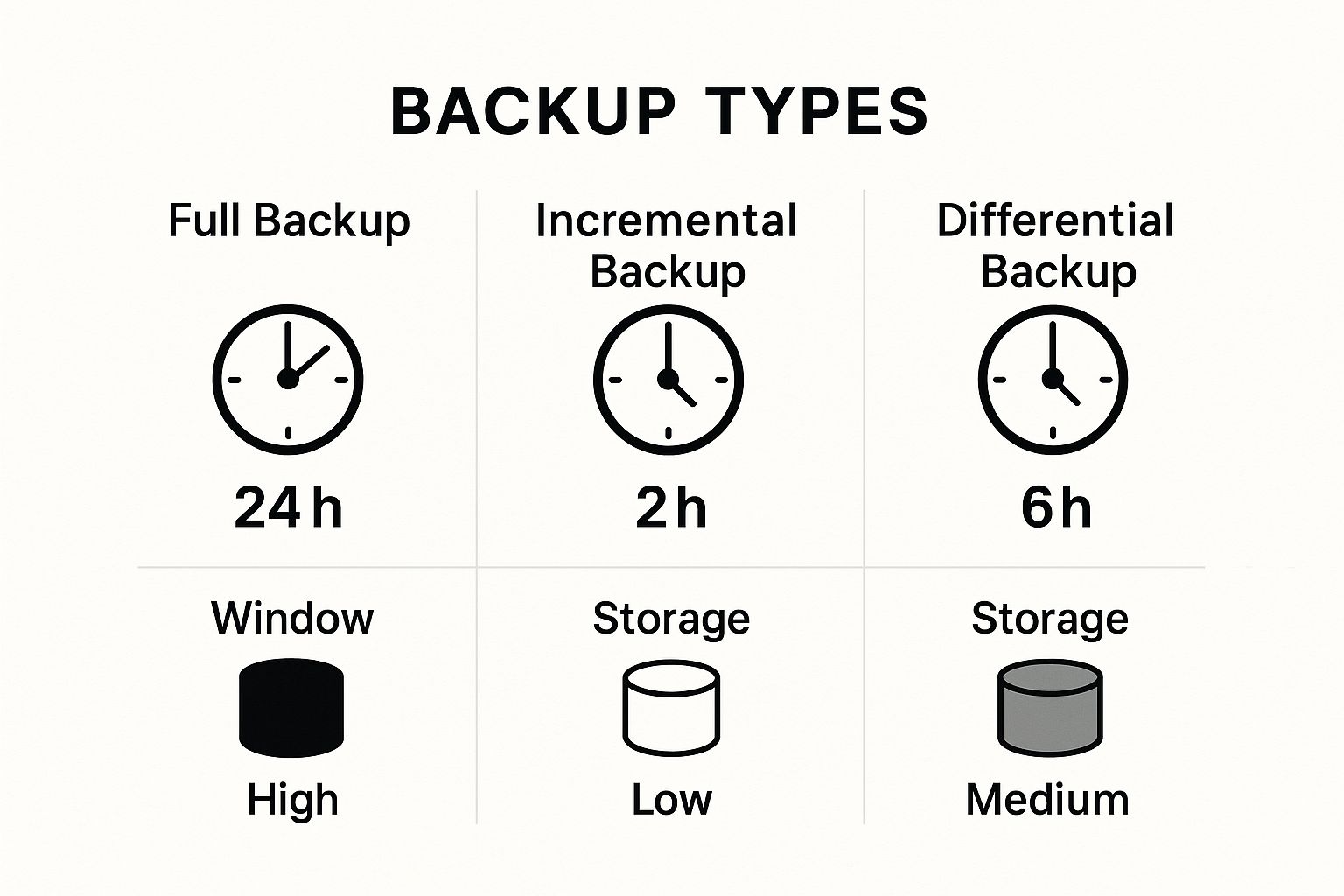
As you can see, the smartest strategies usually involve a mix of these methods to get the right balance of speed, storage efficiency, and easy recovery.
The Rise Of Cloud-Based "As-a-Service" Solutions
For many SMBs, the biggest game-changer in data protection has been the move to the cloud. Modern "as-a-service" models take the headache of managing clunky hardware off your plate and give you access to enterprise-grade technology for a simple subscription fee. Two key models really stand out.
Backup as a Service (BaaS): Think of BaaS as your automated, off-site data vault. It's all about securely copying your data to a managed cloud environment, protecting you from things like local hardware failure, a cyberattack, or an accidental file deletion. It's a fantastic, affordable way to make sure you always have a clean copy of your critical files and systems.
Disaster Recovery as a Service (DRaaS): DRaaS takes things a giant leap further. It doesn't just back up your data; it duplicates your entire IT environment—servers, applications, and networks—in the cloud. If a true disaster hits, you can "failover" to this cloud replica and keep your business running with almost no interruption.
DRaaS is the ultimate safety net. It’s not just about getting your files back; it’s about recovering your entire business operation, turning what could be weeks of downtime into just hours or even minutes.
The growth of DRaaS has been absolutely explosive, which tells you how valuable it is. The global market, valued at USD 12.80 billion in 2024, is on track to hit USD 64.40 billion by 2032. This huge jump, especially in North America, is all about the need for rapid recovery and expert security—things most SMBs can't afford to build in-house.
For a deeper look at local solutions, our guide to backup and disaster recovery in Salinas offers specific insights for businesses right here in Monterey County.
Comparing Backup and Disaster Recovery Models for SMBs
Choosing the right deployment model can feel overwhelming, but breaking it down by features makes the decision much clearer. Whether you stick with on-premise hardware, go all-in on the cloud, or find a sweet spot with a hybrid approach, each has its pros and cons.
| Model Type | Best For | Typical Cost | Recovery Speed | Management Effort |
|---|---|---|---|---|
| On-Premise | Businesses with strict data sovereignty rules, existing IT teams, and a need for total control. | High upfront CAPEX for hardware and software, plus ongoing maintenance costs. | Fast for local file restores, but very slow for a full site disaster. | High. Requires dedicated in-house IT staff for setup, maintenance, and testing. |
| Cloud (BaaS/DRaaS) | SMBs seeking cost-efficiency, scalability, and minimal management overhead. | Low upfront cost. Predictable monthly OPEX subscription fee. | Varies. BaaS is slower for full restores. DRaaS offers very fast recovery (minutes/hours). | Low. The provider manages all the infrastructure, security, and updates. |
| Hybrid | Companies that need fast on-site recovery for common issues and secure off-site protection for major disasters. | Moderate CAPEX and OPEX. Balances on-premise hardware with cloud subscription costs. | Very Fast. Blends rapid local restores with robust cloud failover capabilities. | Moderate. Requires managing the on-site appliance, but the cloud component is handled by the provider. |
Ultimately, the best model is the one that aligns with your specific recovery time objectives (RTO), budget, and how much hands-on work your team can handle. For most SMBs today, the flexibility and power of cloud-based or hybrid solutions offer a level of protection that was once out of reach.
Best Practices for a Resilient BDR Plan

Simply buying a backup and disaster recovery solution isn't enough to shield your business from trouble. A plan on paper is only half the battle; its real value comes from making sure it actually works when a crisis hits. A well-designed BDR plan is what turns a potential catastrophe into a minor hiccup.
Think of it like having fire extinguishers in your office. Owning them provides a sense of security, but it’s a false one without more. You also need a clear evacuation plan, regular inspections, and training so everyone knows exactly what to do. Your BDR strategy demands that same proactive attention to detail.
This isn't just a list of technical suggestions. These are the foundational practices that build genuine resilience into your business operations.
Follow the Gold Standard 3-2-1 Rule
For decades, the 3-2-1 Rule has been the undisputed gold standard for protecting data, and it's just as crucial today. It’s a simple but powerful framework that creates multiple layers of defense against almost any type of data loss. For a reasonable cost, it gives you the kind of robust protection large enterprises depend on.
Here’s how it breaks down:
- Three Copies of Your Data: This means keeping your primary, live data plus at least two backups. This redundancy is key to ensuring a single point of failure won’t take you out of the game.
- Two Different Media Types: Don't put all your eggs in one basket. Store your copies on at least two different kinds of storage—for example, one on a local Network Attached Storage (NAS) device and another in the cloud. This protects you if one type of media fails or gets corrupted.
- One Copy Off-Site: At least one of your backup copies must be stored in a geographically separate location. For any business in Monterey County, this is non-negotiable. Whether it's a fire, flood, or a major regional power outage, your off-site copy remains safe and accessible.
An untested backup plan is not a plan—it's a hope. And hope is not a business strategy. Regular, scheduled testing is the only way to turn your plan into a reliable, functional asset for your company.
Test Your Plan Relentlessly
This brings us to the most critical—and most often skipped—best practice: regular testing. The absolute worst time to discover a flaw in your recovery plan is during a real disaster. An untested plan is just a hopeful guess that could cost you everything.
You should perform different kinds of tests to make sure the entire process is sound:
- File-Level Restoration (Monthly): This is a quick and simple check. Try to restore a few random files or a single folder. It confirms your backups are running successfully and the data is usable.
- Full System Recovery (Quarterly): A more involved test where you restore an entire system, like a critical server, into a sandboxed test environment. This verifies that your system images are working and that you can get key applications back online.
- Full Disaster Simulation (Annually): This is the full-scale dress rehearsal. You simulate a complete site failure and attempt to run your business from your disaster recovery environment. This tests your technology, your processes, and your team's readiness under pressure.
To truly ensure business continuity, a resilient BDR plan must encompass a variety of proven approaches. You can explore comprehensive strategies for building resilient software systems and disaster recovery to build a more robust framework.
Document Everything and Secure Your Data
Finally, your plan must be clearly documented and rigorously secured. During a crisis, you can't rely on one person's memory. Clear, step-by-step instructions ensure anyone on your team can execute the recovery plan effectively. This documentation needs to be stored in multiple accessible places, including with your off-site backup.
Security is just as important. Your backups are a complete copy of your business data, making them a high-value target for cybercriminals.
- Encryption: Make sure your data is encrypted both in transit (as it travels to your backup location) and at rest (while it's being stored).
- Access Controls: Restrict access to your backup systems to only the essential personnel who absolutely need it.
- Compliance: If you're in an industry like healthcare or finance, your backup solution must meet regulatory standards like HIPAA. A compliance failure can lead to steep fines on top of the disaster itself.
By following these best practices, you move from simply owning a tool to having a complete, reliable system for business survival. To learn more about building a plan tailored for local businesses, check out our guide to protecting your business data with backup and recovery in Salinas.
How to Choose the Right IT Partner for BDR
Picking the right technology for your backup and disaster recovery is one thing, but for most business owners, selecting the right partner to manage it all is the real game-changer. Your time is best spent running your business, not moonlighting as an IT manager. A great IT partner should feel like a true extension of your team, delivering enterprise-level results and invaluable peace of mind.
So, how do you find that perfect fit? The market for these services is booming. In fact, experts predict sustained global growth in the BDR market, fueled by digital transformation and the constant threat of cyberattacks. You can dig into the numbers and trends behind this growth on cognitivemarketresearch.com. This growth means you have more options than ever, which makes vetting potential providers carefully an absolute must.
For your business here in Monterey County, the first step to building a resilient company is finding a partner who gets the unique local challenges you face.
Asking the Right Questions
When you start talking to potential IT providers, you need to cut through the sales pitch. Your mission is to get a clear picture of their technical skills, their approach to customer service, and their experience with businesses just like yours.
Here are a few essential questions to get the conversation started:
-
What does your technology stack look like? Don't be shy—ask them what specific software and hardware they use for their backup and disaster recovery solutions. You’re looking for a partner who invests in modern, reliable tech, not someone coasting on outdated systems.
-
Can you describe your support process? Find out what their standard response times are. What happens if you have an emergency at 2 AM on a Saturday? You need a partner with 24/7 support and a clear, well-documented plan for handling urgent problems.
-
What experience do you have in our industry? An IT provider who already supports agricultural businesses in Salinas or hospitality clients in Carmel will have a head start. They'll already understand your operational workflows and specific compliance needs.
Look for Local Expertise
Choosing a local IT partner offers huge advantages that a faceless national call center just can't replicate. A partner based right here in the Monterey Bay Area knows the regional landscape—from the spotty internet connectivity in rural areas to the specific threats our local communities face.
They can get on-site faster when a real emergency strikes and offer insights that are actually relevant to our local economy. A local presence means they're invested in your success because when you succeed, our whole community thrives.
Verify Their Guarantees and Security
Never, ever sign an agreement without a crystal-clear Service Level Agreement (SLA). This document is your written guarantee, spelling out the provider's responsibilities in plain English. It's one of the most critical parts of the partnership.
An SLA isn’t just legal jargon; it's proof of their commitment to you. It should clearly define the RTO and RPO targets they promise to hit, making sure your expectations are perfectly aligned with the service they deliver.
Finally, you have to be relentless when vetting their security. This partner will hold the keys to your kingdom—all your critical data. You need to be completely confident in their security measures.
- Ask for Security Certifications: Do they have credentials like a SOC 2 report?
- Inquire About Their Internal Security: How do they protect their own systems from attack?
- Request Client References: Talk to their current clients. Ask them directly about their reliability, responsiveness, and professionalism.
Taking the time to choose the right partner is a direct investment in your company’s future. It makes sure your BDR solution isn't just a piece of software, but a fully managed strategy that lets you get back to what you do best: running your business.
Common Questions About Backup And Recovery

As an IT partner for businesses across Monterey County, we get a lot of great questions about backup and disaster recovery. Business owners are smart—you know you need to protect your company, but the details can feel a bit overwhelming. Our goal here is to give you straightforward, honest answers to the most common questions we hear, clearing up any confusion so you can make confident decisions.
We've talked to countless owners of hospitality businesses in Monterey, agricultural operations in Salinas, and professional service firms across the region. These are the practical, real-world questions that come up time and time again.
How Much Should A BDR Solution Cost My Business?
This is usually the first question on your mind, and the honest answer is: it depends. The cost of a backup and disaster recovery solution isn't one-size-fits-all. It really hinges on your specific needs, like how much data you have and how quickly you need to be back online after a problem (your Recovery Time Objective, or RTO).
A simple cloud backup for a small office might be a low monthly fee, while a comprehensive solution with near-instant failover is a more significant investment. The key is to weigh the cost against the potential price of downtime. For a retail shop in Carmel, even an hour of being offline on a busy weekend could cost thousands. A good IT partner helps you find that sweet spot—an affordable solution that meets your recovery goals without making you overspend on protection you don’t need.
Is Cloud Backup Secure Enough For Sensitive Data?
Absolutely. In fact, for most small and mid-sized businesses, a reputable cloud provider offers security that far exceeds what a typical company can implement on its own. It's a common misconception that keeping data on-site is automatically safer.
Storing your data in a professionally managed, secure data center with redundant security measures is often far safer than keeping it on a single server in your office.
The trick is to look for providers that offer end-to-end encryption. This means your data is scrambled before it ever leaves your network, while it's traveling to the cloud, and while it's "at rest" in their data center. They should also be compliant with major security standards like SOC 2 or HIPAA, which is a must-have for many of our local industries.
How Often Should We Test Our Disaster Recovery Plan?
Let's be clear: regular testing is completely non-negotiable. An untested plan isn't a plan—it's just a theory. You can't afford to gamble your business on a theory.
We strongly recommend a full-blown disaster recovery test at least once a year. On top of that, you should be doing smaller-scale tests, like restoring a specific file or folder, on a quarterly or even monthly basis. These frequent checks do a few critical things:
- They prove your backups are actually working correctly.
- They keep your recovery procedures sharp and up-to-date.
- They make sure your team knows exactly what to do in an emergency.
Can I Use Google Drive Or Dropbox For Business Backups?
This is a big one. While tools like Google Drive or Dropbox are fantastic for collaboration and file sharing, they are not true backup and disaster recovery solutions. They were built for a different purpose and are missing the features you absolutely need for genuine business continuity.
These services don't offer application-aware backups, server imaging, or automated point-in-time recovery. Most importantly, they give you no structured way to restore your entire business operation—systems, software, and all—after a real disaster. If you're looking to build a truly resilient IT framework, our information on business IT support in Salinas can offer more insights. A purpose-built BDR solution is the only way to ensure you can truly recover and get back to business.
Let's Build a More Resilient Business, Together
Protecting your business isn't just about installing new software; it's about having a clear, actionable strategy and a partner you can count on when things go wrong. We hope this guide has helped take the mystery out of backup and disaster recovery, giving you the confidence to build a more secure future.
Here at Adaptive Information Systems, our goal has always been simple: bring enterprise-grade IT to businesses across Monterey County at a price that makes sense. We believe every local business, from the agricultural leaders in Salinas to the hospitality experts in Carmel, deserves to operate without the constant fear of digital disruption. We’re local, we get it, and we’re here to provide the hands-on support you deserve.
When you're ready to stop worrying about "what if" and start building a truly resilient business, we're ready to help.
Ready to secure your business with a BDR plan built for your specific needs? Contact Adaptive Information Systems today to get started.
Adaptive Information Systems
380 Main St, Salinas CA 93901 | 831-644-0300 | hello@adaptiveis.net