
The real disaster isn't the fire, flood, or cyberattack. It's the moment you realize your safety net was an illusion all along. It's when your backups—the one thing you were counting on—don't actually work. This is the disaster nobody planned for, and it turns a minor IT problem into a business-ending crisis. For business owners in Salinas and across Monterey County, this happens far more often than you’d think. Why? Because you assume your data is safe just because a backup system is in place. Then, when you actually need it, you discover the files are corrupt, incomplete, or gone.

Why Your Salinas Business Is More Exposed Than You Think
For a lot of business owners, the term "cloud backup" sounds like a guarantee. You pay a fee, a little icon turns green, and you move on, trusting that your critical data is safe. But that assumption is dangerously common—and has led many small and medium-sized businesses (SMBs) to lose critical data they thought was protected.
Let's be clear: having a backup system is not the same as having a workable recovery plan.
Imagine your Salinas-based agricultural firm gets hit with ransomware right before harvest. You confidently go to restore your files, only to find the ransomware wormed its way into your backup and encrypted that, too. Or picture your boutique hotel in Carmel losing its entire reservation database after a server crash. When you check the "cloud sync," you discover it just mirrored the corrupted data, leaving you with a perfect, useless copy of a broken system.
This isn't just an IT problem. It's a direct threat to your ability to operate.
The Dangerous Myth of "Set It and Forget It"
Here’s the hard truth: backup systems need active, ongoing management. That old server in the closet, the consumer-grade cloud sync service, the external hard drive you haven't touched in a year—these are the systems that fail when you need them most. They provide a false sense of security that can be catastrophic.
However, research shows that 75% of SMBs couldn’t continue operations after a ransomware attack.
Even when backups are in place, research shows 74% of victims had their data encrypted anyway, showing many backups failed or were incomplete.
What this actually means is that backup systems must be tested, redundant, and isolated from threats—not just installed. Old servers, sync-only systems, and unmonitored cloud backups often fail when recovery is needed most. Believing you're too small to be a target is one of the most common—and dangerous—IT myths that could put your business at risk. If your entire disaster plan is a system you haven't actually verified in months (or ever), you aren't planning for recovery. You're planning to fail.
If your “plan” is a dusty hard drive and blind trust in the cloud—it’s time for a reality check. Ask us how we test and secure backups so your business can survive a worst-case scenario.
Common Reasons Your Cloud Backups Can Fail
You go to restore a critical file, and it’s just… gone. That gut-wrenching moment of panic is the one disaster nobody plans for. When a backup fails, it’s rarely a single, dramatic event. It’s almost always the result of quiet, hidden issues that grow for months, completely unnoticed, until it’s far too late.
Many business owners treat cloud backups as a kind of magic, assuming they're invincible. That’s a dangerous mistake. The reality is that a few common failure points can render your data completely unrecoverable, turning a simple hiccup into a business-ending crisis.
The Mirror Analogy
Think of a simple cloud sync service—like the basic versions of Dropbox or OneDrive—as a perfect mirror. It reflects exactly what’s on your computer at any given moment. That sounds great for convenience, but it's a terrible model for data protection.
If ransomware encrypts your live files, the mirror just shows you a perfect, encrypted copy. If a team member accidentally deletes a critical folder, the mirror dutifully reflects its absence. A sync-only service has no idea you're in the middle of a catastrophe; it just keeps mirroring the disaster.
For a Carmel financial firm, this means client tax records, once encrypted, are instantly encrypted in the cloud, too. For a Salinas agricultural business, corrupted crop yield data is immediately mirrored, overwriting the last known good version. Without a true backup system that keeps historical versions, you’re left with a perfect copy of a useless file.
Incomplete Backups and Configuration Errors
Another common point of failure is an incomplete backup. Sure, you might be backing up your documents and spreadsheets, but what about the critical software that actually uses them? A proper backup includes not just the raw data but also the application settings, user configurations, and databases required to make that data useful.
Without those components, restoring your files is like getting a car back with no engine—the frame is there, but it’s not going anywhere. These misconfigurations are surprisingly common and almost always stem from a "set it and forget it" mentality. You need a complete strategy, and you can see what that looks like in our guide to cloud backup for small businesses.
A backup system that isn't configured correctly is worse than no backup at all. It provides a false sense of security that prevents you from seeking a real solution until after the disaster has already struck.
This is where expert oversight is so important. Did the initial setup account for your accounting software’s specific database structure? Is it capturing the custom settings in your CRM? Forgetting these details is a classic reason backups fail during a real recovery attempt.
Silent Data Corruption and Hardware Failure
Sometimes, data just quietly rots away. This problem, known as bit rot or silent data corruption, involves tiny, gradual changes to a file that eventually make it unreadable. Your backup system might report a successful backup every single night, never realizing the source file it’s copying is already damaged.
Hardware failure is an even more immediate threat. In a world where hard drives fail at 1.42% annually—spiking to a shocking 9.47% for some models—many SMBs discover too late that their on-site backups are as unreliable as they are untested. In fact, a staggering 19% of businesses wouldn't even know their backups failed until disaster hits. You can read the full research about these backup and recovery findings.
These issues all point to one critical truth: your backup is only as good as the last time you successfully tested a full restore. Without regular verification, you’re simply hoping for the best—a gamble no business can afford to take.
The True Cost of a Failed Data Recovery
When we talk about the disaster nobody planned for, it's easy to get lost in the technical details of corrupt files or hardware failures. But the real cost of a failed recovery isn't technical at all. It's the day-by-day collapse of everything you've worked so hard to build. It's about angry customers, stalled operations, and a reputation that can be shattered in an instant.
Imagine this: a ransomware attack hits your Monterey Bay business on a Tuesday morning. The files are locked, the screens are frozen, and panic sets in. You take a deep breath and tell your team, "It's okay, we have backups." But when you go to restore, you get the one error message that changes everything. The backup is corrupt, incomplete, or—worst of all—was also encrypted by the ransomware.
That's the moment the true disaster begins.

From IT Problem to Operational Shutdown
The first casualty is your ability to function. Suddenly, your team can't access customer records, process orders, or even send an invoice. Every single workflow that relies on your digital infrastructure grinds to a halt.
Think about the immediate, real-world impact:
- For a Pacific Grove hospitality business: Your reservation system is gone. You have no idea who is checking in today, which rooms are booked, or how to process payments for current guests. The front desk is in chaos.
- For a Marina-based logistics company: Your shipping manifests, client orders, and delivery schedules have vanished. Trucks are sitting idle, drivers have no routes, and you can't fulfill a single contract.
- For a Salinas financial firm: All client financial data, tax records, and investment portfolios are inaccessible. You can't provide advice, execute trades, or meet critical compliance deadlines.
This isn't just an inconvenience; it's a complete operational shutdown. Each hour of downtime isn't just lost productivity—it's lost revenue, mounting expenses, and a ticking clock on your business's survival. That’s why understanding how quickly you need to recover and how much data you can afford to lose is so critical. You can explore these concepts further by learning more about Recovery Point Objective and Recovery Time Objective.
The Sobering Financial and Reputational Fallout
As the hours turn into days, the financial bleeding accelerates. You’re still paying salaries, rent, and utilities, but no money is coming in. The cost of emergency IT services, potential regulatory fines for data loss, and the expense of manually rebuilding what you've lost can be staggering.
This reality is reflected in a truly sobering statistic.
According to research, 75% of small and medium-sized businesses could not continue operations after being hit by a successful ransomware attack.
That number isn't just an abstract data point; it represents three out of every four local businesses closing their doors for good. The final, and perhaps most devastating, cost is to your reputation. Customers who can't be served will go to your competitors. Word spreads quickly that your business is unreliable or, worse, that you lost their sensitive information.
That trust, which took years to build, can be destroyed in a single afternoon. When backups don’t work, you aren't just losing data. You're losing the confidence of your customers, the morale of your employees, and the future of your company. This is why a "set it and forget it" approach is a gamble you simply can't afford to take.
How to Build a Resilient Backup Strategy
After seeing how easily a simple oversight can lead to a business-ending catastrophe, the path forward can feel intimidating. But here’s the good news: building a truly resilient backup strategy doesn't require a massive budget or a complex, enterprise-grade system. It just requires a clear, proven framework that protects you from multiple points of failure.
This framework is known throughout the IT industry as the 3-2-1 backup strategy. It’s the gold standard for a reason—it's simple, logical, and incredibly effective at preventing the disaster nobody planned for: when backups don’t work.
Breaking Down the 3-2-1 Rule
Think of the 3-2-1 rule as a blueprint for data survival. It’s not about buying a single product; it's a strategic approach that creates layers of protection. Let's walk through each component.
Keep (3) Copies of Your Data
This is the foundation of resilience. On top of your primary, "live" data, you need at least two other copies. Why three? Because it builds in redundancy. If one copy fails or gets corrupted, you have two more to fall back on.
Your primary data lives on your main server or workstations. Your first backup copy might be on a local device, and your second backup copy will be stored elsewhere. This simple multiplication drastically reduces your risk of total data loss.
Store Your Copies on (2) Different Media Types
This step is all about protecting you from technology-specific failures. Storing all your copies on the same type of device—like three external hard drives from the same batch—is asking for trouble. A power surge could fry them all, or a manufacturing defect could cause them all to fail around the same time.
Instead, you diversify your storage media. A practical setup for a Monterey business could look like this:
- Media Type 1: An on-site Network Attached Storage (NAS) device. This is a dedicated file storage server on your local network, offering lightning-fast backup and recovery speeds.
- Media Type 2: A secure cloud backup service. This tucks your data away in a professional data center, shielding it from any local events at your office.
This combination ensures that a failure in one type of technology doesn't take your other copies down with it.
Keep (1) Copy Offsite
This is the most critical step for surviving a true disaster. Having one copy of your data physically separate from your primary location is non-negotiable. If a fire, flood, or theft hits your office, your on-site backups are just as vulnerable as your original data.
An offsite copy could be a cloud backup (which is inherently offsite) or even a physical hard drive stored at a secure, secondary location. The goal is to create an "air gap"—a physical or logical separation between your business and at least one full copy of your data. A cornerstone of any modern strategy involves implementing immutable backup solutions for ransomware defense to guard against sophisticated attacks that try to encrypt your backups right along with your live files.
To make this concept even clearer, here’s a simple table breaking down how the 3-2-1 rule applies in the real world.
The 3-2-1 Backup Strategy At a Glance
| Rule Component | What It Means | Example for a Monterey Business |
|---|---|---|
| (3) Total Copies | Your live production data plus two additional backup copies. | A law firm's client files on their main server, plus a backup on a local NAS and another in the cloud. |
| (2) Different Media | Storing your backup copies on at least two distinct types of storage. | Using an on-site NAS (hard disk drives) and a cloud service (data center storage arrays). |
| (1) Offsite Copy | At least one backup copy is stored in a separate physical location. | The cloud backup is automatically offsite, protecting data from a fire or earthquake at the office. |
Following this simple structure transforms your backup plan from a single point of failure into a robust, multi-layered defense.
Why This Strategy Works
The real beauty of the 3-2-1 rule is how its components work together to cover a huge range of failure scenarios.
The 3-2-1 strategy transforms your backup from a single, fragile copy into a layered defense system. It’s the difference between having a spare tire and having a full roadside assistance plan. One helps with a minor issue; the other prepares you for a real emergency.
This approach directly addresses the most common reasons backups fail:
- Hardware Failure: Multiple copies on different media protect you if a server hard drive or NAS device suddenly dies.
- Local Disasters: The offsite copy ensures your business can recover even if your entire office is inaccessible due to a fire or flood.
- Ransomware & Malicious Attacks: An isolated, offsite, or immutable backup prevents cybercriminals from encrypting everything you own. It gives you a clean version to restore from, taking away their leverage.
Implementing this strategy is one of the most important investments you can make in your business's future. For more tailored advice, you can explore our guide on finding the right backup solutions for your small business. It provides a clear, affordable path to true data security.
The Single Most Important Step Everyone Skips
Having a 3-2-1 backup strategy in place puts you light years ahead of most businesses. But even the best-designed blueprint is just a theory until you test it under pressure.
This is the single most important step in disaster recovery, yet it’s the one almost everyone skips. A backup plan you haven't tested isn't a plan at all—it’s just an expensive hope.
You might think that major corporations with huge IT budgets are immune to this, but recent events prove otherwise.
Imagine this: a tech giant like Google Cloud accidentally deletes the entire cloud account of UniSuper, a major Australian pension fund managing billions in assets. Suddenly, critical data for thousands of retirees vanishes. This wasn't a cyberattack or a natural disaster—it was a simple human error in cloud management that exposed a glaring flaw: their backups weren't properly tested or verified.
If a multi-billion-dollar fund using a top-tier provider can have its entire account wiped out, it can happen to a business in Seaside or Marina.
The UniSuper incident is a powerful, cautionary tale. It underscores a universal truth: no one is immune to failure. Their recovery plan was flawed, not because it didn't exist, but because it wasn't validated.
From Theory to Reality: The Mandate to Test
A recovery test is like a fire drill for your data. You don't just assume everyone knows the escape route; you practice it. The same principle applies here. You must simulate a data loss event to see if your system actually works as expected.
This is where you find the hidden problems:
- Corrupted Files: You discover that your backups have been silently corrupted and won't open.
- Missing Data: You realize a critical database or software configuration was never included in the backup job.
- Slow Recovery: You find out that restoring your data from the cloud would take days, not hours, leaving your business paralyzed.
Finding these issues during a controlled test is a minor inconvenience. Finding them during a real crisis is a catastrophe. That’s why you need a simple, actionable mandate.
Test your recovery process quarterly. No exceptions. This isn't just a best practice; it's a fundamental part of running a resilient business.
This regular testing transforms your abstract plan into a proven, reliable process. It gives you the confidence that when the disaster nobody planned for strikes, your recovery won't be another disaster in itself. For an in-depth look at how to structure these exercises, you can read our guide on effective disaster recovery plan testing.
Implementing the 3-2-1 Rule
The foundation of a testable backup plan is a solid structure, and the 3-2-1 backup strategy is the gold standard.
This simple visual breaks down the strategy: maintain three copies of your data on two different types of media, with one copy stored off-site.
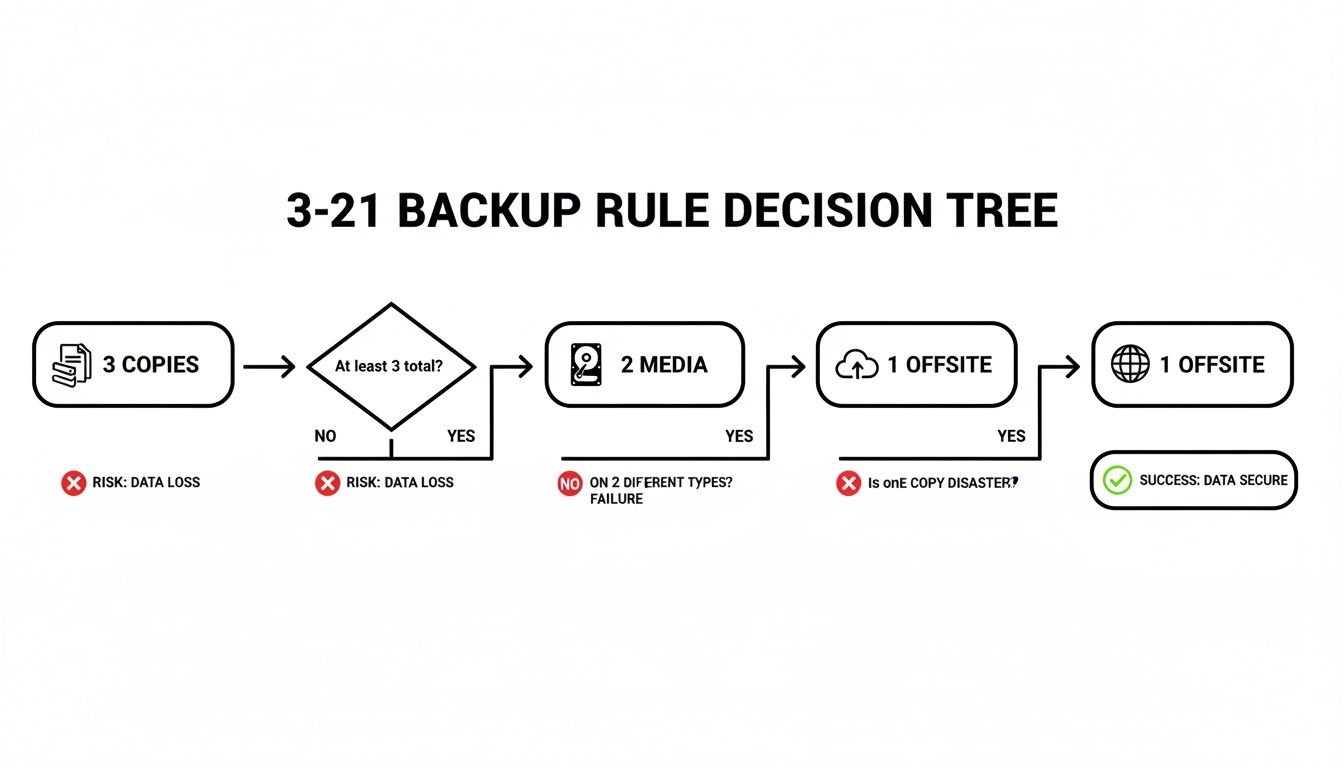
The key takeaway here is its layered approach, ensuring no single point of failure can wipe out all your data. A fire in your office won't destroy the cloud copy, and a ransomware attack that encrypts your server won't affect the offline backup.
Implementing this strategy and—most importantly—testing it quarterly is the only way to move from blind trust to true business resilience.
If your “plan” is a dusty hard drive in a closet and blind trust in the cloud, it’s time for a reality check. Ask us how we test and secure backups so your business can survive a worst-case scenario.
Moving From Blind Trust to True Business Resilience
Relying on a dusty old hard drive or just hoping your cloud provider has you covered isn’t a disaster recovery plan—it’s a gamble you’re taking with your company’s future. We’ve seen it time and again: the disaster nobody planned for isn't the cyberattack itself, but that gut-wrenching moment you realize your backups are useless.
The financial and operational fallout can be devastating. But the solution isn't a secret; it's a proven discipline.
Building true resilience means ditching hope as a strategy and embracing verification. It starts with adopting a robust framework like the 3-2-1 rule and committing to the single most important habit: quarterly recovery testing. This is the only way to know for sure that when a crisis hits your Monterey business, your recovery plan is a procedure, not just a prayer.
Your Path to a Secure Future
This proactive mindset extends beyond just backups; it applies to any high-stakes data operation where a "catastrophe" can sneak up on you, like a complex system migration. As you fortify your defenses, it’s useful to see how experts handle similar mission-critical projects. You can read about one such scenario in this guide to SharePoint Hybrid Migration: A Guide to Avoiding Catastrophe.
Ultimately, this is what separates the businesses that survive a disaster from those that don’t.
What this actually means is that your backup systems must be tested, redundant, and completely isolated from threats—not just installed and forgotten. Old servers, sync-only systems, and unmonitored cloud backups are notorious for failing when you need them most.
If your current "plan" leaves you feeling exposed, it’s time for a reality check. Need help managing aging infrastructure or verifying your backup plan? Read our guide to IT support for small businesses.
Don’t wait for a real disaster to find out your safety net is full of holes. Ask us how we test and secure backups so your business is ready for a worst-case scenario.
Adaptive Information Systems
380 Main St, Salinas CA 93901 | 831-644-0300 | hello@adaptiveis.net
Got Questions About Backup Failures? We've Got Answers.
We hear the same questions time and again from business owners across Monterey County who are just trying to do the right thing and protect their data. Let's cut through the confusion with some clear, straightforward answers.
“If We Have a Cloud Backup, Aren’t We Covered?”
This is one of the most common—and dangerous—assumptions we see. A simple cloud sync service often just mirrors your live data. So, if your files get hit with ransomware and turn into encrypted garbage, that garbage gets synced right up to the cloud. Your "backup" is now just as useless as the original.
The hard numbers don't lie. Research shows that even when victims have backups, a staggering 74% still had their data encrypted anyway. This proves one thing loud and clear: most backup plans are either incomplete or have never actually been tested.
A real backup has to be versioned (so you can go back in time before the attack) and isolated (so the malware can't touch it). That dusty server in the closet or an unmonitored cloud sync simply won't cut it when you need it most.
“What Is the Best Backup Strategy for a Small Business?”
For a small business, the most reliable and cost-effective approach is the 3-2-1 backup strategy. It’s been the industry gold standard for years because it builds in layers of protection against almost any kind of disaster you can think of.
Here’s how it works:
- Keep at least 3 copies of your data (your live, working data plus two separate backups).
- Store those copies on 2 different types of media (like an on-site server and the cloud).
- Keep 1 copy completely offsite or in an "immutable" format that ransomware literally cannot alter.
But the most important rule of all? You have to test your recovery process at least quarterly. A backup you haven’t tested isn't a plan; it's just a theory. Need help managing aging infrastructure or verifying your backup plan? Read our guide to IT support for small businesses.
If your current plan relies on a forgotten hard drive and just hoping the cloud works, it’s time for a reality check. Ask us how we test and secure backups so your business can survive a worst-case scenario.
Adaptive Information Systems
380 Main St, Salinas CA 93901 | 831-644-0300 | hello@adaptiveis.net