
Direct Answer: Every small business should be able to produce a network diagram, an asset inventory, and a written list of who owns each admin account. Without that record, access alone does not restore service.
The message usually arrives sounding calm. The person who set everything up is gone, something has stopped working, and nobody left in the building knows how the system was built.
We heard a version of this from a small inn on the Monterey Peninsula. Their longtime tech had passed away, the WiFi was acting up, and the owner had the wireless controller login but no idea what to do with it. Having the password was the easy part.
What walked out the door was the knowledge: what the system was designed to do, how the access points were named, and which odd settings were intentional. This article covers what IT documentation and admin access for small businesses should actually look like, and why the gap is expensive long before anything breaks.
Access Is Not the Same Thing as Knowing
A login gets you into a dashboard. It does not tell you why the network was built the way it was.
Walk into most small business wireless controllers and you will find access points with names like AP3, AP7, and Back. Which room is Back? Is AP7 the one in the attic crawlspace or the one behind the ice machine? Nobody knows, so every fix turns into a scavenger hunt.
The same pattern shows up with firewalls. A rule was opened in 2019 so a vendor could reach a camera server. Nobody documented it, so nobody knows whether it is safe to close. That uncertainty is how one-person knowledge becomes a business risk.
Here is what usually disappears with the person, not the password:
- Which settings were deliberate versus leftover from a temporary fix
- Why a device sits on its own network segment
- Which vendor supports which piece of equipment
- What has already been tried and failed
- What the system was supposed to do when it was working right
Federal guidance points the same direction. CISA’s cyber guidance for small businesses tells owners to define who is responsible for IT decisions and to write and maintain an incident response plan. That is not enterprise overhead. It is a baseline for a ten person office.

The List Your Business Should Be Able to Produce on Demand
Most small businesses in Monterey County cannot produce this in under a week. A well documented one can produce it in an afternoon.
At minimum, you should be able to hand someone:
- A current network diagram showing how internet, firewall, switches, servers and wireless connect
- An asset inventory of every switch, firewall, access point and server, with model, location, and warranty status
- A written record of who owns the domain registrar account and who controls DNS
- The Microsoft 365 global admin account and who holds it
- The ISP account number and the name on the account
- The wireless controller and phone system admin credentials
- A note on where backups live and when a restore was last tested
The domain registrar and DNS records matter most, and it is the one people overlook. Those records control where your email is delivered and where your website points.
If you lose control of them, you are not filing a support ticket. You are proving ownership of a domain that may have been registered by a former employee, with a personal email address that no longer works. That process can take days, and it will happen at the moment you can least afford silence.
A Simple Ownership Record Beats a Password Spreadsheet
This is the short version of what to write down and keep somewhere your business controls.
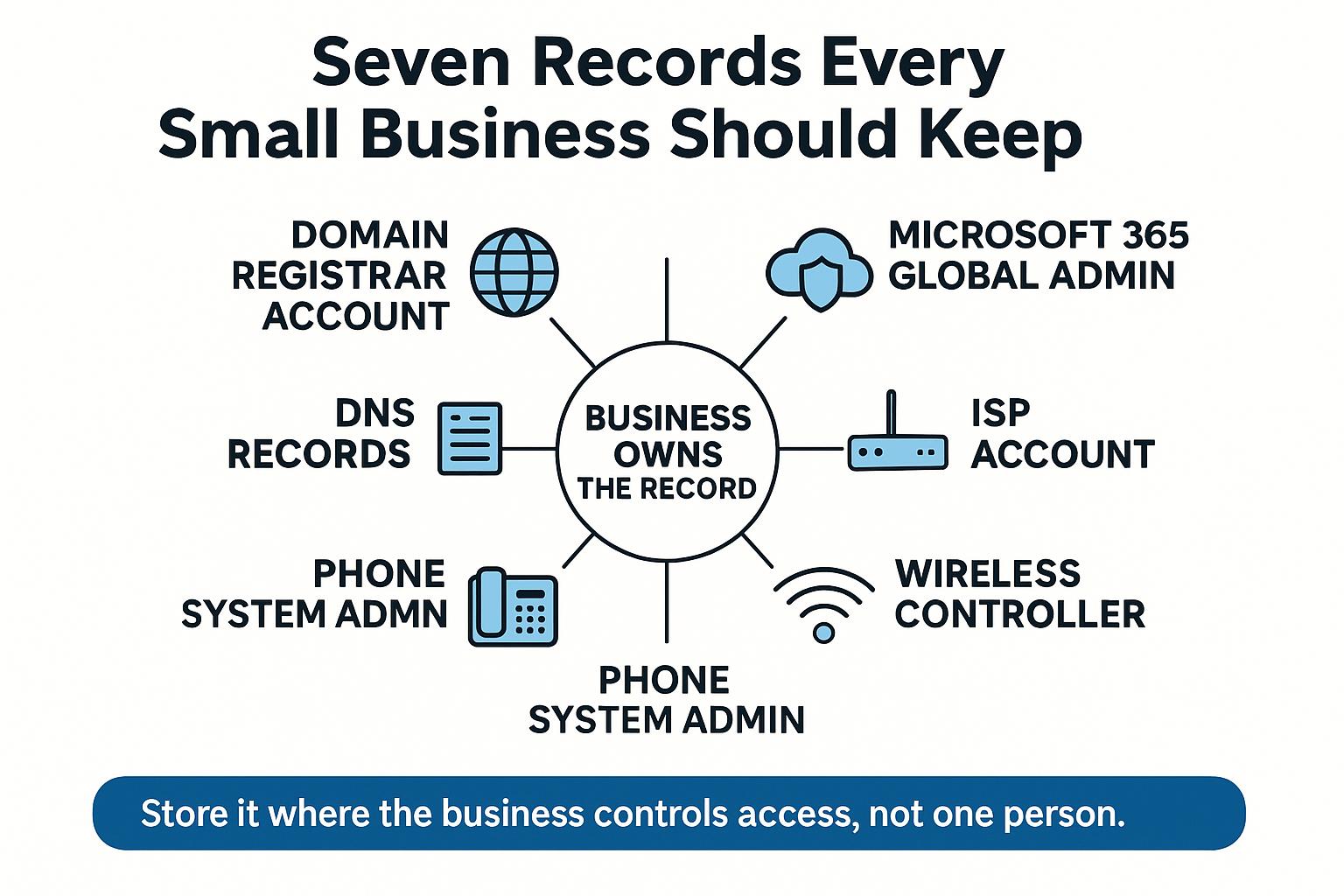
Nobody Wrote Down the Physical Side Either
Documentation gaps are not only about logins. Cables and conduit go undocumented for years, and then a project forces the issue.
A vegetable operation in the Salinas Valley asked us to assess their whole network, including fiber tracing, copper tracing, conduit status, and a network map. That request is a polite way of saying nobody on site knew what was connected to what anymore.
Another business in Monterey County was mid remodel and needed wiring identified as live or dead before demolition. Same failure, different symptom. Infrastructure grew year by year and nobody wrote it down.
For operations spread across coolers, shops, and field offices, the risk compounds fast. We have covered that in more detail in our look at IT challenges specific to Salinas Valley agriculture businesses.
The practical cost is that every change carries risk. Cutting the wrong cable during a remodel can take down a point of sale system, a camera feed, or the line the alarm panel uses. And you will not find out until the crew is gone.
What Goes Wrong When Each Record Is Missing
Here is the practical consequence of each gap, in the order they tend to hurt.
| Record | Who usually holds it | What happens when it is missing |
|---|---|---|
| Domain registrar account | Whoever built the website, often years ago | Email and website can go dark; proving ownership can take days |
| DNS records | A web developer or former IT contact | Mail routing and site changes stall until access is recovered |
| Microsoft 365 global admin | The tech who first set it up | No one can add staff, reset accounts, or pull audit logs |
| ISP account | An office manager or former owner | Outage tickets and circuit changes get refused at the door |
| Wireless controller | Outside IT contractor | Access points cannot be renamed, tuned, or replaced cleanly |
| Phone system admin | The vendor that installed it | Call routing and voicemail changes wait on someone else’s schedule |
| Backup console | Whoever configured it | No way to confirm backups run or test a restore |
Undocumented IT Quietly Costs Money Even When Nothing Breaks
Business owners evaluating IT providers treat missing documentation as a hidden cost, and they are right to.
When nothing is written down, the meter starts before the work does. Every troubleshooting call begins with rediscovery. Every project quote carries padding for unknowns, because no honest provider will bid tight on a network they cannot see.
Costs vary widely by size and site count, but the pattern is consistent: discovery hours you pay for once with documentation, you pay for again on every ticket without it. For an exact picture of what an assessment involves for your setup, ask a provider to scope it directly.
The bigger cost is freedom. Documentation is what keeps you able to change your mind later about a vendor, a staffing plan, or your server architecture.
Without it, switching providers becomes an archaeology project, and you stay put because leaving is too painful. Our breakdown of what actually gets handed over when you switch IT providers walks through what a clean transition should include.
Regulators Want Evidence, Not Good Intentions
Law offices, registered investment advisers, and healthcare adjacent practices around Monterey Bay are increasingly asked to show proof rather than describe their practices.
One local caller needed documented proof of patch compliance for a list of open findings within the week. They had no system that could produce it.
That is the whole problem in one sentence. If your only record of what was patched, backed up, or restored lives in someone’s memory, you have no evidence at all.
The same logic applies to backup. Many owners assume their cloud email is covered, which is a separate and common gap we explain in why Microsoft 365 does not back up your data. A backup you cannot document and cannot test is a hope, not a control.
Summer Is the Window. Fall Is When You Find Out.
Timing matters on the Central Coast. Summer is when the exposure peaks and also when the fix is easiest to schedule.
Hospitality and event operations on the Peninsula run flat out through the August car week weekends. Salinas Valley harvest and cooling operations cannot pause for a network outage. School districts and nonprofits book their infrastructure work while staff are out.
And staggered vacations mean the one person who knows the passwords is often the person on a plane.
Pick one slow week and run a written inventory before fall budget season. Not a full project, just a documented starting point:
- Walk the building and label every switch, access point and patch panel
- List every admin account and who holds it today
- Confirm the domain registrar is in a company email address, not a personal one
- Test one restore and write down the date and the result
If your internal person is already stretched, this is exactly the kind of work that pairs well with outside help. We covered that model in what co-managed IT actually fixes.
What a Real Documentation Handover Looks Like
If you bring in outside help, judge them on what they hand back to you. These are fair questions to ask any provider before you sign anything:
- Will you produce a baseline network diagram and give me a copy?
- Will you deliver an asset inventory with warranty status for each device?
- Do I own the credential vault, or do you?
- Will you provide a backup validation report showing a tested restore?
- What does the first 30 days of stabilization work include?
Our team’s onboarding produces all five, and clients get access to every piece of it. That matters because ownership of the record is what lets a business walk away later if it wants to.
The local part is not a slogan either. Somebody has to physically trace a conduit or find the access point above the ice machine. As one client put it in a review, “As a small local business, we value working with another local company for our IT needs.”
Frequently Asked Questions About IT Documentation and Admin Access
Our IT person is suddenly unavailable. What should we do first?
Secure the accounts that control your identity before anything else. Confirm you can log into the domain registrar, DNS, and Microsoft 365 global admin, and change the recovery email to a company address you control. Everything else can wait a day. Those three cannot.
We have the login but do not know what it controls. Is that enough?
Usually no. A wireless controller login gets you into the dashboard, but it will not tell you which access point serves which room, why a setting was changed, or what the network was designed to do. That is why documentation and access are two separate things.
Should our IT provider hold the domain registrar account or should we?
The business should own it. A provider can manage it day to day, but the account itself should sit under a company email address with billing in the company name. If you ever change providers, that single detail decides whether the transition takes an hour or a week.
How long does it take to document a small business network?
For a single site with 10 to 50 users, a walkthrough plus diagram and inventory is often a matter of days rather than weeks, depending on how much is undocumented and how spread out the equipment is. Multi site operations with outbuildings, coolers, or older conduit take longer because physical tracing is involved.
Does documentation help with compliance or insurance questions?
Yes, because both increasingly ask for evidence. Patch records, backup test results, and a written list of who has admin access are the kinds of artifacts an auditor or carrier wants to see. Describing your process is not the same as producing a report.
Want a Second Set of Eyes on What You Actually Have?
Our team works out of 380 Main St. in Salinas and covers businesses across Monterey County and the wider Monterey Bay Area. If you want someone to walk your building, map what is connected, and tell you plainly which records are missing, we are reachable at (831) 644-0300 or adaptiveis.net.