
Direct Answer: Windows Server 2016 gets its final security update on January 12, 2027. The server keeps running, but Microsoft stops issuing patches, so every new vulnerability becomes your problem.
Most business owners we talk to in Monterey County have a server humming away in a closet that nobody has thought about in five years. It works. Nothing is broken. So it never makes the budget conversation.
That changes on January 12, 2027. Microsoft ends extended support for Windows Server 2016 that day, and the machines get one last monthly security update. After that, the patches stop.
This article covers what that date actually means, what the paid extension really costs, and the two hidden dependencies that turn a simple upgrade into a three month project. If you run an office, a pack house, a clinic, or a small district office around the Salinas Valley or the Peninsula, the planning window is now.
What January 12, 2027 Actually Changes
The server does not shut off. It does not lock you out or flash a warning. Monday morning your staff logs in exactly like they did Friday.
What stops is the protection. No more security patches, no more bug fixes, no more support cases with Microsoft when something breaks.
Here is the practical difference. Today, when a researcher finds a hole in Windows Server 2016, Microsoft writes a fix and pushes it out. After January 12, that same hole stays open on your machine permanently, and attackers know exactly which versions have stopped getting fixes.
A few things this affects right away:
- Cyber insurance renewals. Carriers increasingly ask whether your systems are under vendor support, and an honest answer can move your premium or your coverage terms.
- Compliance obligations. If you handle protected health information, cardholder data, or client financial records, running unsupported software is hard to defend during an audit.
- Software vendors. Many line of business applications quietly drop support for unsupported operating systems, which means your accounting or practice management vendor may stop helping you troubleshoot.
Microsoft published the full list of affected products and dates on its Windows IT Pro blog, including how the paid extension program works.
Extended Security Updates Are a Bridge, Not a Grace Period
This is where most local buyers get surprised. There is a paid program called Extended Security Updates (ESU) that keeps security patches flowing after the end of support date, and a lot of people assume it is a free cushion. It is not.
Three things to understand about ESU:
- It is available for up to three years past the end of support date, and then it is genuinely over.
- It covers security updates only. No technical support, no bug fixes, no feature work.
- Microsoft has said the price doubles each consecutive year and is cumulative. A business that skips year one and enrolls in year two owes for year one too.
On pricing, Microsoft published first year figures for the Windows 10 Enterprise LTSB 2016 edition in the neighborhood of $60 per device, with a lower figure for machines managed through Intune or Autopatch. Treat that as published market context rather than a quote for your situation, since server licensing and device counts work differently and your own mix drives the real number.
The honest way to think about ESU is as rented time. It makes sense when you have a vendor application that genuinely cannot move yet, or when a cutover would land in your busiest month. It stops making sense the second year, when the cost curve starts competing with the price of just doing the migration.

The Deadline Most Salinas Valley Businesses Missed Entirely
There is a second date connected to this one, and it landed first. Windows 10 Enterprise LTSB 2016 and Windows 10 IoT Enterprise LTSB 2016 hit end of support on October 13, 2026.
The IoT edition is the one that matters most around here, and for an awkward reason. ESU for the IoT build is only available through the original equipment manufacturer, not from Microsoft directly.
That build lives inside a lot of gear nobody thinks of as a computer:
- Pack house scales and grading equipment
- Cooler and controller panels
- Self service kiosks and visitor check in stations
- Time clocks
- Label and ticket printers
- Digital signage controllers
Most of this equipment has not been touched since the day it was installed. It has a screen, it has a network cable, and it has an operating system that stopped getting patched.
The practical move is simple and slightly tedious: walk the floor and inventory every piece of equipment with a screen on it. Then call the equipment vendor, not Microsoft, and ask what they support.
And expect the answer to be uneven. The software clock and the hardware warranty run on different timers, so a scale that is mechanically fine for another decade may be running software that went dark last fall.
The Dates That Actually Matter
Four end of support dates cluster together here, and they interact. This is the short version worth printing out.
| Product | End of Support | What It Means for You |
|---|---|---|
| Windows Server 2016 | January 12, 2027 | Final security update ships that day. Paid ESU available up to three years, price doubles annually. |
| SQL Server 2016 | July 2026 | Already out of extended support. Not supported on Windows Server 2022 or 2025. |
| Windows 10 Enterprise LTSB 2016 | October 13, 2026 | Security patches stopped. Paid ESU offered through Microsoft’s program. |
| Windows 10 IoT Enterprise LTSB 2016 | October 13, 2026 | ESU only available from the device manufacturer, not Microsoft. Affects embedded equipment. |
The Database Dependency That Blows Up Q1 Budgets
Here is the trap that catches businesses planning what looks like a clean operating system upgrade.
SQL Server 2016 left extended support in July 2026, and it is not supported on Windows Server 2022 or Windows Server 2025. So a company that budgeted for an OS upgrade opens the hood and finds it also owns a database migration.
And sometimes there is a third layer underneath that. The industry application sitting on top of the database may only be certified against a specific SQL version, which means the app has to move too.
Work the discovery in this order:
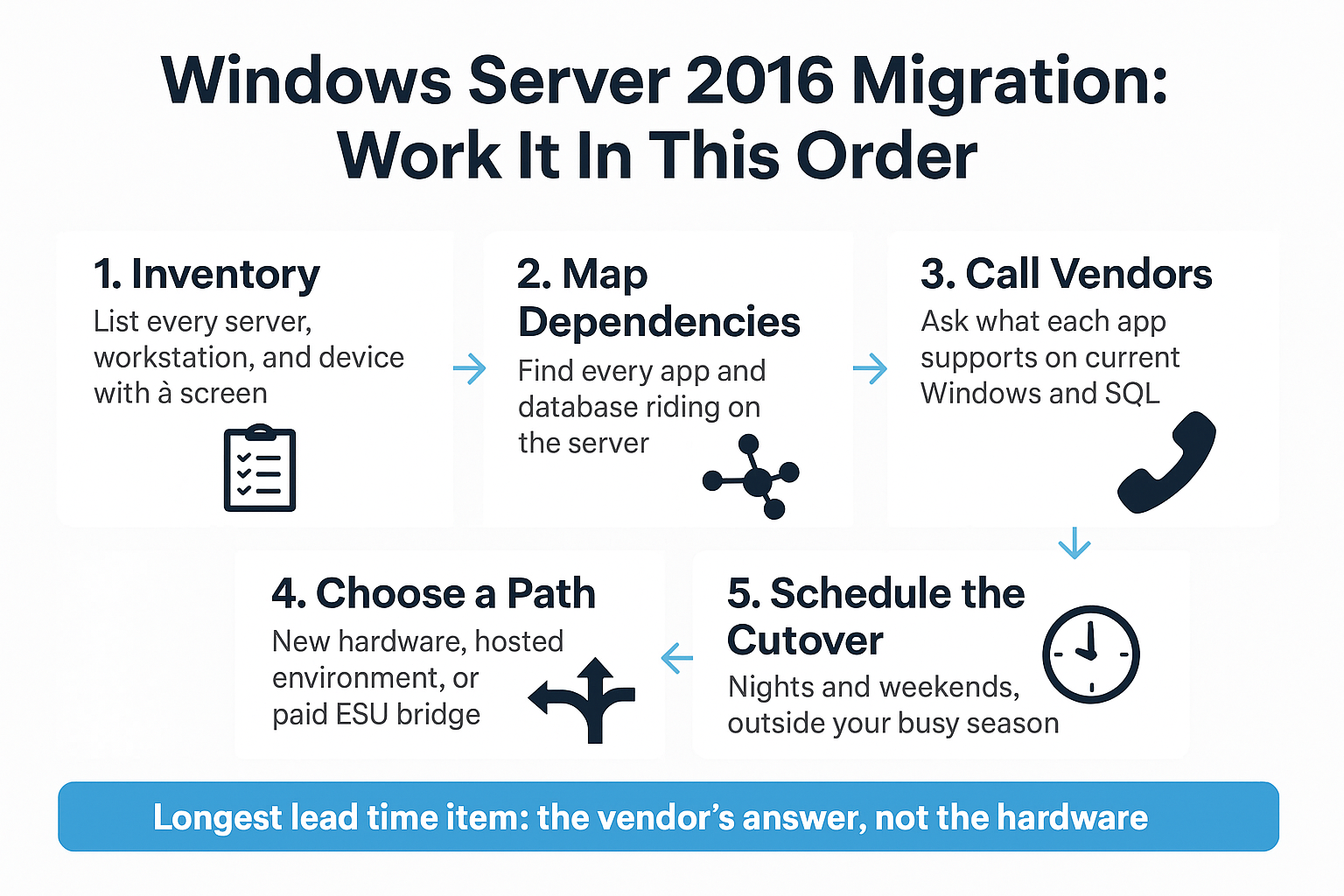
1. List what the server actually does. Usually that is Active Directory logins, file shares, print services, remote access, and one or two industry applications.
2. Identify every application that touches a database. Practice management, accounting, inventory, case management, grower or harvest tracking.
3. Call each application vendor and ask what they support on current Windows Server and current SQL Server versions.
That third step is the long pole. Vendor answers routinely take two to six weeks to get in writing, and occasionally the answer is that the version you own has no supported path forward at all.
Start those calls before you price hardware. The vendor answer decides the shape of the whole project.
The Order to Work This In
Most failed server projects fail because someone bought hardware before they knew what the server was doing. This is the sequence that avoids that.
Three Real Paths, and What Drives the Number
Budget pressure is real in this region right now. Monterey County agriculture produced $4.82 billion in gross value in 2025, down roughly 3 percent from the prior year, with the county’s agricultural commissioner pointing to tariff driven cost increases on imported equipment and fertilizer. Margin pressure is the backdrop for every technology line item from Greenfield to Castroville.
A business with 10 to 200 employees is generally choosing between three paths:
- Replace the hardware. Buy a new server, move to a current Windows Server version, keep everything in house. Highest upfront cost, familiar operating model.
- Move the workload. Shift to a hosted or virtualized environment and stop owning a server at all. Turns a capital purchase into a monthly line item.
- Buy time with ESU. Pay for security updates while you sort out a vendor dependency. Works for a year, gets expensive in year two.
What moves the number in any of those paths:
- How many servers you actually have, including the one in the back office nobody counts
- Which applications ride on them, and whether those apps need upgrading too
- Whether your current hardware can host a newer OS or needs replacing outright
- Whether you need on premise performance for a specific application
We have written a fuller breakdown in Private Cloud or On-Premise Servers: How Monterey Bay Businesses Are Deciding, and a five year cost comparison in Cloud Server or Server Closet. A real figure for your environment only comes out of a conversation about what you actually have.
Sequencing the Cutover Against a Monterey Bay Calendar
A calendar deadline is useless without your calendar. A migration weekend that lands in a customer’s busiest month is a migration weekend that gets postponed twice.
Around here the pinch points are predictable:
- Harvest and pack schedules in the Salinas Valley, where downtime during a run costs real money
- Tax season for accounting and bookkeeping firms, roughly January through mid April
- Event season on the Peninsula, with car week and the summer tourism stretch locking hospitality operators down
Then there is power. PG&E Public Safety Power Shutoffs have hit inland Monterey County every fall since 2019, with notice windows that have run as short as 12 hours. Add a wet winter forecast and storm season outages, and scheduling a physical server cutover for a January weekend starts to look like a bad bet.
The sequence that works for most local businesses:
1. Fall: discovery, vendor calls, and documentation
2. Late fall: procurement, because hardware lead times are the part nobody controls
3. Slow window: the cutover itself, scheduled at night or over a weekend
Order hardware earlier than feels necessary. Supply timelines have been unpredictable for three years running, and a server sitting in a box in your office is a much better problem than a server stuck in transit.
Why This Usually Starts With Documentation, Not Purchasing
One pattern shows up over and over in local inquiries. A produce company in the Salinas Valley recently asked for an evaluation of its entire network, including fiber tracing, copper tracing, conduit status, and an actual network map, because nobody on staff knew what was connected to what anymore.
A small school district with three sites, roughly 750 students, and about 70 staff asked for infrastructure upgrades and on call support in the same breath.
Both requests point at the same thing. End of support work almost always starts with documentation, not a purchase order.
Migrating into an undocumented network is where surprise downtime comes from. You move the server, and then you find out the fire panel, the badge readers, or a remote grading station were pointed at an IP address nobody wrote down.
Spend the first two weeks building the map. It is the cheapest part of the project and the part that prevents the expensive part. If your organization is in a sector that already struggles to get good IT attention, this piece on why some industries have a harder time finding IT support explains a lot about why that documentation never got built in the first place.
Frequently Asked Questions About Windows Server 2016 End of Support
Will my server stop working on January 12, 2027?
No. The machine keeps running exactly as it does today. What stops is security patching, bug fixes, and Microsoft support cases, so any vulnerability found after that date stays open on your system.
How long can I stay on Extended Security Updates?
Up to three years. But the price doubles each consecutive year and it is cumulative, so enrolling late means paying for the years you skipped. ESU also covers security updates only, with no technical support included.
How do I know if my equipment runs the Windows 10 IoT LTSB build?
You usually cannot tell by looking. Walk your facility, list every piece of equipment with a screen, and call the manufacturer with the model number. ESU for that IoT build only comes from the device maker, never from Microsoft directly.
Can I just upgrade the operating system and leave everything else alone?
Sometimes, but check the database first. SQL Server 2016 is not supported on Windows Server 2022 or 2025, so if your line of business application sits on a 2016 database, you are looking at a database migration as part of the same project.
When should a Monterey County business actually start this?
Now, if you have not started. Vendor answers take weeks, hardware lead times are unpredictable, and the good cutover windows around harvest, tax season, and Peninsula event season are narrow. Discovery in the fall, cutover in a slow stretch.
Mapping Out Your 2027 Server Timeline
Migration and project work is something our team plans and executes locally out of Salinas, including cutovers scheduled at nights and weekends so the switch never happens during business hours, with the environment stress tested afterward instead of just declared done. If you want a conversation about what a realistic 2027 timeline looks like for your servers, Adaptive Information Systems is available at (831) 644-0300 or at adaptiveis.net. Even a short discovery call usually tells you whether you are looking at a simple upgrade or a longer project with a vendor dependency in it.