
Direct Answer: Most managed IT agreements bundle monitoring, patching, help desk, and security tools. Onboarding, hardware, projects, after-hours emergencies, and onsite visits are often billed separately, depending on how the proposal defines scope.
Two IT proposals can land in your inbox with the same monthly number and carry completely different amounts of responsibility. One includes weekend emergency response, new hire setup, and onsite visits. The other bills all three by the hour, and you find out on month four.
We see this constantly with businesses in Salinas, Monterey, Hollister, and Watsonville. Owners and office managers are handed a one-page quote with a single dollar figure and no itemization, then asked to sign a 12-month agreement.
This guide walks through what a well-built proposal actually shows, where surprise invoices really come from, and why the messiness of your current setup changes the first bill more than anything else on the page.
What a Properly Itemized IT Proposal Shows You
One organization near Soledad sent us a request that was, honestly, a model for how to shop for IT. They asked for a 12-month agreement itemized month to month for up to 7 users, with the cost of an 8th user spelled out separately.
They also asked for a line item for a second office, a placeholder for a mobile office they expected to grow into, and a separate sheet showing the minimum needed to cover 3 users right away. That is not a difficult ask. That is a buyer protecting themselves.
A proposal built the right way answers all of these without you having to chase them:
- Per-user or per-device rate, stated as its own number rather than buried in a total
- What a new user costs mid-term, and whether that add is prorated
- What removing a user does, and how quickly the credit shows up
- How a second location changes the number, including any separate network or firewall costs
- What the agreement covers at each site, since two offices rarely need identical coverage
- The floor, meaning the smallest configuration that still gets you real protection
When a buyer asks these questions up front, month four stops being a surprise. When they do not, the gap between expectation and invoice is where most bad IT relationships start.

Most Surprise Invoices Are Not Hidden Fees. They Are Undefined Scope.
Providers with bad billing reputations usually are not sneaking charges in. They wrote a proposal that never defined the words it used, and the client filled in the blanks with the most generous reading possible.
The same handful of trouble spots come up again and again:
- After-hours and weekend emergency response. Is a Saturday outage covered by the flat fee or billed at a premium rate?
- Onsite dispatch versus remote resolution. Most issues get solved remotely, but somebody has to pay for the truck roll when they cannot be.
- New employee onboarding and offboarding. Setting up a workstation, licenses, email, and permissions takes real labor. So does shutting an account down correctly.
- Hardware procurement. Is the equipment marked up or passed through at cost, and is the labor to configure it separate?
- Project work. A server migration, a Wi-Fi redesign, or an office move usually sits outside day-to-day support.
Ask in plain language: what counts as an emergency, what hours the flat fee covers, whether a site visit is included, and how hardware is priced. Those four answers tell you more about a proposal than the monthly total does.
If you are moving off hourly support, it also helps to understand what the real cost difference looks like between break-fix and managed IT before you compare monthly figures.
Typically Bundled vs. Commonly Billed Separately
Every agreement is written differently, so treat this as a starting point for questions rather than a rule. The right column is the one to bring to your next proposal review.
| Line Item | Usually Bundled | Question to Ask |
|---|---|---|
| 24/7 monitoring and alerting | Yes, in most managed agreements | Who watches the alerts overnight, and what triggers a call? |
| Patching and updates | Yes | How often, and does it happen during business hours? |
| Help desk during business hours | Yes | What hours count as business hours, and is there a ticket cap? |
| After-hours and weekend emergencies | Sometimes | What qualifies as an emergency, and what is the rate if it does not? |
| Onsite visits | Varies widely | Is dispatch included, and how is travel time to King City or Hollister handled? |
| New user setup and offboarding | Often billed separately | Is there a flat per-user onboarding charge? |
| Hardware and licenses | Almost never bundled | Markup or pass-through, and who owns the license? |
| Migrations, office moves, redesigns | No, quoted as projects | What is scoped as a project versus covered support? |
Onboarding Is the Most Underestimated Line in Any IT Agreement
A 13-room inn on the coast reached out to us after the technician who had managed their Wi-Fi for years passed away. They had the login for their access points and no idea what to do with it.
That is the exact environment a new provider inherits more often than not: no network diagram, no list of what equipment exists, admin credentials held by one person, and backups nobody has tested in years. Cleaning that up is work, and it is work that happens before the monthly service can actually function.
A real onboarding period should hand you documentation you keep, whether or not the relationship continues:
- A network map showing what is connected to what
- An asset and license inventory, including warranty and renewal dates
- A documented credential model, so admin access lives in a vault instead of one person’s memory
- A backup validation report proving a restore actually works, not just that a job ran
- A 30-day stabilization plan listing what gets fixed first and in what order
Messier environments cost more to onboard. That is the honest math. But that cleanup is normally a one-time charge, not a permanent bump in your monthly rate, and a good proposal says so in writing. Our walkthrough of what gets handed over when you switch IT providers covers the first 30 days in more detail.
Five Questions That Separate Two Identical Monthly Numbers
Bring these five questions to any IT proposal review. The answers explain why two quotes with the same price are not the same deal.
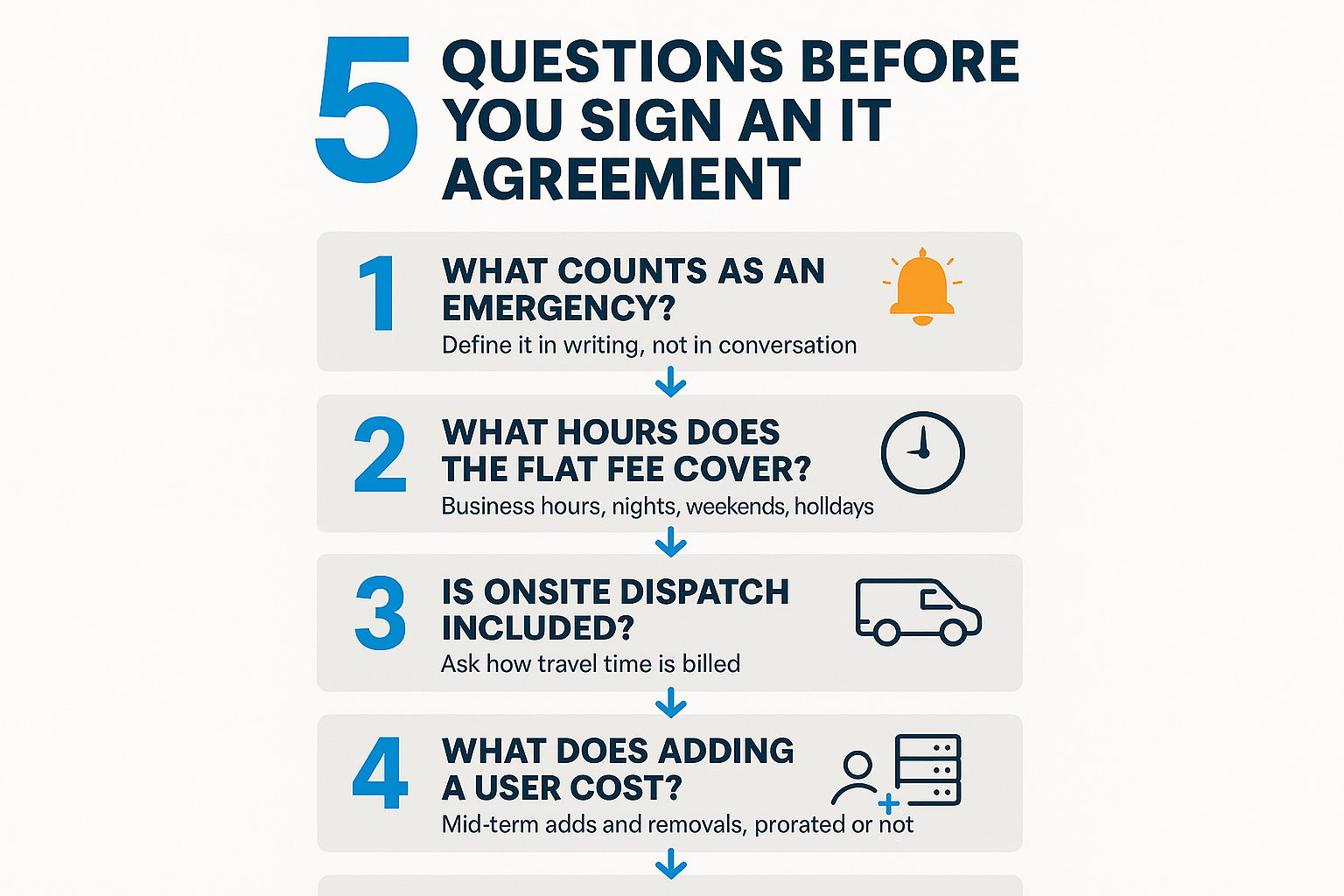
Three Pricing Models, and Why Device Count Does Not Track Headcount
Almost every managed IT quote uses one of three structures, and the one a provider picks changes which environments look expensive.
- Per-user pricing. A flat monthly amount for each supported employee, covering whatever devices that person uses. Clean and predictable for office staff with a laptop and a phone.
- Per-device pricing. Charged by endpoint. Fair when devices are few, punishing when they are many.
- Flat-fee or tiered agreements. A bundled scope at a set price, which works well when the scope is written tightly.
Here is where local reality matters. A medical practice with shared exam room terminals, a Salinas Valley packing operation running floor terminals and rugged tablets, and a school site with a computer lab all have device counts that have nothing to do with headcount.
A 20-employee packing house can easily carry 60 endpoints. Priced per device, that quote looks brutal. Priced per user, it may not reflect the real support load. Neither model is wrong, they just need to match your environment.
On dollars, national market data tends to put fully managed per-user pricing in a broad range of roughly $100 to $250 per user per month, and that spread is wide for real reasons. Support hours, security depth, and compliance obligations move the number more than anything else. The only accurate figure is a written quote against your own environment.
For practices with clinical systems in the mix, our piece on IT expectations for medical and healthcare-adjacent organizations covers what changes the scope.
“Are We Too Small?” How Account Minimums Actually Work
This worry comes up more than any other. A Monterey County land trust wrote in asking about services and protection for 3 users, describing itself as a small office that still wanted real coverage. A solo registered investment adviser described himself as a one-man shop with a laptop and a business phone, trying to be sure he was protecting client data.
Both are legitimate accounts. Both also run into the same structural issue: many providers set a floor, either a minimum number of seats or a base monthly amount, because the security tools, monitoring platform, and documentation work cost roughly the same to stand up whether you have 3 people or 13.
That floor is not a penalty. It is the point where the service can actually be delivered properly.
And a 3-person financial office often needs the same controls as a 30-person one, because the compliance obligation follows the data, not the headcount. If you hold client financial records or patient information, California’s breach notification requirements apply to you at any size.
So the honest question is not whether you are too small. It is which controls you genuinely need, which can wait a year, and what the smallest sensible starting configuration looks like. A provider willing to build you that smaller sheet is telling you something useful about how they work.
Seasonal Headcount and Travel Time: The Central Coast Wrinkle
Almost no national proposal accounts for how business actually moves here. Salinas Valley agriculture operations swing headcount hard through harvest. Monterey Peninsula hospitality and event businesses staff up around August Car Week and the February tournament weeks. School districts do most of their real infrastructure work during summer break.
If your user count is not flat, ask directly:
- Can seats be paused or prorated when headcount drops?
- Is there a minimum billing period per seat?
- How much notice does an add or removal require?
- How is travel time treated for onsite work in King City, Greenfield, Soledad, or Hollister?
That last one gets very different answers depending on who you ask. A provider working out of Salinas and a remote-only vendor with no local technicians are solving two different problems when your switch dies on a Friday afternoon in South County.
If you already have an internal IT person and only need coverage during peak weeks, a co-managed arrangement is often priced differently than a full-service agreement, and it is worth asking for both numbers.
Frequently Asked Questions About Managed IT Pricing
Is onboarding a one-time fee or does it raise my monthly rate?
In most well-structured agreements it is a one-time charge covering documentation, cleanup, and stabilization. If a provider is folding heavy onboarding work into a permanently higher monthly rate, ask them to separate the two so you can see what you are paying for after the first 90 days.
Why would a provider turn down a 3-user office?
Usually they will not turn you down, they just have a floor. The monitoring platform, security tools, and documentation effort cost about the same to set up for 3 users as for 13, so many providers quote a base monthly minimum. Ask what that floor is early so you are not surprised by the first number.
Is after-hours support included in a flat monthly fee?
Sometimes yes, sometimes only for defined emergencies, and sometimes not at all. Get the definition in writing. A server down at 9pm and a password reset at 9pm are very different tickets, and the agreement should say which one triggers included coverage.
How much does adding a second location change the price?
Beyond the per-user cost for staff at that site, a second office typically needs its own firewall, network equipment, and internet circuit monitoring. That is normally a separate line item plus a one-time setup cost. Ask for it broken out, especially if you expect to open the location later in the term.
Do IT providers mark up hardware?
Some mark it up, some pass it through at cost and bill the configuration labor. Neither approach is wrong, but you should know which one you are getting. Ask the question directly and ask who holds the license and warranty, since that matters if you ever change providers.
Questions About How an IT Agreement Is Structured?
Local reviewers tend to praise the same two things, and neither is a price tag. One school administrator put it this way: “the technicians persist until they find an effective solution providing options to fit our financial resources.” A plan sized to the organization and someone who stays with a problem until it is solved is what most Monterey County businesses are actually shopping for.
Our team works out of 380 Main St. in Salinas, and most issues get resolved remotely with onsite dispatch when they cannot be. If you are reading a proposal and want help understanding what is bundled versus billed separately, questions are welcome at (831) 644-0300 or adaptiveis.net.