
When it comes to securing your WiFi network, a few basic steps can make a huge difference. You need to change your router's default login information, give your network a unique name (SSID), and turn on the strongest encryption possible—ideally WPA3. Getting these basics right is your first line of defense. It makes it much harder for hackers to get in and mess with your business data, whether you're in Salinas or elsewhere in Monterey County.
Your First Line of Defense in WiFi Security

If you're a business owner in Salinas, your WiFi network is the quiet hero of your daily work. It connects everything from the registers in your Oldtown Salinas shop to the high-tech gear managing crops in the fields. Your business runs smoothly because of that connection.
But here’s the problem: most routers come from the factory with default settings that are well-known and very easy for a hacker to guess.
Leaving the default username and password (like "admin" and "password") is like leaving the key to your business under the doormat. It’s the very first thing an intruder will check.
Ditch the Default Credentials—Immediately
The most important first step you can take is to change the login for your router. This isn't your WiFi password; this is the key to the control panel where all your network settings live. A strong, unique password here stops someone from taking over your network, changing your security settings, or worse, locking you out.
Along the same lines, you need to change your network's name—its SSID (Service Set Identifier)—from the factory default. A default SSID often reveals your router's brand and model, which is like giving an attacker a blueprint of your network's weak spots.
A unique SSID that doesn't advertise your business name or router model helps your network blend in. It's a simple but effective way to avoid attracting unwanted attention from people scanning for easy targets in a busy area like downtown Monterey.
Why These Simple Steps Are a Big Deal
It all comes down to control. By setting your own login info, you decide who gets in. You build a secure foundation from day one.
This proactive approach is the start of any good security plan. For businesses that handle sensitive customer data—from wineries in Carmel Valley to accounting firms in Pacific Grove—these first steps aren't just a good idea; they are essential.
If you're not sure where to start, we've put together a quick checklist of the basics. Think of this as your immediate action plan to make your network safer right now.
Immediate WiFi Security Checklist
| Action Item | Why It Matters for Your Business | Quick Tip |
|---|---|---|
| Change Router Admin Password | Prevents unwanted access to your network's main settings. | Use a password manager to create and store a long, complex, unique password. |
| Rename Your Network (SSID) | Hides your router's brand/model, making it a less obvious target. | Pick a generic name. Don't use your business name, address, or anything easy to guess. |
| Set a Strong WiFi Password | Protects the connection itself, stopping outsiders from using your internet or spying on your team. | Aim for at least 12-16 characters with a mix of uppercase, lowercase, numbers, and symbols. |
| Enable WPA3 Encryption | Provides the newest and strongest security for data sent over your network. | In your router settings, look for "Wireless Security" and choose WPA3-Personal or WPA3-Enterprise. |
Completing this checklist builds a solid foundation for more advanced security. It’s a mindset that fits well with modern security ideas that assume no user or device can be trusted by default.
In fact, if you want to learn more, understanding how to implement Zero Trust security can give you a whole new way to think about protecting every part of your network. Taking these first steps puts you on the right path.
Choosing the Right WiFi Encryption Standard

Think of your WiFi encryption as the lock on your business’s front door. You wouldn't use a rusty old padlock to protect your shop, and the same idea applies to your digital security. The world of WiFi has a lot of terms like WEP, WPA2, and WPA3, but learning what they mean helps you pick the right "lock" for your network.
Making the right choice here isn't just a technical detail—it's a core business decision. For any business in Monterey County, from a busy café in Pacific Grove to an agricultural tech firm in Salinas, the data flowing over your network is a valuable asset worth protecting with the strongest shield you can get.
Why Older Standards Are a Major Liability
Let's start with what you must avoid: WEP (Wired Equivalent Privacy). This was one of the first encryption types, and years ago, it was better than nothing. Today, it’s dangerously old. Using WEP is like writing your password on a sticky note and leaving it on the front counter for everyone to see.
Hackers figured out how to crack WEP in just a few minutes with free tools. WPA and then WPA2 became the standard, offering much-needed improvements. The latest standard, WPA3, was introduced in 2018 and now provides even better protection against today's threats. You can explore the history of wireless threats and their solutions to see how far we've come.
Using an old standard like WEP isn't just a security risk; it's an open invitation for a data breach. If your router only offers WEP, it's a clear sign that the hardware is too old for business use and you need to replace it right away.
Understanding WPA2: The Longtime Standard
For more than ten years, WPA2 (Wi-Fi Protected Access 2) has been the main security type for most wireless networks. It's a solid, reliable standard that offers good protection when you use a very strong password. Most routers you'll find today support WPA2, and it's considered the minimum level of security for any business.
WPA2 uses a powerful encryption method called AES (Advanced Encryption Standard), which is trusted by governments and large companies around the world. It was a huge step up from what came before it.
However, WPA2 isn't perfect. It has a known weakness that attackers can use to intercept data. For most businesses, though, the biggest risk with WPA2 is simply a weak or easily guessed password.
WPA3: The New Gold Standard for Security
This brings us to WPA3, the modern choice designed to fix the weaknesses of WPA2 and provide strong, future-proof security. If you're serious about learning how to secure your WiFi network the right way, upgrading to a router that uses WPA3 is one of the smartest investments you can make.
It offers several key benefits that are especially valuable for businesses:
- Protection Against Password Guessing: WPA3 makes it nearly impossible for attackers to use "dictionary attacks" to guess your password, even if it's not super complex.
- Individual Data Encryption: On open networks (like a guest network at your business), WPA3 automatically encrypts the connection for each person. This means one person can't spy on another person's activity—a huge privacy win for public WiFi.
- Simplified Security for Smart Devices: It includes a feature called Wi-Fi Easy Connect™, which makes it easier to securely add devices that don't have screens, like smart thermostats or security cameras.
For a forward-thinking business in Carmel that relies on safe, seamless connections for both staff and guests, upgrading to WPA3 is a clear and necessary step. It shows you're committed to protecting customer data and preparing your business for future cyber threats. It’s enterprise-level security made affordable for your local business.
Strengthening Your Router's Advanced Security Settings
You've set a strong password and turned on WPA3 encryption. Great first steps. But true, business-level security is about building layers of defense. It’s time to look beyond the basics and dive into your router's advanced settings, where you can really protect your network from threats.
These settings are what separate a casually secured home network from one that's professionally locked down. While they can feel a bit technical, making these changes are some of the most powerful moves you can make to protect your business.
Turn Off Unnecessary Convenience Features
Many routers come with features designed to make things easy for home users. In a business setting, however, these same features can create big security holes. The two most common ones are WPS and UPnP.
Wi-Fi Protected Setup (WPS) was created to make connecting new devices easy, often with just the push of a button or an 8-digit PIN. The problem? That PIN is easy for hackers to crack. For a business, that small convenience just isn't worth the big risk. You should turn it off in your router’s settings.
Universal Plug and Play (UPnP) is another feature that puts convenience ahead of security. It lets devices on your network—like printers or security cameras—automatically open doors in your firewall to talk to the internet. While helpful in theory, it also means a hacked device could open a backdoor into your network without you knowing. Turning off UPnP puts you back in full control.
Think of UPnP like giving every employee a master key to all the doors in your building. It’s convenient until one of those keys falls into the wrong hands. By turning it off, you become the only one who decides which doors get opened and for whom.
Implement MAC Address Filtering
One of the best ways to control your network is to decide exactly which devices are allowed to connect. This is where MAC address filtering comes in. Every device that can connect to a network—a laptop, smartphone, or register—has a unique code called a MAC (Media Access Control) address.
With MAC filtering, you can create an "allow list" of the MAC addresses for all your company devices. If a device's address isn't on that list, the router won't let it connect, even if the person knows your WiFi password.
This creates a powerful barrier against unwanted access. If a former employee or a stranger in the parking lot tries to get on your network, they'll be blocked. It’s a key layer of security for any business wanting to protect their WiFi. It takes a little time to set up, but the security payoff is huge.
The Critical Importance of Firmware Updates
Your router's software is called firmware. Just like the operating system on your computer or phone, manufacturers regularly release updates to fix security holes, get rid of bugs, and improve performance.
Hackers are always looking for weaknesses in older firmware. Not updating your router is like knowing there's a broken lock on your back door and choosing not to fix it. A firmware update is the manufacturer’s way of sending you a new, stronger lock.
Here’s how to stay on top of it:
- Check for Updates Regularly: Make it a habit to log into your router at least once every few months to check for new firmware. Many modern routers can even be set to update automatically.
- Don't Ignore Notifications: If you see an alert about a new firmware version, don't put it off. These updates often contain critical security fixes.
- Register Your Product: When you register your router with the company that made it, you'll get email notifications about important updates.
Keeping your firmware up-to-date is a key part of long-term network security. For a more detailed look at ongoing protection, you can explore our complete guide to network security best practices for small businesses.
Beyond these basic safeguards, looking into advanced security can further protect your network. This is especially true if you use smart (IoT) devices; you can learn more about securing network components with certificates and TLS from trusted industry resources. By taking these advanced steps, you're not just securing your WiFi; you're building a strong digital foundation for your entire business.
Using Network Segmentation to Isolate Threats
Picture your business as one big, open room. Your employees, customers, sales system, and even the smart thermostat are all mixed together. If one person walks in with the flu (a digital virus), everyone is at risk. This is what your WiFi network looks like without network segmentation.
By creating separate, isolated networks for different users and devices, you’re building digital walls. You create secure "rooms" for each function. If a threat gets into one room—like the guest waiting area—it can’t spread to the secure offices where your important data lives. For a retail shop in Marina or a hotel in Carmel, this is a powerful yet affordable way to protect your business.
The Power of a Dedicated Guest Network
Offering free WiFi is a great perk for customers, but it also creates a big risk. You have no control over the security of your customers' devices. A single infected laptop connecting to your main network could instantly expose your payment systems, employee files, and private business data.
That’s why a guest network is an absolute must-have.
Most modern business routers let you create a separate network for visitors with just a few clicks. This guest network has its own name (SSID) and password. Most importantly, it's completely walled off from your main business network.
- Complete Isolation: Devices on the guest network can get to the internet, but they can't see or connect with your business computers, servers, or printers.
- Bandwidth Control: You can often limit how much internet speed the guest network uses, ensuring your business operations always have the speed they need.
- Enhanced Security: It contains any potential threats from public devices, acting as a digital quarantine zone.
This simple graphic shows the key differences.
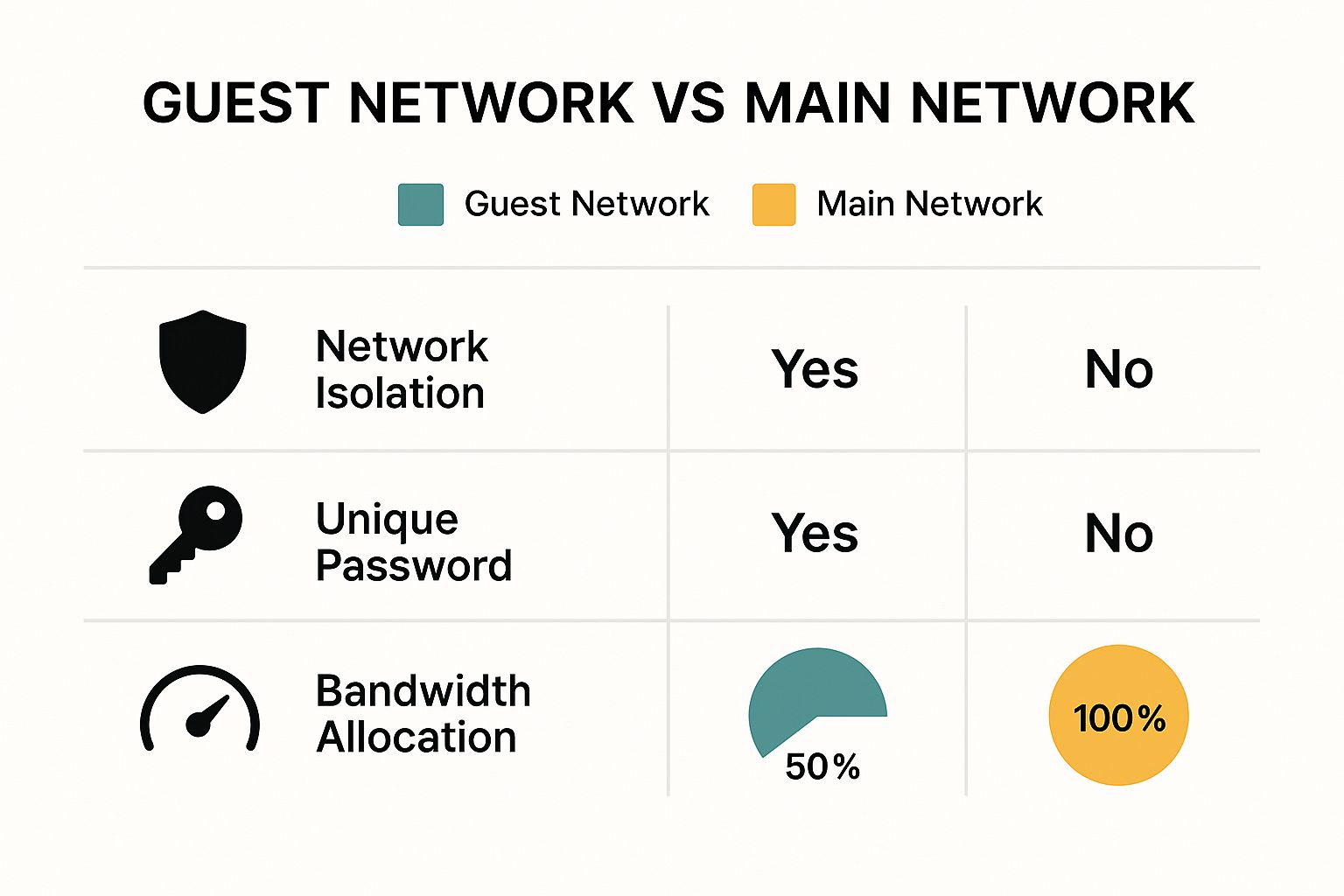
As you can see, the main benefit is total isolation—the guest network is a secure bubble that protects your most important assets.
Creating a Safe Space for IoT Devices
The security challenge doesn't stop with guests. The growth of Internet of Things (IoT) devices—smart security cameras, thermostats, speakers, and sensors—has created a new wave of security problems. These devices are useful but are often built with weak security, making them easy targets for hackers.
In fact, some reports say more than 50% of IoT devices have serious security flaws that hackers can use. Since they often lack strong passwords, they can become an easy back door into your network. Learning how to secure a WiFi network today means paying close attention to these smart gadgets.
The solution is to treat your IoT devices just like you treat your guests: give them their own isolated network. By creating a second, separate network just for your smart devices, you contain the risk.
If a hacker breaks into your smart thermostat, they'll be trapped on the IoT network. They won't be able to jump over and attack your company’s financial server or customer database.
We've found that splitting your network into these different zones is one of the most effective security moves a small business can make. The table below breaks down the most common options.
Network Segmentation Options for Your Business
Comparing the security benefits of different network types to protect your operations.
| Network Type | Who Should Use It | Key Security Benefit |
|---|---|---|
| Primary/Internal Network | Employees, managers, and core business systems (servers, printers). | The most secure zone. Access is strictly limited to company staff and devices to protect sensitive company data. |
| Guest Network | Customers, clients, vendors, and any public visitors. | Complete isolation from your internal network. Prevents viruses from guests' devices from spreading to your business systems. |
| IoT Network | Smart devices like security cameras, thermostats, and smart speakers. | Contains security holes common in IoT devices. If one is hacked, the threat cannot move to critical business computers or servers. |
This strategy is a core part of modern IT security. It's a big-business tactic that’s perfectly accessible and affordable for local small and mid-sized businesses. We cover this and other essential strategies in our small business guide to network security.
By dividing your network, you turn it from a single point of failure into a strong, multi-layered defense system, giving you peace of mind and better protection.
Maintaining a Secure WiFi Network Long Term
Securing your business’s WiFi isn't something you do once and then forget. It’s an ongoing process, just like regular maintenance on your office or equipment. Think of it as preventative care for your digital front door—a key process to keep your business safe from new and changing cyber threats.
Just because your network is safe today doesn't mean it will be tomorrow. Hackers are always finding new ways to break in. That means your defense plan has to adapt, too. This ongoing attention is what separates a truly secure business from one that’s just one new threat away from a major data breach.
Establish a Regular Password Rotation Schedule
Your WiFi passwords are the keys to your digital business, and you wouldn't leave the same key under the doormat for years. Regularly changing the passwords for both your main and guest networks is one of the simplest and most effective things you can do.
A good rule is to change your main business WiFi password at least every 90 days. If an employee with access leaves your company, that password should be changed immediately on their last day. For your guest network, especially in a busy spot like a retail store or café in Monterey, changing it weekly or even daily is a smart move.
This simple habit stops old passwords from being used and makes sure that only current, approved people and devices can get on your network.
Review Connected Devices and Audit Settings
Your router keeps a list of every device that connects to it. Checking this list from time to time is like doing a security walk-through of your office—you’re looking for anything that doesn’t belong.
Set a monthly reminder to log into your router and look at the list of connected devices. Do you recognize all of them? An unfamiliar device could be a sign that someone has gotten onto your network. Investigate and remove any suspicious devices right away, and then change your WiFi password.
While you're there, do a quick check of your security settings.
- Is WPA3 encryption still on?
- Are risky features like WPS and UPnP still turned off?
- Is your guest network still separate from your main network?
Settings can sometimes change after a software update or get switched by mistake. A quick check every few months ensures your defenses are still working as you planned.
A network is only as strong as its weakest link. Regular checks help you find and fix those weak spots before an attacker does, turning a potential disaster into a routine task. It’s a proactive approach that keeps you in control.
Prioritize Consistent Firmware Updates
Your router's firmware is its operating system. Just like your computer or phone, it needs regular updates. Manufacturers release these updates to fix newly discovered security holes, get rid of bugs, and improve performance. Ignoring them is like leaving your back door unlocked.
Hackers actively search for routers running old firmware because they have known security flaws. Keeping your firmware current is a critical part of long-term security. Most modern routers can be set to update automatically, but it’s still wise to manually check every few months just to be sure.
This kind of ongoing maintenance is also a key part of a larger business continuity plan. Having up-to-date systems can make all the difference if a security breach happens. To learn more, explore our expert advice on backup and disaster recovery solutions to ensure your business can handle any emergency. A secure, updated network is always your first line of defense.
Answering Your WiFi Security Questions
As we help businesses across Monterey County secure their networks, the same questions come up again and again. You’re busy running your company, and you need clear, direct answers to protect your business. Let's tackle some of the most common WiFi security concerns we hear from local business owners like you.
Getting expert answers to the right questions is the first step toward building a truly safe digital environment.
How Often Should I Change My Business WiFi Password?
For your main business network that your team uses every day, we strongly recommend changing the password at least every 90 days. Think of it as a regular security checkup. It limits the time an attacker has if they somehow get an old password.
But there's a more urgent time to change it. If an employee who knows the password leaves your company, you need to change it immediately. Don't wait. Make it part of their last-day checklist. This is a vital step to protect your company's data.
Your guest network is different. For a high-traffic business like a hotel in Carmel or a popular café in Salinas, changing the guest password weekly—or even daily—is a great idea. It keeps past visitors from using your network and ensures the connection is fresh for new customers.
Is a VPN Necessary on a Secure WiFi Network?
This is an excellent question that gets to the heart of layered security. While a secure WiFi network (using WPA3) encrypts the data moving between your device and your router, a VPN (Virtual Private Network) adds another powerful layer of protection.
A VPN creates a secure, encrypted tunnel for all your internet traffic, from your device all the way to a remote server. This means not even your Internet Service Provider can see what you're doing online.
Think of it this way: a secure WiFi password is like having a strong lock on your office door. A VPN is like putting your sensitive documents inside a locked briefcase before you even leave the office. It’s an extra, strong layer of security for your most important data.
For any business handling very sensitive information—like a financial services firm in Monterey or a healthcare provider in Pacific Grove—we absolutely recommend using a VPN. Yes, even on your own secure network. It provides total privacy and protection from any kind of digital snooping.
My Router Does Not Support WPA3. Do I Need a New One?
In a word: yes. If your router doesn't support the WPA3 encryption standard, it's a huge red flag that your hardware is old. That means it's likely missing other important security updates, too. While WPA2 with a very strong password is still decent, it doesn't have the modern protections WPA3 offers against password-guessing attacks and other threats.
Upgrading to a newer router that supports WPA3 is one of the smartest, most affordable security investments you can make. The cost of a new business-grade router is small compared to the cost of a data breach.
Besides, a newer router doesn't just give you better security. It almost always brings faster speeds, better range, and more reliable performance—a win-win for any local business that depends on a solid internet connection. Before you make any changes, you should understand your risks. Our guide on the cybersecurity risk assessment process is a great place to start.
Ready for Some Expert Help?
Figuring out how to secure your WiFi network is a huge step, but you don't have to do it alone. If you want hands-on support that brings enterprise-level security to your business without the enterprise price tag, our team is here to help. We can build a custom security plan that fits your business needs.
Contact us today to get started!
Adaptive Information Systems
380 Main St, Salinas CA 93901 | 831-644-0300 | hello@adaptiveis.net