
Direct Answer: A functional cybersecurity baseline for a small business covers phishing-resistant MFA, automated patch management, endpoint detection, email security, and a documented incident response plan, not just antivirus software.
A financial services contact from the Monterey Bay Area put it plainly in a recent inquiry: they try to be cyber-safe, but they want to be sure they’re doing what they can to protect their clients’ data. That’s an honest statement, and it’s exactly where most small business owners land. They’ve done something, antivirus, maybe a firewall, but they’re not confident it’s enough.
The problem is that most content about cybersecurity solutions for small businesses either lists product names or stays so vague it gives you nothing to act on. This article takes a different approach. It defines what a working cybersecurity baseline actually looks like for an organization with 10 to 50 employees, grounded in what’s actually happening in the threat landscape right now.
If you run a business in Salinas, Monterey, Watsonville, or anywhere across Monterey County, this is the honest answer to the question you’ve probably been sitting with.
Why ‘We Have Antivirus’ Is No Longer a Complete Answer
The 2026 Verizon Data Breach Investigations Report, published at verizon.com/business/resources/reports/dbir/, confirmed something that changes how small businesses need to think about security. Software vulnerabilities have now surpassed stolen credentials as the top initial access vector in breaches. That means attackers are getting in through unpatched software more than they’re using stolen passwords.
At the same time, the 2025 Verizon DBIR found that ransomware appeared in 88% of SMB breaches reviewed, compared to 39% for large organizations. Small businesses are not too small to be targeted. They’re being targeted more specifically because their defenses tend to have visible gaps.
For a business in the Salinas Valley or on the Monterey Peninsula, that translates to three concrete exposure points:
- Unpatched systems, software that hasn’t been updated, leaving known vulnerabilities open
- Absent or weak multifactor authentication, meaning a stolen password is all an attacker needs
- Employees who haven’t practiced phishing recognition in the last year or more
Antivirus software alone doesn’t address any of those three problems in a meaningful way. It’s a piece of a baseline, not the baseline itself.

The Five Parts of a Functioning Cybersecurity Baseline
When we talk about a cybersecurity baseline for an SMB, we mean the minimum set of controls that closes the gaps attackers actually use. Not every tool on the market, just the ones that address real, documented risk vectors.
Here’s what each one does in plain terms:
1. Phishing-resistant MFA on all user accounts and remote access points
Multifactor authentication means that a password alone isn’t enough to get into an account. An attacker who buys a stolen password from a breach marketplace, and those marketplaces are active and cheap, still can’t get in without the second factor. This needs to cover email, remote access, and any cloud application employees use regularly. Standard SMS-based codes are better than nothing, but app-based or hardware key authentication is more resistant to interception.
2. Automated patch management with defined timelines
Given that software vulnerabilities are now the leading entry point in breaches, patching can’t be an afterthought or a manual task someone does when they remember. A working patch management process runs on a defined schedule, critical patches applied within 48 to 72 hours of release, routine patches on a set weekly or monthly cycle. Ad hoc updates leave windows of exposure that are measured in weeks.
3. Endpoint detection and response (EDR)
Traditional antivirus scans for known malware signatures. EDR monitors behavior, it watches what processes are doing and flags activity that looks like an attack even if the specific malware has never been seen before. For a 20-person accounting firm in Salinas or a 35-person hospitality operation on the Monterey Peninsula, EDR is the difference between catching a ransomware infection at the first sign and discovering it after files are already encrypted.
4. Email security that goes beyond basic spam filtering
Most business email platforms include basic spam filters. That’s not sufficient protection against modern phishing, business email compromise, or malicious attachments that are designed to bypass signature-based detection. A real email security layer adds link scanning, attachment sandboxing, and impersonation detection, tools that AI-driven email filtering has made more accessible even for small organizations.
5. A documented incident response plan
This one gets skipped most often, and it’s the one that determines how bad an incident actually gets. If something happens today, a ransomware alert, a suspicious login, a phishing email that an employee clicked, does your team know who to call in the first 30 minutes? What systems to isolate? Who to notify? A documented plan doesn’t need to be long. It needs to exist and it needs to be tested.
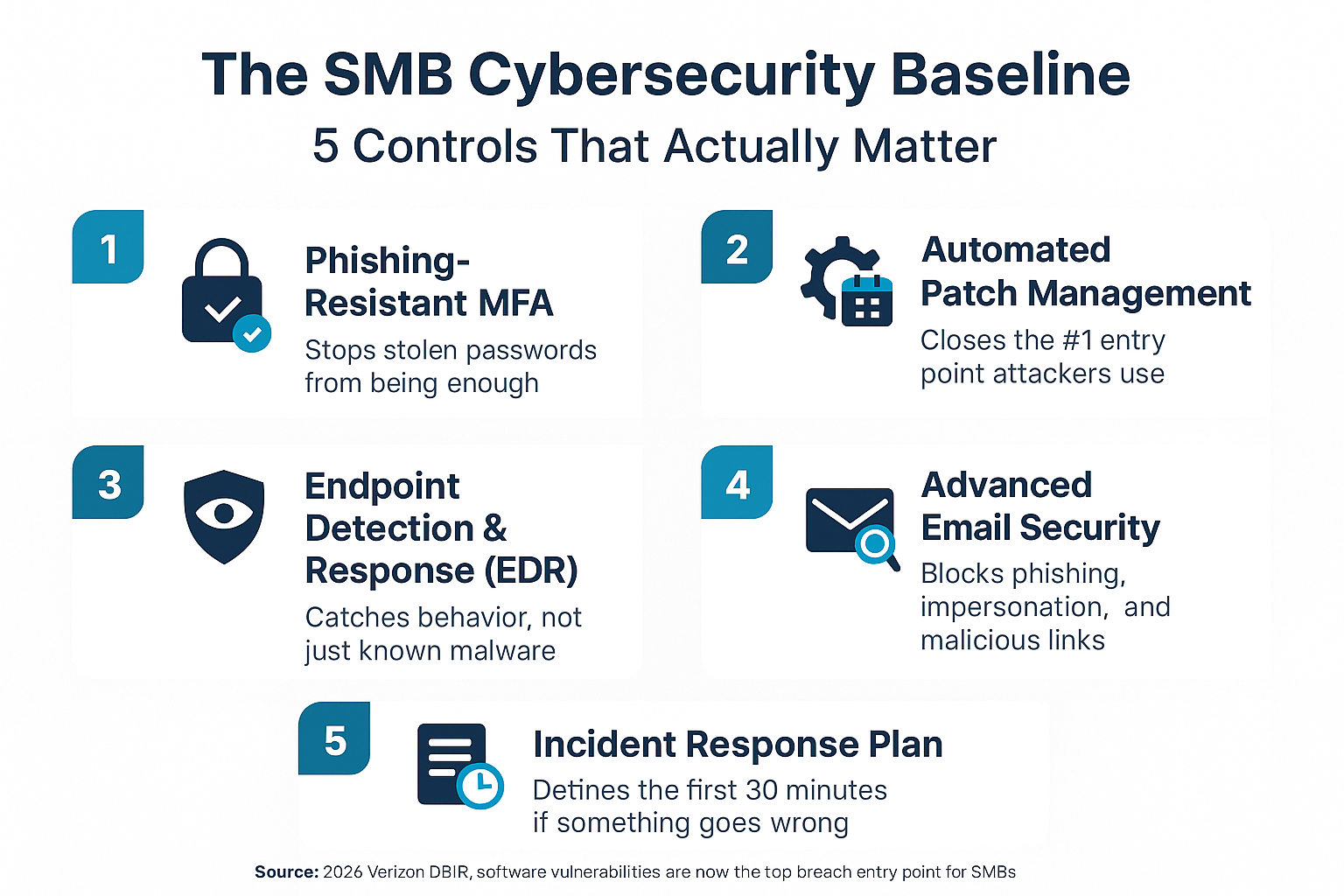
The SMB Cybersecurity Baseline at a Glance
This infographic lays out the five core controls every small business needs to have in place, and what each one actually protects against.
What ‘Good Enough’ Actually Costs When It Isn’t
Several businesses reaching out to IT providers in the Monterey Bay Area are doing so after a scare, not before one. That’s an expensive pattern. Reactive security response is almost always more disruptive and more costly than the controls that would have prevented the incident.
The costs of a breach for an SMB tend to cluster in a few places:
- Downtime, days or weeks of lost productivity while systems are restored
- Data recovery, especially painful if backups weren’t tested or weren’t recent
- Regulatory exposure, California’s data breach notification requirements apply to businesses of any size; if customer data is involved, a breach triggers specific legal obligations with tight timelines. Our article on California’s new breach clock covers what those look like in practice
- Reputational damage, especially in industries like financial services, legal, and healthcare-adjacent work where client trust is the product
For context on what the cybersecurity audit landscape looks like from a compliance angle, it’s also worth reading what California’s new cybersecurity rules mean for Salinas businesses.
The cost of a managed cybersecurity baseline varies depending on the number of users, the tools selected, and whether it’s bundled into a broader managed IT agreement. Businesses in Monterey County generally find that per-user monthly pricing from a managed IT provider is a fraction of what a single incident costs, but the right comparison point is an honest assessment of your current exposure, not a number pulled from a vendor’s pricing sheet.
Baseline Controls: What Each One Protects Against
This table connects each security control to the real-world risk it addresses, the kind of consequences a business owner will actually feel if the control is missing.
| Control | What it protects against | What happens without it |
|---|---|---|
| Phishing-resistant MFA | Account takeover via stolen credentials | A purchased password gives instant access to email, files, and cloud apps |
| Automated patch management | Exploitation of known software vulnerabilities | Attackers find and use unpatched systems, now the leading breach entry point |
| Endpoint detection and response (EDR) | Ransomware and novel malware that bypasses signature scanning | Infections spread before detection; recovery is slower and more costly |
| Advanced email security | Phishing, business email compromise, malicious attachments | Employees receive convincing fake invoices, credential theft attempts, and malware links |
| Documented incident response plan | Uncoordinated, slow response that worsens damage | No one knows who to call or what to isolate in the critical first 30 minutes |
How to Know If Your Current Setup Actually Qualifies as a Baseline
The honest answer for most small businesses is: you probably don’t know for certain, and that’s the problem the financial services contact described so well. Thinking you’re doing okay while being uncertain about whether you actually are.
A security assessment gives you a clear picture of where you stand. It maps your current controls against the gaps attackers actually exploit, identifies which ones are missing or misconfigured, and prioritizes what to fix first based on actual risk rather than vendor upselling.
If you have an in-house IT person or a small internal team, they may already be handling some of this well, but a second set of eyes from an outside team often catches things that are easy to miss when you’re inside the day-to-day. That’s a core use case for co-managed IT, where an outside provider fills gaps without replacing your internal team.
For businesses without any dedicated IT support, the starting point is usually a baseline assessment that tells you what you have, what you’re missing, and what the realistic risk level looks like. From there, you can make decisions with real information instead of guesswork. The related question of what separates a local IT provider from a national one matters here too, a provider who knows Monterey County’s specific compliance and infrastructure context will give you more relevant guidance than a remote vendor with no local footprint.
Frequently Asked Questions About Cybersecurity for Small Businesses
We already have antivirus and a firewall. Isn’t that enough?
For most small businesses today, no. Antivirus catches known malware signatures, and a basic firewall manages traffic, but neither one addresses the two most common breach entry points in 2026: unpatched software vulnerabilities and credential theft. A working baseline needs automated patch management and multifactor authentication on top of those foundational tools. Think of antivirus and a firewall as the door and the deadbolt, useful, but not sufficient if the windows are unlocked.
How does ransomware actually get into a small business?
Usually through one of three paths: a phishing email that tricks an employee into clicking a malicious link, an unpatched vulnerability in software the business is running, or a stolen password used to access a remote login point. The 2025 Verizon DBIR found ransomware in 88% of SMB breaches reviewed, meaning once attackers are in, ransomware deployment is common. The baseline controls described in this article address all three entry paths directly.
What is an incident response plan and does a 15-person business really need one?
An incident response plan is a short documented set of steps your team follows if something goes wrong, who to call, which systems to isolate, how to preserve evidence, and what your legal notification obligations are. Yes, a 15-person business needs one. The first 30 minutes of a security incident are the most important. Without a plan, those 30 minutes get spent figuring out who’s in charge, and during that time, an infection can spread or data can be exfiltrated. The plan doesn’t need to be long. It needs to exist.
Does California law require small businesses to have cybersecurity controls in place?
California has some of the strongest data privacy laws in the country, and they apply to businesses of all sizes if they collect personal information from California residents. The CPRA and related regulations include breach notification requirements with specific timelines, and recent updates have introduced cybersecurity audit obligations for some businesses. The specifics depend on your industry, revenue, and the type of data you handle. Our article on California’s cybersecurity audit rules breaks down which businesses are affected.
How much does a managed cybersecurity baseline typically cost for a small business in Monterey County?
Costs vary based on the number of users, the specific tools included, and whether security is bundled into a broader managed IT agreement. Pricing in this region is generally structured on a per-user monthly basis, and the range depends on what’s included, basic endpoint protection sits at a different price point than a full stack with EDR, email security, patch management, and monitoring. The more useful comparison isn’t the monthly cost versus zero, it’s the monthly cost versus what a single ransomware recovery or breach notification process actually runs. Get a specific assessment done first; pricing makes more sense once you know what your actual gap list looks like.
Ready to Find Out Where Your Business Actually Stands?
If you’re not sure whether your current setup qualifies as a real cybersecurity baseline, a security assessment is the straightforward way to find out. Adaptive Information Systems works with small and mid-sized businesses across Monterey County, from Salinas and the Salinas Valley to Monterey, Seaside, Watsonville, and beyond, and can give you an honest picture of your gaps and priorities without the guesswork. Call (831) 644-0300 or visit adaptiveis.net to start the conversation.