
Direct Answer: The right choice depends on your hardware age, your tolerance for downtime, your backup situation, and your compliance obligations. Neither option is universally better, but a clear framework makes the decision much easier.
At some point, most business owners in the Monterey Bay Area hit the same wall. The server that runs your accounting software or stores your files is getting old, something breaks more often than it used to, and now you have a decision to make. Do you buy new hardware and keep running on-site? Or do you move your workloads to a private cloud environment and hand off the hardware headache?
This is not a theoretical IT question. For a medical office in Monterey, an agricultural operation in Salinas, or a law firm in Watsonville, the wrong answer can mean extended downtime, a compliance problem, or a capital expense that eats your budget for two years. The right answer depends on specifics that national IT vendors rarely ask about.
This article walks through the factors that actually drive the decision, hardware lifecycle, downtime tolerance, compliance requirements, and a few realities specific to Central California, so you can build a clear picture of where your business stands.
What Each Option Actually Means for Your Business
On-premise infrastructure means physical servers live inside your office or a dedicated server closet on your property. Your business owns the hardware, your team or IT provider patches it, and when something fails, a drive, a power supply, a network card, you are the one who absorbs the downtime while it gets fixed.
For small and mid-sized businesses, that model made a lot of sense for decades. But the full cost is easy to underestimate. Hardware refresh cycles run every 3 to 5 years, and a proper server replacement in 2024 carries costs that vary widely depending on specs, storage, and licensing, factors worth pricing out carefully before committing.
Private cloud hosting, in this context, does not mean putting your data on a shared public platform. It means your servers and applications run on dedicated infrastructure inside a managed data center, maintained by a provider, but configured and isolated specifically for your business. You keep the control and data separation that on-premise gives you, without owning the physical hardware or managing what happens when a drive fails at 2 a.m.
The total cost comparison between these two models shifts significantly when you factor in:
- Hardware purchase and scheduled replacement
- Power and cooling for on-site equipment
- IT labor to patch, monitor, and maintain the hardware
- Backup infrastructure and offsite replication
- Downtime costs during hardware failures
When all of those are accounted for across a three-year window, research consistently suggests private cloud can reduce total infrastructure costs compared to on-premises deployments, though the actual range depends heavily on your current setup, your provider, and how much IT labor you are currently spending. A straightforward quote comparison will not show you the full picture without running those numbers.

Why Power Outages Are a Specific Problem for Salinas Valley Businesses
This is the part national IT vendors do not mention. Businesses in the Salinas Valley, and throughout Monterey County, face a physical risk that rarely comes up in a generic cloud versus on-premise comparison: PG&E Public Safety Power Shutoffs.
Wildfire season in Central California runs roughly from late summer through fall, and PSPS events can take power offline for 12 to 72 hours with limited advance warning. A business running a local server in a back room in King City, Greenfield, or Soledad without a generator and a tested uninterruptible power supply is one weather event away from a multi-day outage.
That is not hypothetical. It has happened repeatedly across the Salinas Valley over the past several years. And when a server loses power mid-write, data corruption is a real risk, not just downtime.
A private cloud environment moves that physical exposure to a managed data center with redundant power, backup generators, and climate control, infrastructure that a 30-person agricultural operation cannot economically replicate on-site. For businesses outside Salinas where power reliability is better, this factor matters less. But for anyone operating in an area with documented PSPS exposure, it belongs in the decision.
For a deeper look at how unplanned outages turn into real recovery costs, Does Your Business Have a Real Data Recovery Plan, or Just Backups? walks through what recovery actually looks like when systems go down without tested continuity planning.
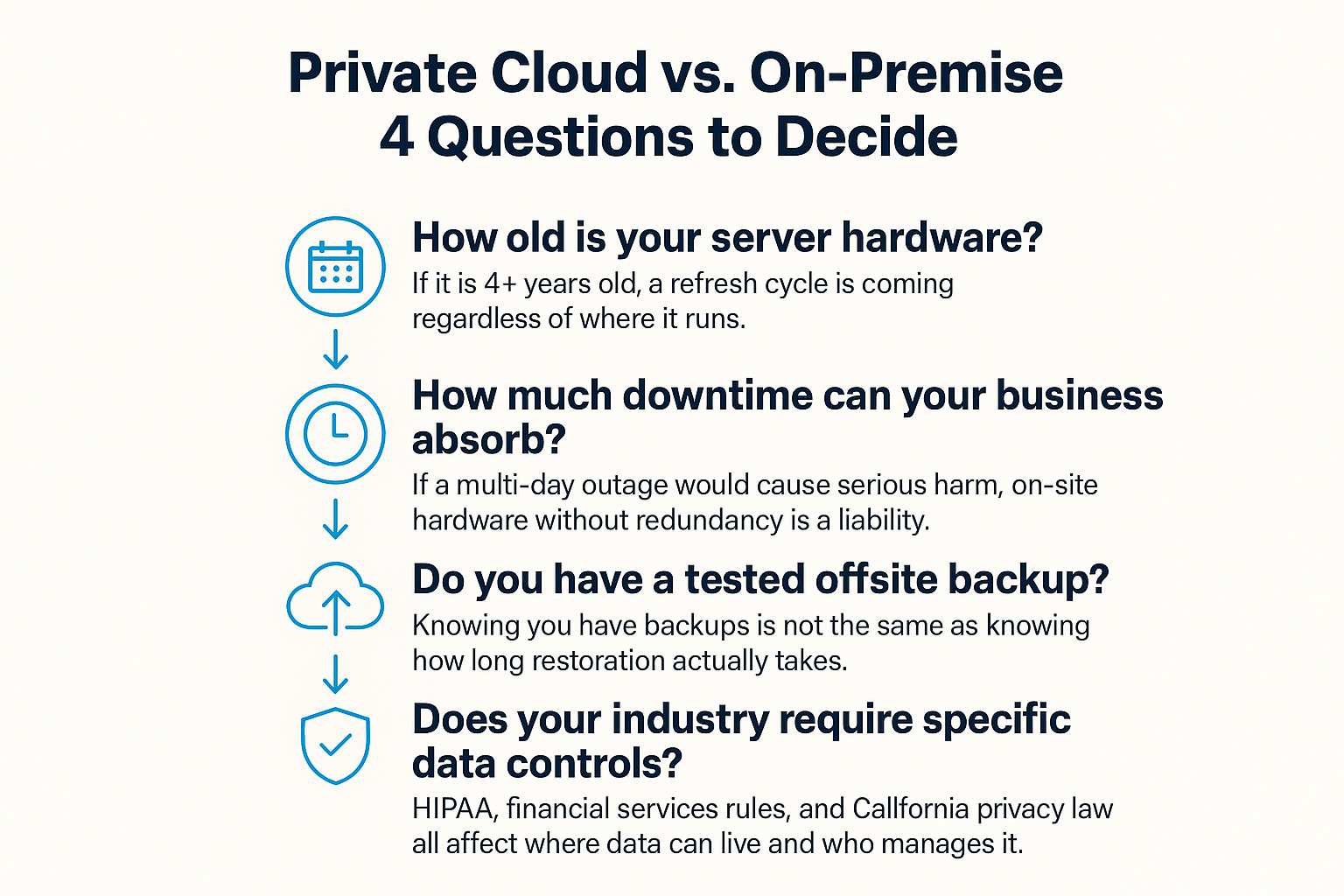
A Four-Question Framework for Making the Decision
Most businesses can narrow down the right infrastructure path by working through four straightforward questions. This framework is designed for business owners and operations managers, not IT specialists.
Where Compliance Enters the Conversation
For many Monterey Bay Area businesses, the infrastructure decision is not just a cost and reliability question. It is a compliance question.
Healthcare-adjacent businesses and medical offices governed by HIPAA need to know which party is responsible for each security control in their environment. On-premise gives you physical custody of patient data, which some compliance arguments favor. But it also places the entire patching, monitoring, and audit trail burden on your organization. Missed patches and undocumented access logs are among the most common HIPAA findings during audits.
Financial services firms and legal offices face similar documentation requirements under California law. And starting January 1, 2026, the California Privacy Protection Agency’s finalized cybersecurity audit regulations add another layer for businesses that process personal data above certain thresholds. The infrastructure you run, and how well it is monitored and documented, is directly relevant to how you demonstrate compliance under those rules.
Cloud-hosted environments can be easier to audit because activity logs, access controls, and patch histories are typically maintained by the provider and available in standardized formats. But that only holds if the shared responsibility model is clearly defined. You need to know exactly which controls the provider handles and which remain yours, and that conversation should happen before you sign a contract, not after.
For more context on how California’s evolving privacy rules affect infrastructure decisions, What California’s New Cybersecurity Rules Mean for Salinas Businesses covers the practical business implications.
On-Premise vs. Private Cloud: Key Factors at a Glance
This table summarizes the core tradeoffs. The right column for your business depends on the four questions in the framework above.
| Factor | On-Premise Servers | Private Cloud Hosting |
|---|---|---|
| Hardware ownership | Business owns and replaces hardware | Provider owns and maintains hardware |
| Upfront cost | Higher capital expense at each refresh cycle (typically every 3-5 years) | Lower upfront, predictable monthly fee |
| Power outage risk | High if no generator or tested UPS on-site | Managed data center has redundant power |
| Patching and maintenance | Business or IT provider responsible | Provider handles hardware; OS/app patching shared |
| Compliance audit trail | Requires internal documentation and monitoring | Logs often standardized and provider-maintained |
| Data recovery speed | Depends on backup infrastructure and restoration testing | Typically faster with provider-managed redundancy |
| Scalability | Requires new hardware purchases to scale | Can scale storage and compute without new equipment |
The Hardware Refresh Question Most Businesses Avoid
One of the most common situations we see is a business running a server that is five or six years old, past its manufacturer support window, running an OS that no longer receives security patches, and treating it as a sunk cost with no refresh plan in sight.
That server is not free to operate. It is accumulating risk. An out-of-support server cannot receive critical security updates, which becomes a direct compliance exposure for regulated industries. And when it fails, not if, the cost of emergency data recovery and unplanned downtime often exceeds what a planned migration would have cost.
The timing of a hardware refresh cycle is one of the best moments to evaluate whether private cloud makes more sense than buying another round of physical equipment. If your servers are 3 years old or older, that conversation is worth having now, not when a drive fails.
For businesses that already have some internal IT capacity but want outside help thinking through infrastructure decisions like this, co-managed IT services offer a way to bring in that expertise without replacing what you already have in-house.
Frequently Asked Questions About Private Cloud vs. On-Premise Servers
Is private cloud the same as putting my data on something like Google Drive or Dropbox?
No. Consumer cloud storage and business private cloud hosting are fundamentally different. A private cloud server environment means your workloads run on dedicated infrastructure in a managed data center, not shared with other businesses, not accessed through a consumer app. You get the security and isolation of on-premise ownership without managing the physical hardware yourself.
What happens to my data if my provider goes out of business?
This is a real question worth asking before you sign anything. A reputable provider will have clear contract language about data portability and what happens to your data if services end. Make sure you understand the exit process and that your data is not locked into a proprietary format that makes migration painful. Ask specifically: how would we retrieve our data, and in what format?
We are a small business with only 15 employees. Is private cloud even relevant for us?
Yes. Private cloud environments scale down to small businesses effectively. A 15-person office paying for shared on-site server maintenance, power, and periodic hardware replacement may actually pay less per month on a hosted private cloud model when total costs are compared honestly. The key is running those numbers across a full three-year window, not just comparing monthly fees.
How do I know my cloud provider is actually keeping my data secure?
Ask for documentation. A serious provider should be able to show you their security certifications (SOC 2 Type II is a common benchmark), their patch management process, their incident response procedures, and how access to your environment is logged and monitored. If they cannot produce those answers clearly, that tells you something. For regulated businesses, you also need a signed Business Associate Agreement if HIPAA applies, and similar documentation for other compliance frameworks.
What if I am not sure my backups actually work?
That uncertainty is one of the most important things to resolve before making any infrastructure decision. Having a backup and having a tested, functional recovery process are two different things. If you have never verified how long restoration actually takes, or whether the backup data is even intact, start there. The answer may change your timeline on everything else.
Can I move some workloads to private cloud and keep others on-site?
Yes, and for many businesses that hybrid approach makes the most sense. A law firm might keep a local file server for frequently accessed case documents while moving email and line-of-business applications to hosted infrastructure. The right split depends on your performance requirements, compliance obligations, and internet reliability at your location. This is the kind of architectural question that benefits from a structured assessment before committing to any one direction. For a sense of what that baseline evaluation looks like, What a Real Cybersecurity Baseline Looks Like for a Small Business covers the assessment process in practical terms.
Ready to Map Out the Right Infrastructure Path for Your Business?
Adaptive Information Systems works with small and mid-sized businesses across Salinas, Monterey, Watsonville, and the broader Central Coast to evaluate exactly this kind of decision, hardware lifecycle, hosted versus on-site tradeoffs, compliance requirements, and total cost of ownership over a realistic timeframe. If your servers are aging, your backup situation is unclear, or you simply want a structured picture of where your infrastructure stands, reaching out is a straightforward next step. Call (831) 644-0300 or visit adaptiveis.net to start the conversation.