
Let's be honest, we've all seen it. That old, familiar tech that runs a business. Whether you're in the Salinas agriculture industry or managing a hotel in Carmel, many businesses in Monterey County run on systems that feel comfortable but are secretly slowing things down. It's easy to fall into the "if it ain't broke, don't fix it" trap. But in today's world, that mindset is one of the biggest risks you can take.
An outdated system isn't just about a clunky screen or slow load times. It's about security gaps that leave you exposed, daily hurdles that frustrate your team, and missed chances to grow. When your software can't talk to modern tools or your team is stuck doing things by hand, you're paying a hidden price in lost time and money.
What Exactly Is a Legacy System?
A legacy system is any outdated technology—software, hardware, or even an old process—that your business still uses for daily operations. It could be that ancient accounting program, a custom-built inventory tracker from ten years ago, or the dusty server in the closet that everyone’s afraid to touch.
These systems earn the "legacy" label because they become a real headache to maintain. They're often expensive to fix, no longer supported by the company that made them, and just can't connect with the modern tools you need to stay competitive. Think of a Pacific Grove boutique using an old cash register that won’t connect to their online store. This forces them to track online and in-store sales on separate spreadsheets. That’s a legacy problem.
And if you're dealing with this, you're not alone. A recent survey found that a huge 62% of organizations still depend on legacy software. For half of them, the reason is simple: it ‘still works.’ But here’s the problem: with 43% of leaders saying security is a huge concern, the risk of doing nothing is getting too big to ignore. You can see more insights from that survey of 2025 IT professionals on Saritasa.com.
The real danger of a legacy system isn't that it will suddenly break. It's that it will slowly drain your business of its efficiency, security, and ability to grow.
Common Signs Your Tech Needs an Upgrade
So, how do you know when "old reliable" has become a problem? Seeing the issue is the first real step. Many business owners get so used to daily tech headaches that they stop seeing them as problems and start accepting them as just part of the job.
It might be time for a change if you're noticing these warning signs.
Warning Signs of an Outdated System
This quick table can help you spot the symptoms of aging technology in your own business.
| Symptom | What It Means for Your Business |
|---|---|
| Frequent Crashes | Every freeze or crash is money down the drain. It directly hits your team's productivity. |
| No Mobile Access | If work stops the minute you leave the office, your system is a roadblock, not a tool. |
| High Maintenance Costs | Spending more on fixes and support than the system is worth? Those costs only go up over time. |
| Security Worries | Old software stops getting security updates, leaving your business and customer data wide open. |
| Can't Integrate New Tools | If you can't connect to modern payment systems or sales tools, you're falling behind your competition. |
Seeing these red flags in your business is a clear signal. It’s time to stop putting out fires and start building a stronger, more secure foundation for the future.
The Hidden Costs of Keeping Old Systems
It's easy to get comfortable with the technology you know. But when you look closer, the true cost of holding onto old systems isn't just about slow computers. It’s about the silent ways they drain your budget and hold your business back. These hidden costs often fly under the radar until a crisis hits, turning a small issue into a major financial headache.
Beyond the daily frustrations, old tech piles up expenses in areas you might not even think about. From high maintenance fees for unsupported software to lost productivity from slow, inefficient tasks, the dollars and cents add up fast. Just imagine a Pacific Grove hotel struggling with a booking system that constantly crashes during the busy summer season—that’s a direct loss of money and reputation.

The Financial Drain of Legacy Tech
Let's break down where the money is really going. These costs are often far more damaging in the long run than paying for a one-time upgrade.
- Skyrocketing Maintenance Costs: As software and hardware get older, finding experts who can still fix them becomes a real challenge. You end up paying high rates for specialized support, and those costs only climb as the technology gets even older.
- Lost Productivity and Efficiency: Think about the time your team wastes on manual workarounds, waiting for slow programs to load, or dealing with system crashes. Every minute of downtime is a direct hit to your bottom line. We have a detailed guide that explores the real financial impact of IT downtime for small businesses.
- Security Vulnerabilities: This is the biggest risk of all. Older systems eventually stop getting security updates. This leaves your business's sensitive data—and your customers' trust—dangerously exposed. A single data breach can lead to huge fines, legal fees, and a loss of customer trust that’s incredibly hard to win back.
This isn't just a "what if" problem. In a critical field like healthcare, over 60% of U.S. hospitals are running key applications on legacy software. This dramatically increases their risk of data breaches, which cost an average of $9.77 million per incident in that industry alone. As these outdated systems stick around, the U.S. has piled up an amazing $1.52 trillion in what's known as technical debt—a burden that makes every future step forward more difficult and expensive.
Understanding Technical Debt
A huge part of these hidden costs is technical debt. The best way to think of it is like financial debt, but for your technology. Every time you choose a quick, easy fix instead of the right, long-term solution, you're taking on a little bit of technical debt.
Over time, this debt adds up. That quick patch from last year makes this year's update more complicated. That old server you kept now stops you from installing modern, secure software. Each shortcut makes future changes more difficult, more time-consuming, and more expensive. The good news is there are proven strategies to reduce technical debt and get your systems back on solid ground.
Sticking with a legacy system is like trying to build a new house on a crumbling foundation. Eventually, the cost of patching the cracks will be much higher than the cost of building a new, solid base.
For businesses here in Monterey County—whether you're in agriculture, hospitality, or another local industry—ignoring these hidden costs is no longer an option. Justifying an investment in modernizing legacy systems becomes much easier when you can clearly see the money argument. It stops being an expense and starts being what it really is: a smart investment in your business's security, efficiency, and future growth.
How to Plan Your Modernization Project
Feeling overwhelmed by the thought of an upgrade? You’re not alone. For a lot of local businesses, the idea of modernizing legacy systems brings to mind huge disruptions and high costs. The good news is, a good plan can turn that anxiety into a manageable, even exciting, process.
Think of it as your game plan. It’s not about ripping everything out at once but about being smart. A good plan turns the big, fuzzy idea of "modernization" into a series of clear, achievable steps. These steps deliver real value to your business, whether you're a Marina-based distributor or a law firm in Monterey.
Take Inventory of Your Current Systems
Before you can plan for the future, you need a clear picture of the present. This means digging in and taking a detailed inventory of every single piece of technology your business uses. Don't just list the software; get into the details of how it actually works day-to-day.
For each system, you need to ask a few key questions:
- What does it do? Pinpoint the exact business task it supports.
- Who uses it? Which departments or team members depend on it?
- What are its pain points? Does it crash all the time? Is it painfully slow? Does it create hours of manual data entry?
- What works well? Are there features your team absolutely loves and can't live without?
This review is more than just a technical checklist; it’s about understanding the human side of your tech. Getting this real-world feedback is critical. In fact, a recent report noted that a shocking 74% of organizations that started a modernization project failed to complete it, often because they skipped this vital planning stage.
Define Clear and Realistic Goals
Once you know what you have, you can finally define where you want to go. Vague goals like "improve efficiency" just won't cut it. You need specific, measurable goals that connect directly to your business's success.
Instead of a generic goal, get specific:
- "Reduce time spent on manual invoicing by 50% within three months by using a new accounting platform."
- "Allow our sales team to access customer data from their phones, increasing their on-site productivity by 25%."
- "Eliminate system downtime during busy hours by moving our booking system to the cloud."
Goals like these do two things. First, they give you a clear target to aim for. Second, they make it incredibly easy to measure your return on investment (ROI) once the project is done. This is the hard data you'll need to prove the project was a success.
A modernization project without clear goals is like driving without a destination. You’ll spend a lot of time and money, but you won't end up where you need to be.
Prioritize and Set a Budget
Let's be realistic: you can't fix everything at once, and you shouldn't even try. Using your system review and clear goals, you can now prioritize what to tackle first. Your focus should be on the systems causing the most pain or holding back the biggest opportunities.
A simple way to prioritize is to score each legacy system on two things: business value and technical condition. A system with high business value but a poor technical condition? That’s a top choice for modernization. A system with low value and poor condition might be better off being retired completely.
Budgeting is where our mission of providing enterprise-level IT at an affordable price really comes into play. A good IT partner will help you explore approaches that spread costs out over time. Maybe you start with a simple cloud migration before moving on to a full software replacement. For a deeper look at the process, you might want to check out a comprehensive guide to legacy application modernization to understand different strategic options.
At Adaptive, we specialize in guiding businesses like yours through these key planning stages. Our expertise in IT migrations and projects ensures you get a realistic, budget-friendly roadmap that causes the least disruption and gives you the best results.
Choosing The Right Modernization Strategy
Once you’ve mapped out your project, the next big question is how to actually modernize your old systems. This isn’t a decision to take lightly, and there's no one-size-fits-all answer. The right path for your business depends on your budget, your timeline, and the specific goals you set during the planning phase.
Choosing a strategy often feels like a balancing act between risk and reward. Let's cut through the technical jargon and look at the most common approaches so you can have a confident, informed conversation with your IT partner.
The Spectrum of Modernization Approaches
It helps to think of modernization as a range of options. On one end, you have quick, low-impact tweaks that score you some fast wins. On the other, you have a complete overhaul that offers the most long-term value but requires a much bigger investment.
Here are the four main strategies you’ll likely see:
- Rehosting (Lift and Shift): The most direct approach. You simply move your current application from an in-house server to a cloud service like AWS or Azure. You make almost no changes to the software itself.
- Replatforming (Lift and Reshape): This is a step up from rehosting. You move your application to the cloud but make a few small changes to take better advantage of what the cloud offers.
- Refactoring (Re-architecting): A much deeper process. Here, you restructure large parts of the application's code to improve its performance, security, and ability to grow. This often makes it a true "cloud-native" app.
- Replacing (Rip and Replace): The most dramatic option. You retire the old system completely and switch to a brand-new solution. This could be a ready-made software product or a new custom-built application.
The global push for modernization is growing fast, with the market expected to hit nearly $25 billion by 2025. A huge part of this growth is the move to the cloud, which now drives over 67% of all modernization projects. More and more, businesses are choosing to redesign their systems because it unlocks greater flexibility and efficiency in the long run. You can dive deeper into these trends in this legacy modernization market report.
Matching the Strategy to Your Business
So, how do you pick the right one? Imagine a logistics company in Marina—they might choose a phased replatforming to avoid disrupting critical shipment schedules. A new startup in Seaside, on the other hand, could go all-in on a full replacement to build their perfect system from scratch.
To make the decision a bit clearer, we've broken down some of the most common upgrade paths below.
Comparing Modernization Strategies
This table offers a quick breakdown of common upgrade paths to help you decide which is right for your business.
| Strategy | Best For | Pros | Cons |
|---|---|---|---|
| Rehosting | Businesses needing a fast, low-cost move to the cloud with minimal disruption. | Quick, low-risk, minimal code changes. | Doesn't fix underlying software issues; limited cloud benefits. |
| Replatforming | Companies that want some cloud benefits without a full rewrite. | Moderate speed and cost; starts using cloud features. | Can be more complex than rehosting; still doesn't address deep code issues. |
| Refactoring | When the main application is still valuable but needs to be more flexible and scalable. | Improves performance and makes it easier to maintain; prepares app for the future. | Slower and more expensive; requires special skills. |
| Replacing | When the current system is too outdated, costly to maintain, or can't meet business needs. | Highest long-term value; aligns perfectly with business goals. | Highest cost, risk, and time commitment; requires significant change management. |
Ultimately, the best choice delivers the most business value with the least amount of disruption.
The infographic below visually compares three of these common approaches—Rehost, Refactor, and Rebuild (a form of replacement)—across the key factors of cost, time, and risk.
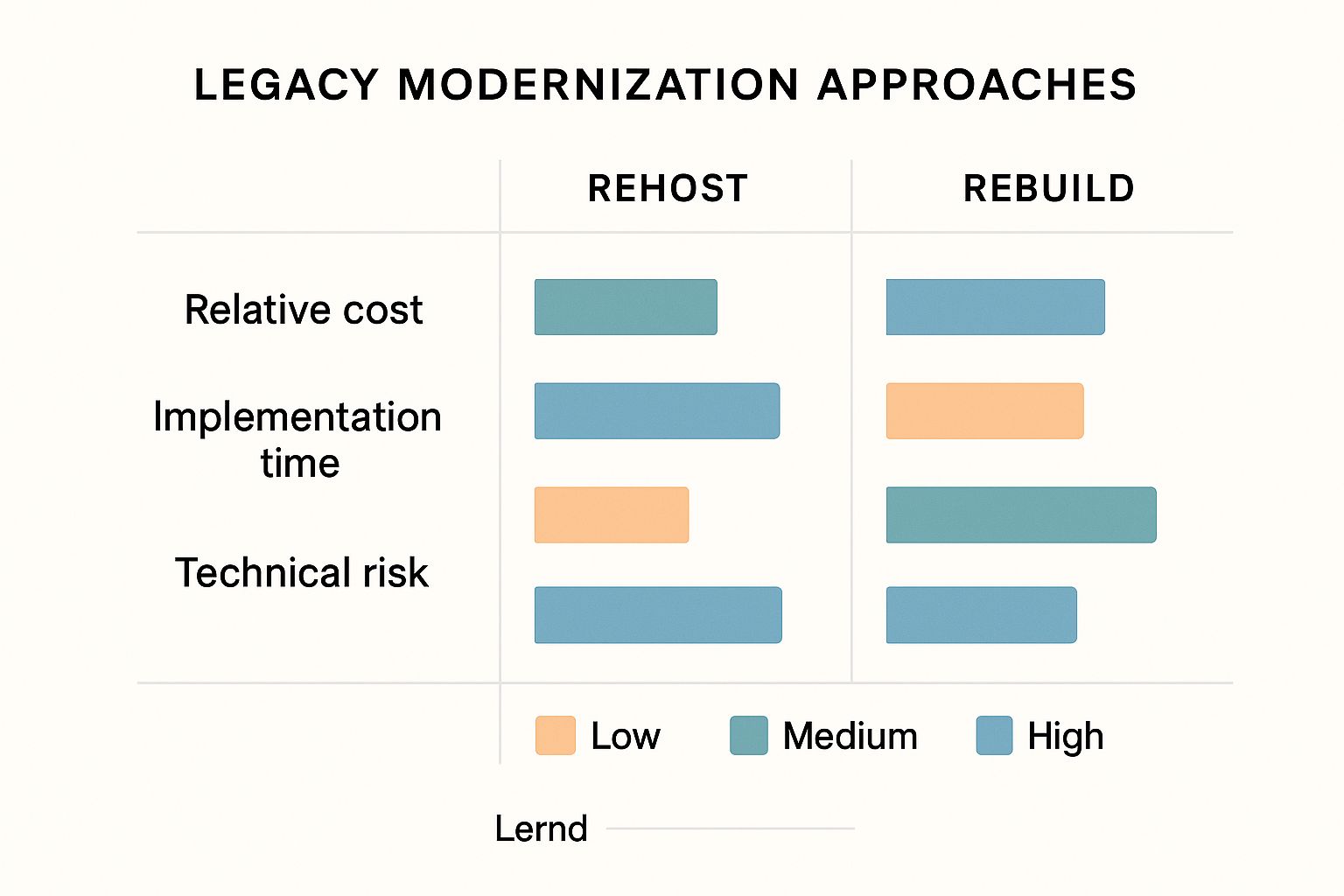
As you can see, a simple rehost is quick and low-risk, but a more intense approach like rebuilding offers the biggest payoff, even if it requires more time and resources.
The goal isn't to pick the most advanced strategy. It's to pick the smartest one for your specific situation.
For example, refactoring might be the perfect fit if your core business logic is solid, but the code is a tangled mess that’s hard to maintain. By cleaning it up, you boost performance without forcing your entire team to learn a new system from scratch.
But if your system is so old it can’t connect with modern tools, a full replacement might be the only real path forward. Often, a successful project involves getting new and old systems to work together. If you want to learn more about that process, our guide explains what system integration is and why it matters.
In the end, the right strategy is one that fits your resources and solves your biggest problems first. It’s about making a practical, smart choice that sets you up for success today and for years to come.
Managing the Transition to New Technology
A great plan is just the beginning. The real success of any modernization project comes down to how you carry it out—the details of putting new technology in place without interrupting the business you've worked so hard to build. This is where the plan becomes reality.
It's about more than just managing technology; it's about managing your people through the change. The goal is a smooth, natural step forward, not a stressful, company-wide shakeup. A well-managed transition introduces tools your team will actually want to use, delivering value from day one and proving the investment was worthwhile.
Finding the Right IT Partner
For any local business in Monterey County, your choice of IT partner is one of the most important decisions you'll make. You're not just looking for someone to sell you software. You need a guide who truly understands the unique challenges of our region.
Think about the seasonal demands of hospitality in Carmel or the complex needs of agriculture in Salinas. A great partner gets it. They act as an extension of your own team.
Look for a provider who speaks plain English, not technical jargon, and puts your business goals first. They should be focused on bringing top-tier solutions to the table that are actually affordable for a small or mid-sized business. A true partnership is built on clear communication and a real commitment to your long-term success.
Using a Phased Rollout to Minimize Disruption
The idea of a single "go-live" day, where everything switches over at once, is enough to cause a panic attack. A much smarter and safer approach is a phased rollout. Instead of a high-stakes gamble, you introduce the new system in manageable, controlled stages.
This method is a game-changer for a few key reasons:
- Reduced Risk: If a problem pops up, it’s contained to a small group. This makes it much easier to fix without bringing the whole company to a stop.
- Easier Training: Your team can learn the new system in smaller, more focused groups. This prevents them from feeling overwhelmed and leads to much better results.
- Valuable Feedback: You can get feedback from the first group of users and make smart adjustments before the company-wide launch.
You might, for example, start by moving only the accounting department to the new software. Once they’re running smoothly, you can roll it out to the sales team. This step-by-step process builds momentum and confidence across your company.
The Most Important Part: Managing Your People
Technology is only as good as the people using it. This is a simple truth, yet the human side of a tech transition is often the most overlooked part of the project. Getting your team on board from the very beginning isn't just a good idea—it's absolutely necessary.
Start by clearly explaining the "why" behind the change. Show your team how the new technology will make their jobs easier, not add another layer of complexity. When they understand the direct benefits—like less manual data entry or fewer system crashes—they'll be your biggest supporters.
The smoothest technology transitions happen when employees feel like active participants in the process, not just people being told about a change they didn't ask for.
Effective training is also key. Go beyond a one-time webinar. Offer hands-on sessions, create easy-to-find instructions, and name a go-to person for questions. You want to create an environment where people feel comfortable asking for help.
Finally, set up a way to get feedback. Check in with your team regularly to see what’s working and what isn’t. Their real-world insights are priceless for fine-tuning the new system and making sure it truly delivers. For businesses with an existing IT staff, you might be interested in exploring how co-managed services can support your IT team through a major change like this.
Where Do You Go From Here?
You've now got a solid roadmap for finally tackling those legacy systems. From spotting the early warning signs to picking the right modernization strategy, you're in a much better position to make smart decisions that will protect and grow your business.
Just remember, modernizing legacy systems isn't a one-time project. It's a journey. The real goal here is to build a strong, efficient foundation that can support your company for years to come. For local businesses in places like Pacific Grove and Monterey, this is what levels the playing field, boosts productivity, and opens up new opportunities for growth. The most important thing you can do now is take action.
Modernization isn't just about swapping out old software. It's an investment in your business's ability to adapt, innovate, and succeed in the years ahead. Having a reliable local IT partner is what makes that journey a success.
At Adaptive Information Systems, we specialize in bringing enterprise-level IT strategy to local businesses without the enterprise-level price tag. We’re here to be your expert guide.
Whether your next step is a simple software update or a full move to the cloud, let's have a conversation about what you actually need. If the cloud is on your mind, our guide to cloud migration for small businesses is a great starting point.
Adaptive Information Systems
380 Main St, Salinas CA 93901 | 831-644-0300 | hello@adaptiveis.net
Got Questions About System Modernization? We've Got Answers.
When you're thinking about a major change like modernizing legacy systems, you’re going to have questions. It’s not just an IT project; it's a huge business decision that impacts your future. We hear the same questions from local business owners all the time, whether they're running a restaurant in Pacific Grove or a farm in the Salinas Valley.
Our job is to cut through the jargon and give you the straightforward answers you need to feel confident moving forward. Every business deserves clear, honest advice, especially when it comes to technology.
How Long Does a Modernization Project Take?
This is usually the first question on everyone's mind. The honest answer? It depends. A simpler project, like moving your server data to the cloud (what we call a "lift and shift" or rehosting strategy), might only take a few weeks. That’s a quick win that can give you an immediate boost in security and accessibility.
On the other hand, something more complex—like completely rebuilding a custom inventory system from the ground up—could take several months. We always push for a phased approach, breaking the project down into smaller, manageable chunks. This way, we minimize disruption to your day-to-day operations so you can keep serving customers without skipping a beat.
Is This Going to Be Too Expensive?
We hear this concern a lot, and it's a completely valid one. At Adaptive, our whole mission is about bringing enterprise-level IT to local SMBs at a price that makes sense. It helps to stop thinking of modernization as an expense and start seeing it as a strategic investment in your business’s future.
The cost of doing nothing—measured in lost productivity, security vulnerabilities, and mounting maintenance fees—is almost always higher in the long run than the cost of a planned upgrade.
That old system is probably costing you money every single day in ways you don't even see. Modernization is about plugging those leaks in your budget, from expensive emergency repairs to the payroll hours you lose every time the system goes down. We'll work with you to map out a flexible strategy that fits your budget and delivers a clear return on your investment.
Will My Team Struggle to Learn New Software?
This is the human side of the equation, and it’s arguably the most important. The short answer is no—not if the transition is handled the right way. A new system is only a success if your team actually uses it and feels good about it.
That’s why our process is about more than just installing software. We focus on:
- Picking User-Friendly Systems: We'll help you select technology that’s intuitive and actually makes your team’s jobs easier, not harder.
- Creating a Solid Change Plan: This involves clear communication about why the change is happening and what the benefits are for everyone involved.
- Providing Hands-On Training: We make sure every single team member gets the hands-on training they need to feel confident and ready from day one.
- Offering Ongoing Support: Questions always pop up after a launch. We’re here to provide ongoing support long after the project is officially "done."
Ready to take the next step toward a more efficient and secure business? The team at Adaptive Information Systems is here to provide the expert guidance and support you need.
Start a conversation with our IT experts today.
Adaptive Information Systems
380 Main St, Salinas CA 93901 | 831-644-0300 | hello@adaptiveis.net