
For any small business in Salinas, the best firewall isn’t some generic, off-the-shelf box. You need what’s called a Next-Generation Firewall (NGFW). This is a modern security tool that gives you powerful protection without breaking your budget or confusing your team.
These aren't the simple firewalls from years ago. They do much more than just filter web traffic. They give you advanced tools to prevent hacking and control which apps your team can use—essentials for keeping your business safe from today’s online threats.
Why Your Salinas Business Needs The Right Firewall

If you're running a business anywhere in Monterey County—from the ag fields of Salinas to a shop in Carmel—you know that technology powers your work. But you might not realize that cybercriminals are now aiming at small, local businesses like yours.
They see you as an easier target than a big corporation. You have valuable customer data but often have less security. This is where a real, business-grade firewall becomes your most important line of defense. Think of it as a digital security guard for your network. It checks all the data coming in and going out and slams the door on anything dangerous before it can cause harm.
Beyond Basic Router Protection
Many business owners think the firewall built into their internet router is enough. Unfortunately, that’s just not true anymore.
Those basic firewalls offer very little protection, leaving you open to more advanced attacks. A dedicated, business-grade firewall provides a much stronger shield.
- Controls Network Access: You set the rules. You can block unknown devices and stop people from accessing private company files.
- Monitors for Threats: It’s always watching your network for signs of an attack and alerts you to any strange activity.
- Protects Customer Data: A strong firewall is a must-have for protecting credit card numbers, client records, and other private information.
Investing in the right firewall isn't just an IT cost; it's a core investment in your business's stability, reputation, and future.
The market for these security tools is growing fast for a reason. The global firewall market for small businesses was valued at around $2.5 billion in 2025 and is expected to grow by about 12% annually through 2033. This growth is happening because of the huge increase in cyberattacks aimed at smaller companies.
A firewall is the foundation of any good security plan. For a deeper look at protecting your digital assets, check out this essential guide to network security for small businesses.
Choosing Your Firewall: Hardware, Software, Or Cloud?
Before you can pick the best firewall for your small business, you need to know the main types. The right choice depends on how your business works—where your team is, what kind of data you handle, and how comfortable you are with IT.
There are three main types: hardware, software, and cloud-based firewalls. Each one protects your network in a different way. We'll break them down with simple examples to help you see which one fits your needs.
Hardware Firewalls: The Physical Gatekeeper
A hardware firewall is a physical device that sits between your office network (your computers and servers) and the internet. Think of it as the main security gate for your whole office building right here on Main Street in Salinas. It checks all traffic trying to get in or out, making it a strong first line of defense.
- Best for: Businesses with one main physical location, like a doctor's office, retail store, or accounting firm.
- How it works: All of your network traffic goes through this one box, where it's filtered based on security rules you set. It creates a strong perimeter around your entire office network.
- Key takeaway: This is a great solution for protecting everything inside a central office but isn't as good at securing remote employees.
Software Firewalls: The Personal Bodyguard
Unlike a single hardware gatekeeper, a software firewall is installed on each computer or server. It acts like a personal security guard for that one device, controlling the traffic that directly enters or leaves it.
Windows Defender Firewall and macOS Firewall are common examples, but you should know that business-level versions offer much more control and better features.
A software firewall is great at protecting individual devices. This is key for stopping a threat that gets past your main gate from spreading from one computer to another inside your office.
Cloud Firewalls: The Offsite Security Service
A cloud-based firewall, often called Firewall-as-a-Service (FWaaS), works entirely from the cloud. Instead of a physical box in your office, your traffic is sent through a secure cloud provider. They filter out threats before they ever reach your network.
This is a perfect fit for modern businesses with remote teams spread across Monterey County or those that use a lot of cloud apps. As you think about moving to the cloud, understanding who provides cloud services in Salinas is a great first step.
For any small business considering this move, security is a top concern. A good technical guide to small business cloud migration can help you understand your options.
Comparing Top Firewall Solutions For Your Business
Choosing the right firewall isn't about picking the one with the most features. It's about finding the perfect fit for how your business actually runs. A solution that works for a single shop in Pacific Grove might be all wrong for a growing hospitality business with staff working from home in Seaside and Marina.
Let's compare the main firewall types. We’ll look at what really matters to your budget and your peace of mind: how much effort they take to manage, their real cost, the security they provide, and how well they support a modern, flexible team.
Ease Of Management
How much time can you or your team really spend managing IT security? Your answer here makes a huge difference.
Hardware Firewalls (UTM Appliances)
People sometimes call these devices "set it and forget it," but that's a dangerous myth. The initial setup can be simple, but they need regular updates and rule changes to stay effective. Without an IT expert on your team, managing these tasks can become a big headache.
Cloud-Based Firewalls (FWaaS)
This is where cloud solutions really help busy owners. You manage everything through a simple web dashboard, and the provider handles all the complex updates and maintenance. This frees you up to focus on your business, not security patches.
The less time you have to spend managing your firewall, the better. A cloud-based or managed solution delivers enterprise-level security without demanding enterprise-level effort from you.
Total Cost And Scalability
Your budget is always a key concern, but it's important to look past the initial price. The true cost includes the hardware, subscription fees, and, just as importantly, the time spent managing it all.
The small business firewall market is booming, growing from $2.68 billion in 2023 to a projected $5.18 billion by 2032. This growth is driven by next-generation and cloud firewalls because they offer the advanced, scalable protection that small businesses now need.
This chart gives you a clear picture of how cost, speed, and user capacity usually scale together.
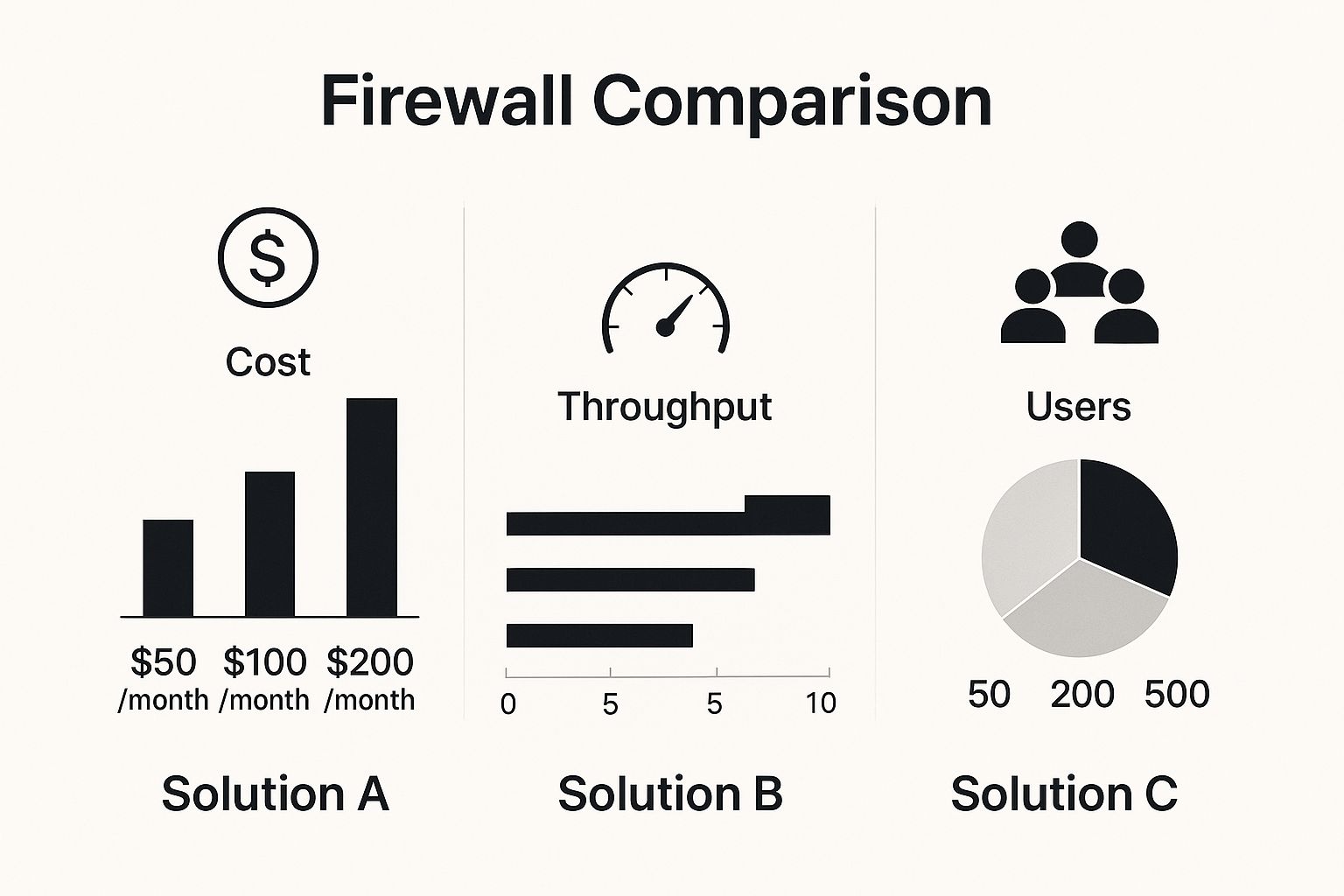
As you can see, a higher monthly cost generally supports more users and delivers faster network speed. This lets your security grow with your business without slowing you down.
To help you see the trade-offs, here’s a quick comparison of the three main firewall types for small and mid-sized businesses (SMBs).
Firewall Solution Comparison For SMBs
| Feature | Hardware Appliance (UTM) | Cloud-Based Firewall (FWaaS) | Software Firewall (NGFW) |
|---|---|---|---|
| Initial Cost | High (Upfront hardware purchase) | Low (Subscription-based) | Varies (Subscription or license) |
| Management | On-site, requires IT expert for updates. | Cloud-based dashboard, provider handles updates. | Managed on each device or from one console. |
| Scalability | Limited by hardware. Upgrades are expensive. | Highly scalable. Adjust subscription as you grow. | Flexible, but can get complex with more users. |
| Remote Support | Poor. Requires a separate, often slow, VPN. | Excellent. Protects users wherever they are. | Good. Protects individual devices anywhere. |
| Best For | Single-office businesses with on-site IT help. | Businesses with remote/hybrid teams or limited IT staff. | Companies needing deep control on specific servers. |
This table shows the key differences. For most small businesses today, the flexibility and easy management of a cloud-based solution often make more sense than a traditional hardware box.
Level Of Protection And Remote Work Support
Finally, how well does each option actually protect your team, especially when they're not in the office? For modern businesses, this is where the differences really matter.
Hardware UTM Appliances
A Unified Threat Management (UTM) appliance is great at providing layers of security for everyone inside your office. It combines a firewall with antivirus, content filtering, and intrusion prevention in one box. The problem? Its protection doesn't automatically follow employees home. Securing them requires a separate VPN setup that can be slow and a pain to manage.
Cloud-Based Firewalls (FWaaS)
For any business with remote or hybrid teams, this is the clear winner. A cloud firewall protects your employees no matter where they are. Security rules are applied in the cloud before bad traffic even gets to their device. This consistent protection is essential for securing a spread-out team and is a key part of modern cybersecurity solutions for small business.
Ultimately, the best firewall is the one that balances powerful protection with how your business really works. For most local companies, a managed or cloud-based solution offers the best mix of strong security, predictable costs, and stress-free management.
What Is A Next-Generation Firewall And Do You Need One?
You’ve probably heard the term Next-Generation Firewall (NGFW). It's easy to think it's just more IT jargon. But an NGFW is a smarter, more powerful version of a traditional firewall. It’s the new standard for any business that is serious about security.
Think of a traditional firewall like a bouncer checking IDs at a door. It looks at the basics—where traffic is from and where it's going—and decides if it gets in. That was fine years ago, but today’s cyber threats are much smarter.
An NGFW is more like a full security team. It not only checks IDs but also looks inside every package coming through. It doesn’t just see the traffic; it understands what's inside the data.
Going Beyond Basic Blocking
The real power of a Next-Generation Firewall comes from its advanced features, which create many layers of defense. These aren't just extra options; they are vital for fighting the complex attacks targeting businesses in Salinas and across the country.
- Deep Packet Inspection (DPI): This is the "package inspection" I mentioned. An NGFW looks inside the data moving across your network. It can spot bad code or sensitive information that a basic firewall would miss.
- Intrusion Prevention System (IPS): An IPS actively scans your network for known cyberattack patterns and shuts them down instantly. It’s like a security system that recognizes a burglar's methods and stops them before they even get to the door.
- Application Control: This feature puts you in charge. You can decide which apps your team can use on the company network. You can block time-wasting social media, but more importantly, you can stop employees from using risky file-sharing apps that could leak client data.
A basic firewall might block a suspicious connection, but an NGFW can see exactly what data is being sent and stop an employee from accidentally uploading sensitive client files to an unapproved cloud drive.
Is An NGFW Right For Your Business?
So, do you really need one? If your business handles any kind of sensitive information—customer records, financial data, patient files—the answer is a strong yes. The threats facing hospitality, agriculture, and financial businesses here in Monterey County demand more than simple filtering.
An NGFW gives you the visibility and control you need to defend against modern threats like ransomware and data breaches. It lets you build smart security rules that fit your business. Getting those rules right is critical, and you can learn more by checking out these firewall rule best practices.
In the end, investing in an NGFW is about moving from a passive defense to an active one. It’s a necessary step to protect your business, your reputation, and the trust your customers have in you.
Choosing The Right Firewall For Your Industry And Budget
Let’s be honest: the "best" firewall isn't a one-size-fits-all box you can just plug in. The right choice for a Monterey law firm protecting client files is very different from what a modern Salinas farm needs to secure its automated ag-tech systems.
Your industry, budget, and the kind of data you handle are what truly matter. The choice often comes down to this: a one-time hardware purchase versus a predictable monthly subscription for a cloud service. A physical device has a bigger upfront cost but can feel more solid. A cloud-based firewall gets you started for less and scales as your business grows.
Matching Security To Your Industry
Some industries have more at stake. If you're in healthcare, finance, or legal services, you’re not just guarding your network—you're legally required to protect client data. Failure isn't an option.
This is where specialized features become essential. For example, any business with a website that takes online payments or stores customer info absolutely needs a Web Application Firewall (WAF). A WAF is designed specifically to protect your web-facing apps from advanced attacks that a standard firewall would likely miss.
The demand for features like WAFs is growing quickly, mainly because of new regulations. For industries like banking and insurance, strong application security is now a core requirement.
The market for small business firewalls is growing for a reason—these strict cybersecurity rules are here to stay. Forecasts show a steady increase, driven by the need for tools like WAFs to protect digital services and sensitive financial data. To get a feel for these trends, you can explore more insights on the web application firewall market.
Budgeting For Real-World Protection
When you're looking at your budget, don't just focus on the sticker price. That cheaper hardware box might look good, but you have to add in the hidden costs of your own time—or an employee's—spent on setup, maintenance, and fixing things when they go wrong.
Here’s a practical way to think about your options:
- Upfront Cost (Hardware): A great fit if your business has a dedicated budget for equipment and the in-house tech skills to manage the device long-term.
- Monthly Subscription (Cloud/Managed): Perfect if you prefer a predictable monthly cost and want to hand off the headaches of security management to experts.
At the end of the day, this is about making a smart, long-term investment. Choosing the right firewall means finding a solution that delivers serious protection without becoming a financial drain or a management nightmare.
Your Local Partner in Firewall Security Management
Choosing the best firewall for your small business is a great first step. But the real work begins right after it's installed. A firewall isn't a "set it and forget it" device; it needs constant attention to protect you from new cyberattacks.
This is where having a local expert makes all the difference. As a busy business owner, you don't have time to monitor network traffic, update security rules, and apply critical patches. And these aren't small tasks—missing a single update can leave your entire business exposed.
We handle this complex work so you can get back to what you do best: running your business. Think of us as your dedicated IT security team. We give you the same level of protection that large corporations have, but at a price that makes sense for a local Monterey County business.
Why Ongoing Management Matters
Effective firewall management is a continuous process, not a one-time project. It’s an active, hands-on job that includes:
- Threat Monitoring: We’re always watching for suspicious activity and can respond before it becomes a real problem.
- Policy Updates: Rules need to be adjusted to safely add new employees, software, or business services.
- Regular Patching: This is a must. We make sure your firewall’s software is always up-to-date to fight the latest threats.
Partnering with a managed service provider means you get proactive security. We don't just fix problems; we work to prevent them from happening in the first place. This saves you from expensive downtime and potential data breaches.
This proactive approach is at the heart of what we do. Learn more about how our managed IT services can give you genuine peace of mind.
Common Questions About Business Firewalls
Deciding on the right firewall for your small business can bring up a lot of questions. As your IT partner here in Salinas, we want to give you clear, simple answers to help you feel confident about your security.
Here are a few of the most common questions we hear from local business owners like you.
How Much Should a Small Business Firewall Cost?
The price really depends on which type you choose. A physical, on-site hardware firewall is a one-time purchase that can run anywhere from $700 to over $1,500 for the device. On top of that, you'll have yearly subscription fees for important security updates.
Cloud-based firewalls use a subscription model, which usually costs between $10 to $100 per user, per month. This way, you avoid the big upfront cost and pay a predictable amount that can grow with your business.
Can I Manage a Firewall Myself?
Technically, yes, you can. But the real question is, should you? For most business owners, it's not a good use of your time. Managing a firewall isn't a "set it and forget it" task. It's an ongoing job that involves updating security rules, constantly watching for threats, and applying critical software patches as soon as they come out.
For most business owners, the time and knowledge needed to properly manage a firewall far outweigh the cost of having a professional handle it. One wrong setting or a missed update can leave your entire network at risk.
How Often Do Firewall Rules Need to Be Updated?
Your firewall rules should not stay the same forever; they need to change as your business changes. Think of it this way: any time your business operations change, your firewall rules probably need a review.
You should update them when you make changes like:
- Hiring new employees or when someone leaves the company.
- Adding new software or cloud services to your daily work.
- Changing how your team gets online, such as moving to a remote or hybrid work model.
A good practice is to have a professional review all your rules at least once every three months. This makes sure your firewall is still giving you the best protection without blocking any real business activity.
Adaptive Information Systems
380 Main St, Salinas CA 93901 | 831-644-0300 | hello@adaptiveis.net