
Picture this: your best employees are all in the same office, but they refuse to speak to each other. One handles sales, another accounting, a third manages inventory. They're all doing their jobs, but nothing is connected. That's exactly what happens when your business software operates in silos.
For a local business in Salinas or anywhere in Monterey County, this means countless hours wasted on manual data entry and a high risk of costly errors. Put simply, system integration is the process of connecting these separate software applications so they can finally "talk" to each other, sharing data automatically and working together as a single, highly efficient team. It's how we bring enterprise-level IT to your local business at a price that makes sense.
Why Your Salinas Business Systems Need to Communicate

As a business owner in Monterey County, you're constantly juggling multiple tasks. You have one system for your sales leads (your CRM), another for accounting (like QuickBooks), and maybe a third for managing your inventory or client appointments. Each one holds a critical piece of the puzzle, but they weren't designed to communicate with each other.
This creates a hidden tax on your team’s time and your company's accuracy. Think about a local hospitality business in Carmel. When a guest books a room online, someone on your team likely has to manually update the reservation system, then enter the payment details into the accounting software, and finally adjust room availability on another platform. Every single step is an opportunity for something to go wrong.
The Problem of Disconnected Data
This daily friction is more than just a minor annoyance; it’s a major operational bottleneck that holds your business back. When your systems are disconnected, you run into several core problems:
- Wasted Employee Hours: Your team spends valuable time on mind-numbing, repetitive data entry instead of focusing on high-value activities like customer service or growing your sales.
- Costly Human Errors: Every time data is copied and pasted from one system to another, there’s a risk of typos or mistakes. A single misplaced decimal in an invoice or an incorrect inventory count can have a real, painful financial impact.
- Lack of Real-Time Insight: You can’t make smart, fast business decisions if you don’t have a complete, up-to-the-minute view of your operations. Pulling reports from three different systems just to get one answer is slow and often inaccurate.
System integration isn't just a technical fix; it's a strategic move to eliminate these inefficiencies. By creating automated pathways for your software to share information, you build a more resilient, efficient, and profitable business.
This urgent need for automation is fueling massive growth. The global system integration market was valued at around USD 461.36 billion and is projected to more than double by 2033, driven by businesses demanding connected, automated workflows.
Signs Your Business Needs System Integration
Still not sure if this is a problem you need to solve? Use this quick checklist to see if you recognize these common daily frustrations at your business.
| The Daily Frustration You Experience | The Underlying System Disconnect | How Integration Provides the Solution |
|---|---|---|
| Your team is constantly copy-pasting customer info from your CRM to your invoicing software. | Sales and accounting systems aren't communicating. | When a deal is marked "won" in the CRM, an invoice is automatically created in your accounting system. |
| You have to manually check inventory levels before confirming an order with a customer. | Your e-commerce platform and inventory management system are separate. | Website inventory is automatically updated in real-time as sales are made, preventing overselling. |
| Generating monthly performance reports takes hours of exporting and merging spreadsheets. | Your data is fragmented across marketing, sales, and operations software. | A central dashboard pulls data from all connected systems, providing instant, accurate business insights. |
| A customer's updated address in one system isn't reflected in the shipping software. | Customer data is not synchronized across all platforms. | Updating a customer's profile in one place automatically syncs the information everywhere else. |
If any of these scenarios sound familiar, it’s a clear sign that disconnected systems are costing you time and money.
Finding the Right Partner
Ultimately, the goal of system integration is to make your technology work for you, not against you. It allows a Salinas agricultural company to instantly sync harvest data from the field with its inventory and accounting systems, giving them a crystal-clear view of profitability in real-time.
Achieving this seamless connectivity requires a partner who understands both the technology and your specific local business needs. A skilled partner can design and implement these connections without disrupting your day-to-day work. To see how a dedicated team can manage this entire process for you, check out our guide on the benefits of local IT service providers.
At Adaptive, we specialize in delivering these enterprise-level solutions at a price that makes sense for your bottom line.
How Different Software Systems Talk to Each Other
Now that we’ve established why disconnected software is a problem, let's pull back the curtain on how system integration actually works. It might sound complex, but the core ideas are surprisingly straightforward. Think of it less like dense computer science and more like managing a busy restaurant kitchen.
For your software to work together, they need a standardized way to communicate, request information, and get answers. This is where two key components come into play: APIs and middleware. Once you get a handle on these, you'll see exactly how a truly connected business operates.
APIs: The Universal Menu for Software
An Application Programming Interface, or API, is one of the most common tools for connecting modern software. Honestly, the best way to understand an API is to think of it as a restaurant menu.
When you sit down at a restaurant, you don’t just wander into the kitchen and tell the chef how to cook your meal. Instead, you use the menu—a predefined list of options—to tell your waiter exactly what you want. The waiter then takes that specific order to the kitchen, and the kitchen sends back your prepared dish.
An API works in the exact same way for your software:
- The Menu (The API): It provides a clear, standardized list of "requests" one program can make to another. For example, your accounting software can use an API to ask your CRM, "Send me the latest customer contact information."
- The Waiter (The Request): This is the action of one system sending a request to another through the API.
- The Kitchen (The Second System): The other program receives the request, processes it behind the scenes, and prepares the "dish"—the data.
- The Dish (The Data): The requested information is sent back through the API to the first program, completing the loop.
This whole process allows your systems to share specific information without needing to know a thing about each other's complex internal "kitchen operations." It's a secure and incredibly efficient way for your sales platform to automatically push customer data to your marketing tool or for your online store to update your inventory system in real-time.
An API is like a universal language for software. It allows different applications to communicate effectively, even if they were built by different companies for different purposes. This is the foundation of modern, automated business workflows.
Middleware: The Universal Translator
So, what happens when you have an older, trusted system that doesn't have a modern API? This is a super common situation. You might have a legacy accounting or inventory system that’s been a workhorse for years, but it just doesn't "speak the language" of your new cloud-based apps.
This is where middleware comes in. Think of middleware as a universal translator standing between two people who speak different languages.
Imagine your English-speaking sales team (your new cloud CRM) needs to communicate with your Spanish-speaking warehouse team (your legacy inventory system). A human translator (the middleware) would listen to the sales team's request in English, translate it into Spanish for the warehouse, and then translate the warehouse's reply back into English.
Middleware does exactly this for your software. It sits between two or more systems and makes communication possible by translating data from one system's format into a format the other can understand. This lets you:
- Connect old with new: Integrate your essential legacy systems with modern cloud applications without expensive, from-scratch custom programming.
- Add new capabilities: Introduce new business rules or logic without having to tear apart the core programming of your existing systems.
- Simplify complex connections: Instead of building dozens of direct, point-to-point links between all your apps, you can connect them all to a central middleware hub.
When you're thinking about how your different software systems can communicate in real time, following a clear set of guidelines is critical for success. To learn more, exploring real-time data integration best practices can provide valuable insight into ensuring seamless and efficient data exchange. By using tools like APIs and middleware, you create a robust ecosystem where every piece of your technology puzzle finally fits together.
The Strategic Benefits for Monterey County Businesses

Knowing what system integration is and how it works is one thing. Understanding its power as a core business strategy is what gives you a real competitive edge. For a Monterey County business, this isn't just a technical upgrade; it's a direct investment in your bottom line, your team’s productivity, and your customers' satisfaction.
When your software talks to each other, you move beyond the daily grind of manual work and unlock tangible, strategic benefits. It’s all about making smarter decisions, and making them faster.
Eliminate Costly Manual Errors
Think about every time an employee has to copy a sales order from your CRM into your accounting software. Every single time, there's a risk of a mistake. A simple typo can snowball into an incorrect invoice, a delayed shipment, or a seriously frustrated customer. These small errors really add up, creating financial leaks and slowly damaging your reputation.
System integration automates these handoffs. When your systems share data on their own, you completely remove the opportunity for human error in those repetitive, mind-numbing tasks. This ensures your data is consistent and accurate across your entire operation, from the first time a customer clicks on your site to the final delivery confirmation.
Boost Team Productivity and Morale
Your best people shouldn't spend their days acting like human copy-paste machines. You hired them for their problem-solving skills, their ability to connect with customers, and their ideas for growing the business. Forcing them to perform tedious data entry is a massive drain on both their time and their morale.
When you automate data flows, you give your team their valuable time back. This frees them up to focus on the strategic work that truly matters. One of the best outcomes of this newfound freedom is a dramatic improvement in how your business runs. For a deeper dive, there are excellent resources on how to improve operational efficiency that align perfectly with this goal.
This shift doesn't just make your business more efficient; it makes it a better place to work.
Gain a 360-Degree View of Your Business
How long does it take you to get a clear, real-time snapshot of your business performance right now? If you're pulling reports from three different systems and trying to merge them in a spreadsheet, your data is already outdated by the time you see it.
System integration breaks down those frustrating data silos, creating a single source of truth. It pulls information from sales, marketing, operations, and finance into one unified view, letting you make informed decisions with confidence.
Imagine a hospitality business in Carmel seeing a guest's entire journey—from their initial website visit to their booking history and post-stay feedback—all in one place. Or picture a Salinas agricultural company instantly syncing field data with its inventory, sales, and financial software. This comprehensive insight is what allows you to spot trends, manage resources effectively, and jump on opportunities before your competitors even know they exist. For many local businesses, achieving this level of insight is a key reason they work with a partner for ongoing support. You can explore more about how this works in our article on managed IT services in Salinas.
This hunger for connected, intelligent systems is fueling huge investments around the world. The system integration market is expected to explode from around USD 590.09 billion to an incredible USD 1,946.37 billion by 2034. As a hub for technology adoption, North America leads this trend, especially in cloud services. These numbers show just how critical this strategy is becoming for businesses of all sizes.
Choosing the Right Integration Method for Your SMB
Once you’ve decided that connecting your software is the right move, the next question is: how? Not all system integration strategies are created equal, and the right approach for a massive corporation isn't always the best fit for a local business in Monterey County.
Choosing an integration method is a bit like planning a road trip. You need to pick the route that best suits your vehicle, your budget, and where you plan to go in the future. Let’s break down the most common approaches so you can have a more informed conversation about the road ahead.
Point-to-Point Integration: The Quick But Brittle Fix
The most basic method is point-to-point integration. Think of it as building a single, dedicated bridge directly between two of your applications, like connecting your CRM to your accounting software. It’s often fast to set up and can solve an immediate, painful data-sharing problem.
But this quick fix comes with a major downside. As your business grows and you add more software, you have to build a new bridge for every new connection. If you have five systems that all need to talk to each other, you suddenly have a tangled mess of ten separate connections. This “spaghetti integration” becomes incredibly fragile and expensive to maintain. If one system gets an update, it can break multiple bridges all at once.
This is why modern integration techniques have largely shifted toward more scalable, API-driven models, as this chart shows.
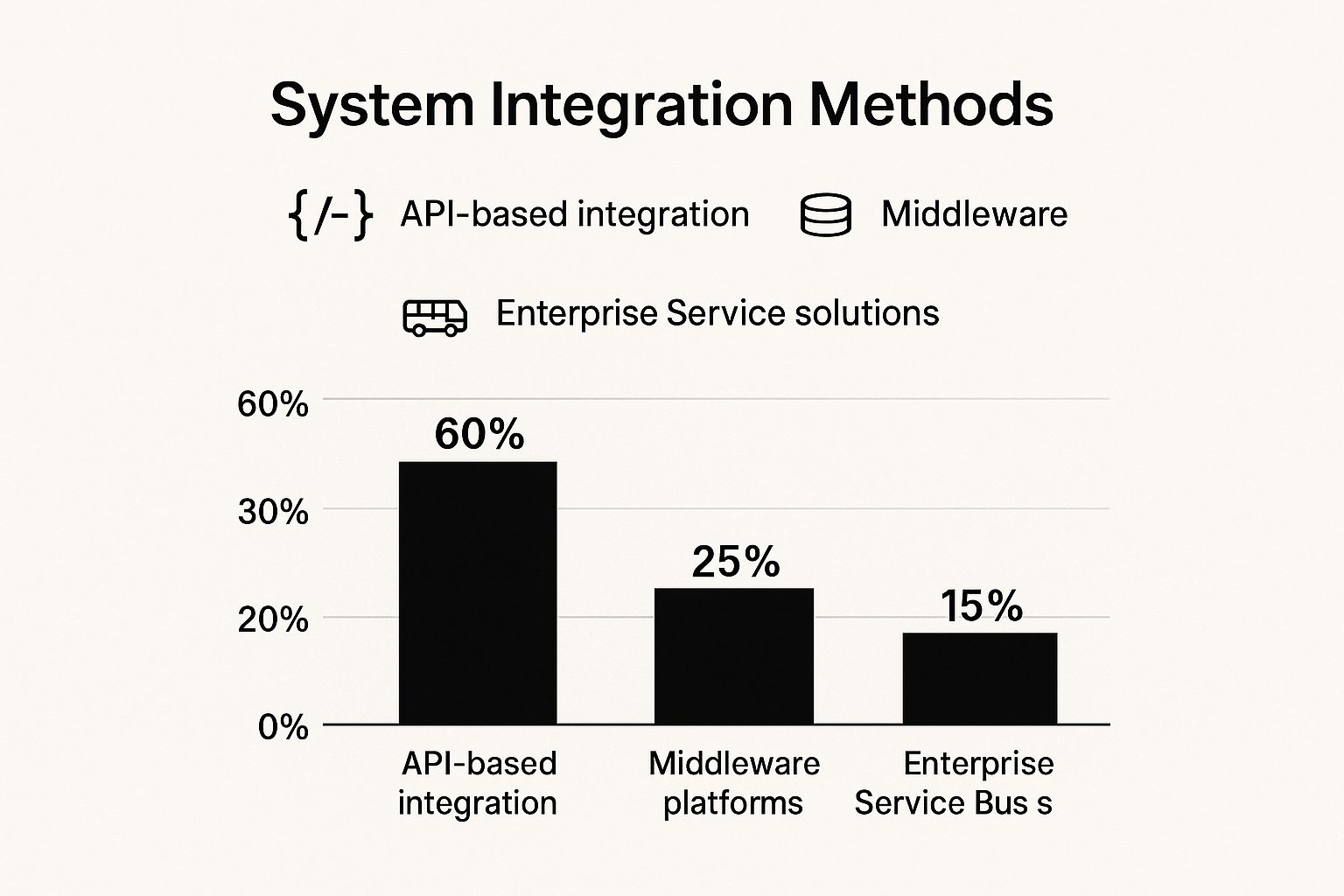
The data is clear: 60% of businesses now prefer API-based integrations for their flexibility and scalability, leaving older, more rigid methods behind.
Hub-and-Spoke Integration: A Scalable Central Hub
A much more organized and future-proof approach is the hub-and-spoke model. Imagine Monterey Regional Airport. Instead of every city having a direct flight to every other city (a point-to-point nightmare), all flights connect through a central hub. The airport handles all arrivals, departures, and transfers in one organized place.
A hub-and-spoke integration works the same way:
- The Hub (Middleware): A central piece of software (often called middleware or an integration platform) acts as your airport terminal.
- The Spokes (Your Systems): Each of your applications (CRM, ERP, marketing tools) connects directly to this central hub with a single "spoke."
When one system needs to send data to another, it sends it to the hub. The hub then translates the data if needed and routes it to the correct destination. This model is far more efficient and easier to manage as you grow. If you add a new piece of software, you just build one new spoke to the hub. If you replace an old system, you just swap out its spoke without disrupting everything else.
The hub-and-spoke model is the foundation for enterprise-level IT at an affordable price. It provides the structure to grow your business without having to completely rebuild your data infrastructure every few years.
Comparing System Integration Methods for SMBs
To make the best choice, it helps to see the methods side-by-side. This table compares common integration methods, helping you understand the trade-offs in cost, scalability, and maintenance.
| Integration Method | Best For | Key Advantage | Main Drawback |
|---|---|---|---|
| Point-to-Point | Simple connections between only two or three systems with no plans to add more. | Fast to implement for a single, immediate problem. | Becomes complex and unmanageable as systems are added ("spaghetti integration"). |
| Hub-and-Spoke | Growing businesses that use multiple applications and plan to add more in the future. | Scalable, centralized, and easy to maintain or update individual systems. | Requires a bigger initial setup and investment in a central integration platform. |
Ultimately, the right method depends on your vision for the future.
Making the Right Choice for Your Business
So, which path is right for you? It really comes down to your current needs and your five-year plan.
- Point-to-Point: Might make sense if you only have two cloud-based apps and a very limited, immediate need. But think of it as a short-term patch, not a long-term strategy.
- Hub-and-Spoke: This is the recommended approach for almost any SMB that plans to grow. It provides the scalability and stability you need to add new tools and services without creating a maintenance headache.
Choosing the right path forward requires careful planning and a clear understanding of your business goals. This is where getting expert advice can save you from costly missteps. Our team specializes in helping local companies figure out this exact challenge. To see how we approach these strategic decisions, learn more about our process for IT consulting in Salinas. We’ll help you build an integration strategy that supports your business today and prepares you for tomorrow.
Navigating the Common Challenges of Integration
Embarking on a system integration project is an exciting step toward building a more efficient and powerful business. But like any significant upgrade, it’s smart to go in with a clear view of the potential hurdles. A successful project isn't about avoiding challenges altogether; it's about anticipating them and having a solid plan in place.
When you understand the common obstacles, you can tackle them proactively instead of being caught off guard. Let's have an honest discussion about the key issues—from managing costs to protecting your data—and how a good plan turns these roadblocks into manageable steps.
Keeping Project Costs Under Control
One of the first questions any business owner asks is, "What will this cost?" It’s a perfectly valid concern. Integration projects can feel like a huge investment, and the biggest financial risk is scope creep—where a simple project slowly expands, causing budgets to balloon without warning.
The best way to prevent this is with a phased rollout. Instead of trying to connect everything at once, we pinpoint the single most impactful integration for your business. We start with the one that will save the most time or eliminate the costliest errors.
This approach lets you:
- Control your budget by focusing on one manageable piece at a time.
- See a faster return on investment, which can help fund future phases.
- Minimize operational disruption by introducing changes gradually.
This strategy makes powerful, enterprise-level results affordable and achievable for local businesses, ensuring you get the most value without overstretching your resources.
Bridging the Gap Between Old and New Systems
Many businesses rely on trusted legacy systems—that older accounting or inventory software that has been a workhorse for years. It’s essential to your operations, but it wasn't designed to talk to modern cloud apps. This can feel like a major integration headache.
The good news is you don’t have to replace what’s already working. The right strategy involves building a "bridge" with modern tools like middleware. This allows your essential legacy software to communicate seamlessly with your new applications, protecting your initial investment while expanding its capabilities. It's all about making your entire tech stack work together, regardless of age.
The goal isn’t to rip and replace your core systems. It’s to enhance them, creating a unified ecosystem where every piece of software, old and new, contributes to a more efficient operation.
Ensuring Data Security Throughout the Process
Connecting different systems naturally creates new pathways for data to travel. This raises a critical question: how do you keep that data secure? Protecting your business and customer information is completely non-negotiable. A security breach during or after integration can be devastating.
This is exactly why security can't be an afterthought. A report from CISA highlights that while 67% of critical infrastructure sectors have integrated their IT and operational systems, those with connected cybersecurity can respond to threats 40% faster.
A secure-by-design approach is essential, embedding safeguards at every stage of the project. This involves things like access controls, data encryption, and continuous monitoring to protect your information. To get a better handle on the basics, check out our small business guide to network security. With a skilled IT partner guiding you, these complexities become just another part of a well-executed plan.
Your Next Steps Toward a Fully Connected Business

So, where do you go from here? Taking that first step toward a truly integrated business is often much simpler than you might imagine. By now, you’ve seen how connecting your systems is the clear answer to ending data chaos, boosting team productivity, and setting your business up for smart, sustainable growth. It's how you start making faster, better-informed decisions.
The best part? You don’t have to be a tech wizard to see these benefits. You just need a dependable local partner who gets your goals and understands the unique hurdles that businesses face right here in Monterey County.
From Strategy to Action
The journey to a fully connected business always starts with a single, straightforward conversation. The goal isn't some massive, disruptive overhaul. It's about making a targeted, strategic improvement that delivers real value. We begin by pinpointing the one integration that will have the most immediate and meaningful impact on your day-to-day work.
This could mean:
- Automating invoicing: Connecting your sales software directly to your accounting system to finally get rid of manual data entry.
- Syncing your stock: Linking your e-commerce store with your inventory management to stop overselling popular items.
- Unifying customer data: Creating a single, clear view of your customer across every platform to deliver standout service.
This focused approach guarantees you see a tangible return on your investment right away, building momentum for the next step. As part of this process, you can also explore how cloud services can save your business time and money.
A successful integration strategy isn’t about just connecting software. It's about empowering your team to do their best work, free from the friction of disconnected tools.
Your Invitation to a Smarter Workflow
You've put in the hard work to build your business. It's time to make your technology work just as hard for you. This is your chance to bring enterprise-level IT efficiency to your local business—at a price that makes sense.
Ready to see what's possible? We invite you to schedule a no-obligation consultation with our team. We'll help you identify the single biggest integration opportunity waiting inside your business and map out a clear, actionable path forward. Let’s build a more efficient, connected future for your company, together.
Adaptive Information Systems
380 Main St, Salinas CA 93901 | 831-644-0300 | hello@adaptiveis.net