
Direct Answer: Most small business firewalls are misconfigured — either too permissive or cluttered with outdated rules. The fix is a documented ‘deny by default’ policy reviewed at least quarterly.
A lot of Monterey County businesses have a firewall. Very few of them actually know what it’s doing — or not doing — on any given day. The firewall gets installed, the technician leaves, and the rules inside it quietly sit there for years without anyone reviewing them.
But a firewall is not a passive shield. It’s a policy engine. The policies running inside it decide what traffic moves in and out of your network. When those policies are sloppy, outdated, or never designed with intent in the first place, the firewall creates a false sense of security while leaving real doors open.
This is one of the most consistent problems we see when auditing small business networks from Salinas to Seaside. The hardware is fine. The rules are the problem.
The Right Starting Point: Deny Everything, Then Add Exceptions
The foundational principle of sound firewall policy is deny by default, permit by exception. Every rule that allows traffic should exist because someone made a conscious decision that a specific business need requires it.
The alternative — allowing everything and blocking only known-bad addresses — is roughly equivalent to leaving your office unlocked and just refusing entry to strangers you recognize. Attackers don’t announce themselves. They walk through doors you didn’t realize were open.
In practice, this means every allow rule should answer three questions:
- What specific traffic does this rule permit (source, destination, port, protocol)?
- What documented business reason justifies it?
- When was it last reviewed?
Rules that can’t answer all three questions are candidates for removal. This isn’t a theoretical exercise — the NIST Cybersecurity Framework treats access control and documented authorization as foundational requirements for any organization managing sensitive data, including the kinds of financial, legal, and health-adjacent records that many Monterey County businesses handle every day.
For organizations already thinking about what California’s cybersecurity rules mean for their operations, a defensible firewall policy is one of the most concrete places to start.
Why Outbound Rules Matter More Than Most People Think
Most small business owners, when they think about firewalls, think about keeping threats out. Inbound rules get all the attention. But outbound rules are where many breaches actually do their damage.
Here’s why. Ransomware and other malware almost always needs to communicate back to a remote server — to receive instructions, to send stolen data, or to deliver an encryption key. Security researchers call these command-and-control connections. If your firewall allows outbound traffic to any destination on any port, that communication happens without a hint of friction.
A firewall with well-defined outbound rules only allows connections to destinations your business actually uses:
- Your cloud applications (Microsoft 365, Google Workspace, your practice management software)
- Your VPN endpoints
- Your email provider’s servers
- Specific vendor portals your team accesses regularly
Everything else gets blocked by default. That one change dramatically reduces the window attackers have to exfiltrate data, even when a device on your network has already been compromised.
For regulated businesses — legal firms in Monterey County, healthcare-adjacent organizations in Salinas, financial services companies on the Peninsula — documented outbound rules also feed directly into compliance requirements. California’s data breach notification obligations apply regardless of how the breach happened, and regulators increasingly expect organizations to demonstrate they had controls in place. If you haven’t reviewed your outbound rules recently, that’s a gap worth closing. Why small businesses are now ransomware’s favorite target gets into the broader threat picture if you want more context.
The Three Rule Categories That Cause the Most Problems
After reviewing firewall configurations across a range of local businesses, three specific types of rules show up again and again as the source of real security risk. None of them are exotic. All of them are avoidable.
1. Vendor and contractor rules that never got removed.
Someone brought in an outside technician to configure a new system. They needed temporary access to a specific port or range of addresses. The rule got created. The project ended. The rule stayed. Six months later, nobody remembers why it exists — but it’s still allowing inbound connections from an external IP range that now belongs to who-knows-what.
This is especially common in Salinas Valley agricultural operations that bring in specialized software vendors during planting or harvest and grant them temporary remote access. That access often persists into the following season without anyone noticing.
2. Rules using ‘any’ as the source or destination.
When someone needs something to work quickly, the path of least resistance is setting the source or destination to “any.” It solves the immediate problem. And it stays that way permanently. A rule that says “allow any traffic from any source to any destination on port 443” is not a security control — it’s a gap with a label on it.
3. Remote access ports open to the open internet.
Port 3389 — the default port for Remote Desktop Protocol (RDP) — is one of the most commonly scanned ports on the internet. Attackers run automated tools around the clock looking for machines that expose RDP without restriction. If your firewall has an inbound rule allowing 3389 from “any” source, you have a known attack surface sitting wide open. Remote access should always be restricted to specific, approved IP addresses or routed through a VPN — never exposed directly.
These three categories alone account for a significant portion of the initial access events that lead to ransomware deployments. Setting up a small business network that won’t fight you later covers the broader architecture questions that go hand in hand with firewall policy.
The Quarterly Firewall Rule Review — What to Check
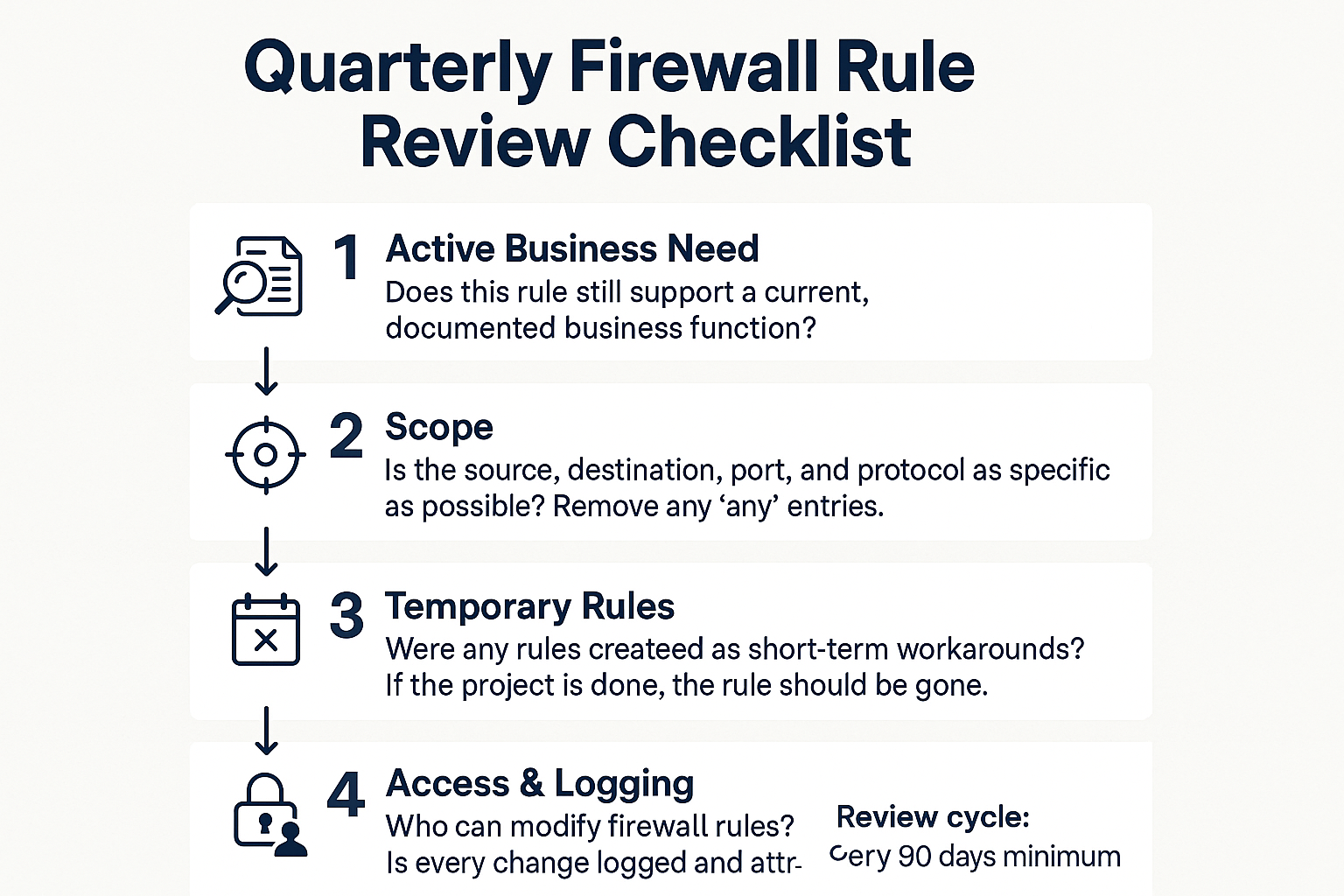
A structured rule review doesn’t take long when you know what to look for. This checklist covers the four questions every review should answer.
Common Firewall Rule Problems at a Glance
These are the rule patterns that show up most often in small business firewall audits — what they look like, and what risk they carry.
| Rule Pattern | What It Looks Like | Risk Level |
|---|---|---|
| Stale vendor access | Inbound allow from an external IP range, no description, created 2+ years ago | High — unknown external party retains access |
| ‘Any’ source or destination | Allow traffic from ANY to ANY on port 80/443/3389 | High — no meaningful restriction on who can connect |
| RDP open to internet | Inbound allow on port 3389 from source: any | Critical — actively targeted by automated scanners |
| Unused outbound allows | Rules permitting outbound to destinations no longer used by the business | Medium — expands the paths malware can use to phone home |
| No rule descriptions | Rules with blank or generic names like ‘temp’ or ‘test’ | Medium — impossible to audit or justify during a review |
Firewall Rule Hygiene Is a Quarterly Practice, Not a One-Time Fix
Getting your firewall rules cleaned up once is a good start. Keeping them clean is a different discipline — and it’s one most small businesses skip entirely.
A quarterly rule review doesn’t have to be a major project. It’s a structured conversation between you and whoever manages your network, working through a short set of questions:
- Does each rule still serve an active, documented business need?
- Is every rule scoped as narrowly as possible?
- Are there any rules that started as temporary workarounds?
- Who has the ability to modify firewall rules, and is every change logged?
For agricultural businesses in the Salinas Valley, the seasonal contractor cycle makes this review especially important. Temporary network access granted during harvest — to irrigation control vendors, crop management software providers, or remote equipment technicians — has a way of becoming permanent access that nobody tracks. A quarterly review catches that before the next season rolls around.
The same applies to any business that runs project-based work with outside vendors. Law firms in Monterey County that bring in IT contractors for a specific implementation, nonprofits that work with grant-funded software vendors, hospitality operations that use seasonal booking platforms — all of them accumulate temporary rules that outlive their purpose.
How businesses catch network problems before employees do speaks to the broader monitoring side of this — because a firewall audit is most useful when it’s part of a wider practice of staying ahead of issues rather than reacting to them. And if your organization is weighing what kind of backup and recovery plan sits behind your security controls, a real data recovery plan is the logical next conversation.
Frequently Asked Questions About Firewall Rules
How do I know if my firewall rules are a problem right now?
The honest answer is that you probably can’t tell without reviewing them. The most telling signs are rules with no descriptions, rules that reference vendors or contractors who no longer work with you, and any rule that uses ‘any’ as the source or destination. If you don’t have a recent log of who made changes and when, that’s also a flag. A basic firewall audit from a managed IT provider can usually surface the biggest issues within a few hours.
Do I need enterprise-level equipment to have good firewall rules?
No. The equipment matters less than the configuration. A mid-range business-grade firewall with well-maintained, documented rules will outperform an expensive appliance with a permissive default policy every time. The discipline of reviewing and tightening rules is what creates security, not the price tag on the hardware.
Is RDP really that big a deal to leave open?
Yes — and this is one of the most consistent things we see in small business firewall reviews. Port 3389 is actively scanned by automated tools around the clock. If your firewall exposes RDP to the open internet without IP restriction, it’s only a matter of time before someone finds it. Remote access should run through a VPN or be locked to specific, approved IP addresses. Closing or restricting that one rule removes one of the most common initial access points attackers use.
How often should we review our firewall rules?
Quarterly is a practical minimum for most small businesses. Organizations in regulated industries — healthcare-adjacent, financial services, legal — or businesses that regularly bring in outside vendors and contractors should treat it as a standing agenda item. The Salinas Valley harvest cycle is a good real-world example: if you grant temporary network access to a contractor in September, that rule needs to be on your radar by January.
Does my IT provider handle this, or is it my responsibility?
If you have a managed IT provider, firewall rule reviews should be part of your service agreement — ask specifically whether it is. If you’re on a break-fix arrangement where you only call when something breaks, rule reviews almost certainly aren’t happening. That’s one of the core differences between reactive support and proactive IT management.
Want to Know What’s Actually Inside Your Firewall?
Adaptive Information Systems works with small and mid-sized businesses across Monterey County — from Salinas and Greenfield to Monterey, Carmel, and Seaside — to review firewall configurations, close known gaps, and set up a review cycle that keeps rules current. If you’re not sure when your firewall rules were last audited, or whether anyone on your team could explain why each rule exists, that’s worth a conversation. Reach us at (831) 644-0300 or visit adaptiveis.net to learn more about how we approach network security for local businesses.