
Direct Answer: When your IT staff is overwhelmed, the practical fix is adding outside support through co-managed IT — not replacing your team, but giving them backup coverage where they need it most.
You hired one IT person — maybe two — and for a while, it worked. But somewhere between adding new staff, switching software platforms, and fielding a wave of security alerts, your IT team went from managing the environment to just surviving it. This is one of the most common situations we hear about from businesses across Salinas, Watsonville, and the Monterey Peninsula.
A stretched IT team doesn’t just get behind on tickets. It starts making decisions under pressure — skipping patches, delaying upgrades, ignoring alerts because there aren’t enough hours to chase every one. That’s where small problems quietly become expensive ones. The real cost of waiting until something breaks adds up faster than most business owners expect.
This article isn’t about convincing you to outsource everything. It’s about helping you understand what your options actually look like when your internal IT capacity doesn’t match your business demands — and what the right move is depending on your situation.
What ‘Stretched Thin’ Actually Looks Like in Practice
There’s a difference between a busy IT team and a team that’s genuinely over capacity. Busy teams get things done — they’re just moving fast. Over-capacity teams start showing specific warning signs that have real consequences.
Watch for these:
- Tickets are taking 2–3 days to resolve that used to be same-day
- Patch cycles are slipping — updates that should happen monthly are running 6–8 weeks behind
- Security alerts are going unreviewed because there’s no time to investigate every flag
- Your IT person can’t take PTO without someone panicking about who covers things
- Strategic projects keep getting pushed — a server refresh or cloud migration that’s been ‘almost ready’ for a year
- Repeat issues keep coming back because fixes are band-aids, not root-cause solutions
If three or more of those sound familiar, your team isn’t just busy — they’re running a deficit. And in industries like agriculture or financial services, where Monterey County businesses operate under real compliance obligations, that deficit creates risk beyond just slow response times.
The signs that your IT support partner is actually protecting your business are worth reviewing here — because a lot of those same checkpoints apply to an internal team under pressure.

The Difference Between Co-Managed IT and Fully Outsourced IT
Most business owners assume their only options are ‘keep the IT team’ or ‘replace them with an MSP.’ That’s not actually how it works.
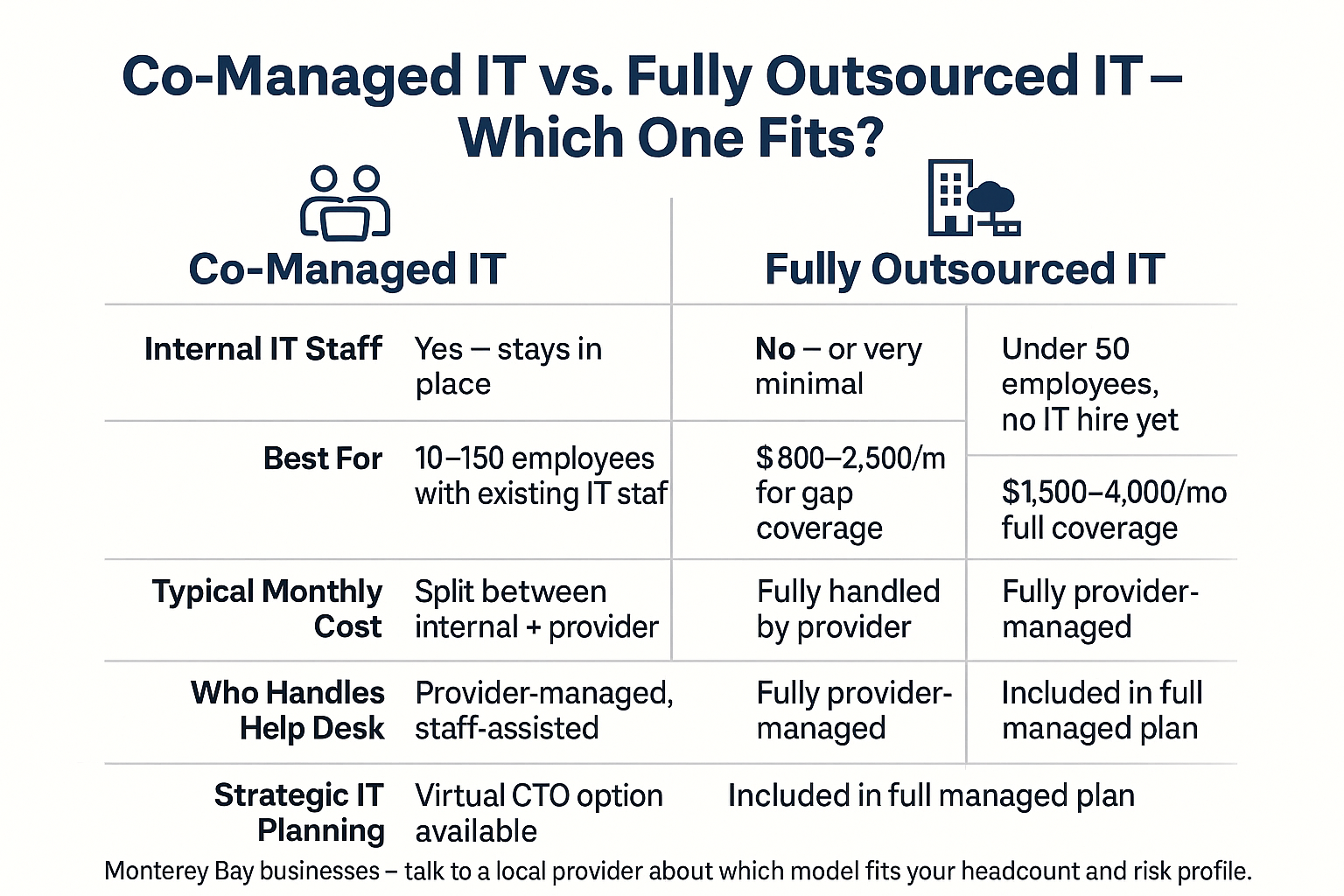
Co-managed IT is a middle path — your internal IT person or team stays in place, and an outside provider fills the gaps. That might mean after-hours monitoring coverage, a dedicated help desk for tier-1 tickets, cybersecurity tools your team doesn’t have time to manage, or a virtual technology officer who handles strategic planning so your IT staff can focus on day-to-day operations.
Fully outsourced IT makes more sense for businesses that don’t have any internal IT staff and don’t want to hire. How small businesses in Monterey are handling IT without an in-house team covers what that model looks like in practice.
The co-managed model works especially well when:
- Your internal IT person has deep knowledge of your specific systems and relationships with your staff
- You need coverage outside normal business hours without paying overtime
- Your team handles day-to-day support well but lacks bandwidth for security, compliance, or infrastructure projects
- You’re growing fast enough that one IT hire won’t be enough, but not fast enough to justify two full-time additions
For a Salinas-area agricultural business managing ERP systems, IoT sensors in the field, and a mix of office and remote staff, co-managed IT can mean your internal person focuses on what they know best while outside support handles endpoint monitoring, backup verification, and compliance documentation.
Cost-wise, co-managed IT typically runs $800–$2,500/month depending on the scope of coverage — significantly less than a second full-time IT hire, which in Monterey County can run $65,000–$90,000/year in salary alone before benefits.
Co-Managed IT vs. Fully Outsourced IT: Which Fits Your Business?
Use this side-by-side breakdown to figure out which model matches where your business actually is right now.
What You Should Actually Do First When the Team Is Overwhelmed
Before you call anyone or sign any contracts, get specific about where the breakdown is actually happening. ‘IT is overwhelmed’ is too vague to solve.
Start here:
1. Map where time actually goes.
Have your IT staff log their time by category for two weeks — help desk tickets, security tasks, infrastructure work, meetings, and reactive emergencies. Most overwhelmed teams discover that 60–70% of their time is absorbed by tier-1 support tasks that could be handled by a lower-cost help desk.
2. Identify what’s being skipped.
Ask your IT team directly: what tasks are consistently getting pushed back? Patch management, backup verification, and security log review are the three things most commonly dropped when a team gets behind — and they’re the three that matter most for risk.
3. Separate ‘can’t do’ from ‘won’t do without more resources.’
Some gaps exist because the work is beyond your team’s skill set — advanced cybersecurity, compliance documentation, or network architecture. Others exist because there aren’t enough hours. Those two problems have different solutions. The first needs outside expertise. The second might need co-managed support, better tooling, or a conversation about priorities.
This is also the right time to think about whether your current setup has grown past what it was originally designed to support. Aging technology problems stay hidden until systems crash — and an overwhelmed team is rarely in a position to catch those warning signs early.
Common IT Gaps and the Right Coverage Model for Each
Not every gap needs the same fix. Use this to match your specific problem to the right type of support.
| Gap You’re Experiencing | Root Cause | Best Coverage Model |
|---|---|---|
| Help desk tickets piling up | Not enough hands for tier-1 support | Co-managed help desk |
| Security alerts going unreviewed | Lack of time or security expertise | Co-managed or fully outsourced cybersecurity |
| No after-hours coverage | Single IT person, no on-call structure | 24/7 monitoring via co-managed or MSP |
| Patches and updates slipping | Reactive workload crowds out maintenance | Automated managed patching |
| No IT strategy or roadmap | Staff focused on ops, not planning | Virtual Technology Officer (VTO) |
| IT person leaving or out sick | Single point of failure | Fully outsourced or co-managed backup |
When It Makes Sense to Keep Some IT In-House
There’s a real case for maintaining internal IT staff — especially for businesses with 50 or more employees, highly specialized systems, or operations where an on-site presence matters. A winery in Carmel Valley or a produce shipper in the Salinas Valley might have equipment, software, or regulatory requirements that benefit from someone who knows the business intimately.
The question isn’t whether internal IT has value. It’s whether your internal team is positioned to succeed, or whether they’re set up to fail because the workload doesn’t match the headcount.
When it makes sense to keep some IT in-house goes deeper on this — including the headcount thresholds and business types where internal IT is genuinely the right call.
For most small to mid-sized businesses in Monterey County, the answer ends up being a hybrid. Internal staff who know your business, backed by outside expertise that covers the gaps they can’t realistically fill alone. And critically — what separates a local IT provider from a national one matters here, because a co-managed partner who doesn’t know your systems, your region, or your compliance landscape creates its own set of problems.
Frequently Asked Questions About IT Staff Capacity and Co-Managed IT
Will bringing in outside IT support make my current IT person feel threatened?
This comes up a lot, and it’s worth addressing directly. Most internal IT staff who are overwhelmed are actually relieved when outside support comes in — because it means they stop being the single point of failure for everything. The key is framing: the outside partner handles tier-1 tickets and after-hours monitoring so your IT person can focus on the work that actually requires their specific knowledge. When roles are clearly defined, it works well. When it’s ambiguous, it causes friction. Get clarity on scope before anything else.
How quickly can a co-managed IT arrangement be set up?
Onboarding typically takes 2–4 weeks for documentation, tool deployment, and getting a new provider familiar with your environment. Some critical coverage — like remote monitoring and after-hours alerting — can be active faster, sometimes within the first week.
What if my IT team doesn’t want to share access or documentation with an outside provider?
That resistance is usually about trust, not about access. It’s worth understanding why before pushing through it. Sometimes the concern is job security. Sometimes it’s that the environment has undocumented workarounds your IT staff is embarrassed about. A co-managed engagement built on a clear scope agreement — with defined boundaries about who manages what — tends to resolve this faster than mandating access from above.
Is co-managed IT cheaper than hiring another full-time IT employee?
Almost always, yes. A second IT hire in Monterey County costs $65,000–$90,000/year in salary before benefits, PTO, and employer taxes. Co-managed support covering comparable gaps typically runs $10,000–$30,000/year depending on scope. The tradeoff is that you get coverage but not a dedicated employee with full-time availability and institutional knowledge.
What happens if my IT person leaves and I’m partly relying on them?
This is one of the strongest arguments for getting co-managed IT in place before you need it. When an outside provider already has your systems documented, your environment monitored, and your help desk covered, an unexpected departure doesn’t become a crisis. It becomes a transition. Businesses that have no outside IT relationship and lose their only IT person are in a much harder position.
Ready to Figure Out Where Your IT Gaps Actually Are?
Adaptive Information Systems works with small to mid-sized businesses across Monterey County — from Salinas and Watsonville to the Monterey Peninsula — to build co-managed and fully managed IT arrangements that fit what the business actually needs. If your team is running behind and you want a straight conversation about what the options look like, call (831) 644-0300 or visit adaptiveis.net to start that conversation.