
Direct Answer: Most small businesses in Monterey handle IT by outsourcing to a managed services provider — getting full IT support at a predictable monthly cost, without hiring a full-time employee.
Most small businesses in Monterey County don’t have an IT department. No dedicated technician, no helpdesk ticket system, no one watching the network overnight. When something breaks, the owner calls a nephew or posts in a Facebook group.
That approach works — until it doesn’t. A ransomware attack on a Salinas-area ag distribution company, a server failure during peak harvest season, a compliance audit that turns up missing security documentation. These aren’t hypothetical scenarios on the Central Coast. They happen here, to businesses with 10 to 75 employees who never thought they were big enough to be a target.
But there’s a more practical question underneath all of that: if you can’t afford a full-time IT hire, what do you actually do? This article explains how local businesses are solving that problem — and what the real trade-offs look like.
Why Hiring an In-House IT Person Doesn’t Add Up for Most Monterey Businesses
A mid-level IT generalist in Monterey County earns somewhere between $65,000 and $90,000 per year in base salary. Add health benefits, payroll taxes, PTO, and the cost of keeping their certifications current, and you’re looking at $85,000 to $115,000 annually for one person who may or may not have experience in cybersecurity, cloud infrastructure, compliance, and networking all at once.
For a 20-person company running on thin margins — which describes a lot of the professional services firms, small manufacturers, and ag-adjacent businesses operating between Salinas and King City — that’s not a realistic line item.
And even if you could afford it, one person can’t cover everything. They go on vacation. They get sick. They have blind spots. If your business handles any kind of sensitive client data, one generalist without a team behind them is a compliance and continuity risk, not a solution.
This is the core reason managed IT services exist: to give small businesses access to a full team — helpdesk, network engineers, security analysts, a virtual CTO — for a monthly flat fee that’s often less than half the cost of one full-time hire. For many businesses in Monterey County, that fee lands between $1,200 and $4,500 per month depending on the number of devices, complexity, and service tier.

What Managed IT Actually Covers Day-to-Day
When business owners hear ‘managed IT,’ they often picture someone who shows up when things break. That’s closer to the old break-fix model — and it’s why so many small businesses eventually switch away from it.
A managed services agreement covers ongoing operations, not just emergencies. In practice, that means:
- 24/7 monitoring of servers, firewalls, and endpoints — problems get flagged before users notice them
- Patch management — operating system and software updates applied on schedule, not whenever someone remembers
- Helpdesk access — employees call or submit a ticket when something isn’t working, and someone picks up
- Backup verification — not just setting up backups, but confirming they actually run and can be restored
- Security monitoring — watching for unusual login attempts, data movement, or malware activity
- Vendor management — your MSP deals with your internet provider, software vendors, and phone system so you don’t have to
For a law firm in Monterey handling confidential client files, or a dental office in Seaside navigating HIPAA requirements, this isn’t optional infrastructure — it’s the floor. The alternative is hoping nothing goes wrong and scrambling when it does.
One thing worth understanding: a good MSP doesn’t just fix problems. They track aging technology before it causes a crash and plan replacements before the equipment fails mid-workday.
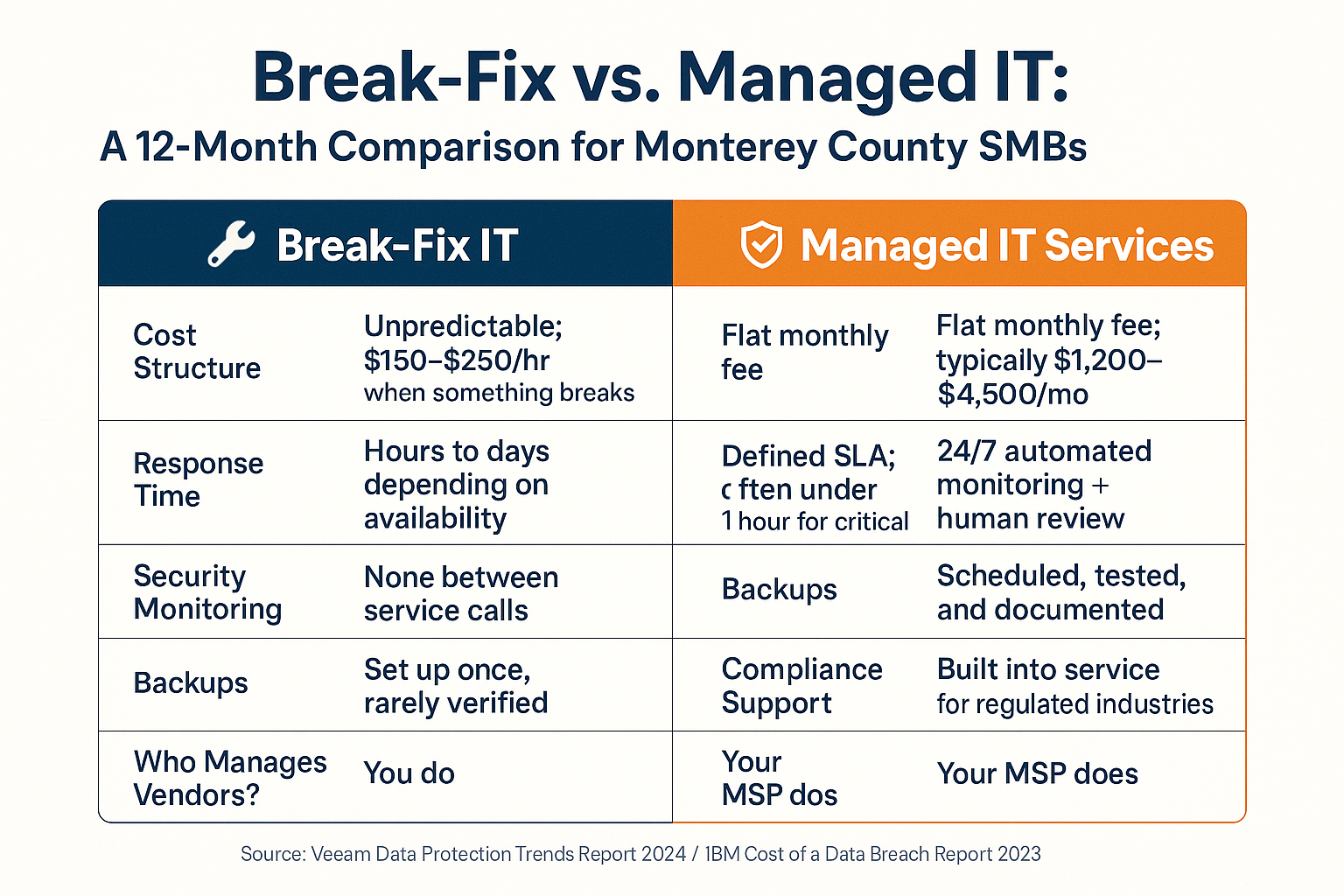
Break-Fix vs. Managed IT: What the Difference Looks Like Over 12 Months
This comparison lays out the real operational and financial difference between reactive break-fix IT and proactive managed IT services for a typical Monterey County small business.
The Cybersecurity Problem Most Small Businesses Underestimate
Small businesses are not too small to be targeted. According to the 2023 Verizon Data Breach Investigations Report, 43% of data breaches involve small businesses. And the average cost of a data breach for a small to mid-sized business now exceeds $200,000 — enough to close most of the companies operating in Salinas or along the Monterey Peninsula.
The Central Coast has some specific risk factors worth naming directly. Agricultural businesses in the Salinas Valley increasingly rely on networked equipment, sensors, and cloud-connected platforms. A compromised credential doesn’t just expose email — it can touch operational systems. Meanwhile, California’s data breach notification law (Civil Code §1798.82) requires businesses to notify affected individuals ‘in the most expedient time possible’ after discovering a breach. Non-compliance carries real legal exposure.
For businesses in industries like financial services, healthcare-adjacent organizations, or education, the compliance layer is even more demanding. If you’re not sure where your business stands, understanding what compliance with a security standard actually requires is a useful place to start.
The businesses in Monterey County that are handling this well aren’t necessarily spending more money. They have a managed IT partner who built security controls into the baseline — endpoint protection, multi-factor authentication, email filtering, and documented incident response procedures — rather than treating security as an add-on they’ll get to eventually.
And when wildfire season creates power disruption risks or coastal fog causes connectivity issues along Highway 1, having a tested backup and disaster recovery plan isn’t dramatic preparation — it’s just common sense for a business that can’t afford to be down for two days.
Managed IT Cost Ranges for Monterey County Small Businesses
These are realistic monthly cost ranges based on business size and service scope — not quotes, but a reasonable baseline for planning purposes.
| Business Size | Typical Monthly Range | What’s Usually Included |
|---|---|---|
| 10–20 employees | $1,200 – $2,200/mo | Helpdesk, monitoring, patch management, basic security, backups |
| 21–50 employees | $2,200 – $4,000/mo | Above + advanced endpoint security, compliance documentation, vendor management |
| 51–100 employees | $4,000 – $7,500/mo | Above + network infrastructure management, MDM, strategic IT planning (VTO) |
| 100–200 employees | $7,500 – $14,000/mo | Full managed stack, co-managed options, dedicated account management |
How to Evaluate Whether an IT Partner Actually Understands Your Market
Not all managed IT providers are equal — and the difference between a local MSP and a national one matters more than most business owners realize when they’re comparing pricing.
A national provider may offer a lower headline number, but they don’t know that Pacific Gas & Electric outages during Diablo wind events can take out connectivity across the Salinas Valley for hours. They don’t know the compliance landscape for California-licensed businesses, and they can’t send someone on-site to your Watsonville office when remote access isn’t cutting it.
When evaluating a potential IT partner, the practical questions are:
- Do they have clients in your industry? A firm that supports agricultural operations understands different risk profiles than one focused on retail.
- What’s their response time commitment in writing? Verbal promises aren’t SLAs.
- Can they show you a documented backup and recovery procedure? Not describe one — show you one.
- Do they carry cyber liability insurance? If they’re managing your systems and something goes wrong, that matters.
- Are they proactive or reactive? Ask them to describe the last three problems they caught before a client noticed them.
The signs that your IT support partner is genuinely protecting your business go beyond whether they answer the phone. And if you want to understand what separates a local provider from a national one in practical terms, that comparison is worth reading before you sign anything.
For a business owner in Carmel running a boutique hospitality operation, or a nonprofit in Marina managing donor data, the right IT partner isn’t just technically capable — they understand what’s at stake for your specific organization in this specific region.
Frequently Asked Questions About IT Support for Small Businesses in Monterey
What’s the difference between managed IT and just paying someone hourly when things break?
Break-fix IT is reactive — you pay $150 to $250 per hour when something fails, and nothing happens between calls. Managed IT is proactive — a team monitors your systems constantly, patches vulnerabilities before they’re exploited, and handles helpdesk requests as part of a flat monthly fee. Most businesses find managed IT costs less over 12 months than unpredictable break-fix bills, and they have far less downtime.
Is managed IT worth it for a business with only 10 or 15 employees?
Yes — and businesses this size are often the most exposed. Smaller teams typically have no one with IT training, limited backup procedures, and no security monitoring. A 10-person company storing client financial records or health-adjacent data carries real compliance and liability risk. Managed IT at this size typically runs $1,200 to $1,800 per month, which is far less than one data breach or one week of unplanned downtime.
What happens if something goes wrong and my MSP needs to come on-site?
A local MSP can dispatch a technician to your location. A national or remote-only provider cannot. For businesses in Salinas, Monterey, Seaside, or Watsonville, on-site response matters — some problems simply can’t be resolved remotely, particularly hardware failures or network infrastructure issues.
Do managed IT providers handle compliance requirements like HIPAA or California data privacy law?
Good ones do, or at least help you get there. Compliance support — documenting security controls, managing access policies, preparing for audits — is often included in mid-tier and higher managed service agreements. If your business is subject to California’s data breach notification law, HIPAA, or financial services regulations, you should ask any prospective MSP exactly how they support compliance documentation before signing a contract.
What should I look for in a managed IT contract?
Look for a clearly defined Service Level Agreement (SLA) with specific response time commitments, a list of what’s included versus billed separately, and clear language around data ownership and backup procedures. Month-to-month or annual contracts are both common — be cautious of multi-year lock-ins before you’ve established trust with the provider.
Can a managed IT provider also help with phones and remote work setups?
Yes. Most full-service MSPs handle VoIP phone systems, remote access tools, and mobile device management as part of their service stack or as add-ons. If your team works from home part of the week — common across the Monterey Bay Area since 2020 — a good MSP will ensure those remote connections are as secure and reliable as your in-office setup.
Ready to Stop Running IT on Your Own?
If your business is somewhere between ‘we figure it out as we go’ and ‘we need a real plan,’ Adaptive Information Systems works with small and mid-sized businesses across Monterey County — from Salinas to Carmel to Watsonville — to build IT infrastructure that runs reliably without requiring a full-time hire. Call (831) 644-0300 or visit adaptiveis.net to talk through what your business actually needs.