
Direct Answer: Yes — slow internet directly cuts into employee productivity, customer experience, and revenue. Most businesses don’t notice the full cost until they start measuring it.
Your employees aren’t complaining about slow internet because they’re lazy. They’re complaining because it’s eating their day — and yours. A two-second page load delay might sound trivial until you multiply it across every cloud app, every video call, every file transfer happening across your office simultaneously.
For businesses in Salinas, Watsonville, and across Monterey County, this problem hits different. Many commercial areas here — especially in agricultural and light industrial corridors along the Salinas Valley — are still running on infrastructure that wasn’t built for the way modern businesses actually operate. VoIP calls drop. Cloud-based ERP systems crawl. Remote workers lose connections mid-task.
This article focuses on two things that actually matter: what slow internet is really costing you in measurable terms, and how to figure out whether your network is the problem or your internet plan is. Those are different problems with different fixes, and mixing them up wastes money.
What Slow Internet Actually Costs — In Real Numbers
Most business owners think of slow internet as an annoyance. Accountants and operations managers should think of it as a line item.
Research from Ookla and various workforce productivity studies consistently shows that employees lose between 30 and 60 minutes per day to connectivity delays — waiting for files to sync, sitting through buffering, re-dialing dropped calls, and retrying failed uploads. At an average loaded labor cost of $35–$55 per hour for a typical Monterey County office worker, that’s $875 to $1,375 in lost productivity per employee per month.
That math changes fast when you have 20 employees.
Beyond productivity, slow internet affects:
- VoIP call quality — choppy audio and dropped calls erode client relationships and, for medical or legal offices, can create compliance exposure
- Cloud application performance — tools like Microsoft 365, QuickBooks Online, and Salesforce degrade measurably under constrained bandwidth
- Video conferencing reliability — Zoom and Teams require a consistent 3–4 Mbps per active stream just to maintain HD quality
- Backup windows — if your nightly backup can’t complete before business hours resume, your disaster recovery plan has a gap you probably don’t know about
For ag-tech operations and packing facilities in the Salinas Valley that are increasingly running connected equipment and IoT sensors alongside office infrastructure, unmanaged network strain can quietly undermine both sides of the business at once.

Your Internet Plan Might Not Be the Problem
This is where most businesses waste money. They call their ISP, upgrade to a faster plan, and two weeks later the problem is still there. That’s because slow internet inside your building is usually a network problem, not a bandwidth problem.
Here’s a simple test: run a speed test directly on a laptop plugged into your modem with an ethernet cable. Then run the same test on a workstation two offices down connected over Wi-Fi. If the numbers are dramatically different, your ISP delivered what they promised — your internal network is the bottleneck.
Common internal causes of slow performance include:
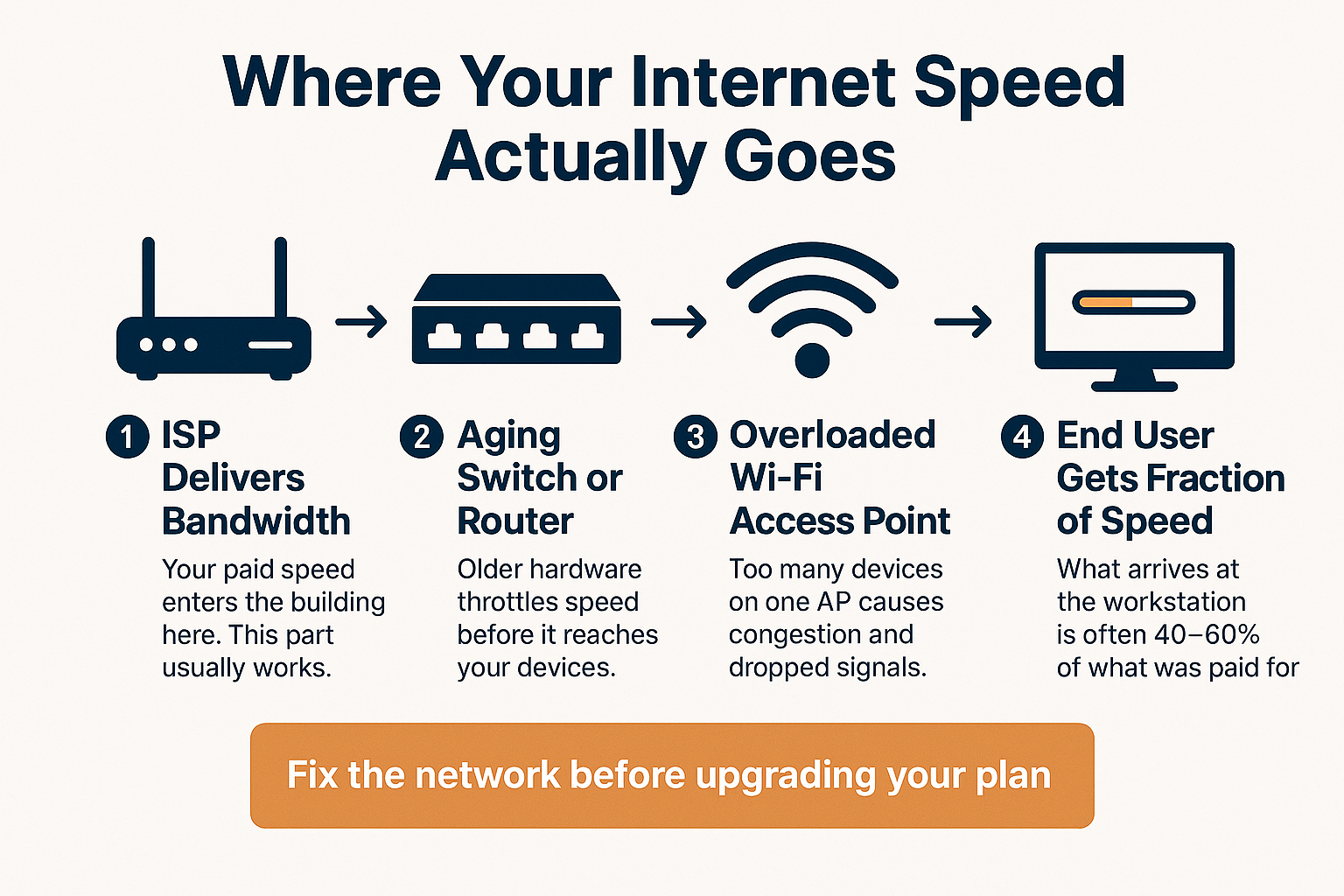
- Aging switches and routers — hardware older than 5–7 years often can’t process modern traffic volumes at rated speeds
- Overloaded Wi-Fi access points — a single consumer-grade access point covering an entire office floor creates congestion the moment more than 15–20 devices connect
- No traffic prioritization (QoS) — without Quality of Service rules, a large file download from one workstation can degrade VoIP call quality for the entire office
- Flat network architecture — when every device from the lobby kiosk to the accounting server shares the same network segment, everything competes for the same bandwidth
Enterprise-grade networking — the kind designed for business environments with 20 or more users and mixed device types — separates these traffic flows by design. It’s not about expensive hardware for its own sake. It’s about building a network that matches how your business actually runs.
For businesses that have grown quickly, or that added remote workers after 2020 and never revisited their on-site infrastructure, this gap is extremely common.
How Network Bottlenecks Build Up Inside Your Office
This infographic breaks down the four stages where a business network commonly loses speed — from the ISP connection to the end user’s screen.
Internet Speed vs. Business Use — What You Actually Need
Bandwidth requirements vary significantly by how your team works. This table gives rough guidance for common business use cases, assuming simultaneous users.
| Business Use Case | Minimum Speed Needed | Notes |
|---|---|---|
| 10 employees, basic email + web browsing | 50–100 Mbps download | Low demand; most plans cover this easily |
| 20 employees using Microsoft 365 + Teams | 200–300 Mbps download | Video calls and cloud sync add up fast |
| VoIP phones (10 active lines) | 10–20 Mbps dedicated upload | Upload quality matters more than download for calls |
| Cloud-based ERP or POS system (retail/ag) | 300+ Mbps, low latency | Latency under 50ms critical for real-time data |
| Remote workers connecting via VPN | 50 Mbps upload minimum | Each VPN user adds symmetric load on office side |
| Nightly cloud backup (100GB+ data sets) | Dedicated after-hours bandwidth | Backup should never compete with business-hours traffic |
When It Is Time to Call Your ISP — and What to Ask For
If your internal network checks out but speeds are still lagging, then yes — your plan may need an upgrade. Before you call, know what you’re asking for.
Symmetrical bandwidth matters for businesses in a way it doesn’t for residential customers. Consumer plans are built for downloading (streaming, browsing). Business operations — VoIP, cloud backups, video conferencing, remote desktop sessions — all require strong upload speeds too. Ask specifically for a plan with symmetrical or near-symmetrical upload and download rates.
In Monterey County, fiber availability varies significantly by location. Salinas proper and parts of Monterey and Marina have better fiber infrastructure than rural areas of the Salinas Valley or south county communities like Soledad and Greenfield. If fiber isn’t available at your location, fixed wireless or dedicated business broadband may be the most reliable alternative — and the real cost of staying on an inadequate connection adds up faster than most business owners expect.
Also ask about SLAs (Service Level Agreements). Business-grade ISP accounts typically come with guaranteed uptime and faster restoration windows than residential plans. If your ISP can’t tell you their SLA for your account, that’s a meaningful signal about how they’ll respond when something goes wrong.
For businesses that have layered in work-from-home setups since 2020, it’s also worth revisiting whether your remote work infrastructure has aged in ways that amplify connectivity problems — aging VPN hardware and outdated router firmware are common culprits that get overlooked.
Frequently Asked Questions About Slow Business Internet
How do I know if slow internet is hurting my employees’ productivity right now?
Start by asking your team directly — but be specific. Ask how often they experience delays opening cloud applications, how frequently video calls drop or degrade, and whether file uploads or downloads interrupt their workflow. Then run a speed test from a wired workstation (not Wi-Fi) at peak business hours and compare it to the speed you’re paying for. A gap of more than 30–40% between purchased and delivered speed is worth investigating.
We just upgraded our internet plan and it’s still slow. What’s going on?
Almost certainly a network issue inside the building. The most common causes are aging routers, overloaded wireless access points, and unmanaged traffic competing for the same bandwidth. Run a direct ethernet speed test to isolate whether the problem is your ISP delivery or your internal infrastructure. Nine times out of ten with this scenario, it’s the latter.
What’s Quality of Service (QoS) and do we actually need it?
QoS is a setting on business-grade routers and switches that lets you tell your network which types of traffic to prioritize. VoIP calls, for example, need consistent low-latency delivery. Without QoS, a large file download can crowd out a phone call and make it sound garbled. If you run VoIP phones or do a lot of video conferencing, QoS isn’t optional — it’s the difference between calls that work and calls that don’t.
Does Wi-Fi ever make sense as the primary connection for a business office?
For lower-demand use cases — a small office with under 10 employees doing mostly email and web browsing — Wi-Fi can work fine with the right access point hardware. But for anything more demanding, wired ethernet connections for stationary workstations will always outperform Wi-Fi in speed, reliability, and security. Wi-Fi should be a complement to a wired infrastructure, not a replacement for it.
Can slow internet create security problems, not just productivity problems?
Yes, in a few ways. Security updates and patches are often large files — if your bandwidth is constrained, updates may fail silently or get skipped, leaving systems vulnerable. Slow connections also affect backup completion. If your backup window can’t finish before business hours resume, you may have gaps in your recovery data that you won’t discover until you actually need it. That’s a significant risk for any Monterey County business subject to California’s data breach notification requirements.
Not Sure Whether the Problem Is Your Network or Your ISP?
Adaptive Information Systems works with small and mid-sized businesses across Monterey County — from Salinas and Watsonville to Monterey and King City — to diagnose exactly where connectivity problems are coming from before recommending any changes. If your team is dealing with slow apps, dropped calls, or unreliable remote access, it’s worth getting a real answer rather than guessing. Call us at (831) 644-0300 or visit adaptiveis.net to start a conversation.