
Direct Answer: Ask them specific questions about your industry, local regulations, and regional infrastructure risks. A provider who knows your area will have real answers, not generic ones.
Most IT providers will tell you they can support any business, anywhere. And technically, a lot of them can — remotely. But there’s a real difference between an IT company that can connect to your systems from a call center in Phoenix and one that actually understands what it means to run a business in Salinas, Watsonville, or Monterey.
In the Monterey Bay Area, that difference shows up in specific ways. It shows up when your IT provider doesn’t understand California’s data breach notification requirements. Or when they’ve never heard of the compliance pressures facing agriculture operations in the Salinas Valley. Or when wildfire season rolls around and your backup and recovery plan looks nothing like what a business at real risk of power disruption actually needs.
This article lays out what local IT knowledge actually looks like — not as a sales pitch, but as a practical checklist for any business owner trying to figure out whether their current provider is genuinely equipped for this market.
What ‘Local IT Knowledge’ Actually Means in Practice
A lot of IT providers use the word ‘local’ loosely. They might have a satellite office in the region, or they might just have a local phone number that routes to a national support desk. Actual local knowledge is something you can test.
A provider who genuinely understands the Monterey Bay Area should be able to speak specifically to:
- California’s data breach notification law (Civil Code §1798.82), which requires businesses to notify affected individuals within a reasonable time — and has specific rules about what counts as a breach
- Agricultural sector compliance, including the tech and data security requirements that come with food safety certifications like FSMA and SQF — relevant to any grower, packer, or shipper operating in the Salinas Valley
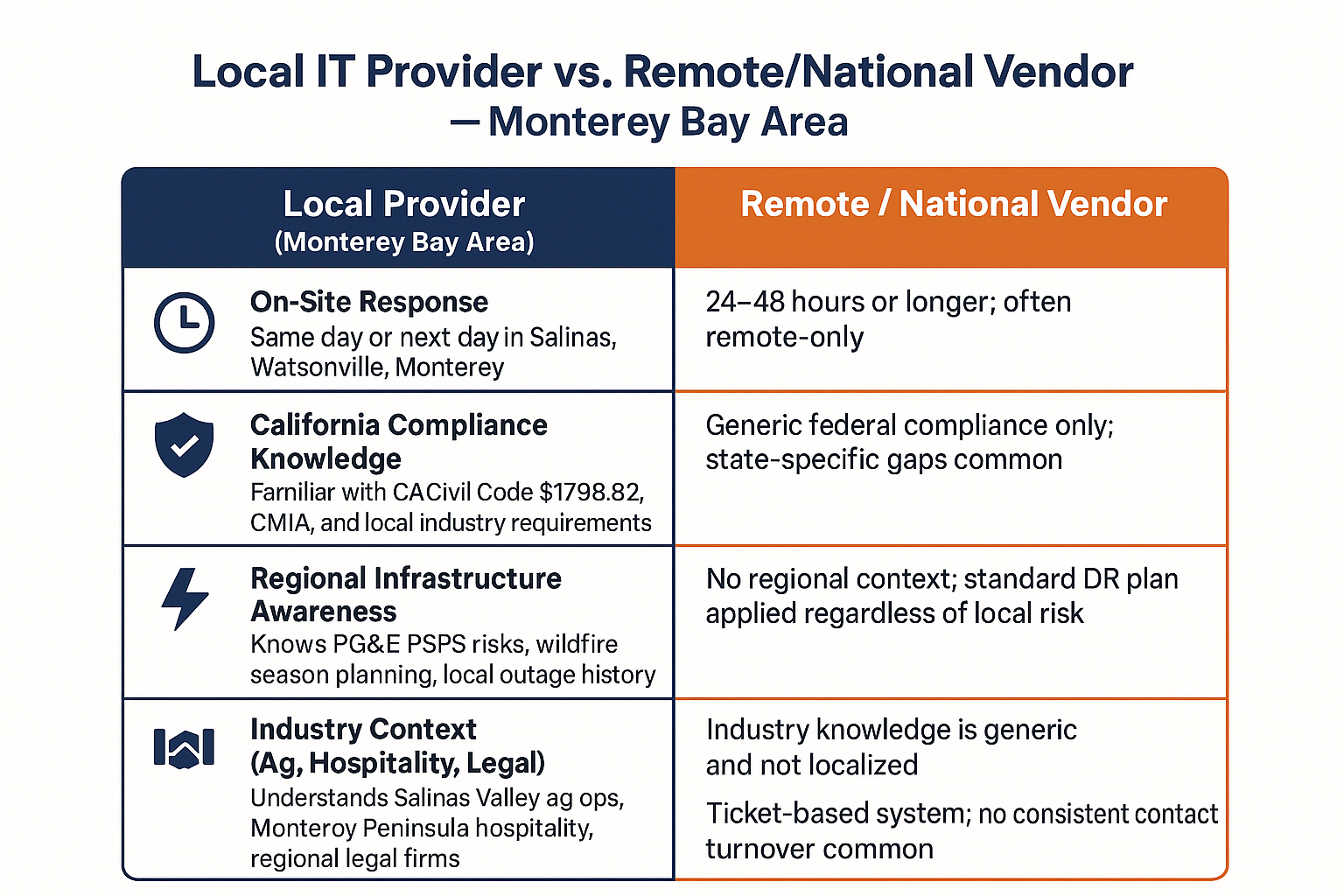
- Regional infrastructure risks, including PG&E’s Public Safety Power Shutoff (PSPS) program, which has affected businesses in Salinas and the surrounding areas during wildfire season
- Industry-specific regulations that apply to healthcare-adjacent organizations, financial services firms, and school districts throughout Monterey County
If your current provider gives you blank stares on any of those, that’s a real gap. It doesn’t mean they’re bad at IT — it means they’re not equipped to give you advice that fits your actual situation. And advice that doesn’t fit your situation can be as costly as no advice at all.
You can read more about why some industries have a harder time finding IT support that accounts for these regional and industry factors.

The Questions That Separate Real Local Knowledge From the Sales Pitch
When you’re evaluating an IT provider — or auditing the one you already have — there are a few direct questions that will tell you quickly whether they know this market.
Ask them about your industry first. A provider covering Monterey County should be able to name the compliance frameworks that matter to your sector without you prompting them. If you run a medical billing office in Seaside, they should bring up HIPAA and California’s CMIA without being asked. If you run a legal firm in Monterey, they should know what data retention and confidentiality obligations look like in practice, not just in theory.
Ask what happens during a power event. The PSPS program is real here — PG&E has cut power to parts of Monterey County during high fire-risk periods, sometimes with very short notice. A provider who knows this market will have a concrete answer about how your backups, your VoIP systems, and your remote access hold up when the grid goes down. What does ‘immutable backup’ actually mean for your business? is worth reading if you’re not sure your current backup strategy would survive an unplanned outage.
Ask about response time — and mean it. Remote support is fine for a lot of issues, but some problems require someone on-site. Ask specifically how long it takes to get a technician to your building. A national MSP managing clients across six states may quote you 24-48 hours for an on-site visit. A provider headquartered at 380 Main St. in Salinas can have someone at your door in a fraction of that time.
Local vs. Non-Local IT Provider: What the Differences Look Like
This breakdown shows the specific ways a locally rooted IT provider differs from a remote-only or national vendor — across the areas that matter most to Monterey Bay Area businesses.
Why the Monterey Bay Area Creates Specific IT Challenges
The Monterey Bay Area isn’t just a geographic region — it’s a mix of industries, infrastructure conditions, and compliance environments that most generic IT frameworks aren’t built for.
The agriculture sector alone creates unusual IT demands. Growers and packers in the Salinas Valley operate with seasonal spikes, field-deployed devices, and increasingly complex food safety data requirements. Managed IoT is becoming standard in modern ag operations — and if you want to understand why that matters for security, what problems happen when IoT devices aren’t properly managed? explains it clearly.
On the coast, the hospitality and tourism economy around Monterey, Pacific Grove, and Carmel creates different pressures — high staff turnover, point-of-sale systems that need to stay PCI-compliant, and guest Wi-Fi networks that have to stay completely isolated from internal business systems. A provider who doesn’t understand that landscape may set up a network that looks fine on paper and fails a compliance audit.
And then there’s the wildfire and power shutoff risk that Central California businesses have learned to take seriously. An IT provider who’s genuinely local will build backup and disaster recovery plans that account for multi-day outages — not just overnight server failures. If you’re not confident your current setup would hold up, is my cloud backup enough to protect my small business? walks through what a real answer to that question looks like.
IT Provider Evaluation: Questions to Ask and What a Good Answer Looks Like
Use this as a practical checklist when evaluating a new IT provider or reviewing your current one. The ‘red flag’ column shows what vague or evasive answers actually sound like.
| Question to Ask | Strong Answer | Red Flag Answer |
|---|---|---|
| What California data privacy laws apply to my business? | Names Civil Code §1798.82, explains notification timelines, asks about your industry | Says ‘we follow all applicable laws’ without specifics |
| How do you handle PSPS or power outage events? | Explains backup power, cloud failover, and communication protocol for your team | Says ‘we have disaster recovery’ without describing what that means for local outages |
| How fast can you get someone on-site? | Gives a specific timeframe based on your location — same day or next day from a nearby office | Says ‘we handle most things remotely’ and avoids committing to on-site response time |
| Who will I talk to when I call for support? | Names a specific contact or team and describes escalation process | Says ‘our help desk team’ with no further detail on who that is or where they’re located |
| Do you have other clients in my industry? | Names industries served in the region and describes relevant experience | Gives a generic answer about serving ‘all types of businesses’ |
The Break-Fix Trap and Why It’s Worse When Your Provider Doesn’t Know Your Market
One of the most common frustrations we hear from businesses across Monterey County is that their IT provider only shows up when something breaks. That reactive model is already a problem on its own — but it’s an even bigger problem when the provider doesn’t understand the local conditions that caused the break in the first place.
An ag operation outside of Salinas that loses connectivity during peak shipping season isn’t just dealing with an inconvenient outage. They’re dealing with potential food safety documentation failures, delayed shipments, and real financial exposure. A provider who treats that like a routine help desk ticket doesn’t understand what’s at stake.
Why do small businesses switch from break-fix IT to managed IT services? is worth reading if you’re still operating on a reactive model. The short version: proactive monitoring catches problems before they become outages — and a provider who knows your market knows which problems to watch for.
Local knowledge doesn’t replace technical skill. But technical skill without local knowledge means you’re getting advice that was built for someone else’s situation — and applied to yours anyway.
Frequently Asked Questions About Evaluating IT Providers in Monterey County
Does it really matter if my IT provider is based in the Monterey Bay Area versus somewhere else in California?
It depends on what you need. For basic help desk support and remote monitoring, geography matters less. But for on-site response, local compliance knowledge, and understanding of regional risks like wildfire season and PSPS outages, a local provider has a real edge. The further away your provider is, the more likely they are to give you a generic plan that doesn’t account for your actual environment. You can dig into what separates a local IT provider from a national one for a more detailed breakdown.
How do I know if my current IT provider is actually keeping up with California’s compliance requirements?
Ask them directly. A provider who’s on top of California compliance should be able to explain Civil Code §1798.82 (data breach notification), name any industry-specific requirements that apply to your business, and describe how they monitor for compliance changes. If they can’t answer those questions without looking things up, that’s a sign their compliance knowledge may not be current.
What should I expect to pay for a local managed IT provider in the Monterey Bay Area?
For a small business with 10–50 employees, monthly managed IT costs in this region typically range from $1,500 to $5,000 per month depending on the number of endpoints, the complexity of your infrastructure, and the level of cybersecurity included. Providers who quote significantly below that range often aren’t including proactive monitoring, security tooling, or meaningful on-site support — read the contract carefully before assuming it’s a deal.
My provider is national but says they have a local team. Is that the same as a locally based provider?
Sometimes, but not always. The key questions are: Who answers when you call? Is your dedicated technician physically located in the Monterey Bay Area? Do they have a track record with local businesses in your industry? A national brand with a local subcontractor is different from a locally owned provider with staff who live and work in this region.
We’re in agriculture — is that a hard industry to find good IT support for?
It can be. Agriculture has some specific IT challenges that generic providers aren’t equipped for — field-deployed devices, food safety data compliance, seasonal staffing, and connectivity in areas where infrastructure isn’t reliable. If you’re in the Salinas Valley and haven’t found an IT partner who understands those conditions, you’re not alone.
Want to Know How Your Current IT Setup Holds Up?
Adaptive Information Systems has been working with businesses across Monterey County and the broader Monterey Bay Area for years — from ag operations in the Salinas Valley to professional services firms on the Peninsula. If you have questions about whether your current IT provider is actually equipped for this market, we’re happy to have that conversation. Reach us at (831) 644-0300 or visit adaptiveis.net to learn more about how we work with local businesses.