
As a business owner in Monterey County, you're constantly balancing growth with operational efficiency. From the agricultural fields of Salinas to the bustling hospitality sector in Monterey, your technology is the backbone of your success. Are you truly maximizing its value? Effective IT asset management (ITAM) isn't just about knowing what computers you have; it’s a strategic discipline that helps you reduce costs, tighten security, and get the most from every technology dollar you spend.
For many local SMBs, this can feel like an enterprise-level challenge without an enterprise-level budget. Without a clear framework, you risk overspending on software licenses, falling out of compliance, or exposing sensitive data through unmanaged devices. Poor asset management leads to operational friction, unexpected expenses, and security vulnerabilities that can disrupt your entire business. The good news is that implementing a strong strategy is achievable for any organization, regardless of size, and we're here to show you how.
This guide is designed to give you clear, actionable advice on the most critical IT asset management best practices. We'll move beyond generic tips to provide a detailed roadmap. You will learn how to:
- Establish a complete and accurate inventory of all your hardware and software assets.
- Automate license tracking to eliminate waste and ensure compliance.
- Manage the entire lifecycle of your technology, from procurement to disposal.
- Integrate asset data with other core IT and business functions for streamlined operations.
- Enhance your security posture by identifying and mitigating asset-related risks.
By following these practices, you can build a robust ITAM framework that supports your growth, protects your data, and drives profitability for your Salinas-based business. Let's get started.
1. Comprehensive Asset Discovery and Inventory Management
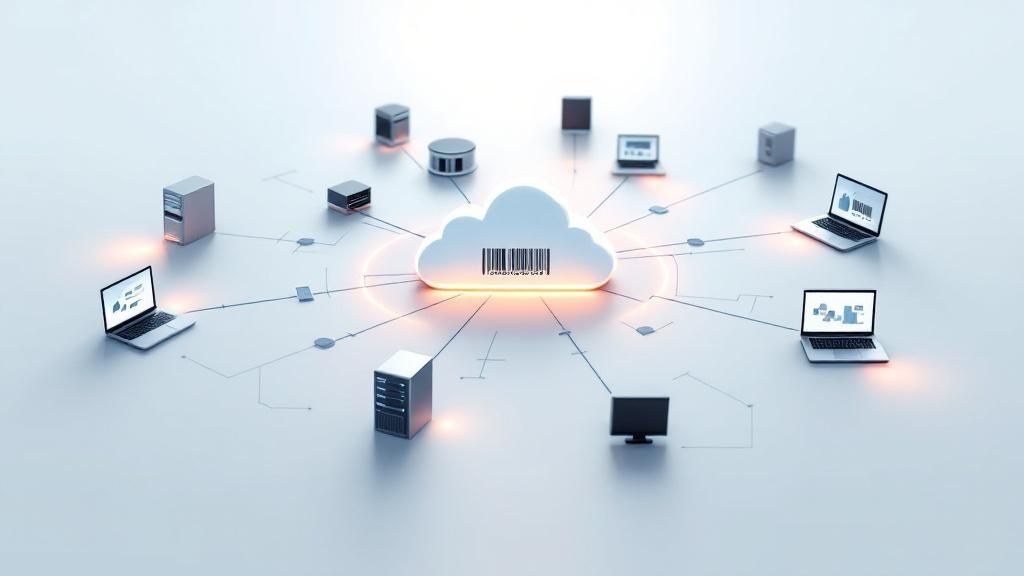
You can't manage what you don't see. This fundamental principle is the bedrock of effective IT asset management best practices. Comprehensive asset discovery and inventory management is the systematic process of identifying, cataloging, and maintaining an accurate, real-time inventory of every IT asset connected to your organization. This includes everything from servers and laptops to software licenses, cloud instances, and mobile devices. A complete inventory provides the foundational visibility you need for security, cost optimization, and operational efficiency.
For your business in Salinas and across Monterey County—from agricultural operations in the valley to hospitality services along the coast—knowing precisely what technology you own is the first step toward controlling IT costs and mitigating risks. Without this complete picture, assets can easily become "ghosts" in your system, consuming resources and creating security vulnerabilities without anyone's knowledge.
Why This Is a Foundational Practice
A meticulously maintained IT asset inventory is not just a list; it's a dynamic strategic tool. It empowers you to make informed decisions about technology purchases, track asset lifecycle from procurement to disposal, and ensure you are compliant with software licensing agreements, preventing costly audits. For financial firms in Monterey or educational institutions in Seaside, this level of control is essential for both regulatory compliance and budget forecasting.
Key Insight: An accurate inventory turns reactive problem-solving (like scrambling to find a vulnerable device during a security threat) into proactive, strategic management that drives business value and security.
How to Implement Comprehensive Discovery
Achieving a complete inventory requires a blended approach that combines affordable automated tools with structured manual processes.
- Start with Automation: Deploy automated discovery tools to scan your network and cloud environments. These tools can be agent-based (software installed on each device) or agentless (scanning the network from a central point). This initial sweep will capture the vast majority of your hardware and software assets, providing a detailed baseline.
- Establish Clear Taxonomies: Before assets start populating your inventory, define a consistent naming convention and classification system (taxonomy). This ensures every asset is categorized correctly (e.g., by type, department, location, owner), making the data easy for you to search, filter, and report on.
- Automate Onboarding: Create simple, automated workflows for when new assets are acquired. When you purchase a new laptop for your Marina office, the process should automatically add it to the inventory, assign it to a user, and install the necessary software, ensuring it's tracked from day one.
- Regular Reconciliation: No tool is perfect. Schedule regular, periodic reconciliations where you compare the data from your automated discovery tools against purchasing records and manual checks. This hybrid approach ensures maximum accuracy and catches any assets the automated scans might have missed.
2. Automated Software License Management and Compliance
Managing software licenses can quickly become a complex and costly challenge, especially as your business grows. Automated software license management is a proactive practice that uses specialized tools to track software installations, monitor usage, and ensure continuous compliance with vendor agreements. This goes far beyond simply having a list of licenses; it’s about actively managing your software portfolio to prevent overspending and eliminate the risk of surprise audit penalties.
For your organization in Monterey County, from legal firms in Carmel to agricultural tech companies in Salinas, failing to manage software compliance can lead to significant financial and legal repercussions. A single software audit that reveals non-compliance can result in fines that cripple a budget. Effective software asset management (SAM) turns this potential liability into a strategic advantage by optimizing costs and ensuring you only pay for what you actually use.
Why This Is a Foundational Practice
Without a systematic approach, it's easy to lose track of software licenses, leading to two common problems: over-licensing (paying for more software than you need) and under-licensing (using more software than you've paid for, creating a compliance risk). Automated management provides the necessary visibility to balance this equation perfectly. It gives you precise data on which applications are deployed, who is using them, and how often, allowing you to reallocate licenses and avoid unnecessary purchases.
Key Insight: Proactive software license management transforms your software from a necessary but unmanaged expense into a fully optimized and transparent operational asset, protecting your business from both financial waste and legal risk.
How to Implement Automated License Management
Implementing a robust software license management system involves integrating affordable tools and clear processes into your IT operations.
- Implement Software Metering Tools: Deploy tools that can not only discover installed software but also meter its actual usage. This helps you identify "shelf-ware"—software that is installed but rarely or never used. This insight is key to trimming unnecessary costs.
- Centralize License Entitlements: Create a single, authoritative repository for all your software license agreements, purchase records, and entitlement documents. This central database is the "source of truth" that your automated tools will compare against discovered installations to identify compliance gaps.
- Establish Automated Workflows: Integrate license management into your employee onboarding and offboarding processes. When a new team member joins your Pacific Grove office, a workflow should automatically assign the necessary licenses; when they leave, it should reclaim those licenses for reallocation, preventing license waste.
- Conduct Regular Optimization Reviews: Use the data from your tools to conduct quarterly or semi-annual license optimization reviews. This is where you can make strategic decisions, such as moving users to a different license tier based on their usage patterns or uninstalling software that provides little business value, directly impacting your bottom line.
3. Structured IT Asset Lifecycle Management
An IT asset’s journey doesn't end after it's deployed; that’s just the beginning. Structured IT asset lifecycle management is a strategic framework for managing an asset's entire journey—from the moment you decide to purchase it until it is securely retired and disposed of. This proactive approach ensures you extract maximum value at every stage, optimize performance, and minimize total cost of ownership. It’s one of the most critical IT asset management best practices for long-term financial health and operational stability.
For your business across the Monterey Bay area, from law firms in Carmel to agricultural tech companies in the Salinas Valley, managing the asset lifecycle prevents unnecessary spending and enhances security. By formalizing processes for acquisition, deployment, maintenance, and disposal, you transform assets from simple expenses into strategic investments that you actively manage for maximum return.
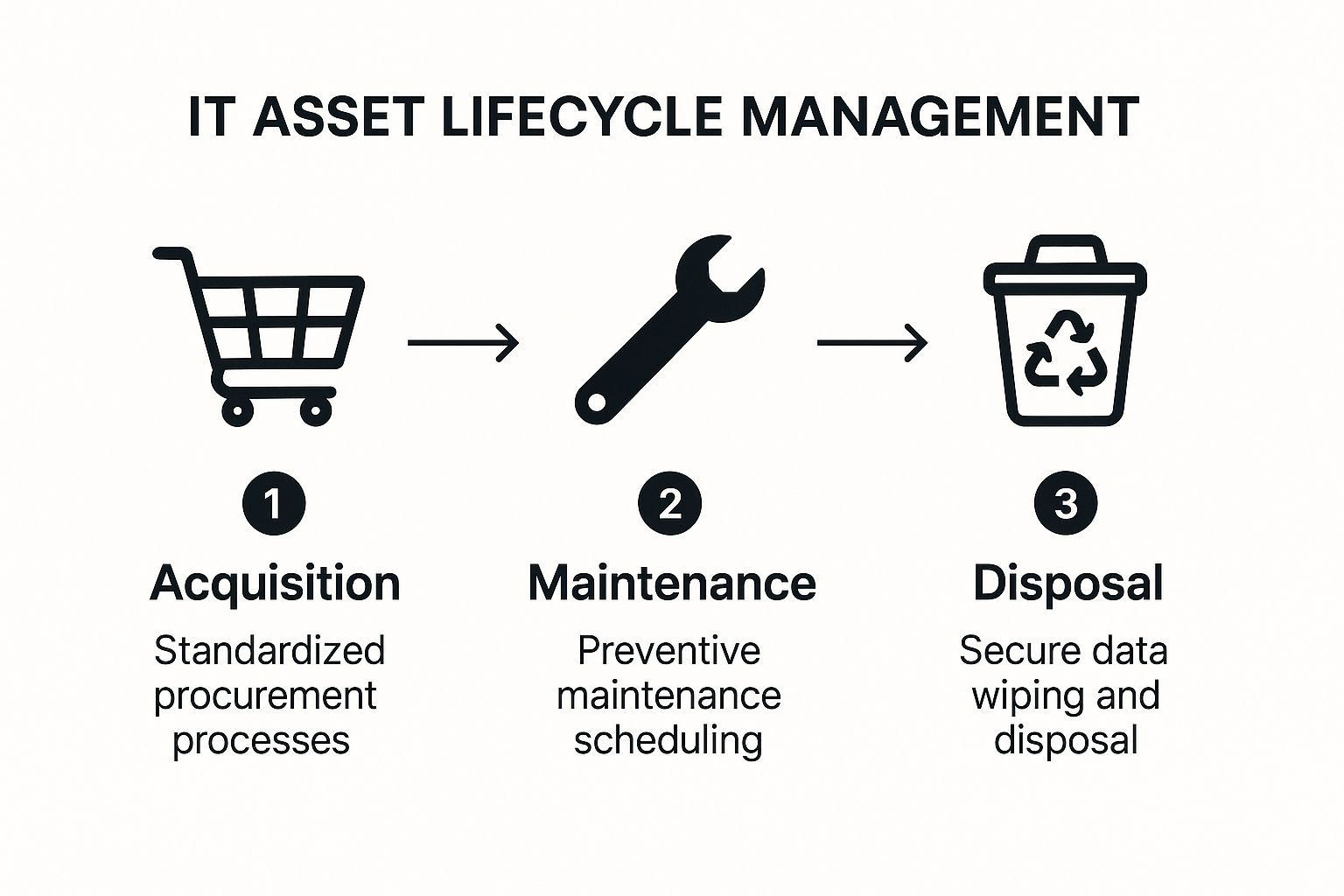
This process flow visualizes the core stages of IT asset lifecycle management, from standardized acquisition to secure disposal. The flow from one stage to the next highlights how a structured approach ensures no asset is left unmanaged, maximizing its value and security throughout its operational life.
Why This Is a Foundational Practice
Managing the entire lifecycle of your assets allows you to make smarter, data-driven decisions. You can accurately forecast future IT needs, plan budgets for upgrades and replacements, and avoid the surprise costs associated with unexpected hardware failures. For organizations like educational institutions in Seaside or hospitality businesses in Pacific Grove, this foresight is invaluable for maintaining consistent service delivery and managing operational budgets effectively.
Key Insight: Viewing IT assets through a lifecycle lens shifts your focus from a one-time purchase cost to the total cost of ownership (TCO), leading to more strategic and cost-effective technology decisions.
How to Implement Structured Lifecycle Management
Putting a robust lifecycle plan in place involves defining clear stages and processes for every asset class, something that's achievable at an affordable scale.
- Define Lifecycle Stages: Formally document the key stages: procurement, deployment, maintenance, upgrades, and retirement/disposal. For each stage, define clear entry and exit criteria. For example, a laptop moves from "maintenance" to "retirement" after five years or when repair costs exceed 50% of its replacement value.
- Standardize Acquisition and Deployment: Create standardized hardware models and software stacks for different roles in your company. When your Marina office needs a new computer, this ensures the new device is consistent, secure, and easily integrated into your existing environment, simplifying deployment and ongoing support.
- Automate Maintenance and Replacement Alerts: Use your ITAM software to track asset age, warranty status, and performance metrics. Set up automated alerts to notify your IT team when an asset is due for preventive maintenance, a software license is nearing renewal, or a device is approaching its scheduled end-of-life.
- Establish a Secure Disposal Process: Develop a strict, documented process for asset retirement. This must include secure data wiping that meets industry standards (like NIST 800-88), followed by environmentally responsible disposal or recycling through a certified vendor. This is non-negotiable for protecting your sensitive company and customer data.
4. Centralized Configuration Management Database (CMDB)
While a comprehensive inventory tells you what assets you have, a Configuration Management Database (CMDB) tells you how they all connect and work together. A CMDB is a centralized repository that serves as the single source of truth for your entire IT environment. It goes beyond a simple list by mapping the intricate relationships between hardware, software, services, and users, creating a dynamic, interconnected blueprint of your technology ecosystem. This is a cornerstone of advanced IT asset management best practices.
For your financial services firm in Carmel or a fast-growing tech startup in Monterey, understanding these relationships is critical. Knowing that a specific server hosts a critical accounting application, which in turn is used by the entire finance department, allows you to predict the impact of any change or failure. Without a CMDB, you're flying blind, unable to see the downstream consequences of a single server outage or software update.
Why This Is a Foundational Practice
A well-maintained CMDB transforms your IT management from a component-level task to a service-oriented strategy. It provides the context you need for effective change management, incident resolution, and problem analysis. When a key service goes down, a CMDB can instantly show all dependent assets, drastically reducing troubleshooting time. This holistic view is invaluable for organizations in regulated industries like healthcare or finance, where proving control over the IT environment is essential for compliance.
Key Insight: A CMDB is the "connective tissue" of your IT infrastructure. It turns a static list of assets into a living map of your IT services, enabling smarter, faster, and safer operational decisions.
How to Implement a CMDB
Building a CMDB is a strategic project that requires careful planning and execution. It's not just a tool, but a discipline.
- Start Small and Scale: Don't try to map your entire IT universe at once. Begin by modeling your most critical business services. For a hospitality business in Pacific Grove, this might be the property management system (PMS) and its supporting servers, databases, and network devices. Once that is successfully mapped, you can expand outward to less critical services.
- Integrate and Automate: Manually populating a CMDB is unsustainable. You should integrate it directly with your automated discovery tools (from step 1) to feed it real-time asset data. Further integration with IT service management (ITSM) platforms ensures that incident, problem, and change records are automatically linked to the correct configuration items (CIs).
- Establish Strong Governance: Define clear ownership for CI data and establish strict policies for how CIs are created, modified, and retired. This governance ensures the data in your CMDB remains accurate, trustworthy, and consistent across the organization. You can learn more about how this discipline applies to your network in our guide to network configuration management.
- Conduct Regular Audits: Schedule periodic audits to verify the accuracy of your CMDB data. Compare the CMDB against discovery data and physical checks to identify and correct discrepancies. A stale CMDB is worse than no CMDB, so data quality and maintenance are paramount.
5. Real-time Asset Tracking and Monitoring
Static inventory lists are a great start, but they only show a snapshot in time. True IT asset management best practices evolve beyond this by incorporating real-time tracking and monitoring. This advanced practice involves using a suite of technologies like IoT sensors, GPS, RFID tags, and network monitoring tools to provide a live, dynamic view of your assets' location, status, health, and performance. This continuous visibility allows you to move from reactive fixes to proactive management, significantly reducing asset loss and boosting operational efficiency.
For industries in Monterey County, from healthcare facilities in Salinas tracking critical medical equipment to agricultural operations in the Salinas Valley monitoring remote sensors, real-time data is transformative. It provides immediate alerts and enables automated responses, ensuring your high-value assets are secure, accounted for, and operating optimally at all times.

Why This Is a Foundational Practice
Real-time tracking turns your asset inventory from a historical record into a live operational dashboard. It answers critical questions instantly: Where is that shared diagnostic tablet? Is a specific server in the data center overheating? Has a company vehicle left its designated route? This capability is invaluable for preventing theft, streamlining logistics, and automating maintenance. For a logistics company in Marina or a hospitality group in Carmel, knowing the exact location and status of assets minimizes downtime and improves service delivery.
Key Insight: Real-time monitoring bridges the gap between your digital inventory and the physical world, creating a single source of truth that enhances security, accountability, and operational intelligence.
How to Implement Real-time Tracking
Deploying a real-time tracking system requires a strategic approach tailored to your specific assets and operational environment.
- Select the Right Technology: Your choice of tracking technology depends on the asset and its environment. You could use RFID tags for high-density environments like data centers or storerooms. For high-value mobile assets like vehicles or field equipment, GPS tracking is ideal. For smaller, indoor assets, consider IoT-based solutions that use Bluetooth or other protocols.
- Implement Geofencing: Create virtual boundaries around key locations, such as your office in Seaside or a specific worksite. You can configure your system to send instant alerts if a tagged asset enters or leaves a geofenced area, helping to prevent theft and unauthorized use.
- Integrate with Other Systems: Maximize value by integrating your tracking platform with existing IT management, security, and facility systems. For instance, linking a server's temperature sensor data to your IT service management (ITSM) tool can automatically create a high-priority ticket when it exceeds a safe threshold.
- Establish Clear Policies: Define which assets warrant real-time tracking. Not every keyboard needs a GPS tag. Create clear policies that balance security needs, cost, and employee privacy to ensure the program is both effective and well-managed.
6. Risk-Based Asset Classification and Security
Not all assets are created equal. A publicly accessible marketing server carries a different level of risk than a database holding your sensitive client financial data. A risk-based approach to IT asset management best practices involves systematically categorizing assets based on their criticality, value, and exposure to threats. This allows you to apply security controls and management resources proportionally, focusing your most robust defenses on your most valuable assets.
This practice is crucial for your business across Monterey County, whether you're a financial firm in Carmel managing sensitive client portfolios or an agricultural operation in Salinas protecting proprietary operational data. By classifying assets, you move from a one-size-fits-all security posture to an intelligent, resource-efficient strategy that prioritizes what truly matters to your business operations and continuity.
Why This Is a Foundational Practice
Risk-based classification is the blueprint for a resilient and cost-effective security program. It ensures you aren't over-investing in protecting low-impact assets or, more dangerously, under-protecting high-impact ones. This strategic allocation of resources is vital for regulatory compliance frameworks like HIPAA or PCI-DSS and is a core tenet of modern cybersecurity standards.
Key Insight: Classifying assets by risk transforms your security from a blanket expense into a strategic investment, ensuring your most critical business functions receive the highest level of protection.
How to Implement Risk-Based Classification
Implementing this practice requires a clear methodology that aligns technology with your business objectives. A detailed cybersecurity risk assessment template can provide a structured starting point for this process.
- Define Your Classification Scheme: Establish clear, simple categories based on business impact. A common model uses tiers like: High (major financial or reputational damage if compromised), Medium (moderate operational disruption), and Low (minor inconvenience). Tie these tiers to data sensitivity, system criticality, and regulatory requirements.
- Align with Business Impact: Work with your department heads in your Marina or Monterey offices to understand which systems are essential for their operations. What would happen if the accounting server went down versus a public-facing blog? The answer determines the asset's classification.
- Apply Controls by Class: Implement security controls based on an asset's classification. For example, a High-criticality asset might require multi-factor authentication, advanced endpoint detection, and hourly backups, while a Low-criticality asset may only need standard antivirus and weekly backups.
- Regularly Review and Update: Business needs change, and so does the risk landscape. Re-evaluate asset classifications annually or whenever a significant change occurs, such as a new software implementation or a change in data handling processes. This ensures your security posture remains aligned with current business realities.
7. Integration with IT Service Management (ITSM) and Business Processes
IT Asset Management (ITAM) doesn't operate in a vacuum. The most effective ITAM strategies are deeply woven into the fabric of your broader IT Service Management (ITSM) and core business processes. This integration ensures asset data provides real-world context for service delivery, creating a unified system where asset information informs everything from resolving a help desk ticket to planning a major technology upgrade. This synergy is a cornerstone of mature IT asset management best practices.
For your financial services firm in Carmel or a fast-growing tech startup in Salinas, connecting asset data to service requests means you can see an asset's entire history—including past issues and associated costs—whenever a support ticket is raised. This holistic view transforms ITAM from a simple inventory into a powerful operational intelligence engine, providing context that is critical for efficient problem resolution and strategic decision-making.
Why This Is a Foundational Practice
Integrating ITAM and ITSM breaks down information silos. When an employee's laptop fails, your service desk instantly knows its warranty status, purchase date, and configuration, dramatically speeding up the resolution process. Similarly, when you're planning a software rollout, change management processes can pull data directly from the asset inventory to identify all affected devices and users, minimizing disruptions. This connection ensures your assets are managed not just as items on a list, but as vital components delivering specific business services.
Key Insight: Integrating ITAM with ITSM turns asset data into actionable intelligence. This connection allows you to manage technology in the context of the services it provides, linking IT costs and performance directly to business value.
How to Implement ITAM and ITSM Integration
Achieving seamless integration requires a strategic approach that leverages technology and establishes clear governance.
- Map Assets to Services: Begin by linking assets in your inventory to specific entries in your service catalog. For example, a particular server cluster in your Monterey office should be formally associated with the "Customer Relationship Management (CRM) Service" it supports.
- Automate Workflows: Use the integration to trigger automated processes. When a new computer is procured, a workflow can automatically create an asset record, add it to the configuration management database (CMDB), and generate a service ticket to prepare it for the new employee.
- Establish Data Synchronization: Ensure that data flows in real-time between your ITAM and ITSM systems. If a service desk technician replaces a hard drive (a change tracked in ITSM), that component change should automatically update the asset's record in your ITAM system. This maintains data integrity across platforms.
- Leverage APIs for Flexibility: Utilize Application Programming Interfaces (APIs) to connect disparate systems, such as linking your ITAM platform to your finance and procurement software. This gives you a holistic view of the asset lifecycle, from purchase order to retirement. For a deeper understanding of how integrated systems can benefit your operations, explore the role of professional IT service providers on adaptiveis.net.
8. Continuous Audit and Compliance Monitoring
Effective IT asset management best practices extend beyond just knowing what you have; they demand continuous verification that your assets adhere to internal policies and external regulations. Continuous audit and compliance monitoring is the proactive, ongoing process of assessing your IT assets against established security baselines, regulatory requirements, and industry standards. This ensures your organization remains in a constant state of compliance, rather than scrambling to prepare for annual audits.
For businesses in Monterey County, especially those in highly regulated sectors like finance in Carmel or healthcare in Salinas, this practice is non-negotiable. It transforms compliance from a periodic, stressful event into an automated, integrated part of daily operations. By continuously monitoring your asset landscape, you can identify and remediate compliance gaps and security vulnerabilities in real-time, preventing them from escalating into costly data breaches or fines.
Why This Is a Foundational Practice
In today's complex regulatory environment (e.g., HIPAA, PCI DSS, GDPR), proving compliance is as important as achieving it. Continuous monitoring provides the evidence-based assurance that your controls are working as intended. It shifts your security posture from reactive to predictive, allowing you to spot configuration drift or unauthorized software before it becomes a significant risk. This systematic oversight is crucial for maintaining data integrity and protecting your business's reputation.
Key Insight: Continuous monitoring turns compliance into a business-as-usual activity. It embeds security and regulatory adherence into your IT culture, reducing audit fatigue and strengthening your overall defense against threats.
How to Implement Continuous Monitoring
Implementing a robust continuous monitoring program involves leveraging automation and establishing clear processes for response and documentation.
- Implement Automated Compliance Tools: Deploy specialized tools designed for continuous assessment. These solutions can automatically scan your assets against predefined policies and regulatory frameworks, giving you instant visibility into your compliance status.
- Establish Regular Internal Audits: Supplement automated scanning with scheduled internal audits. These periodic manual checks help validate the accuracy of your automated tools and assess compliance aspects that technology cannot, such as physical security or procedural adherence.
- Maintain Detailed Documentation: Meticulously document all your compliance activities, including scan results, identified gaps, remediation steps taken, and verification of fixes. This documentation is your proof of due diligence for auditors and stakeholders. It also forms a critical part of a resilient IT strategy, similar to the detailed planning required for backup and disaster recovery.
- Create Remediation Workflows: Don't just identify problems; fix them. Establish automated workflows that assign remediation tasks to the appropriate teams or individuals as soon as a compliance gap is detected. Track these tasks through to completion to ensure your environment is returned to a compliant state quickly.
8 IT Asset Management Best Practices Comparison
| Item | Implementation Complexity 🔄 | Resource Requirements ⚡ | Expected Outcomes 📊 | Ideal Use Cases 💡 | Key Advantages ⭐ |
|---|---|---|---|---|---|
| Comprehensive Asset Discovery and Inventory Management | Moderate to High (initial setup and continuous validation) | High (tools, integration, maintenance) | Complete real-time IT asset visibility | Organizations seeking full IT infrastructure visibility | Enhanced security, compliance, and incident response |
| Automated Software License Management and Compliance | High (specialized expertise, complex licensing) | Moderate to High (cost of tools and training) | Reduced audit risk, optimized license usage | Companies needing strict license compliance and cost control | Significant cost savings and audit risk reduction |
| Structured IT Asset Lifecycle Management | Moderate (process documentation and training needed) | Moderate (process management and analytics) | Optimized asset ROI and reduced downtime | Enterprises managing asset end-to-end lifecycle | Increased ROI, reduced failures, regulatory compliance |
| Centralized Configuration Management Database (CMDB) | High (complex initial setup, ongoing data quality efforts) | High (infrastructure and skilled staff) | Single source of truth, impact analysis | Large enterprises requiring service impact and dependency mapping | Improved decision-making and service management |
| Real-time Asset Tracking and Monitoring | Moderate to High (technology deployment and infrastructure) | High (tracking tech, wireless infrastructure) | Reduced asset loss, proactive maintenance | Environments needing real-time asset location and status | Enhanced security, asset utilization, and reporting |
| Risk-Based Asset Classification and Security | Moderate (requires ongoing review and updates) | Moderate (tools and training) | Focused security resource allocation | Organizations prioritizing assets based on risk | Better risk management, incident prioritization |
| Integration with ITSM and Business Processes | High (complex integration and ongoing synchronization) | High (custom development, maintenance) | Improved service delivery and IT governance | Organizations linking ITAM with ITSM and business workflows | Reduced manual errors, better cost allocation |
| Continuous Audit and Compliance Monitoring | High (expertise required in various regulations) | Moderate to High (tools and monitoring effort) | Proactive compliance posture maintenance | Businesses with stringent regulatory requirements | Reduced audit costs, improved compliance and risk management |
Partner with Adaptive IS to Master Your IT Assets
The journey through IT asset management best practices reveals a fundamental truth: managing your technology effectively is no longer just an IT function—it's a core business strategy. From comprehensive asset discovery to continuous compliance monitoring, each practice we’ve explored is a crucial component of a larger system designed to enhance your security, control costs, and drive operational efficiency. For businesses here in Monterey County, from the agricultural fields of Salinas to the bustling hospitality sector in Monterey, mastering these principles means transforming your technology from a reactive expense into a proactive, strategic asset that fuels your growth.
Adopting these practices doesn't happen overnight. It requires a deliberate, structured approach. Think of it as building a house. You start with a solid foundation: your comprehensive asset inventory (Practice #1). Without knowing exactly what you have, you can't secure it, manage it, or optimize it. From there, you build the framework, implementing structured lifecycle management (Practice #3) and a centralized CMDB (Practice #4) to create order and visibility. The walls and wiring come next, with automated software license management (Practice #2) and real-time tracking (Practice #5) protecting you from compliance risks and operational blind spots. Finally, you install the security systems and utilities, represented by risk-based security classification (Practice #6) and deep integration with your ITSM and business processes (Practice #7).
From Theory to Tangible Business Value
The real power of these IT asset management best practices emerges when they work in concert. A complete inventory informs your security policies. Real-time tracking provides data for your lifecycle decisions. And a well-maintained CMDB becomes the single source of truth that powers your entire IT service delivery model. This integration is what separates a basic checklist from a truly adaptive IT ecosystem.
Consider the practical benefits for your local financial services firm in Carmel or a fast-growing startup in Seaside. Proper ITAM isn't just about counting laptops.
- It’s about fiscal discipline. By eliminating redundant software licenses and negotiating better vendor contracts based on actual usage data, you directly impact your bottom line.
- It’s about robust security. Knowing every device, its configuration, and its user is the first step in defending against cyber threats and ensuring you meet strict regulatory requirements.
- It’s about strategic agility. When you can deploy resources quickly, retire obsolete technology efficiently, and provide your employees with the exact tools they need, your entire organization becomes more nimble and productive.
Key Takeaway: Effective IT Asset Management is a continuous cycle of discovery, organization, optimization, and security. It’s not a one-time project but an ongoing discipline that delivers compounding returns in cost savings, risk reduction, and operational excellence.
Your Next Steps on the Path to ITAM Mastery
Embarking on this path can feel daunting, but you don't have to navigate it alone. The goal is progress, not perfection. Start small and build momentum. Your first actionable step could be as simple as initiating a comprehensive discovery audit to get a true baseline of your current assets. Or perhaps you can focus on one high-risk area, like software license compliance, and build out from there.
The key is to have a partner who understands both the technology and the unique context of your business. At Adaptive Information Systems, our mission has always been to deliver enterprise-level IT solutions at a price point that makes sense for the small and mid-sized businesses that form the backbone of our community. We provide the expertise and tools to implement these IT asset management best practices effectively, tailored specifically to your needs. Let us handle the complexities of your technology infrastructure, so you can focus on what you do best: running your business.
Ready to transform your IT assets from a liability into a strategic advantage? Contact Adaptive Information Systems to schedule a consultation and learn how our tailored ITAM solutions can bring cost control, security, and efficiency to your Monterey County business. Visit us online at Adaptive Information Systems to see how we help local businesses thrive.
Adaptive Information Systems
380 Main St, Salinas CA 93901 | 831-644-0300 | hello@adaptiveis.net