
Understanding Network Configuration Management Like a Pro
Let's cut through the technical jargon. Imagine you're trying to manage a busy restaurant kitchen where every chef uses a slightly different recipe for the same dish. One chef might sear a steak perfectly, while another overcooks it. The result? Inconsistent food and unhappy customers. This is exactly what happens in an unmanaged network: every device—like a router, switch, or firewall—operates by its own rules, creating chaos instead of reliability.
Network configuration management is the process of creating a single, master cookbook for your entire digital kitchen. It establishes a standardized recipe (baseline configuration) for each type of device, making sure they all operate predictably and securely. This systematic approach transforms your network from a collection of independent, unpredictable parts into a cohesive, well-run system. Instead of just reacting to problems, you are proactively directing how everything should work together.
What It Involves
At its core, network configuration management is about establishing and maintaining consistent settings across all your network hardware and software. It’s a continuous cycle, not a one-time setup. This discipline is a key part of the broader field of configuration management, which applies to all IT systems, not just networks.
The diagram below visualizes the main components of a standard configuration management process, which includes planning, identification, control, and verification.

This process ensures that from the initial setup to ongoing updates, every action is tracked and aligned with a defined plan. Think of it as the quality control system for your network's operational "recipes."
Why It's Not Just an IT Buzzword
Without a formal process, your network is vulnerable to configuration drift. This is what happens when small, undocumented changes build up over time—much like chefs slowly altering a recipe without telling anyone. These minor tweaks can lead to major issues, including security vulnerabilities and unexpected outages. In fact, research consistently shows that misconfigurations are a leading cause of network security gaps, creating easy entry points for attackers.
Effective network configuration management delivers clear advantages:
- Consistency: Every device of the same type is configured identically, which reduces complexity and makes troubleshooting easier.
- Control: All changes are authorized, tested, and documented, preventing unauthorized or accidental modifications that could bring down the network.
- Visibility: You gain a complete and current inventory of all network devices and their exact settings at any given moment.
Ultimately, this isn't just about keeping your IT closet tidy. It is a foundational practice for building a reliable and secure network that your business can depend on for its daily operations.
The Real Cost of Network Chaos (And Why It Keeps You Up)
Trying to manage a network without a clear plan is like steering a ship by only watching the wake it leaves behind. By the time you spot a problem, its origin is far in the past, and your business is already off course. The true costs of this reactive approach extend well beyond a major network outage; they are the hidden drains on productivity, security, and morale that slowly weaken a company.

From Downtime to Slow Decay
The most obvious expense is, of course, downtime. When a critical router goes offline because of an unapproved change, business grinds to a halt. Sales can't be processed, customer support phones go silent, and production lines may even stop. But the quieter, more damaging cost comes from configuration drift. This is the gradual deviation from a set standard, creating tiny inconsistencies that lead to frequent, minor issues.
These small disruptions turn your expert IT team into perpetual firefighters, constantly putting out small blazes instead of building a stronger, more resilient infrastructure. These hidden costs show up in several ways:
- Lost Productivity: A slow network or spotty connectivity interrupts employee focus and creates bottlenecks in daily workflows.
- Wasted IT Resources: A huge portion of an IT team's day can be eaten up by manually fixing problems that a proper network configuration management system would have prevented or resolved automatically.
- Security Gaps: Every unmanaged device and inconsistent setting is a potential backdoor for attackers. Industry research confirms that misconfigurations are a primary cause of security breaches.
The Growing Need for Control
These financial and operational risks are why more companies are investing in solutions to regain control. The broader configuration management market is expected to grow substantially, from USD 3.35 billion in 2025 to USD 9.22 billion by 2032. This impressive growth shows a widespread understanding that proactive management is no longer a luxury but a fundamental business need. You can find more details about this trend by exploring research on the configuration management market growth.
Ultimately, ignoring network configuration isn't just an IT issue; it's a direct business risk. It chips away at efficiency, opens the door to threats, and stops technology from being the engine for growth it's meant to be. The real question isn’t whether you can afford to implement network configuration management, but whether you can afford the consequences of not doing it.
The Core Capabilities of Network Configuration Management
Effective network configuration management isn't a single tool but a collection of functions working together to keep your network healthy and stable. Think of it as moving from a simple toolbox to having a dedicated digital assistant for your IT infrastructure. This assistant doesn't just react to problems; it helps prevent them, remembers every change, and makes sure every device follows the rules you set. Understanding these core capabilities shows how NCM shifts your IT operations from reactive firefighting to proactive management.
Automated Discovery and Inventory
You can't manage what you can't see. The first job of any NCM system is to know exactly what’s on your network. Automated discovery acts like a detailed census taker, constantly scanning for and identifying every connected device.
- Device Discovery: The system automatically finds all your routers, switches, firewalls, and access points. It then creates a complete inventory, so you have a single source of truth for your network hardware.
- Configuration Backup: Once a device is found, its current configuration is automatically backed up. This creates a "last known good" state you can always return to.
- Centralized View: All this data is organized into one central database. This gives you a clear, up-to-the-minute picture of your entire network, which is the foundation for all other management activities.
Configuration Version Control and Rollback
Imagine having a time machine for your network settings—that's what version control delivers. Every time a change is made to a device's configuration, the system saves it as a new version. This is essential for maintaining stability and recovering quickly from errors. If a new configuration update causes problems, you can instantly roll back to a previous, stable version with just a click. This reduces downtime from hours to mere minutes and eliminates the stressful guesswork of trying to manually undo a faulty change.
To better understand how these capabilities compare, the table below breaks down the differences between manual methods and an automated NCM approach.
| Capability | Manual Approach | Automated NCM | Business Impact |
|---|---|---|---|
| Device Discovery | Manually maintained spreadsheets; often outdated. | Automatic, continuous scanning and mapping. | Saves time and ensures an accurate, real-time inventory. |
| Configuration Backups | Infrequent, manual backups; prone to human error. | Scheduled, automated backups of all devices. | Guarantees a "last known good" state for quick recovery. |
| Version Control | No formal versioning; changes are hard to track. | Every change is versioned and logged with user details. | Reduces downtime by enabling instant rollback to stable versions. |
| Compliance Monitoring | Manual, time-consuming audits; spot-checks. | Real-time, automated checks against defined policies. | Improves security and ensures continuous adherence to regulations. |
This comparison highlights a clear shift: automated NCM replaces slow, error-prone manual tasks with reliable, efficient processes. This not only strengthens your network's security and stability but also frees up your IT team to focus on more strategic work.
Compliance Monitoring and Reporting
Keeping your network aligned with internal security policies and external regulations is a constant and critical task. Compliance monitoring acts as your tireless internal auditor, checking every device's configuration against predefined standards.
The infographic below illustrates how a compliance dashboard can visualize network health. It clearly marks compliant devices with green checks and flags misconfigured ones with red warnings, allowing for immediate action.
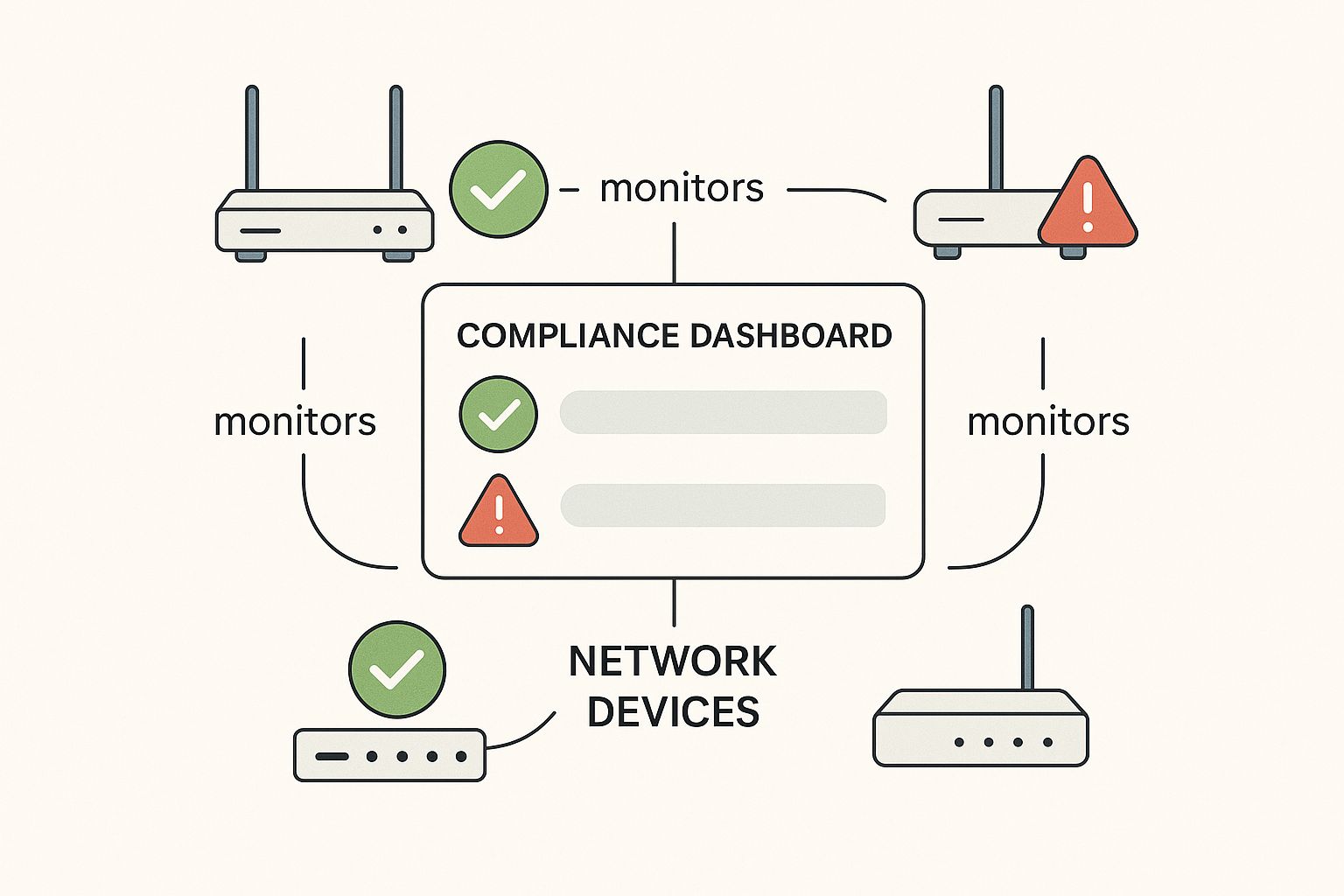
This real-time visibility helps IT teams quickly spot and fix devices that have drifted from security benchmarks. For a small business, this level of oversight is a major step forward in building a secure and dependable network. To learn more about this, our small business guide to network security offers additional strategies.
Together, these capabilities build a more resilient, secure, and manageable network, turning your infrastructure from a potential liability into a reliable business asset.
Building Your Network Configuration Strategy From Scratch
Getting started with a formal network configuration management plan can feel a lot like trying to change the tires on a moving car. You’re trying to add stability and control, but you can't disrupt the day-to-day operations that rely on that very network. The secret is to build your strategy in stages, starting with high-impact, low-risk steps that show immediate value. This approach helps build momentum and wins over any doubtful stakeholders.
Assess Your Current State
Before you can chart a course forward, you need to know your starting point. The first step is to conduct a baseline assessment. This isn’t a deep, complex technical audit but rather a practical inventory of your current setup. The goal is to answer a few simple questions:
- What devices are on our network? If you have automated discovery tools, great. If not, even a well-managed spreadsheet is a solid start.
- How are we backing up configurations? Are backups performed regularly and automatically, or is it a hit-or-miss manual task?
- Who can make changes? Pinpoint everyone with administrative access to network devices and document the current change process, assuming one exists.
- What are our biggest pain points? Talk to your team. Are they struggling with slow troubleshooting, frequent small outages, or nagging security concerns?
This initial assessment gives you a snapshot of your network’s health and shines a light on the most urgent areas for improvement.
Identify Quick Wins for Maximum Impact
With your assessment complete, it's time to find the low-hanging fruit—the areas where you can deliver visible benefits fast. Instead of attempting a massive overhaul, focus on a "quick win" project. A perfect place to begin is with automated configuration backups. This single step is a cornerstone of network management and provides an immediate safety net. If a change goes wrong, you can restore a working configuration in minutes instead of hours.
Another high-impact win is establishing a centralized configuration inventory. Moving from scattered documents and tribal knowledge to a single source of truth eliminates guesswork and makes troubleshooting dramatically faster. These early successes prove the value of a structured approach, making it much easier to get support for more involved projects down the road.
The growing focus on these practices is mirrored in the market itself. The global network configuration management market was valued at around $10 billion in 2025 and is projected to grow at a 12% compound annual growth rate through 2033. This reflects a clear industry-wide shift toward more controlled and automated network operations. You can explore the full network configuration market projections to see how this trend is unfolding. By starting with these foundational steps, you align your business with practices that are quickly becoming the standard for reliable and secure networks.
Best Practices That Work in the Real World
Theoretical knowledge is a good starting point, but successful network configuration management is forged in the reality of tight budgets, legacy systems, and team resistance. True success comes from implementing practical, tested strategies that deliver results without disrupting your entire operation. These aren't textbook ideals; they are proven tactics from the IT trenches.
Start with Gradual Automation
The thought of full-scale automation can be intimidating for any team. Instead of a massive, disruptive overhaul, focus on automating one high-impact, low-risk task first. A perfect candidate for this is automated configuration backups.
This single step provides an immediate safety net. It ensures you always have a "last known good" version to restore, dramatically reducing recovery time after a failed change. Once this is running smoothly, you can move on to automating compliance checks for a specific set of critical devices. This phased approach builds confidence and shows value without overwhelming your staff.
Implement Change Management People Actually Follow
A structured change process is essential, but it fails if it’s too bureaucratic. Your goal is to create a process that’s helpful, not a hindrance. A practical approach includes these key elements:
- A Clear Request Process: Use a simple form or ticket that outlines what is changing and, just as importantly, why.
- Peer Review: For non-critical changes, having another team member review the plan is a simple way to catch basic mistakes before they cause problems.
- Defined Maintenance Windows: Schedule all changes during low-impact periods to minimize any potential disruption to business operations.
- A Rollback Plan: Every change must have a documented plan to revert it if something goes wrong. This isn't optional; it's a critical safety measure.
This framework creates accountability and reduces human error without burying your team in unnecessary red tape. It’s about maintaining control, not creating pointless complications.
Maintain Thorough and Accessible Documentation
Documentation is often the first thing neglected in a busy IT department, yet it becomes your most critical asset during a crisis or staff turnover. The key is to make documentation a living part of your daily workflow, not an afterthought.
- Centralize Everything: Use a wiki or a shared document repository where all network diagrams, device configurations, and standard operating procedures are stored. No more hunting through personal drives or old emails.
- Update as You Go: Make updating documentation a required final step in your change management process. A change isn't truly complete until the documentation reflects it.
This discipline ensures that vital institutional knowledge stays with the organization, not just with individual employees. Of course, documentation is only one part of building a resilient network. A solid backup strategy is non-negotiable for true protection. For a closer look at safeguarding your information, you can find valuable insights in our article on data backup and recovery for Monterey businesses. These practices, when combined, create a network foundation that can withstand unexpected challenges.
To help you put these ideas into action, we've created a step-by-step guide. This table breaks down how to implement these best practices with realistic timelines and clear goals.
Network Configuration Management Best Practices Implementation Guide
Step-by-step implementation approach with timelines, resource requirements, and success metrics
| Practice Area | Implementation Steps | Timeline | Key Success Metrics |
|---|---|---|---|
| Gradual Automation | 1. Identify a low-risk task (e.g., router/switch backups). 2. Select and configure an automation tool for backups. 3. Schedule daily automated backups. 4. Test the restoration process from a backup file. |
1-2 Weeks | 100% of critical devices are backed up daily. Successful restoration test completed within 15 minutes. |
| Change Management | 1. Create a simple change request template. 2. Define roles for request, review, and approval. 3. Establish and communicate maintenance windows. 4. Mandate a "Rollback Plan" section in all requests. |
2-3 Weeks | 95% of network changes follow the new process. Reduction in change-related outages by 50% within 3 months. |
| Documentation | 1. Choose and set up a central repository (e.g., wiki, shared drive). 2. Document the top 5 most critical network devices. 3. Integrate "Update Documentation" into the change process checklist. 4. Schedule quarterly documentation reviews. |
3-4 Weeks | All network changes include a documentation update confirmation. Time to locate critical device info is under 2 minutes. |
By following this roadmap, you can systematically improve your network's stability and security. These practices move network configuration management from a reactive, stressful task to a proactive, controlled process.
Avoiding Expensive Mistakes and Common Pitfalls
Even the best plans for network configuration management can go sideways, leading to wasted time and money. The journey is often filled with obstacles that sales presentations conveniently leave out. Understanding these common pitfalls ahead of time is the key to building a sustainable, effective practice that survives real-world pressures.
The "Tool-First" Trap
One of the most frequent and costly mistakes is the tool-first approach. This happens when an organization buys a sophisticated NCM tool, expecting it to magically solve all its network problems. The reality is that a tool without a strategy is just an expensive dashboard. Before you even look at vendors, you need a clear understanding of your processes, your pain points, and what you want to achieve.
A tool can’t fix a broken process. If your team has no defined change management protocol or documentation standards, the software will only automate chaos. Start by defining your goals:
- What is our current change approval process?
- How do we document configurations now?
- What is the single biggest problem we need to solve first (e.g., failed changes, security gaps)?
Answering these questions first ensures you select a tool that fits your process, not the other way around.
Avoiding Bureaucratic Gridlock
Another common pitfall is creating a configuration management process so rigid and bureaucratic that it slows everything down. If making a simple change requires five levels of approval and mountains of paperwork, your team will inevitably find workarounds, defeating the entire purpose. The goal is control, not paralysis.
Your change process should be practical. For routine, low-risk changes, a simple peer review might be enough. For major updates that could affect the entire network, a more formal approval workflow is appropriate. The key is to balance control with agility. If your NCM system becomes a bottleneck, it has failed. These slowdowns can have significant financial repercussions, much like the more obvious issues. To better grasp these effects, it is helpful to understand the hidden costs of IT downtime and how they ripple through a business.
Ultimately, successful network configuration management is built on realistic expectations and practical processes. It requires addressing operational challenges and resource constraints with the same focus you give to technical problems. By anticipating these hurdles, you can navigate them effectively and build a system that delivers lasting value.
Making Network Configuration Management Work for Your Business
The true test of a successful network configuration management program isn't a perfectly documented router; it's the real-world business results it creates. While technical details matter, the main goal is to turn improved network stability into a competitive edge that justifies the investment. This means moving the conversation from IT jargon to business value, showing how a reliable network directly supports revenue, customer satisfaction, and operational efficiency.
Communicating Value Beyond Technical Metrics
Your leadership team might not know what configuration drift is, but they certainly understand risk and opportunity. To make a strong case for NCM, you need to connect the dots between your technical work and the company's bottom line.
Think about it this way:
- From Uptime to Revenue: Instead of saying you achieved "99.9% uptime," report that there were "zero hours of lost sales due to network outages." This frames technical success in clear financial terms.
- From Compliance to Trust: Rather than just mentioning policy enforcement, you can highlight that you "passed all regulatory audits with zero findings." This demonstrates how NCM protects the company's reputation and helps avoid expensive fines.
- From Fast Fixes to Productivity: Instead of measuring how quickly you fix problems, showcase the "hours of employee productivity saved" because you prevented issues from ever disrupting their work.
Scaling and Evolving Your NCM Strategy
Your NCM practices must grow and adapt along with your business. A strategy that works today could become outdated tomorrow. A smart approach involves continuous improvement and adapting to new technologies without having to start over completely.
As businesses pour more resources into their digital foundations, the demand for these management solutions is growing fast. The global market for network management systems is expected to jump from an estimated $11.04 billion in 2025 to nearly $25.94 billion by 2034. This major growth highlights just how important it is to maintain a strong and scalable network. You can explore more analysis on the network management market to better understand these industry movements.
By focusing on business outcomes and building an adaptable strategy, you foster a culture of operational excellence. This approach changes network management from a simple cost center into a strategic force that drives business growth.
Ready to align your IT infrastructure with your business goals? Adaptive Information Systems provides the expertise and managed services to build a reliable, secure, and scalable network. Contact us today to learn how we can support your success.