
As a business owner in Monterey County, from the agricultural fields of Salinas to the bustling hospitality scene in Carmel, you know operational efficiency is key. A slow, unresponsive IT help desk doesn’t just frustrate your employees; it costs you time, money, and your ability to serve your customers. So how do you transform your IT support from a bottleneck into a business asset? The solution is implementing proven strategies that deliver enterprise-level IT at a price that makes sense for your local business.
This guide moves beyond generic advice to give you a clear, actionable roadmap. We’ll detail the essential IT help desk best practices you can use to boost system reliability, enhance team productivity, and secure a competitive advantage. We’ll cover critical elements like implementing a robust ticketing system, establishing clear Service Level Agreements (SLAs), and prioritizing First Call Resolution (FCR) to ensure issues are solved efficiently the first time.
At Adaptive Information Systems, our mission is to help our local partners thrive. That starts with building you a solid, high-performing IT foundation. Let's explore the specific steps you can take to build a help desk that actively supports your company's growth.
1. Implement a Comprehensive Ticketing System
A well-structured ticketing system is the foundation of any effective IT help desk. Think of it as your central command center, where every IT issue your business encounters is logged, tracked, and resolved systematically. This system is crucial for moving away from chaotic, ad-hoc support requests that get lost in emails or voicemails, ensuring no task falls through the cracks. It gives you complete visibility into your support operations, your team's needs, and your company's overall IT health.
For any business, especially those in fast-paced local sectors like Salinas Valley agriculture or Monterey's hospitality industry, a ticketing system transforms IT support from a reactive cost center into a proactive, data-driven asset. By centralizing all requests, you can analyze patterns, identify recurring problems, and make informed decisions to improve your services. You get the kind of efficiency a large enterprise would have, but tailored to your needs.
How to Implement and Optimize Your Ticketing System
Getting started doesn't have to be complicated. The key is to build a system that aligns with your specific operational needs and can scale as you grow.
- Start Simple: Begin with basic workflows for ticket creation, assignment, and resolution. You can always add complexity, like advanced automation or integrations, down the road.
- Align Categories: Make sure your ticket categories (e.g., "Hardware Failure," "Software Access," "Network Connectivity") directly reflect the services your team needs. This makes your reporting much more accurate.
- Automate Communications: Set up automated email or message notifications to keep your staff informed about their ticket status from submission to resolution.
- Train Your Team: Proper documentation is one of the most critical IT help desk best practices. Train your IT staff to log detailed, consistent notes on every ticket to build a valuable knowledge base for the future.
This chart visualizes the key performance indicators (KPIs) you can track with a robust ticketing system.
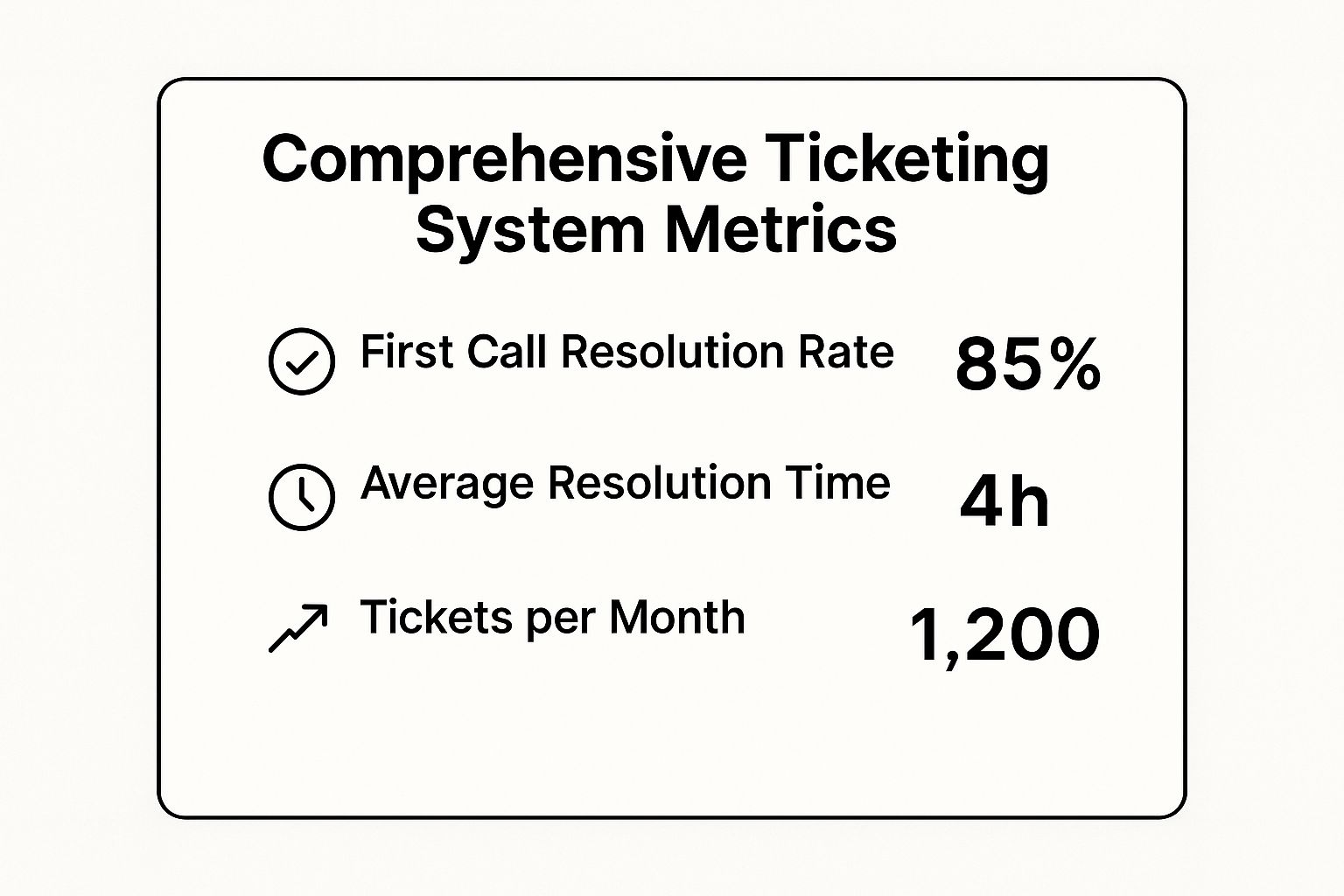
Tracking metrics like these gives you immediate insight into your help desk's efficiency and helps you set tangible goals for improvement. Implementing a ticketing system is the primary step to unlocking the many help desk support benefits that drive your business forward.
2. Establish Clear SLA (Service Level Agreement) Standards
A Service Level Agreement (SLA) is your formal commitment to your end-users that defines the expected level of service. It moves beyond vague promises and establishes specific, measurable targets for response and resolution times. This critical document sets clear expectations for everyone, turning your IT support from a source of frustration into a reliable, predictable business function.
For businesses in competitive environments, like the agricultural operations in Salinas or the dynamic hospitality sector in Monterey, SLAs are essential. They ensure that critical issues are addressed with the urgency they require, preventing minor IT problems from escalating into costly downtime. An SLA means you can promise your team that a critical system failure will be addressed within a specific timeframe, giving them—and you—peace of mind.
How to Implement and Optimize Your SLAs
Developing effective SLAs is about balancing your team’s expectations with your IT team's realistic capacity. Your goal is to create standards that are both meaningful and achievable.
- Base SLAs on Data: Use historical performance data from your ticketing system to set realistic initial targets for different issue priorities (e.g., critical, high, medium, low).
- Define Clear Priorities: Clearly categorize what constitutes a critical issue (e.g., a server outage affecting everyone) versus a low-priority request (e.g., a question about a software feature).
- Communicate and Educate: Ensure all your employees and stakeholders understand the SLA terms. Communicate any changes transparently and explain how they impact service delivery.
- Review and Refine: Your business needs will change. Review your SLAs quarterly or semi-annually to ensure they still align with your operational priorities and what your team is telling you.
SLAs aren't just about speed; they also underscore the importance of reliability and business continuity. A well-defined SLA for critical system failures, for instance, should be supported by a robust plan for getting those systems back online, which highlights the value of a comprehensive data backup and recovery strategy. This approach is one of the most important IT help desk best practices for building trust and proving IT's value to your organization.
3. Develop a Comprehensive Knowledge Base
A comprehensive knowledge base is a dynamic, centralized library of IT solutions, how-to guides, and procedural documents. It empowers both your help desk staff and your end users by providing instant access to answers, which dramatically reduces resolution times and encourages self-service. This system is a core component of modern IT help desk best practices, as it captures institutional knowledge and ensures you provide consistent, accurate support across the board.
For organizations in specialized sectors, such as Monterey's thriving hospitality industry or Salinas's advanced agricultural firms, a knowledge base is indispensable. It allows you to document solutions for industry-specific software or hardware, ensuring new and existing staff can quickly solve common problems without reinventing the wheel. It's about making your team smarter and more self-sufficient.
How to Build and Maintain Your Knowledge Base
Creating an effective knowledge base is an ongoing process, not a one-time project. Your goal is to build a resource that evolves with your business and technology needs, making your IT support more efficient over time.
- Start with High-Frequency Issues: Begin by documenting solutions for the most common questions your help desk receives. Analyze your ticketing system data to identify these recurring problems.
- Write for Your Audience: Use clear, simple language and avoid technical jargon whenever possible. Include step-by-step instructions, screenshots, and even short video clips to make guides easy for anyone to follow.
- Incentivize Contribution: Encourage your IT staff to contribute new articles and update existing ones as part of their regular workflow. This makes it part of the job, not an extra task.
- Implement a Review Cycle: Information can become outdated quickly. Establish a regular schedule to review and update articles, and use feedback mechanisms to let users flag content that is inaccurate or unclear.
By turning documented solutions into accessible articles, you transform every resolved ticket into a lasting asset. This strategy not only improves your help desk’s efficiency but also builds a more self-reliant and knowledgeable workforce—a key advantage for any growing business.
4. Prioritize First Call Resolution (FCR)
First Call Resolution (FCR) is a critical performance metric and one of the most impactful IT help desk best practices you can adopt. The goal of FCR is straightforward: resolve a user's IT issue completely during their very first contact with the help desk. This eliminates the need for follow-up calls, emails, or further escalations, which dramatically improves user satisfaction and frees up your team's time.
For any organization, from a law firm in Carmel to a farm operator in the Salinas Valley, a high FCR rate translates directly into a more productive workforce. When your employees get their problems solved quickly, they can return to their primary tasks with minimal disruption. It’s about respect for your team’s time and a commitment to getting things done right the first time.
How to Implement and Optimize for First Call Resolution
Boosting your FCR rate requires a strategic combination of empowering your team and refining your processes. The focus should be on giving your front-line technicians everything they need to solve problems independently and effectively.
- Provide Comprehensive Training: Equip your IT team with in-depth knowledge of common issues, systems, and solutions. Continuous training keeps them sharp and ready for new challenges.
- Ensure Access to Tools: Your help desk staff must have immediate access to all necessary resources, including remote access software, a detailed knowledge base, and administrative credentials.
- Empower Your Staff: Grant your front-line team the authority to make decisions and implement fixes without navigating complex approval chains for routine issues.
- Implement Warm Transfers: When an issue must be escalated, ensure the initial technician performs a "warm transfer" by briefing the next-level support agent on the problem and the steps already taken. This prevents your user from having to repeat themselves.
5. Implement Proactive Monitoring and Maintenance
Effective IT support is about more than just fixing problems as they arise. Proactive monitoring shifts your help desk from a reactive fire-fighting unit to a preventive maintenance powerhouse. It involves continuously observing your IT systems, networks, and applications to identify and resolve issues before they escalate and impact your users. This approach is essential for minimizing downtime, boosting productivity, and ensuring your business keeps running smoothly.
For any local business, from agricultural operations in the Salinas Valley to financial firms in Monterey, system reliability is non-negotiable. Proactive monitoring provides the foresight needed to maintain that reliability. Imagine catching a failing server hard drive before it crashes during your busiest season—that's the power of being proactive. It's about preventing fires, not just putting them out.
How to Implement and Optimize Proactive Monitoring
Adopting a proactive stance doesn't require a massive initial investment. Your goal is to gain visibility into your most critical systems first and expand from there, turning your IT infrastructure into a well-oiled machine.
- Start with Critical Systems: Begin by monitoring essential services like your primary servers, network switches, and key business applications. You can gradually expand coverage to less critical assets.
- Set Intelligent Alerts: Configure monitoring tools to send alerts based on meaningful thresholds. This helps you avoid "alarm fatigue," ensuring your team only responds to genuine threats.
- Establish Clear Procedures: Document clear escalation paths for different alert types. A low-disk-space warning should follow a different procedure than a complete server outage.
- Automate Remediation: For common, low-risk alerts, create automated scripts to perform initial remediation steps. This frees up your technicians to focus on more complex issues.
- Review and Refine: Regularly review your monitoring data and alert logs. Use this information to tune rules, identify recurring problems, and inform decisions about system upgrades or hardware replacement.
By identifying vulnerabilities and performance bottlenecks early, proactive monitoring becomes a cornerstone of your overall security. This forward-thinking approach is a key part of building a resilient IT environment, a topic we explore further in our small business guide to network security. Adopting this is one of the most impactful IT help desk best practices for enhancing system stability and user trust.
6. Establish Effective Communication Protocols
Clear and consistent communication is the lifeblood of a high-performing IT help desk. Establishing effective communication protocols ensures that every interaction between your IT team and end-users is professional, helpful, and empathetic. These guidelines govern everything from the initial ticket acknowledgment to status updates and final resolution confirmations, building user trust and significantly improving how your team perceives the service.
For any organization, from a law firm in Carmel to a bustling agricultural business in Salinas, strong communication transforms the help desk experience. It prevents misunderstandings, manages expectations, and makes your team feel valued and heard. This is one of the most critical IT help desk best practices for building strong internal relationships and demonstrating that IT is a true partner in the business.
How to Implement and Optimize Your Communication Protocols
Creating effective protocols is about blending standardization with a human touch. Your goal is to provide consistent service that still feels personal and responsive to individual user needs.
- Develop Templates: Create pre-written templates for common interactions like ticket receipts, status updates, and resolution confirmations. This ensures consistency but allows technicians to personalize messages as needed.
- Train for Empathy: Go beyond technical skills. Train your staff in active listening and patience. The ability to understand and validate a user's frustration is often as important as the technical fix itself.
- Use Plain Language: Instruct your team to avoid technical jargon when communicating with non-technical users. Explaining issues in simple, understandable terms reduces confusion and empowers your team.
- Establish Update Cadences: For complex or long-running tickets, set clear expectations for how often the user will receive a status update, even if there's no new progress to report. This prevents them from feeling forgotten.
These strategies are fundamental, especially when managing support for distributed teams. You can find more insights on maintaining service quality in our guide to remote IT support services.
7. Continuously Train and Develop Staff
Technology evolves constantly, and so must the skills of your help desk team. Continuous training and development are essential IT help desk best practices that ensure your staff remains effective, efficient, and capable of handling emerging challenges. This goes beyond initial onboarding; it involves a sustained investment in both technical expertise and soft skills, transforming your help desk into a proactive, value-generating team.
Investing in your staff's growth directly impacts service quality and employee retention. For businesses across Monterey County, from agricultural operations in Salinas to healthcare providers in Marina, a well-trained team can mean the difference between a minor hiccup and a major operational disruption. When you invest in your people, you're investing in the stability and future of your entire company.
How to Implement and Optimize Staff Development
Building a successful training program requires a strategic approach that aligns with both your employee's career goals and your business objectives. The key is to create a culture of continuous learning.
- Assess Skill Gaps: Start by identifying the specific technical and soft skills your team needs to improve. Use performance metrics, customer feedback, and one-on-one meetings to pinpoint these areas.
- Mix Training Methods: Combine formal training sessions with informal, on-the-job learning. Mentoring programs, peer-to-peer coaching, and access to online learning platforms are highly effective.
- Develop Career Paths: Show your team a clear path for advancement within the organization. When your employees see opportunities for growth, they are more motivated to learn and excel in their current roles.
- Focus on Soft Skills: Technical knowledge is critical, but communication, empathy, and problem-solving skills are what create a positive customer experience. Dedicate training time specifically to these interpersonal abilities.
A commitment to ongoing staff development is one of the most powerful strategies for improving your help desk's performance. By empowering your team with the right skills, you not only solve today's issues more effectively but also prepare your business for the technological demands of tomorrow. For a deeper look into building a high-performing team, you can learn more from expert IT consulting in Salinas to guide your strategy.
7 Key IT Help Desk Best Practices Comparison
| Item | Implementation Complexity 🔄 | Resource Requirements ⚡ | Expected Outcomes 📊 | Ideal Use Cases 💡 | Key Advantages ⭐ |
|---|---|---|---|---|---|
| Comprehensive Ticketing System | Medium-High: setup & training needed | Moderate-High: software, training, maintenance | Improved issue tracking, performance insights, faster resolution | Organizations needing centralized ticket management and reporting | Eliminates lost requests, transparent tracking, automation benefits |
| Clear SLA Standards | Medium: Define, monitor, and enforce | Low-Moderate: policy definition, monitoring tools | Clear service expectations, prioritized handling, accountability | Businesses requiring measurable service benchmarks and prioritization | Sets clear targets, improves accountability, aids resource planning |
| Comprehensive Knowledge Base | Medium: content creation & maintenance | Moderate: content management & updates | Faster resolution, reduced repetitive tickets, self-service | Support teams aiming to empower users and preserve knowledge | Reduces ticket volume, consistent solutions, self-service empowerment |
| First Call Resolution (FCR) | Medium-High: training & empowerment | Moderate: skilled staff, access to resources | Higher user satisfaction, reduced ticket volume and costs | Environments focused on improving first-contact solutions | Improves satisfaction, lowers costs, increases staff efficiency |
| Proactive Monitoring & Maintenance | High: setup monitoring tools, ongoing tuning | High: monitoring infrastructure, skilled analysts | Reduced downtime, improved reliability, preventive fixes | Critical IT systems requiring uptime and early issue detection | Prevents outages, improves system health, reduces emergency calls |
| Effective Communication Protocols | Medium: define standards & train staff | Low-Moderate: training and tools | Clear interactions, reduced misunderstandings, trust building | Organizations seeking consistent professional communication | Builds user confidence, reduces repeat contacts, audit trails |
| Train and Develop Staff | Medium-High: ongoing training programs | Moderate-High: time, budget, management | Better service quality, higher retention, skill enhancement | Teams needing continuous skill upgrades and career growth | Improves resolution, boosts retention, supports advanced skills |
Partner with Adaptive for Your IT Success
Transforming your IT support from a reactive cost center into a proactive, strategic asset is no small feat. Throughout this guide, we've walked you through the foundational pillars of exceptional IT support—moving beyond mere troubleshooting to build a system that actively empowers your business. Mastering these IT help desk best practices is your key to unlocking new levels of efficiency, security, and employee satisfaction, turning your technology into a true competitive advantage.
From Theory to Strategic Implementation
Your journey begins with structure and clarity. Implementing a comprehensive ticketing system and establishing clear Service Level Agreements (SLAs) are non-negotiable first steps. These practices replace chaos with order, ensuring every issue is tracked, prioritized, and resolved according to standards that align with your business goals. But structure alone isn't enough. The goal is empowerment, which is why developing a robust knowledge base and prioritizing First Call Resolution (FCR) are so critical. These elements equip both your IT team and your employees with the tools they need to solve problems quickly, reducing downtime and fostering a culture of self-sufficiency.
Ultimately, the most effective help desks shift from a reactive to a proactive stance. By implementing proactive monitoring, you can resolve potential issues before they disrupt operations for your teams in Salinas or Monterey. This forward-looking approach, combined with effective communication and continuous staff training, creates a resilient IT ecosystem. It’s a system that doesn’t just fix what's broken but actively works to prevent breakage, securing your operations and paving the way for sustainable growth.
Your Local Partner for Enterprise-Level IT
Implementing these IT help desk best practices in-house can be a significant undertaking, demanding time, expertise, and resources that many small and mid-sized businesses don't have. For local businesses in the Monterey Bay area, from the agricultural fields of Salinas to the hospitality firms in Carmel, this is where a trusted partner becomes invaluable.
At Adaptive Information Systems, we don't just understand these best practices; we live them every day. We provide the enterprise-level IT framework and expert support that allows you to focus on what you do best. We handle the complexities of ticketing, monitoring, and security so you can reap the benefits without the overhead.
Ready to elevate your business with a world-class help desk designed for your needs? Contact Adaptive Information Systems to learn how our managed IT services can implement these best practices for you, providing proactive support that fuels your success. Visit us at Adaptive Information Systems to schedule a consultation today.
Adaptive Information Systems
380 Main St, Salinas CA 93901 | 831-644-0300 | hello@adaptiveis.net