
As remote and hybrid work becomes the new standard for many companies in Salinas and across Monterey County, having your team rely on their home or public Wi-Fi opens your business to serious security risks. The best way to lock things down is with a Virtual Private Network (VPN). A VPN creates an encrypted, private tunnel over the public internet, securely connecting your team directly to your company network—giving you enterprise-level protection at a price that makes sense for your business.
Why Salinas Businesses Need a VPN for Remote Work
If you're a business owner in Salinas, you know our local economy is built on trust. Whether you’re managing sensitive guest data for a hotel in Monterey or handling crop yield information for an ag-tech firm, protecting that information is everything. But when your team works from home or on the road, they connect through public or home networks you have zero control over, leaving a wide-open door for security breaches.
A VPN for remote work slams that door shut. Think of it like creating a private, armored lane just for your company’s data on the public internet highway. This secure connection shields you from cyber threats and ensures your operations stay private and compliant, no matter where your employees clock in.
This isn't just a local concern; it’s a global shift. The worldwide VPN market is projected to hit USD 68.25 billion in 2025 and is expected to balloon to USD 234.86 billion by 2032. That explosive growth shows just how vital businesses like yours consider VPNs for secure, modern work.
Securing Your Most Valuable Assets
One of the biggest security myths we see among local businesses is the idea that you're "too small to be a target." The reality is quite different. Cybercriminals often go after small and mid-sized businesses precisely because they assume your security isn't as tight. A VPN is a foundational layer of defense that offers major protection for a minimal investment.
Implementing a VPN is one of the most cost-effective ways you can get enterprise-level security. It’s a proactive step that safeguards your business, your employees, and your customers' trust.
For your company, a VPN delivers a few critical benefits:
- Data Encryption: It scrambles all data traveling between your employee's device and your network, making it completely unreadable to anyone who might try to intercept it.
- Secure Access: Your team can safely get into internal files, servers, and applications just as if they were sitting in your Main Street office.
- Compliance: Many industries, from healthcare to finance, have strict data privacy rules. A VPN helps you meet those requirements by securing how data is transmitted.
Of course, choosing the right security partner is just as important as the tool itself. If you're looking at ways to strengthen your defenses, understanding what professional IT service providers bring to the table is a great next step. We can help you move beyond basic fixes to a fully managed security strategy that truly protects your business.
How a VPN Actually Protects Your Business Data
To really get a feel for how a VPN for remote work shields your company, let's start with a simple analogy. Picture this: you need to send sensitive business plans from your Carmel office to a remote employee. Without a VPN, it's like sending those plans through public mail in a see-through plastic folder. Anyone who handles it along the way can see exactly what's inside.
A VPN completely changes the game. It takes that folder and locks it inside a private, armored steel box for its entire journey. Even if someone manages to intercept the box, they can't see the contents or even its final destination. This is precisely how a business-grade VPN operates, using a few key technologies to create that secure transit for you.
The Armored Box: Encryption
The first and most critical piece of the puzzle is encryption. This process scrambles your data, turning it from plain, readable text into a complex, unreadable code. Think of it as a secret language that only your employee's device and your company network can understand.
Should a cybercriminal try to snoop on the connection—a common risk at a coffee shop with public Wi-Fi—all they'll see is gibberish. This protection is non-negotiable, as studies show that 90% of IT professionals believe remote workers introduce a security risk. Encryption directly neutralizes one of the biggest threats: data interception.
The Private Path: Tunneling
Next up is the concept of tunneling. A VPN creates a secure, private "tunnel" that cuts directly through the public internet. All of your employee's work-related traffic gets routed through this dedicated pathway, isolating it completely from all other internet activity.
This tunnel acts as a protective shield, hiding your data from prying eyes. It ensures that all communication between your employee and your business network remains private and confidential, just as if they were plugged directly into the office server.
This method provides a secure and direct line of communication, which is a cornerstone of modern security for distributed teams. You can dive deeper into this topic by exploring our guide to hybrid work security solutions. This approach is fundamental to protecting your business in a flexible work environment.
The Hidden Address: IP Masking
Finally, a VPN masks your employee's IP address—their device's unique identifier and location marker on the internet. Instead of showing their actual home IP address in Pacific Grove, the VPN assigns them an IP address from one of its own servers.
This delivers two major benefits for your business security:
- Anonymity: It prevents outsiders from tracking your employees' online activities or physical locations, adding a powerful layer of privacy.
- Access Control: It helps ensure that only authorized users connecting through the VPN can access sensitive company resources, effectively blocking unauthorized access attempts.
By combining encryption, tunneling, and IP masking, a VPN creates a robust defense system. It makes secure remote work not just possible, but practical and affordable for any business looking to establish an enterprise-level security posture.
Choosing the Right Business-Grade VPN Solution
When it comes to VPNs, one size definitely does not fit all. The consumer-grade service an employee uses to stream movies at home simply doesn’t have the muscle to protect your company’s critical assets. Picking the right professional VPN for remote work requires a clear roadmap, and it all starts with understanding the different types available and the features you absolutely can't do without.
Your first big decision is choosing the VPN architecture that matches your business model. For most small to mid-sized companies in Monterey County, this usually boils down to two main options:
- Remote Access VPN: This is the go-to solution for businesses with remote or hybrid teams. It allows individual employees—whether they're in Seaside or at a conference across the country—to securely connect their device directly to your central office network.
- Site-to-Site VPN: This model is designed to connect entire office networks. For instance, if you have a main office in Salinas and a smaller branch in Monterey, a site-to-site VPN creates a permanent, secure bridge between them, making both locations function as a single, unified network.
Must-Have Features for a Business VPN
Once you know which type you need, the real work begins: evaluating providers based on a core set of security and performance features. Cheap or free VPNs almost always cut corners in these exact areas, leaving your business wide open to risk.
A business-grade VPN isn't just about security; it's about reliability and control. These features are the building blocks of a professional solution that you can trust to protect your company day in and day out.
This infographic lays out the key features you should be looking for in any professional-grade VPN service.
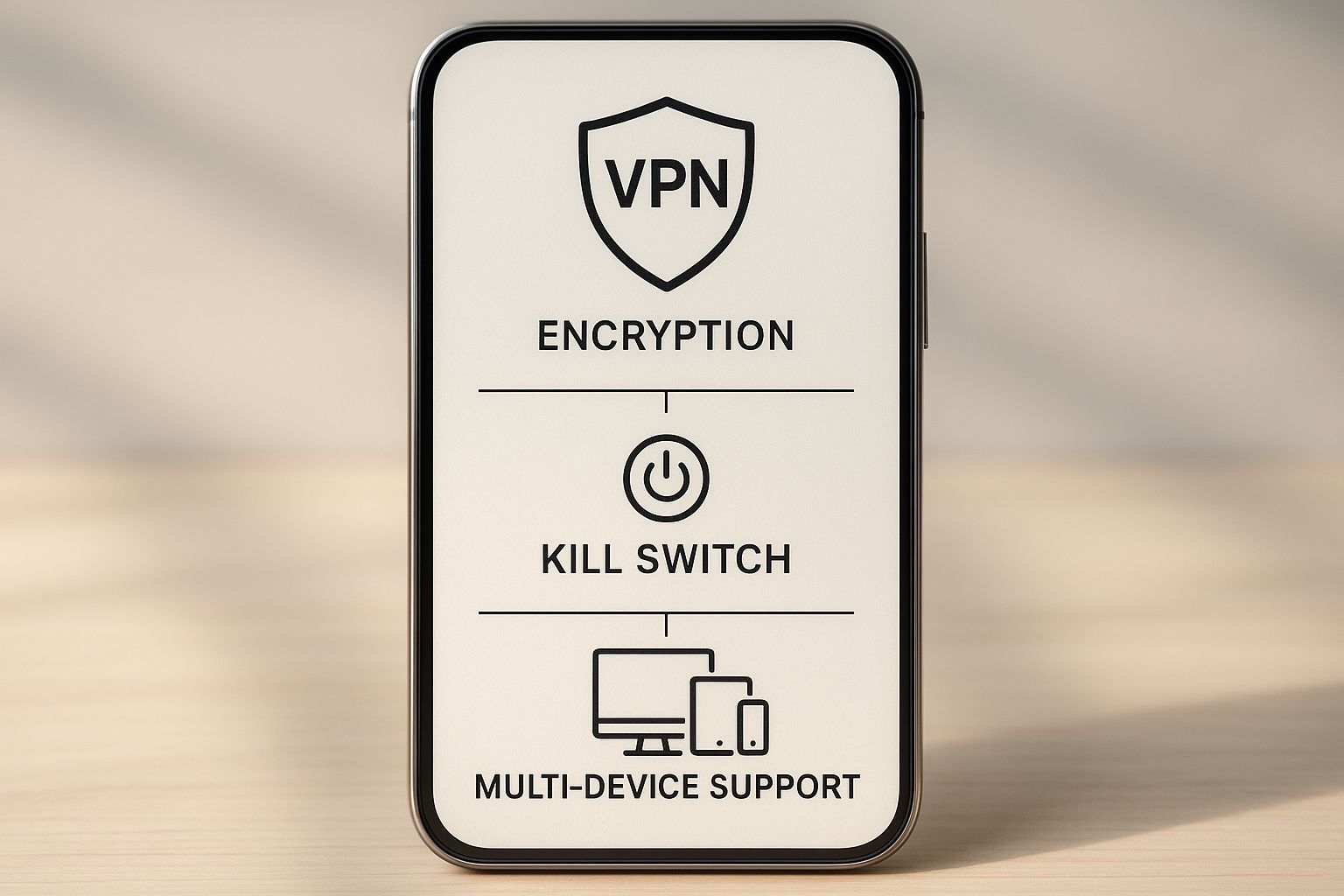
As the image shows, strong encryption, a kill switch, and multi-device support aren't just nice-to-haves; they are the foundation of a secure and flexible VPN that can adapt to your team's needs.
Business VPN Feature Checklist
To make your evaluation process easier, we've put together a checklist of essential features. Think of this as your guide to separating the serious solutions from the ones that could put your business at risk.
| Feature | Why It's Critical for Your Business | Non-Negotiable? |
|---|---|---|
| Strong Encryption | Uses industry-standard protocols like OpenVPN or WireGuard® to scramble your data, making it unreadable to anyone trying to intercept it. | Yes |
| Multi-Factor Authentication (MFA) | A password alone is no longer enough. MFA adds a crucial second layer of verification, like a code sent to a phone, to block unauthorized access. | Yes |
| Strict No-Logs Policy | Ensures your VPN provider doesn't track, store, or sell any information about your team's online activities. This is vital for privacy and compliance. | Yes |
| A Kill Switch | This is your ultimate fail-safe. If the VPN connection unexpectedly drops, the kill switch instantly cuts off internet access to prevent data from leaking onto an unsecured network. | Yes |
| Centralized Management | A user-friendly dashboard allows your IT team or partner to easily add or remove users, monitor connections, and enforce security policies across the organization. | Yes |
| Scalable Server Network | A wide network of servers ensures reliable connections and fast performance for your team, no matter where they are located. | Yes |
When you're vetting potential VPN providers, use this table as a scorecard. Any service that doesn't check all these boxes isn't ready for your business.
This growing reliance on secure connections is driving significant market growth. The Remote-Access VPN market, valued at about $946.5 million in 2025, is projected to expand steadily, fueled by the permanent shift to hybrid work. You can read more about these market trends to see how they reflect this demand.
Defining these security requirements is a foundational step in building a robust security framework for your entire company. You can learn more about this in our guide to IT security policy templates.
Best Practices for VPN Security and Management
Putting a business-grade VPN in place is a brilliant first step, but it’s definitely not a ‘set it and forget it’ solution. Think of it like the essential equipment you rely on every day, whether in the hospitality industry or on the farm. Your VPN needs ongoing attention to stay effective and keep your business safe.
Proper management ensures your VPN for remote work remains a strong shield rather than slowly turning into a security liability. It’s a proactive approach that’s more critical than ever. VPN adoption has skyrocketed, with over 1.5 billion people—that’s about 31% of all internet users—expected to use them by 2025. You can see more on this trend with the VPN usage statistics on PureVPN.com. This just goes to show how central they’ve become to modern, secure work.
Update and Patch Consistently
One of the most important jobs is keeping your VPN software up to date. Cybercriminals are always on the hunt for new weaknesses to exploit. In response, VPN developers regularly release patches and updates to seal off those security gaps.
Ignoring these updates is like leaving a window unlocked right after a locksmith warns you about a new type of lockpick circulating in the neighborhood. You have to install updates as soon as they’re available to shield your network from the latest threats. It’s a simple habit, but it’s a cornerstone of good cyber hygiene.
Implement the Principle of Least Privilege
A core principle of any strong security strategy is granting employees access only to the data and systems they absolutely need to do their jobs. This is known as the principle of least privilege.
For instance, someone on your marketing team has no business accessing the company's financial servers. Likewise, your accounting department probably doesn't need to get into your proprietary software code. By restricting access this way, you dramatically shrink the potential damage if an employee's account is ever compromised.
A VPN with granular access controls is your best tool for enforcing this principle. It lets you create specific user groups and policies, ensuring that even with a secure connection, employees can only reach their designated areas.
This level of control is fundamental. For a closer look at how to protect your business with a layered strategy, check out our guide on Salinas cybersecurity support.
Monitor and Review Access Logs
Your VPN generates logs that keep a record of who connects, when they connect, and what they access. You don’t need to stare at these logs 24/7, but reviewing them regularly is a powerful security practice.
Keep an eye out for unusual patterns that could signal trouble:
- Odd Login Times: An employee who works 9-to-5 is suddenly logging in at 3 AM.
- Unusual Locations: Access attempts are coming from countries where you have no employees.
- Multiple Failed Logins: A string of failed attempts could be a sign of a brute-force attack.
Reviewing these logs helps you spot potential security incidents before they have a chance to escalate into a full-blown breach. This kind of vigilance is what keeps your VPN a trustworthy safeguard for your entire business.
Partnering with a Salinas IT Expert for Your VPN
As a local business owner, your time is your most valuable asset. While this guide gives you a solid foundation for understanding the importance of a VPN for remote work, the actual deployment, management, and monitoring require specialized expertise.
Getting tangled up in network configurations and threat monitoring can easily pull you away from what you do best—running your business.
This is where partnering with a local IT expert makes all the difference. Instead of trying to become a cybersecurity specialist overnight, you can lean on a team that lives and breathes this work. A managed services provider like us handles the entire lifecycle of your VPN.
This process includes:
- Selecting and deploying the ideal VPN solution for your specific needs.
- Managing all updates and security patches to protect against new threats.
- Monitoring network activity 24/7 to detect and respond to suspicious behavior.
- Providing ongoing support to your team, ensuring they stay connected and productive.
Partnering with an expert gives your Salinas Valley business access to enterprise-level security and support without the enterprise-level price tag. It’s the most affordable way to secure your operations and gain peace of mind.
This hands-off approach lets you focus on your core business goals, confident that your remote workforce is secure. For companies in Monterey County, having dedicated local professionals means faster response times and a partner who truly understands the challenges you face.
You can explore more about what to look for with our guidance on Salinas IT support and find a partner who fits your business.
Common VPN Questions for Business Owners
When you start thinking about using a VPN for remote work, a few questions always pop up. That’s perfectly normal. Getting clear, straightforward answers is key to helping you choose the right solution for your business with confidence. Let's tackle some of the most frequent questions we hear from local business owners just like you.
Will a VPN Significantly Slow Down Our Internet Connection?
This is probably the number one concern we hear, and it's a valid one. The good news is that a quality, business-grade VPN is built for performance. For everyday tasks like checking email, using company software, or sharing files, the impact on speed is often so small you won't even notice it.
While the encryption process does add a tiny step, professional VPN services are highly optimized to keep things zipping along. For any Monterey County business, the massive security boost you get far outweighs any minor speed considerations.
Can My Employees Just Use a Free VPN for Work?
In a word: no. Free VPN services are one of the biggest security risks you can introduce to your business. They’re notorious for using weak encryption, and many have been caught tracking and selling their users' online activity to make money. On top of that, they're often painfully slow and unreliable.
Free VPNs have to make money somehow, and it's usually by monetizing their users—which can mean selling your company’s data. Investing in a reputable, business-grade VPN is a non-negotiable part of any serious cybersecurity strategy.
Do We Still Need a VPN If We Mostly Use Cloud Apps?
Yes, absolutely. While cloud platforms like Microsoft 365 or Google Workspace have their own security, a VPN protects the connection itself. Think about it: when your employee connects to the cloud from an unsecured public Wi-Fi at a local cafe or the airport, their entire internet connection is exposed.
A VPN encrypts all of their online traffic—from web browsing to cloud app access—creating a private tunnel that shields their entire digital workspace. It's a vital layer of security that cloud apps alone don't provide.
Ready to secure your remote team without the hassle? The experts at Adaptive Information Systems can design and manage the perfect VPN solution for your business.
Learn how our managed IT services can protect your company.
Adaptive Information Systems
380 Main St, Salinas CA 93901 | 831-644-0300 | hello@adaptiveis.net