
As a business owner, you’ve probably asked yourself: “Can’t we just call someone when something breaks instead of signing a contract?” It sounds logical. But the simple truth about “quick fix” tech support is that it’s a short-term patch for what are often long-term problems. This reactive approach always feels cheaper at first, but for businesses here in Salinas and across Monterey County, the cycle of waiting for things to break almost always leads to more expensive repairs, repeated downtime, and lost productivity down the road.
Why the Break-Fix Model Is So Tempting
If you’re running a business, you’re always watching the bottom line. The pay-as-you-go model, known as “break-fix” tech support, seems like a smart way to control costs. You only get a bill when a computer fails, a server crashes, or your network goes down. On paper, it seems like the most affordable way to handle your IT. This is especially true for our local industries in agriculture, hospitality, and education, where every dollar counts.
But this is exactly where the hidden costs start to creep in. When your entire operation depends on technology to function, an unexpected crash isn’t just an inconvenience—it’s a direct threat to your revenue. The time your team spends unable to work, the potential sales you lose, and the urgent call-out fees all add up fast. You can explore a deeper dive into the real financial impact by understanding the hidden costs of IT downtime in our detailed guide. This reactive cycle keeps you in a state of perpetual firefighting, never actually addressing what’s causing the problems in the first place.
The Illusion of Saving Money
The real issue with the “quick fix” mindset is that it focuses on the immediate expense of a single repair rather than the total cost of ownership and the price of disruption. A one-time invoice might look small, but what happens when the same problem pops up again next month? Or when a different, more critical system fails because no one was monitoring it?
What this actually means is that while break-fix may seem cheaper short term, it’s often more expensive long term. Managed support helps identify root causes, prevent repeat problems, and protect uptime.
Recent insights show that SMBs using managed services cut IT costs by up to 45% while increasing reliability and uptime. In contrast, break-fix clients pay for every visit—and often for recurring issues.
Moving from Reaction to Prevention
A proactive approach changes the entire dynamic. Instead of paying a technician to fix a crisis, you invest in a partner whose entire goal is to prevent that crisis from ever happening. It’s about building a stable and secure technology foundation so you can focus on running your business, not worrying about the next tech headache.
The first step doesn't have to be a massive commitment. You can start with a small managed plan or IT health check. It’s a risk-free way to benchmark where your IT stands and discover hidden issues before they cost you hours of productivity.
Have your own IT person? Learn how co-managed IT fills the gaps without taking over.
Still unsure if managed support is right for you? Let’s break down the real difference—in dollars and downtime. Schedule a free comparison.
Adaptive Information Systems
380 Main St, Salinas CA 93901 | 831-644-0300 | hello@adaptiveis.net
Why Paying Per Hour for IT Support Costs You More
The break-fix model seems simple enough on the surface: you only pay when something goes wrong. For many businesses here in the Monterey Bay Area, it feels like a practical way to manage expenses. But this approach is a bit like only calling a plumber after your house has already flooded, instead of doing routine maintenance to prevent the pipes from bursting in the first place.
This pay-per-hour arrangement creates a problematic conflict of interest. A break-fix provider’s business model is built on your emergencies, while a true IT partner profits from your stability. Think about it—they get paid when your technology fails, not when it succeeds. This dynamic guarantees you'll always be playing defense, reacting to problems instead of getting ahead of them.
The True Cost of an Emergency Call
When you call for "quick fix" tech support, that hourly bill is just the tip of the iceberg. The real damage is hidden in the disruption to your business. Every single minute your system is down, you are losing money. A recent analysis threw this into sharp relief, showing that downtime can cost small businesses an average of $300 per minute. Because break-fix support doesn't include proactive, 24/7 monitoring, a single server crash can easily vaporize thousands of dollars in lost sales and productivity before the technician even arrives.
The visual below breaks down how one system crash spirals into a cascade of costly problems under the reactive break-fix model.
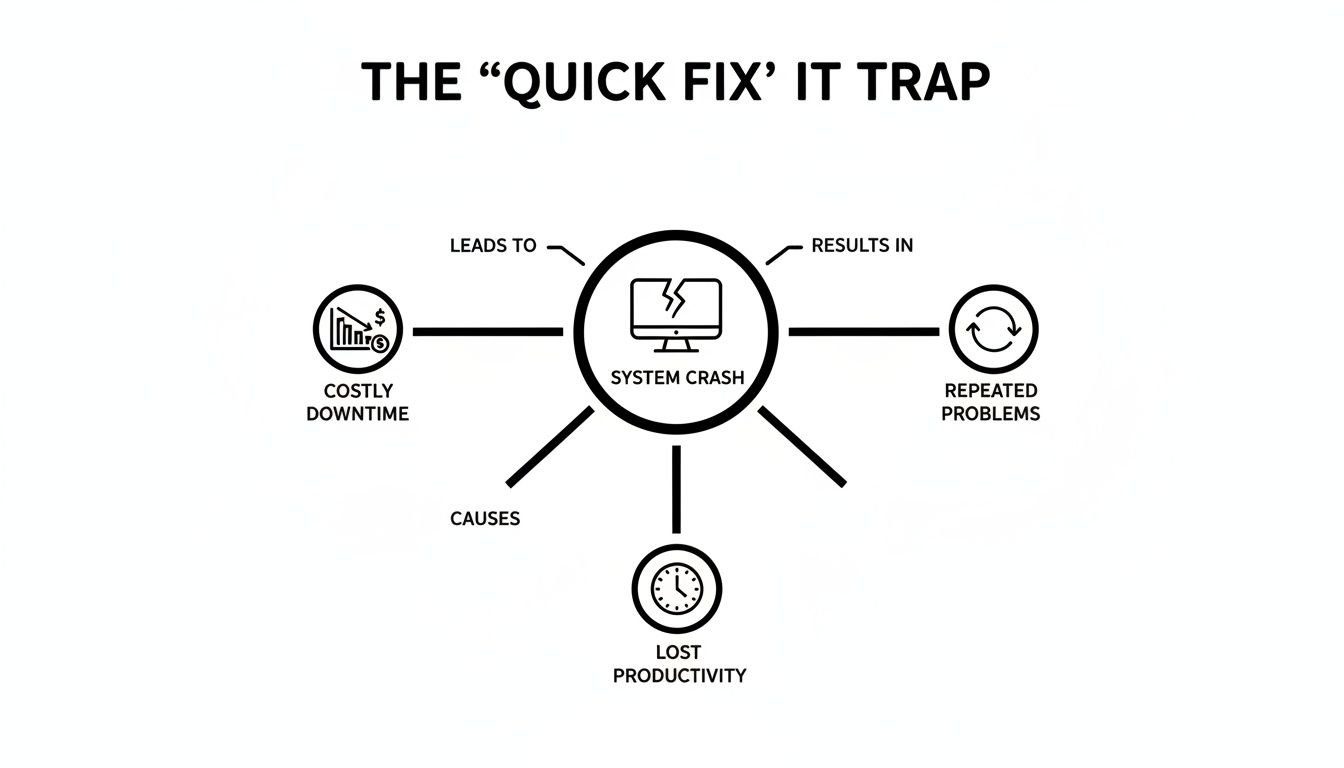
As you can see, what starts as a single technical hiccup quickly multiplies. It turns into costly downtime, frustrating recurring issues, and a major hit to your team's ability to get their work done.
Unpacking the Hidden Financial Drains
Beyond the technician's invoice, the break-fix model quietly drains your finances in ways that don't show up on a bill but absolutely impact your bottom line. These are the costs that really add up over time.
This reactive approach costs you more in several key ways:
- Lost Employee Productivity: When systems go down, your staff can't work. They might be sitting idle, trying to figure out clumsy workarounds, or dealing with frustrated customers—all while you're still paying their salaries. This lost labor cost often dwarfs the actual repair bill.
- Recurring Problems: Quick-fix technicians are paid to patch the immediate issue, not dig deeper to find the root cause. This leads to the same problems popping up again and again, each time costing you another service call and more disruptive downtime.
- Damaged Customer Trust: Unreliable systems directly affect your customers. A crashed point-of-sale system at a Carmel retail shop or a down booking server for a Pacific Grove hotel leads to lost sales and a reputation for being undependable.
- No Strategic Guidance: A break-fix technician’s job is done the moment the immediate fire is out. They don’t offer strategic advice on how to improve your systems, secure your data, or plan for future growth. You’re left making critical technology decisions in a vacuum.
This table gives a clearer picture of how the two models stack up when you look beyond the hourly rate.
Break-Fix vs. Managed IT: The Real Cost Comparison
| Feature | Quick Fix Break-Fix Support | Proactive Managed IT Support |
|---|---|---|
| Cost Structure | Unpredictable, hourly rates | Fixed, predictable monthly fee |
| Downtime | High; paid only after a problem occurs | Minimized; proactive monitoring prevents issues |
| Productivity | Frequently interrupted by tech failures | Consistent; stable systems support workflow |
| Budgeting | Impossible to budget accurately | Simple, predictable operational expense |
| Root Cause Analysis | Rarely performed; focused on symptoms | Standard practice to prevent recurrence |
| Strategic Advice | None; technician's role is transactional | Included; partner helps plan for growth and security |
The constant cycle of break, fix, and repeat makes it impossible to budget for IT expenses with any real confidence. You never know when the next big, expensive failure will strike, leaving your business vulnerable. If you're wondering how this compares to other options, you might be interested to learn why a full-time IT staff could be costing you more than you think.
Ultimately, switching to a proactive model is the only way to break this expensive cycle and finally gain control over both your technology and your budget.
How Proactive IT Management Saves Your Business Money
So, instead of just reacting to emergencies, let's flip the script and talk about prevention. A proactive, managed IT service is a lot like having a dedicated expert IT department on your team, but for a predictable, flat monthly fee. This one move fundamentally changes the game from frantic, reactive problem-solving to calm, proactive stability. It's the core difference separating businesses that are thriving from those stuck in a cycle of tech-related stress.
This approach isn't just about making life easier; it's about strengthening your bottom line. The data is clear: small and mid-sized businesses that switch to managed services can significantly cut their overall IT costs while, at the same time, boosting reliability and uptime. For a business here in Carmel or Pacific Grove, that means fewer disruptions, much stronger cybersecurity, budgeting you can actually count on, and access to enterprise-level tools you couldn't otherwise afford.

Through 24/7 monitoring, strategic planning, and routine maintenance, potential issues get spotted and solved long before they have a chance to interrupt your workday and hurt your revenue. This is how you escape the "quick fix" tech support trap for good.
The Financial Power of Predictability
One of the biggest wins in a managed IT model is the move from unpredictable capital expenditures (CapEx) to stable operating expenditures (OpEx). Instead of getting hit with a massive, unexpected bill for a new server, you pay a consistent monthly fee. That fee covers everything from monitoring and maintenance to day-to-day support, which makes budgeting incredibly simple and reliable.
You can finally plan your finances with confidence, knowing your technology costs are locked in and under control. That stability lets you put resources where they really matter—toward growth, marketing, or other critical parts of your business. By shifting to proactive IT, companies can eliminate those costly reactive fixes and implement broader strategies to reduce operational costs, securing their long-term financial health.
Preventing Problems Before They Start
Here’s the thing about a proactive partner: we are directly incentivized to keep your systems running smoothly. Our success is tied to your stability—the complete opposite of the break-fix model where the provider profits from your problems. We use advanced tools to monitor your network around the clock, constantly looking for the little warning signs of trouble.
This constant vigilance lets us handle small issues before they blow up into major disasters. Think of it like this:
- Proactive Patch Management: We make sure all your software and systems are updated with the latest security patches. This closes the vulnerabilities that hackers are looking to exploit.
- Performance Monitoring: We keep an eye out for signs of failing hardware or slowing performance, which lets us schedule maintenance or replacements during off-hours so your workday is never disrupted.
- Security Alerts: Our systems actively scan for threats, from phishing attempts to malware, and neutralize them before they can compromise your data.
This constant oversight is what truly protects your business. Instead of waiting for the alarm to go off, we're focused on making sure it never needs to sound in the first place. This proactive stance is critical, as our guide to managed IT support explains in more detail.
Immediate Support When You Need It
Of course, even with the best prevention, problems can still pop up. The real difference is in how they're handled. With a managed plan, you have a dedicated team that already knows your systems inside and out. No time is wasted getting a new technician up to speed on your unique setup.
A proactive partner already has a deep understanding of your business goals and technological infrastructure. It’s not just another quick fix; it's a lasting solution built on a true partnership.
Signs You're Stuck in the Quick Fix Tech Support Trap
Does your current IT support feel more like a temporary patch than a real, long-term solution? It can be tough to tell when you're in the thick of running a business, but getting stuck in a costly break-fix cycle is a surprisingly common problem. Spotting the signs is the first step toward finding a better, more stable way to manage your technology.
Many businesses fall into this trap because the promise of a "quick fix" is so appealing. But the reality often looks quite different. For instance, while 83% of customers expect an immediate response when they have a problem, most break-fix models simply can't deliver that consistently, leaving you frustrated and exposed when things go wrong.

If you’re wondering whether your business is caught in this expensive loop, here are the major red flags to watch for.
The Same Problems Keep Happening
Does it feel like you’re calling for help with the same issues over and over again? Maybe it's that one computer that always loses its network connection or a piece of software that crashes at the worst possible moment. This is the biggest sign you’re dealing with a Band-Aid, not a cure.
A "quick fix" technician is paid to solve the immediate symptom, get you running again, and move on to their next emergency. They rarely have the time—or the incentive—to dig deeper and find the root cause. A true IT partner, on the other hand, is motivated to find and fix the underlying problem permanently so it doesn't happen again.
You Get Hit with Surprise Invoices
Another dead giveaway is the unpredictable nature of your IT bills. One month it’s a small fee for a simple tweak, but the next, you’re staring at a massive invoice for several hours of emergency work. This financial roller coaster makes it impossible to budget for technology with any certainty.
When you’re paying by the hour, every service call is a gamble. You have no idea what the final cost will be until the work is done, and sometimes a "simple" fix uncovers much bigger, more expensive problems. This lack of predictability puts a constant strain on your cash flow and makes financial planning a nightmare.
Key Takeaway: If your IT costs are a constant surprise, it’s a sign your support model is reactive. Proactive management offers a flat, predictable monthly fee, turning a chaotic variable expense into a stable operational cost.
Your Technician Is a Stranger to Your Business
When you call for help, do you get a different technician every time? Does that person spend the first hour just trying to understand your network, your software, and how your team actually works? This is a huge red flag that you’re not getting strategic support.
A technician who doesn’t know your specific setup can’t provide effective or efficient help. They’re starting from scratch every single time, which means you’re paying for their learning curve. This isn't just inefficient; it's also a security risk, as they may not be aware of your specific compliance needs or security protocols.
True support comes from a team that understands your business goals. If you're running a business in Carmel and feel like you're missing this kind of dedicated partnership, you might be interested in our guide on the benefits of managed IT for Carmel businesses.
Your First Step Toward Stable and Predictable IT
Moving away from the break-fix cycle can feel like a big step, but it doesn't have to be a massive, overwhelming leap. You don't need to jump straight into a huge, long-term contract to start seeing what a proactive IT strategy can do for your business.
The real problem with "quick fix" tech support is its complete lack of foresight. So, your first step in a new direction should be all about gaining that valuable perspective. Think of it as a low-risk, high-reward way to test the waters. You can start with a small managed plan or, even better, a comprehensive IT health check. This is all about getting a clear, honest benchmark of where your technology actually stands today.
Get a Clear Picture with an IT Health Check
An IT health check is like getting a full diagnostic workup for your business's technology. A skilled team comes in and assesses everything—from your network security and the age of your hardware to how efficiently your software is configured. It’s a completely risk-free way to get an expert, third-party opinion on your current setup.
This process is invaluable because it uncovers the hidden issues a typical break-fix tech would never even look for. These are the lurking problems that eventually turn into major downtime and surprise expenses.
Common things we find include:
- Outdated Security Protocols: Glaring vulnerabilities in a firewall or unpatched software that leave the door wide open for a cyberattack.
- Failing Hardware: Clear signs of wear and tear on a critical server or a hard drive that’s about to give up completely.
- Inefficient Configurations: Network bottlenecks that are secretly slowing down your entire team's productivity every single day.
By catching these risks before they blow up into catastrophes, you’re taking a real, concrete step toward a more stable and predictable IT environment. It’s the perfect opportunity to see what’s really going on behind the scenes without any long-term commitment.
An IT health check is what shifts your mindset from being reactive to proactive. It’s about finding those hidden vulnerabilities before they cost you hours of lost productivity and thousands in emergency repair bills.
What If You Already Have an IT Person?
Many business owners here in the Monterey Bay Area figure that if they have an in-house IT person, they’re all set. The reality is, even the most talented IT manager can get buried under the daily flood of user support tickets, let alone find time for strategic planning and staying ahead of cybersecurity threats.
This is where a partnership model can make a world of difference. You don't have to replace your IT staff—you can empower them.
A co-managed approach fills in the gaps, providing specialized expertise, advanced monitoring tools, and extra hands to manage routine maintenance. This frees up your internal team to finally focus on the high-impact projects that actually drive your business forward. To see how this collaborative model works, check out our guide on how co-managed IT fills the gaps without taking over.
Whether you’re starting from scratch or looking to support an existing team, the goal is the same: to build a technology foundation you can actually rely on. Taking that first small step with a health check or a focused plan is the smartest way to get started.
Building a Reliable Technology Foundation for Your Business
When it comes to your business's technology, the path of least resistance—calling for a quick fix only when something breaks—is almost always the most disruptive. It might seem cheaper upfront, but the real cost of "break-fix" tech support is paid in downtime, lost productivity, and serious security risks.
Choosing proactive, managed IT support is a strategic investment in your Salinas business’s stability, security, and future growth. It’s about building a reliable technology foundation that actually works for you, not against you, so you can focus on what you do best: running your business.
From Unpredictable Bills to a Predictable Partnership
The real value of managed support comes down to one word: predictability. Instead of getting hit with surprise invoices for emergency repairs, you have a fixed monthly cost. This simple shift moves your IT spending from a chaotic capital expense (CapEx) to a stable operating expense (OpEx), which makes budgeting and planning for the future infinitely easier.
Recent insights show that SMBs using managed services don't just stabilize their spending; they often cut overall IT costs by up to 45% while seeing a major boost in reliability. How? Because a dedicated partner prevents the very same costly emergencies that inflate those break-fix bills in the first place.
What this actually means is that while break-fix may seem cheaper short-term, it’s often more expensive long-term. Managed support helps identify root causes, prevent repeat problems, and protect uptime.
Taking a Small, Strategic First Step
Making this shift doesn't require a massive leap of faith. The best way to start is with a small, manageable action that gives you real clarity.
Start with a comprehensive IT health check. It’s a risk-free way to benchmark where your technology stands today. This assessment will uncover hidden hardware issues, security vulnerabilities, or network slowdowns before they can cost you hours of productivity and thousands in emergency fees. It’s the first step from constant firefighting to genuine future-proofing.
To truly build a reliable technology foundation, you have to think about the entire lifecycle of your IT assets. This includes knowing the best ways to track and manage your equipment. That's why reviewing these 10 IT Asset Management Best Practices can offer valuable insights for optimizing your technology investments for the long haul.
Still unsure if managed support is right for you? Let’s break down the real difference—in dollars and downtime. Schedule a free comparison to see exactly how a proactive approach can benefit your bottom line and give you the peace of mind you deserve.
Adaptive Information Systems
380 Main St, Salinas CA 93901 | 831-644-0300 | hello@adaptiveis.net
Clearing Up the Confusion Around IT Support
Making the jump from reactive, "quick fix" tech support is a big decision, and it's natural to have a few questions. It’s a move that changes how you handle technology, so you absolutely deserve clear, straight-up answers. Here are some of the most common questions we hear from business owners right here in the Monterey Bay Area.
Isn't a Managed IT Contract Too Expensive for My Small Business?
It’s easy to see a monthly fee and think it’s an added cost, but in our experience, most businesses actually find it’s far more cost-effective. Think about it this way: managed services are all about preventing expensive downtime in the first place.
When you factor in the critical maintenance, the constant monitoring, and the predictable budget, you eliminate those chaotic, cash-flow-killing repair bills. The truth is, many small and mid-sized businesses who make the switch end up cutting their overall IT costs.
What if We Already Have an IT Person on Staff?
That's a perfect scenario for what we call a co-managed approach. A managed service provider isn’t there to replace your go-to IT person, but to supplement them. We can lift the burden of routine monitoring and maintenance off their plate or bring in specialized expertise for complex projects.
This frees up your internal expert to focus on the big-picture initiatives that actually drive your business forward.
The goal is always partnership, not replacement. Have your own IT person? Learn how co-managed IT fills the gaps without taking over.
With a Managed Plan, How Fast Can We Really Expect a Response?
This is one of the biggest differences. Managed IT plans are built on a Service Level Agreement (SLA) that contractually guarantees specific response times. It's a world away from the break-fix model, where you’re just another number in a long line of panicked callers.
Even better, our proactive monitoring means we often spot and resolve issues before you even realize there's a problem. That's how you protect your team’s productivity—by stopping fires before they ever start.
Still unsure if managed support is the right fit? Let’s break down the real difference—in dollars and downtime. Schedule a free, no-pressure comparison with Adaptive Information Systems.
Adaptive Information Systems
380 Main St, Salinas CA 93901 | 831-644-0300 | hello@adaptiveis.net