
Planning Your Network Infrastructure Like a Pro
A solid network for your small business isn't about buying the most expensive gear; it’s about smart, upfront thinking. Many owners jump straight into purchasing hardware without a clear blueprint, leading to slow speeds, poor coverage, and expensive redos. The secret to avoiding these headaches is to plan with a strategic mindset, focusing on how your business actually works, not just on technical specs.
This means shifting your thinking from "What do I need?" to "How do we operate day-to-day?"
Conducting a Realistic Needs Assessment
Before you even glance at a router or switch, you need a crystal-clear picture of your daily demands. A common pitfall is planning for a theoretical maximum load that never happens. Instead, ground your assessment in your actual workflow.
Start by asking some practical questions:
- Who needs access? Make a list of every user, from the front desk to the back office, and don't forget regular contractors or even guests who need Wi-Fi.
- What devices are connecting? Think beyond computers. You need to account for office phones (VoIP), security cameras, point-of-sale systems, printers, and smart devices. Each one adds to the network load.
- What software do you use? A business that relies on cloud-based accounting software and video conferencing has very different needs than one using locally hosted applications. For instance, a design firm constantly uploading large media files will stress a network far more than an accounting firm primarily using QuickBooks Online.
This detailed inventory gives you a tangible baseline for your network setup for a small business. It stops you from either under-building a system that can’t keep up or overspending on capacity you'll never use.
Mapping Your Physical and Future Landscape
With your user and device list complete, it's time to map out your physical space. Sketch a simple floor plan of your office. Mark where your primary workstations are, where your team meets, and any areas with heavy foot traffic. Also, identify potential signal killers like concrete walls, metal shelving, or large appliances. This map is crucial for planning where to place Wi-Fi access points for consistent, reliable coverage.
Just as important as your current layout is your future vision. Are you planning to hire five new employees next year? Thinking about moving to a larger office in two years? These aren't just business goals; they're critical network planning details. A scalable network is designed with this growth in mind.
Budgeting is a key part of this strategic look ahead. To give you a clearer idea of potential costs, here’s a breakdown of what you might expect based on your business size.
| Business Size | Employee Count | Setup Cost Range | Key Requirements |
|---|---|---|---|
| Micro-Business | 1–10 | $1,000–$5,000 | Basic router, a few Wi-Fi access points, simple firewall. |
| Small Business | 10–50 | $5,000–$15,000 | Business-grade router, managed switches, multiple access points, dedicated server. |
| Medium Business | 50–100 | $15,000–$40,000+ | Advanced firewalls, multiple managed switches, extensive Wi-Fi coverage, potential for redundant internet connections. |
The table shows that as you grow from 10 to 50 employees, the cost can jump significantly from $5,000 to $15,000 due to the need for more robust, business-grade equipment. Understanding these figures helps you align your growth plans with a realistic technology budget.
By thoroughly assessing your current usage, mapping your environment, and planning for growth, you create a strong framework. This strategic foundation ensures your investment results in a high-performing network that supports your business today and scales with you tomorrow.
Choosing Network Hardware That Actually Delivers
Once you have a solid plan, the next exciting phase is picking the actual hardware. It’s easy to get lost in a sea of technical jargon and flashy marketing claims. However, the best network setup for a small business isn’t built on the most expensive equipment, but on the right equipment for your specific needs. Let's cut through the noise and focus on what truly delivers performance and value.
The core components of your network will be the router, switches, and wireless access points. Think of the router as the main traffic controller for your internet connection, switches as the local dispatchers directing data between your wired devices, and access points as the couriers delivering wireless signals.
Routers: The Brain of Your Network
Your router is the most critical piece of the puzzle. A consumer-grade router from a big-box store might work for a home office, but it will quickly become a bottleneck in a business environment with multiple employees, POS systems, and security cameras all competing for bandwidth.
When you're looking at business-grade routers, here are the practical features you should prioritize:
- VPN (Virtual Private Network) Support: This is essential for giving you and your team secure remote access. It creates an encrypted tunnel over the internet, protecting sensitive company data when you're working from home or on the road.
- Quality of Service (QoS): This feature lets you prioritize network traffic. For example, you can make sure your VoIP phone calls always get enough bandwidth to stay crystal clear, even if someone else is downloading a huge file.
- Dual-WAN Failover: This handy feature allows you to connect a second internet line from a different provider. If your main connection goes down, the router automatically switches to the backup, keeping your business online and operational.
Switches and Access Points: Expanding Your Reach
While the router is the brain, switches and access points are the nervous system that extends its reach. Switches connect your wired devices—like desktops, printers, and servers—at high speeds. The market for small business networking hardware is growing fast, with North America leading in adopting new tech. The industry is projected to expand at a 5.2% CAGR from 2024 to 2033, which shows a strong demand for better solutions.
For most small businesses, fixed port network switches are the go-to choice because they are affordable and easy to manage. You can explore more about these trends in the full regional analysis report. For Wi-Fi, you’ll want dedicated access points (APs) instead of just using your router's built-in wireless. Placing multiple APs throughout your office gets rid of dead zones and ensures a strong, reliable signal everywhere.
To help with your router decision, we've put together a quick comparison of what to expect at different levels.
Small Business Router Comparison Guide
Essential features and specifications comparison for popular small business routers
| Router Model | Max Devices | Coverage Area | Key Features | Price Range |
|---|---|---|---|---|
| Good (Entry-Business) | 25-50 | ~1,500 sq. ft. | Basic QoS, VPN Server | $150 – $300 |
| Better (Growing Business) | 50-100 | ~3,000 sq. ft. | Advanced QoS, Dual-WAN, VLAN Support | $300 – $700 |
| Best (Future-Proof) | 100+ | 5,000+ sq. ft. | High-throughput, Advanced Security, Robust Management | $700+ |
This table shows how a small step up in investment can significantly boost your network's capacity and features, setting you up for future growth.
Choosing hardware isn't just about today; it's about building a foundation that can handle what's next. A slightly higher investment in a scalable router or a managed switch can save you from a costly and disruptive replacement a year or two down the line. Remember that your network holds your most valuable asset: your data. Ensuring its accessibility and integrity is paramount, which is why your hardware choices should align with a solid data protection strategy. For a deeper dive into this topic, you might be interested in our guide on backup and disaster recovery for small businesses.
Installing Your Network Without the Technical Overwhelm
You’ve got the hardware and a solid plan. Now it’s time to bring your network to life. This is the part where many business owners start picturing a mess of tangled wires and confusing software menus. But the physical installation and initial setup of your network setup for a small business don't need to cause a headache. The trick is to be methodical and focus on a few core ideas that will give you a clean, dependable system from day one.
Many hardware makers now offer simplified setup wizards and management portals to make this whole process much easier. For example, business networking solutions from companies like TP-Link are often designed with user-friendly interfaces in mind.

As you can see, modern gear often includes a centralized platform. This lets you manage your routers, switches, and access points from a single screen, which really lowers the technical barrier.
From the Box to a Functioning Network
Let's break down the physical setup into practical, manageable tasks. Think of it like organizing a new office space—thoughtful placement makes everything run better down the line.
- Find a Central Home for Your Core Gear: Your modem, router, and main switch should live in a central, secure, and well-ventilated spot. A small utility closet or a dedicated server rack is perfect. A common mistake is cramming them into a sealed cabinet where they can overheat, which is a frequent cause of poor performance.
- Route Cables Strategically: A "rat's nest" of cables isn't just ugly; it's a maintenance nightmare waiting to happen. Plan your cable runs logically. Using cable trays or conduits can keep them organized and protected. A pro tip: keep your Ethernet cables away from power lines to avoid electrical interference that can mess with your network signal.
- Place Access Points for Peak Performance: Go back to your office floor plan. Your Wi-Fi access points (APs) need to be mounted high on a wall or ceiling, clear of big physical obstacles like metal file cabinets or concrete pillars. Placing an AP on a desk in a corner is a frequent mistake that severely limits its signal reach. Your goal is to create overlapping zones of coverage to get rid of any Wi-Fi dead spots.
Once your hardware is physically in place, it's time to connect it all. Begin by connecting your Internet Service Provider's (ISP) modem to the WAN (Wide Area Network) port on your router. Next, connect your main network switch to one of the LAN (Local Area Network) ports on the router. Finally, plug in your wired devices, such as desktops, printers, and any other switches, into your main switch.
Basic Configuration That Makes a Big Difference
With everything powered up, you'll need to do some initial configuration. Most modern business routers have a web-based interface you can get to from a connected computer. This is where you’ll lay the foundation for your network.
Your first, most critical move is to change the default administrator username and password on your router. Leaving the factory-set credentials is like leaving the front door of your business unlocked; it’s one of the biggest security risks you can take.
Next, you'll configure your Wi-Fi network. This involves a few key settings:
- Network Name (SSID): Pick a professional and recognizable name for your main business network.
- Security Protocol: Always choose WPA3 for encryption if it's available, or WPA2 as a solid alternative. This scrambles your wireless traffic, making it gibberish to anyone trying to snoop on your connection.
- Guest Network: Set up a separate network just for visitors. This is an essential feature that gives guests internet access while keeping them completely walled off from your secure internal business network and sensitive files.
After these basic settings are good to go, test your connections. Connect a computer with an Ethernet cable and check if you can browse the internet. Then, connect a phone or laptop to your new Wi-Fi network and do the same. This simple test confirms that your core network setup for a small business is working properly before you connect every other device in the office.
Implementing Security That Protects Your Business Assets
With your network hardware installed and configured, it’s time to shift focus to its most important job: protecting your business. A proactive approach to security isn’t just for large corporations; it’s a critical part of any successful network setup for a small business. Let's move past scare tactics and concentrate on practical, maintainable security measures that will safeguard your operations without needing a dedicated IT team.
The unfortunate reality is that small businesses are prime targets for cybercriminals. In fact, cybersecurity concerns are well-founded, as 43% of all cyberattacks in 2023 were aimed at small businesses. Even more telling is that human error was found to be responsible for 95% of all cybersecurity breaches. These figures highlight the need for a layered defense that combines strong technical safeguards with consistent team training. You can explore more about these trends by reviewing the latest small business cybersecurity statistics.
Building Your Digital Fortress
Effective security starts with the basics you configured during installation but expands into a more robust defense. Your router's firewall is your first line of defense, acting as a gatekeeper that inspects incoming and outgoing traffic. Make sure it's enabled and, if your router offers it, consider activating intrusion prevention features. This adds another layer of security by actively looking for and blocking suspicious activity.
Next, let's talk about access. Not everyone on your team needs access to everything. A great way to manage this is through VLANs (Virtual Local Area Networks). Think of a VLAN as creating separate, private networks within your main network. For example, you can put your finance department on one VLAN, your sales team on another, and your guest Wi-Fi on a third. This segmentation contains any potential breach; if one area is compromised, the attacker can't easily jump to another sensitive part of your network.
Smart Password Policies and User Training
Strong passwords are non-negotiable, but getting your team to use them consistently can be a challenge. Instead of just demanding complex passwords, implement a strategy that makes security easy.
- Use a Password Manager: Encourage the use of a business-grade password manager. These tools generate and store complex, unique passwords for every service, and employees only need to remember one master password. This single step can drastically improve your security.
- Enable Multi-Factor Authentication (MFA): MFA requires a second form of verification—like a code sent to a phone—in addition to a password. It's one of the most effective ways to prevent unauthorized account access, even if a password gets stolen.
- Conduct Regular, Simple Training: You don't need elaborate training sessions. A simple monthly email with a single security tip or a reminder about identifying phishing emails can make a huge difference. Focus on real-world examples, like spotting a fake invoice email.
Backup and Recovery: Your Ultimate Safety Net
No security system is perfect. That's why a reliable backup and recovery plan is your ultimate safety net. It ensures that even if the worst happens—like a ransomware attack or a critical hardware failure—you can restore your data and get back to business quickly.
| Backup Type | Frequency | Target Location | Best For |
|---|---|---|---|
| Full System Image | Weekly | On-site (NAS) & Off-site (Cloud) | Complete server and workstation recovery after a disaster. |
| Critical File Backup | Daily | Cloud Storage | Quick restoration of essential documents, spreadsheets, and databases. |
| Configuration Backup | On Change | Secure Cloud Folder | Restoring network device settings (router, switches) quickly. |
Your strategy should involve both local backups for fast recovery and off-site cloud backups to protect against physical disasters like fire or theft. Test your backups periodically to ensure they are working correctly. A backup you can't restore is just taking up space. For more detailed strategies, our small business guide to network security offers an even deeper look at protecting your assets.
Optimizing Network Performance for Real-World Usage
Your network is up and running, but the job isn't quite done. Having a connection is one thing; having a high-performing, reliable one that helps your business thrive is another. This is where you shift from just having a network to making sure it’s truly tuned for your specific daily activities. It’s like owning a delivery van—it’s not enough that it runs; you need to ensure it can handle your specific routes and cargo efficiently every single day. A well-tuned network setup for a small business is a real competitive edge.

Identifying and Addressing Performance Bottlenecks
A "slow network" is a common complaint, but the cause can be tricky to pin down. It’s not always about your internet speed. Often, the bottleneck is hiding somewhere inside your own office. A great first step is to run simple, real-world tests. For instance, have an employee in the back office try to access a large file from your server while someone at the front desk is on a VoIP call. Does the call quality drop? If so, you might have a Quality of Service (QoS) issue, where your router isn’t prioritizing the call traffic.
Another common culprit is Wi-Fi coverage. Walk around your office with a laptop or smartphone and use a free Wi-Fi analyzer app. These tools show you the signal strength in different areas. You might find that the conference room, where you hold all your video calls, has surprisingly weak signal because a metal filing cabinet is blocking the nearest access point. This simple test gives you an actionable insight: move the cabinet or install another access point.
Proactive Maintenance for Sustained Performance
A network isn't a "set it and forget it" system. Just like any other critical business tool, it requires regular, simple maintenance to keep it running smoothly. This doesn't have to be complicated or time-consuming.
Here are a few essential maintenance tasks to put on your calendar:
- Check for Firmware Updates (Monthly): Your router, switches, and access points get updates from their manufacturers. These often include crucial security patches and performance improvements. Most business-grade hardware makes this a one-click process in the management dashboard.
- Review Your Network Traffic (Quarterly): Many business routers provide basic reports on bandwidth usage. Take a look. Are you seeing huge, unexplained spikes in data usage at 2 a.m.? It could be a sign of a misconfigured backup process or, worse, unauthorized activity.
- Reboot Your Equipment (Quarterly): It sounds simple, but a scheduled reboot of your router and switches can clear out memory leaks and resolve minor glitches that can build up over time and slow things down.
These routine checks help you catch small problems before they become major disruptions. Think of it as preventative care for your digital infrastructure.
Knowing When to Upgrade or Expand
Your network should support your business, not hold it back. As you grow, you'll inevitably reach the limits of your current setup. The key is to recognize the signs before they start costing you productivity.
| Warning Sign | What It Might Mean | Potential Solution |
|---|---|---|
| Frequent complaints of slow Wi-Fi | Your access points are overloaded with too many devices. | Add more access points to distribute the load. |
| Dropped video or VoIP calls | Insufficient bandwidth or poor QoS configuration. | Upgrade your internet plan or fine-tune router QoS settings. |
| Internet feels sluggish for everyone | Your primary router can't handle the total traffic volume. | Upgrade to a more powerful business-grade router. |
For example, if you just hired three new people and suddenly the Wi-Fi is crawling, it’s a clear sign you’ve outgrown your current capacity. Upgrading to newer technology like Wi-Fi 6 can also be a game-changer. It’s designed to handle many devices more efficiently, offering better speed and reliability, especially in a crowded office. This isn’t just about speed; it's about building a stable foundation for the future.
Scaling Your Network Infrastructure Strategically
Business growth is exciting, but it shouldn't create a full-blown network crisis. It's a common mistake to set up a network and then forget about it until things start breaking. A truly effective network setup for a small business is one designed to evolve. This means planning for future expansion from day one, so adding new employees or services doesn't require a complete overhaul. The aim is to build a system that grows alongside you, not one that holds you back.
Think of it like adding a new room to your office building instead of tearing the whole thing down to start over. This forward-thinking approach saves money, minimizes disruption, and supports your business's long-term goals.
Upgrade or Expand: Making the Right Call
As your team and operations grow, you'll hit a fork in the road: do you upgrade your current hardware or expand the network by adding more devices? The right answer depends entirely on what's causing the slowdown.
- Upgrading is usually the solution when a central piece of equipment can't keep up. For instance, if the internet feels sluggish for everyone—even with a fast plan from your provider—your router might be the bottleneck. It just can't handle the traffic from all your devices. In this scenario, replacing the router with a more powerful model is the most direct fix.
- Expanding is the better choice when performance issues are isolated to certain areas. If the Wi-Fi is perfect in the main office but nonexistent in a newly added conference room, you don't need a brand-new router. Instead, you can expand your coverage by installing a new wireless access point in the weak spot. Likewise, if you've run out of physical ports for new workstations, adding another switch is a simple and effective expansion.
Integrating New Tech Without the Headaches
Adding new tools like a VoIP phone system or security cameras shouldn't turn into a technical nightmare. The secret to a smooth integration is choosing hardware that is built on open standards. Proprietary systems can lock you into a single brand, making any future changes both expensive and complicated.
When you bring in new technology, think in terms of modules. For example, moving up to Wi-Fi 6 or the even newer Wi-Fi 6E can make a huge difference in areas crowded with devices. These standards are built to manage more simultaneous connections with greater efficiency—perfect for a busy, growing office. A nice side effect is that these newer standards are often more power-efficient, which can mean better battery life for laptops and phones connected to your network.
Documentation and Capacity Planning
Finally, smart growth depends on two practices that are too often ignored: documentation and capacity planning. Your network documentation doesn't have to be a massive technical manual. A simple, up-to-date diagram showing how everything is connected, along with a spreadsheet of key settings (stored securely, of course!), is priceless. This becomes your go-to guide for troubleshooting or any future expansion.
Capacity planning is about looking ahead to anticipate future needs without overspending today. It's asking questions like, "If we hire five more people next year, will we have enough open switch ports?" or "Will our current internet bandwidth be enough if we add a cloud-based video editing service?" By thinking ahead, you can make small, affordable adjustments over time instead of being forced into a massive, reactive, and expensive upgrade. This foresight is what separates a good network from a great one.
Your Network Implementation Action Plan
Now it's time to bring your plans and hardware together to create a functioning network. This section is your roadmap, turning the concept of a network setup for a small business into a dependable reality. Think of this less as a final checklist and more as a practical framework for getting everything up and running with confidence.
Deployment and Testing Priorities
The first thing to focus on is a solid physical foundation. This means carefully placing your router, switches, and access points in the locations you mapped out earlier. The goal is to maximize signal coverage and avoid things that could cause interference, like thick walls or large metal objects. Once everything is physically in place and powered on, your immediate next steps are all about foundational security.
- Initial Configuration: The single most important first step is to change all the default administrator passwords on your new hardware. Default credentials are a massive security risk and are often publicly known.
- Establish Core Connectivity: Set up your primary, private Wi-Fi network using WPA3 security, which is the current standard for strong encryption. At the same time, create a separate guest network to keep visitor traffic completely isolated from your business devices.
- Systematic Testing: Before you connect every single computer and printer, test the basics. Connect one device with an Ethernet cable and another via Wi-Fi. Can they both get to the internet? A simple "yes" here confirms your core setup is working as it should.
Once you have that basic connectivity confirmed, you can start layering in more specific settings. This is when you would configure VLANs to segment department traffic or fine-tune Quality of Service (QoS) rules to prioritize voice calls on your VoIP phone system.
Ongoing Maintenance and Growth
A network isn't a "set it and forget it" project. It needs regular attention to stay secure, fast, and reliable. This infographic shows a simple but effective routine for keeping your network in top shape.
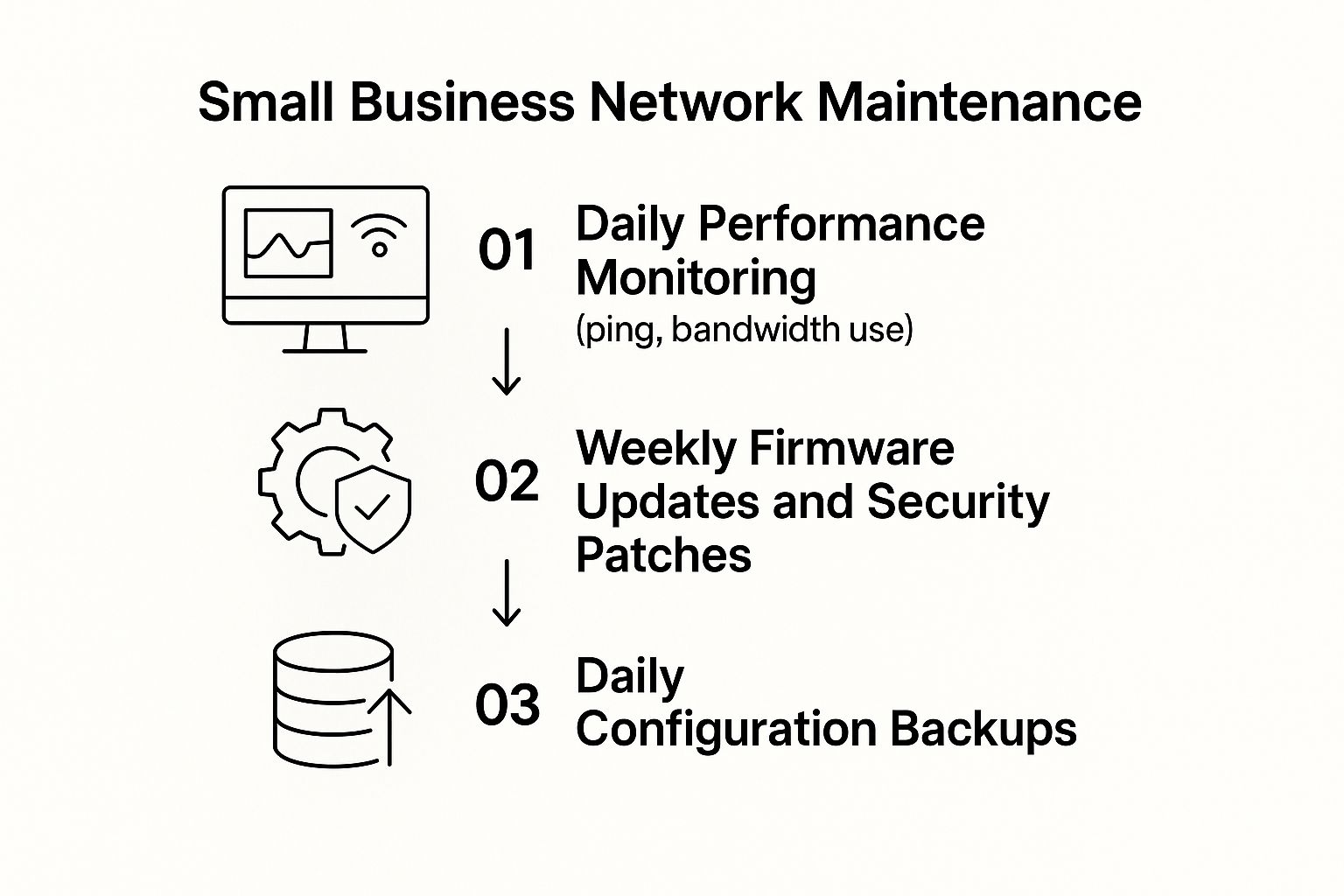
As the visual shows, consistent, small actions are far more effective than waiting for a major problem to force a complete overhaul. While managing a network might seem complex, focusing on these core maintenance tasks will help you maintain a stable and secure environment for your business. For companies in Monterey, having local expertise can make a huge difference. If you think you might need hands-on help, our guide on Monterey business IT support offers some great advice on finding the right local partner.
Feeling like it's a bit much to handle on your own? You don't have to. At Adaptive Information Systems, we specialize in designing, deploying, and managing robust network solutions for businesses just like yours. Contact us today to learn how we can build an IT foundation that supports your business's growth.