
Think of data backup and disaster recovery as the best insurance policy for your business. It’s a simple, two-part strategy. First, you make copies of all your important information (backup). Second, you have a solid plan to get everything running again if something goes wrong (recovery). This combination is your best defense against losing data and the downtime that can shut you down.
Why Your Salinas Business Needs a Recovery Plan

Imagine your Salinas ag-tech firm or your Carmel hospitality business suddenly loses access to everything. Your work would stop cold. You could lose customer trust and watch your income dry up. For businesses across Monterey County, this isn't just a scary thought—it’s a real threat you face every day.
We're not just talking about big disasters like earthquakes, though it’s smart to be ready for those. The most common problems are smaller and can sneak up on you:
- A key server suddenly stops working without any warning.
- A hacker locks up your financial records and demands money to get them back.
- An employee accidentally deletes a folder with years of customer history.
Any of these can bring your business to a halt, costing you thousands in lost sales and work time. The hard truth is, many small businesses that lose a lot of data never reopen.
More Than Just a Copy of Your Files
Just thinking about data backup and disaster recovery is the first step to making your company stronger. This isn’t just an IT task to check off a list. It’s a key part of your plan to survive and succeed. It’s the safety net that protects your most important asset: your information. With a good plan, you can get back on your feet quickly, no matter what happens.
A great recovery plan answers two simple but very important questions: "How fast can we be back online?" and "How much recent work can we afford to lose?" Answering these honestly is the first step to protecting your business.
This guide is here to make data backup and disaster recovery easy to understand. We’ll look at the real-world dangers that can stop your business and show you why having a strong recovery plan is a must-have to do well in our local economy. A prepared company can handle almost any storm. Understanding these ideas is the key to keeping your business running smoothly.
Find out more about what goes into a full strategy in our detailed article on business continuity solutions.
Understanding Backup vs. Full Disaster Recovery
Many business owners use "backup" and "disaster recovery" to mean the same thing. They are related, but they solve different problems and play separate roles in keeping your business safe. Getting this difference right is the first step to building a business that can handle anything.
Let’s use a simple example. Think of a data backup as the spare tire in your car. It’s a copy of something you absolutely need—your data—ready to go if the original gets a flat. You wouldn't drive without one, but it’s still just one piece of the puzzle.
A full disaster recovery plan is your entire roadside assistance package. It includes the spare tire (the backup), but it also comes with the jack, the wrench, the phone number for a tow truck, and a clear plan to get you back on the road. It's the whole strategy, not just one part.
What Is a Data Backup?
A data backup is a copy of your important files and computer data stored somewhere separate from the originals. The goal is simple: if your main data is lost or locked by a hacker, you can get it back from this copy.
Of course, not all backups are the same. Here are a few common types:
- Full Backup: This is a complete copy of every file you choose to save. It's the simplest method, but it takes a lot of time and storage space. Most businesses don’t do this every day.
- Incremental Backup: This is a much faster method. It only copies the data that has changed since the last backup was made. It saves space, but getting your data back can be more complex because you need the last full backup and all the smaller backups since then.
- Differential Backup: This method copies all the data that has changed since the last full backup. It uses more space than an incremental backup, but it’s much simpler to restore your files. You only need the last full backup and the most recent differential one to get everything back.
Knowing the difference between just having copies and having a real recovery plan is key. You can learn more about how backups fit into a bigger picture in our guide on archiving and backup.
What Is a Disaster Recovery Plan?
A disaster recovery plan (DRP) is the complete guide your business follows to get back to work after a major problem. It’s much more than just restoring files. A good DRP lays out the exact steps, people, and tools you need to bring your entire computer system back to life.
A backup saves your data. A disaster recovery plan saves your business. It’s the written strategy that makes sure you can actually use that data to get back to work.
A solid DRP answers the tough questions before you’re in a crisis. Who’s in charge? How will you talk to your team and your customers? Which systems are most important and need to be restored first? The image below shows the main steps in building one.
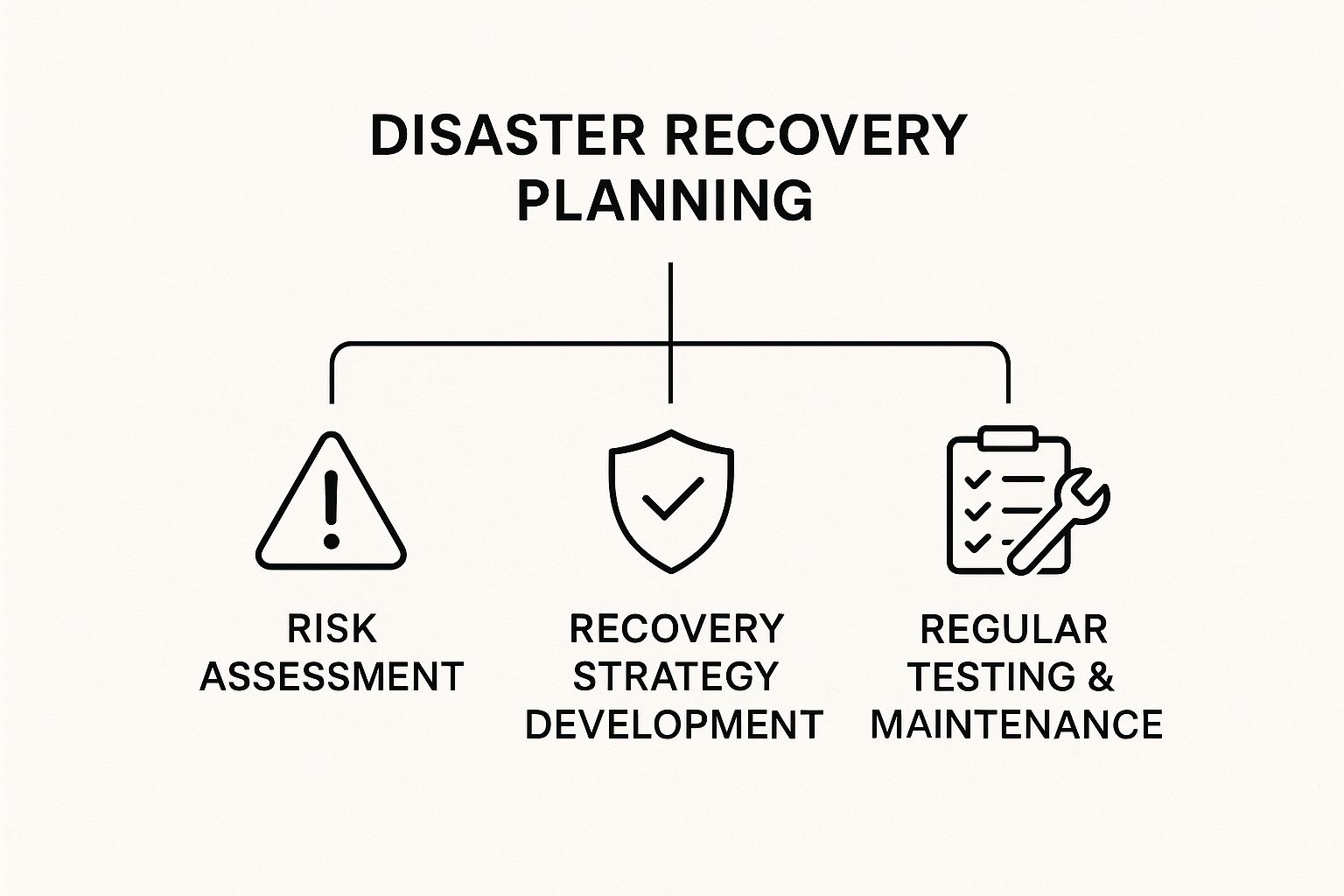
As you can see, a powerful plan is built on understanding your risks, creating a clear strategy to handle them, and then testing that strategy over and over to make sure it works when you need it most.
Backup vs. Disaster Recovery at a Glance
To make it crystal clear, here’s a simple table showing the key differences between having a data backup and having a full disaster recovery plan.
| Aspect | Data Backup | Disaster Recovery |
|---|---|---|
| Main Goal | To make a copy of data to prevent it from being lost. | To get the business running again as fast as possible after a problem. |
| What It Covers | Just your files, folders, and computer programs. | Your whole IT system, including computers, software, and networks. |
| Key Part | The data copies themselves (like a spare tire). | The full plan, steps, and tools (like the roadside assistance package). |
| When to Use It | For small problems, like deleting a file by accident. | For big events, like a cyberattack or a major power outage. |
| Main Question | "Can we get our data back?" | "How fast can we get the business running again?" |
This table shows that backups are a key ingredient, but disaster recovery is the complete recipe for keeping your business strong.
How to Build Your Disaster Recovery Plan

You know you need a disaster recovery plan. But sitting down to actually build one can feel like a huge project. It doesn't have to be.
If you break it down into a few simple steps, you can create a clear plan that protects your business without getting lost in technical details.
Think of it like an emergency plan for your family. You'd figure out what's most important to grab (kids, pets, important papers), pick a safe meeting spot, and make sure everyone knows what to do. Building a data backup and disaster recovery plan follows the same common-sense logic.
The goal is to go from feeling worried to feeling ready. Let's walk through the four key steps of building that plan.
Identify Your Mission-Critical Assets
First, you can't protect anything until you know what matters most. Not all of your data and computer systems are equally important. Some are absolutely needed to keep your business open, while others are less urgent.
Start by making a list of every key program, set of data, and piece of equipment your business uses every day. Then, rank them by importance. For each one, ask yourself a simple question: if this goes down, can we still work? Can we still help customers and make money?
For a retailer in Pacific Grove, the sales system and customer data are top priority. For a law firm in Monterey, client files and billing software are the most important. Figuring out your "crown jewels" is the foundation of a smart, affordable plan.
Define Your Recovery Objectives
Once you know what you're protecting, you need to decide how quickly you need it back. This is where two simple but powerful ideas come in: RTO and RPO. Don't let the letters scare you; they just answer two basic questions.
-
Recovery Time Objective (RTO): This is the longest amount of time your business can afford to be down after a disaster. It answers the question, "How fast do we need to be back online?" An RTO of one hour means your most important systems must be working again within 60 minutes.
-
Recovery Point Objective (RPO): This measures how much recent work you can afford to lose. It answers, "What's the most work we can stand to redo?" An RPO of 15 minutes means your backups must be recent enough that you'd only lose, at most, the last 15 minutes of data.
Your RTO sets the speed of your recovery, while your RPO sets how often you need to back up. Be honest here—aiming for zero downtime is expensive and often not needed for most small businesses.
Setting these goals helps you make smart choices. A busy online store might need an RTO and RPO of just a few minutes, while an internal file server might be fine with an RTO of a few hours.
Choose the Right Backup Solution
Now that your goals are clear, you can pick the right tools for the job. Your choice of backup solution will directly affect your ability to meet your RTO and RPO goals, all while staying in your budget. There are three main options.
-
On-Site Backup: This means storing your data on equipment at your office, like an external hard drive. It offers very fast recovery speeds, but it's at risk from the same physical disasters (like fire or theft) that could affect your main computers.
-
Cloud Backup: Here, your data is protected and sent over the internet to a secure location. This gives you excellent protection from local disasters and is easy to expand as you grow. It's a popular choice for local businesses.
-
Hybrid Approach: This strategy combines the best of both. You keep a local backup for quick, everyday restores (like getting back a deleted file) and a cloud backup for a real disaster. This is often the strongest and most practical plan for most businesses.
At Adaptive, we believe in finding the right fit for your needs and budget. We help you get big-business-level protection at a price that makes sense for your Monterey County business.
Document the Plan and Assign Roles
A plan that only exists in your head isn't a real plan. The final, most important step is to write everything down in a clear document. This document needs to be stored in a few places, including a secure online folder, so you can get to it even if you can't get into your office.
Your written plan should include:
- A list of key people and what they are responsible for during a disaster.
- Contact information for your team, vendors, and your IT partner.
- Step-by-step instructions for recovery.
- A plan for talking to employees and customers to keep them informed.
Building a plan from scratch can be tough. To help you get organized, check out our small business disaster recovery plan template for a good starting point. While a template is a great start, a detailed walkthrough can also be helpful. To guide you through the process of developing a robust strategy, this resource provides an in-depth look at How to Create a Disaster Recovery Plan for Your Business.
Giving everyone a clear role ensures that when a crisis hits, there's no confusion. Everyone knows what to do, which turns chaos into a calm, controlled recovery.
The Dangers of an Untested Recovery Plan

So, you’ve worked hard to build a disaster recovery plan. You've listed your important systems, set your recovery goals, and picked a backup solution. It’s easy to file that plan away and relax. But that creates a huge, dangerous blind spot.
A data backup and disaster recovery plan that only exists on paper is a gamble. It gives you a false sense of security. Until you test it, you have no idea if it will work when a real crisis hits. Think of it like putting in smoke alarms but never checking the batteries.
You can think of it as a fire drill for your data. You wouldn't wait for a fire to find out if your escape routes are clear and your alarms work. In the same way, you can’t wait for a hacker or server crash to find a major problem in your recovery process. Regular testing is the only way to turn your plan from a guess into a guarantee.
The Confidence Gap
Too many business owners think they are more prepared for a disaster than they really are. This can be a huge problem when a crisis hits and the recovery plan falls apart.
A recent survey of IT professionals showed a big gap between what people think and what is real. Most companies felt they could get back to work in just a few hours after a problem. But only about one-third were actually able to do so. This shows that they thought they were better prepared than they were, usually because their plans weren't tested. You can find more insights in the 2025 State of Backup and Recovery report.
This "confidence gap" is where businesses get into serious trouble. You might think your backups are running fine, only to find out they were broken or incomplete when you need them most. Testing closes this gap by replacing risky guesses with proof.
Common Methods for Testing Your Plan
Testing your recovery plan doesn't have to be a huge event. For a small or medium-sized business, you can test your plan in stages without causing major problems for your daily work. The key is to be consistent.
You can start small and work your way up to bigger tests over time. Here are a few common ways to test your plan:
-
Simple File Restore: This is the most basic test and should be done often. Just try to restore a single, non-important file from your backup. It's a quick way to make sure your backup is working on a small scale.
-
Application Recovery Test: This test goes a step further. You restore a whole program, like your accounting software, in a separate, test environment. This checks that both the data and the software can be brought back online.
-
Full-Scale Simulation: This is the most complete test. You pretend a full disaster has happened, switch to your backup systems, and try to run your business from them for a short time. This test checks your entire plan, from the technology to your team's duties.
Testing isn’t about passing or failing. It’s about finding weak spots in a safe way so you can fix them before they become a real disaster.
Creating a Practical Testing Schedule
For most businesses in Monterey County, doing a full test every year might be too much to handle. A more practical approach balances thorough testing with the daily needs of running your business.
A good testing schedule could look like this:
- Monthly: Do simple file restores. This only takes a few minutes and gives you a quick check on your backup system.
- Quarterly: Test the recovery of one of your key programs. You can test a different one each quarter to cover more ground over the year.
- Annually: Run a more complete test. This could mean restoring an entire server or a key part of your network to make sure all the pieces work together.
This organized approach makes testing easy to manage and builds real confidence in your plan over time. To get started on building a structured approach, you can explore our detailed guide on disaster recovery plan testing. Regular drills are what turn your recovery plan from a document into a living, reliable process that will protect your business when it matters most.
Preparing for Common Data Disaster Scenarios
When you hear “disaster,” it’s easy to imagine a big event—a fire, a flood, or the earthquakes we know are possible here in Monterey County. But the disasters that stop most businesses are much more common and often happen without warning.
A solid data backup and disaster recovery strategy isn't just for the worst-case scenario. It's a practical, everyday defense against the common problems that are much more likely to stop your business.
Understanding these threats is the first step to building a truly strong business. By preparing for specific, real-world problems, your recovery plan will be ready for anything. It will protect your profits, your reputation, and your peace of mind.
The Ever-Present Threat of Ransomware Attacks
There's a reason ransomware is one of the most feared words in business. In this type of cyberattack, criminals get into your network, lock up your important files, and then demand money to release them. Your work stops completely, leaving you with a terrible choice.
But paying the ransom is almost never a good idea. There's no promise you'll get your data back, and it marks you as a target for future attacks.
A well-designed recovery plan is your best defense against ransomware. Instead of dealing with criminals, you can ignore their demands, wipe the infected computers clean, and restore your data from a recent backup. This turns a huge crisis into a manageable problem. For a deeper look into prevention, check out our guide on how to prevent ransomware attacks.
The Sudden Sting of Hardware Failure
Technology is great, but it doesn’t last forever. Servers, hard drives, and other computer parts can fail suddenly without any warning signs. A server crash can stop your business just as much as a cyberattack, cutting off access to the programs and data your team needs.
Whether it’s a broken server or a failed hard drive, the result is the same: costly downtime. With a proper disaster recovery plan, however, hardware failure becomes a solvable problem, not a business-ending threat.
When hardware fails, a good recovery plan lets you quickly switch to a backup system or restore your data onto new equipment. This reduces downtime from days or weeks to just a few hours.
The Simple Mistake of Human Error
Believe it or not, one of the most common causes of data loss isn't a hacker or a broken computer—it's a simple human mistake. Someone on your team might accidentally delete an important customer folder or overwrite a key spreadsheet. These small mistakes can have huge results.
Without a reliable backup system, a simple "oops" can lead to lost information forever, costing you hours of rework or damaging customer trust. This is where a strong data backup and disaster recovery plan acts as your safety net.
Your plan should let you restore single files or folders quickly without having to restore an entire system. This lets you undo simple mistakes in minutes, keeping your team working and your data safe.
Preparing for Regional Disasters
While less common, we can't ignore events that could affect our whole area. From the constant risk of earthquakes to severe storms that cause long power outages across Salinas and the Monterey Bay, you need a plan for when disaster hits your building or neighborhood.
This is where having an off-site or cloud-based backup is a must. If you can't get to your office, your data is still safe in a secure location hundreds of miles away. You can restore your systems to the cloud and have your team work from home. This ensures your business keeps running even when you can't get to your main location.
Data loss is a serious threat. Businesses with recovery plans have a much higher chance of surviving after a major problem. To discover more insights about disaster recovery statistics on llcbuddy.com, you can see just how important these plans are.
Making Enterprise-Level Protection Affordable
When you hear terms like "enterprise-level" or "disaster recovery," you might picture a huge price tag. For a long time, that kind of serious protection was only for big companies with big budgets and large IT teams.
But that’s just not true anymore.
Thanks to new technology and smarter plans, powerful data backup and disaster recovery is now affordable for local businesses right here in Monterey County. The secret? Moving away from the old, expensive model of buying and managing your own equipment. Cloud-based tools and managed services have changed everything. They let you get the protection you need without a huge upfront cost.
Shifting from a Big Purchase to a Monthly Bill
One of the biggest money-savers is turning a large, one-time purchase into a predictable, monthly bill.
Instead of spending tens of thousands on computers and software, you can partner with a local expert like Adaptive. We handle all the equipment, so you get top-tier technology for a manageable monthly fee. This saves you money, time, and the headache of trying to manage it all yourself.
Partnering with a managed services provider is almost always cheaper than trying to hire an in-house IT expert to run your recovery plan. We take care of the monitoring, testing, and management. This gives you peace of mind to focus on what you do best—whether that's agriculture in Salinas or hospitality in Carmel.
While recovery is important, preventing problems is just as key. Testing your systems for weak spots is another affordable part of the puzzle. You can learn more about services like affordable automated penetration testing to see how prevention can fit into a smart budget.
Your business's future is too important to leave to chance. Don’t let old ideas about cost stop you from protecting it.
Your Data Recovery Questions, Answered
Even with a good plan, it's normal to have questions about data backup and disaster recovery. Here are simple, clear answers to the questions we hear most often from business owners across Monterey County.
Getting these details right is what turns a simple backup into real confidence in your ability to bounce back from anything.
How Often Should My Business Back Up Its Data?
The best way to answer this is with another question: how much data can you really afford to lose? That amount of time is your Recovery Point Objective (RPO), which we talked about earlier.
For the most important parts of your business—like sales records for a Carmel shop or the client list for a Salinas accounting firm—daily or even constant backups are a must. For less critical information, like an internal marketing folder, a weekly backup might be enough. We can help you figure out the right schedule for every part of your business.
The goal isn't to back up everything, all the time. It's about building a smart plan that protects what matters most without wasting money. That’s how you get a recovery plan that’s both effective and affordable.
Is a Cloud Backup Solution Secure Enough for My Business?
Absolutely. In fact, for most small and mid-sized businesses, a professional cloud backup service is far more secure than what they could manage on their own.
Modern cloud services use strong, end-to-end encryption. This means your data is scrambled and unreadable while it's traveling over the internet and while it's stored on their computers. When you partner with a trusted provider, you're not just getting storage; you're getting many layers of security. This makes it a powerful part of any recovery plan.
What Is the Single Biggest Mistake Businesses Make?
Without a doubt, the most common—and dangerous—mistake is the "set it and forget it" attitude. Too many business owners put a backup system in place and just assume it's working perfectly, without ever checking it.
A backup is useless if you can't restore your data from it. Regularly testing your ability to recover files or even whole servers is the only way to know for sure that your plan will work in a real crisis. An untested plan isn't a plan at all; it's just a guess.
How Much Does a Professional Disaster Recovery Service Cost?
The cost can change based on a few things, like how much data you have and how quickly you need to be back up and running. That said, managed services have made professional-grade data backup and disaster recovery surprisingly affordable for small businesses.
When you compare that cost to the huge potential cost of lost sales, damage to your reputation, and losing customer trust from being down for days or weeks, it's a small price to pay for peace of mind.
Don't leave your business's future to chance. At Adaptive Information Systems, we provide local, expert guidance to build a recovery plan that fits your needs and your budget.
Secure your business today by scheduling a consultation with us at adaptiveis.net
Adaptive Information Systems
380 Main St, Salinas CA 93901 | 831-644-0300 | hello@adaptiveis.net