
If you're running a small business here in Salinas or anywhere across Monterey County, your data isn't just data—it's your most valuable asset. The most effective backup solutions for your business will likely be a cloud-based or hybrid system, giving you the strongest defense against everything from hardware failure and cyberattacks to local disasters.
A proper backup strategy isn't just another IT expense; it's the essential insurance policy that guarantees your business can weather any storm.
Your Guide to Data Backup for Salinas Businesses

Think about it. From client records at an ag-tech firm in the Salinas Valley to sales data for a shop on Cannery Row, a single data disaster can bring your operations to a grinding halt. Imagine a server crashing during the peak of harvest season or losing your entire customer list right before a major event like the Monterey Car Week. The fallout can be devastating, costing you revenue, time, and the trust you've worked so hard to build.
This guide is designed to cut through the confusing tech-speak and give you a clear, practical roadmap. We believe in bringing enterprise-level IT support to local businesses like yours, at a price that makes sense. We'll start by breaking down the three fundamental choices you have: on-premises, cloud, and hybrid backups.
Understanding Your Core Options
Let's use a simple analogy to make sense of these options for you:
-
On-Premises Backup: This is like keeping a high-security safe right in your office. You have total physical control over it, which is great for quick access. But what happens if a fire, flood, or break-in hits your building? Both your original data and your backup could be wiped out in one go.
-
Cloud Backup: Think of this as using a bank's secure, off-site vault. Your data is stored safely somewhere else, managed by security experts, and you can get to it from anywhere with an internet connection. It’s the modern standard for good reason.
-
Hybrid Backup: This approach gives you the best of both worlds. It’s like having that small, quick-access safe in your office and the ultra-secure bank vault. You get immediate local recovery and ultimate protection against any single point of failure.
To help you figure out where to start, we've put together a quick comparison table. It lays out the main characteristics of each solution so you can get a feel for what might be the best fit for your company.
Quick Comparison of Small Business Backup Solutions
Here’s a snapshot of the three main backup solutions, comparing what they do best and what you need to keep in mind.
| Backup Type | Best For | Key Advantage | Primary Consideration |
|---|---|---|---|
| On-Premises | Businesses needing instant, on-site recovery speeds and total data control. | Fastest local access to backed-up files without an internet connection. | Vulnerable to local disasters (fire, flood, theft) that can destroy both original and backup data. |
| Cloud | Most SMBs, especially those with remote teams or limited on-site IT resources. | Excellent protection from local disasters, accessible from anywhere, and highly scalable. | Recovery speed is dependent on your internet connection's bandwidth. |
| Hybrid | Businesses that can't afford any downtime and need both speed and redundancy. | Combines the rapid local recovery of on-premises with the off-site security of the cloud. | Involves higher initial setup complexity and cost compared to a single-solution approach. |
This table should give you a solid starting point for your decision-making process. Each path has its own set of trade-offs involving cost, security, and accessibility. For a more detailed breakdown, you can also explore our data backup and recovery guide for Salinas & Monterey businesses.
Key Takeaway: The statistics are sobering: a shocking 60% of small businesses that suffer a major data loss are forced to close their doors within six months. A reliable backup isn't about avoiding a technical glitch; it's about ensuring your business survives one.
Choosing the right backup solution protects your financial records, customer information, and operational history—the very lifeblood of your company.
Choosing Your Backup Model: On-Premises, Cloud, or Hybrid
Picking the right strategy for your data backup is one of the most important technology choices you'll make for your business. It’s not just about selecting a product; it’s about choosing a model that fits your day-to-day operations, budget, and how much risk you're willing to take. For most small businesses, your decision will come down to three main models: on-premises, cloud, and hybrid.
Each one offers a completely different way of protecting your critical information. Think of it like deciding how to safeguard your most vital business documents. You could keep them in a fireproof safe right in your office, store them securely at an off-site facility, or do a bit of both for total peace of mind.
To help you see how these paths differ, the diagram below breaks down the core categories of modern backup solutions.
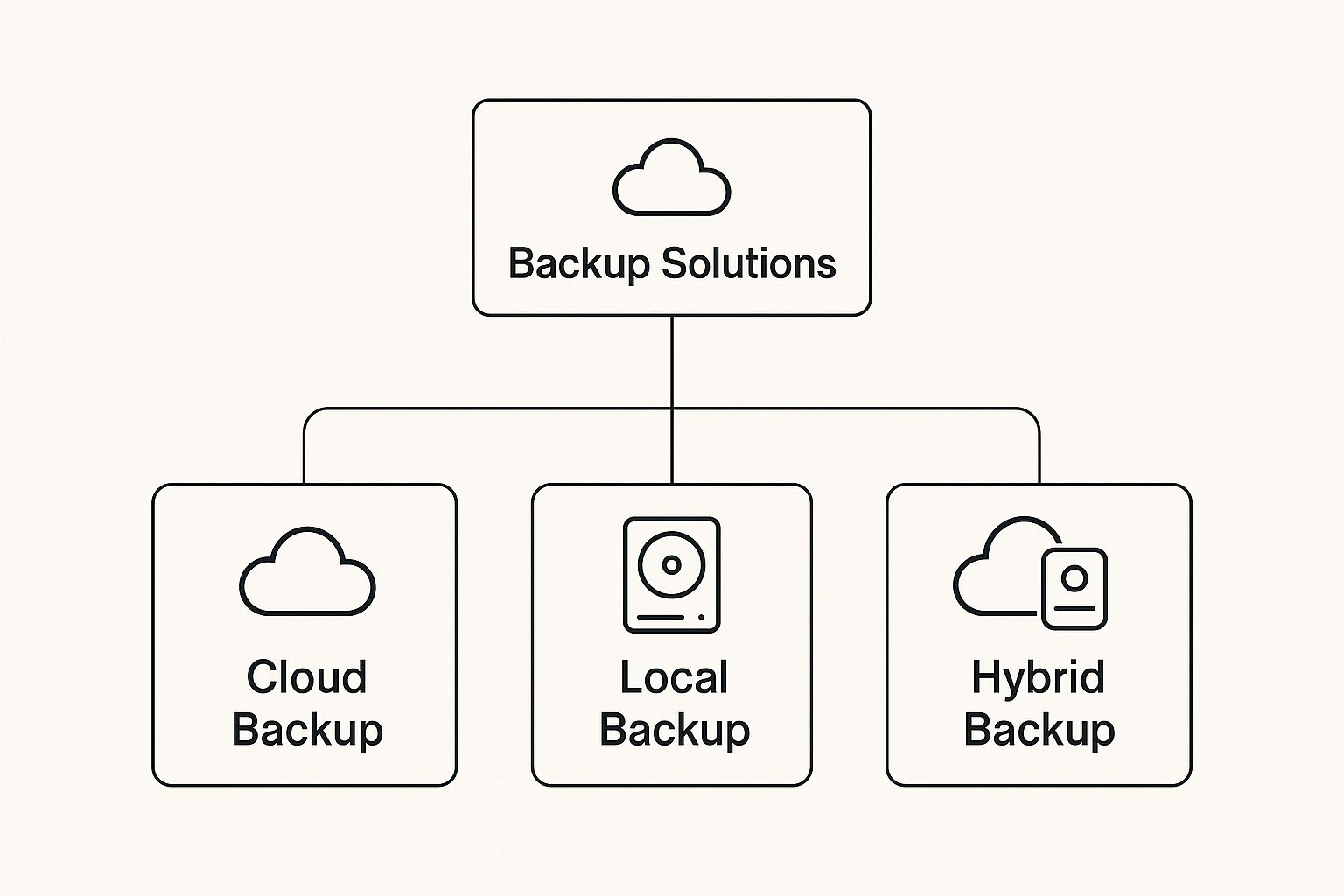
This really shows how all backup strategies grow from these three concepts, each serving a different primary need for security, access, and redundancy.
On-Premises Backup: The In-House Safe
On-premises backup, which you might hear called local backup, is the traditional approach. It simply means you store copies of your data on physical hardware located right at your place of business—whether that's a small shop in Pacific Grove or a larger operation in the Salinas Valley.
This is usually done with devices like:
- Network Attached Storage (NAS): A dedicated file storage device connected to your network that everyone on your team can access.
- External Hard Drives: A simple, portable option that works well for smaller amounts of data.
- Local Servers: A more powerful choice for businesses that have significant data to protect.
The biggest plus here is speed. Restoring files from a local device is incredibly fast since you aren't held back by your internet connection. You also have complete physical control over your data. However, that control comes with a major risk: any disaster that hits your office—like a fire, flood, or theft—can wipe out both your original data and your backups in one go.
Cloud Backup: The Secure Off-Site Vault
Cloud backup has quickly become the favorite for many small businesses, and it’s easy for you to see why. With this model, your data is encrypted and sent over the internet to a secure, off-site data center run by a specialized provider. It’s like using a bank’s vault; your assets are protected by experts in a secure, remote location.
This approach gives you excellent protection against local disasters. If something compromises your office, your data remains safe and sound, ready for you to restore. It’s no wonder off-site backup is the foundation of modern data protection. Research shows that nearly half of tech leaders (48.5%) depend on offsite backups to defend against cyberattacks, hardware failures, and physical disasters.
Interestingly, while cloud adoption is on the rise, 29.8% of small businesses still use tape backups because of their reliability and immunity to online threats. In contrast, on-site methods like local servers and external drives are used by only 12.7% and 0.2%, respectively.
Key Insight: The primary benefit of the cloud is business continuity. Whether you run a hospitality business in Monterey or an ag-tech firm in Salinas, a cloud backup ensures you can get back up and running from anywhere with an internet connection.
As you weigh the move to the cloud, a solid grasp of the transition process is a huge help. For a deeper dive into making the move smoothly, take a look at this great guide on understanding cloud migration.
Hybrid Backup: The Best of Both Worlds
Why choose just one when you can have both? A hybrid model blends the speed and control of an on-premises backup with the off-site security of the cloud. This strategy creates a powerful, multi-layered defense for your data.
Here’s how it usually works for you:
- First, you back up your data to a local device, like a NAS. This gives you lightning-fast restores for minor incidents, like someone accidentally deleting an important file.
- Then, that local backup is copied to the cloud. This second, off-site copy provides the ultimate protection you need to recover from a major disaster that takes out your entire office.
This approach is like having a small safe in the office for quick grabs and a bank vault for true disaster-proofing. While a hybrid setup can be a bit more complex and costly to get started, it offers the most complete protection available, making it the gold standard for businesses that simply cannot afford any downtime. It’s the kind of enterprise-level peace of mind we believe every local business deserves.
Why Cloud Backup Is a Smart Move for SMBs
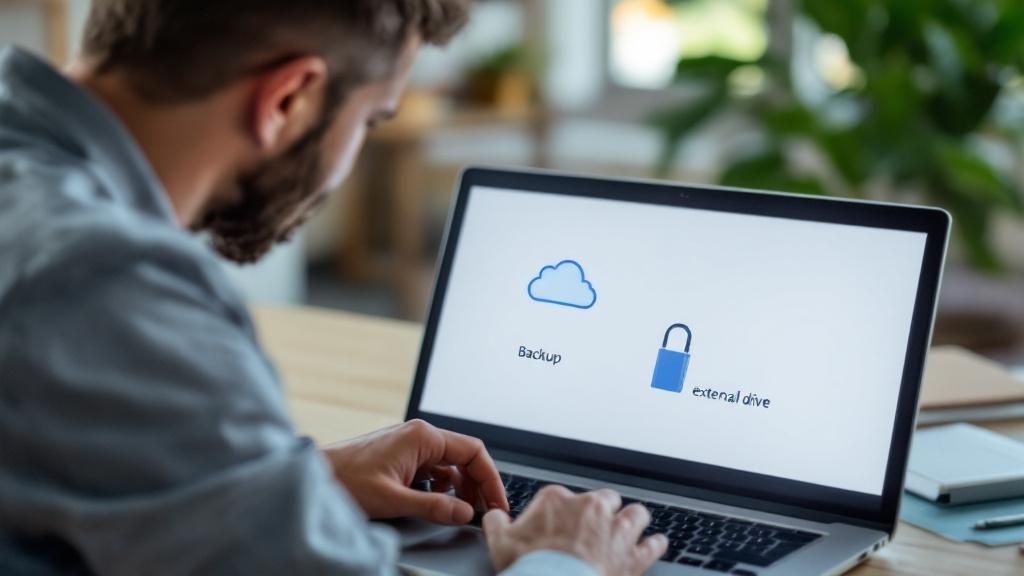
So, why are so many local businesses—from wineries in Carmel Valley to startups in Marina—making the switch to cloud backup? It’s because cloud solutions tackle some of the oldest and most frustrating problems in data protection, giving small businesses like yours enterprise-grade security without the enterprise price tag.
Think of it this way: relying on on-site backups is like being your own security guard. You have to remember to lock up every night, check the alarms, and just hope nothing goes wrong. Cloud backup is like hiring a professional security firm. They handle all the complex details so you can focus on what you do best: running your business.
Set It and Forget It with Automatic Backups
The biggest vulnerability in any backup plan is simple human error. Forgetting to run a backup for a few days, or even a week, can lead to devastating data loss if disaster strikes. This is especially true when your team is busy with the daily demands of serving customers and managing operations.
Cloud backup services eliminate this risk entirely through automation. Once it's set up, it works quietly in the background, copying your new and updated files to a secure, off-site location. No one on your team has to lift a finger, ensuring your protection is always up to date. It’s a reliable safety net that catches everything.
The Professional’s Choice: Managed Service Providers (MSPs)—the IT experts businesses trust—overwhelmingly prefer cloud solutions. A staggering 86% of MSPs now offer cloud backup as their primary data protection service, a clear sign of industry consensus. You can dig into more data on this trend and the growing $7.13 billion cloud backup market in the full report from Infrascale.
This "set it and forget it" approach frees you from the tedious and time-consuming task of managing backups yourself, giving you confidence that your data is consistently protected.
Scale Your Protection as Your Business Grows
Your business isn't standing still, so why should your backup solution be? Whether you’re a growing agricultural business in Salinas adding new equipment or a hospitality group in Monterey expanding to new properties, your data needs are going to change.
This is where cloud backup really shines. It delivers incredible scalability.
- Pay for What You Need: Forget over-investing in expensive hardware for future growth. With the cloud, you only pay for the storage you use right now.
- Grow on Demand: As your data footprint expands, your cloud storage can grow right along with it. There are no physical servers to upgrade or replace.
- Stay Flexible: This model keeps your IT costs directly aligned with your actual needs, making it a far more efficient and affordable approach for a small business.
This flexibility ensures you always have the right level of protection without paying for resources you don't need yet. It’s the definition of cost-effective IT.
Achieve True Disaster Recovery
Let’s be honest: the most important reason for a backup is to recover from a disaster. And a real disaster isn't just a single deleted file. It's a fire, flood, or a major ransomware attack that takes your entire office offline. If your only backup is on a server in that same office, you've effectively lost everything.
Cloud backup is the cornerstone of modern disaster recovery. By keeping an encrypted copy of your data in a secure location miles away, you ensure your business can survive a true worst-case scenario.
If a catastrophe hits your physical location, you can restore your entire system to new hardware from anywhere with an internet connection. This capability transforms a potentially business-ending event into a manageable problem, getting you back up and running in hours or days—not weeks or months. It’s the ultimate insurance policy for your business.
Evaluating Top Backup Services for Your Business
Once you’ve decided which backup model feels right for your company—whether that’s on-premises, in the cloud, or a hybrid approach—the next step is picking the actual service provider. This is where the details really start to matter.
Sifting through the countless backup solutions for small businesses can feel like a chore, but if you focus on the right criteria, you'll find a partner that genuinely protects your company. It's all about looking past the shiny marketing brochures and comparing services on the factors that will actually impact your day-to-day operations and your bottom line.
Let's break it down through the lens of a local Monterey Bay business owner, focusing on what's truly important: clear pricing, ease of use, and rock-solid security.
Key Factors for Your Comparison
Don't let yourself get lost in a sea of technical jargon when comparing providers. Instead, just concentrate on these three practical areas to find the best fit for your team and your budget.
-
Pricing Model: How does the service charge you? Is it per computer, or is it based on the amount of data you store? A "per computer" model might be a fantastic value for a law firm in Monterey with a dozen workstations but relatively small files. On the other hand, a "per gigabyte" plan could be far more cost-effective for a Carmel design studio working with massive video and image files on just a few machines.
-
Ease of Use: This is a big one. Can your office manager—or anyone without an IT degree—easily restore a lost file? The best services have clean, intuitive dashboards that make file recovery a simple, straightforward process, not a four-alarm technical emergency.
-
Essential Security Features: Dig deeper than just basic storage. You need to look for critical features like ransomware recovery, end-to-end encryption, and certifications for industry regulations if your business requires them.
A balanced review helps you see the real-world trade-offs. For instance, a plan that boasts "unlimited" storage might sound amazing, but what if it comes with painfully slow recovery speeds? That's not a trade-off you want to discover in the middle of a crisis.
A Look at Popular Backup Solutions
Let's see how these factors play out with a well-known service like Carbonite Safe. It’s a popular choice that perfectly illustrates the trend toward simplified, automated services for companies that don't have a dedicated IT department.
Carbonite's core plan supports an unlimited number of computers, external hard drives, and even Network Attached Storage (NAS) devices. It also bundles in vital features like ransomware recovery and compliance with regulations like HIPAA—something that’s non-negotiable for many local healthcare providers in our area.
Real-World Trade-Off: While Carbonite is often praised for its simplicity and 7-day-a-week support, some users point out downsides like slow download speeds or delays in its continuous backup feature. This highlights a critical point: you have to align a service's strengths and weaknesses with what your business actually needs to operate.
It's also smart to think about any specialized needs you might have. For many businesses, the company website is a primary asset. Exploring the best WordPress backup plugin options can give you tailored protection for your online presence, which often demands a completely different approach than backing up internal company files.
Ultimately, picking a provider is just one piece of a much larger puzzle. The tool you choose is only as effective as the process you build around it. To learn more about putting that complete strategy together, check out our guide on building a backup and disaster recovery plan for your small business. It will help you integrate whichever service you choose into a bulletproof plan that ensures you're always protected.
Implementing a Backup Strategy That Actually Works
Choosing a backup service is a great first step, but a tool is only as good as the plan you build around it. Simply having a backup isn't enough—you need a real-world strategy to ensure your data is not only saved but is actually recoverable when it counts. An untested backup is just a hope, not a reliable business continuity plan.
This is where you move from just buying a product to building a solid process. A truly effective strategy involves clear rules, regular testing, and well-defined goals. This approach transforms your backup from a simple utility into a powerful system that safeguards the future of your business.
The 3-2-1 Rule: The Gold Standard of Data Protection
For decades, IT professionals have sworn by a simple yet powerful principle called the 3-2-1 Backup Rule. It’s not a product or a service, but a straightforward methodology that creates incredible resilience against data loss. We recommend it to all our clients, from agricultural businesses in Salinas to hospitality firms in Carmel.
Here’s the breakdown for you:
- Three Copies: Always maintain at least three separate copies of your data. This includes your primary, "live" data and two backups.
- Two Different Media: Store your copies on at least two different types of storage media. For example, you could use an on-site NAS device and a cloud backup service. This protects you if one type of media fails or becomes corrupted.
- One Off-Site Copy: Keep at least one of these backup copies in a completely separate, off-site location. This is your ultimate protection against a local disaster like a fire, flood, or theft that could destroy your office and your on-site backups along with it.
Following this rule dramatically reduces your risk of a catastrophic, business-ending data loss. If one copy is destroyed, you always have other versions to fall back on.
Define Your Recovery Goals: RTO and RPO
To make your backup plan work, you have to define what "recovery" actually means for your specific business. Two key metrics guide this entire process: your Recovery Time Objective (RTO) and Recovery Point Objective (RPO).
RTO (Recovery Time Objective): This is all about downtime. How quickly do you need to be back up and running after a disaster? Can your business survive being offline for a day, or do you need to recover in under an hour to avoid major losses?
RPO (Recovery Point Objective): This is about data loss, measured in time. How much data can you afford to lose? If your last backup was at 5 PM yesterday, your RPO is effectively 24 hours—meaning you could lose an entire day's worth of transactions, emails, and files.
Defining your RTO and RPO forces you to set clear, realistic goals for your backup strategy. It helps you decide how often to run backups and what kind of recovery speed you need from a provider. These metrics are fundamental, as a robust data backup strategy forms the foundation of a comprehensive modern network disaster recovery plan.
For a deeper look into creating a plan that fits your business, our guide to Salinas backup and disaster recovery services can provide more tailored insights. Ultimately, a great strategy isn't just about having backups; it's about having a tested, reliable plan you can count on when everything is on the line.
Your Partner for Secure Business Backups in Salinas
We've covered a lot of ground on the what, why, and how of modern business backups. If there's one thing you take away, it's this: a reliable backup strategy isn't just a nice-to-have IT feature—it's a core requirement for keeping your doors open.
For businesses here in Salinas, or just down the road in Pacific Grove and Seaside, the risk of data loss is all too real. Whether it's a sudden server crash or a targeted cyberattack, the potential damage is simply too great to leave to chance.
At Adaptive Information Systems, our goal has always been straightforward. We bring enterprise-grade IT protection to the local businesses that form the heart of our Monterey Bay community, at a price that makes sense for your bottom line. We get the unique hurdles you face, from the fields of agriculture to the front desks of hospitality, and we design solutions to meet those challenges head-on.
Your Local IT Partner
Trying to pick the right backup solution can feel like a monumental task, but you don't have to go it alone. We work right alongside you to build a complete data protection plan that fits your specific operations, budget, and recovery objectives. This is about more than just installing software; it’s about having a dedicated expert in your corner who knows your business.
A strong backup plan is the foundation of a resilient business. But it must be supported by a robust security posture. After all, preventing a data breach is always better than recovering from one.
To create a truly secure environment, your backup strategy has to work hand-in-hand with your overall security measures. You can dive deeper into how we protect local companies by checking out our guide to Salinas managed IT security services.
Stop losing sleep over data loss and start focusing on what you do best—growing your business. Let our team handle the technical complexities so you can have total peace of mind.
Adaptive Information Systems
380 Main St, Salinas CA 93901 | 831-644-0300 | hello@adaptiveis.net
Frequently Asked Questions About Business Backups
Even with a solid plan in place, you probably still have a few questions about what will work best for your business. We get it. Here are some straightforward answers to the questions we hear most often from local business owners about data backup solutions. Our goal is to make you feel confident and prepared.
How Often Should My Small Business Back Up Its Data?
For most small businesses, daily automatic backups are the gold standard and provide a strong baseline of protection. Simple as that.
However, for your most critical data—think daily financial records or constantly changing customer databases—you might need continuous backups to prevent any data loss at all. The right frequency really comes down to your Recovery Point Objective (RPO). That’s just a technical way of asking, "How much data can you really afford to lose?" If losing a full day's worth of work is a non-starter, you need daily backups at an absolute minimum.
Is a File-Syncing Service Like Dropbox or Google Drive Enough?
No, and this is a critical distinction that trips up a lot of business owners. Services like Dropbox, Google Drive, and OneDrive are fantastic tools for collaboration and sharing files, but they are not true disaster recovery solutions.
Key Difference: File-syncing services are missing essential backup features like point-in-time recovery. If a ransomware attack encrypts your files, that encryption can sync across all your devices, overwriting your clean copies. A real backup solution is built specifically for data protection and system restoration—a crucial difference in an emergency.
What Is the Biggest Backup Mistake Small Businesses Make?
The single most common—and dangerous—mistake we see is the "set it and forget it" mindset. It's easy to assume your backup system is humming along perfectly in the background, only to discover it failed months ago right when you desperately need it.
An untested backup is just a hope, not a reliable plan. You have to regularly test your backups by actually restoring a few files. This simple step confirms your data isn't just being copied, but is 100% recoverable. And that's the whole point, right?
Should I Manage Backups Myself or Hire an IT Professional?
While many cloud solutions are designed to be user-friendly, a truly solid backup and disaster recovery strategy involves more than just software. Partnering with an IT professional or a Managed Service Provider (MSP) ensures your entire system is configured correctly, monitored for failures, and ready when you need it. For local businesses in Salinas, working with a hands-on expert can make all the difference.
An experienced partner validates that your backups are tested regularly and can help you stay compliant with industry regulations like HIPAA. This professional oversight provides priceless peace of mind, freeing you up to focus on running your business. To get a better sense of this relationship, you can learn more about what to look for in a Salinas IT security partner.
Ready to secure your business with a backup strategy you can count on? The team at Adaptive Information Systems is here to build a plan that protects your valuable data and lets you focus on growth. Get in touch with us today for a no-obligation consultation!