
Direct Answer: Waiting for IT problems to force your hand costs significantly more than preventing them. Emergency repairs, lost productivity, and downtime in Monterey County typically run 3–5x the cost of proactive monthly IT management.
Something goes wrong with your network on a Tuesday morning. Employees can’t access files. A client is waiting on a quote. You call whoever you can find, pay whatever they ask, and spend the next two days cleaning up the mess. If that sounds familiar, you’re not alone — it’s one of the most common IT stories we hear from businesses across Salinas, Watsonville, and the Monterey Peninsula.
The problem isn’t just the inconvenience. Break-fix IT — calling for help only when something fails — carries costs that most business owners never add up: emergency labor rates, lost revenue during downtime, data that may be unrecoverable, and the time you personally spend managing a crisis instead of running your business.
This article breaks down what those costs actually look like for small and mid-sized businesses in Monterey County, where the math genuinely tips in favor of preventing problems rather than reacting to them.
What Break-Fix IT Actually Costs When You’re in the Middle of It
When a server goes down or ransomware hits, the invoice you get from an IT vendor is only part of the bill. The full cost is spread across several places most owners don’t account for.
Emergency labor rates for on-site IT support in the Salinas and Monterey area typically run $150–$250 per hour, and that’s before any parts or licensing fees. After-hours calls push that number higher. A single incident that takes four hours to resolve can run $800–$1,200 just in labor — before you account for anything else.
But the bigger number is almost always productivity loss. According to research from Veeam’s 2023 Data Protection Report, the average cost of unplanned downtime for SMBs is $1,467 per hour. For a 20-person company in Greenfield or King City where most employees touch a computer to do their job, even two hours of downtime can wipe out the equivalent of a full day’s revenue.
The costs that tend to get ignored:
- Your own time spent calling vendors, explaining the problem, and managing the situation
- Customer-facing disruption — delayed responses, missed appointments, failed transactions
- Data recovery fees if backups weren’t current or weren’t tested
- Reputational damage when clients notice the outage before you do
None of these appear on an IT invoice. But they’re real, and they compound.

The Hidden Problem: Most IT Failures Don’t Announce Themselves
The failure you scramble to fix on a Tuesday didn’t start on Tuesday. Most system crashes, data losses, and security breaches have a backstory — weeks or months of warning signs that nobody caught because nobody was watching.
A hard drive degrading slowly. A firewall running firmware from 2021. An employee account that still has full access even though that person left the company eight months ago. These aren’t dramatic events. They’re quiet problems that compound until they aren’t quiet anymore.
This is one of the core reasons aging technology problems stay hidden until systems suddenly crash — without someone actively monitoring the environment, there’s no early warning system. Break-fix IT has no mechanism for catching these things. By definition, nobody looks until something stops working.
For businesses in the Salinas Valley — where agricultural operations, financial services firms, and logistics companies run on tight margins and tight schedules — a two-day disruption isn’t just an inconvenience. It can mean missed harvest coordination, delayed payroll, or a compliance incident that triggers reporting requirements under California’s data breach notification law (Civil Code § 1798.82).
The question isn’t whether something will eventually break. It’s whether you find out before or after it costs you.
Break-Fix vs. Proactive IT: Where the Money Actually Goes
This infographic compares the real cost distribution of break-fix IT versus proactive managed IT for a typical 20-person business in Monterey County.
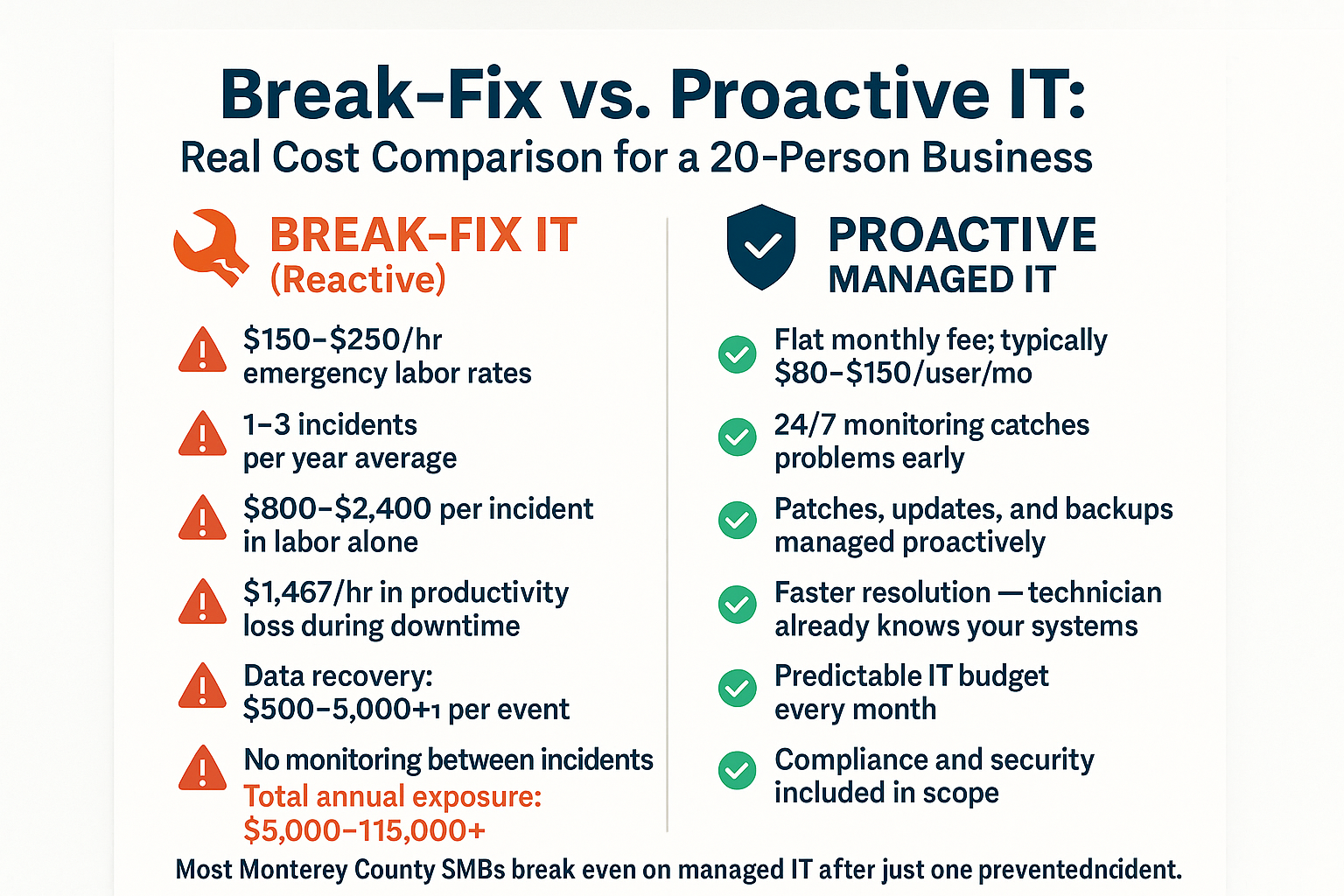
Break-Fix vs. Managed IT: Side-by-Side Cost Reality
This table shows how the two approaches compare across the factors that actually determine total IT cost for a small business.
| Cost Factor | Break-Fix IT | Proactive Managed IT |
|---|---|---|
| Labor rate | $150–$250/hr, billed per incident | Flat monthly fee per user |
| Response time | Hours to days depending on availability | Typically under 1–4 hours with SLA |
| Monitoring | None between incidents | 24/7 automated monitoring |
| Patch management | Done reactively or not at all | Included and scheduled |
| Data backup | Assumed — rarely verified | Tested and documented |
| Average annual cost (20 users) | $5,000–$15,000+ (unpredictable) | $19,200–$36,000 (predictable) |
| Compliance support | Not included | Part of standard scope |
Why Predictable IT Costs Beat Lower-Looking IT Costs
The most common objection to managed IT services is straightforward: “We don’t have many IT problems, so why would we pay every month for something we might not need?”
It’s a fair question. And for businesses that genuinely have very few IT needs and nothing sensitive at stake, break-fix might be fine. But that describes very few real businesses in Monterey County.
Most small businesses here — whether it’s a financial firm in Monterey, a medical-adjacent practice in Salinas, or a nonprofit in Watsonville — are handling employee data, client records, or payment information that puts them in scope for at least one set of compliance obligations. California law requires notifying affected individuals within a defined window if a breach occurs. That notification process alone, managed by outside counsel and forensics vendors, can cost $10,000–$50,000 depending on the size of the incident.
Many small businesses in Monterey are already handling IT without an in-house team — and finding that proactive management keeps both costs and surprises lower than the break-fix alternative. When you know what IT will cost each month, you can budget for it. When you don’t, one bad month can set back an entire quarter.
And the comparison isn’t really “monthly fee vs. nothing.” It’s monthly fee vs. unpredictable annual exposure — which, for most SMBs that have experienced a real incident, ends up being a much larger number.
What Proactive IT Management Actually Includes (And What It Prevents)
Proactive IT management isn’t a single product. It’s a set of ongoing practices that collectively reduce the probability and severity of IT failures.
For a typical SMB in Monterey County, that includes:
- 24/7 monitoring of servers, workstations, and network equipment for early warning signs
- Patch management — applying security updates to operating systems and software before vulnerabilities get exploited
- Backup verification — not just confirming backups ran, but actually testing restores so you know the data is usable
- Endpoint security — managed antivirus and threat detection across every device
- User account management — making sure former employees lose access and current employees have the right permissions
- Hardware lifecycle tracking — flagging equipment that’s approaching end-of-life before it fails unexpectedly
None of these are glamorous. But each one represents a category of incident that doesn’t happen — or gets caught early enough to avoid a crisis.
For industries under specific compliance obligations — healthcare-adjacent organizations, financial services, agriculture operations handling regulated data — these practices also map directly to compliance standards that California businesses are expected to meet. A break-fix vendor who shows up after the fact can’t retroactively satisfy an auditor asking why patches were 18 months behind.
If you’re curious what separates a local provider who knows this context from a national help desk, that difference is worth understanding before you make a decision.
Frequently Asked Questions About Break-Fix vs. Managed IT Costs
We only have about 12 employees. Is managed IT actually worth it at our size?
For most 10–20 person businesses in Monterey County, yes — especially if any of your work involves client data, financial records, or regulated information. At 12 users, managed IT typically runs $960–$1,800 per month. One avoided incident — even a modest one — usually covers multiple months of that cost. The math shifts further in favor of proactive management the more your business depends on systems being available to serve customers or meet deadlines.
How do I know if my current IT person is being proactive or just reactive?
Ask them to show you your last patch report, backup test results, and any monitoring alerts from the past 30 days. If they can’t produce those quickly, they’re working reactively. There are specific signs your IT support partner is actually protecting your business — and documentation is one of the clearest ones.
What’s the typical response time difference between break-fix and managed IT?
With break-fix, response time depends entirely on whoever you can reach and how busy they are. In a busy stretch — or during a regional event like the power outages that hit parts of Monterey County during wildfire season — you may wait 24–48 hours for on-site help. Managed IT providers with a defined SLA typically respond within 1–4 hours for most issues, and faster for critical outages, because your environment is already known and monitored.
Can’t I just use a big national IT company to keep costs down?
You can, but local context matters more than it sounds. A national provider won’t know that your Salinas office sits in an area prone to power instability during dry-season wind events, or that your industry has California-specific compliance obligations that differ from federal baselines. What separates a local IT provider from a national one comes down to accountability and familiarity — things that are hard to replicate from a remote help desk two time zones away.
What happens to our data if we have a ransomware attack and we’ve been doing break-fix IT?
In most cases, it depends on whether you have current, tested backups — and whether your backups are stored somewhere ransomware can’t reach them. Many break-fix clients discover after an attack that their backups either weren’t running, hadn’t been tested, or were stored on the same network that got encrypted. The ransomware risk for small businesses is not theoretical — 75% of SMBs that experience a significant ransomware attack face the possibility of closure. Recovery from scratch, if backups fail, can cost $30,000–$150,000 depending on business size and data complexity.
Ready to Know What IT Is Actually Costing Your Business?
If you’re running a business in Monterey County and still calling for IT help only when something breaks, it’s worth running the real numbers before the next incident does it for you. Adaptive Information Systems works with small and mid-sized businesses across Salinas, Monterey, Watsonville, and the surrounding region — and we’re happy to walk through what proactive IT management would actually look like for your operation. Call us at (831) 644-0300 or visit adaptiveis.net to start the conversation.