
Is your IT support a true partner or just another vendor? It’s a question we hear all the time from business owners across Monterey County: “Why does IT support always feel like a sales pitch?”
If that sounds familiar, you're not alone. Many small and medium-sized businesses (SMBs) in places like Salinas and Monterey feel burned by providers who focus more on upselling than actually solving problems. This guide is here to help you cut through the noise. We'll show you exactly how to tell if your IT provider is actually helping (or just selling) by looking at three key things: clear communication, real results, and smart advice. A local ag business, for example, needs a partner who understands their unique needs, not one who just pushes a generic product.
Why Your IT Relationship Feels More Like a Sales Pitch
You didn't start a business to become a tech expert. You need a partner who handles your IT so you can focus on what you do best.
However, recent insights show that a staggering 73% of SMBs aren’t confident their current MSP can defend them from cyberattacks—and many would switch for more transparent support.
What this actually means is most small businesses don’t want bells and whistles—they want clear, honest communication, dependable results, and someone who actually explains what’s happening. You want someone who can tell you what’s going on with your technology in plain English.
From Vendor to Partner: The Critical Shift
An IT vendor sells you a product or fixes something when it breaks. It's a simple transaction. A true IT partner, on the other hand, invests in your success. They take the time to learn your business, figure out what you need, and give you advice that helps you grow.
The difference isn't just in the service; it's in the results.
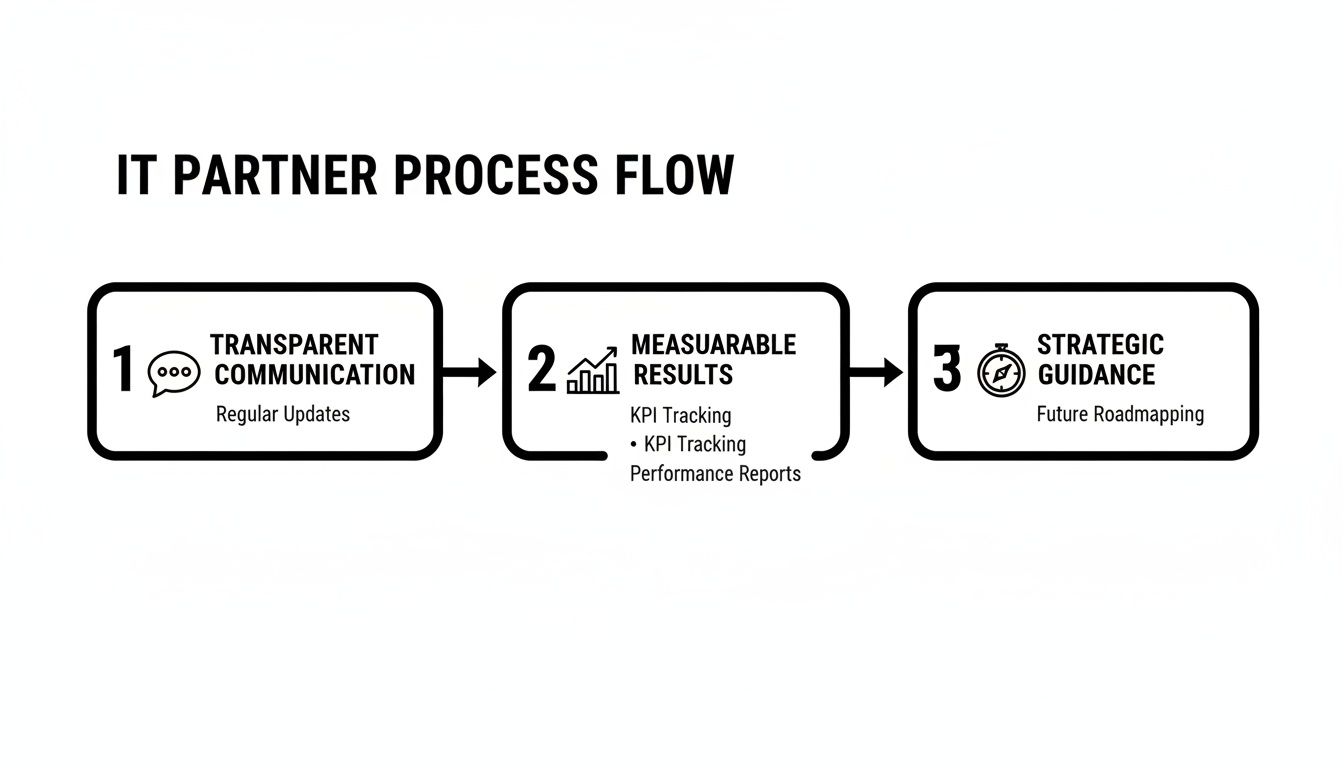
This process shows how a real partnership goes beyond simple fixes to deliver real, ongoing value. Wondering what real support should look like? See our breakdown of effective tech support vs. break-fix models.
Helping Partner vs. Selling Vendor At a Glance
Sometimes the differences are small, but when you know what to look for, the signs are clear. Use this quick comparison to see where your current provider stands.
| Characteristic | Helping Partner (Your Goal) | Selling Vendor (Red Flag) |
|---|---|---|
| Focus | Your business outcomes and long-term success. | Closing the next sale or contract renewal. |
| Communication | Proactive, strategic, and in plain English. | Reactive, jargon-filled, or primarily sales-focused. |
| Solutions | Custom-fit to your specific operational needs. | One-size-fits-all products and services. |
| Reporting | Provides clear data on performance and value. | Offers vague reports or focuses on tasks completed. |
| Goal | To become an indispensable part of your team. | To maximize their revenue from your account. |
If your provider's behavior lines up more with the "Selling Vendor" column, it's a strong signal that the relationship isn't helping your business.
The ROI of a Real Partnership
Have you ever wondered why so many small businesses struggle to stay open? Tech problems are a big, often silent, reason. We’re talking about old systems, security threats that get ignored, and quick fixes that just drain your bank account.
A true IT partner watches over your systems to prevent problems, which gives you a great return on investment (ROI). Smart IT strategies can lead to big savings and better workflows. Good 24/7 support doesn't just fix things; it stops them from breaking in the first place, saving you money on emergency repairs. It’s about turning your IT from a cost into a tool for growth.
Ask your current provider (or any potential one): How often do you review our setup with us? Can you explain our billing line-by-line? What has your service improved in the past 90 days? If they can’t answer clearly, it’s time to look elsewhere.
For a deeper dive into evaluating your provider's performance, this is a great resource on how to know if your Managed Service Provider is doing a good job.
What Your Monthly Invoice Is Really Telling You
Your monthly IT invoice is more than just a bill—it's a report card on your provider's honesty and value. For many business owners in Salinas, this document can feel like a puzzle filled with confusing terms. But when you learn how to read it, you can see if your provider is a partner or just a vendor.
A good invoice should be a clear, simple summary of the value you received. You shouldn't need a dictionary to understand it. If you see vague descriptions or surprise charges, that’s a big red flag that you might be paying for things you don’t need or aren’t even using.

Decoding Common Invoice Jargon
Let's break down some of the common terms you might see on your bill. Understanding these helps you spot where you're getting value and where costs might be too high.
- Per-User or Per-Device Fee: This is a standard model where you pay a flat monthly rate for each employee or piece of equipment (like a computer) being managed. It’s often a good deal, but you have to make sure you aren't paying for old employees or equipment you no longer use.
- Monitoring Agent: This is software installed on your systems that watches for issues like a failing hard drive or a security threat. This is a key part of good IT service—it’s how they prevent problems before they start.
- BDR Solution (Backup & Disaster Recovery): This is your business’s safety net. It’s a mix of tech and services that get you back up and running quickly if you lose data from something like a cyberattack or broken hardware.
Questions to Ask About Your Bill
A provider who is truly helping will welcome your questions and give clear answers. A vendor focused on selling will often avoid the question or use more confusing jargon.
Don’t be afraid to schedule a call and walk through your invoice line-by-line. A partner will see this as a chance to show their value; a salesperson will see it as a bother.
Here are a few direct questions you should be asking:
- Can you explain this charge in plain English? If they can't describe what a service does without using tech jargon, they might not understand how it actually helps your business.
- How does this service help me reach my business goals? Every dollar you spend on IT should connect back to making your business more efficient, secure, or profitable.
- Can you show me a report on what this monitoring service did for us last month? They should be able to give you real data on threats they blocked, downtime they prevented, or important updates they installed.
In the end, your invoice should reflect a partnership, not just a purchase. If it’s creating more questions than it answers, it might be a sign that you’re paying for a sales pitch instead of real support. Understanding this is a key step, just like figuring out if a full-time IT staff is costing you more than you think.
Three Questions That Reveal Your IT Provider's True Motives
Once you’ve looked at the bills, it’s time for a real talk. Knowing how to tell if your IT provider is actually helping (or just selling) often comes down to asking the right questions—ones that cut through the tech-speak and get straight to the point.
These aren't meant to be trick questions. They're simple questions designed to show you whether your provider thinks like a business partner or a salesperson. A true partner will have confident, data-backed answers ready. A vendor will likely get defensive or try to change the subject.

Question 1: What specific business outcome has your service improved for us in the last 90 days?
This is the most important question. It forces them to connect their technical work directly to your business goals. Any vague answer here is a huge red flag.
- A Bad Answer: "We've kept your systems running and installed security patches." This is just the bare minimum they are paid to do, not a real business result.
- A Good Answer: "We noticed your team was spending a lot of time entering inventory data by hand. We set up a simple automation script that cut that time by 40%, saving your staff about 10 hours a week."
See the difference? One answer is about doing tasks; the other is about delivering real business value.
Question 2: How often do you proactively review our technology strategy?
A partner looks ahead. A vendor just waits for things to break. This question reveals their approach. Are they helping you plan for the future, or are they just showing up to fix problems?
Regular, proactive meetings—at least once a quarter—should be normal. These aren't sales calls. They should be strategy sessions to review how things are going, talk about your goals, and make sure your technology is helping you grow, whether you're in Marina or Monterey.
If you only hear from your IT provider when something is broken, an invoice is due, or they have a new product to sell, you don't have a partner. You have a reactive vendor.
Question 3: Can you show me a report that connects your work to our efficiency or security?
This question is all about proof. You're asking for facts, not just promises. They should be able to show you simple reports with numbers that actually matter to you.
- Efficiency Report: This might show less system downtime, faster computer speeds, or fewer help desk tickets from your team. All of these point to fewer tech headaches.
- Security Report: This should list specific threats that were blocked, phishing emails that were stopped, and security holes that were patched before they could cause a problem.
This isn't about getting lost in technical terms. It’s about them proving, with real evidence, that their service is making your business better and safer. Wondering what real support should look like? See our breakdown of effective tech support vs. break-fix models.
A real IT partner delivers results you can measure, not just empty promises. When you have a smart partner, studies show that strategic IT consulting drives small business growth.
Measuring Real Performance Beyond Break-Fix Support
If your IT provider only shows up when something is already broken, they aren't helping you grow—they're just putting out fires. That old "break-fix" model doesn't work anymore. A true partner gives you measurable, proactive value that you can see in your daily operations. This is how you start to tell if your IT provider is actually helping, not just selling.
The goal is to stop paying for repairs and start investing in results. A proactive provider works to prevent problems from ever happening. Think about a hospitality business in Pacific Grove during tourist season. Proactive maintenance doesn't just fix a server crash; it prevents the disaster from happening in the first place, saving days of lost business and unhappy customers.
Moving Beyond "It Works" to "It Works Better"
Your technology shouldn't just be "not broken." It should be a tool that makes your business faster, more efficient, and more secure. To measure this, you need to look at Key Performance Indicators (KPIs). These are just simple numbers that prove your IT is working for you.
You can learn more by exploring these critical information technology KPIs, but here are the three most important ones to start with:
- Uptime Guarantees: This is the percentage of time your important systems—like servers and networks—are working. A good provider will promise a high uptime, like 99.9%, in their contract.
- Ticket Resolution Time: How long does it take them to solve a problem once you report it? More importantly, how many tickets are you sending in? A lower number of support tickets is a great sign that they are fixing the root causes of problems.
- Security Incidents Prevented: A great provider doesn't just clean up after a cyberattack; they show you the attacks they stopped before they ever reached you. Ask for reports on blocked threats, phishing attempts, and patched security gaps.
Calculating the Real ROI on Your IT Spend
It’s easy to see your IT support bill as just another monthly expense. But when it's done right, it’s one of the best investments you can make. A great provider helps you connect their services directly to your profits.
Imagine this: a small business was stuck with slow, old systems. They brought in a good IT partner who set up a modern solution. The result? They automated 70% of their manual tasks, which cut down on errors and saved them a lot of money.
This isn't just a nice story—it's proof of how a real IT partner helps your business grow. Studies show that small businesses with proactive IT partners see revenue growth 20% faster than those stuck in reactive mode.
Start by looking at your team's productivity. If your staff saves just a few hours each week because computers are faster and more reliable, that time turns directly into more work getting done. That's a real return on your investment. To truly measure value, it's key to look at client satisfaction metrics that show how technology is improving your team's experience.
Red Flags That Signal It’s Time for a Change
Sometimes the signs are small, but they're always there. Recognizing the red flags that your IT provider is more interested in sales than service is the first step toward getting the support your business deserves.
If any of these situations sound familiar, it may be time to rethink your partnership. You need a partner who understands your goals, not just your wallet. For a business in Pacific Grove, that means getting smart advice on technology, not just another quote for a new server.
Constant Upselling on Every Call
Does every technical problem somehow turn into a sales pitch? This is a huge red flag.
If your provider's first response to a slow computer is to sell you a new one instead of finding the real problem, they're just treating symptoms. This is a classic sign they care more about easy sales than real service. A true partner investigates first. They might find the issue is a simple software problem or a network issue—fixes that don't cost you anything in new hardware.
What to Ask: "Before we talk about new equipment, can you show me data that proves my current hardware is the problem and can't be fixed?"
This question forces them to back up their recommendation with facts, not just a sales pitch.
Lack of Proactive Communication
If the only time you hear from your IT provider is when something breaks or a bill is due, you don't have a partner—you have a reactive repair service.
A provider who cares about your success will reach out with strategic advice, security updates, and performance reviews without you having to ask. They should be scheduling regular check-ins to discuss your business goals and how technology can help you reach them. Silence isn't a good sign; in this business, it's a sign of neglect.
Jargon Is Used as a Defense
Technology can be complicated, but it's your provider's job to make it easy to understand. If they use a lot of technical language that leaves you confused, they might be doing it on purpose.
Using jargon is often a way to avoid being held accountable and to pressure you into buying services you don't understand. A good partner will take the time to explain things in plain English, so you feel confident about every decision. Their goal should be clarity, not confusion.
Many business owners find themselves in this exact spot. If you're wondering if there's a better way, see if your Carmel business is missing out on managed IT that focuses on partnership over pitches.
IT Provider Red Flag Checklist
Use this quick checklist to review your current IT provider and spot any warning signs.
| Red Flag | What It Looks Like | What to Do About It |
|---|---|---|
| Sales-First Approach | Every issue leads to a quote for new hardware or software. | Ask for diagnostic data proving the purchase is necessary. |
| Reactive, Not Proactive | You only hear from them when there's a problem or an invoice. | Ask them to schedule a quarterly business review (QBR). |
| Confusing Jargon | They use technical terms that hide the real issue. | Insist on a plain-English explanation of the problem and solution. |
| Blame Game Mentality | They blame your other vendors or your staff for IT issues. | Ask for logs or evidence that supports their claim. |
| Nickel-and-Diming | Your bills are filled with unexpected charges for small tasks. | Request a clear list of what's included and what costs extra. |
If you find yourself checking off more than one or two of these boxes, it’s a strong sign that your IT provider’s goals are not aligned with yours. It's not just about fixing today's problem; it's about building a tech foundation that supports your future.
Got Questions About Your IT Provider? We've Got Answers.
Even with a good plan, figuring out if your IT provider is the real deal can be tricky. As a local Salinas IT consultant, we hear the same worries from business owners all the time. Let's answer the most common questions so you can feel confident.

It’s a familiar story: you feel burned by a provider who was more interested in upselling you than solving your problems. That feeling is very common. Recent insights show that 73% of SMBs aren’t confident their current MSP can defend them from cyberattacks—and would switch for a provider who was more transparent.
What that really tells you is that most small businesses just want straight talk and dependable results.
How often should I actually be meeting with my IT provider?
A proactive IT partner will insist on regular meetings, usually every quarter. These meetings should never feel like a sales pitch. The goal should be to review performance reports (like uptime and security threats blocked), talk about your business goals for the next quarter, and make sure your technology is helping you get where you want to go.
If you only get a call when something breaks or a bill is late, that's a huge red flag. A true partner invests their time in your business's success.
My provider says I need to upgrade everything. How do I know if it's really necessary?
This is a classic sales tactic. A genuine partner will justify any big purchase with a clear business reason, not just by using fear.
They should be able to show you data that proves your current equipment is failing, creating security risks, or slowing down your team's productivity.
Ask them for a simple ROI breakdown. Something like, "This new server will cut your report processing time by 40%, saving your finance team 10 hours a week." If they can't connect the purchase to a real business benefit, they're focused on a sale, not a solution.
What’s a reasonable price for small business IT support?
While costs can vary, you should always focus on value, not just the lowest price. A cheap hourly rate might look good at first, but those costs can skyrocket if you have a major problem or a slow-to-respond technician.
A flat-fee managed services model is usually better because it encourages the provider to keep your systems running smoothly to prevent problems in the first place.
Instead of asking, "Who's the cheapest?" you should be asking, "What business value am I getting for this fee?" A good provider will have no problem explaining their costs with hard data on prevented downtime and improved efficiency. To get a better handle on finding the right fit, check out our guide on what to look for in local IT service providers.
Tired of vague promises and tech jargon? Let us show you exactly what we do, what it costs, and how it helps your business—not just your inbox.
Adaptive Information Systems
380 Main St, Salinas CA 93901 | 831-644-0300 | hello@adaptiveis.net