
If you're running a business in Salinas, you know technology is the engine that keeps things moving. But how can you be sure that engine is running at its best?
That’s where Information Technology Key Performance Indicators (IT KPIs) come in. Think of them as the dashboard for your company's tech. They are simple, measurable numbers that give you a real-time look at how your systems are doing. For any local business in Monterey County, from Salinas to Monterey, understanding these numbers is key to smart growth.

Understanding Your Technology's True Performance
For many small and mid-sized businesses here in Monterey County—whether you're in agriculture, hospitality, or education—IT can feel like a mystery. You spend money on servers, software, and support, but it's hard to know if you're getting a good return on that investment.
Are you paying for services you don’t need? Is slow tech secretly hurting your team's productivity? These are the questions IT KPIs are designed to answer.
They help you move away from guessing and start making decisions based on facts. Instead of just feeling like the network is slow, you can measure its exact speed and uptime. Instead of wondering if your IT support is effective, you can track exactly how quickly they solve issues.
By measuring what matters, you can manage your technology with the same confidence you manage your finances. This gives you a clear view of what’s working, what isn’t, and where your budget is making the biggest impact.
Why KPIs Are a Game-Changer
When you start tracking the right numbers, you can finally connect your technology directly to your business goals. This simple change gives you the power to:
- Justify Your IT Spending: Show exactly how technology investments are improving efficiency or protecting your company.
- Spot Problems Early: Find those annoying, recurring issues—like constant printer jams or software glitches—before they become major headaches.
- Improve Team Productivity: Pinpoint the technical roadblocks that are slowing your employees down and fix them for good.
- Strengthen Security: Measure your defenses to make sure your important business data is safe from cyber threats.
The global IT market is huge and growing, expected to reach around $9.61 trillion next year. This growth means more complexity and more choices for business owners like you. Getting through it all requires a smart plan based on real data.
This is where solid business technology consulting can give you a major advantage. KPIs give you the clarity you need to make the right choices for your company’s future.
Moving from Guesswork to Growth with IT Metrics
Would you try to run your business finances without looking at your profit and loss statements? Of course not. So why manage your technology based on feelings or guesswork? This is where measuring IT performance with key metrics comes in. It shifts your entire approach from putting out fires to planning for growth.

Using information technology KPIs lets you make important decisions backed by real data. It’s the difference between saying, “I feel like the network was down a lot last month,” and knowing for a fact, “Our network uptime was 98.5%, which caused four hours of lost productivity during our busiest time.”
That kind of clarity is a game-changer. It helps you see exactly where your technology budget is going and the real return you're getting from it.
Aligning Technology with Business Goals
The real power of IT KPIs is how they connect your technology to your main business goals. When you track the right numbers, you can easily explain every dollar you spend.
Think about these common situations for local businesses:
- Retail Store in Marina: Tracking your Point-of-Sale (POS) system uptime can show you if frequent crashes are costing you sales on busy weekends.
- Agricultural Business in Salinas: Monitoring network performance can tell you if slow internet is stopping your team from uploading and analyzing important field data.
- Hospitality Venue in Carmel: Measuring the response time of your booking software makes sure you aren't losing reservations because of tech problems.
By keeping an eye on these specific numbers, you’re no longer just spending money on IT. You’re investing in solutions that directly help you make money and work more efficiently.
When you measure your IT performance, you can confidently justify your budget, spot problems before they get serious, and make sure your technology is helping you grow.
Making Data-Driven Decisions
Without KPIs, you’re left guessing why things are going right or wrong. With them, you can track performance over time, see important patterns, and plan for the future with much more accuracy. This forward-thinking approach makes sure every dollar you put into technology helps build a stronger, more profitable business.
This is a core idea behind good IT management. Partnering with the right experts can help you set up these systems without the headache. To see how professional support can make a difference, you can learn more about what to look for in local IT service providers and see how they guide this process.
Ultimately, using IT KPIs gives you three big advantages:
- Measurable Performance: You stop collecting random data and start analyzing meaningful information that connects to your business goals.
- Clear Accountability: When you track metrics, it becomes obvious what’s working and what isn’t. This lets you do more of what's successful and quickly fix what's failing.
- Improved Predictability: Past data helps you guess what’s coming next, whether that means upgrading equipment before it fails or adding more internet bandwidth before a busy season.
By adopting this data-focused mindset, you turn your technology from a simple cost into a strategic tool for success.
Choosing the Right IT KPIs for Your Business
Let's be honest, not all data is equally useful. You could track dozens of different numbers, but you'll just end up confused. The secret is picking information technology KPIs that connect directly to what you're trying to achieve as a business.
Without that focus, you're just collecting data for fun—not actually making things better. For a local business in Salinas or Carmel, the right KPIs become your roadmap. They guide every tech investment and help you avoid costly mistakes.
Start with Your Business Goals
The best way to choose your KPIs is to work backward. Start with your main business goals and go from there. Your technology should always serve your business, not the other way around.
The structure is simple: Your business goals decide your IT goals, and those goals tell you which KPIs to watch.
This visual shows how your overall business plan should be the starting point for any tech metric you decide to measure.
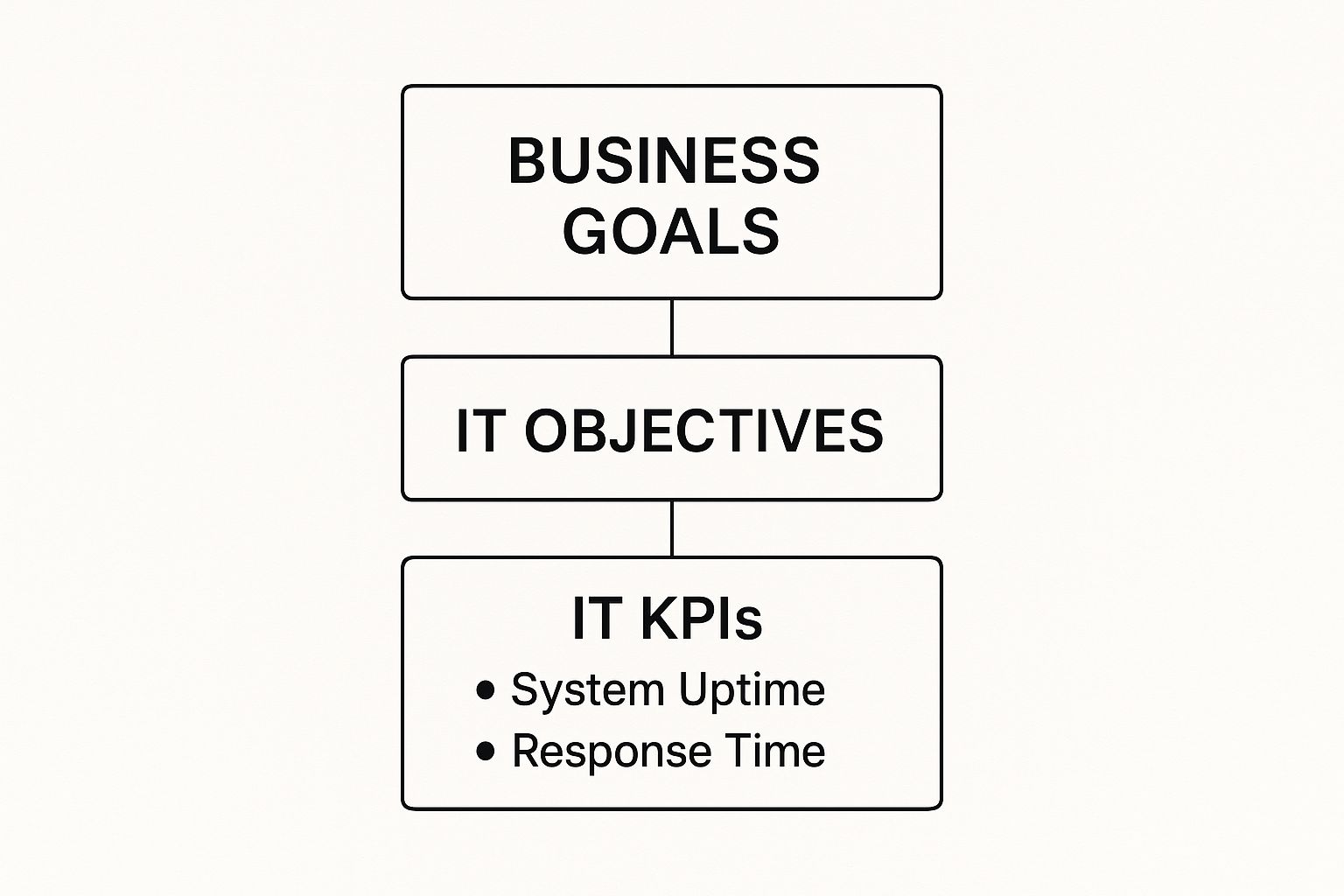
As you can see, a metric like ‘System Uptime’ isn’t just technical talk. It’s a direct measure of how well your IT is supporting your ability to stay open and make money.
This isn't a new idea. Proven frameworks like ITIL's Service Level Management (SLM) practices have been saying this for years, pushing for a clear link between IT performance and actual business results.
The Four Core Categories of IT KPIs
To keep things simple, you can group the most important IT KPIs into four main categories. Focusing on these areas gives you a complete view of your technology’s health and its impact on your business—without getting lost in the details.
Here’s a simple table that breaks down these categories and what they mean for a local business.
| KPI Category | What It Measures | Example Metric |
|---|---|---|
| Availability | Are your systems online and working when needed? | System Uptime: The percentage of time a server is working. |
| Performance | How fast and smooth are your systems? | Average Response Time: How quickly an app responds to a user. |
| Security | How well are you protected against online threats? | Mean Time to Detect (MTTD): How fast you spot a security issue. |
| User Satisfaction | How do your employees feel about the tech they use? | Internal Net Promoter Score (NPS): How likely staff are to recommend IT tools. |
Let's look a little closer at what each of these means for you.
1. Availability KPIs
This category answers a simple but vital question: is your technology working when you and your customers need it? For any business, downtime means lost money. These metrics track the reliability of your most important systems.
A key example is System Uptime, which measures the percentage of time a server, network, or app is online and working.
2. Performance KPIs
So, your systems are online. The next question is, how well are they running? Performance KPIs measure the speed and smoothness of your tech. A slow system can be just as bad as one that's offline, hurting productivity and frustrating everyone.
A key metric here is Average Response Time, which tracks how quickly a system or app responds to a user's action.
Think of it like this: Availability is whether your delivery truck starts in the morning. Performance is how fast that truck can make its deliveries. Both are absolutely critical for a successful day.
3. Security KPIs
Is your business data—and your customers' data—safe? Security KPIs help you measure how strong your defenses are against cyberattacks and data breaches. In a world where these threats are constant, you must monitor your security.
One important KPI is Mean Time to Detect (MTTD), which tells you how quickly your team can find a potential security breach. The faster you know, the faster you can act.
4. User Satisfaction KPIs
At the end of the day, technology is only useful if people can use it without getting frustrated. These KPIs measure how your own employees feel about the tools they use every day. High satisfaction almost always leads to higher productivity and better morale.
A common metric is the Internal Net Promoter Score (NPS). It’s a simple survey asking staff how likely they are to recommend your company's IT tools to a coworker. Their answers tell you a lot.
Essential IT KPIs You Can Start Tracking Today
Now that you know why you need to track your tech's performance, let's get practical. You don't need a complicated system to start making smarter choices. By focusing on a few powerful information technology KPIs, you can get a great look into what’s working and what’s holding you back.
Think of these metrics as your starting lineup—the core players that will give you the most valuable information right away.
Measuring Reliability with System Uptime
The first and most important KPI is System Uptime. This metric simply tracks the percentage of time your critical systems—like servers, networks, and key software—are online and working. If your uptime is low, nothing else matters, because your business can't run.
Imagine you run a busy cafe in Pacific Grove. If your Point-of-Sale (POS) system goes down during the morning rush, you can't take payments. That's not just an annoyance; it's lost money and a hit to your reputation.
Your Goal: Aim for an uptime of 99.9% or higher. While 100% is impossible, anything less than 99% often points to a problem with your equipment or network that needs attention.
Tracking this helps you spot recurring issues and justify investments in better equipment before a major outage hurts your business. To learn more, it helps to understand the basics of what infrastructure monitoring is and how it provides these important insights.
Evaluating Support Speed with MTTR
When something does break, how fast can you fix it? That’s what Mean Time to Resolution (MTTR) measures. It’s the average time from when a support ticket is opened to when the issue is completely solved.
A low MTTR means your IT support is quick and effective, getting your team back to work with little delay. A high MTTR means productivity is lost while employees wait for a fix. This is a key KPI for measuring how good your IT helpdesk is.
Gauging Efficiency with First Contact Resolution
A similar metric is the First Contact Resolution (FCR) Rate. This KPI tracks the percentage of helpdesk tickets that are solved on the very first try—no follow-up calls or emails needed. A high FCR is a great sign of an experienced and knowledgeable support team.
It tells you that your team isn't just closing tickets quickly; they're solving problems correctly the first time. This boosts employee morale and stops small issues from becoming bigger problems.
Here’s a quick summary of these two important support metrics:
| Support KPI | What It Measures | Why It Matters for You |
|---|---|---|
| Mean Time to Resolution (MTTR) | The average time it takes to fix an issue from start to finish. | Shows how much total time your team loses to technical problems. |
| First Contact Resolution (FCR) | The percentage of issues solved in a single interaction. | Reveals the efficiency and skill of your IT support. |
When you’re looking at your network, people often wonder if it's more important to have high WAN bandwidth or Quality of Service (QoS). In reality, both affect how your team uses the network and are vital for keeping productivity high.
Identifying Patterns with Helpdesk Ticket Volume
Are you constantly dealing with the same printer issues or software glitches? Tracking your Helpdesk Ticket Volume helps you see these repeating problems clearly. You can even sort tickets by category to find exactly where the pain points are.
For instance, a hospitality business in Seaside might notice a lot of tickets related to their booking software every month. This data signals that it’s time to either retrain the staff or look for better software. It turns complaints into action.
Staying Secure with Patching Cadence
Finally, in an age of constant cyber threats, Patching Cadence is a security KPI you can’t ignore. This measures how quickly you apply important security patches to your software and systems once they're released.
Hackers often attack known security holes that have already been fixed by a patch. A slow patching schedule leaves your business open to attack. By tracking this, you ensure your digital doors are locked and your defenses are always up to date, protecting your sensitive business and customer data.
Using Cybersecurity KPIs to Protect Your Business
If you’re running a business in Monterey County, whether it’s an agricultural operation in Salinas or a boutique hotel in Carmel, cybersecurity isn't just a tech issue—it's a major business risk. Everything from your financial records to your daily operations relies on technology that is safe. Hoping for the best is not a good plan.
This is where specific information technology KPIs for cybersecurity make all the difference. Think of them as an alarm system for your digital property. They give you real data on how strong your defenses are, showing you where you're protected and where you might be vulnerable.
Gauging Your Detection Speed
One of the most important cybersecurity KPIs is Mean Time to Detect (MTTD). In simple terms, this tracks how fast your team and your security tools can spot a potential threat. It’s like a digital smoke detector; the quicker it alerts you, the faster you can put out the fire.
A low MTTD is great news. It means you’re spotting suspicious activity almost as it happens. A high MTTD, however, is a huge red flag. It means a hacker could be moving through your network for days or weeks without being noticed.
The financial risk here is massive. The average cost of a data breach has climbed to $4.88 million globally. And don't think this is just a problem for big companies—small and medium-sized businesses are the target in 43% of all cyberattacks. Being proactive is your best investment, and tracking MTTD is where it starts.
Ensuring Your Team Is Your Strongest Defense
Your employees can be your first line of defense or your biggest weakness. It all comes down to training. That’s why the Security Awareness Training Completion Rate is such a critical KPI to watch. It simply measures what percentage of your staff has finished their required cybersecurity training.
A high completion rate tells you that your team knows how to spot phishing emails, create strong passwords, and avoid common online scams. This KPI shows how strong your company's security culture is.
A well-trained team is one of the most effective and affordable security tools you can have. When your employees know what to look for, they help protect your business and reduce your risk of a breach.
Tracking Your Vulnerability Management
Another key security KPI is the Number of Critical Vulnerabilities. This metric counts the high-risk security weaknesses across all your systems, from software that needs updating to firewalls that aren't set up correctly. The goal is simple: keep this number as close to zero as possible.
Running regular vulnerability scans is like a health check-up for your network. It lets you find and fix problems before a criminal can find and use them.
Often, the best way to get a clear picture of your weak spots is with a professional audit. Our guide on what to expect from cybersecurity assessment services walks you through how this process can find risks you never knew you had.
Here are a few other security KPIs worth watching:
- Phishing Test Success Rate: How many employees report a fake phishing email instead of clicking on it? This is a great real-world test of your training.
- Access Control Audits: This tracks how often you review who has access to sensitive company data. Regularly removing access for former employees is a simple but powerful security habit.
By consistently tracking these cybersecurity KPIs, you can build a much stronger defense, protect your company's data, and make sure your business can operate securely.
Your Local Partner for IT Success
Trying to track all these information technology KPIs—and then figure out what to do with the data—can feel like a full-time job. The good news? You don’t have to do it alone.
At Adaptive Information Systems, our mission is to bring practical, enterprise-level IT strategy to local businesses right here in Monterey County, all at a price that makes sense.
We'll work with you to find the KPIs that actually matter for your goals. Then, we’ll set up the right tools to track them and turn that data into a clear story. Our job is to help you see what’s really going on so you can make confident decisions that improve efficiency and help you grow.
Focus on Your Business, Not Your Tech
Let us handle the technology so you can get back to what you do best: running your business. We believe being proactive is always better than being reactive—waiting for something to break is never a good plan.
Taking the complexity out of IT management lets you turn your technology from a headache into a real advantage. You get all the benefits of an in-house IT team without the high cost.
This hands-on, proactive approach is the core of effective IT support. To see how it can change your day-to-day operations, check out our guide to managed IT services and see how we keep local businesses running smoothly. We’ll handle the technical details so you can stay focused on your customers.
Let's build a stronger and more profitable future together.
Adaptive Information Systems
380 Main St, Salinas CA 93901 | 831-644-0300 | hello@adaptiveis.net
Your Top Questions About IT KPIs, Answered
When you start digging into information technology KPIs, it’s normal to have a few questions. Here are some simple answers to the questions we hear most often from business owners in Monterey County.
How Often Should I Review My IT KPIs?
The honest answer? It depends on what you're measuring. You wouldn't stare at your car's temperature gauge constantly, but you glance at the speedometer every few seconds. IT metrics work the same way.
- Real-Time or Daily: Think of these as your system's vital signs. Things like network uptime, server status, and security alerts need constant monitoring. If something goes wrong here, you need to know right away.
- Weekly: This is a great schedule for checking things like Helpdesk Ticket Volume or First Contact Resolution Rate. A weekly review helps you see patterns—like recurring printer problems—or lets you praise your support team for their great work.
- Monthly or Quarterly: Save the bigger, more strategic KPIs for a monthly or quarterly check-in. This is the perfect time to review your IT budget or the feedback from employee satisfaction surveys.
The most important thing is to be consistent. Reviewing your metrics regularly helps you spot trends and fix small problems before they grow.
What Is the Most Important IT KPI for a Small Business?
While every business is different, System Uptime is almost always the best place to start. It’s the foundation everything else is built on.
If your systems are down, you can’t work. You can’t process payments, answer emails, or access your files. Whether you run a retail shop in Monterey or an accounting firm in Salinas, downtime is a direct hit to your sales and reputation.
Once you have your systems staying online reliably, you can build from there. But without good uptime, all other metrics come second.
Can I Track IT KPIs Without Expensive Software?
Absolutely. You don't need a fancy dashboard to get started. The goal is to start measuring something. You can always get more advanced later.
A simple shared spreadsheet is a great first step. You can use it to log IT issues, track how long it takes to fix them (MTTR), and see which problems keep happening. Also, many of the tools you already use have free reporting features. Check your internet router's admin page or the dashboard for your Microsoft 365 subscription—you’ll likely find basic performance and uptime data waiting for you.
The most important step is simply to start. Building the habit of making decisions with data is far more valuable than any software you can buy.
How Do KPIs Help Justify My IT Budget?
KPIs are your secret weapon for turning budget requests from "I think we need this" into a strong business case. They give you the hard data to show exactly how technology affects your bottom line.
Think about the difference between these two requests:
Instead of saying, "Our server seems slow and I think we need a new one," you can present a data-backed case: "Our server uptime dropped to 97% last quarter, which led to about 15 hours of lost productivity. Investing in a new server will get us back to our 99.9% uptime goal and prevent those losses."
This approach proves the return on investment (ROI) and shows that technology is not just a cost, but a critical part of your company's success.
Ready to stop guessing and start measuring? The team at Adaptive Information Systems can help you find and track the KPIs that will make the biggest difference for your business. Let's build a smarter IT strategy together. Learn more at https://adaptiveis.net.
Adaptive Information Systems
380 Main St, Salinas CA 93901 | 831-644-0300 | hello@adaptiveis.net