
Managing a remote team comes down to three key things: setting clear goals, using the right technology, and keeping communication open. Success isn't about trying to copy your physical office online. It's about building a new way of working based on trust, responsibility, and the right digital tools for your business.
Building Your Foundation for Remote Work in Salinas
Making the switch to a remote or hybrid model can feel like a huge project, especially for local businesses here in Monterey County. Whether your business is in agriculture in Salinas, hospitality in Monterey, or another local industry, the challenges are real. How do you keep everyone on the same page? How do you maintain your company culture when you're not all in the same room?
The answer is to build a strong digital foundation from day one.
Think of it as the blueprint for your virtual office. Before anyone logs on from their home in Carmel or Pacific Grove, you need to define the rules. This isn't about micromanaging. It’s about giving your team the clarity they need to do great work without someone looking over their shoulder.
Start with Clear Expectations
The biggest problem I see in remote management is confusion. When people are unsure of their roles, priorities, or deadlines, work slows down. You can get ahead of this by setting clear expectations for every part of the job.
This means you need to write everything down. Create a central document that clearly explains:
- Roles and Responsibilities: Who is in charge of what? What specific things does each person need to deliver?
- Communication Guidelines: Set simple rules for how quickly people should reply. For example, a 4-hour reply time for emails and a 1-hour reply for Microsoft Teams messages during business hours.
- Core Working Hours: Even with flexible schedules, it helps to have a core time (like 10 AM to 3 PM) when everyone is expected to be available to work together.
- Meeting Rules: Lay out some ground rules, like asking everyone to turn their cameras on for team meetings. This helps keep everyone connected and engaged.
Choosing Your Core Technology
Technology is the backbone of any successful remote team. For a small business like yours, the goal is to find affordable, powerful tools that don't break your budget. You don't need a dozen different apps. You just need a few key tools that work well together.
By carefully choosing your tools, you can explore different options that fit your needs and budget.
For many small businesses, a successful remote setup isn't about having the most expensive software. It's about choosing reliable, user-friendly tools that solve specific problems—like making communication easier or tracking project progress. Then, the whole team needs to commit to using them.
To make this easier, I've put together a quick starter kit that covers the basics.
Essential Remote Work Starter Kit for SMBs
This table breaks down the must-haves for getting your remote team up and running.
| Component | Why It Matters for Your SMB | Example Tool |
|---|---|---|
| Communication Hub | Creates a central place for real-time chat, file sharing, and team announcements, which reduces email overload. | Microsoft Teams |
| Project Management | Shows who is working on what, tracks deadlines, and keeps projects moving forward. | Asana or Trello |
| Cloud Storage | Makes sure everyone has secure access to the latest versions of files from anywhere, on any device. | OneDrive or Google Drive |
| Video Conferencing | Allows for face-to-face meetings and brainstorming sessions, which helps maintain your team culture. | Zoom or Google Meet |
Getting these four pieces in place gives you a solid technical foundation to build on as your remote team grows.
The image below shows a simple, three-part process for establishing a solid remote work foundation.
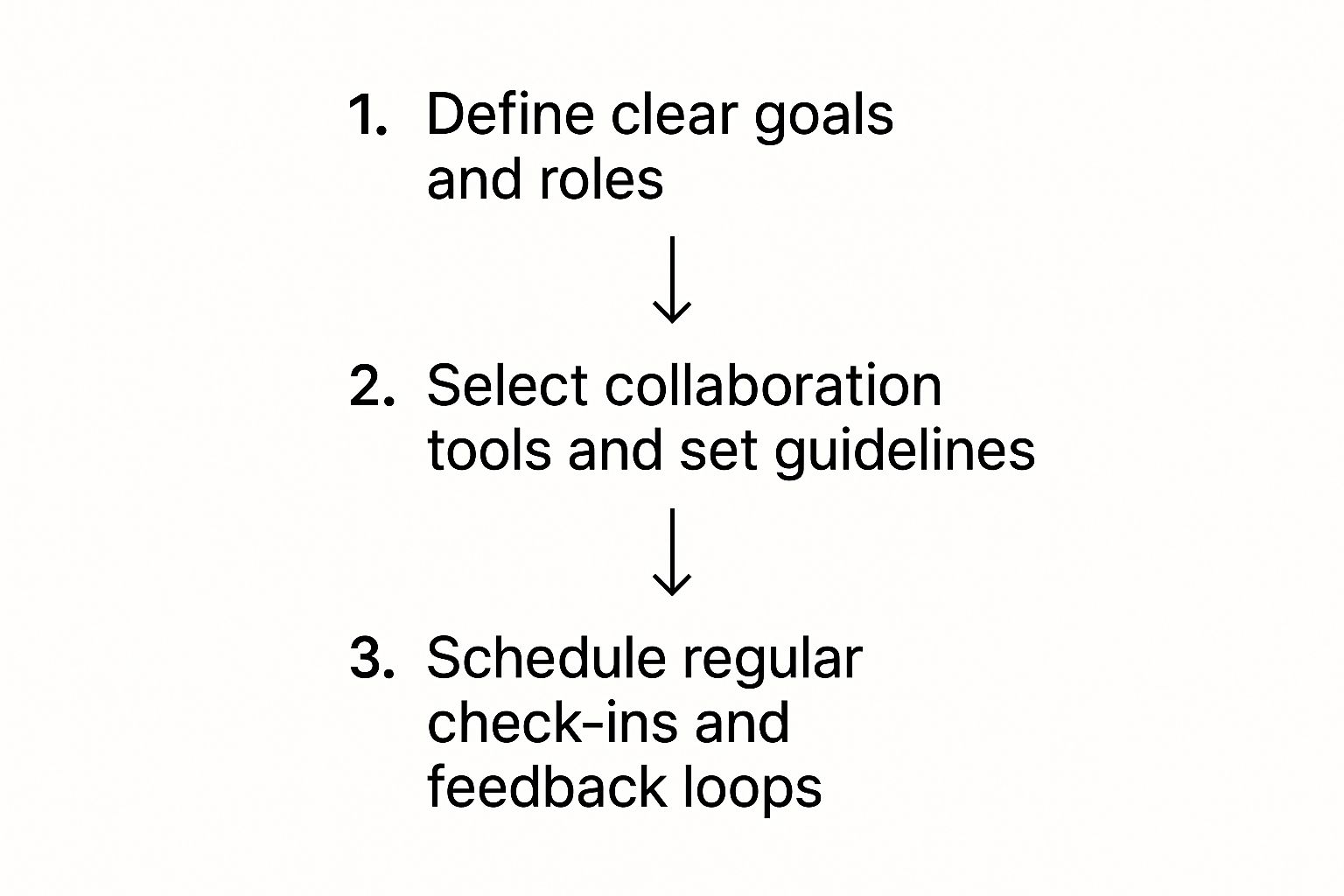
This process shows that success starts with clear goals, is supported by the right tools, and is kept alive through regular communication. With 48% of the global workforce now working remotely in some way, having a clear plan is more important than ever.
In fact, fully remote workers are often more productive. They log an extra 51 minutes of productive time each day. For a deeper look at the details, check out this comprehensive guide to managing remote teams.
Choosing the Right Tech for Team Collaboration
Once you’ve got your foundation set, the next big piece of the puzzle is picking the right technology. For any local business in Monterey County, from hospitality in Carmel to agriculture in Salinas, the right tools are what connect your team when they're not in the same room.
This isn't about buying the fanciest software. It's about being smart. You want affordable, effective tools that help your team without costing a fortune. A good set of tech tools is like the central nervous system for your remote team. It keeps communication flowing, projects moving, and your data secure, no matter where your team is.
Let’s break down the three pillars of a great remote tech setup.
Pillar 1: Communication Tools
Good remote work depends on clear and constant communication. If you're still using email for everything, you're causing confusion and slowing everyone down. You need one main place where your team can connect in real-time.
This is where platforms like Microsoft Teams or Slack come in. They let you create different channels for projects, departments, or even just for fun (like a virtual water cooler). This keeps conversations organized and makes it easy for anyone to find what they need.
When you're looking for a communication tool, make sure it has:
- Instant Messaging: For quick questions and brainstorming.
- Video Conferencing: A must for face-to-face team meetings.
- File Sharing: So you can easily drop documents right into a conversation.
- Integrations: The ability to connect with your other tools is very important.
Here’s a quick look at the Microsoft Teams interface. It pulls chat, meetings, and file sharing all into one application.

As you can see, having one platform like this means less jumping between different apps. It keeps all your team collaboration neat and tidy.
Pillar 2: Project Management Platforms
Okay, communication is flowing. Now what? You need to see what everyone is working on. A good project management tool becomes your single source of truth for tasks, deadlines, and progress. It answers the question, "Who is doing what, and by when?"
Most small businesses don't need a super complex system. User-friendly platforms like Asana, Trello, or ClickUp are great because they give you a visual way to track work.
When picking a platform, make sure it lets you:
- Assign Tasks: Clearly give work to specific people.
- Set Deadlines: Keep everyone on the same page about timelines.
- Track Progress: Get a quick overview of a project's status.
- Centralize Documents: Attach files directly to the tasks they relate to.
Adopting a project management tool is less about the technology itself and more about being transparent. When everyone can see the moving parts of a project, people naturally feel more accountable. You'll spend way less time chasing people for updates.
Making that switch from asking for updates to just checking a shared dashboard is a huge game-changer for any remote manager. For more ideas on structuring your virtual workspace, take a look at our detailed guide on remote work best practices.
Pillar 3: Security and Access
Finally, letting your team work from anywhere creates new security risks. Protecting your company and client data is something you can't ignore, especially when employees are logging in from different locations like Marina or Seaside.
You have to give your team secure access to company files while protecting your network from threats. This is where having enterprise-level IT becomes so important, even for a small business.
Your core security measures should include:
- Virtual Private Network (VPN): A VPN creates a secure, encrypted connection for employees to access the company network. This is key for protecting data, especially over public Wi-Fi.
- Multi-Factor Authentication (MFA): This adds a strong layer of security by requiring a second form of verification (like a code from a phone app) to log in. It stops hackers even if a password gets stolen.
- Cloud-Based File Storage: Using a secure service like OneDrive means your files are always backed up and available from anywhere, with permission levels that you control.
Putting these three pillars in place—communication, project management, and security—gives you a strong, affordable tech setup. It provides the structure your team needs to do their best work and the peace of mind you need as a business owner.
Fostering a Strong Remote Company Culture
Running a remote team is about more than just having the right software. When your team isn't sharing an office in Monterey, you miss out on those casual chats that build a strong company culture. Without that, your team can start to feel disconnected, which can lead to low morale and lower productivity.
The good news? You can absolutely build a great remote culture. It just takes a different plan—one that’s more focused on the human side of things. This means being intentional about how you communicate, run meetings, and create space for your team to connect as people.
Rethink Your Meetings
Let’s be honest: nobody loves a day full of meetings that could have been an email. In a remote setup, meeting fatigue is a real problem. The solution isn't to get rid of all meetings, but to make sure the ones you do have are worth everyone's time.
Before you schedule that next virtual meeting, ask yourself one simple question: "Does this really need a face-to-face discussion?" If you're just sharing a status update, a clear message in your team's chat is often a much better choice. It respects everyone’s schedule and frees up time for focused work.
For the meetings that are truly necessary, stick to a few simple rules:
- Always have a clear agenda. Send it out beforehand so everyone knows the goal and can come prepared.
- Keep them short. A focused 25-minute meeting is almost always more productive than a rambling 60-minute one.
- Encourage everyone to talk. Don't let the loudest voices take over. Make a point to ask quieter team members for their thoughts.
Embrace Asynchronous Communication
One of the biggest benefits of remote work is flexibility. You can support this by embracing asynchronous communication—that is, communicating in a way that doesn't demand an immediate reply. This lets your team members structure their days in a way that works best for them, which leads to better focus and results.
Instead of a quick Slack message that needs an instant reply, you could record a short video explaining a new process. Or you could write a detailed post in your project management tool. Your team can then review it when they have a moment and give a thoughtful response. It's a simple change that can cut down on stress and boost efficiency. To get started, you can explore our overview of essential IT services that support remote collaboration.
A strong remote culture is built on trust, not watching over people's shoulders. When you give your team the freedom to manage their own time and focus on results, you empower them to do their best work.
The modern workforce expects this kind of flexibility. By 2025, attitudes have shifted dramatically, with 69% of U.S. companies offering location flexibility. This is driven by employee demand, as 51% of professionals now prefer fully remote roles because it makes them happier at work.
Create Virtual Water Cooler Moments
So, how do you recreate those casual office chats that build real relationships? You have to create the space for them on purpose. It might feel a little strange at first, but these small efforts make a huge difference in preventing loneliness and building a strong team.
To keep your team motivated and connected, you can explore some fresh remote employee engagement ideas that go beyond the usual virtual happy hour.
Here are a few practical ways to get started:
- Launch a "Non-Work" Channel: Create a special space in Microsoft Teams or Slack for casual chat. This is where people can share photos of their pets, talk about their weekend plans, or discuss a local event in Salinas.
- Schedule Virtual Coffee Chats: Randomly pair up team members for a 15-minute, non-work video call each week. It’s an easy way for people from different departments to get to know each other.
- Celebrate Wins Publicly: When someone on your team does great work, don’t just tell them privately. Give them a public shout-out in your main team channel. This recognition boosts morale and shows what your company values.
Building this kind of culture takes consistent effort, but the payoff is huge. A connected, engaged team is a productive team, whether they're in the office or working from home.
Driving Performance and Productivity Remotely

"How do I know my team is actually working if I can't see them?" It’s a question I hear all the time from business owners like you. The answer? Stop managing by sight and start managing by results. This is a big mental shift. It means moving away from tracking hours worked to celebrating goals met.
This new mindset is the key to unlocking the true power of a remote team. It’s not about spying on people. It’s about building a culture of trust and responsibility. When you give your team clear goals and the freedom to meet them, you create a more empowered and productive team.
This model is especially effective for the different industries we have in Monterey County. Whether you're coordinating harvest schedules in agriculture or managing hotel bookings, focusing on results just makes everything simpler.
Set Clear, Measurable Goals
Vague instructions kill productivity in any office, but they're especially bad for remote teams. Your people need to know exactly what success looks like for every project. This is where simple, structured goal-setting makes all the difference.
Instead of just saying, "Get that report done," you need to be more specific. Try something like this: "Complete the Q3 sales report by Friday at 5 PM. Make sure it includes data from all three product lines and a summary of key trends." This clarity removes the guesswork and helps your team work with confidence.
Here’s how to set goals that work for a remote team:
- Define "Done": For every task, clearly explain what the finished product should look like. No confusion.
- Set Realistic Deadlines: Agree on timelines that are challenging but doable.
- Use Project Management Tools: Platforms like Asana or Trello are great for assigning tasks and tracking progress. Everyone can see who is responsible for what and when it’s due.
When your team understands their specific goals and how they help the company, they become more invested in the outcome. This sense of purpose is a powerful motivator that traditional supervision can't match.
Conduct Meaningful Check-Ins
Regular check-ins are the heartbeat of remote management, but people often get them wrong. They shouldn't be about grilling someone on what they did all day. They should be supportive talks focused on progress, challenges, and well-being.
A weekly one-on-one is a perfect chance to ask questions like, "What's going well?" or "Is there anything standing in your way that I can help with?" This simple change turns the meeting from a status update into a helpful coaching session. It shows you're there to support them, not to watch their every move.
The productivity benefits of this trust-based approach are huge. Research shows that remote employees can be 35% to 40% more productive, mostly due to fewer distractions and more flexible schedules. In fact, 62% of workers feel more productive from home, which means lower turnover and happier employees for your business. You can find more insights on the state of remote work from Neat.
Focus on Outcomes, Not Activity
In the end, learning how to manage remote teams successfully comes down to one main idea: measure what matters. It doesn't matter if an employee worked from 8 AM to 4 PM or in short bursts throughout the day. What matters is the quality of their work and if it's done on time.
This focus on results has several powerful benefits:
- Builds Trust: It shows your team you trust them to manage their own time.
- Increases Autonomy: Employees who feel ownership over their work are usually more engaged and creative.
- Reduces Burnout: It allows for the flexibility needed to maintain a healthy work-life balance, which is key for long-term success.
This shift helps you lead a high-performing team from anywhere. For local companies, using these strategies with the right technology is key. You can learn more by exploring our guide to Salinas business technology support.
Navigating Common Remote Management Hurdles

Managing a remote team isn't always easy. Even with the best plans and tools, new challenges will come up. The real difference between a team that just gets by and one that really succeeds is how you handle these challenges.
These aren't just small bumps in the road. They're issues that can hurt your team's morale and productivity. By getting ahead of common problems—like burnout, difficult onboarding, and unfair career paths—you can build a stronger remote work model.
Preventing Employee Burnout
When your commute is just a walk to the next room, the line between work and home can get blurry. Without that physical separation, your employees might find it hard to switch off at the end of the day. This "always-on" feeling is a fast track to burnout.
As a manager, you have a responsibility to protect your team's work-life balance. It’s not just about being a good person; it's a smart business move. A well-rested team is a creative and productive team.
Here are a few practical ways you can help:
- Lead by Example: Stop sending emails at 10 PM. If you have to work late, use the "schedule send" feature. Your team looks to you for what is okay.
- Encourage PTO: Don't just approve paid time off—actively encourage your team to take it. Make it a rule that when someone is on vacation, they are not to be contacted unless it's a true emergency.
- Promote "Unplugged" Time: Try things like "no-meeting Fridays" or flexible hours that give people the space to manage their personal lives without feeling guilty.
Your job as a remote manager isn't to make sure your team is always working. It's to make sure they can deliver great results over the long run. A healthy work-life balance isn't a perk—it's a core part of a successful remote strategy.
Onboarding New Hires Effectively
Bringing someone new onto a remote team is a big challenge. You can't just have them sit with a coworker or go to a welcome lunch. A poorly planned remote onboarding process can leave a new hire feeling confused and disconnected from day one.
You need a clear, structured plan to make them feel like part of the team. This isn't just about training; it's about building real human connections.
A solid onboarding plan should include:
- A "Buddy" System: Pair them with a long-term team member for their first few weeks. This gives the new hire a go-to person for all the small questions they might be afraid to ask a manager.
- Structured Check-Ins: Schedule daily check-ins for the first week. Keep them short and casual—just a quick chat to see how they're doing and answer questions.
- A Clear 30-60-90 Day Plan: Don't leave them guessing. Give them a document that clearly outlines what they should be learning and achieving in their first three months.
Ensuring Fair Career Growth
One of the biggest worries for remote employees is being "out of sight, out of mind." They worry that their in-office coworkers will get better projects and promotions just because they see the boss more often.
This is an especially big risk for hybrid teams. You have to be very careful to make sure employees working from places like Seaside have the same opportunities as those in the main office. For a closer look at how structured IT can support these fair processes, see this A Business Guide to Managed IT Services in Salinas.
To level the playing field for career growth, you need to:
- Focus on Performance Data: Base promotions and opportunities on clear, measurable results, not on who you see in the hallway.
- Make Development a Priority: In your one-on-one meetings, regularly discuss career goals with every single team member, no matter where they work.
- Provide Equal Access: Make sure all training materials and professional development resources are available online so everyone can access them.
By getting ahead of these common hurdles, you aren’t just solving problems. You’re building a stronger, fairer foundation for your entire remote team.
Answering Your Remote Management Questions
As an IT consultant for businesses all over Monterey County, I get a lot of questions about making remote teams work. The ideas we’ve covered are a great start, but let's get into the practical, everyday concerns I hear most often from local business owners like you.
Think of this as a quick FAQ session for the real-world challenges you're facing.
How Do I Make Sure My Team Is Actually Working?
This is the number one question. The secret is to change your thinking from watching activity to measuring results. Worrying about who is online is a fast track to micromanagement and a total breakdown of trust.
Instead, set crystal-clear goals and deadlines. Use a project management tool to track the progress of the work, not the people.
When you judge performance based on the quality of what’s produced, you build a culture of accountability. This approach gives your team the freedom to manage their own time, which almost always leads to a huge boost in productivity and morale.
Trust is the foundation of successful remote management. When you empower your team with clear goals and the freedom to hit them, they will almost always rise to the occasion. Focusing on results, not hours logged, is the best way to drive performance.
What Is The Best Affordable Software For A Small Team?
For most small to mid-sized businesses, the smartest and most affordable move is an all-in-one suite like Microsoft 365 or Google Workspace. These platforms are great because they bundle all your essentials—email, cloud storage, video conferencing (Teams or Meet), and shared documents—into one subscription.
This saves you money and gets rid of the headache of juggling a dozen different tools.
When it comes to project management, you don't need to break the bank. Here are a few great, budget-friendly options I often suggest:
- Trello: A simple, visual, card-based system that’s very easy to learn. Perfect for getting started.
- Asana: Offers a bit more structure for tracking bigger projects with multiple steps.
- ClickUp: A very customizable platform that can grow with you as your team and projects get more complex.
Ultimately, the "best" software is the one your team will actually use every day. At Adaptive, we can help you figure out exactly what you need and find an enterprise-level solution that fits your small business budget.
How Can I Maintain Our Company Culture Remotely?
Keeping your company culture alive when everyone is spread out takes real, consistent effort. It won't happen by accident. You have to create opportunities for human connection that used to happen naturally around the office.
Start scheduling non-work virtual get-togethers. This doesn't have to be a cheesy happy hour. It could be a monthly virtual coffee break, a quick online game, or a "show-and-tell" for personal hobbies. The goal is simple: get people talking as people, not just as coworkers.
Also, create a chat channel just for casual talk. This is your virtual water cooler—a place for sharing pet photos, talking about a great new restaurant in Salinas, or celebrating personal wins. Most importantly, you have to lead by example. If you're open and supportive, that sets the tone for the entire team. Culture is built on shared values and communication, and both can grow remotely if you work at it.
Managing a remote team effectively is a journey, not a destination. By focusing on trust, clear communication, and the right technology, you can build a productive and engaged team no matter where they are. If you need a partner to help you build a secure and efficient remote work infrastructure, Adaptive Information Systems is here to help.
Find out how our managed IT services can support your Monterey County business by visiting us at https://adaptiveis.net.
Adaptive Information Systems
380 Main St, Salinas CA 93901 | 831-644-0300 | hello@adaptiveis.net