
For business owners in Hollister, reliable technology is the engine that powers your entire operation. Managed IT services offer a completely different way to handle your tech. Instead of stressing over emergency fixes, you can have predictable, stable performance.
It’s like having a full-time mechanic keeping your farm equipment tuned up, rather than waiting for a major breakdown in the middle of harvest season here in Monterey County. Managed IT services give your business that same level of proactive care.
Understanding the Shift to Proactive IT Support
If you run a business anywhere in the Salinas Valley, you know how frustrating tech problems can be. A server crashes. Your payment system freezes during a busy lunch rush. An employee can't open a critical file with a deadline approaching.
The old way of handling this is called "break-fix." You only call for help when something is already broken. The result? Expensive downtime, unhappy employees, and lost sales.
Managed IT services flip that model around. Instead of waiting for things to break, a Managed Services Provider (MSP) works around the clock to prevent problems from ever happening.
What is a managed IT service?
At its core, a managed IT service is a partnership. You hire a team of experts to take full responsibility for your technology. For a predictable, flat monthly fee, your MSP handles everything from cybersecurity and data backups to network monitoring and everyday user support.
Think of it as a subscription for your company's total technology health. You get access to a full team of specialists—cybersecurity experts, network engineers, help desk technicians—for less than it would cost to hire a single in-house IT person. It’s how local businesses can get enterprise-level IT at an affordable price.
What does a managed IT services provider do?
A true MSP acts as your technology partner. Their goal isn't just to fix computers; it's to make sure your IT is secure, reliable, and actively helping you reach your business goals. While services can be customized, a good provider will always cover these core tasks:
- 24/7 Monitoring: They constantly watch over your entire network, actively looking for signs of trouble. For example, they might see a hard drive is starting to fail and can replace it over the weekend before you even notice a problem.
- Layered Cybersecurity Defense: They build a fortress around your business data. This includes managing your firewall, deploying advanced antivirus software, and training your team to spot online scams.
- Bulletproof Data Backup and Recovery: Your provider makes sure your important business data is backed up regularly. More importantly, they test that it can be restored quickly if something goes wrong.
- Responsive Help Desk Support: When your employees run into daily tech hiccups—a password won't work, a printer goes offline—they have a direct line to an expert who can solve the problem fast.
The real value of managed IT services is prevention. It’s about stopping problems before they start, so your team in Hollister or Monterey can focus on their jobs without being sidetracked by technology.
When you're comparing your options, it's easy to get lost in the details. Let's break down the three main ways businesses handle their technology.
Comparing Your IT Support Options
| Feature | In-House IT Team | Break-Fix Support | Managed IT Services (MSP) |
|---|---|---|---|
| Cost Structure | High fixed costs (salaries, benefits) | Unpredictable, hourly rates | Predictable, flat monthly fee |
| Approach to IT | Proactive (if staffed well) | Reactive (waits for problems) | Proactive (prevents problems) |
| Downtime | Can be low, but depends on team size | High, as problems must happen first | Minimized through 24/7 monitoring |
| Expertise | Limited to your staff's knowledge | Varies by technician | Access to a broad team of specialists |
| Budgeting | Hard to scale, high overhead | Impossible to budget for emergencies | Simple and predictable |
| Best For | Large companies with complex needs | Very small businesses with little tech | SMBs that want to grow and be stable |
Ultimately, partnering with an MSP for managed IT services in Hollister is about buying peace of mind. You hand off the complex work of IT management to a local team whose success is tied to yours. This lets you get back to what you do best: running your business.
The Real Business Benefits of Proactive IT Support

It’s one thing to know what a managed IT services provider does, but it’s another to see how that actually helps your business here in Monterey County. Proactive IT support isn't just another expense; it's an investment in your company’s stability and growth.
This is about turning technology from a source of headaches into one of your biggest advantages. When your systems just work, your team can focus on what they do best—serving your customers, whether you're running a busy restaurant in Carmel or an agricultural operation near Hollister.
Gain Control Over Your IT Budget
One of the biggest headaches for any business owner is surprise expenses. With the old break-fix model, you’re always waiting for a massive bill after a server dies or the network goes down. This makes budgeting almost impossible.
Managed IT services change that. The unpredictable costs are replaced with a flat, predictable monthly fee. You know exactly what your IT will cost each month, which lets you plan ahead and invest in other parts of your business. It turns IT from a chaotic expense into a stable one.
This shift to a predictable cost model is a game-changer. It empowers you to plan for growth with confidence, knowing your technology budget is under control.
For many of our clients, that stability alone is worth it. It removes the financial guesswork and lets them get back to running their business. You can learn more about why a small business needs managed IT services.
Minimize Costly Downtime
How much does it really cost you when your systems are down for an hour? The number is usually bigger than you think. Downtime doesn't just mean lost sales; it stops productivity, frustrates your team, and can even damage your reputation with customers.
The whole point of proactive monitoring is to stop downtime before it starts. By catching small problems—like a hard drive that’s about to fail—we can fix them before they turn into major outages. This constant watchfulness keeps your business online and your team working.
A stable IT foundation is also essential for automating business processes for better efficiency. When your core systems are reliable, you can build powerful, time-saving workflows on top of them.
Strengthen Your Cybersecurity Defenses
Cybersecurity isn't just a "big company" problem anymore. Hackers actively target small and mid-sized businesses right here in our area because they often have weaker defenses. A single attack can be devastating, leading to huge financial losses and ruining the trust you've built with your customers.
Having a dedicated IT partner gives you access to enterprise-level security. We build a multi-layered defense around your business, including:
- Managed Firewalls: Actively blocking malicious traffic before it gets to your network.
- Advanced Threat Detection: Using smart tools to spot and stop malware and phishing attacks.
- Security Awareness Training: Teaching your employees how to spot scams, turning them into your first line of defense.
When you partner with a provider for managed IT services in Hollister, you're not just buying tech support. You’re investing in your company's future by controlling costs, boosting productivity, and protecting your hard-earned reputation.
How to Choose the Right IT Provider for Your Hollister Business
Picking a partner to manage your technology is a huge decision. You're not just finding someone to fix a printer; you're handing over the keys to your entire operation. The right choice can give your Hollister business a serious competitive edge, while the wrong one can cause constant frustration.
Finding the right provider for managed IT services in Hollister means looking beyond a simple list of services. You need a partner who understands the local business environment—from the unique demands of agriculture in the Salinas Valley to the needs of hospitality businesses over in Carmel.
Start with Local Experience
An IT provider based hundreds of miles away won't understand the challenges you face every day. A local partner just gets it. They know the regional internet providers, understand the business rhythm during peak seasons, and are close enough to be on-site quickly in an emergency.
When you talk to potential providers, ask about their experience with businesses like yours right here in Monterey County. A provider who has helped a local accounting firm or guided a Pacific Grove winery through a system upgrade has the kind of practical experience you need.
Ask the Right Questions
Don't be shy about digging deep in your first meetings. A good IT partner will welcome your questions and give you clear, straightforward answers. If they use confusing tech jargon or dodge your concerns, that's a huge red flag.
Here's a quick checklist to get you started:
- How do you handle emergency support? Ask about their process. What is their guaranteed response time for a critical failure, like a server going down?
- Can you share local testimonials or case studies? Hearing from other business owners in the area is one of the best ways to judge a provider's service.
- What's included in your standard package? Look for total transparency. You want to avoid providers who will charge you extra for every little request.
- How do you approach cybersecurity? They should talk about a layered defense that includes firewalls, security updates, and employee training, not just antivirus software.
The goal is simple: find a partner who is transparent, responsive, and truly invested in helping your business succeed. A great provider will make you feel confident and informed, never confused or pressured.
Understand the Service Level Agreement
The Service Level Agreement (SLA) is your contract. It's a critical document that spells out exactly what services you'll receive and defines response times for different issues. Don't just skim it—read it carefully.
Look for specific, measurable promises. Vague commitments like "fast response times" are meaningless. A solid SLA will define priority levels for support requests and guarantee a response within a set timeframe, like "15-minute response for emergencies" or "4-hour response for non-urgent requests."
This document sets the expectations for your entire relationship, so make sure you are comfortable with everything in it before you sign.
Look for a Strategic Partner, Not Just a Fixer
Ultimately, the best managed IT services Hollister providers are more than just a help desk. They become a strategic part of your team, actively offering advice on how you can use technology to hit your business goals. They should be proactive, bringing fresh ideas to the table.
A great partner will also be well-organized themselves. It's worth asking how IT companies manage their communications to ensure they have the systems in place to deliver the responsive support you need.
Finding the right IT partner is a key step for any growing business. For a deeper look at the specific services that work best for companies your size, check out our guide on IT services for small businesses. By taking the time to choose carefully, you can build a partnership that provides not just technical support, but true peace of mind.
What to Expect When You Switch to Managed IT Services
The idea of changing your IT can feel like a huge task. Many business owners picture weeks of downtime and chaos, but switching to professional managed IT services in Hollister is a smooth, structured process. The goal is to get you stable and secure, fast, without disrupting your business.
It all starts with a simple conversation. We sit down with you to understand your business goals, your current tech frustrations, and where you want to go. After that, we do a thorough network assessment to map out your entire IT setup. This helps us pinpoint strengths, weaknesses, and any security risks that need immediate attention.
This first step is essential. It gives us the blueprint to build a plan that actually fits your business, whether you're a busy agricultural operation in Salinas or a growing firm in Monterey.
The First 30 Days: Onboarding and Stabilization
Your first month is all about laying a solid foundation. We start quietly working behind the scenes to install our monitoring and security tools across your network. This is almost always done with minimal interruption to your team's workday.
During this phase, our focus is on a few key things:
- Establish a Baseline: We get a clear picture of your network's normal behavior. This is key for spotting anything unusual later on.
- Deploy Security Tools: We roll out the essentials right away—like advanced antivirus, managed firewalls, and security updates—to immediately lower your risk.
- Introduce the Help Desk: We'll have a quick, friendly training session with your staff to show them exactly how to get help when they need it.
This period is about getting your technology stable and protected while your team gets used to having a responsive support system.
The image below shows the shift from just fixing problems to a continuous cycle of proactive management that starts on day one.
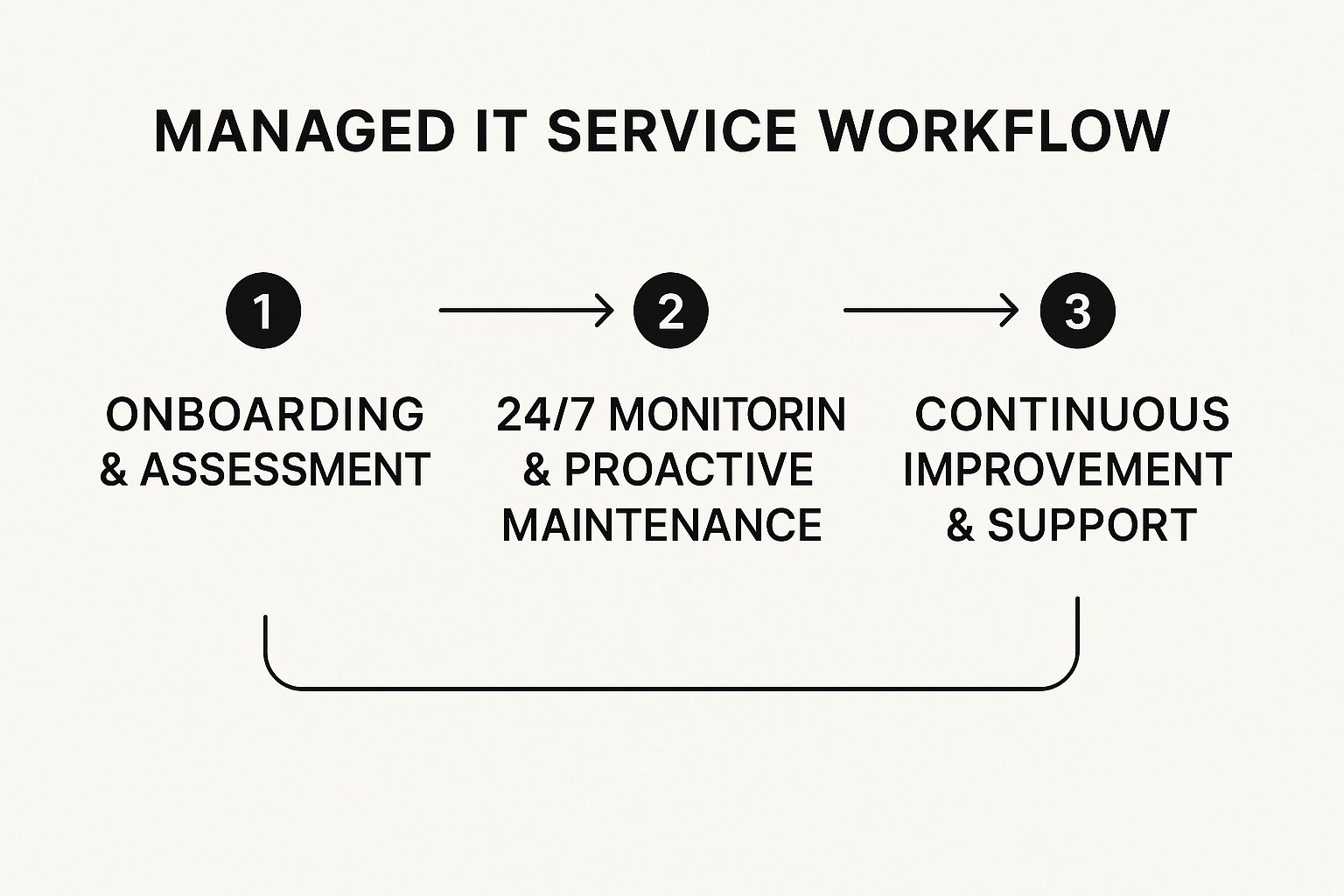
This proactive cycle—monitoring, maintaining, and improving—is what managed IT is all about.
The First 60 to 90 Days: Optimization and Strategy
Once your systems are stable and secure, we shift our focus to making things even better. We move from just monitoring your network to actively improving it.
This is when we can tackle bigger projects like boosting network speed, organizing your data, or putting a rock-solid backup solution in place. Our guide on backup and disaster recovery solutions for Salinas businesses dives deeper into why this is so important.
By day 90, you should feel a real difference. The constant, nagging tech issues that used to disrupt your team will have faded away. Instead, you’ll have smooth performance and the confidence that comes with having an expert team watching your back.
We’ll also schedule our first strategic business review. This is a dedicated meeting where we look at how your technology is performing and make sure our IT plan is still perfectly aligned with your business goals. It's a partnership, and regular communication is what makes it work.
Frequently Asked Questions About Local IT Services

We talk to business owners all over Monterey County, from Hollister to Salinas, and we tend to hear a lot of the same questions. We get it—changing your IT is a big decision.
That’s why we’ve gathered a few of the most common questions right here, with direct, no-nonsense answers. Our goal is to give you the clarity you need to make the best choice for your company.
What is a managed IT service?
Think of a managed IT service as having a complete, outsourced IT department on subscription. Instead of the old "break-fix" model where you only call for help when something goes wrong, you pay a consistent monthly fee. In return, you get a dedicated team that proactively monitors, maintains, and protects your entire technology environment, 24/7. This all-in-one approach covers everything from cybersecurity and data backups to network management and day-to-day help desk support for your employees.
What does a managed IT services provider do?
A managed IT services provider, or MSP, is your technology partner. Their main job is to make sure your IT systems are secure, efficient, and aligned with your business goals. They handle all the complex, behind-the-scenes work so you can stay focused on what you do best.
Here’s what that looks like:
- Proactive Monitoring: They keep a constant eye on your systems, 24/7, to spot and fix potential problems before they can cause downtime.
- Cybersecurity Defense: Your MSP builds layers of security to shield your valuable data from threats like ransomware and phishing scams.
- Data Backup & Recovery: They make sure your important business information is regularly backed up and can be restored quickly in an emergency.
- User Support: When your team runs into tech issues, they have a responsive help desk to call for fast, friendly solutions.
The core idea is simple: an MSP’s success is directly tied to keeping your business running smoothly. It’s a true partnership built on prevention, not just reaction, which is key for any company seeking reliable business IT support in Salinas or the surrounding areas.
Ready to Get Proactive with Your Hollister IT?
Making the switch to proactive IT support isn't just about fixing problems—it's a smart business decision. It's about securing your operations, making your team more efficient, and setting up your Hollister business to grow without tech getting in the way.
When you partner with a local expert who understands the challenges of the Monterey County business community, you gain peace of mind and a real competitive edge. You're trading unpredictable tech headaches for predictable performance and a stable monthly budget.
If you're ready to see how enterprise-level IT can fit a small business budget, we should talk. You don't have to settle for reactive support that only shows up after something goes wrong. There’s a smarter way to manage your technology, and it's right here in your backyard.
Let's schedule a no-obligation chat to go over your specific needs. We can build a straightforward technology plan that lets you move forward with confidence, knowing your IT is finally in expert hands. Taking this step gives you the freedom to focus on what you do best—running your business.
Ready to make your technology a true asset? Contact Adaptive Information Systems today to schedule your complimentary consultation at https://adaptiveis.net.
Adaptive Information Systems
380 Main St, Salinas CA 93901 | 831-644-0300 | hello@adaptiveis.net