
As a business owner in Monterey County, whether you're in the agricultural heart of Salinas or the bustling hospitality scene in Carmel, a secure network isn't just an IT issue—it's the foundation of your entire operation. The constant threat of cyberattacks means a simple firewall just doesn't cut it anymore. To protect your sensitive data, maintain your customers' trust, and safeguard your hard-earned reputation, you need a proactive, multi-layered strategy. This means putting a robust set of network security best practices into action, designed for the real-world challenges your business faces today.
Here at Adaptive Information Systems, our mission is to deliver enterprise-level IT at an affordable price for local SMBs. We're eager to help you succeed, which is why we’ve put together this straightforward guide. We’re cutting through the jargon to give you a clear, actionable roadmap.
This list will walk you through ten critical security measures you can implement, including:
- Adopting a Zero Trust Architecture to verify every single request.
- Making Multi-Factor Authentication (MFA) mandatory for everyone.
- Using Network Segmentation to contain potential threats.
- Establishing a rigorous Patch Management schedule.
- Conducting regular Security Audits and Employee Training.
Each point is broken down into practical steps you can take to fortify your digital defenses. This isn't just a theoretical checklist; it's a strategic plan to help you build a more resilient and secure business right here in the Monterey Bay Area. Let’s strengthen your digital front door.
1. Zero Trust Architecture
The old "castle-and-moat" approach to security—where you trust everything inside your network—is dangerously outdated. Modern threats, from insider risks to sophisticated phishing attacks, can easily bypass a simple perimeter defense. This is where Zero Trust Architecture comes in as one of the most effective network security best practices for today's dynamic threat landscape.
Zero Trust operates on a simple but powerful principle: "never trust, always verify." You get rid of the outdated idea of a trusted internal network and instead enforce strict verification for every user and device trying to access your resources, no matter where they are. This model assumes a breach is always possible and that threats can exist both inside and outside your network walls.
How to Implement a Zero Trust Model
Shifting to Zero Trust is a strategic journey, not an overnight switch. For small and mid-sized businesses, we always recommend a phased approach to ensure a successful transition without disrupting your work.
- Start Small: Begin with a pilot program targeting a specific, high-value part of your network, like your financial data or customer relationship management (CRM) system. This lets you test and refine policies in a controlled environment.
- Focus on Identity: The core of Zero Trust is knowing who is accessing your data. Invest in a solid Identity and Access Management (IAM) solution to ensure that only authenticated and authorized users can get in.
- Segment Your Network: Implement micro-segmentation to create small, isolated security zones within your network. This is crucial because it prevents an intruder from moving laterally across your systems if one area is compromised.
Key Insight: Adopting Zero Trust fundamentally changes your security posture from reactive to proactive. Instead of just building walls, you are actively verifying every single access request, which drastically reduces your attack surface.
The following infographic illustrates the core components that form the foundation of a Zero Trust security framework.
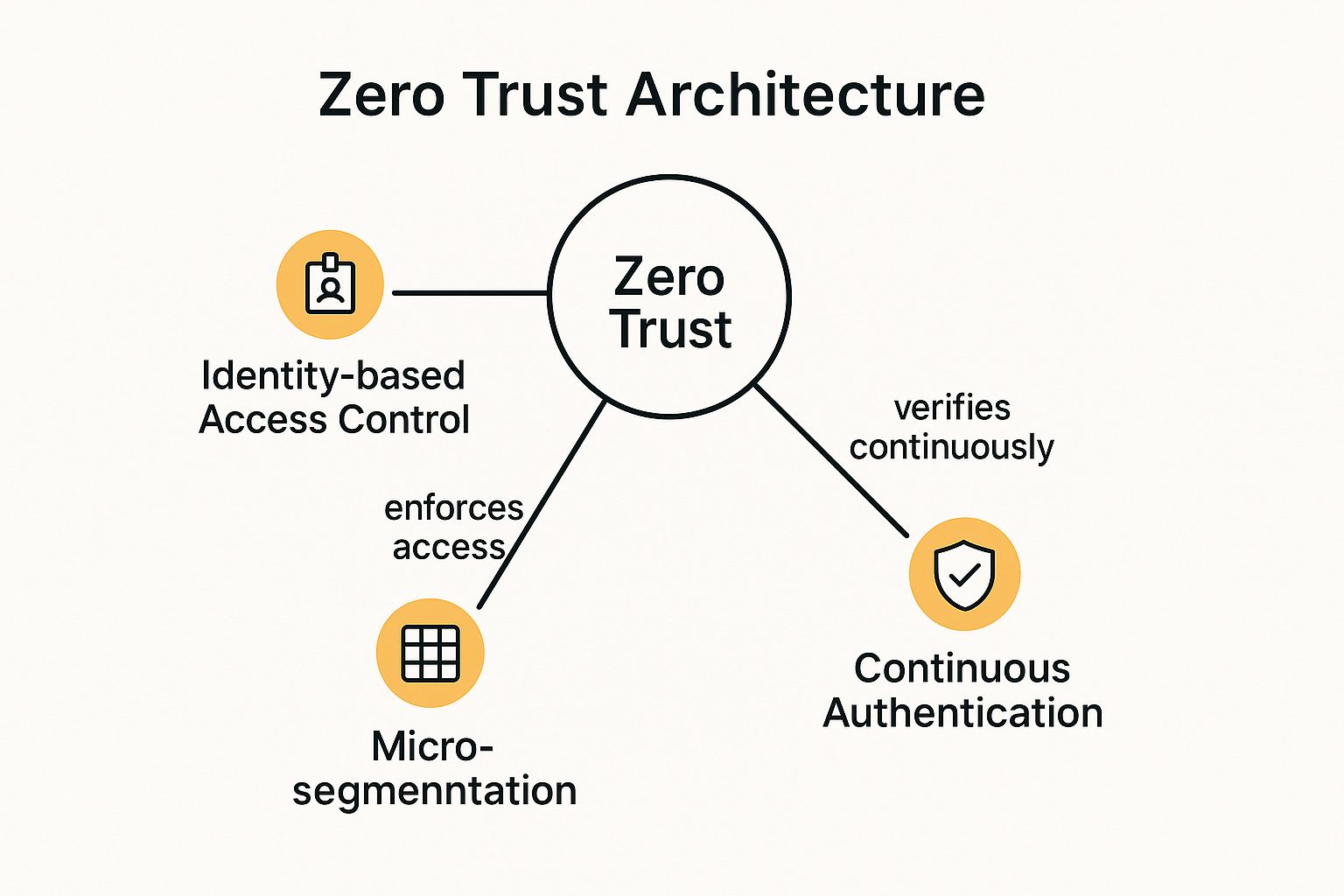
As the diagram shows, the model relies on the interplay between verifying user identity, segmenting the network into secure zones, and continuously authenticating access to protect resources effectively.
2. Multi-Factor Authentication (MFA)
Relying on just a password to protect your critical business data is like leaving your front door unlocked. Stolen or weak credentials are the #1 cause of security breaches, making single-factor authentication a major risk. Implementing Multi-Factor Authentication (MFA) is one of the most impactful network security best practices you can adopt to immediately strengthen your defenses.
MFA acts as a powerful security checkpoint by requiring you to provide two or more verification factors before granting access. This creates a layered defense, combining something you know (like a password) with something you have (like a phone app or security token), or something you are (like a fingerprint). Even if a cybercriminal steals a password, they are stopped cold without that second factor.

How to Implement Multi-Factor Authentication
You can roll out MFA across your organization smoothly and strategically without overwhelming your team. For businesses in Monterey County, from agricultural firms in Salinas to hospitality services in Carmel, we find a phased approach works best.
- Prioritize Privileged Accounts: Start by enabling MFA for your administrators and executives. These accounts hold the keys to your most sensitive systems, so securing them first gives you the biggest immediate security gain.
- Choose the Right Method: While SMS text codes are common, authenticator apps like Google Authenticator or Microsoft Authenticator are more secure because they aren't vulnerable to SIM-swapping attacks. It's a good idea to offer a couple of options to accommodate different user needs.
- Educate and Expand: Train your team on what MFA is, why it's so important for security, and how to use it. Once your high-priority users are comfortable, you can gradually expand the requirement to all employees accessing company resources.
Key Insight: Implementing MFA is the single most effective step you can take to prevent unauthorized access. It neutralizes the threat of stolen passwords and has been shown to reduce the risk of a successful cyberattack by over 99%.
As seen in major platforms like Microsoft 365 and Google Workspace, MFA is no longer an optional extra—it's a fundamental security control. By adding this simple verification step, you build a powerful barrier against the most common cyber threats facing businesses today.
3. Network Segmentation
If a hacker breaches your perimeter, what's stopping them from accessing everything? Without internal controls, an intruder can move freely across your network, turning a minor incident into a catastrophic data breach. This is why Network Segmentation is one of the most fundamental network security best practices.
Network Segmentation is simply the practice of dividing your computer network into smaller, isolated sub-networks or "segments." Each segment acts like its own small network, and traffic between them is strictly controlled by security rules you set. This containment strategy ensures that if one part of your network is compromised, the breach is confined to that segment, protecting your most critical assets. For businesses handling sensitive data, from ag-tech firms in Salinas to financial services in Monterey, this isn't just a best practice; it's essential risk management.

How to Implement Network Segmentation
Properly segmenting your network requires careful planning, but the security payoff is immense. For small and mid-sized businesses, a deliberate, phased rollout is the most effective approach.
- Identify and Classify Your Assets: Start by mapping your network to identify what's critical. Group systems with similar functions and sensitivity levels. For example, you should create separate zones for your guest Wi-Fi, point-of-sale (POS) systems, and your internal servers.
- Establish Strong Access Controls: Use firewalls and access control lists (ACLs) to define and enforce strict rules for traffic moving between segments. Your default setting should be to block everything and only allow communication that is absolutely necessary.
- Implement and Test Gradually: Roll out your segmentation strategy one zone at a time. For instance, start by isolating your guest network, test it thoroughly to make sure no legitimate business functions are disrupted, and then move on to more critical areas.
Key Insight: Network Segmentation turns your flat, vulnerable network into a series of secure, compartmentalized zones. This drastically limits an attacker's ability to move around, containing threats and minimizing the potential damage from a breach.
As illustrated in the diagram, segmentation relies on creating distinct zones and using a firewall to enforce security policies, effectively building internal barriers to protect your valuable data and systems.
4. Regular Security Updates and Patch Management
Leaving known security flaws on your systems is like posting a "welcome" sign for hackers. Attackers actively scan for outdated software, making unpatched vulnerabilities one of the biggest—and most avoidable—risks to your business. Implementing a systematic process for security updates and patch management is one of the most fundamental network security best practices to protect your digital assets.
This practice means having a disciplined process to identify, test, and deploy software updates (or "patches") across all your devices, from servers to employee workstations. The goal is to close security gaps as soon as fixes become available, preventing cybercriminals from exploiting them.
How to Implement Effective Patch Management
For businesses in Salinas and across Monterey County, creating a streamlined patching process is crucial for maintaining a strong security posture without disrupting your daily operations. A proactive strategy is far more effective than a reactive scramble after a breach.
- Establish a Schedule: Create a regular, predictable schedule for applying updates. Many businesses follow models like Microsoft's "Patch Tuesday," dedicating a specific day each month to this task. This builds a routine and ensures patches aren't forgotten.
- Prioritize and Test: Not all patches are equal. Prioritize updates based on the severity of the vulnerability they fix, focusing on critical flaws first. Always test patches in a non-production environment to ensure they don’t cause conflicts with your existing systems, especially for critical software used in local industries like agriculture or hospitality.
- Automate and Verify: Use automated tools to streamline deployment. However, automation should always be paired with verification. You should maintain a detailed inventory of all your network assets and confirm that patches have been successfully applied across the board.
Key Insight: Consistent patch management is the cybersecurity equivalent of routine maintenance. It isn't a glamorous task, but it's one of the most effective at preventing common, opportunistic attacks and ensuring your network remains resilient against known threats.
5. Intrusion Detection and Prevention Systems (IDS/IPS)
While firewalls act as gatekeepers for your network, they don't typically analyze the traffic that's allowed through. This is where Intrusion Detection Systems (IDS) and Intrusion Prevention Systems (IPS) provide a critical layer of defense, making them essential network security best practices for any business serious about protecting its data. Think of them as your network's vigilant security guards, constantly watching for suspicious activity.
An IDS monitors your network traffic for malicious patterns and alerts you to potential threats. An IPS takes this a step further by not just detecting threats but actively blocking them in real-time. Together, these systems form a powerful defense, capable of stopping attacks that might otherwise slip past your perimeter.
How to Implement IDS/IPS Effectively
Deploying an IDS/IPS is more than just installing new software; it requires ongoing management to be truly effective. For businesses in the Monterey Bay area, a well-configured system can be the difference between a minor alert and a major breach.
- Tune for Accuracy: Out of the box, these systems can generate a lot of "false positives." You'll need to fine-tune the rules to match your specific network environment. This reduces noise and ensures your team only responds to genuine threats.
- Keep Signatures Updated: IDS/IPS solutions rely on signature databases to identify known threats. Make sure these are updated regularly to protect against the latest malware and attack techniques. An outdated system is an ineffective one.
- Integrate with Your Response Plan: The alerts from your IDS/IPS are only useful if they trigger a clear, rehearsed response. Integrate these systems with your incident response plan so your team knows exactly what to do when a critical alert is received. Learn more about effective network security monitoring on adaptiveis.net.
Key Insight: Implementing an IDS/IPS transforms your security from a passive stance to an active one. You gain real-time visibility into your network, allowing you to detect and neutralize threats as they happen, not after the damage is done.
6. Strong Password Policies and Management
Passwords are the front door to your digital assets, yet they are often the weakest link in a company's security. Establishing and enforcing strong password policies is a fundamental yet critical part of any effective security strategy. This goes beyond just asking employees to create complex passwords; it involves a comprehensive management approach to ensure credentials stay secure.
This is one of the most essential network security best practices because stolen credentials are a leading cause of data breaches. A robust policy, supported by the right tools, protects your sensitive data and prevents unauthorized access. It moves your organization from a passive hope for good password habits to an active, enforceable security standard.
How to Implement Strong Password Policies
For small and mid-sized businesses, the key is to implement a password policy that is both secure and user-friendly. You want to make security easy for your team to follow.
- Define Clear Requirements: Your policy should mandate password length (12-16 characters is the modern standard), complexity (a mix of cases, numbers, and symbols), and history (preventing reuse of old passwords). We also encourage passphrases—long, memorable phrases—which are often more secure and easier for people to remember.
- Deploy a Password Manager: Mandate the use of an enterprise password manager like 1Password or LastPass. These tools generate, store, and auto-fill unique, strong passwords for every service. This eliminates the dangerous habit of reusing passwords and the need for your employees to remember dozens of complex credentials.
- Conduct Regular Audits: Periodically audit password strength and user access logs. This helps you identify weak passwords, inactive accounts, and unusual login activity that could signal a compromised account. Regular training should also reinforce the importance of not sharing passwords and recognizing phishing attempts.
Key Insight: A strong password policy isn't just an IT rule; it's a cultural shift. When you combine it with tools like password managers and ongoing education, you empower your team to become an active part of your security defense rather than a potential vulnerability.
7. Regular Security Audits and Penetration Testing
Simply setting up your defenses isn't enough; you must continuously test them to ensure they hold up against evolving threats. A static security posture quickly becomes an obsolete one. This is why regular security audits and penetration testing are crucial network security best practices for any business, including those in high-compliance sectors like Salinas Valley agriculture and finance.
This practice involves a systematic evaluation of your security through comprehensive audits and simulated attacks. It moves beyond passive checks by actively probing for weaknesses. Automated vulnerability scans identify known issues, while manual penetration testing (pen testing) by security professionals mimics how a real-world attacker would try to breach your network, uncovering complex vulnerabilities that automated tools might miss.
How to Implement Regular Testing
For a small or mid-sized business, building a regular testing cadence is a powerful way to stay ahead of cybercriminals. It turns security from a one-time setup into a continuous improvement cycle.
- Schedule It: Don't wait for an incident. We recommend conducting vulnerability assessments quarterly and a more intensive penetration test at least annually, or after any significant changes to your network.
- Use a Hybrid Approach: Combine the efficiency of automated scanning tools with the expertise of a human-led penetration test. This gives you both broad coverage and deep, contextual insights into your vulnerabilities.
- Prioritize and Remediate: A test is only useful if you act on the findings. Use a risk-based approach to prioritize which vulnerabilities to fix first, focusing on those that pose the greatest threat to your critical assets. Documenting your progress is vital for tracking your improvement.
Key Insight: Proactive testing shifts your perspective from asking "Are we secure?" to "How are we vulnerable?" This mindset is essential for identifying your blind spots and hardening your defenses before they can be exploited.
By systematically identifying weaknesses, you can perform a detailed cybersecurity risk assessment to create a clear roadmap for improvement. You can learn more about how to structure your own cybersecurity risk assessment on adaptiveis.net.
8. Secure Wi-Fi Configuration
An insecure wireless network is like leaving the back door of your business wide open. In today's mobile-first world, where employees, guests, and even IoT devices all connect wirelessly, a poorly configured Wi-Fi network can easily become the weakest link in your security. Implementing a secure Wi-Fi configuration is a fundamental network security best practice that protects your sensitive data from being intercepted.
This practice involves a multi-layered approach that goes far beyond just setting a password. It means using robust encryption, strong authentication, and a properly segmented network. For businesses in Monterey and Salinas, where everything from a POS system in a Carmel retail shop to agricultural sensors in the field relies on wireless, a secure setup is non-negotiable.
How to Implement Secure Wi-Fi Configuration
Securing your wireless network doesn't have to be overly complex, but it does require careful planning. For small and mid-sized businesses, a strategic approach can significantly bolster your defenses.
- Enforce Strong Encryption: Disable outdated protocols like WEP and WPA. Your baseline should be WPA2, but we highly recommend moving to WPA3 as it offers superior security, including stronger protection against password-guessing attacks.
- Segment Your Networks: Never allow guests, personal employee devices, or IoT devices on the same network as your core business systems. Create separate, isolated networks (SSIDs) for different user groups, such as a "Guest" network and an "Internal" network. This containment strategy limits the potential damage an infected device can cause.
- Use Robust Authentication: For your internal company network, move beyond a simple shared password. Implement WPA2/WPA3-Enterprise, which uses 802.1X authentication. This requires each user to log in with their own unique credentials, providing individual accountability and making it easy to revoke access for one person without changing the password for everyone.
Key Insight: Your Wi-Fi network is an extension of your physical office. You should treat its security with the same seriousness you would your main servers. A segmented and properly encrypted wireless network prevents a minor breach on a guest device from turning into a major catastrophe for your entire business.
9. Data Loss Prevention (DLP)
Your business runs on data, but what happens if that sensitive information—like customer lists or financial records—ends up in the wrong hands? Data Loss Prevention (DLP) is a critical strategy designed to stop this from happening. It acts as a digital gatekeeper, making sure your confidential data doesn't leave your network without authorization.
DLP solutions work by monitoring, detecting, and blocking sensitive information whether it’s being used, sent across the network, or stored on a server. For industries like financial services protecting client data or healthcare organizations in Monterey maintaining HIPAA compliance, implementing DLP is one of the most essential network security best practices. It’s about classifying your critical information and then enforcing rules on how it can be handled.
How to Implement a Data Loss Prevention Strategy
Deploying a DLP system requires a thoughtful, phased approach. This helps you avoid disrupting daily operations while maximizing protection.
- Identify and Classify Data: You can't protect what you don't know you have. Start by identifying your most critical data. This could be anything from agricultural trade secrets in Salinas to proprietary legal documents for a law firm in Carmel. Then, classify this data based on its sensitivity level.
- Start with Monitoring: Begin by implementing DLP in a monitoring-only mode. This allows you to understand how data flows within your organization and identify potential policy violations without blocking legitimate business processes. It helps you fine-tune your rules and avoid frustrating your team with false alarms.
- Educate Your Team: Your employees are your first line of defense. Provide clear training on data handling policies and the importance of protecting sensitive information. An informed team is far less likely to cause an accidental data leak.
Key Insight: A successful DLP strategy is not just about technology; it's a combination of the right tools, well-defined policies, and continuous user education. It shifts your security focus from simply securing the network perimeter to securing the data itself, no matter where it goes.
10. Employee Security Training and Awareness
Your technical defenses like firewalls and antivirus software are essential, but they can't address one of the most significant vulnerabilities: human error. Your employees are your first line of defense, but without proper guidance, they can also be your weakest link. This is why establishing a robust employee training and awareness program is one of the most critical network security best practices you can adopt.
A successful program moves beyond a one-time onboarding session. It fosters a security-first culture where every team member understands the threats, knows how to spot them, and feels empowered to act. This human-centric approach transforms your staff from potential targets into active participants in your company's defense.
How to Implement an Employee Security Program
Creating an effective security awareness program involves consistent reinforcement and engagement, not just a boring annual video. For businesses in Salinas and across Monterey County, making this training practical and ongoing is the key to real behavioral change.
- Make It Relevant and Engaging: Tailor your training content to specific job roles. An accountant needs different security guidance than a sales representative. Use real-world examples, such as recent phishing scams targeting local businesses in Pacific Grove, to make the lessons stick.
- Implement Phishing Simulations: Regularly test your employees with simulated phishing emails. These provide safe, real-world practice and give you metrics to see who might need a bit more training, without any real risk.
- Keep It Consistent: Don't limit training to a single event. Offer short, recurring sessions, send out security tip newsletters, and discuss recent threats in team meetings. This is especially important for protecting data in modern work setups, and you can learn more about securing your team in our guide to hybrid work security solutions.
Key Insight: The goal of security training isn't just to share information; it's to change behavior. When your employees instinctively question a suspicious email or report a potential threat, you have successfully built a powerful human firewall that complements all your technical security measures.
Network Security Best Practices Comparison Matrix
| Security Measure | Implementation Complexity 🔄 | Resource Requirements ⚡ | Expected Outcomes 📊 | Ideal Use Cases 💡 | Key Advantages ⭐ |
|---|---|---|---|---|---|
| Zero Trust Architecture | High – requires cultural & technical shifts | Significant investment in identity and network tools | Strong reduction in attack surface; granular access control | Organizations with hybrid/remote work; high-security environments | Limits lateral threat movement; continuous authentication; strong visibility |
| Multi-Factor Authentication (MFA) | Moderate – integrates with existing systems | Moderate – tokens, apps, user support | Effective reduction of credential-based attacks | Protecting user accounts, privileged access, compliance-driven sectors | Strong protection against phishing and credential theft; cost-effective |
| Network Segmentation | Moderate to High – involves network redesign | Moderate to high – firewalls, VLANs, tools | Limits attacker lateral movement; improves performance | Environments needing granular network control, compliance, or OT/IT separation | Reduces blast radius of breaches; enhances traffic control |
| Regular Security Updates & Patch Management | Moderate – requires coordination & testing | Moderate to high – tools, staff, testing | Closes vulnerabilities promptly; maintains system stability | All organizations needing ongoing vulnerability management | Prevents exploitation of known weaknesses; supports compliance |
| IDS/IPS | High – tuning and ongoing maintenance required | High – hardware/software, skilled analysts | Early detection and prevention of network threats | Networks with high traffic, sensitive data, regulatory requirements | Real-time threat detection/blocking; detailed forensics |
| Strong Password Policies & Management | Low to Moderate – policy and tool enforcement | Low to moderate – policy tools, managers | Reduced credential attacks; improved security posture | All organizations requiring baseline access security | Easy to implement; cost-effective |
| Regular Security Audits & Penetration Testing | High – requires skilled professionals and time | High – external/internal testers, tools | Identification of unknown vulnerabilities; security control validation | Organizations requiring compliance and proactive defense | Finds hidden risks; validates defenses; improves incident response |
| Secure Wi-Fi Configuration | Moderate – technical setup and ongoing monitoring | Moderate – encryption, authentication tools | Strong wireless security; prevents unauthorized access | Enterprises with extensive wireless networks and BYOD policies | Protects mobile access; supports secure connectivity |
| Data Loss Prevention (DLP) | High – complex policy setup and tuning | High – specialized tools and monitoring | Prevention of sensitive data leaks; compliance enforcement | Organizations handling sensitive/regulatory data | Protects data in use/motion/rest; reduces insider threats |
| Employee Security Training & Awareness | Moderate – ongoing training and engagement | Moderate – program creation, delivery tools | Reduced human error; stronger security culture | All organizations seeking to improve human factor in security | Cost-effective; increases incident reporting; builds security mindset |
Partner with a Local Expert to Implement Your Security Strategy
Navigating the complex world of network security can feel overwhelming, especially for small and mid-sized businesses in the Monterey Bay area. We've explored a comprehensive suite of ten critical network security best practices, from implementing a Zero Trust Architecture and enforcing Multi-Factor Authentication to conducting regular security audits and fostering a culture of security awareness among your employees. Each practice serves as a vital layer in a multi-faceted defense strategy designed to protect your valuable data, maintain operational continuity, and secure the trust of your clients.
The journey from understanding these concepts to successfully implementing them is where the real challenge lies. You're not just checking boxes on a list; you're building a resilient security posture tailored to your specific operational needs, whether you're managing sensitive financial data in Monterey, protecting agricultural technology in Salinas, or ensuring guest privacy in Carmel's hospitality sector.
From Theory to Action: Building Your Security Fortress
The core takeaway from this guide is that modern network security is proactive, not reactive. It’s a continuous process of assessment, implementation, and refinement. Waiting for a security incident to occur is a high-stakes gamble that can lead to devastating financial loss, reputational damage, and regulatory penalties.
Let’s distill the most important actions you can take right now:
- Prioritize the "Big Three": If you're starting from scratch, focus your initial efforts on Multi-Factor Authentication (MFA), a strong patch management program, and comprehensive employee security training. These three pillars provide the greatest immediate impact on hardening your defenses against the most common cyber threats.
- Embrace a Zero Trust Mindset: Shift your perspective from "trust but verify" to "never trust, always verify." This fundamental change, which underpins practices like network segmentation and strict access controls, is crucial for mitigating internal and external threats in today's remote and hybrid work environments.
- Make Security Audits a Non-Negotiable Routine: You can't protect what you don't know. Regular, unbiased security audits and penetration tests are not a luxury; they are an essential diagnostic tool. They reveal hidden vulnerabilities before attackers can exploit them, providing you with a clear, actionable roadmap for improvement.
Mastering these network security best practices is not just about avoiding a negative outcome. It’s about creating a positive one. A secure network is a competitive advantage. It builds confidence with your customers, empowers your employees to work safely from anywhere, and provides a stable foundation for you to innovate and grow your business without the constant fear of a digital disruption.
You Don’t Have to Do It Alone
Implementing enterprise-level security shouldn't require an enterprise-level budget. As a local business, you need a partner who understands the unique landscape of our community, from the regulatory demands on financial firms to the specific operational challenges faced by our agricultural leaders. You need a team that can translate these complex security frameworks into practical, affordable solutions that work for you.
Protecting your business is the most important investment you can make. The first step is a simple conversation. Don't wait for a breach to force your hand; take control of your digital future today.
Ready to transform these best practices into a robust security strategy for your business? The team at Adaptive Information Systems specializes in providing enterprise-level IT and security solutions tailored for SMBs right here in Monterey County. Visit Adaptive Information Systems to learn how we can help you build a secure, resilient, and affordable network.
Adaptive Information Systems
380 Main St, Salinas CA 93901 | 831-644-0300 | hello@adaptiveis.net