
For any business owner in Salinas weighing outsourced IT against an in-house team, the right choice is becoming clearer. As you face increasing cybersecurity threats, the complexities of remote work, and rising tech costs, exploring outsourced IT is a smart way to get expert support and reduce your risk. It’s a direct path to a specialized team, predictable costs, and advanced security without the heavy overhead of full-time staff.
The Modern IT Dilemma for Local Businesses
As a business owner, you know that technology isn't just a tool anymore; it’s the engine that drives your company. The core question has moved beyond simple cost comparisons. It’s about picking the right IT model to truly protect and grow your company. The debate over outsourced IT vs. in-house support is a critical conversation about your security, efficiency, and future.

This guide gets right to the point, directly comparing these two approaches to help you decide what’s best for your team. We’ll look at the unique pressures businesses in Monterey County face, from the constant cybersecurity threats targeting our vital agriculture and hospitality sectors to the real-world demands of supporting a modern workforce.
Key Differences at a Glance
Before we dive deep, this side-by-side view helps frame the conversation. Here’s how in-house and outsourced IT typically stack up for a local business like yours.
| Feature | In-House IT Team | Outsourced IT Provider |
|---|---|---|
| Cost Structure | High fixed costs (salary, benefits, training) | Predictable, scalable monthly fee |
| Expertise Level | Limited to the knowledge of 1-2 individuals | Access to a diverse team of specialists |
| Availability | Typically 9-to-5, with gaps for vacation/illness | 24/7/365 monitoring and support |
| Scalability | Slow; requires lengthy hiring processes | Rapid; scales with your business needs |
| Tools & Tech | Limited by your company's budget | Access to enterprise-grade security tools |
A Shift in Strategy, Not Just Savings
Many local leaders I talk to now see outsourced IT not as a compromise, but as a strategic advantage. It’s a way to tap into enterprise-level expertise without the massive overhead. If you're curious about how this works, you can learn more about what managed IT support entails in our detailed article.
The reality is simple. The shift toward outsourced IT isn't just about cost-cutting. It's a strategic move toward scalability, efficiency, and enhanced protection. Businesses that adapt early gain a competitive advantage by focusing internal resources on growth instead of tech troubleshooting.
This shift aligns perfectly with our mission at Adaptive Information Systems: to provide enterprise-level IT at an affordable price for local SMBs, helping your business thrive right here in Salinas and beyond.
Comparing IT Models: A Practical Breakdown
Let's get past the generic pro/con lists and look at how outsourced vs. in-house IT actually plays out for your business. When you're running a company, you need a comparison based on what impacts your daily operations, not just theory. This is a head-to-head look at what you can truly expect from each model.
We'll dig into the areas that really matter: the total cost, the depth of expertise you get, and what happens when you need help outside of business hours. Using scenarios familiar to local businesses, you'll see the practical impact of each choice. Let's break down the key differences between building your own IT department and partnering with a managed service provider (MSP).
In-House IT vs Outsourced IT a Quick Comparison
| Factor | In-House IT Team | Outsourced IT Provider (MSP) |
|---|---|---|
| Cost Structure | High fixed cost (salary, benefits) plus variable ongoing expenses (tools, training). | Predictable monthly operating expense. |
| Expertise | Limited to the knowledge of one or a few individuals. Gaps in specialized areas are common. | Access to a deep bench of specialists in security, cloud, compliance, and more. |
| Availability | Restricted to business hours, vacations, and sick days. | 24/7/365 monitoring and support. Someone is always on watch. |
| Tools & Tech | Requires direct purchase and management of all software and security tools. | Enterprise-grade tools are included in the service fee. |
| Scalability | Scaling is slow and expensive, requiring new hires. | Scales up or down easily as your business needs change. |
This table makes it clear that the choice isn't just about hiring a person versus a company; it's a fundamental decision about how you want to manage cost, risk, and expertise.
Total Cost of Ownership
When you hire an in-house IT manager, their salary is just the start. You also have to factor in benefits, payroll taxes, ongoing training, certifications, and the steep cost of the software and security tools they need to do their job. These hidden expenses add up fast, and you might be surprised to learn how a full-time IT staff could be costing you more than you think.
An outsourced IT provider works differently. They operate on a predictable subscription fee. You pay one flat monthly rate for access to an entire team and a full suite of enterprise-grade tools. This approach eliminates surprise costs and makes budgeting for your technology simple and straightforward.
Key Takeaway: An in-house team represents a high fixed cost with variable ongoing expenses. An outsourced provider offers a predictable, scalable operating expense that often delivers more value for your investment.
This "build versus buy" dilemma isn't unique to IT. The strategic thinking is similar across different business functions. For another perspective on this choice, you can explore insights on the build or buy decision for AI talent, which touches on many of the same core considerations.
Depth and Breadth of Expertise
Your in-house IT person might be a fantastic generalist, a real hero at solving day-to-day computer problems. But can that same person also be an expert in cybersecurity, cloud architecture, network engineering, and regulatory compliance? No. The reality is that no single person can master every corner of modern technology.
This creates knowledge gaps. Traditional in-house IT teams often lack the bandwidth or specialization to keep up with evolving demands, especially around compliance, cloud infrastructure, and 24/7 support. This creates performance and security gaps that external providers can close.
When you partner with an outsourced provider, you're not just hiring one person—you're getting access to an entire team of specialists. You instantly gain:
- A dedicated cybersecurity expert focused on threat hunting and prevention.
- A cloud specialist who knows how to optimize your infrastructure for cost and performance.
- A compliance professional who understands the regulations affecting your industry.
- A team of help desk technicians ready to support your staff.
This collective brainpower means you have the right specialist for any challenge, plugging the performance and security holes that a small in-house team simply can't avoid.
Availability and Responsiveness
What happens when your one IT manager goes on vacation during Monterey Car Week? Or gets sick in the middle of a critical harvest season? Your business is left completely unsupported. An in-house team is limited by business hours, sick days, and vacation schedules.
In contrast, a good outsourced IT provider offers 24/7/365 monitoring and support. Because they have a full team working in shifts, someone is always watching your network. They're ready to handle any emergency, whether it’s a server crashing at 2 AM or a phishing attack on a Saturday morning.
This constant vigilance is non-negotiable for preventing downtime and protecting your business from threats that don't operate on a 9-to-5 schedule. For any company that can't afford to be offline, this difference is often the single biggest deciding factor.
The Strategic Shift to Outsourced IT
Thinking of outsourced IT as just a cost-cutting trick is an old-school view. Today, it’s a strategic play that helps businesses gain a real competitive advantage, especially when weighing outsourced IT vs. in-house options. When you partner with the right IT provider, your team gets to stop putting out tech fires and start focusing on what actually grows the business.
This isn't about simply keeping the lights on anymore. It's about transforming IT from a reactive cost into a proactive driver of your success, building a tech foundation that can support your future goals.
Gaining an Edge Through Scalability and Expertise
One of the biggest wins you get right away is instant scalability. Let’s say your hospitality business in Carmel needs to gear up for a major event, or your ag-tech company in the Salinas Valley is hitting a growth spurt. With an in-house team, scaling up means a slow, expensive hiring process.
An outsourced partner lets you add support and resources on demand. Your technology never becomes a bottleneck for your growth. That kind of agility is a massive leg up in a fast-moving market.
You also get immediate access to a deep bench of specialists. A single in-house IT generalist can't be an expert in everything. An outsourced team, however, brings specialists in areas like:
- Advanced Cybersecurity: Protecting you from sophisticated threats a small internal team might miss.
- Cloud Management: Making sure you're not overspending on cloud services and that they're performing well.
- Compliance: Helping you navigate the tricky waters of industry-specific regulations.
This kind of enterprise-grade expertise is often out of reach for a small business to hire directly. It levels the playing field, giving you the same high-level support that bigger corporations have.
Focusing on Growth Not Gadgets
The most valuable resource in your business is your team’s time and attention. When your staff is constantly sidetracked by printer jams, sluggish Wi-Fi, or software glitches, they aren't working on what truly matters: serving your customers and moving the business forward.
Outsourcing IT takes these daily distractions off their plate. By handing over the technical troubleshooting to a dedicated team, you empower your employees to concentrate on their core responsibilities. This boosts productivity, improves morale, and gets you to your goals faster.
The move toward outsourced IT isn't just about finding a cheaper option. It's a strategic decision to improve scalability, efficiency, and protection. Businesses that adapt early gain a competitive advantage by freeing up internal resources to focus on growth instead of tech troubleshooting.
As you consider this strategic shift, it's smart to understand how to evaluate potential partners. Properly vetting an external provider is crucial for protecting your business. Understanding how to conduct a thorough third-party risk assessment guide is key to choosing the right partner.
Investing in Innovation and Security
Ultimately, choosing to outsource is an investment in your company's future. It’s about building a more resilient, efficient, and secure operation. While an in-house team is often buried just trying to keep things running, a managed services provider (MSP) is incentivized to be proactive.
Their job is to prevent problems before they start, keeping your systems optimized and secure around the clock. This proactive model minimizes costly downtime and protects your reputation. Many local SMBs are discovering that this model isn't just cheaper in the long run; it's a much smarter way to manage technology. You can explore our deep dive into why outsourced IT isn't just cheaper, it's smarter for more insights.
By making this strategic shift, you position your business to not just survive but thrive, turning your technology from a necessary expense into a true competitive advantage.
Answering Your Biggest Security Concerns
Let's talk about the elephant in the room when it comes to the outsourced IT vs. in-house debate: security. Handing over the keys to your technology kingdom can feel like a huge leap of faith. You’re worried about your data, your customers' information, and your company's reputation. These are valid concerns, and you're right to take them seriously.
But the common assumption that keeping IT in-house is automatically safer is often a dangerous misconception. In reality, a dedicated Managed Service Provider (MSP) can dramatically strengthen your security, turning a potential vulnerability into a powerful asset.
The In-House Security Gap
Think about the daily reality for a typical one-person or small in-house IT team. They are stretched thin, juggling everything from fixing printer jams and onboarding new employees to managing servers and software updates. They are generalists by necessity.
While they may be excellent at their jobs, they simply don't have the time or specialized training to keep up with the constantly evolving world of cyber threats. This creates a significant security gap.
Without a dedicated focus, it's easy to miss a critical security patch, misconfigure a firewall, or fail to notice the subtle signs of a brewing cyberattack. For businesses in our area that handle sensitive data—from agriculture operations to healthcare providers—these gaps can have devastating consequences.
How Outsourcing Closes the Gap
Partnering with an MSP like Adaptive Information Systems completely flips the script. Instead of relying on one person to do everything, you gain an entire team of certified security specialists whose sole job is to protect your business.
Here's how that translates to better protection for you:
- 24/7 Proactive Monitoring: Cyber threats don’t stick to a 9-to-5 schedule. An MSP provides round-the-clock monitoring of your network, actively hunting for suspicious activity and neutralizing threats before they can cause damage.
- Access to Enterprise-Grade Tools: We invest in advanced security technologies—threat detection systems, endpoint protection, and security information and event management (SIEM) tools—that are typically far too expensive for a single SMB to afford.
- Deep Specialization: Our team includes experts who live and breathe cybersecurity. They are constantly training and staying ahead of the latest attack methods, ensuring your defenses are always current.
- Compliance Expertise: Navigating regulations like HIPAA or CMMC can be a minefield. An experienced MSP helps ensure your technology meets these strict requirements, reducing your risk of costly fines and penalties.
A common fear is losing control, but when it comes to security, outsourcing actually gives you more control over your risk. You're delegating the tactical, day-to-day battle to experts so you can maintain strategic command of your business's safety.
This approach provides a level of protection that is simply unattainable for most in-house teams. To explore this topic further, you can read our guide on how outsourced cybersecurity is reshaping small business IT.
The Data Backs It Up
The trend among business owners reflects this reality. Less than 30% of small businesses manage their IT security internally, yet over 80% plan to increase cybersecurity budgets. This reflects a growing awareness of the limitations of DIY IT and the value of trusted managed service providers.
This shows a clear shift toward trusting specialists with this critical responsibility.
For a business in Monterey or Salinas, this isn't just about abstract risk. It's about protecting your livelihood, your employees, and the trust your customers have placed in you. By partnering with a local expert, you're making a strategic choice to fortify your business for the long haul.
When an In-House Team Still Makes Sense
Outsourced IT is a powerful tool, but it isn’t the perfect fit for every single company. The outsourced vs. in-house debate isn't about crowning a universal winner. It's about finding what works for your specific needs. For some businesses, keeping an IT expert on staff, or adopting a smart hybrid model, is the superior strategic move.
Having a full-time, on-site IT professional can be a massive asset in the right environment. Their value truly shines when your business has unique, highly specialized demands that require someone to be deeply integrated with your team and culture every day.
Scenarios Favoring an In-House Presence
Imagine a local company in Pacific Grove that has developed its own complex, proprietary software. In that case, having a full-time IT expert who lives and breathes that system is invaluable. They can provide immediate, specialized support and help drive its evolution in a way an external partner couldn't.
Likewise, a larger organization with distinct internal workflows might benefit from an IT director who is part of the leadership team. This person isn’t just fixing tech problems; they’re absorbing the company culture and contributing to strategic decisions with a level of nuance that only comes from being fully embedded in the day-to-day operations.
The decision to keep IT in-house often boils down to deep specialization. If your core operations rely on proprietary technology or a unique culture that an outsider can't easily grasp, a dedicated internal expert might be non-negotiable.
The Rise of the Hybrid Model
Fortunately, the best answer isn't always a black-or-white choice. A hybrid or co-managed approach offers a powerful middle ground, blending the best of both worlds. This model is quickly gaining traction because it solves a very common challenge.
Your in-house IT team might be fantastic, but they often lack the bandwidth or the niche expertise to keep up with everything, especially around cybersecurity, compliance, cloud infrastructure, and 24/7 support. This can create dangerous performance and security gaps that an external provider is perfectly positioned to close.
Here’s how a hybrid model works in the real world:
- Your In-House Staff Handles Daily Needs: Your on-site person is the familiar, go-to resource for your team. They manage the day-to-day tickets, user support, and immediate hardware issues.
- An Outsourced Partner Manages the Heavy Lifting: A managed service provider like us handles the complex, specialized functions. This includes 24/7 cybersecurity monitoring, strategic IT planning, managing cloud infrastructure, and executing major projects.
This balanced strategy frees up your on-site person to focus on immediate user needs without getting bogged down by complex security threats or infrastructure management. Our guide on co-managed IT provides a deeper look into this effective approach. It’s a solution that gives you the on-the-ground presence you value, backed by the enterprise-grade expertise you need to stay protected and efficient.
A Practical Checklist for Making Your Decision
Choosing between in-house IT and a managed services partner feels like a major commitment—because it is. To help you move forward with confidence, we've put together a practical checklist. Work through these questions to get a clear view of your needs, understand the real costs involved, and make sure your technology is helping you grow.
This isn't just a cost-cutting exercise. It's about building a more resilient, efficient, and secure foundation for your business. Use this guide to make a decision that’s right for your company.
Evaluate Your True IT Costs
First things first: you need a complete picture of what you're actually spending on technology. A quick look at a salary figure can be misleading. A real assessment goes much deeper.
Ask yourself these questions:
- What is the total cost of my in-house staff? Don't just stop at salary. Factor in benefits, payroll taxes, vacation coverage, and the ongoing budget for essential training and certifications.
- How much do we spend on IT tools? Add up the annual costs for all your software licenses, security tools, backup systems, and any other subscriptions you rely on.
- What is the hidden cost of downtime? Think back to the last time your systems went down. How much potential revenue was lost? How much employee productivity was wasted? Even a couple of hours can be shockingly expensive.
Once you have these numbers, you can compare them to the predictable, all-inclusive monthly fee of a managed services plan. The comparison is often eye-opening.
Assess Your Security and Risk Exposure
Next, it's time for an honest look at your current security posture. In today's threat-filled environment, a reactive, "fix it when it breaks" approach to cybersecurity is no longer an option. You have to be proactive to protect your business, your team, and your customers.
Consider these points:
- How would a major data breach impact our business? Think beyond the immediate financial hit. Consider the long-term damage to your reputation and the trust you've built with your customers.
- Do we have 24/7 monitoring in place? Cyberattacks don’t stick to a 9-to-5 schedule. If no one is watching your network after hours, you’re leaving the door wide open for trouble.
- Are we meeting all compliance requirements? For many industries, like healthcare or finance, adhering to regulations isn't optional. One misstep can lead to severe penalties and legal headaches.
This is an area where a dedicated IT partner can make a world of difference, offering a level of round-the-clock protection that’s nearly impossible for a small in-house team to achieve on their own.
Don't just think about what a security breach could cost. Consider what robust, proactive protection is worth to your peace of mind and the stability of your business. It's an investment, not just an expense.
Align Technology with Your Growth Plans
Finally, look to the future. Your IT shouldn’t just be about keeping the lights on today; it should be a powerful tool that enables your growth tomorrow. Your technology has to be able to scale with your ambitions.
Think about your goals for the next one to three years:
- Do our growth plans require technology that can scale on demand? If you’re planning to open a new location in Marina or expand your team, will your current IT setup support that growth seamlessly, or will it become a major bottleneck?
- Can we quickly adopt new technologies? When a new tool or system could give you a competitive edge, do you have the expertise on hand to implement it effectively and securely?
- Is our current IT team focused on strategy or just troubleshooting? If your tech staff is constantly putting out fires, they simply don't have the time to think strategically about how technology can help you hit your long-term goals.
Adaptive Information Systems offers tailored, cost-effective IT support designed specifically for the needs of Salinas-area businesses — combining local responsiveness with enterprise-grade tools and deep technical expertise. To see how we support local growth, you can learn more about our approach and services on our website.
If you're a business in Salinas or the surrounding area considering how to improve your IT strategy, reach out to Adaptive Information Systems for a no-obligation consultation. We’ll help you explore whether outsourcing is right for your team.
Frequently Asked Questions About Outsourcing IT
Even after weighing the pros and cons, you probably still have a few questions. It’s a big decision. Here are some straight answers to the most common concerns we hear from business owners right here in the Monterey Bay Area who are thinking about making a change.
Will I Lose Control Over My IT If I Outsource?
Not at all—in fact, you actually gain more strategic control.
A good managed service provider (MSP) takes over the day-to-day tactical work, like software updates, security patches, and user troubleshooting. This frees you up to stop worrying about what's broken and start focusing on how technology can actually grow your business. You set the vision, and they handle the expert execution, giving you clear, detailed reports to keep you in the loop.
Is Outsourcing Really Cheaper Than Hiring One IT Person?
When you look at the whole picture, the answer is almost always yes. The true cost of an employee goes far beyond their salary. You have to factor in benefits, payroll taxes, training, vacation time, and sick days. On top of that, you still have to pay for all the essential security and monitoring software they'll need.
With a managed services plan, you get access to an entire team of certified experts for a single, predictable monthly fee. This model gets rid of surprise expenses and gives you a much bigger bang for your buck.
To help you visualize the decision, this chart walks through the key questions around cost, security, and your company's growth plans.
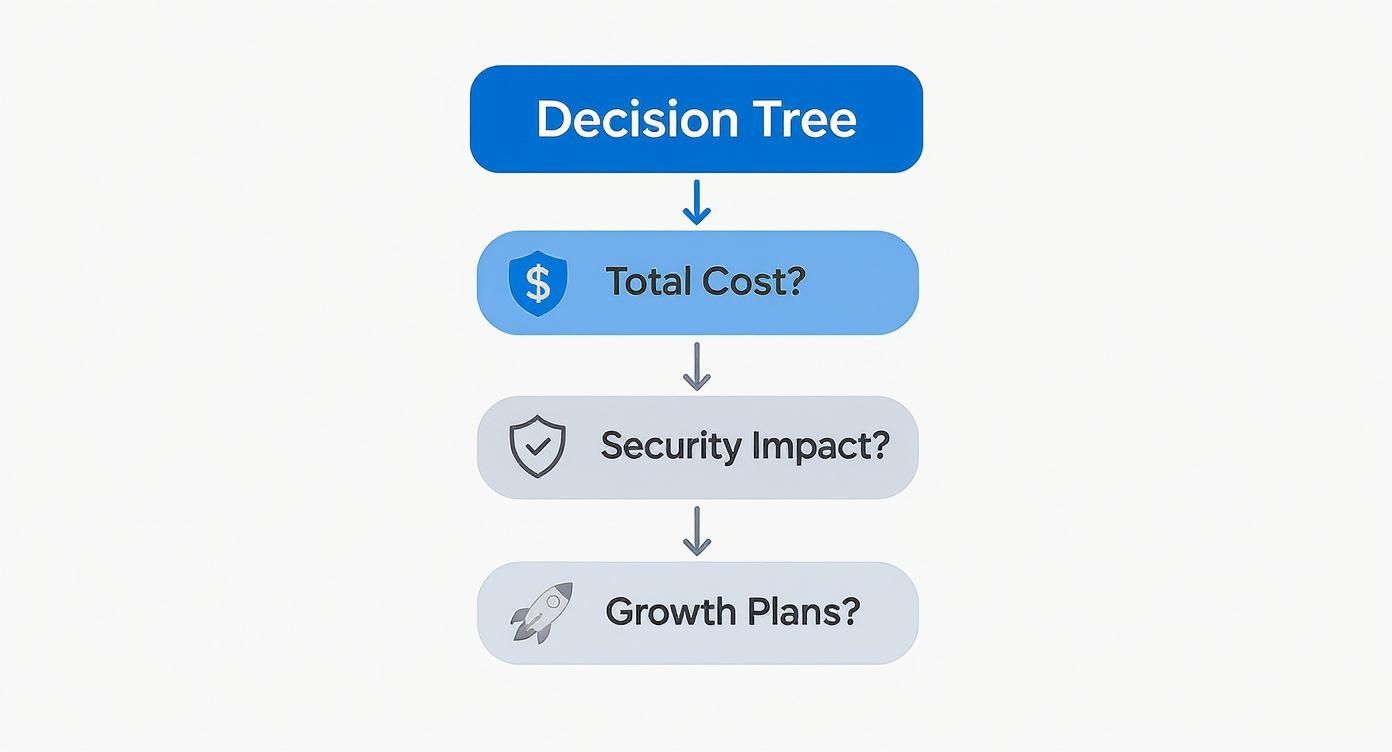
As the decision tree shows, the right path really depends on your specific needs for budget predictability, the depth of your security requirements, and how quickly you plan to scale.
What Does the Onboarding Process Look Like?
A professional MSP will manage the entire transition from start to finish. The process typically kicks off with a deep-dive assessment of your current IT environment to understand what’s working and what isn’t.
From there, they’ll deploy advanced monitoring and security tools across your network. The final step is to document everything, creating a complete blueprint of your systems. This careful, methodical approach ensures a seamless switch with minimal disruption to your daily operations.
Adaptive Information Systems
380 Main St, Salinas CA 93901 | 831-644-0300 | hello@adaptiveis.net