
When it comes to in-house vs. outsourced IT, the big question for any Salinas business owner is simple: which one saves you more money? While hiring an IT person might feel like the most direct path, the answer isn't what you'd expect. For most businesses in Monterey County, outsourcing your IT almost always delivers greater long-term savings and far more value—especially once you see all the hidden costs.
The True Cost of IT for Your Salinas Business
As a business owner, you’ve probably thought, “Can’t we just hire someone or have our team handle IT?” It’s a common question. On the surface, managing technology yourself seems straightforward enough.
But that approach often misses the full financial picture. The real cost of IT goes way beyond a single employee's salary. To make a smart decision for your business, you need to look at the Total Cost of Ownership (TCO). This includes every direct and indirect expense that comes with running your own IT department.
Direct vs. Indirect Costs
An in-house hire involves much more than just a paycheck. The direct costs are the ones you’ll see on a budget sheet:
- Annual Salary: The base pay for a qualified IT professional in our area.
- Benefits and Taxes: Health insurance, retirement contributions, and payroll taxes can easily add another 20-30% on top of their base salary.
- Recruiting Fees: The time and money you sink into finding, interviewing, and onboarding the right person.
But it’s the indirect costs that really sneak up on you. These are the expenses that aren’t so obvious until it’s too late:
- Continuous Training: Technology moves fast. Your employee will need ongoing education just to keep up with new systems and emerging security threats.
- Specialized Tools: Professional-grade software for security monitoring, network management, and diagnostics can be incredibly expensive.
- Downtime: What happens when your one IT person is sick, on vacation, or simply can't solve a complex problem? Every minute your system is down, your business is losing money.
The reality is that a single in-house employee can become a single point of failure. Outsourcing gives you a full team's resilience and expertise without the associated overhead.
For industries that are the lifeblood of our local economy—like agriculture in the Salinas Valley or hospitality in Pacific Grove—reliable technology isn't a luxury; it's essential. Before you commit to a full-time hire, it's crucial to understand that a full-time IT staff could be costing you more than you think. Let's break down exactly why.
A Full Financial Breakdown of In-House vs. Outsourced IT
To really get to the bottom of the in-house vs. outsourced IT debate, you have to look past the sticker price. The key is to calculate the Total Cost of Ownership (TCO), a figure that pulls back the curtain on all the direct and indirect costs tied to each option. Let’s put them side-by-side to see how the numbers actually stack up for a business here in the Salinas Valley.
The True Cost of an In-House IT Hire
Hiring an in-house IT manager seems straightforward at first, but the salary is just the tip of the iceberg. Once you start adding up all the related expenses, the real cost becomes clear.
The direct costs are the obvious ones:
- Annual Salary: A competitive wage is necessary to attract and keep a skilled IT professional in our local market.
- Benefits Package: This includes health insurance, retirement contributions, and paid time off.
- Payroll Taxes: Social Security, Medicare, and unemployment taxes tack on a significant percentage right on top of the base salary.
Then you have the indirect—or "hidden"—costs. These expenses rarely show up as a neat line item on a budget, yet they absolutely impact your bottom line. We’re talking about your leadership’s time sunk into recruiting and hiring, the budget for ongoing professional development, and the money needed for specialized diagnostic tools and software licenses.
This chart gives you a clearer picture of the major cost categories you need to account for.
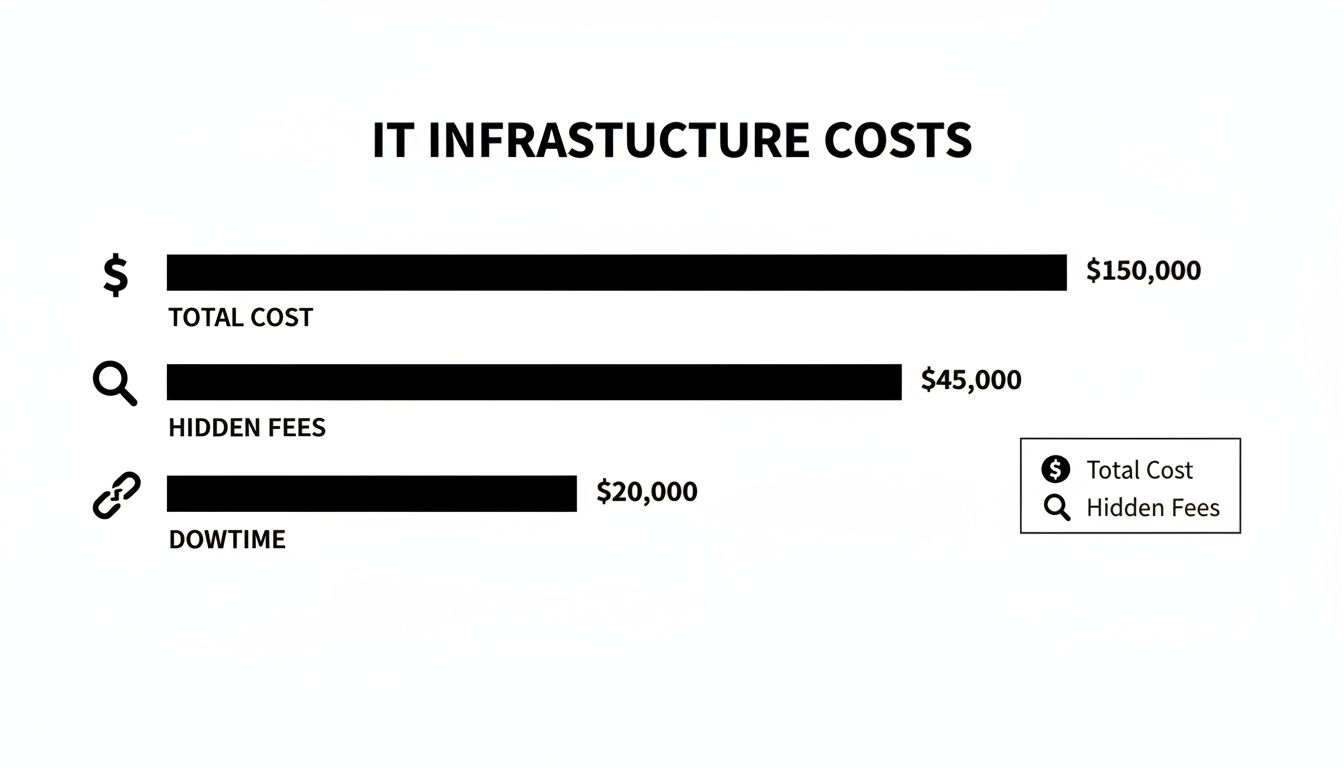
As you can see, things like hidden fees and potential downtime carry substantial financial risk that often gets left out of the initial math when considering an in-house hire.
The Transparent Cost of an Outsourced IT Partner
Now, let’s look at the outsourced model with a Managed Service Provider (MSP). Instead of juggling a long list of variable expenses, you get a predictable, fixed monthly fee. That single payment covers an entire team of specialists, advanced security tools, and 24/7 monitoring.
This approach transforms your IT costs from an unpredictable capital expense into a stable and manageable operating expense. You get the expertise you need without the financial surprises.
What this actually means for you is that doing IT alone may cost more in time, risk, and inefficiency. Managed IT support gives you access to a full team of specialists for less than the cost of a single full-time employee.
For the better part of two decades, industry analyses have consistently shown that outsourcing IT delivers a significantly lower TCO compared to building an in-house team. A single IT manager’s salary in our area often falls in the $65,000–$85,000 range, but the fully-loaded cost can easily climb toward $88,000–$120,000 annually. In stark contrast, a comprehensive managed IT plan for a 40-employee firm is estimated to be around $60,000 per year.
Total Cost of Ownership Comparison In-House IT vs Outsourced IT
To make this crystal clear, let's put the annual costs side-by-side for a typical 40-employee business right here in Monterey County. The table below breaks down the expected expenses for hiring an in-house IT manager versus partnering with an MSP.
| Cost Component | In-House IT (Annual Estimate) | Outsourced IT (Annual Estimate) |
|---|---|---|
| Salary | $75,000 | N/A |
| Payroll Taxes & Benefits (30%) | $22,500 | N/A |
| Recruiting & Onboarding | $5,000 | $0 |
| Training & Certifications | $3,000 | $0 |
| Software & Tools | $10,000 | Included |
| Management Overhead | $5,000 | $0 |
| After-Hours & Emergency Support | Variable | Included |
| MSP Monthly Fee | N/A | $60,000 |
| Total Annual Cost | $120,500+ | $60,000 |
The numbers really do speak for themselves. The predictable fee from an MSP not only comes out ahead on cost but also eliminates the financial risks and hidden expenses that come with an in-house hire.
To dig deeper into the strategic factors involved, a comprehensive guide to IT outsourcing development can provide valuable context. And no matter which path you choose, tracking the right information technology KPIs is essential to measure the true value and return on your investment.
Accessing a Full Team of Specialists for the Price of One
When you hire an in-house IT person, you’re hiring one person’s skill set. They might be a fantastic generalist, but what happens when your Monterey business runs into a problem outside their wheelhouse? A tricky server migration, a sophisticated cyberattack, or a new cloud project often demands specialized knowledge that one person simply can't have.
This is where the in-house vs outsourced IT: which saves more? debate gets really interesting. The salary for a single IT generalist is significant, but the hidden costs of their knowledge gaps—in downtime, risk, and missed opportunities—can be far higher.
Working with a Managed Service Provider (MSP) completely flips that script. Instead of being limited to one person's abilities, you get an entire team of certified specialists for a predictable monthly fee. In many cases, this costs less than the fully-loaded salary of a single full-time employee.
 IT services.” />
The Specialist Advantage
Think of it this way: you wouldn’t ask your family doctor to perform open-heart surgery. Your business technology deserves the same specialized attention because different IT challenges require different experts.
An MSP gives you immediate access to a deep bench of talent, including:
- Cybersecurity Experts: Professionals who live and breathe threat protection, keeping you safe from the latest ransomware and phishing schemes.
- Network Engineers: The architects who design, build, and maintain the digital backbone of your entire operation.
- Cloud Architects: Specialists who can guide your cloud migration and manage your data securely and efficiently in platforms like Azure or AWS.
- Help Desk Technicians: A responsive team dedicated to solving the day-to-day tech issues that keep your employees from being productive.
Having this range of expertise on call means problems get solved faster and, more importantly, they get solved correctly the first time. You’re no longer gambling on whether your lone IT person has the right skills for a critical job.
The Numbers Tell the Story
However, recent insights show that less than 30% of SMBs manage IT security entirely in-house—outsourcing is the norm, not the exception. Smart business owners recognize that trying to do it all yourself is a risky and expensive bet.
What this actually means for you is that doing IT alone may cost more in time, risk, and inefficiency. Managed IT support gives you access to a full team of specialists for less than the cost of a single full-time employee.
This model is especially powerful for businesses that need specialized support but don't need a full-time expert in every single discipline. An MSP delivers that flexibility without the long-term commitment of hiring. For companies that already have some IT staff, this partnership model can fill critical gaps. Our guide on co-managed IT in Aptos explains exactly how this works.
Comparing Your Current Costs
The best way to see the value is to compare your current IT costs (staffing, downtime, software) with an MSP proposal. Take a hard look at what you’re really spending on IT right now. Go beyond salary and include the indirect costs: downtime, lost productivity when staff struggle with tech, and software licensing fees.
At Adaptive, we offer a transparent, side-by-side cost-benefit analysis. We help you see the full picture, including the immense value of having a complete team of experts and advanced Cybersecurity Solutions included in your service.
Curious how outsourcing compares to what you're doing now? Let’s break it down together—request a free IT health check today.
Managing Financial Risks from Downtime, Compliance, and Security
When you’re weighing in-house vs. outsourced IT, one of the biggest factors is risk. These costs don’t show up on a balance sheet until something goes terribly wrong, but for a small business, they can be devastating.
Just think about it. What’s the real financial damage if your network goes down for an entire business day? What about the fines for failing a compliance audit? These are the financial landmines that are often underestimated when relying on a single in-house IT person. Partnering with a Managed Service Provider (MSP) isn't just about getting tech support; it's about investing in a powerful shield against these costly threats.
The Staggering Cost of Unplanned Downtime
For a local business, downtime is far more than an inconvenience—it's a direct shot to your revenue. Picture a popular restaurant in Carmel losing its point-of-sale system on a packed Saturday night, or a Monterey law firm that can't access client files for an entire afternoon. The losses pile up, and they pile up fast.
When your systems are down, it’s not just about the sales you lose in that moment. You’re also paying for:
- Lost Productivity: Your team is on the clock but can't work. You're paying salaries for zero output.
- Reputation Damage: Customers lose faith fast when your services are unreliable. They might not give you a second chance.
- Recovery Costs: Last-minute emergency repairs and data recovery can be incredibly expensive.
A single in-house IT employee, no matter how good, can only do so much. In sharp contrast, an MSP brings proactive, 24/7 monitoring to the table, designed to spot and fix problems before they ever cause downtime. To get a better sense of how these expenses add up, you can explore the hidden costs of IT downtime in more detail.
Navigating the Complex World of Compliance
Compliance isn’t a choice. For many businesses right here in our area, specific regulations come with brutal fines for getting it wrong. A medical practice in Salinas has to be lock-tight on HIPAA to protect patient data, while a boutique in Pacific Grove needs to meet PCI standards to process credit cards safely.
Keeping up with these dense regulations is a full-time job. An in-house generalist often doesn’t have the specialized knowledge to guarantee you’re compliant, leaving your business open to major financial penalties.
A good MSP has a team of experts who live and breathe these requirements. They implement the right security controls, run regular risk assessments, and keep the detailed documentation needed to prove you’re always ready for an audit. This kind of specialized expertise is baked into your service, protecting you from fines that could cripple a small business.
Gaining Enterprise-Grade Security
Let's be realistic: a single in-house IT person cannot possibly watch your network for threats around the clock. They have to sleep, they take vacations, and they get sick. Meanwhile, cybercriminals work 24/7, endlessly searching for a weak spot in your defenses.
However, recent insights show that less than 30% of SMBs manage IT security entirely in-house—outsourcing is the norm, not the exception. They recognize this critical vulnerability and choose a stronger path.
An MSP delivers a multi-layered security strategy that one person could never replicate. This includes:
- 24/7 Threat Monitoring: A security operations center (SOC) is actively looking for suspicious activity, day and night.
- Advanced Security Tools: You get the benefit of enterprise-grade firewalls, endpoint detection, and email filtering that would be too expensive for most SMBs to buy on their own.
- Incident Response: A team of experts is on standby, ready to jump into action the second a breach is detected to minimize the damage.
This constant vigilance is a core part of the value an MSP provides, turning your security from a reactive, fingers-crossed approach into a proactive, hardened defense.
Curious how outsourcing your IT compares to what you're doing now? Let’s break it down together—request a free IT health check today.
Real-World Cost Savings for Monterey Bay Businesses
Theory is great, but let's bring the "in-house vs. outsourced IT" question down to earth with some scenarios right here in our community. Seeing how the numbers actually play out for businesses like yours in Salinas and Monterey is the only way to really grasp the impact of this decision.
We'll look at two very common situations: a 25-employee agricultural business trying to modernize its field operations and a 50-person hospitality group that absolutely cannot afford downtime.

Scenario 1: The Salinas Agricultural Business
Picture a 25-employee ag-tech company right here in Salinas. They're trying to modernize by securing sensitive data that moves from the field to the office, all while keeping their specialized operational software running smoothly.
The In-House Approach:
They hire a single mid-level IT manager. He’s sharp, but he's immediately swamped, trying to juggle daily help desk tickets from the team and the massive project of securing their mobile data network. The big project stalls. Eventually, they're forced to bring in a pricey outside consultant for the specialized security work, blowing up the budget.
The Outsourced Approach:
Instead, they partner with a Managed Service Provider (MSP). For one predictable monthly fee—less than the fully loaded cost of that one IT manager—they get an entire team on day one. Help desk techs handle the daily user problems, while a dedicated network engineer and a cybersecurity specialist collaborate to roll out a secure, modern system. The project gets done faster and better, with zero surprise consulting fees.
This highlights the core value of outsourcing: you’re not just hiring a person; you’re investing in an entire IT department. You get a full bench of specialists that scales precisely with what you need, when you need it.
Scenario 2: The Monterey Hospitality Group
Now, think about a 50-person hospitality group with properties in Monterey and Pacific Grove. Their entire business hinges on 24/7 uptime for their booking systems and ironclad PCI compliance to protect guest credit card information. Any downtime or a data breach would be catastrophic.
The In-House Approach:
They hire a skilled IT director. The problem? One person can't watch the network around the clock. A server fails overnight. By the time the director gets in the next morning, the booking system has been down for hours, leading to lost revenue and furious guests. Keeping up with constantly changing PCI compliance rules becomes a stressful, full-time battle.
The Outsourced Approach:
The group goes with managed IT services. The MSP provides 24/7/365 proactive network monitoring, so they spot the potential server issue and fix it before it ever causes an outage. Their compliance specialists ensure PCI standards are always met, running regular scans and generating the reports needed to keep the business protected from fines. The hotel's team can finally focus on guest experience, knowing their technology is secure and always on.
Across every industry we work with, the financial upside of outsourcing is clear. Most businesses save anywhere from 30% to 70% by partnering with an MSP compared to building an equivalent in-house team.
How to Make the Right IT Choice for Your Business
So, after digging into the costs, risks, and benefits, how do you make the final call? Deciding between in-house and outsourced IT isn't just about picking the cheapest option on a spreadsheet. It’s about making the smartest, most sustainable IT decision for where your business is headed.
The right choice comes from an honest look at your company’s specific needs and goals.
As a starting point, it's pretty clear why outsourcing has become the standard. Recent insights show that less than 30% of SMBs manage IT security entirely in-house—outsourcing is the norm, not the exception. Most have realized that going it alone often costs far more in hidden ways—like downtime, inefficiency, and gaping security holes.
Your Decision-Making Checklist
To help you think it through, walk through these key questions. Your answers will steer you toward the model that actually fits your operational reality.
- How quickly do you need to scale? If your business is growing, can a single in-house hire really keep up? An outsourced team scales with you instantly, without the long delays and costs of hiring.
- What is the real business impact of downtime? Do the math. Calculate what just one hour—or one full day—of a system outage would actually cost your business in lost sales and wasted wages.
- Do you handle sensitive data? If you manage client financial records or patient health information, do you have the specialized compliance expertise on hand to avoid six-figure fines?
- Can you afford a full team of experts? Does your budget really allow for a cybersecurity analyst, a network engineer, and a help desk technician? Outsourcing gives you access to all of them for a single, predictable fee.
When weighing different IT models, it’s also helpful to review a comprehensive comparison of internal hiring, outsourcing, and EOR solutions. This wider perspective can bring the financial and operational trade-offs of each approach into sharp focus.
What this actually means for you is that doing IT alone may cost more in time, risk, and inefficiency. Managed IT support gives you access to a full team of specialists for less than the cost of a single full-time employee.
Ultimately, the only way to know for sure is to compare your total current IT costs—staffing, software, downtime, and all—against a transparent proposal from a Managed Service Provider. The numbers will tell the story.
Curious how outsourcing compares to what you're doing now? Let’s break it down together—request a free IT health check today.
Common Questions About Outsourcing Your IT
Even when the numbers add up, making the switch from an in-house team to an outsourced partner can feel like a huge leap. Most business owners I talk to here in the Monterey area have the exact same questions you probably do. Let's get you some clear, straightforward answers.
Will I Lose Control Over My IT If I Outsource?
Not at all—in fact, you end up with more strategic control, not less. A good Managed Service Provider (MSP) acts as your partner, taking on the complex, day-to-day technical grind. This frees you up to focus on the high-level business goals that actually drive growth.
You’re still in the driver's seat setting the strategy, and we're the ones executing it. We keep you fully in the loop with regular, easy-to-understand reports, so you’re always informed and firmly in control of your IT decisions.
Isn't Outsourcing Just for Big Companies?
That's a common myth, but the reality is just the opposite. Outsourcing is one of the most powerful moves a small or mid-sized business can make. Large corporations can afford to build out massive in-house teams with specialists for every need, but an MSP gives you that exact same enterprise-level expertise for a fraction of the cost.
For a local business, it’s one of the smartest financial decisions you can make to get top-tier technology and robust Cybersecurity Solutions without the enterprise-level price tag.
What if We Already Have an IT Person on Staff?
That's actually a perfect scenario for what’s called a "co-managed IT" model. An MSP doesn't have to replace your current staff; we can work right alongside them to make them even more effective. We can handle time-consuming tasks like 24/7 monitoring, security patching, and fielding help desk calls.
This approach frees up your internal IT resource to focus on strategic, revenue-generating projects that directly move your business forward. It’s about augmenting their capabilities, not replacing them, creating a powerful partnership.
Curious how outsourcing compares to what you're doing now? Let’s break it down together. Adaptive offers a transparent, side-by-side cost-benefit analysis so you can see the numbers for yourself. Request a free IT health check today.
Adaptive Information Systems
380 Main St, Salinas CA 93901 | 831-644-0300 | hello@adaptiveis.net