

Think of your business like a brick-and-mortar shop. Your customer lists, financial records, and strategic plans are the most valuable items on your shelves. In the digital world, that "inventory" is just as real, but it's a whole lot more exposed. Cyber Security 101 is all about learning how to properly lock your digital doors.
Why Cyber Security Is Your New Business Essential
It’s a common mistake to see cybersecurity as just another technical chore on a long to-do list. The reality is that it’s a core business function, every bit as critical as managing your finances or marketing your services. Digital threats are on the rise, and they pose a massive financial and reputational risk—especially for small and mid-sized businesses, which attackers often see as softer targets.
This isn’t about becoming a security wizard overnight. It’s about understanding the environment you’re operating in, putting practical defenses in place, and having a plan for when—not if—a threat appears. The goal here is to build a sense of manageable urgency that empowers you to take those first crucial steps toward a stronger defense.
For a business owner, knowing the basics of cybersecurity is no longer optional. It's the modern equivalent of locking your doors at night—a non-negotiable part of protecting your livelihood.
The Stakes Are Higher Than Ever for Local Businesses
As more and more business moves online, even local companies right here in the Monterey Bay area are sitting on a treasure trove of sensitive data. That makes them a tempting target. This isn't just a local trend; the global cybersecurity market is expected to hit USD 301.91 billion in 2025 and is projected to soar to USD 878.48 billion by 2034. You can dig into more data on this market growth in recent reports. That staggering investment shows just how serious these threats have become.
For a local company, this all boils down to one simple fact: proactive defense is far cheaper than reactive cleanup. Our guide on Salinas cyber security offers more context for protecting businesses in our community. By getting the essentials right, you can:
- Protect Customer Trust: A data breach can wipe out the confidence you’ve worked so hard to build in an instant.
- Ensure Business Continuity: A successful ransomware attack can bring your entire operation to a screeching halt.
- Avoid Costly Fines: Depending on your industry, you could face steep penalties for failing to meet compliance standards.
Understanding The Three Pillars of Digital Safety

Every security measure, from a simple password to a sophisticated firewall, is built on three fundamental principles. In the industry, we call this the “CIA Triad,” and it gives you a simple but powerful way to think about your security goals. Getting a handle on this model is the first real step in cyber security 101.
But don’t think of these as just technical jargon. They’re really business objectives. They define exactly what you're trying to protect and, more importantly, why. When you start looking at your defenses through this lens, the reason behind every security action becomes crystal clear, helping you make smarter, more effective decisions.
The CIA Triad—Confidentiality, Integrity, and Availability—isn't just a security concept; it's a business framework. It answers the fundamental questions: Is our data private? Can we trust our data? And can we access our data when we need it?
The Goal of Confidentiality
Confidentiality is all about keeping your secrets safe. Think of it as the digital version of a locked filing cabinet that only authorized people can open. For your business, this means making sure that sensitive client files, private financial records, and employee data are only seen by those who absolutely need to.
A breach of confidentiality is what most people think of as a data leak. For instance, if a hacker manages to steal your customer list, that’s a confidentiality failure. This is why strong passwords, encryption, and strict access controls are the essential tools for keeping information private.
The Goal of Integrity
Integrity is the guarantee that your data is trustworthy and hasn't been secretly altered. It’s about being certain that the information you rely on every day is accurate and hasn't been tampered with. Imagine sending an invoice for $5,000, only for an attacker to intercept it and change the amount to $500 before it reaches your client.
That’s a classic failure of integrity. This principle is absolutely critical for everything from financial transactions to project plans. We use tools like file permissions, digital signatures, and data validation checks to protect the integrity of our digital assets.
The Goal of Availability
Finally, availability ensures that your systems and data are up and running when you and your customers need them. If your e-commerce website crashes during a big holiday sale, that’s an availability failure—one that costs you real money and customer trust.
Ransomware attacks are a direct assault on availability, locking you out of your own files and bringing business to a halt. This is precisely why reliable data backups, redundant systems, and strong protection against denial-of-service (DDoS) attacks are so critical for keeping your doors open.
Recognizing The Top Threats To Your Business
To build a solid defense, you first need to understand what you're up against. In cybersecurity, that means getting familiar with your enemy—the common attacks targeting businesses just like yours every single day. These aren't just abstract concepts from a textbook; they are real, tangible risks that exploit human behavior and technical weak spots.
The financial stakes are staggering. Global cybercrime costs are projected to hit $10.5 trillion annually by 2025. A big reason for this jump is that the shift to remote work has opened up all sorts of new security holes. If you want more context on these numbers, you can review key cybersecurity statistics that break down the economic impact. For your business, this means one thing is crystal clear: ignoring these threats is no longer an option.
The Most Common Cyber Threats
Understanding the primary threats is a core part of cyber security 101. While the list of potential attacks is long, most incidents you're likely to face boil down to a handful of well-known types. Let's break down the ones you absolutely need to know.
-
Phishing: This is the digital version of a wolf in sheep's clothing. Attackers send emails or messages disguised as a trusted source—a bank, a vendor, or even your own IT department. The goal is simple: trick an employee into giving up their login credentials or clicking a link that unleashes malware.
-
Ransomware: Imagine a criminal breaking into your office, locking every single file cabinet, and leaving a note demanding a hefty payment for the keys. That's exactly what ransomware does to your digital files. It encrypts your critical data, bringing your entire business to a grinding halt until you pay up.
-
Social Engineering: This is the art of psychological manipulation. Instead of trying to hack systems, attackers hack people. They might impersonate a CEO to convince someone in accounting to wire money, or call the front desk pretending to be a technician to gain network access.
The most effective cyber attacks often don't target technology at all—they target people. An employee clicking a single bad link can bypass millions of dollars in security software, making awareness your most valuable asset.
This data chart shows the gap between common security weaknesses and the adoption of key protective measures.
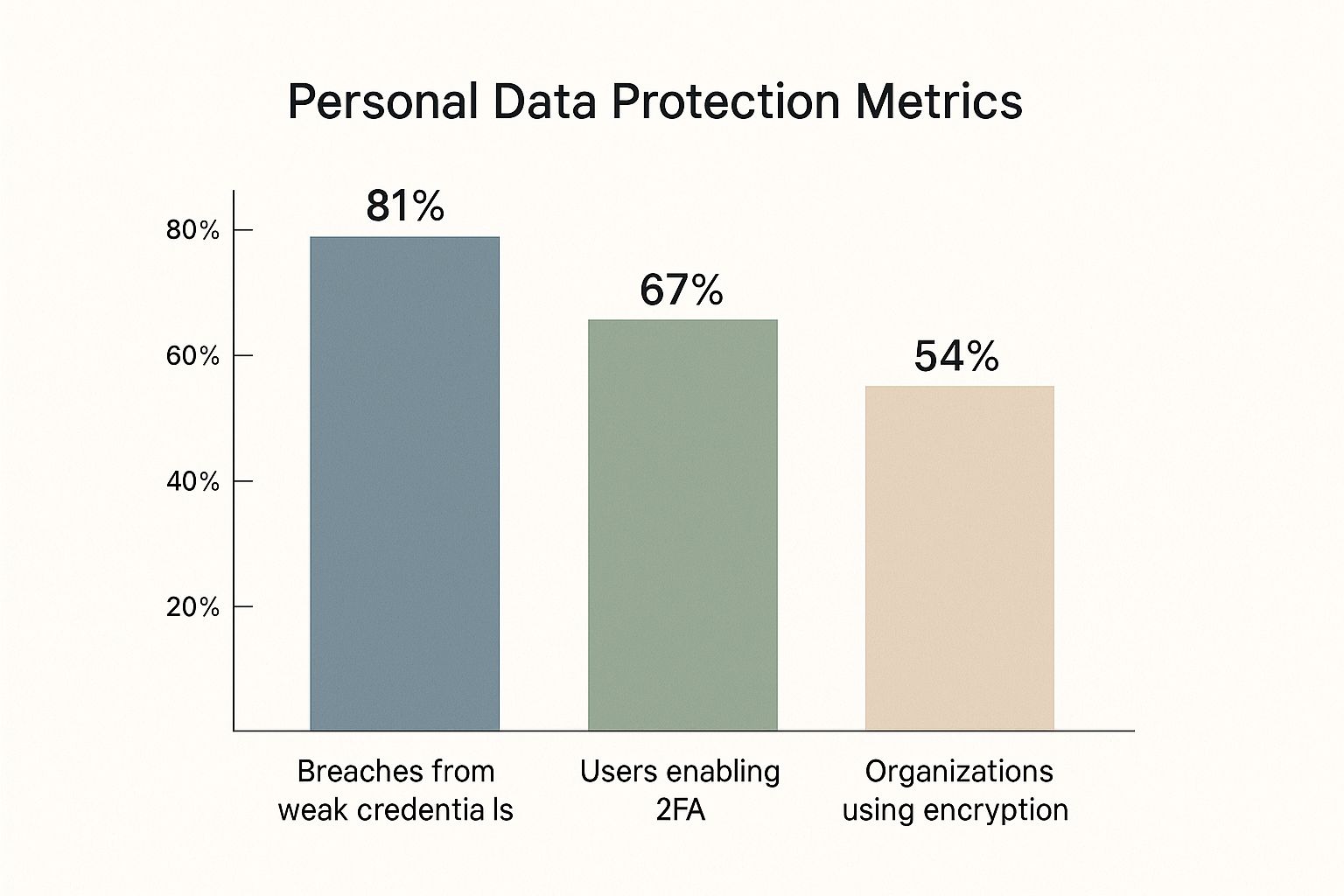
The visualization highlights a critical disconnect: while 81% of breaches stem from weak credentials, only about two-thirds of users have enabled two-factor authentication (2FA). This gap is where attackers thrive. For a deeper dive into these and other risks, check out our guide on the top 10 cybersecurity threats your business may face.
To make these concepts even clearer, here’s a quick-glance table breaking down the threats we’ve discussed.
Common Cyber Threats at a Glance
| Threat Type | Primary Goal | Common Method | Key Defense |
|---|---|---|---|
| Phishing | Steal credentials or install malware | Deceptive emails, texts, or messages from a "trusted" source | Employee security awareness training and email filtering |
| Ransomware | Extort money by holding data hostage | Phishing links, software vulnerabilities, or malicious downloads | Regular data backups and advanced threat protection |
| Social Engineering | Trick people into breaking security rules | Impersonation, pretexting, or creating a false sense of urgency | Strong internal protocols and a culture of verification |
Remember, understanding how these attacks work is the first and most important step toward building a defense that actually works.
Your First Line Of Digital Defense
Fantastic security doesn’t come from expensive software or complicated systems. It actually starts with strong, simple habits that build a powerful wall against the most common cyberattacks. This is your playbook for the essential, high-impact practices any business can put in place right away. Think of it as your cyber security 101 foundation.
The best part? These steps are straightforward and won't break the bank, yet they stop the vast majority of automated attacks that criminals count on. By getting these basics right, you make your business a much tougher and less appealing target.
Your strongest defense is a layered one. Think of it like securing a building: you lock the doors, bar the windows, and install an alarm. Each layer makes a break-in progressively more difficult for an intruder.
Enforce Strong Password Policies
Weak and reused passwords are one of the biggest reasons data breaches happen. The first step is to ditch easily guessable phrases. A strong password policy isn't about making things complicated for no reason; it's about making it practically impossible for attackers to guess their way in.
- Use a Password Manager: These tools create and save unique, complex passwords for every single account. Your team only has to remember one master password, and the manager handles the rest.
- Set a Minimum Length: Insist on passwords being at least 12-14 characters long. When it comes to passwords, length is often a much better defense than just a random mix of special characters.
Activate Multi-Factor Authentication
Multi-Factor Authentication (MFA) is one of the single most effective security measures you can turn on. It’s like using your debit card at an ATM—you need both the physical card and your secret PIN to get cash. One without the other is completely useless. MFA brings that same powerful logic to your digital accounts.
By requiring a second proof of identity, like a code from a phone app, MFA can stop an attacker cold, even if they somehow manage to steal a password.
Automate Software Updates
Outdated software is riddled with security holes that cybercriminals know exactly how to exploit. Developers release patches and updates specifically to plug these gaps. Trying to keep up with every update manually is a losing battle, which is why automation is so important.
Simply enable automatic updates on all your operating systems, web browsers, and other applications. It's a "set-it-and-forget-it" tactic that provides continuous protection without you having to lift a finger.
Building Your Essential Security Toolkit
Once you’ve nailed down your foundational security habits, it’s time to layer in the right technology. This isn’t about buying every fancy new tool on the market; it’s about strategically building a defense that turns good habits into a rock-solid security posture. This is a core part of any cyber security 101 strategy.
Think of it like securing a physical office. A strong lock on the front door is a great start, but it's not enough. You also need alarms, cameras, and a fireproof safe for your most important documents. Your digital tools work together the same way, with each one playing a specific, vital role in protecting your business from every possible angle.
Your Core Defensive Tools
While the world of security software is vast, every business needs to start with three non-negotiable tools. These are the absolute bedrock of your technical defenses, designed to shut down the most common ways attackers try to get in.
-
Antivirus and Anti-Malware Software: Think of this as your company’s digital immune system. It’s constantly on the lookout, actively scanning files, emails, and web downloads for known threats. When it spots something suspicious, it quarantines it immediately—before it has a chance to wreak havoc. Modern solutions protect against far more than just old-school viruses.
-
Firewalls: A firewall is the digital bouncer for your entire network. It stands guard at the main entry point of your internet connection, inspecting every piece of data coming in or going out. Its job is to block unauthorized access and suspicious connections, making sure only legitimate traffic gets through.
-
Data Backup Solutions: This is your ultimate safety net. If the worst happens—whether it's a crippling ransomware attack, a server crash, or even a natural disaster—a reliable backup is what gets you back on your feet. It allows you to restore all your critical data and resume operations quickly. The key is to have backups that run regularly, are fully automated, and are stored separately from your main network.
Cyberattacks are only getting more sophisticated, fueled by global trends that make a multi-layered toolkit more essential than ever. Attackers are now laser-focused on high-value business assets like intellectual property and customer data. The World Economic Forum even notes that geopolitical tensions are intensifying cyber espionage. You can read more about these global cybersecurity trends and what they mean for your business.
Trying to manage all these tools can feel like a full-time job in itself. That’s why many businesses in the Monterey Bay area turn to experts for help. Exploring managed cybersecurity services gives you access to enterprise-level protection without the cost and complexity of building an in-house security team.
Your Cyber Security Questions Answered
Taking that first step into cybersecurity always brings up a ton of practical questions. This is where the rubber meets the road—where foundational concepts like cyber security 101 bump up against the reality of running a business. Let's clear up some of the most common worries so you can move forward with a plan that makes sense.
My Business Is Very Small. Do I Really Need To Worry About This?
You absolutely do. In fact, many attackers see small businesses as the perfect target precisely because they assume your defenses are weaker.
Think about it: you handle valuable data every single day. Customer lists, payment details, private business plans—all of it is highly profitable for criminals on the dark web. A single breach isn't just an IT headache; it can lead to devastating financial losses and completely shatter the trust you've worked so hard to build with your customers. Starting with the basics isn't just a "nice to have," it's essential for survival.
Where Should I Start If My Budget Is Almost Zero?
This is a great question. You don't need a huge budget to make a real difference. Focus on the high-impact actions that cost little to nothing. These steps build a surprisingly powerful defensive foundation without a major investment.
- Enforce Strong Passwords: Make long, unique passwords mandatory for every single account. A good password manager makes this surprisingly easy for your whole team to adopt.
- Activate Multi-Factor Authentication (MFA): This is a big one. Turn on MFA for all critical accounts—especially email, banking, and any cloud services you use. It's one of the single most effective defenses you can deploy.
- Automate Software Updates: Go into your settings and make sure all your software is set to update automatically. This closes security holes before attackers even know they exist.
- Establish Data Backups: Set up a regular, automated data backup routine using an affordable cloud service. This is your ultimate safety net if you're ever hit with ransomware.
- Train Your Team: Your people are a critical layer of defense. Teach your staff how to spot the warning signs of a phishing email or a suspicious link.
Think of antivirus as locking your front door—it's essential, but it doesn't secure the windows, the garage, or the back patio. True security is about layering defenses so that if one fails, another is right there to stop an attack in its tracks.
Is My Antivirus Software Enough To Keep My Business Safe?
Antivirus is a crucial tool, but on its own, it's just one piece of a much larger puzzle. Modern threats, like sophisticated phishing attacks and clever social engineering schemes, are designed to bypass traditional antivirus protection entirely.
A truly effective strategy relies on what we in the industry call defense in depth, which just means having multiple layers of security working together. This layered approach includes a strong firewall, consistent software updates, ongoing employee training, and, of course, reliable data backups. Each element covers a different potential weakness, creating a security posture that is far more resilient and complete.
Protecting your business today demands a proactive and layered approach. If you're ready to build a robust defense without the headache of managing it all yourself, the experts at Adaptive Information Systems are here to help. We specialize in providing enterprise-level IT solutions designed specifically for small and mid-sized businesses throughout the Monterey Bay Area.
Learn how Adaptive Information Systems can secure your business