
Direct Answer: Your old provider should hand over network documentation, an asset inventory, admin credentials, ISP account details, license records, backup configuration and firewall rules. A new provider then assesses, rotates access, verifies backups and deploys monitoring.
Most of the businesses that call us about switching managed IT providers are not still deciding whether to switch. They already know. What stops them is a quieter worry: if we leave, something breaks, and nobody left in the building knows how to fix it.
That fear is reasonable. In a lot of small Monterey County offices, the network only makes sense to one person, and that person works for the company you are about to part ways with.
So let’s skip the pitch and talk mechanics. This article covers what your outgoing provider should hand over, what a real first 30 days looks like, and where these changeovers usually go sideways.
The Handover Inventory: What to Ask For Before You Sign Anything
Most business owners have never been told what to ask for at the end of an IT contract. That is the whole problem. Read a typical small business managed services agreement and you will often find pages about payment terms and almost nothing about what happens when the relationship ends.
Here is the list of artifacts a new provider needs on day one:
- A current network diagram showing how sites, circuits, switches and firewalls connect
- An asset inventory of every workstation, server, switch, access point and firewall, with model, age and location
- The admin credential set, plus where those credentials are stored and who else can reach them
- ISP and circuit account details, including account numbers and who is listed as authorized contact
- Software license and warranty records for Microsoft 365, antivirus, line of business apps and hardware
- The backup configuration and proof of the last successful restore test, not just a green status screen
- The existing firewall rule set, including any remote access rules that were opened years ago and forgotten
CISA’s guidance for organizations that outsource IT makes a point worth repeating: you keep the risk even when you hand off the work, and security and continuity expectations belong in the contract before you select anyone. You can read the framework in CISA’s risk considerations for MSP customers.
The practical takeaway: ask for a documented handover before signing, not during the exit. Once notice is given, your leverage is gone.

Undocumented Systems Are a Single Point of Failure
A 13 room inn on the coast reached out to us with a message that stuck with our team. Their IT tech, the one person who built and managed their WiFi, had passed away. They had the Ubiquiti login. They had no idea what to do with it.
That is not an inconvenience. That is a business system that outlived the only person who understood it.
The same thing happens without anyone passing away. A technician retires. A provider sells to a larger firm. A contract dispute goes cold and calls stop getting returned. If your network only exists in one person’s memory, you are one of those events away from an inn-style problem.
Which is why documentation is the real deliverable in any provider change. Hardware can be replaced in a week. Undocumented configuration takes far longer to rebuild, because someone has to rediscover decisions that were never written down. If you are also weighing whether hourly support is serving you at all, our breakdown of break-fix versus managed IT costs covers that side of the math.
What the First 30 Days Should Actually Look Like
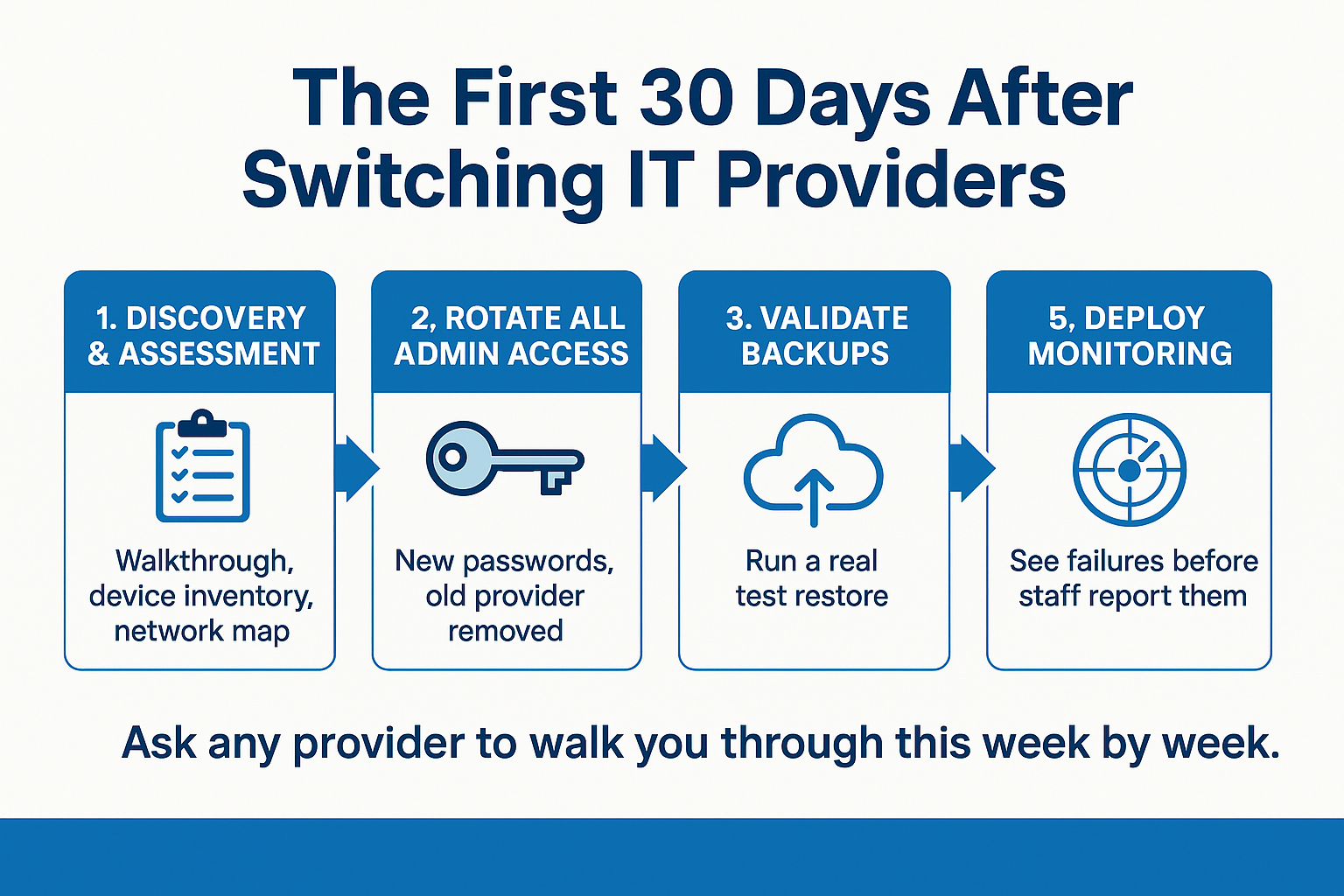
“Smooth transition” is not a plan. Ask any provider to walk you through week by week. A realistic first month usually covers five things:
- Discovery and assessment. Physical walkthrough, device inventory, circuit verification and a written picture of what actually exists versus what the old documentation claims.
- Access rotation. Every administrative password changed, the former provider’s remote tools removed, and their accounts pulled from Microsoft 365, firewalls and remote access.
- Backup validation. Confirming backups run, and then performing a test restore to prove the data comes back.
- Patch baseline. Finding every machine that is behind on updates and getting the fleet to a known starting point.
- Monitoring deployment. Agents on servers and workstations so the new team sees failures before staff report them.
We have seen local buyers ask exactly the right questions here. A Salinas Valley produce operation asked for an assessment of its entire network including fiber tracing, copper tracing, conduit status and a full network map. A local law firm asked for a review of its security, infrastructure and backup posture before committing to anyone.
You are allowed to ask for that too, and any serious provider should welcome it. For firms with confidentiality obligations, our piece on what law firms should expect from a managed IT partner goes deeper on that assessment stage.
The First 30 Days, Step by Step
Here is the sequence a well-run provider transition follows in the first month.
Scope Gray Areas to Get in Writing
Trust breaks down over billing surprises more than over outages. These are the areas where the monthly fee and the extra invoice tend to blur together.
| Gray area | Question to ask in writing | Why it comes up |
|---|---|---|
| After hours emergencies | Is nights, weekend and holiday response included, or billed at a different rate? | A Friday night server failure at a hotel is not a Monday problem |
| Onsite versus remote | How many onsite visits are included, and what triggers a dispatch charge? | Most issues resolve remotely, but cutovers and hardware failures need hands on site |
| Onboarding and offboarding | Is setting up or removing a user included per person? | Seasonal ag and hospitality staffing means constant account churn |
| Hardware procurement | Is the time spent quoting, ordering and configuring new equipment billable? | Procurement labor is often excluded from the flat fee |
| Project work | Are server migrations, office moves and network rebuilds separate? | Projects are usually quoted on their own, and should be |
What Actually Drives the Monthly Price
Pricing in this market varies widely, so be careful with any number you see quoted online. What we can tell you is what moves it.
The main cost drivers are user count, number of physical sites, how much security tooling is bundled in versus sold separately, whether you carry compliance obligations like HIPAA or financial services requirements, and how much after hours coverage you need.
Ask every provider for a written per-user, per-site quote with the security stack itemized. A local nonprofit modeled this well. They asked for a 12 month proposal broken out month to month for up to 7 users, plus a separate line showing the cost of adding an eighth user and a second office they expected to grow into.
That request tells you two things fast: whether the provider can price growth honestly, and whether they will nickel and dime you later. If your situation involves keeping an internal IT person and adding outside support, the economics look different again, and our overview of co-managed IT for internal IT teams explains how that split usually gets scoped.
Timing a Provider Change Around Central Coast Seasons
National advice on this topic ignores how seasonal our region is. Around Monterey County, the calendar decides more than the contract does.
Schools and public agencies get their real working window between June and August. One small district with three sites, 750 students and 70 staff came looking for phone system and infrastructure help during exactly that gap, which is the right instinct.
But those same months are peak season for Salinas Valley agriculture and Monterey Peninsula hospitality. Cutting over a network during harvest or during a Concours weekend in Pebble Beach is a self-inflicted wound.
So map your own quiet weeks first, then build the transition schedule backward from there. Two practical notes:
- Leave buffer for circuit and ISP account transfers, which depend on the carrier’s timeline, not yours
- Schedule the access rotation early, not last
That second point matters legally. California’s breach notification duties do not pause during a provider change. If a former provider still holds administrative access to your systems weeks after the relationship ended, that is your exposure, not theirs. Revoking access promptly is part of staying secure and compliant, not just tidy housekeeping. Providers who know the area tend to plan around this instinctively, which is part of how you can tell whether an IT provider actually knows your region.
The Part Clients Bring Up Later
When local clients describe a transition that went well, they rarely mention tools. They mention people, and specifically whether the same faces stayed involved after the setup phase.
One longtime client put it plainly in a review about that early stage: “Gary and Jesse were flexible setting up our account to fit our exact needs.”
There is also a plain logistical piece. A team based on Main Street in Salinas can be at a Watsonville, Soledad or Carmel office the same morning when a cutover needs hands on the equipment.
Frequently Asked Questions About Switching Managed IT Providers
What if my current provider refuses to hand over documentation?
It happens, and it is more common than most owners expect. Start by reading your agreement for any termination or data return clause. If there is nothing there, focus on what you can control directly: ISP and circuit accounts are in your company name, Microsoft 365 global admin can usually be recovered through Microsoft’s process, and firewalls can be factory reset and rebuilt. A new provider can reconstruct almost everything from scratch. It just costs more hours than a clean handover would have.
How long does switching managed IT providers actually take?
The core transition work typically runs 30 to 60 days for a business under 100 users, depending on how many sites you have and how much documentation exists. Discovery and access rotation move fast. Circuit transfers and any deferred maintenance the old provider left behind are usually what stretch the timeline.
Will my business go down during the changeover?
It should not. Most of the first 30 days is assessment, credential changes and monitoring deployment, which happen quietly in the background. The moments that carry real risk are things like a firewall replacement or a phone system cutover, and those get scheduled after hours on a date you approve in advance.
Should I tell my current provider before or after I sign with a new one?
Sign first, then give notice. Once you announce a departure, responsiveness often drops and access to documentation gets harder. Having the new team lined up means discovery can start the same week notice goes out.
What is the single most important thing to verify in the first month?
That your backups restore. Not that they run, that they restore. A test restore of a real file and a real server is the only proof that matters, and it is the item most often skipped by the provider you are leaving.
Thinking Through a Provider Change in Monterey County?
If you are mapping out a transition for later this year or next, the handover list above is the place to start, whoever you end up hiring. Adaptive Information Systems works with businesses across Salinas, Monterey, Watsonville and the wider Central Coast, and our team is happy to talk through assessment and timing questions. You can reach us at (831) 644-0300 or at adaptiveis.net.