
Direct Answer: Modern email filters in Microsoft 365 and Google Workspace use AI to analyze behavioral patterns, not just keywords — but they still miss nearly half of targeted phishing attacks, so human judgment remains essential.
Most business owners in the Monterey Bay Area think of their email filter as a basic spam blocker — something that catches messages with sketchy subject lines and flags senders from unfamiliar domains. That mental model made sense ten years ago. It does not describe what is actually running inside your inbox today.
The filtering layer built into Microsoft 365 and Google Workspace is now driven by machine learning models trained on billions of messages. It is not matching keywords against a blocklist. It is making probabilistic judgments about intent — analyzing sender behavior, domain age, link routing patterns, and message context all at once. Most Salinas business owners have no idea this is happening, and that gap matters.
It matters because the threat side of email has changed just as fast. Attackers are now using their own AI tools to generate convincing, grammatically clean messages at scale — which means the old tells your team used to catch are disappearing. This article explains what your filter is actually doing, where it still has blind spots, and what that means for a small business running on a tight team.
What AI-Based Email Filtering Actually Does
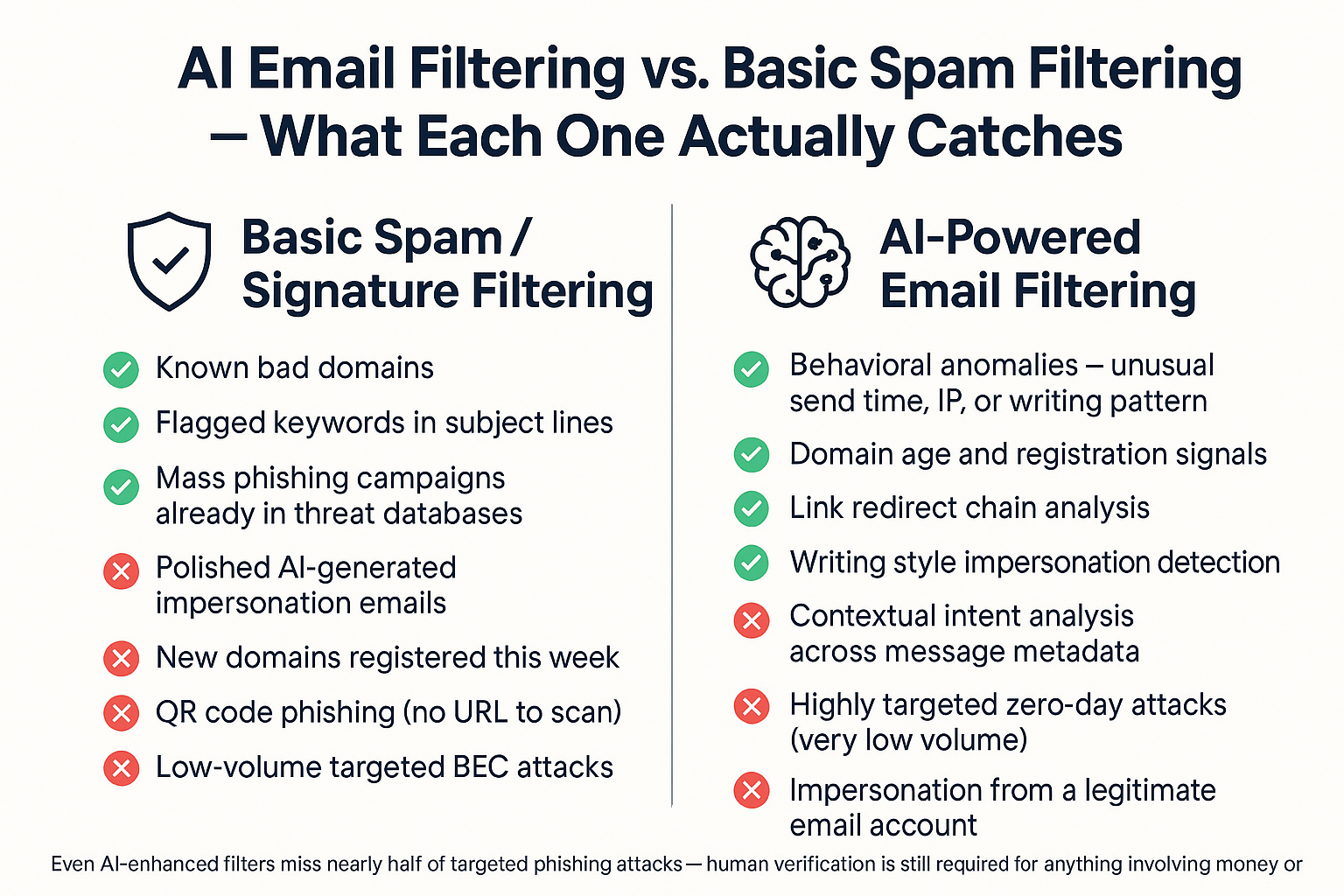
The version of email filtering most people picture works like a checklist. If the message contains certain words, comes from a flagged domain, or includes a known malicious link, it gets blocked. That approach — called signature-based filtering — was good enough when attackers were sending mass, low-effort spam.
What runs inside Microsoft 365 today (specifically through Microsoft Defender for Office 365) and Google Workspace’s built-in protection does something different. It watches for behavioral anomalies across thousands of signals simultaneously:
- A sender domain registered fewer than 48 hours ago
- A message that mimics your CEO’s writing style but originates from an unrecognized IP address
- A link that passes through an unusual number of redirect hops before reaching its destination
- An email that is technically clean but arrives at an odd time with atypical formatting for that sender
None of those individual signals would trip a keyword filter. But an AI model reading them together can flag the message as high-risk with reasonable accuracy.
For a 20-person ag operation in the Salinas Valley or a small law firm in Monterey, this matters because your team does not have a dedicated security analyst reviewing every suspicious message. The filter is doing that work automatically — which is genuinely useful, as long as you understand what it cannot do.
The Threat Has Gotten Smarter — Fast
By April 2025, research from SecurityBrief found that more than half of all spam emails and 14% of business email compromise (BEC) attacks were AI-generated. That number was not even trackable a few years ago.
What that means in practical terms: a criminal who used to spend several hours crafting a convincing impersonation of your CFO can now generate dozens of personalized, polished versions of that message in minutes. The grammar is clean. The tone matches. The request feels plausible.
For a medical practice in Monterey or a financial advisory firm in Carmel, this type of attack — sometimes called a CEO fraud or impersonation attack — is not a distant enterprise risk. It is already hitting organizations your size. Agribusiness operations in the Salinas Valley, which often run lean back-office teams handling large wire transfers tied to harvest season, are a particularly attractive target.
And attackers are not just getting better at writing. They are getting better at evading filters. QR code phishing is one of the fastest-growing evasion tactics flagged in Microsoft’s Q1 2026 threat analysis. An attacker embeds an image in an email — a QR code that leads to a credential harvesting page. Because the attack lives inside a picture rather than a hyperlink, traditional URL inspection tools cannot see it at all. The AI filter has to detect the attack based on the surrounding context of the message, not the payload itself.
How AI Email Filtering Compares to Basic Spam Filtering
This comparison shows what each filtering approach can and cannot catch, so you know where your real exposure sits.
Where the Filter Still Falls Short — and What You Should Do Instead
A recent industry analysis found that nearly half of all phishing and business email compromise attacks slip past traditional secure email gateways — and even AI-enhanced systems can be fooled when the attack is extremely low-volume and highly targeted.
The hardest attacks for any filter to catch are impersonation attacks where the sender’s email address is completely legitimate. No spoofed domain. No suspicious link. A real email account — maybe one that was compromised weeks ago — sends a message asking your office manager to process a wire transfer before end of day. The email looks exactly like something your vendor or executive would send. The AI filter sees a known sender, a clean IP, no malicious links. It passes the message through.
This is where human judgment still has to close the gap. The practical rule is straightforward: anything involving money movement or credential changes requires out-of-band confirmation, meaning you pick up the phone and call the person directly using a number you already have on file — not a number provided in the email. This applies regardless of how clean and familiar the email looks.
For context, the real cost of waiting until something breaks to call IT applies here too — a single successful BEC attack on a Salinas-area business can easily result in losses in the tens of thousands of dollars, and recovery is rarely straightforward once a wire clears.
Default Email Filtering vs. Dedicated Email Security: What’s the Difference?
Businesses in regulated industries often discover this distinction when a cyber insurer or auditor asks whether they have ‘active email security management.’ Here is what each level actually includes.
| Feature | Default M365 / Google Workspace Filter | Dedicated Email Security Layer |
|---|---|---|
| Spam and known malware blocking | Included | Included |
| AI behavioral anomaly detection | Basic (varies by subscription tier) | Advanced — continuously updated models |
| QR code phishing detection | Limited | Present in leading platforms |
| Impersonation protection | Basic | Policy-based, configurable by role |
| Reporting and audit logs | Standard | Detailed — useful for compliance documentation |
| Cyber insurance documentation | Often insufficient alone | Typically meets underwriter requirements |
| Active management and policy tuning | Manual / self-serve | Managed and monitored by IT partner |
| Cost (general market range) | Included with subscription | Varies — often added per-user monthly fee |
Why This Matters for Compliance and Cyber Insurance
If your business operates in a regulated space — a financial advisory firm in the Monterey Bay Area, a healthcare-adjacent organization, a law firm handling client data — your email security posture is no longer just an IT question. It is a compliance question.
Cyber insurance underwriting questionnaires increasingly ask specifically whether you have an actively managed email security layer, separate from the default filtering included with your Microsoft 365 or Google Workspace subscription. Those are treated as different things. A default filter that runs without monitoring or policy tuning does not carry the same weight as a documented, managed solution with audit logs.
California’s data breach notification requirements add another layer of urgency. Under the CPRA framework, the 30-day notification clock starts from the moment a breach is discovered — and a successful phishing attack that compromises client records counts. Having documented controls in place, including active email security management, is part of what demonstrates reasonable security under California law.
For RIA clients and other financial services firms operating out of Monterey County, FINRA and SEC examination staff have also become more focused on email security as part of cybersecurity program reviews. Saying ‘we have Microsoft 365’ is not the same as saying ‘we have a managed, documented email security program.’
The gap between those two statements is exactly where networking and security solutions for Monterey Bay SMBs come into play.
Frequently Asked Questions About AI Email Filtering for Small Business
Does Microsoft 365 or Google Workspace include AI email filtering automatically?
Both platforms include basic AI-assisted filtering with every subscription. But the depth of that protection varies significantly by plan. Microsoft Defender for Office 365 Plan 2, for example, includes advanced threat protection features that are not available on lower-tier plans. Many small businesses in Salinas are running on entry-level Microsoft 365 Business Basic licenses and have far less protection than they assume.
How does QR code phishing work, and why can’t my filter catch it?
An attacker sends an email with an embedded image — typically a QR code that looks like a login prompt or document link. When someone scans it with their phone, they land on a fake credential harvesting page. Because the attack is baked into an image rather than a hyperlink, traditional URL scanning tools have nothing to analyze. AI filters can sometimes catch these by reading the surrounding message context, but it is one of the fastest-growing evasion tactics right now precisely because it is harder to detect automatically.
Our team is pretty good at spotting phishing. Isn’t that enough?
It helps, but research consistently shows that even trained users click on a meaningful percentage of well-crafted phishing attempts — and AI-generated emails are now polished enough that they no longer carry the grammar errors and odd formatting that made older attempts easier to spot. A single click is all it takes. Training your team is still worth doing, but it should work alongside your technical controls, not instead of them.
We’re a small nonprofit in Monterey County with only a few users. Does this really apply to us?
Yes — and in some ways, small nonprofits are more attractive targets because they often have less security overhead while still handling donor financial data and sensitive client information. Several nonprofit organizations in the Monterey Bay Area have reached out specifically about getting basic security controls in place. Size does not reduce risk; it often increases it because attackers know smaller organizations have fewer defenses.
What’s the difference between an email getting filtered and an email getting quarantined?
A filtered message is typically blocked or flagged before it reaches the inbox. A quarantined message is held in a separate folder for review — usually by an IT administrator or the recipient — before being released or deleted. Quarantine is actually useful because it gives you a record of what was blocked and lets you recover a legitimate message that was caught by mistake. If your current setup is not quarantining suspicious messages, you may have less visibility into what is actually being stopped.
How do I know if my current email security is enough to satisfy a cyber insurance questionnaire?
Pull out your last insurance renewal questionnaire and look for questions about email security controls — specifically whether you have multi-factor authentication on email accounts, advanced threat protection enabled, and active monitoring in place. If you cannot answer those questions with documentation to back them up, that is worth addressing before your next renewal. Insurers are tightening underwriting standards, and gaps in email security are one of the most common reasons premiums increase or coverage is denied.
Want to Know What Your Email Security Is Actually Doing?
Adaptive Information Systems works with small and mid-sized businesses across Monterey County — from ag operations in the Salinas Valley to professional services firms on the Monterey Peninsula — to review what email security controls are actually in place versus what business owners assume they have. If you want a clear-eyed look at your current setup, reach out at (831) 644-0300 or visit adaptiveis.net to start the conversation.