

If you’re a business owner in Monterey County, you know that preventing a ransomware attack isn't about finding a single magic bullet. It’s about building a proactive, layered defense. As your local IT partner, we're here to show you exactly how to do that. It all comes down to training your team to be vigilant, deploying the right security technologies affordably, and having a bulletproof backup plan so you never have to consider paying a ransom.
For any business in Salinas, Carmel, or anywhere in between, this framework is your absolute best defense against a cyber incident that could otherwise shut you down for good.
A Realistic Look at Ransomware Threats in Salinas
Running a business in Monterey County—whether you're in the agricultural fields of Salinas or the hospitality sector of Carmel—means ransomware is a very real, local threat. It’s no longer a problem just for giant corporations. Attackers are actively targeting you, the small and mid-sized businesses, because they know you're the backbone of our local economy and often have fewer dedicated IT resources.
A single successful attack can halt your operations, snarl supply chains, and inflict irreparable damage on the reputation you've worked so hard to build.

The way in is often shockingly simple: a deceptive email. Phishing and social engineering are the top ways criminals get a foothold. They might deploy "infostealer" malware through a convincing-looking invoice or a malicious link, designed to quietly swipe your access credentials. In fact, recent threat intelligence shows an 84% increase in this exact kind of malware delivery through phishing campaigns.
This just goes to show that preventing ransomware is as much about your people and processes as it is about your technology.
Understanding the Modern Attack Landscape
The nature of these threats is constantly shifting, so staying informed is non-negotiable. A great way to keep up is by understanding recent ransomware outbreaks and learning from them. At its core, the challenge for you remains the same: attackers exploit human trust and technical oversights to break in.
Ransomware isn't just about locking your files anymore. Attackers now practice "double extortion." They steal your sensitive data before encrypting it, then threaten to leak it publicly if you don’t pay. This raises the stakes significantly for any business that handles private client or employee information.
A robust defense strategy really boils down to three foundational pillars. Think of these as the absolute essentials for protecting your business.
We’ve put together a quick table that summarizes these non-negotiable strategies.
The Three Pillars of Ransomware Prevention
| Pillar | Core Action | Why It Matters for Your Business |
|---|---|---|
| A Human Firewall | Empower your team with ongoing security awareness training. | Your employees are the first line of defense. A well-trained team can spot and report threats before they cause damage. |
| Layered Technology | Implement modern security tools that go beyond basic antivirus. | A single tool is not enough. Multiple layers of security create a much stronger barrier against sophisticated attacks. |
| Resilient Recovery | Ensure you have secure, tested backups isolated from your primary network. | If the worst happens, having a clean, accessible backup means you can restore your operations without paying a dime to criminals. |
These three pillars are the foundation of a modern, resilient cybersecurity posture.
Throughout this guide, we'll break down each of these pillars into clear, actionable steps. Our goal is to give you an enterprise-level IT framework at a price that makes sense for local SMBs, protecting your business and ensuring it continues to thrive.
Building a Human Firewall With Your Team
Your technology stack is a critical piece of the puzzle, but let's be direct—the weakest link in your defense against ransomware often isn't a piece of software. It’s a person.
Even the most advanced firewalls and antivirus programs can be bypassed with a single, accidental click from one of your well-meaning employees. This is why any serious conversation about how to prevent ransomware attacks has to start with your people. It's time to build a resilient "human firewall."
This isn't about blaming your team. It's about empowering them. When you succeed, you transform your staff from a potential vulnerability into your most vigilant and powerful line of defense. The goal is a security-first culture where every single person feels responsible for protecting the business.
Train for Local Threats
Generic, off-the-shelf training videos are a start, but they rarely stick. For training to be truly effective, it has to feel real and relevant to your employees' daily work right here in Monterey County. Cybercriminals are smart—they don't use one-size-fits-all attacks. They tailor their scams to specific regions and industries.
Think about how this plays out for local businesses like yours:
- An agricultural supplier in Salinas gets a fake invoice from a "vendor" that looks nearly identical to the real thing. It arrives right in the middle of the chaos of harvest season.
- A boutique hotel in Carmel receives a phishing email disguised as a booking confirmation from a major travel site. It contains a malicious link to "view details."
- A financial services firm in Monterey sees an email pop up, pretending to be an urgent wire request from a high-net-worth client. The attacker is trying to trick an employee into sending funds or revealing sensitive data.
When you use these kinds of real-world, local scenarios in your training, you're no longer talking about abstract concepts. You're providing practical, memorable lessons that resonate.
The goal isn't to scare your employees; it's to equip them. When someone can visualize exactly how an attack might target them, they are far more likely to recognize and report it. This proactive mindset is the cornerstone of a strong human firewall.
Running Effective Phishing Simulations
The best way to see if your training is working is to test it. Phishing simulations are a fantastic tool for this. They're controlled, safe tests where you send fake (but realistic) phishing emails to your staff to see who clicks.
This isn't about catching people and getting them in trouble. It’s an incredibly powerful educational tool that measures your team's current awareness and shows you exactly where you need to focus more training.
We recommend running these simulations quarterly. This frequency keeps security top-of-mind without causing "test fatigue," where everyone just gets annoyed. The results give you invaluable data on which departments or individuals might need a bit more coaching.
After a simulation, it's crucial to provide immediate, non-punitive feedback. If an employee clicks a link, they should be taken to a landing page that gently explains the specific red flags they missed. This turns a simple mistake into a powerful, lasting learning moment.
Key Red Flags to Teach Your Team
Your training should hammer home one core idea: be healthily skeptical of any unsolicited email or message. Coach your team to slow down and look for these common signs of a phishing attempt before they even think about clicking a link or downloading a file.
- Unexpected Urgency: Watch out for emails that demand immediate action. Phrases that threaten to suspend an account or warn of dire consequences are classic attacker tactics. They create panic to make you act before you think.
- Suspicious Sender Address: This is a big one. Hover your mouse over the sender's name to see the actual email address. A message from "Bank of America" that comes from an address like
support@boamerica-security123.xyzis a dead giveaway. - Generic Greetings: Legitimate companies almost always use your name. Be wary of vague salutations like "Dear Valued Customer" or "Hello Account Holder."
- Spelling and Grammar Mistakes: While attackers are getting better, many phishing emails are still full of typos and awkward phrasing. It's often a sign the message isn't from a professional organization.
- Mismatched Links: Just like with the sender's address, you can hover your mouse over any link to see its true destination. If the link text says
www.yourbank.combut the little pop-up preview shows a completely different and weird-looking URL, don't click it.
Building this human firewall is a continuous process of education, testing, and reinforcement. For a truly resilient team, investing in comprehensive ransomware training that goes deep into both prevention and response is essential. This foundational training, combined with the right technology and policies, creates a robust defense. To see how this fits into a bigger picture, check out our Small Business Guide to Network Security.
Deploying the Right Security Technology Affordably
When we talk with local business owners, the term "enterprise-grade security" often sounds intimidating and, frankly, expensive. It brings to mind images of massive server rooms and six-figure software licenses—things that seem totally out of reach for a business in Pacific Grove or Marina.
We're here to tell you that this perception is just plain outdated.
Protecting your business isn't about breaking the bank. It’s about making smart, strategic investments in the right technologies. This is a core part of our mission: delivering robust, affordable IT solutions that make sense for the real-world budgets of Monterey County businesses.
Let's pull back the curtain on the essential security tools that provide the biggest impact and show you how to implement them without getting sticker shock.
The Power of Endpoint Detection and Response (EDR)
For years, traditional antivirus (AV) software was the standard. It worked like a security guard with a list of known criminals, blocking anything that matched its files. The problem? Modern ransomware is a master of disguise, constantly changing its appearance in ways old-school AV simply can't recognize.
This is where Endpoint Detection and Response (EDR) changes the game. Think of EDR not as a guard with a list, but as a detective actively monitoring behavior. It doesn’t just look for known bad guys; it analyzes what’s happening on your computers and servers (the "endpoints") to spot suspicious activity in real-time.
If a program suddenly starts trying to encrypt hundreds of files or communicate with a known malicious server, EDR spots this unusual behavior and can automatically shut it down before real damage is done. It's a proactive approach, and it's essential for stopping today's fast-moving cyberattacks.
Key Takeaway: Traditional antivirus is reactive; it catches known threats. EDR is proactive; it detects and stops suspicious behaviors, making it far more effective against new and evolving ransomware strains.
Must-Haves vs. Nice-to-Haves for SMBs
With a limited budget, you need to know exactly where to focus your spending. We help our clients distinguish between what's absolutely critical and what can wait.
Here’s a practical breakdown for a typical local business:
Your Non-Negotiable Security Stack
- Multi-Factor Authentication (MFA): This is the single most effective security measure you can deploy. It demands a second form of verification (like a code on your phone) on top of a password. Even if a cybercriminal steals a password, they can't get in.
- Endpoint Detection and Response (EDR): As we just covered, this is your modern replacement for basic antivirus. Consider it your active defense against threats that get past other layers.
- Advanced Email Filtering: Most attacks start with a phishing email. A dedicated service that scans incoming mail for malicious links and attachments is crucial for stopping threats before an employee even has a chance to click.
- Consistent Patch Management: This isn't a flashy tool, but it's one of the most important security routines. Unpatched software vulnerabilities are wide-open doors for attackers. A process to regularly update your operating systems and applications is a must.
A cornerstone of modern cybersecurity is robust Enterprise Identity Management, which ensures only authorized users can access your systems and data. This goes hand-in-hand with MFA to form a powerful barrier against unauthorized access.
How a Managed Provider Makes This Affordable
Trying to buy, implement, and manage all these technologies on your own can quickly become complex and costly. This is where partnering with a Managed Service Provider (MSP) like us creates incredible value.
We bundle these essential services—EDR, MFA management, email filtering, and patching—into a single, predictable monthly fee. Because we purchase these tools at scale for all our clients, we can offer them at a price point that's far more accessible than if you tried to buy them all individually.
More importantly, you get our team of experts to manage it all for you. We handle the configuration, monitor the alerts, and respond to threats 24/7. This frees you up to run your business, confident that you have an enterprise-level security team watching your back for an affordable monthly cost.
Your technology decisions should always align with clear policies. You can get a head start by reviewing our IT Security Policy Template for small businesses.
Creating Your Bulletproof Backup and Recovery Plan
Even with the best security tech and the sharpest team, a determined attacker might still find a way in. This is where your last line of defense—your backup and recovery plan—becomes your most important one.
Think about it: a ransomware attack only works if the criminals believe you can't get your data back without paying them. When you can restore your entire business operation from a clean, recent backup, their leverage completely evaporates.
An attack that could have been a business-ending catastrophe suddenly becomes a manageable, albeit frustrating, IT problem. This isn't just about recovering files; it's about saving your business.
Beyond The Basic 3-2-1 Rule
For years, the gold standard for backups was the 3-2-1 rule: keep 3 copies of your data on 2 different types of media, with 1 copy stored offsite. It's a solid foundation, but modern ransomware attacks have forced us to add a few more layers to that thinking.
Cybercriminals know you have backups, so they actively hunt for them. In fact, a staggering 96% of ransomware attacks now specifically target backup locations and repositories. Attackers are fast, too. The median time from getting into your network to deploying ransomware is just over six days, according to the latest cybersecurity statistics from VikingCloud.com. That's a tiny window to react.
This is why we now stress two additional concepts that are absolutely critical for a modern backup strategy.
- Air-Gapped Backups: This means creating a physical or logical gap between your backups and your live network. The simplest example is an external hard drive that's physically disconnected after the backup finishes. An attacker on your network can't touch what isn't connected.
- Immutable Backups: This is a true game-changer. Immutability means that once a backup is written, it cannot be changed or deleted for a set period. Not even by someone with the highest-level administrator credentials. If an attacker gets total control of your systems, they still can't wipe out or encrypt your immutable backups.
What was once an enterprise-level feature is now available and affordable for small businesses through modern cloud services.
How Often Should You Test Your Backups?
Having a backup is good. Knowing for a fact that your backup actually works is everything.
A backup that has never been tested isn't a recovery plan; it’s a gamble. We've seen too many businesses get a nasty surprise when they try to restore data during a real crisis, only to find the files are corrupted, incomplete, or the wrong version.
You have to test your restores regularly. We recommend performing a full test restoration at least twice a year, with smaller, file-level spot checks every quarter.
This is one of the most overlooked steps in cybersecurity planning. Scheduling and performing regular test restores ensures your data is viable and that your team knows the exact procedure to follow in an emergency. It builds confidence and removes panic from the equation.
A real test is more than just clicking on a file to see if it opens. You should try to restore a critical system—like a database or a whole server—to a separate, isolated test environment. This proves the data is good and also helps you understand how long a real recovery would take.
The image below shows the stark difference in outcomes between organizations that are disciplined about security hygiene (like patching) and those that aren't. This same discipline is what separates a successful recovery from a disaster.
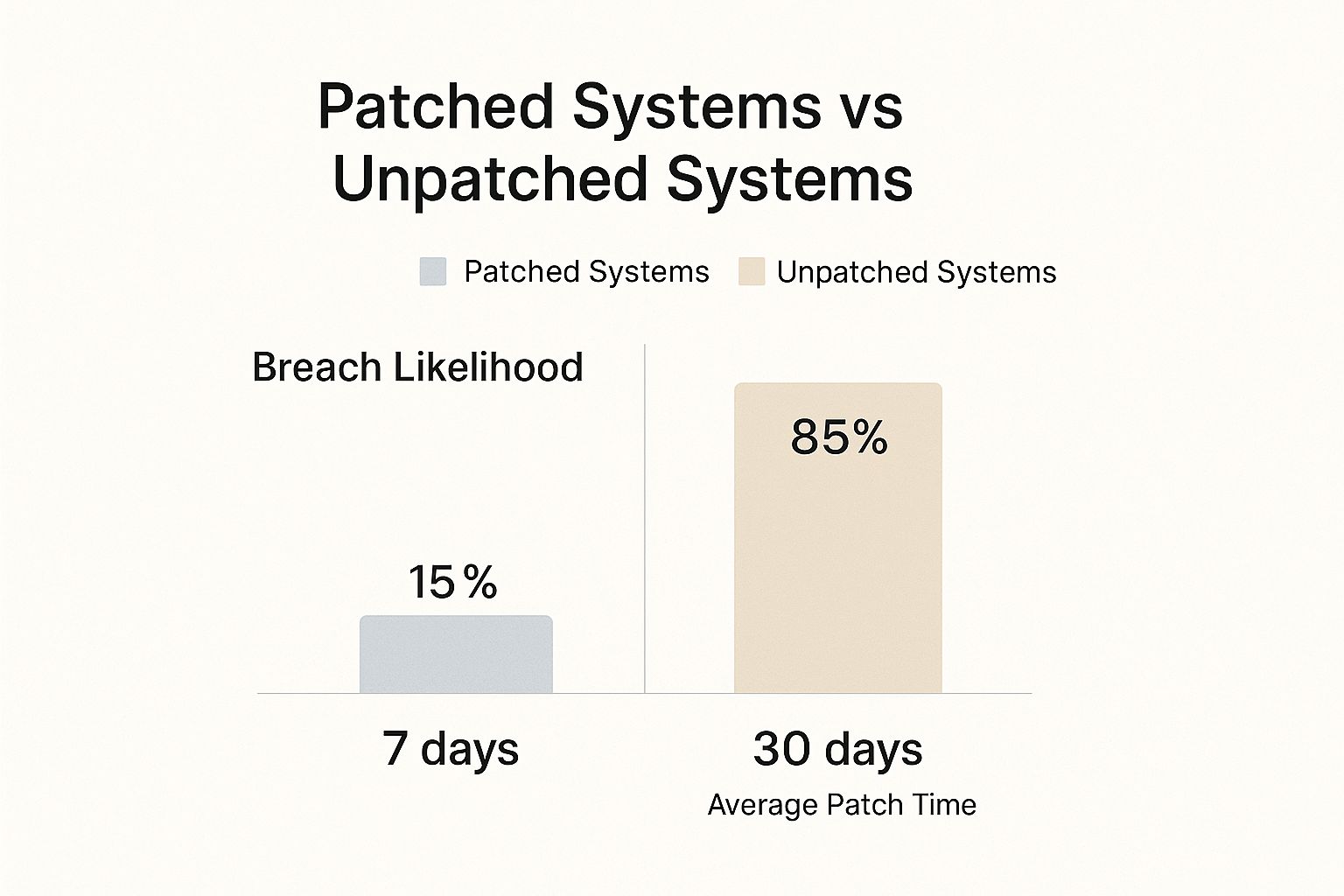
The data makes it crystal clear: proactive, disciplined measures drastically reduce your risk. A solid, tested backup strategy is non-negotiable.
When thinking about which backup method is right for you, it helps to compare the modern options available.
Comparing Modern Backup Solutions
Choosing the right backup solution can feel overwhelming. This table breaks down common methods to help you find the right balance of protection, cost, and convenience for your business.
| Backup Method | Protection Level | Typical Cost | Best For |
|---|---|---|---|
| External Hard Drives | Low-Medium | $ | Very small businesses with minimal data and a disciplined manual process. |
| Local Network Storage (NAS) | Medium | $$ | Businesses needing quick local access to backups but requires strong security. |
| Standard Cloud Backup | High | $$ | Most SMBs needing reliable, automated offsite backups. |
| Cloud with Immutability | Very High | $$$ | Businesses in any industry that cannot afford any data loss or downtime. The ultimate ransomware defense. |
Ultimately, a combination of these methods often provides the best protection. For instance, you might use a local NAS for fast, day-to-day restores and an immutable cloud backup for disaster-level protection.
Your Simple Recovery Plan Template
When disaster strikes, you don't want to be flipping through a 100-page binder. Your recovery plan needs to be clear, concise, and easy for anyone to follow under extreme pressure.
Here is a simple framework you can adapt for your own business.
1. Immediate First Steps (The First 30 Minutes)
- Isolate: The moment you suspect something is wrong, disconnect the affected computers from the network. Unplug the network cable. Turn off Wi-Fi and Bluetooth. Containment is key.
- Alert: Call your IT provider (that's us!) or your designated internal IT lead immediately. Don't try to be a hero and fix it yourself—you could make it worse.
- Communicate: Let your management team know. Use your phone or a personal device, not a potentially compromised company computer or email account.
2. Assessment & Recovery
- Identify the Scope: Work with your IT partner to figure out which systems are hit and, if possible, what type of ransomware you're dealing with.
- Wipe and Restore: Follow your IT partner’s guidance to wipe the infected machines clean and begin restoring from your verified backups—ideally from that air-gapped or immutable copy.
- Verify: After restoring, every system must be thoroughly scanned to ensure no traces of the malware are left before you reconnect them to the network.
3. Post-Incident Review
- Analyze: Find out exactly how the attacker got in. Was it a phishing email that someone clicked? A server that was missing a patch?
- Improve: Use what you learned to make your defenses stronger. Update your security tools, patch your systems, and refresh your employee training.
Developing a strategy that fits your specific business needs is crucial. For a closer look at how we build these plans, check out our guide on data backup and recovery for Salinas-Monterey businesses. This is how you make sure an attack is just a bump in the road, not the end of it.
Your Cybersecurity Partner in Monterey County
We’ve covered a lot of ground—from building a human firewall to deploying the right tech and creating a bulletproof backup plan. Knowing the theory is one thing, but taking decisive action is what truly protects your business. Now, let’s bring it all together.

This isn’t about checking boxes on some generic list. It’s about building a living, breathing security culture within your organization. A proactive, layered defense that makes you a much, much harder target for cybercriminals.
Your Action Plan Checklist
Think of this as your immediate to-do list. These are foundational steps you can start tackling today to seriously upgrade your security posture.
- Schedule a Team Training Session: Your people are your first line of defense. Get a mandatory meeting on the calendar to go over phishing red flags and establish a clear "see something, say something" policy.
- Activate Multi-Factor Authentication (MFA): Go through your most critical apps—email, financial software, cloud storage—and switch on MFA for every single user. This one step can block 99.9% of automated account compromise attacks. It's a non-negotiable.
- Review Your Backup Strategy: Ask the hard questions. Are your backups actually tested? Are they isolated from your main network (air-gapped)? If the answer is no, make this your top technical priority.
- Identify Your Critical Data: You can't protect what you don't know you have. Figure out what your most valuable information is and where it lives. This focuses your protection and recovery efforts where they matter most.
The best security plan is one that's actively managed. It’s not a "set it and forget it" project. Continuous monitoring, regular training, and consistent testing are what separate a resilient business from an easy victim.
You Don't Have to Fight This Alone
We get it. As a business owner in Monterey County, you're already juggling a dozen different hats, from managing agricultural operations in Salinas to overseeing hospitality services in Carmel. Becoming a cybersecurity expert shouldn't be another one of them.
That’s where we come in.
As a local IT partner rooted right here in Salinas, we're all about making enterprise-level security accessible and affordable for our neighbors. We believe every local business deserves the same caliber of protection as a massive corporation, but tailored to your specific reality and budget. We’re here to help you build a practical plan that actually protects your livelihood. This commitment to local businesses is a core part of our mission, and we have deep experience in all aspects of Monterey cybersecurity.
Don’t wait for an attack to reveal your vulnerabilities. Reach out to our team for a no-obligation chat to assess where you stand. Let’s work together to build a stronger, more secure future for your business.
Adaptive Information Systems
380 Main St, Salinas CA 93901 | 831-644-0300 | hello@adaptiveis.net
Ransomware Prevention FAQs
As we guide local business owners through the complexities of cybersecurity, certain questions about ransomware prevention pop up all the time. You’ve got the foundational strategies down, but let's dive into some of the most common concerns we hear from our partners right here in Monterey County.
What Is the Single Most Important Step to Prevent Ransomware?
This is the big one we get asked constantly. While there's no single "magic bullet," the most powerful first step is actually a one-two punch: ongoing employee security training combined with Multi-Factor Authentication (MFA).
Technology is vital, of course, but it’s critical to remember that most ransomware attacks start by tricking a person, not breaking through software. A well-crafted phishing email can fool an employee into clicking a malicious link, bypassing even the most advanced firewalls.
That’s why your strongest defense starts here:
- Train your people: Your team can become your best defense—a human firewall. Regular training teaches them how to spot and report suspicious emails and other social engineering tricks before they cause damage.
- Protect your accounts: Enforce MFA on every critical application, especially email. Even if a cybercriminal steals a password, MFA stops them in their tracks because they won't have the second code from your phone.
This combination dramatically shrinks your attack surface, addressing both the human and technical weak points that attackers love to exploit.
Should My Business Ever Pay the Ransom?
Our guidance here is firm, and it mirrors the official recommendation from the FBI: you should not pay the ransom.
It’s an incredibly tempting thought when your operations are dead in the water and the pressure is mounting. However, giving in to these demands opens up a whole new set of dangers.
Paying a ransom does more than just fund criminal enterprises; it validates their business model. It tells attackers that their tactics work, which directly encourages them to launch more attacks against other businesses in our community.
Beyond that, there's absolutely no guarantee you’ll get your data back—or that it will even be usable. We've seen situations where businesses pay the ransom only to get a faulty decryption key, or worse, they find their data has been corrupted beyond repair. Sometimes, the attackers just take the money and vanish.
A much safer and more responsible strategy is to build a robust, tested backup and recovery plan. If you can confidently restore your systems from a clean backup, you hold all the cards, and the attacker's threats become empty.
Is My Small Business Really a Target for Ransomware?
Yes, absolutely. It's a dangerous myth that cybercriminals only chase after huge, multinational corporations. The truth is, attackers often see small and medium-sized businesses (SMBs) like yours as the perfect targets.
They work on the assumption that you have fewer dedicated IT security resources, less formal employee training, and might not have sophisticated backup systems in place. To them, you look like an easier payday.
The impact of a successful attack on an SMB can be devastating—far more so than on a large enterprise with deep pockets. The downtime, reputational damage, and recovery costs can easily put a smaller company out of business.
This is why proactive defense is so crucial, no matter your company's size. Whether you're a two-person shop or a 50-employee firm, you are a valuable target. To better understand the threats right in our own backyard, check out our detailed guide on Salinas business cybersecurity.
At Adaptive Information Systems, we believe you shouldn't have to navigate these challenges alone. We're here to provide clear, actionable guidance and affordable, enterprise-level solutions to protect your business. Learn more about how we can build a resilient security plan for you at https://adaptiveis.net.
Adaptive Information Systems
380 Main St, Salinas CA 93901 | 831-644-0300 | hello@adaptiveis.net