

When you're comparing help desk software for your local business, you'll quickly run into a fundamental choice: do you go with an all-in-one platform or a dedicated support tool? Choosing the right system is a critical step for any Salinas business aiming to provide top-tier service.
An all-in-one system like HubSpot Service Hub rolls marketing, sales, and service tools into a single package. On the other hand, specialized solutions from companies like Zendesk and Freshdesk zero in on providing deep, powerful features specifically for customer support. The right path for your business really depends on whether you need one system to manage the entire customer journey or a best-in-class tool to truly master your support operations.
Choosing Your Help Desk Software In Monterey County
For any business in Monterey County—whether you're in Salinas, Monterey, or Carmel—you already know that exceptional customer service is what sets you apart. It’s a non-negotiable part of thriving in our unique local economy, from hospitality in Pacific Grove to agriculture in the Salinas Valley. This guide is built to give you a direct, no-fluff comparison that's tailored for local businesses that need serious capabilities without the massive enterprise price tag.
We're here to cut through the marketing jargon and get straight to what matters for your business: improving efficiency, building customer loyalty, and operating cost-effectively. Our goal is simple: to help your team resolve issues faster, keep your customers happy, and give you more time to focus on running your business here on the Central Coast.
A Quick Look At Top Help Desk Solutions for SMBs
Making this decision is a big deal, especially when you see how fast the help desk market is growing. Valued at $14.3 billion in 2025, it's expected to more than double by 2035. That growth is fueled by businesses just like yours looking for smarter, more efficient tools.
To get started, let's take a high-level look at the top contenders. This table gives you a quick snapshot to help frame your thinking.
| Software | Best For | Pricing Model | Key Strength |
|---|---|---|---|
| Zendesk | Businesses needing deep, powerful support features and analytics. | Per Agent/Month | Highly customizable and scalable ticketing. |
| Freshdesk | SMBs seeking an intuitive, user-friendly interface with strong automation. | Per Agent/Month + Freemium | Ease of use and "Freshworks" ecosystem. |
| HubSpot Service Hub | Companies wanting an all-in-one CRM, sales, and support platform. | Tiered based on features | Seamless integration with marketing and sales. |
| Zoho Desk | Budget-conscious businesses already using other Zoho products. | Per Agent/Month + Freemium | Excellent value and Zoho ecosystem integration. |
This table is just a starting point, of course. For a wider view of the market, you might find a more in-depth help desk software comparison useful.
The goal isn't just to pick the software with the most features. It's about finding the one with the right features that fit how you actually work, whether you're running a hotel in Pacific Grove or an agricultural firm in Salinas.
In the sections that follow, we'll dig much deeper into what these differences really mean for your day-to-day operations.
How Smart Help Desk Tools Drive Your Business Growth
If you're still managing customer support for your Pacific Grove business out of a shared email inbox or a tangled web of spreadsheets, you know the daily chaos all too well. It’s a constant battle against missed requests, accidental duplicate replies, and having zero real insight into how your team is performing. But shifting to a dedicated help desk system isn't just about getting organized—it's a strategic move that directly fuels your bottom line.
A smart help desk platform transforms your support from a purely reactive chore into a proactive growth engine. It automates the monotonous, time-consuming tasks that bog down your team, freeing them up to tackle complex problems and forge genuinely positive customer relationships. That's where the real magic happens.

Unlocking Operational Efficiency and Savings
The return on investment (ROI) you get from a proper help desk tool is something you can actually see and measure. It provides the essential structure to manage every inquiry efficiently, whether it’s from a hotel guest in Seaside or a client at a downtown financial firm. This organized approach creates a ripple effect, improving both team productivity and your budget.
The data doesn't lie. By 2025, a staggering 86% of service teams reported a boost in productivity right after implementing a help desk system. The savings are just as significant. Automation alone can resolve roughly 22% of all service tickets with almost no direct cost involved. When you consider that a single support interaction can cost over $15, those automated resolutions add up fast.
For a local business, this means you can handle a growing volume of customer issues without the immediate need to expand your payroll. You aren't just buying software; you're investing in a more scalable, profitable way to operate.
This newfound efficiency also gives you the bandwidth to listen to what customers are truly telling you. A good help desk is crucial for closing the feedback loop, turning valuable customer input into actionable improvements that build loyalty.
Building a Foundation for Scalable Support
As your business grows, your support needs will inevitably become more complex. A solid help desk platform is a non-negotiable piece of your infrastructure—just as critical as reliable internet or your phone system. It acts as the central command center for every customer interaction, creating a rich history that helps your team provide smarter, more consistent service over time.
This foundation is what separates businesses that are just surviving from those built to last. Here are three core benefits you can count on:
- Improved Team Productivity: You can set up automation rules to instantly assign tickets to the right agent, send out pre-written responses for common questions, and flag urgent issues. This slashes manual work and lets your team resolve problems much faster.
- Enhanced Customer Loyalty: When your customers get quick, accurate, and consistent support, their trust in your brand grows. A help desk ensures no request falls through the cracks, transforming good service into a powerful competitive edge.
- Data-Driven Decision Making: You can use built-in dashboards and reports to track key metrics like first response time, ticket volume, and customer satisfaction scores. This data allows you to spot trends, identify recurring pain points, and allocate your resources where they'll make the biggest impact.
Investing in these capabilities is fundamental to building a resilient business. To understand how a strong tech foundation empowers local companies, you can read more about the key IT services in Salinas that are proven to drive success.
Digging Deeper: A Feature-by-Feature Help Desk Breakdown
Alright, let's get to the core of what makes these help desk tools tick. It’s easy for you to get lost in marketing fluff, but the real value is in the details—the specific features that will shape your team’s daily workflow. For a local business, a long list of capabilities doesn't mean much. What matters is how a single feature solves a real problem you face, whether that's managing guest services in Monterey or coordinating technicians across Salinas.
A feature that seems minor on paper can completely change your team's efficiency. One platform’s automation might be a perfect fit for a Marina-based retailer struggling with online order questions, while another’s deep reporting is built for a financial firm tracking compliance. Let's look at what these features mean in the real world.
First, a quick look at how starting costs compare. This chart gives you a baseline for what to expect when you start budgeting.
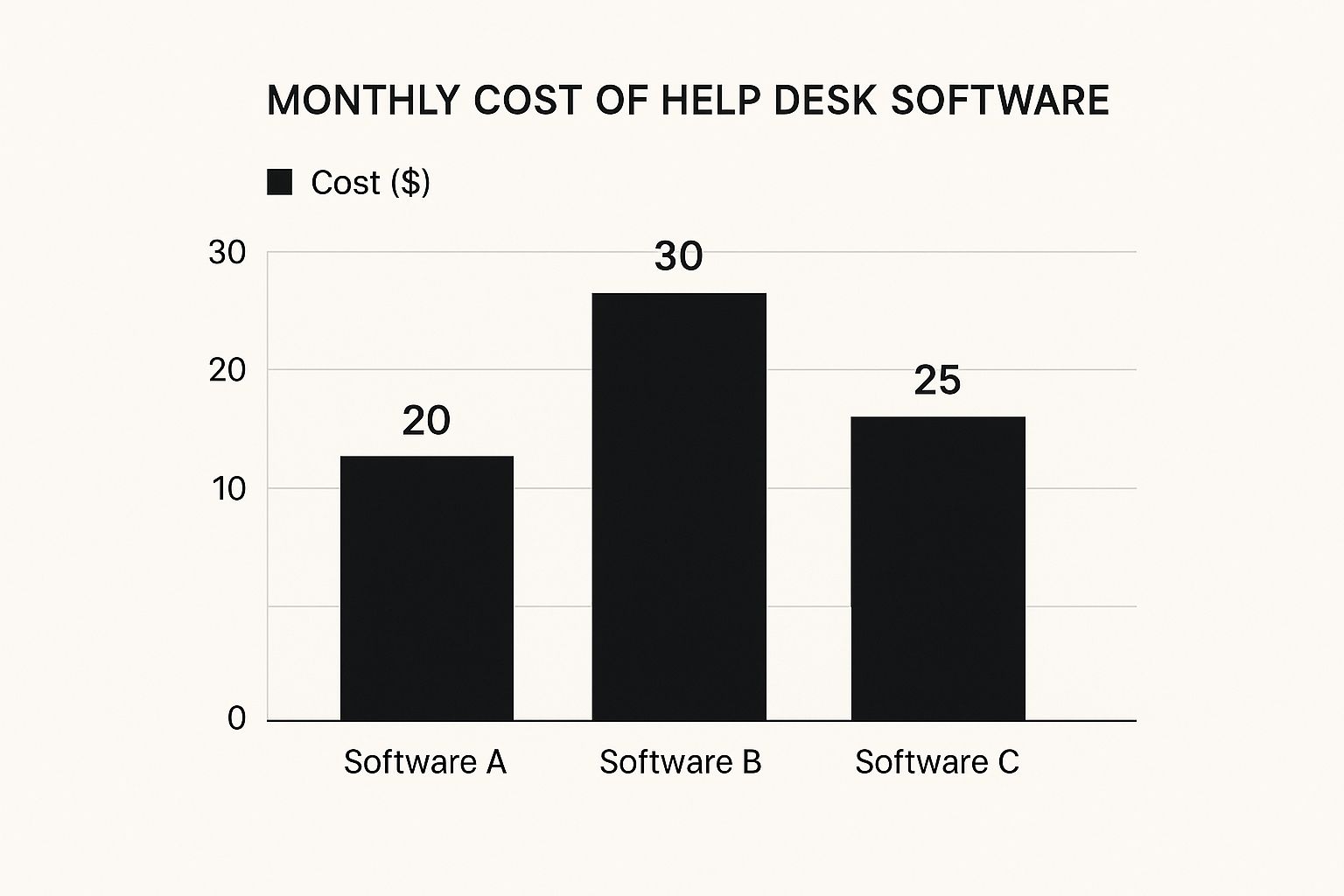
As you can see, entry-level pricing varies quite a bit. This is why it’s so important to match the features you actually need to your budget to get the best value.
In-Depth Feature Comparison of Leading Help Desk Tools
To get into the weeds, you need to compare more than just the basics. The table below breaks down the nuanced differences between the top platforms, highlighting the features that are most critical for small and medium-sized businesses. This is where you'll find the distinctions that make one tool a better fit for your specific operations.
| Feature | Zendesk | Freshdesk | HubSpot Service Hub | Zoho Desk |
|---|---|---|---|---|
| Ticket Automation | Highly customizable with "Triggers" and "Automations." Best for complex, multi-step workflows. | Intuitive "Scenario Automations" that non-technical users can set up easily. | Workflow automation is tied directly to the CRM for powerful, context-rich actions. | Strong departmental automation rules and AI-powered routing. |
| Knowledge Base | Robust AI-powered article suggestions and internal collaboration tools. | User-friendly editor with good categorization and feedback mechanisms. | Fully integrated with the CRM; can restrict content based on customer lists. | Allows for multiple, distinctly branded help centers under one account. |
| Live Chat | Powerful, bot-ready chat included in most plans. | Integrated "Freshchat" is a solid offering across all tiers. | Included in its free tools, with advanced bot features in paid plans. | Only available in the higher-priced Enterprise plan—a key budget consideration. |
| Social Media | Integrates with X (Twitter) and Facebook for public and private messages. | Strong native integration for turning social DMs and comments into tickets. | Tightly integrated with the marketing and sales hubs for a full social view. | Good support for major platforms, converting social interactions into tickets. |
| Reporting & Analytics | Best-in-class, highly detailed, and customizable reporting dashboards. | Clean, easy-to-read reports covering all the essential support metrics. | Excellent at tying service metrics back to the customer journey and revenue. | Solid, customizable dashboards with a good balance of detail and clarity. |
This side-by-side view shows that the "best" tool really depends on your priorities. A business focused on deep data analysis might lean toward Zendesk, while a company wanting to unify sales, marketing, and service would find HubSpot's integrated approach more compelling.
Ticketing Systems and Automation
The ticketing system is the absolute heart of any help desk. It’s what turns every customer email, phone call, or chat into a trackable ticket. A weak system just creates a slightly more organized version of your old chaotic inbox. A strong one brings order.
- Zendesk is famous for its powerful and incredibly customizable ticketing. You can create complex workflows and link multiple incidents to a single root problem, which is fantastic for IT-heavy support.
- Freshdesk offers a more intuitive, user-friendly ticketing interface. Its automation rules are easy for non-technical managers to set up for common tasks like assigning tickets or sending canned responses.
- HubSpot Service Hub shines by building its ticketing directly into the CRM. Every ticket is automatically linked to a rich contact record, giving your team instant context on past purchases and conversations.
Critical Differentiator: For a business with distinct departments, like an agriculture co-op in Salinas with separate teams for sales and technical support, Zoho Desk's ability to create department-specific ticketing queues within a single account offers incredible organizational power at an affordable price.
Knowledge Base and Self-Service
A good knowledge base is one of the smartest investments you can make. It lets customers find their own answers 24/7, which dramatically cuts down on the simple, repetitive questions your team has to field. This frees them up for complex issues that need a human touch.
Think of it as hiring a digital employee who never sleeps. For many local businesses, the help desk support benefits start right here with this feature. Zendesk's knowledge base is particularly robust, while Zoho Desk's ability to create entirely separate, branded help centers for different products is a huge plus for companies with diverse offerings.
Multi-Channel Support
Your customers want to reach you on their terms—email, phone, live chat, or social media. A modern help desk unifies these channels into a single view so your team isn't bouncing between browser tabs all day. That unified view is key to providing consistent service.
The global help desk software market is projected to grow from USD 9.5 billion in 2023 to roughly USD 18.3 billion by 2032. This explosive growth is driven by rising customer expectations for seamless, multi-channel support across every industry.
- Social Media Integration: Tools like Freshdesk and HubSpot make it easy to pull in comments and direct messages from Facebook and Twitter, turning them into tickets automatically. This is a must-have for any business with an active social media presence.
- Telephony: Many solutions offer VoIP integrations, allowing you to make and receive calls right from the help desk. The system automatically creates a ticket and can even add a call recording for quality assurance.
Reporting and Analytics
You can't fix what you don't measure. Reporting is what turns your help desk from a communication tool into a source of powerful business insights. By tracking the right metrics, you can see how your team is performing, spot your most common customer issues, and make decisions backed by real data.
Zendesk leads the pack here with incredibly detailed reports. HubSpot is excellent at showing how service activities impact the bigger picture, tying support metrics directly to revenue and customer retention. For most SMBs, however, the simpler dashboards in Freshdesk or Zoho Desk are more than enough.
Key Metrics to Watch:
- First Response Time: How long does a customer wait for that first reply? This is a huge driver of satisfaction.
- Average Resolution Time: How long does it take your team to completely solve an issue from start to finish?
- Ticket Volume: Are you seeing spikes in tickets at certain times or related to specific products? This helps you plan.
- Customer Satisfaction (CSAT) Scores: Are customers happy with the help they receive? Most platforms let you send simple one-click surveys to find out.
Practical Examples for Your Local Business
Let's stop talking about features in a vacuum and get down to what really matters. A help desk platform is only as good as the real-world problems it solves for your business. How would one of these systems actually hold up against the day-to-day grind of our local Monterey County economy?
I want to walk you through a few practical scenarios. This isn’t just a thought experiment; it's about seeing how these software tools translate into tangible results for the industries that make our community tick. When you can visualize a tool in your own workflow, the decision becomes less about a checklist of features and more about the outcomes you can expect.
Hospitality and Tourism in Carmel and Monterey
Imagine you run a boutique hotel in Carmel-by-the-Sea. Your front desk is a constant whirlwind of guest requests coming from every direction—emails, phone calls, and people standing right in front of you. Juggling maintenance tickets, housekeeping needs, and concierge questions is a recipe for something to fall through the cracks.
A help desk system is designed to bring order to this exact kind of chaos. Here’s how it works in practice:
- Centralized Ticket Management: That email asking for extra towels, the phone call about a broken TV remote, and the handwritten note for a dinner reservation all become organized, trackable tickets in one shared dashboard. Nothing gets lost.
- Automation Rules: You can set up simple rules. For instance, any incoming ticket with the keyword "maintenance" can be automatically routed to your facilities manager. This skips the front desk entirely, leading to faster repairs and happier guests.
- Internal Notes: A front desk agent can add a private note to a ticket—like "Guest is celebrating an anniversary." This gives the next team member who interacts with them the context needed to add a personal touch that guests remember.
For any hospitality business, the right help desk tool acts as a central nervous system. It ensures every single guest request is logged, assigned, and resolved efficiently—which is the foundation for earning those five-star reviews and bringing guests back year after year.
Agriculture and AgTech in the Salinas Valley
Now, let's shift gears and picture a Salinas-based ag company. You have field technicians spread out across hundreds of acres, supporting high-tech irrigation systems and harvesting machinery. When a critical piece of equipment goes down, every minute of downtime costs you real money. Your techs need fast, accurate support, right there in the field.
This is where a help desk with strong mobile capabilities becomes a game-changer.
- Mobile App Access: A technician can pull out their phone, create a new support ticket, snap a few photos of the broken part, and describe the problem on the spot. That information is instantly available to the support team back at the main office.
- Knowledge Base: Your senior techs and support staff can build out a detailed knowledge base filled with troubleshooting guides, service manuals, and quick repair videos. A technician can pull this up on a tablet to solve common issues themselves, without even needing to make a call.
- Asset Tracking: Many modern help desks let you tie tickets to specific assets. When a ticket for "Tractor #7" comes in, your support team can immediately pull up its entire service history, see past repairs, and check warranty information.
Local Non-Profits and Community Organizations
Finally, think about a non-profit in Seaside that’s trying to coordinate dozens of volunteers for a big community event like the Monterey Jazz Festival. Right now, communication is probably a mess of personal email chains, text messages, and shared spreadsheets. It’s easy for assignments to get confused or for volunteers to feel left in the dark.
A help desk can be a surprisingly powerful tool for streamlining volunteer and operational management.
- Dedicated Support Channels: You could set up a specific email address, like
volunteers@yournonprofit.org, that automatically converts every incoming email into an organized ticket. Suddenly, you have a searchable, organized database of all volunteer communications. - Canned Responses: For all those frequently asked questions—"Where do I park for the event?" or "What time does my shift start?"—you can create pre-written responses. This allows a small staff (or even one person) to answer a high volume of questions quickly and consistently.
- Reporting: You can track the kinds of questions people are asking. If you see a huge spike in questions about event logistics, you'll know that your pre-event communication needs to be clearer next time. It’s a simple way to improve your operations over time.
Analyzing the True Cost of Help Desk Software
When you're comparing help desk software, it’s all too easy to let the monthly subscription fee steal the show. But that sticker price? It's often just the tip of the iceberg. To get a real sense of what you'll be spending, you need to look at the Total Cost of Ownership (TCO)—a practical view that includes every related expense.
This is exactly how we approach things at Adaptive: our goal is to deliver enterprise-level IT at a price that makes sense for local SMBs. A low monthly fee means very little if the software nickel-and-dimes you for add-ons, demands extensive training, or needs a dedicated admin just to keep it running. The real win is finding a solution that gives you maximum value without any nasty cost surprises down the road.

Beyond the Subscription Price
The true cost of any software includes the time, money, and people it takes to make it actually work for your business. Before you commit, it’s smart to map out these potential expenses to see the full picture. These are the costs people usually forget, and they can turn a "cheap" option into a very expensive one.
Here are the key factors you can’t afford to ignore:
- Implementation & Setup: Are you going to need an expert to get it configured, migrate your old data, and connect it to other tools? Some platforms are genuinely plug-and-play, but others demand serious technical heavy lifting.
- Team Training: How intuitive is the software, really? A clunky, confusing interface translates directly into lost hours as your team struggles to get up to speed. That's a real cost to your bottom line.
- Third-Party Integrations: Does it play nice with the tools you already rely on, like your CRM or accounting platform? You might find that some vendors lock essential integrations behind a paywall.
- Ongoing Administration: Will someone on your team have to babysit the software for hours every week, or does it mostly run itself once it's set up?
The Hidden Limits of Free Plans
So many vendors try to hook you with a "free forever" plan. And for a brand-new startup, they can be a great starting point. But make no mistake, they are almost always designed with sharp limitations that force a growing business to upgrade sooner rather than later. Think of them as a long-term demo, not a permanent home.
For a growing Monterey County business, the tipping point often arrives when you realize a 'free' plan is costing you more in lost efficiency than a paid plan would cost in dollars. The goal is to anticipate this moment and plan for it.
For example, a free plan might cap you at a few users, limit how much data you can store, or hold back the automation features that actually save you time. A local company needing robust IT help desk support in Salinas will hit these walls fast. The real value is almost always hiding in the paid tiers, where features that boost efficiency and improve service live.
Finding the Sweet Spot of Value
The best choice isn’t always the cheapest one, nor is it the one crammed with the most features. It’s the one that delivers the most value for your specific situation. Start by making a list of your absolute "must-have" features, whether that's live chat or specific reporting tools. This immediately helps you cross off platforms that would force you into their most expensive plan just for one critical function.
Compare the pricing tiers not just by their cost, but by the features they unlock. You’ll often find that a small price jump from a basic to a mid-level plan delivers a huge return on investment. It might introduce powerful automation or analytics that give your business a real advantage. This is the kind of careful thinking that turns a software subscription into an investment that actively fuels your growth.
Our Recommendations for Monterey County SMBs
After breaking down all the features, pricing, and real-world scenarios, it’s time to land the plane. Choosing the right help desk software is a big decision, and our recommendations are here to give you a clear path forward, specifically for businesses like yours here in Monterey County. We’ve weighed every option against our own mission: delivering enterprise-level IT at a price that actually works for local SMBs.
Your final call shouldn't just be about which software has the longest feature list. It’s about finding the tool that fits your budget, your team's day-to-day workflow, and your future growth. Let’s pinpoint the best fit for different local businesses.
Best Overall Value for Most SMBs
For the majority of small and mid-sized businesses, whether you’re running a retail shop in Pacific Grove or a professional services firm in Salinas, Zoho Desk is tough to beat. It strikes an incredible balance between powerful features and real-world affordability. The interface is clean and user-friendly, so your team can get going without a steep learning curve, and the pricing won't force you into making painful compromises elsewhere.
The real magic of Zoho Desk for a growing business is its ability to scale right alongside you. You can set up department-specific ticketing and create multiple branded help centers under a single account—that’s organizational firepower you typically only get from platforms costing much, much more.
Top Choice for Scalability and Deep Analytics
If your business has complex support needs or you live and breathe data, Zendesk is the clear winner. It's the most powerful and scalable dedicated support platform out there, period. Yes, it's a bigger investment, but for businesses that will actually use its deep customization and best-in-class reporting, the cost is absolutely justified.
This is the right choice for a fast-growing AgTech company or a multi-location hospitality group that needs granular control and insight into every single customer interaction.
Ideal for an All-In-One Platform
If you’re already in the HubSpot ecosystem for marketing or sales—or you're aiming for one unified system to manage the entire customer journey—then HubSpot Service Hub is the logical move. Its single greatest advantage is the seamless flow of data between support, sales, and marketing. Every support ticket is automatically enriched with a complete customer history, giving your team amazing context for every conversation.
For so many local companies, building that solid operational foundation is the key to lasting growth. You can see how we apply this thinking in our approach to Monterey business IT support, which is all about creating systems that are both efficient and resilient.
Frequently Asked Questions
When you're about to make a big software decision, a few questions always come up. We hear these all the time from business owners across Monterey County, so we wanted to answer them directly to help you feel confident about your choice.
Let's clear up any lingering doubts you might have.
How Long Does It Take To Implement A Help Desk System?
For most cloud-based help desk tools, a small business can get a basic setup running in a few days to two weeks. That timeline usually covers the essentials: importing your contacts, connecting email, setting up a few starter automation rules, and getting the team comfortable with the interface.
Of course, if you need complex integrations with your other business software, that timeline can stretch. A big part of what we do at Adaptive is map out this process to get you live and helping customers faster, with as little disruption as possible.
Can I Migrate My Existing Support Emails?
Absolutely—and you should. This is a standard, must-have feature for any modern help desk platform. It typically works by forwarding your existing support email (like support@yourcompany.com) to a new, unique address provided by the software. Once that's done, every new email automatically becomes a trackable ticket.
Many platforms also have tools for importing your email history, though the process can vary. Getting all your past and future conversations into one place is a game-changer for understanding the complete history of every customer relationship.
Key Insight: Moving your support emails isn't just a technical task; it's a strategic move. You're turning a chaotic, messy inbox into an organized, searchable database of every customer issue and conversation you've ever had.
What Is The Most Critical Feature For An SMB?
While shiny features are nice, the single most critical feature for any small or medium-sized business is a robust, centralized ticketing system. This is the absolute foundation. Get this wrong, and nothing else matters.
A great ticketing system has to do a few things flawlessly:
- Capture everything: It must reliably turn emails, form submissions, and even phone logs into tickets.
- Assign clear ownership: Every single ticket needs a clear status (Open, Pending, Resolved) and a person responsible for it.
- Allow for teamwork: Your team needs the ability to add private notes to tickets so they can collaborate on solving tricky problems behind the scenes.
All the other impressive features like automation, reporting, and knowledge bases exist to make this core ticketing function even better. For a deeper look at how professional services can strengthen your support, check out our guide on managed IT support services in Salinas. If you nail the ticketing, you solve the core problem of disorganization and pave the way for a truly efficient support operation.
Ready to implement a help desk solution that fits your business and your budget? The team at Adaptive Information Systems is here to help you choose, implement, and manage the right tools for your success.
Get started with a free consultation today
Adaptive Information Systems
380 Main St, Salinas CA 93901 | 831-644-0300 | hello@adaptiveis.net