
What Is Managed IT Support for Salinas Businesses?

Imagine having a full-blown, expert IT department on call for your Salinas business—but without the six-figure payroll. That’s the simplest way to think about managed IT support.
It’s a complete shift away from the old "break-fix" model, where you’d only call for help after a server has already crashed or a computer gives up. Instead, you enter a proactive partnership focused squarely on preventing those problems from ever hurting your business.
Think of it like a subscription plan for your company's technology health.
Moving Beyond Reactive Fixes
The traditional way of handling IT—waiting for something to break—is both expensive and inefficient. Every minute your systems are down is a minute your team can't work, customers can't be served, and your bottom line suffers.
For a hospitality business in Monterey, this could mean the reservation system crashing right in the middle of tourist season, leading to chaos and lost bookings. Managed IT flips this entire model on its head.
For a predictable monthly fee, a dedicated team of specialists actively monitors, maintains, and secures your entire tech setup. This approach ensures your systems run smoothly and securely, day and night.
With managed IT support, your technology becomes a reliable asset that helps your business grow, rather than a constant source of unexpected problems and expenses.
This partnership gives you immediate access to a full team of experts that most small to mid-sized businesses simply couldn't afford to hire in-house. This includes:
- 24/7 Monitoring: Your network is watched constantly to catch and fix issues before you even know they exist.
- Cybersecurity Defense: Powerful protection against modern threats like ransomware, phishing, and data breaches is baked right into the service.
- Helpdesk Support: Your employees get fast, friendly help whenever they have a tech question or run into a problem.
- Strategic Guidance: You gain a partner who provides real advice on how technology can help you hit your business goals. For a deeper dive, our guide on business technology consulting explains how this expert advice can shape your company's future.
Enterprise-Level IT for Local Businesses
Our goal is simple: to give you the same powerful IT capabilities that massive corporations enjoy, but at a price that actually makes sense for a local SMB.
For an agricultural company right here in the Salinas Valley, this means making sure the technology managing crop data and logistics is always online and secure. It’s about protecting your operations from the kind of downtime that costs real money.
Ultimately, managed IT support lets you get back to focusing on what you do best—running and growing your business. You can finally step away from troubleshooting computer problems and leave the complex world of technology management to the experts.
The Real-World Benefits for Your Business
Let's move past the technical jargon. What does managed IT support actually do for your business and your bottom line? The advantages are direct and measurable, impacting everything from your annual budget to your team's daily focus.
A major win is how managed IT can improve overall workplace efficiency. Instead of your team getting sidetracked by frustrating tech glitches, they can stay focused on their real jobs—whether that's serving customers in Carmel, managing agricultural logistics in Salinas, or growing your business.
From Unpredictable Costs to a Flat Monthly Fee
One of the biggest financial headaches for any business is an unexpected, massive IT bill. A server crashes, a network goes down, and suddenly you're staring at thousands of dollars in emergency repair costs you never saw coming.
Managed IT support completely flips that script. You pay a single, predictable monthly fee that covers everything from proactive maintenance to unlimited helpdesk support. This lets you budget for your technology with total confidence, turning a volatile expense into a stable, manageable operating cost.
With a fixed IT budget, you can reinvest your capital into areas that directly fuel growth—like marketing, new equipment, or hiring—instead of constantly holding funds in reserve for the next tech disaster.
This shift toward predictable spending is a huge reason why so many businesses are jumping on board. The U.S. managed services market is expected to hit $116.25 billion by 2030, showing a clear trend away from reactive IT fixes and toward proactive, strategic partnerships.
In-House IT vs. Managed IT Support: A Cost Comparison
To really see the financial difference, let’s break down the estimated annual costs of hiring a full-time, in-house IT professional versus partnering with a managed IT support provider for a typical small business. The numbers often tell a surprising story.
| Expense Category | Annual In-House IT Cost (Estimate) | Annual Managed IT Support Cost (Estimate) |
|---|---|---|
| Salary & Benefits | $85,000 | Included in Service Fee |
| Training & Certifications | $5,000 | Included in Service Fee |
| Monitoring/Security Software | $10,000 | Included in Service Fee |
| Backup & Recovery Tools | $4,000 | Included in Service Fee |
| Emergency Support (After Hours) | $5,000+ (Variable) | Included in Service Fee |
| Total Estimated Annual Cost | $109,000+ | $24,000 – $48,000 |
As you can see, the all-inclusive nature of managed IT support provides access to a full team of experts and enterprise-grade tools for a fraction of the cost of a single in-house hire. This makes it a much more financially sustainable model for most small to mid-sized businesses.
Minimizing the True Cost of Downtime
Every minute your systems are offline, you're losing money. It’s not just about the repair bill; it's about lost sales, tanking productivity, and damage to your reputation. A restaurant in Pacific Grove can't process orders if its point-of-sale system is down, and a local law firm is dead in the water if its network is offline.
The proactive approach of managed IT support is designed to stop these costly interruptions before they ever happen. Through constant monitoring and regular maintenance, potential issues are spotted and fixed behind the scenes, usually before you even know there's a problem.
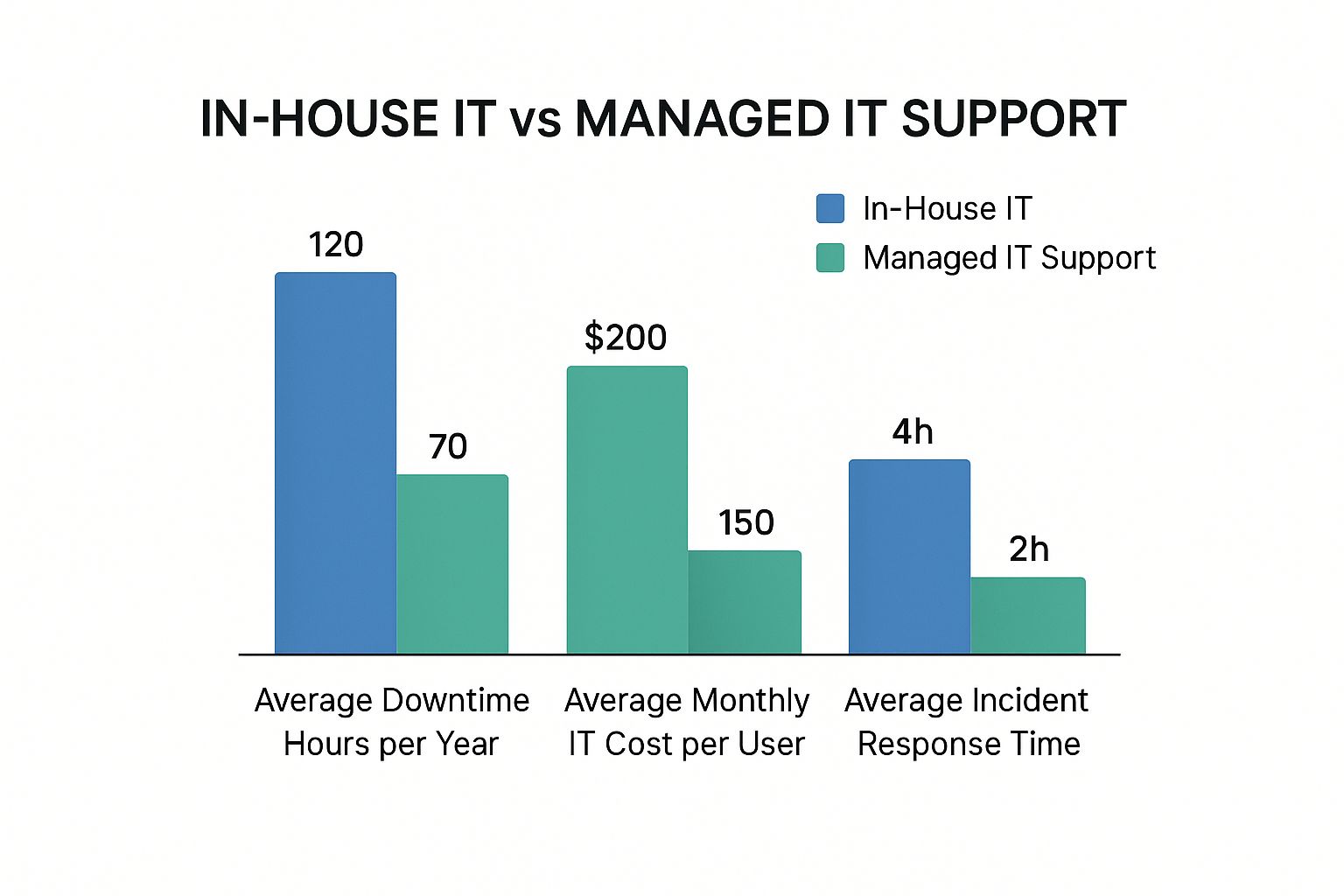
The data here doesn't lie. Partnering with a managed provider can dramatically cut downtime, lower per-user costs, and slash incident response times, all of which lead to major gains in productivity.
Scaling Your IT as Your Business Grows
Your business isn't standing still, so why should your technology support be stuck in place? As you hire new people, open a new office, or adopt new software, your IT needs are going to change.
With an in-house team, scaling up can be slow and expensive. It often means a lengthy hiring process and significant investments in new infrastructure. Managed IT support offers a far more flexible solution that grows right alongside you.
A good Managed Services Provider (MSP) can seamlessly:
- Onboard New Employees: Get new users set up fast with the right access, software, and security protocols.
- Support Remote Teams: Make sure your hybrid or fully remote workers have secure and reliable access to company resources from anywhere.
- Integrate New Technology: Expertly roll out and manage new tools without disrupting your day-to-day operations.
This built-in scalability ensures your technology is always an asset, never a roadblock to your growth. You get the kind of enterprise-level capabilities that adapt to your needs, all at a price that makes sense for a local SMB.
Core Services Included in Your IT Plan

So, what are you actually getting for your monthly fee when you sign up for managed IT support? It's so much more than just a repairman on standby. Think of it as a complete technology package designed to keep your business running smoothly, securely, and without frustrating interruptions.
A great way to think about it is like the service plan for a high-performance car. You don't just get the keys; you get ongoing engine diagnostics, advanced security systems, and a direct line to a specialist mechanic. They all work together to prevent breakdowns before they happen.
A managed IT plan does the exact same thing for your tech, bundling critical services into one predictable cost. This model is becoming the standard as business technology gets more complicated.
24/7 Network and Infrastructure Monitoring
The very foundation of any solid IT plan is constant watchfulness. Your provider installs monitoring software that acts like a sleepless security guard, watching over your entire IT ecosystem—servers, computers, and network gear—24 hours a day, 7 days a week.
This isn't a passive system just waiting for an alarm. It's actively hunting for early warning signs, like a server's storage filling up too quickly or a key application using too much memory.
By catching these small hiccups early, your IT partner can swoop in and fix them before they snowball into major outages that bring your business to a halt. You can learn more about the mechanics in our guide on what is infrastructure monitoring. This proactive mindset is what really separates modern managed IT from the old "wait until it breaks" model.
Proactive Maintenance and System Health
Just like your car needs regular oil changes to keep the engine from seizing, your technology needs consistent upkeep to perform at its best. Proactive maintenance is a core part of your service plan where your IT provider handles all the essential but easily forgotten tasks.
This includes things like:
- Applying Security Patches: Making sure all your software is updated with the latest security fixes to shut the door on vulnerabilities.
- Optimizing System Performance: Tidying up system files, checking logs for errors, and ensuring your computers are running at top speed.
- Verifying Backups: Regularly double-checking that your data backups are actually working and can be restored if the worst happens.
This quiet, behind-the-scenes work is absolutely critical for preventing slowdowns, crashes, and security breaches. It keeps your tech healthy so your team can stay productive.
Robust Cybersecurity and Threat Protection
In today's world, strong cybersecurity isn't a "nice-to-have"—it's essential. A quality managed IT plan layers multiple security tools to shield your business from an ever-growing list of digital threats. At the heart of this strategy is the implementation of modern enterprise network solutions.
And we're not just talking about basic antivirus software. This is a complete security strategy.
Your managed IT provider becomes your dedicated security team, deploying and managing the same caliber of tools used by large corporations to defend your network, data, and employees from cyberattacks.
You can expect key services like advanced firewalls, email filtering to catch phishing scams, and endpoint protection for every device. Many providers also include security awareness training to turn your employees into your strongest line of defense.
Reliable Backup and Disaster Recovery
What would happen if a fire, flood, or a nasty ransomware attack took out your servers? A solid backup and disaster recovery (BDR) plan is what ensures your business can live to fight another day.
This service is far more than just saving copies of your files. It involves creating a complete, restorable image of your entire system. If a catastrophe strikes, your IT partner can rapidly bring your operations back online on a new server or even run your systems from the cloud, drastically minimizing expensive downtime.
Unlimited Helpdesk Support
When your employees hit a technical snag, they need help, fast. Managed IT support gives your staff access to a professional helpdesk they can reach by phone, email, or a simple ticketing system.
Whether it’s a forgotten password, a glitchy piece of software, or a printer that won't cooperate, your team gets direct access to friendly experts who can solve their problems quickly. This gets you and your managers out of the business of being the default IT support, letting everyone focus on their actual jobs.
Vendor Management
We've all been there—stuck on hold with the internet provider or trying to explain a technical issue to a software company's support line. It's a frustrating, time-sucking ordeal.
With vendor management, your IT partner takes that entire burden off your plate. If your internet drops or you have an issue with a specific application, you make one call to your provider. They take it from there, dealing with the third-party vendor on your behalf to get things fixed. It's a massive time and stress saver.
How Monterey County Industries Thrive with Managed IT
Managed IT support isn’t a one-size-fits-all service. It’s a specific set of tools and strategies applied to solve the real-world headaches your business faces every day. For local businesses here in Monterey County, from Salinas to Carmel, that means finding a technology partner who actually gets the unique demands of your industry.
Think about it: technology is the engine driving your business, but that engine looks completely different depending on what you do. The IT needs of a farm in the Salinas Valley are a world away from a boutique hotel in Pacific Grove or a law firm in Monterey. An effective managed IT support plan is built from the ground up to handle these specific operational realities.
Let's take a look at how this proactive approach helps key local industries do more than just get by—it helps them thrive.
Powering Salinas Valley Agriculture
Agriculture is the backbone of our local economy, and today's farms are more tech-heavy than ever before. You depend on complex systems for everything from automated irrigation and drone-based crop monitoring to supply chain logistics and payroll. When any of that technology goes down, the consequences are immediate and expensive.
Proactive managed IT is essential to prevent that kind of disruption. For instance:
- Ensuring Uptime for Critical Systems: A managed services provider is constantly watching the servers and network that run your irrigation controls and logistics software. Potential problems get fixed before they can shut down operations during a critical planting or harvest window.
- Protecting Sensitive Data: Farm operations produce massive amounts of valuable data, from soil sensor readings to financial records. Robust cybersecurity protects this information from ransomware attacks that could paralyze your business.
- Connecting the Field and Office: You need reliable connectivity across your entire property. A skilled IT partner can design and manage a network that keeps your field teams and office staff perfectly in sync.
By keeping the tech running smoothly behind the scenes, you can focus on what you do best—growing the food that feeds the nation. To see how a dedicated strategy makes a difference, you can learn more about specific agriculture IT services in Salinas.
Enhancing the Guest Experience in Hospitality
For hotels, inns, and restaurants in tourism hotspots like Monterey and Carmel, the guest experience is everything. Technology plays a massive role in shaping that experience, and any little hiccup can quickly spiral into negative reviews and lost business. A single hour of POS system downtime can cost a restaurant thousands of dollars in lost sales.
Managed IT support delivers the stability these businesses depend on.
Think of your IT provider as your digital concierge. They work behind the scenes to ensure every technological touchpoint—from booking to checkout—is seamless, secure, and reliable for your guests.
Key services for hospitality include maintaining secure guest Wi-Fi, making sure payment processing systems are always online and compliant, and keeping reservation platforms stable. This foundation of reliable tech is what helps you earn those coveted five-star reviews.
Securing Professional Services Firms
Law offices, accounting firms, and financial advisors in places like Seaside and Pacific Grove handle some of the most sensitive data imaginable. For them, a data breach isn't just an inconvenience; it can be a catastrophic event that shatters client trust and leads to severe regulatory penalties.
Managed IT support is fundamental to their security and compliance. This includes:
- Advanced Cybersecurity: Implementing and managing multiple layers of security defenses to protect client financial records, legal documents, and personal information from cyber threats.
- Regulatory Compliance: Ensuring all IT systems and data-handling procedures meet strict industry standards like HIPAA or financial regulations.
- Software Availability: Guaranteeing that the critical practice management or accounting software your team relies on is always up, patched, and performing at its best.
By outsourcing their IT, these firms get enterprise-level security and reliability without the enterprise-level headcount, allowing them to focus on giving expert advice to their clients with total confidence.
Calculating Your Return on Investment

It’s easy to look at the monthly fee for managed IT support and see it as just another line item in the budget. But if you’re only looking at the cost, you’re missing the whole story. The smart way to approach it is to see it as an investment—one that pays you back in your business's efficiency, security, and overall health.
The real question isn't "what does it cost?" but "what's my return on this investment?" To find that answer, you have to look past the monthly invoice and start thinking about all the expensive, time-consuming problems that proactive IT management helps you avoid altogether.
It’s a simple mindset shift from "How much do I pay?" to "How much does this save and earn for me?"
The Hidden Costs of Old-School IT
Before you can really appreciate the value of a managed plan, you have to get honest about the hidden costs you’re probably already paying. These are the expenses that don't show up neatly on a bill but are quietly draining your resources every day.
Think back to the last time your server crashed or your team couldn't get into a critical file. What did that really cost you?
You can start putting a number to it by looking at a few key areas:
- Lost Revenue from Downtime: Every single hour your systems are offline is an hour you can't make a sale, help a customer, or bill for your time. That direct financial hit adds up faster than you’d think.
- Wasted Employee Productivity: How much time do your people spend fighting with their own tech? Even 15 minutes a day per employee spent wrestling with a slow computer is a massive drain on your payroll.
- The Expense of a Data Breach: A single security incident can be financially devastating. We’re talking regulatory fines, legal bills, and serious damage to the reputation you’ve built with clients in Monterey and beyond.
The global managed IT support market is exploding—projected to hit $1,314.9 billion by 2035—precisely because businesses are waking up to these hidden costs and looking for a smarter, more predictable model.
A Simple Framework for Calculating ROI
Figuring out a precise ROI means looking at both the hard numbers you save and the softer—but just as critical—gains in productivity. It’s all about measuring the real value you get back for every dollar you put into professional IT management.
Your return isn’t just about money saved on emergency repairs. It’s found in the extra hours your team can focus on their actual jobs, the new clients you win because your systems are always reliable, and the catastrophic breach you never have to clean up.
Here’s a practical way to break it down:
- Calculate the Cost of Inaction: First, get a rough estimate of what your current IT approach (or lack of one) is costing you each year. Add up the cost of downtime, lost productivity, and any emergency repair bills. Our guide on the hidden costs of IT downtime can help you uncover all of them.
- Estimate the Gains from Managed IT: Now, think about the benefits. What would you save by cutting downtime by 90%? What’s the value of giving your team back several hours of productive work every single week?
- Compare the Two: Finally, subtract the annual cost of a managed IT support plan from your "cost of inaction." The result gives you a clear picture of your potential ROI. More often than not, that number shows that proactive IT support doesn't just pay for itself—it actively boosts your bottom line.
How to Choose the Right IT Partner in Monterey County
Let's be honest—not all IT providers are the same. Picking the right one is one of the biggest technology decisions you'll make for your business, and it pays to get it right.
The first step is finding a partner who genuinely understands the local landscape, from the unique agricultural demands in Salinas to the fast-paced hospitality world of Monterey. You're not just hiring a vendor; you're looking for a team that feels like a true extension of your own.
Key Questions to Ask Any Potential Provider
Before you even think about signing a contract, you need to get past the sales pitch. Treat this like an interview for a critical role on your team, because that’s exactly what it is.
Here are a few questions I always recommend you ask to get the ball rolling:
- What is your guaranteed response time? Ask to see their Service Level Agreement (SLA). You need to know how fast they'll jump on a critical issue versus a low-priority ticket.
- What experience do you have in my industry? An IT provider who already knows the software and operational headaches in agriculture or hospitality is miles ahead of one who doesn't.
- What certifications do your technicians hold? You want to see proof of expertise. Look for current certifications in networking, security, and cloud technologies. This tells you their team's skills are sharp and up-to-date.
- Can you provide client testimonials or case studies? There’s no better way to gauge reliability than hearing directly from other local business owners they work with.
Look for Local Expertise and Understanding
Choosing a local provider gives you a massive advantage. A team right here in Monterey County has a much better feel for the regional business environment and can offer hands-on support when you need it most.
They get the local internet providers, the specific compliance hoops California businesses have to jump through, and the day-to-day challenges you face.
Your IT partner shouldn't be some faceless voice in a call center hundreds of miles away. They should be a local resource who can give you strategic advice that actually makes sense for the Monterey Bay Area economy.
A local firm can also get on-site much faster when a major issue pops up. If you're starting your search, our list of the top IT consulting firms in Monterey is a great place to begin.
Ultimately, you're looking for a partner committed to helping local businesses like yours succeed with enterprise-level IT at a price that makes sense.
Common Questions About Managed IT Support
After exploring the benefits and services, you might still have a few questions about how managed IT support would actually work for your business. That's perfectly normal. Here are some clear, direct answers to the questions we hear most often from local business owners like you.
Is My Small Business Big Enough for This?
This is one of the most common questions we get, and the short answer is almost always yes. Managed IT was practically designed for small to mid-sized businesses that are too small for a full-time, in-house IT department but too big to keep relying on a "break-fix" approach.
If you have a handful of employees and your business depends on technology to operate—whether you're a small accounting firm in Monterey or a growing ag-tech company in Salinas—you're exactly the right size. It gives you the high-level expertise you need at a cost that makes sense.
What's the Real Difference From Break-Fix IT?
The biggest difference is the entire mindset. Break-fix IT is purely reactive; you only call for help after something has already broken, which almost always leads to frustrating downtime and unexpected costs.
Managed IT support is proactive.
Think of it like this: Break-fix is the emergency room, treating problems after they happen. Managed IT is your primary care doctor, focused on preventative health to keep you out of the ER in the first place.
Your provider works to stop problems before they even start, making sure your systems are always healthy, secure, and ready for business.
How Long Does It Take to Switch IT Providers?
The thought of switching can feel overwhelming, but a professional provider makes the process surprisingly smooth and straightforward. The onboarding process typically takes a few weeks, not months.
Your new IT partner will handle all the heavy lifting, including:
- A thorough assessment of your current technology.
- A detailed plan for a seamless transition.
- Deploying monitoring tools and security software with minimal disruption.
- Coordinating with your old provider to ensure a clean handover.
The entire goal is to get you up and running on the new system without interrupting your day-to-day operations.
Can You Work with Our Industry-Specific Software?
Absolutely. A key part of choosing the right IT partner is finding one with experience in your field. Whether you use specialized software for agricultural logistics, hospitality management, or legal case files, a good provider will learn your systems inside and out.
They'll work directly with your software vendors to manage updates, troubleshoot issues, and ensure your most critical applications are always running smoothly. This frees you from being the middleman between your software company and your IT support.
Ready to see how a proactive IT strategy can protect your business and boost your bottom line? The team at Adaptive Information Systems provides enterprise-level IT support at a price that makes sense for local SMBs.
Get a free consultation to build your custom IT plan.
Adaptive Information Systems
380 Main St, Salinas CA 93901 | 831-644-0300 | hello@adaptiveis.net