
A proper disaster recovery plan for a small business isn't just a binder collecting dust on a shelf. It’s your detailed playbook for getting back on your feet quickly after a major disruption. Think of it as a complete strategy for operational survival, defining exactly how you'll recover everything from customer records to daily workflows, and most importantly, how you'll minimize costly downtime. For businesses here in Salinas and across Monterey County, having a plan is non-negotiable.
Why Your Salinas Business Needs a Resilient Recovery Plan

Let's be direct. For your small business in Salinas or anywhere in Monterey County, a single unexpected event can jeopardize everything you’ve worked so hard to build. This isn't about fear-mongering; it's about helping you take control of your company's future. A sudden PG&E power outage, a wildfire creeping too close, or a sophisticated ransomware attack can halt your operations in an instant.
The statistics are sobering. According to an analysis of Small Business Administration data, nearly 90% of small businesses that get hit by a major disaster never reopen. That number is a stark reminder of just how vulnerable local companies are.
A well-crafted disaster recovery plan (DRP) is your proactive defense. It helps you turn panic into a clear, methodical response.
At its core, disaster recovery is about one thing: resilience. It’s your ability to take a hit—whether from a natural disaster or a cyber threat—and not just survive, but get back to serving your customers quickly and confidently.
More Than Just a Backup
Too many business owners I talk to think having a data backup is enough. While backups are absolutely critical, they're only one piece of a much larger puzzle. A true disaster recovery plan addresses the entire scope of your business operations.
It forces you to answer tough but essential questions:
- If your primary location in Monterey or Carmel is inaccessible, where will your team work?
- How will you communicate with employees, clients, and suppliers when your main systems are down?
- Which business functions are absolutely essential, and in what order must they be restored to minimize financial bleeding?
For instance, an agricultural business in the Salinas Valley depends on specific software for crop management and logistics. A hospitality business on Cannery Row relies on its point-of-sale (POS) and reservation systems. Each has unique critical functions that require a tailored recovery strategy. This is where getting specific about your recovery goals becomes so important. Our guide on backup and disaster recovery for small businesses digs deeper into this fundamental difference.
Decoding Core Recovery Concepts
To build an effective plan, you need to understand two key metrics that will define your entire strategy: the Recovery Time Objective (RTO) and the Recovery Point Objective (RPO). These aren't just IT buzzwords; they are practical measures that directly impact your budget and your ability to bounce back.
The table below breaks down these essential terms in a way that’s easy to understand.
Decoding Disaster Recovery Terms
A quick reference to understand the core concepts of disaster recovery planning for your business.
| Term | What It Means for Your Business | Real-World Example |
|---|---|---|
| Recovery Time Objective (RTO) | The maximum acceptable downtime for a system. It answers: "How quickly must we be back up and running?" | A busy e-commerce site might have an RTO of 1 hour, while an internal HR system might have an RTO of 24 hours. |
| Recovery Point Objective (RPO) | The maximum amount of data you can afford to lose. It answers: "How much work are we willing to redo?" | A law firm entering billable hours all day might need an RPO of 15 minutes. A marketing agency working on long-term projects might be fine with a nightly backup (RPO of 24 hours). |
Getting a handle on your RTO and RPO is the first real step toward creating a plan that provides enterprise-level protection at a price that makes sense for your business. Once you know these numbers, you can start building a strategy that truly fits.
Conducting Your Business Impact Analysis
Before you even think about writing a disaster recovery plan, you have to know exactly what you’re protecting. A generic, off-the-shelf plan just won't cut it. Why? Because your business isn't generic. A law firm in Monterey has wildly different "must-have" functions than a farm just outside of Salinas.
This is where a Business Impact Analysis (BIA) comes in. Think of it as the diagnostic phase—it’s the foundational step that ensures your recovery plan actually works when you need it most. A BIA cuts through the chaos of a potential disaster, helping you make logical, priority-driven decisions instead of panicked ones.
Pinpointing Your Critical Operations
First things first, you need to map out every single process that keeps your lights on and money coming in. Don't just focus on the tech; think about the entire operational workflow from start to finish. Ask yourself: which functions, if they stopped right now, would immediately tank our revenue, shred our reputation, or put us in legal trouble?
Let's take a local hospitality business in Carmel as an example. Their absolute critical functions would likely be:
- Point-of-Sale (POS) System: If this goes down, payments stop. Revenue grinds to a halt. It’s that simple.
- Online Reservation Platform: An outage here means no new bookings and no way to manage existing guest arrivals. It's a direct hit to both your income and your reputation.
- Guest Communication System: This covers your phones and email. If you can't talk to current or potential guests, you're essentially closed for business.
Now, contrast that with an agricultural operation in the Salinas Valley. Their list would look totally different. The specialized software managing irrigation schedules or the logistics platform coordinating produce shipments would be at the very top. The goal is to identify your unique, non-negotiable operations.
Inventory Your Key Assets
Once you’ve identified what’s critical, it’s time to list the specific assets—the hardware, software, and data—that make those functions possible. This inventory becomes the practical backbone of your recovery strategy.
Think of it like this: A BIA tells you what you need to protect. Your asset inventory tells you how those things are delivered. You can't restore a critical function if you don't even know what tools are needed to run it.
Create a simple but detailed list. It should include:
- Hardware: Servers, employee laptops, POS terminals, network switches, printers—anything physical.
- Software: Your accounting package (like QuickBooks), CRM platform, any industry-specific applications, and your communication tools.
- Data: This is the big one. Customer lists, financial records, employee files, and any proprietary business data.
Get specific. Don't just write "server." Note its role (e.g., "File Server for Shared Docs"), what it runs, and how critical it is. This level of detail is invaluable when the pressure is on.
Mapping the Consequences of Downtime
With your critical functions and assets listed, you can finally assess the real-world damage of losing each one. This is what helps you prioritize. For each critical asset, ask the tough question: "If this is unavailable for an hour, a day, or a week, what really happens?"
Break down the fallout across different areas:
- Financial Impact: How much revenue do we lose per hour of downtime? Are there contractual penalties or fines for missing deadlines?
- Reputational Impact: How would an outage hurt customer trust? Could it lead to a flood of negative online reviews or kill future business?
- Operational Impact: Can my team still do their jobs? Does one small failure create a massive bottleneck that paralyzes everyone else?
- Legal & Compliance Impact: Are we at risk of violating regulations like HIPAA or PCI-DSS if certain data is inaccessible or breached?
Having a clear-eyed view of these consequences is everything. It's what separates a controlled, strategic response from a full-blown reactive panic.
If you're feeling overwhelmed by this, that's normal. Our team provides expert Salinas business IT support and can walk you through a BIA tailored specifically to your operations. This analysis will give your disaster recovery plan the solid, real-world foundation it needs to succeed.
Defining Realistic Recovery Objectives

You’ve done the hard work of the Business Impact Analysis and now have a clear picture of what makes your business tick. The next step is translating that knowledge into concrete, measurable goals for your disaster recovery plan. This is where we get practical about your Recovery Time Objective (RTO) and Recovery Point Objective (RPO).
These aren't just IT buzzwords; they're the two most critical dials you can turn to balance cost against protection. Getting them right is the key to building a disaster recovery plan for a small business that’s both effective and affordable.
Setting Your Recovery Time Objective (RTO)
Your RTO answers a simple but vital question: How long can you afford to be down? This isn’t about what’s convenient. It’s about what your business can realistically survive.
Think about it. An hour of downtime for an online flower shop in Pacific Grove on Valentine's Day could be catastrophic. But for an accounting firm in the off-season, an hour might just be a minor hiccup. You have to attach a real dollar figure to your downtime to make an informed decision.
Downtime isn't some hypothetical problem, either. Recent industry reports found that a shocking 100% of organizations lost revenue from IT outages in the last year alone. With businesses facing dozens of outages annually, these interruptions can quickly devastate a small company's bottom line. You can explore the full findings in the State of Resilience report.
Establishing Your Recovery Point Objective (RPO)
Your RPO tackles the other side of the equation: How much data can you afford to lose? This is all about your tolerance for re-doing work after a failure.
Imagine the data that flows through your business every day. If your server crashed right now, would losing the last hour of work be acceptable? Or would it mean losing dozens of transactions from your POS system or critical client updates?
- A business with high transaction volume, like a popular cafe in downtown Monterey, needs a very low RPO—perhaps just a few minutes.
- A construction company that primarily updates project files at the end of the day might be perfectly comfortable with a 24-hour RPO, as long as nightly backups are secure.
The shorter your RTO and RPO, the more sophisticated (and typically more expensive) your recovery technology needs to be. Our mission is to find the perfect balance for you—delivering robust protection without the enterprise-level price tag.
Key Takeaway: Your RTO and RPO are not just technical settings. They are business decisions that directly connect the cost of your recovery solution to the real-world financial impact of a disaster.
Aligning these objectives with your budget is fundamental. For example, achieving a near-zero RTO often requires advanced systems that create a live, mirrored version of your environment, which might be overkill. A slightly longer RTO of a few hours might be perfectly acceptable and achievable with more cost-effective cloud-based solutions. Understanding these trade-offs is crucial—and it directly influences your overall security posture. To learn more, check out our insights on building a strong cybersecurity foundation in Salinas.
Choosing the Right Backup and Recovery Technology
Alright, you’ve defined your recovery objectives. Now for the fun part: picking the technology that actually makes it happen. This is the heart of your technical strategy and the engine that powers your entire disaster recovery plan for a small business. Get this right, and you can hit your RTO and RPO targets without emptying your bank account.
Your decision really boils down to where your data is stored and how you get it back. There are three main models, and each comes with its own set of trade-offs for businesses here in Monterey County.
Comparing Your Backup Options
The best solution is all about your specific needs, budget, and how much risk you’re willing to stomach. A restaurant in Seaside has a totally different risk profile than a financial services firm in Carmel, so understanding the give-and-take is key.
-
Local Backups: This is the old-school method—copying data to an external hard drive or a server right there in your office. It's usually the cheapest and fastest way to grab a single file you accidentally deleted. The big problem? It leaves you completely exposed to site-wide disasters like a fire, flood, or a serious earthquake. If your office is out of commission, so is your backup.
-
Cloud Backups: This approach sends your data across the internet to a secure, off-site data center. Its main superpower is geographic separation. If something happens to your building, your data is safe and sound somewhere else entirely. In a region known for seismic activity, that’s a massive plus. The potential downside is the time it can take to pull a huge amount of data back over your internet connection.
-
Hybrid Backups: Honestly, this is the sweet spot. It gives you the best of both worlds by combining a local backup for quick, everyday file restores with a cloud backup for true disaster recovery. You get the speed of a local device plus the rock-solid protection of an off-site copy. For most small businesses, this model strikes the perfect balance between speed, security, and cost.
This simple workflow gives you a visual of how the recovery process should play out, from the initial backup all the way to verifying you're back in business.
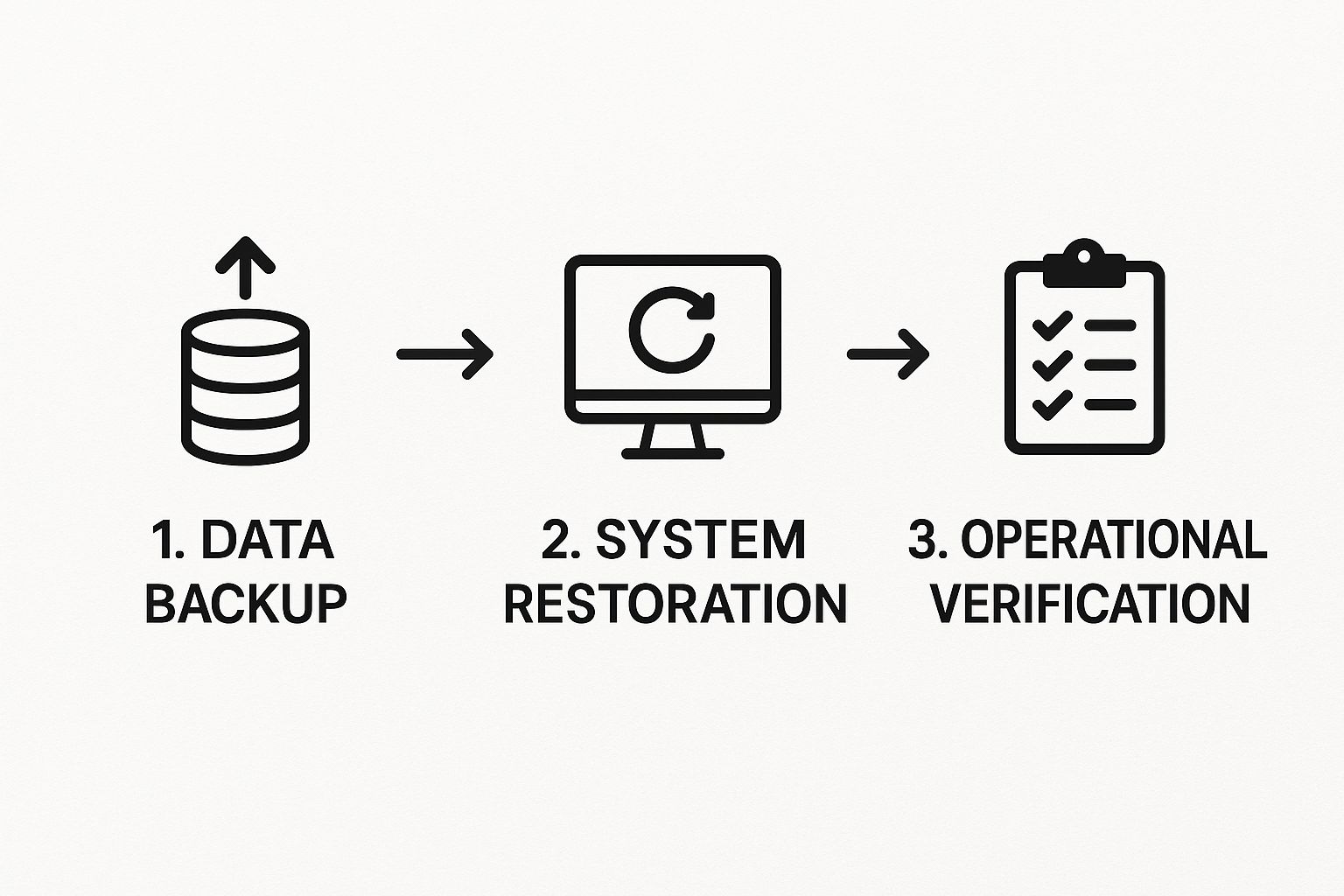
The key takeaway here is that recovery isn't just about restoring data. It’s a multi-step process that ends only when you’ve confirmed your business is fully operational again.
Your Best Defense Against Ransomware
Modern backup technology is so much more than a simple recovery tool; it's one of your strongest weapons against ransomware. Cybercriminals know the game. If they can encrypt your primary data and your backups, they know you'll have little choice but to pay up. This is where the more advanced features really prove their worth.
Immutable Backups: Think of these as "write-once, read-many-times" copies of your data. Once a backup snapshot is created, it cannot be changed, encrypted, or deleted by anyone—not even an administrator with the keys to the kingdom. This turns your backup into a fortress against ransomware. Attackers simply can't touch it, guaranteeing you have a clean copy to restore from.
The speed of that recovery is everything. A recent Sophos report laid out a pretty grim reality: only about 7% of companies could get back on their feet within a day after a ransomware attack. A shocking 34% took over a month to recover. Delays that long are often a death sentence for a small business.
Bringing Enterprise-Level Power to Your Business
It wasn't long ago that the most powerful recovery solutions were only accessible to giant corporations with bottomless budgets. Thankfully, that's not the world we live in anymore. Technologies like Disaster-Recovery-as-a-Service (DRaaS) now give small businesses the same level of bulletproof protection at a price that makes sense.
DRaaS works by creating a warm-standby clone of your entire IT environment in the cloud. If your on-site systems get knocked offline, you can "failover" to this cloud environment and be back up and running in minutes or hours—not days or weeks. This is exactly how you achieve an aggressive RTO without a massive upfront investment in hardware.
Choosing the right technology is all about aligning your tools with your goals. Our team specializes in designing and implementing these very solutions for local businesses. You can get a deeper look at our approach in our guide on data backup and recovery for Salinas and Monterey businesses. We can help you find that perfect mix of local, cloud, and hybrid technology to protect what you've built, effectively and affordably.
Building and Testing Your Actionable Recovery Plan
You’ve done the hard work of analyzing business impacts and defining your recovery objectives. That’s the foundation. Now, it’s time to build the actual playbook—a clear, actionable document that anyone on your team can grab and follow when a crisis hits.
A disaster recovery plan that only exists in your head is a recipe for failure. An untested one is just a well-intentioned theory.
This isn’t about creating some massive, complicated manual that no one will ever read. The goal is to document the essential steps and information needed to move from chaos back to control. Think of it as a set of simple, clear instructions for getting your business back online. When done right, this document becomes one of the most valuable assets you own, turning panic into a methodical process.
Assembling the Core Components of Your Plan
Your written disaster recovery plan needs to be a centralized, single source of truth. All the critical information must be in one place so no one is scrambling to find contacts or procedures when every second counts.
Here are the non-negotiable elements every plan must include:
- Key Personnel Contact List: This is more than a simple employee directory. List who is responsible for what during a recovery, their specific roles, backup contacts, and multiple ways to reach them (cell phone, personal email, etc.). Don't forget to include third-party contacts like your IT provider, your insurance agent, and support lines for critical software.
- Step-by-Step Recovery Procedures: For each critical system you identified—your server, POS system, accounting software—outline the exact steps for restoration. Be painfully specific. Who has the authority to declare a disaster? What backup solution will be used? Who physically (or virtually) performs the restoration?
- Pre-Drafted Communication Templates: The last thing you want to be doing in a crisis is writing customer emails or social media posts from scratch. Prepare templates for internal team updates, client notifications, and public statements. This ensures your messaging stays calm, consistent, and professional, even under immense pressure.
The goal is to create a document so clear that an employee who has never been part of a recovery drill could still follow the instructions. Simplicity and clarity are your best friends here.
This level of detailed planning is a core part of effective IT management. For many businesses in our area, integrating this process with professional oversight is what makes it truly work. You can explore how we support local companies through our managed business IT services in Salinas to see how this fits into a broader strategy.
Turning Your Plan into a Living Process Through Testing
This is where the rubber meets the road. If you only do one thing after creating your plan, make it this: Test it. Regularly.
Testing is what transforms your plan from a static document gathering dust into a reliable, battle-ready process. It’s how you find the gaps, uncover outdated information, and build muscle memory within your team so they can act confidently when it matters most.
And the good news? You can test your plan without bringing your entire operation to a halt.
Methods for Testing Your DRP
| Test Type | Description | Best For |
|---|---|---|
| Tabletop Exercise | A simple discussion where your team walks through a specific disaster scenario, using the plan as a guide. (e.g., "Our server room is flooded. What’s step one?") | Quarterly reviews, training new staff, and finding obvious gaps with minimal disruption. |
| Walk-Through Test | A more hands-on check where you perform some of the actual steps, like confirming you can log into your backup portal or accessing the contact list from an offsite location. | Biannual checks to verify that critical access and procedures are still functional. |
| Full Recovery Test | The most thorough test. This involves actually restoring a non-critical system from a backup into a sandboxed environment to confirm data integrity and that your RTO/RPO goals are realistic. | Annual validation to ensure the entire recovery process works end-to-end. |
Testing isn't a one-and-done event; it's essential maintenance. We strongly recommend a tabletop exercise at least quarterly and a more involved walk-through or full recovery test annually.
You should also re-test the plan anytime you make a significant change to your IT, like switching to a new software platform or changing a key vendor. This continuous improvement loop is what keeps your business resilient, no matter what comes next.
Your Disaster Recovery Questions Answered

We've helped countless businesses across Monterey County, from Salinas to Pacific Grove, build out their recovery strategies. Along the way, we've noticed that once the initial risk assessment is done, a few practical questions almost always come up.
Let's dig into the common questions we hear after businesses have sorted out their risks and chosen their tech.
How Much Should a Small Business Spend on Disaster Recovery?
This is the big one, and the honest answer is: it depends. There’s no magic number. It all circles back to your risk assessment and the RTO/RPO targets you’ve set for your critical operations.
The real question isn't about a specific dollar amount, but about value. You have to weigh the investment in a recovery solution against the potential cost of having your doors shut. For some, a robust cloud backup solution is enough. For others, a full-fledged Disaster-Recovery-as-a-Service (DRaaS) plan is necessary to get back online in minutes, not days. Our job is to find that perfect balance, delivering enterprise-grade protection that doesn't break an SMB budget.
How Often Should I Test My Disaster Recovery Plan?
Think of your plan as a living document, not a trophy to sit on a shelf. We recommend running a full-scale test at least once a year.
On top of that, you should be doing smaller "tabletop exercises" quarterly or at least twice a year. This is basically a guided discussion where your team walks through the plan step-by-step. It’s a surprisingly effective way to keep procedures fresh in everyone's minds without major disruption.
And here’s a critical tip: always re-test your plan after any significant change to your IT setup. That means if you bring on new core software, switch internet providers, or upgrade a server, it's time for a test. You have to ensure the plan still works with your current environment.
The biggest mistake we see is the "set it and forget it" mindset. Creating a plan and letting it gather dust is almost as bad as having no plan at all. A DRP is not a one-time project; it's an ongoing process of refinement.
Your business changes. Technology evolves. New threats pop up all the time. Consistent reviews, updates, and—most importantly—regular testing are what make a disaster recovery plan actually work when you need it most.
Adaptive Information Systems
380 Main St, Salinas CA 93901 | 831-644-0300 | hello@adaptiveis.net