
If you're running a business in Monterey County, the term "server migration" might sound like a complex bit of IT jargon you'd rather ignore. But when you break it down, the concept is pretty straightforward and essential for your growth. We're here to explain it in plain English, helping you understand how this move can benefit your Salinas-based business.
Server migration is the process of moving your business's digital operations—all your data, applications, and workflows—from one server environment to another. Think of it less as a technical chore and more as a strategic business upgrade, one that can set you up for success.
Your Guide to Server Migration in Monterey County

A great way to think about server migration is to compare it to moving your physical storefront. You wouldn't try to run a thriving shop from a building with a leaky roof, shaky foundations, and faulty wiring, would you? The same exact logic applies to your digital headquarters. An old, sluggish server doesn't just slow your team down; it can become a serious security risk that holds your entire business back.
A well-executed server migration moves your essential information to a better, more powerful, and more secure home. This "new location" can take several forms, and the right choice for your business in the Monterey Bay area depends entirely on your specific goals.
Where Can Your Server Be Migrated?
The best destination for your data comes down to your unique business needs, budget, and plans for growth. The most common paths include:
- A New On-Premise Server: This involves upgrading the physical server hardware located right in your office. It’s a solid choice if you need direct, hands-on control over your systems and data.
- A Data Center: Here, you relocate your operations to a secure, professionally managed facility off-site. This move significantly boosts physical security and operational reliability.
- The Cloud: This means moving your server functions to a powerful platform like Microsoft Azure or Amazon Web Services (AWS). The cloud offers incredible flexibility, scalability, and often, better cost efficiency.
The shift toward cloud solutions is undeniable. The global cloud migration market is expected to surge from USD 9.85 billion in 2025 to a massive USD 35.29 billion by 2032, as more companies like yours look for ways to become more agile and rein in costs. You can read more on this market growth to see just how big this trend has become.
To make sense of these options, this table breaks down the core ideas using simple analogies.
Core Concepts of Server Migration at a Glance
| Concept | Simple Analogy | Why It Matters for Your Business |
|---|---|---|
| On-Premise Server | Owning your own office building. | You have total control but are responsible for all maintenance, security, and repairs. |
| Data Center (Colocation) | Leasing a secure, high-tech warehouse for your goods. | You get top-tier security and reliability without building it yourself. |
| Cloud Migration | Moving from an office building to a flexible co-working space. | You pay for what you use, can scale up or down easily, and get modern amenities included. |
Ultimately, choosing the right path is what matters most. For a local business—whether you’re in agriculture near Salinas, hospitality in Carmel, or professional services in Monterey—the goal is always to find the perfect fit. At Adaptive, our mission is to deliver enterprise-level IT at an affordable price for local SMBs, ensuring your migration strategy aligns perfectly with your goals for a more secure and efficient future.
The Strategic Benefits of a Server Migration
A server migration is so much more than just a technical chore; it's a strategic move that delivers real, measurable returns. For you, as a local small or mid-sized business owner, this is how you get your hands on the kind of high-level IT advantages that were once reserved for massive corporations, but at a price that actually makes sense. The benefits ripple out far beyond just having shiny new equipment.
Think of it as an investment that directly impacts your company’s performance, security, and bottom line. When you move away from outdated systems, you’re not just swapping out old tech—you're future-proofing your operations and building a solid foundation for growth. It's a critical step for any local business trying to stay competitive, whether you're in the Salinas Valley agriculture scene or the Monterey Peninsula hospitality industry.
Improved Performance and Productivity
One of the first things you'll notice is a huge jump in performance. A modern server gets rid of the frustrating lag and slow application load times that grind your team's daily productivity to a halt. This means your team can get more done without being held back by sluggish tech, creating a far more efficient and less stressful work environment.
Enhanced Security and Reliability
Old servers are often riddled with security holes that cybercriminals know how to exploit. Migrating to a new environment, whether it's on-site or in the cloud, gives you a massive security upgrade right out of the gate.
A server migration is one of the most effective steps you can take to protect your sensitive business and client data from evolving digital threats, ensuring your operations remain secure and compliant.
This move also boosts your reliability. You’ll see significantly less unexpected downtime, which means your business stays online and available when your customers need you. That stability is absolutely essential for maintaining trust and protecting your revenue.
Long-Term Cost Savings and Scalability
While there’s an initial investment, a server migration delivers impressive long-term savings. Newer hardware is far more energy-efficient, which can seriously cut down your monthly electricity bills. Of course, getting it right means partnering with pros, and you can learn more about how to choose from the best IT service providers to manage your project.
Plus, a modern server environment gives you the scalability to grow your business without hitting a technological wall. You can easily add more users, storage, or computing power as your company expands. This ensures your IT infrastructure is there to support your success, not hold you back.
Exploring the Different Types of Server Migrations
Not all server migrations are the same. Knowing the difference is critical to choosing the right path for your company's specific goals and budget. Think of it like deciding how to move your business: do you renovate your current office, lease a brand-new space, or build something from scratch? Each option solves a different problem.
Understanding the three main types of server migrations helps you make an informed, cost-effective decision. Each approach addresses different needs and delivers unique benefits.
The Three Core Migration Paths
Your final choice will come down to a mix of factors, including your budget, security needs, and future growth plans. Let's break down the main options in simple terms.
- On-Premise Migration: This is like upgrading the physical server hardware right inside your own office. It's a direct hardware refresh, perfect for a business that wants to keep total control over its equipment while getting a big boost in performance and reliability.
- Data Center Migration: This involves moving your server from your office to a professional, off-site hosting facility. Imagine taking your company's critical assets out of a backroom closet and putting them into a secure, climate-controlled vault with 24/7 security.
- Cloud Migration: This is the process of moving your server's functions from a physical machine to a flexible, scalable platform like Microsoft Azure. It has quickly become the most popular route for businesses looking for affordability and the power to scale up or down on demand.
For local companies, the right choice often connects directly to their industry. A law firm in Carmel, for instance, might choose a secure cloud migration for compliance reasons, while a growing farm in Salinas may upgrade its on-premise server to process agricultural data faster. If the cloud sounds like the right move for you, you can explore our guide to cloud migration for small businesses for a deeper look.
This chart shows the kind of improvements your business can expect after a successful migration, including dramatic reductions in downtime and costs, alongside a significant performance boost.
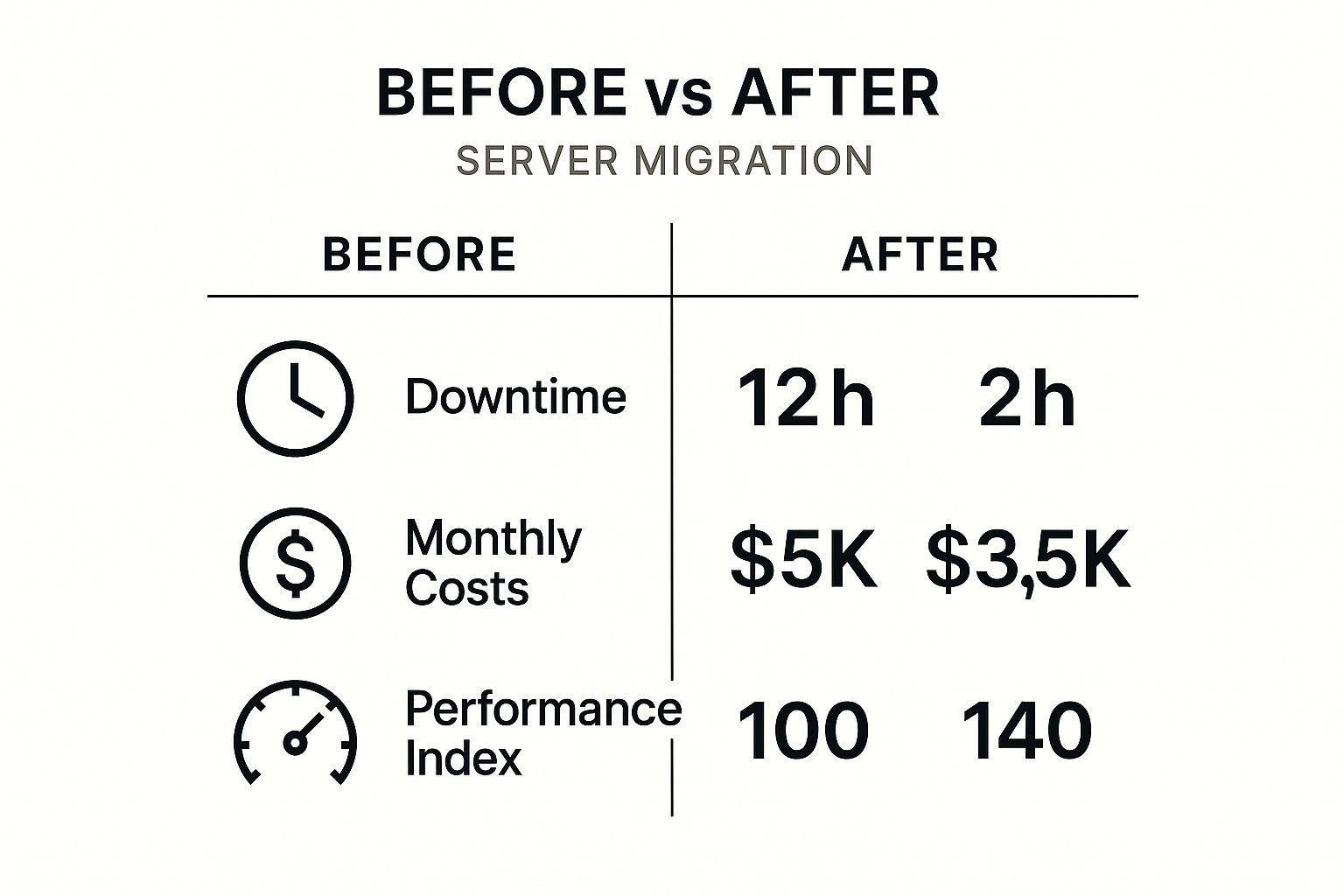
As the data shows, the benefits are clear and measurable. A well-planned migration is a powerful investment in your company’s future efficiency and resilience.
How to Avoid Common Migration Pitfalls

While a server migration is a powerful move for your business, it’s not something you should jump into blindly. A successful project really hinges on steering clear of common mistakes that can lead to unexpected downtime, budget overruns, and lost revenue.
For your business, sidestepping these issues is the key to a smooth and painless transition.
The single biggest mistake we see? Inadequate planning. Rushing into a migration without a detailed roadmap is a recipe for disaster. This almost always leads to overlooking critical application dependencies—those little connections where one piece of software relies on another to function. When those connections break, your operations can grind to a halt.
Another major risk is data loss. Even a temporary loss of information can be catastrophic for businesses that depend on accurate records, from local hospitality services in Monterey to agricultural producers in Salinas.
The golden rule of any server migration should be: protect your data at all costs. A successful project isn't just about moving systems; it's about moving them completely intact and without a single bit of corruption.
Key Risks to Address Upfront
To make sure your project stays on track, you need to get ahead of these potential problems right from the start.
- Data Integrity: Before, during, and after the move, you need a rock-solid validation process. This means creating and testing backups to ensure every last file is accounted for and uncorrupted. It's wise to explore different data backup strategies to see what fits your operation best.
- Budget Creep: Hidden costs, especially with cloud migrations, can completely derail your budget. Things like unexpected data transfer fees or higher-than-anticipated storage costs can add up fast. It's vital to get a clear and complete cost forecast upfront.
- Scope & Downtime: You have to clearly define what is being migrated and establish a realistic timeline. A well-planned migration minimizes downtime by scheduling the final switch during off-hours, ensuring your business isn't disrupted.
Is Your Business Ready for a Server Migration?
Knowing when to migrate your server is just as important as knowing how. For many local business owners, the idea of a server migration feels overwhelming, but a quick readiness check can bring a lot of clarity. If you're running a business in Salinas or anywhere in Monterey County, it's worth asking yourself a few direct questions to see if the time is right.
Answering 'yes' to any of the points below is a strong signal that you should be exploring your options. This isn't just about a technology upgrade; it's about tackling core business risks and frustrating inefficiencies before they snowball into major problems.
A Simple Readiness Checklist
Take a moment to think about your current setup. Do any of these sound a little too familiar?
- Is your server slow or unreliable? If your team is constantly complaining about lag or you’re dealing with frequent, unexplained downtime, your server is actively hurting your productivity.
- Are you worried about security? Older systems often run on unsupported software, making them wide-open targets for cyberattacks. A modern, patched server is a critical layer of your security defense.
- Are your IT costs creeping up? High electricity bills from inefficient hardware and mounting repair costs can turn an old server into a serious financial drain.
- Do you need more flexibility? If supporting a remote or hybrid team is a constant challenge, a new server environment—whether on-premise or in the cloud—can provide the secure, accessible foundation you need.
Answering these questions honestly helps you see the real-world impact of sticking with your current system. The good news is that moving data and applications is becoming much more common as businesses modernize. In fact, the global market for data migration is projected to hit $25.2 billion by 2030, driven by this exact need for better efficiency and security. You can read more research on data migration trends to see just how widespread this shift is.
If these issues resonate with you, it might be time to get some professional help. Our team provides responsive Monterey business IT helpdesk support, and we're ready to help you evaluate your options and find the right path forward.
Frequently Asked Questions About Server Migration
As IT consultants who work with local businesses like yours every day, we field a lot of questions about server migrations. Below are some straightforward answers to the most common concerns we hear from business owners who are thinking about making this important move.
How Long Does a Server Migration Usually Take?
Honestly, the timeline for a server migration completely depends on how complex your project is. A simple on-premise hardware refresh for a small office might be wrapped up over a single weekend with very little disruption.
On the other hand, a more involved cloud migration for a business with a ton of different applications could take several weeks of careful planning, testing, and execution. We always provide you with a detailed and realistic timeline right after our initial assessment, so you know exactly what to expect from the start.
Will My Business Experience Downtime During the Migration?
Our number one goal in any server migration is to hit zero or minimal downtime. We know that every minute your systems are offline is a minute you can't serve your customers or support your team.
We meticulously plan the final cut-over to happen during your slowest business hours, like overnight or on a weekend. This careful scheduling, combined with our proven migration strategies, ensures a smooth transition that won't get in the way of your daily operations.
Is Moving to the Cloud More Expensive Than an On-Premise Server?
Not necessarily, especially when you step back and look at the total cost of ownership over the long run. While there's an initial project cost, moving to the cloud often ends up reducing your overall expenses.
You get to eliminate big, upfront hardware purchases, lower your monthly power bills, and cut way down on ongoing maintenance. The cloud's pay-as-you-go model gives you an affordability and scalability that’s often a perfect fit for a growing SMB's budget.
What Is the First Step in a Server Migration Project?
The first and most critical step is always a thorough discovery and assessment phase. This is where we roll up our sleeves and analyze your entire IT environment—your current hardware, software, essential applications, data dependencies, and what your users actually need to do their jobs.
This deep-dive analysis is what allows us to build a custom migration strategy that lines up perfectly with your business goals and budget. Getting this foundation right is essential for a successful project, and it's a core part of how we provide effective Salinas business technology support.
At Adaptive Information Systems, we specialize in creating custom IT solutions that help businesses thrive. We’re located right in the heart of Salinas and are always ready to chat about your technology needs.
Give us a call or drop us a line—we’d love to hear from you.
Adaptive Information Systems
380 Main St, Salinas CA 93901 | 831-644-0300 | hello@adaptiveis.net